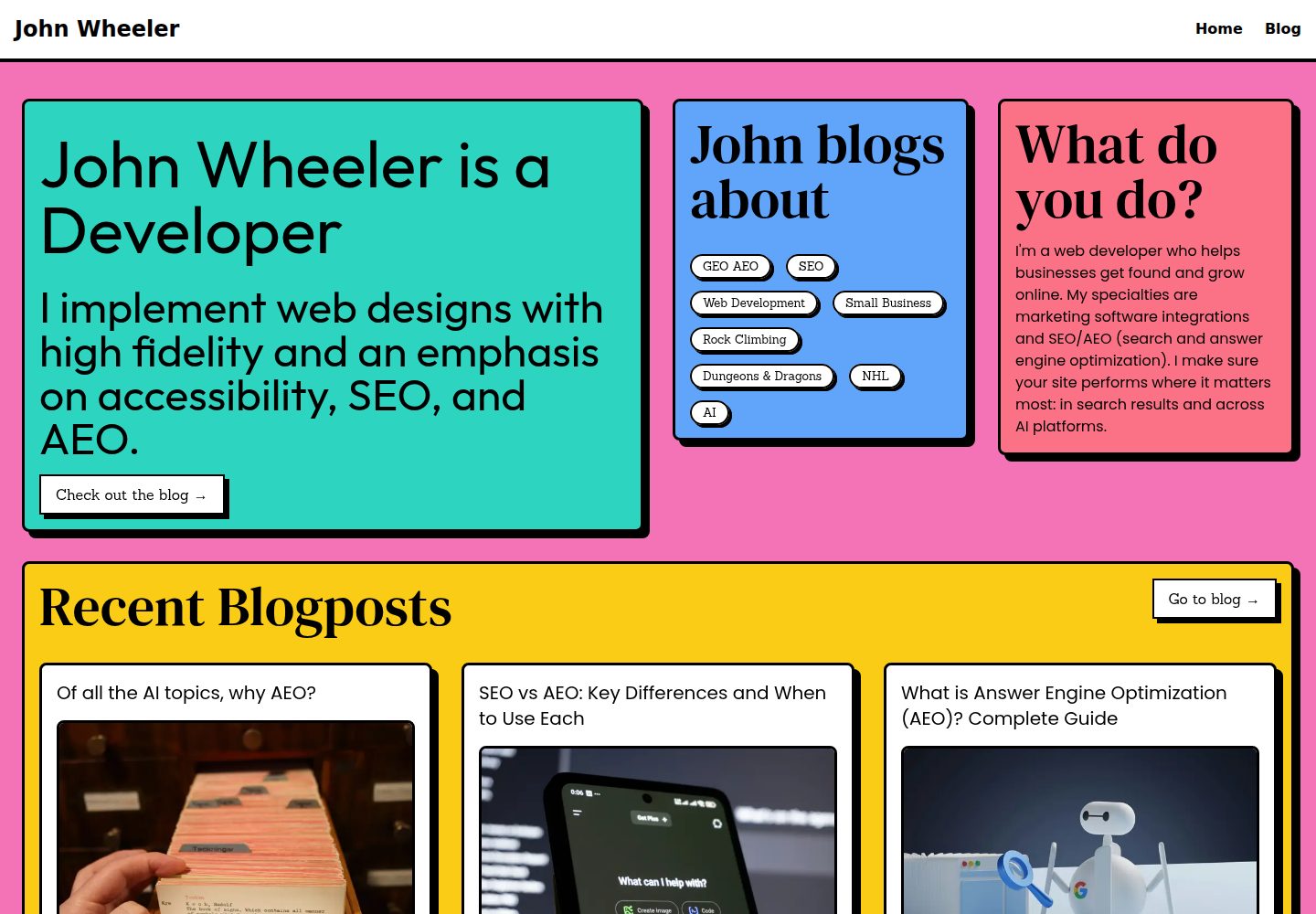
基于 Astro 的极简新粗野主义主题,设计取向为极简与功能性
Astro博客
brutal-astro — Astro 博客模板
作者 johnwheeler-prod
Brutal 是一个基于 Astro 的极简新粗野主义主题,内置图片优化、RSS、Sitemap 与 UnoCSS,默认不包含 JavaScript 集成。
看看你的网站会是什么样
浏览真实页面截图,比较内容排版与手机效果。点击下方缩略图切换,放大查看整页细节。
全部页面与视图 3
截图用于了解视觉与布局,交互效果请以实际项目为准。
采集于 2026-10-12查看来源
值得关注的模板亮点
从已有项目资料中,快速了解它的特点。
默认不包含 JavaScript 集成,可按需自行添加
使用 UnoCSS 生成 CSS,README 称其与 TailwindCSS 兼容,并支持 PureCSS 图标
构建时自动生成 Sitemap,需在 astro.config.mjs 中替换 site 为自有域名
RSS 从 src/content/blog 下的 Markdown 文件自动生成,默认输出到 /feed.xml
提供 blog、errors、generic、home、layout 等组件目录及一组预设颜色
模板详细介绍
Brutal 是面向 Astro 的极简新粗野主义(neobrutalist)主题,README 说明其设计取向为极简与功能性,并基于作者个人网站 elian.codes 扩展了更通用的内容。主题默认不集成 JavaScript,但可按需添加。
功能与集成方面,README 列出图片优化、RSS、Sitemap 以及用于生成 CSS 的 UnoCSS;Sitemap 在构建时自动生成,RSS 从 src/content/blog 目录下的 Markdown 文件自动生成,默认输出到 /feed.xml。主题提供 blog、errors、generic、home、layout 等组件目录,以及一组可在组件中使用的颜色。
使用方式上,README 给出通过 create astro 命令以 eliancodes/brutal 为模板初始化项目的步骤,以及 install、dev、build、preview 等本地命令。README 未说明该主题的生产就绪程度、性能表现或除上述内容外的其他功能。
Astro博客
适合你的项目吗?
适用场景
- 使用 create astro 命令以 eliancodes/brutal 为模板初始化新的 Astro 项目
- 搭建以 Markdown 文章为内容来源、需要 RSS 与 Sitemap 的博客
- 在 Astro 项目中使用 UnoCSS 编写样式,并按需替换为 TailwindCSS
- 复用主题提供的 layout、home、blog 等组件组织页面结构
适合人群
- 希望使用 Astro 构建极简、功能性风格网站的开发者
- 需要 RSS 与 Sitemap 自动生成能力的博客项目
- 偏好 UnoCSS 或希望从 UnoCSS 切换到 TailwindCSS 的项目
- 接受默认无 JavaScript 集成、可按需自行添加的前端方案
上手与定制指南
结合仓库当前版本的说明,按下面的资料检查内容、配置与运行要求。
- 1
README 提供通过 create astro 命令以 eliancodes/brutal 为模板初始化项目的步骤,npm、pnpm、yarn 命令略有差异
- 2
常用命令包括 pnpm install、pnpm dev(localhost:3000)、pnpm build(输出到 ./dist/)、pnpm preview 以及 pnpm astro 系列 CLI 命令
- 3
Sitemap 构建时自动生成,需在 astro.config.mjs 中将 site 替换为自己的域名
- 4
RSS 默认输出到 /feed.xml,可通过重命名 src/pages/feed.xml.js 更改
- 5
更多颜色可在 astro.config.mjs 的 colors 数组中添加
授权与来源资料
使用条件与限制
免费使用 · 保留许可声明本次收录的是公开仓库中采用 MIT 许可的免费版本;免费范围为该版本代码,不代表外部服务或第三方素材免费。
使用时需要遵守
- 允许免费使用、修改、商用和分发该版本代码。
- 分发代码副本或实质性部分时,保留原作者版权声明和完整 MIT 许可声明。
- 代码按现状提供;担保与责任限制以原许可证及适用法律为准。
额外费用与待核对事项
- 演示图片、字体、图标及其他第三方素材需按各自许可核对,不能仅凭代码的 MIT 许可判断。
- 域名、托管、数据库、支付或 AI 等外部服务可能另外收费。
查看原文依据
https://github.com/johnwheeler-prod/brutal-astro/blob/main/LICENSEhttps://github.com/johnwheeler-prod/brutal-astro/blob/main/README.mdPermission is hereby granted, free of charge
许可证原文
DeepSeek 根据仓库许可证和 README 整理 ·2026-10-12。结果仅覆盖已读取资料,依赖、图片、字体及后续条款变更以各自原文为准。
项目核对记录与介绍依据
模板资料
- 来源平台
- GitHub
- 资料与维护参考分
- 资料较完整 · 83 / 100
- 技术栈
- Astro
- 网站类型
- 博客
这个分数如何计算
本站按许可资料(最高30分)、演示链接(12分)、预览图(10分)、Star数(15分)、记录的维护时间(15分)、描述完整度(8分)、功能记录(5分)和分类资料(5分)计算。它不是代码、安全或性能测试,也不是 Google 评分;有链接不代表已实测可用。
这个项目需要核对什么
- 记录的仓库更新时间
- 2026-05-07
- 截图检查日期
- 2026-10-12
已收录演示链接。请用你的内容与屏幕尺寸检查;有演示不代表表单、认证或支付已经可用。
目录记录的主要技术栈是 Astro。请通过依赖清单和锁文件核对实际版本与托管要求。这些说明基于收录资料,不代表代码审计或部署实测。
查看具体选型方法 →介绍的制作与核对状态
介绍由 AI 辅助整理目录与仓库资料。仓库作者不等于这篇介绍的审核者。
审核声明: codex-user-requested-batch-review-20261015 · 2026-10-15
查看当时使用的来源资料
SHA-256: f09768f4049a53308e431c2c38edd8e776dd0dbf2fb67ffb8bc6d78e6fd4bd6b
2026-10-12T18:36:59.859Z
来源文件 / 仓库# Brutal - The neobrutalist Astro theme
Brutal is a minimal neobrutalist theme for [Astro](https://astro.build/). It's based on Neobrutalist Web Design, a movement that aims to create websites with a minimalistic and functional design. It has some integrations like Image Optimization, RSS, Sitemap, ready to get your SEO done right.
The theme has no JavaScript integration out of the box, but can always be added of course.
This template is based on [my own personal website](<https://www.elian.codes/>), with some more generic things added.
## Usage
You can bootstrap a new Astro project using Brutal with the following command:
```bash
# npm 6.x
npx create astro@latest --template eliancodes/brutal
# npm 7+
npx create astro@latest -- --template eliancodes/brutal
# pnpm
pnpm dlx create-astro --template eliancodes/brutal
# yarn
yarn create astro --template eliancodes/brutal
```
### Commands
All commands are run from the root of the project, from a terminal:
(Here I use PNPM, no problem if you use NPM or Yarn)
| Command | Action |
| :------------------ | :------------------------------------------------- |
| `pnpm install` | Installs dependencies |
| `pnpm dev` | Starts local dev server at `localhost:3000` |
| `pnpm build` | Build your production site to `./dist/` |
| `pnpm preview` | Preview your build locally, before deploying |
| `pnpm astro ...` | Run CLI commands like `astro add`, `astro preview` |
| `pnpm astro --help` | Get help using the Astro CLI |
## Integrations
### UnoCSS
In this theme, I'm using [UnoCSS](https://uno.antfu.me/) to generate the CSS. It's a utility-first CSS framework that uses a single class to style elements. It's very easy to use and has a lot of features. It's setup to be completely compatible with TailwindCSS, with the advantage of being able to use PureCSS icons. You can always switch out UnoCSS for TailwindCSS if you want to, without breaking the general styles.
### Sitemap
To generate the sitemap, you don't need to do anything. It's automatically generated when you build your site. You'll just need to switch out the `site` on `astro.config.mjs` to your own.
```js title="astro.config.mjs"
import { defineConfig } from 'astro/config';
export default defineConfig({
site: 'https://example.com',
});
```
### RSS
The RSS feed is automatically generated from the Markdown files in the `src/content/blog` folder. You can ofcourse completely change this to your own needs.
The RSS will output to `https://example.com/feed.xml` by default. You can change this, by renaming `src/pages/feed.xml.js`.
### Image
## Components
### `components/blog/`
This directory contains all components for the blog.
### `components/errors/`
This directory contains all error components.
#### `components/errors/404.astro`
This component is used when a page is not found.
### `components/generic/`
This directory contains all generic components, reused over multiple pages.
### `components/home/`
This directory contains all components for the home page.
### `components/layout/`
This directory contains all layout components. For instance, the header and footer and `<head>` section.
### Colors
The theme has a few colors that you can use in the included components.
- red
- blue
- green
- yellow
- pink
- purple
- orange
- teal
- cyan
- lime
- emerald
- fuchsia
- violet
- rose
- sky
- amber
More colors can be added in `astro.config.mjs` in the `colors` array.
If you need more from this theme, don't hesitate to open an issue or reach out to me!
看看同类模板
对比同技术栈与用途的模板,找到更适合的视觉与内容结构。

astrowind
⭕️ AstroWind: A free template using Astro v7 and Tailwind CSS v4. Astro starter theme.
Astro · 博客

astro-paper
基于 Astro 的博客主题,使用 Markdown/MDX 内容、Tailwind 样式和 Pagefind 搜索。搜索属于博客功能,不代表独立工具站产品。
Astro · 博客

fuwari
✨A static blog template built with Astro.
Astro · 博客

Firefly
Firefly 是一款基于 Astro 的静态博客主题,由 CuteLeaf 在 saicaca 的 Fuwari 模板基础上二次开发,主打清新美观的视觉风格。
Astro · 博客

astro-theme-cactus
面向博客与笔记发布的 Astro 启动模板,支持 Markdown/MDX 内容、Tailwind 样式与 Pagefind 搜索,主要用途是发布文章和笔记。
Astro · 博客

astrofy
Astrofy is a free and open-source template for your Personal Portfolio Website built with Astro and TailwindCS…
Astro · 作品集