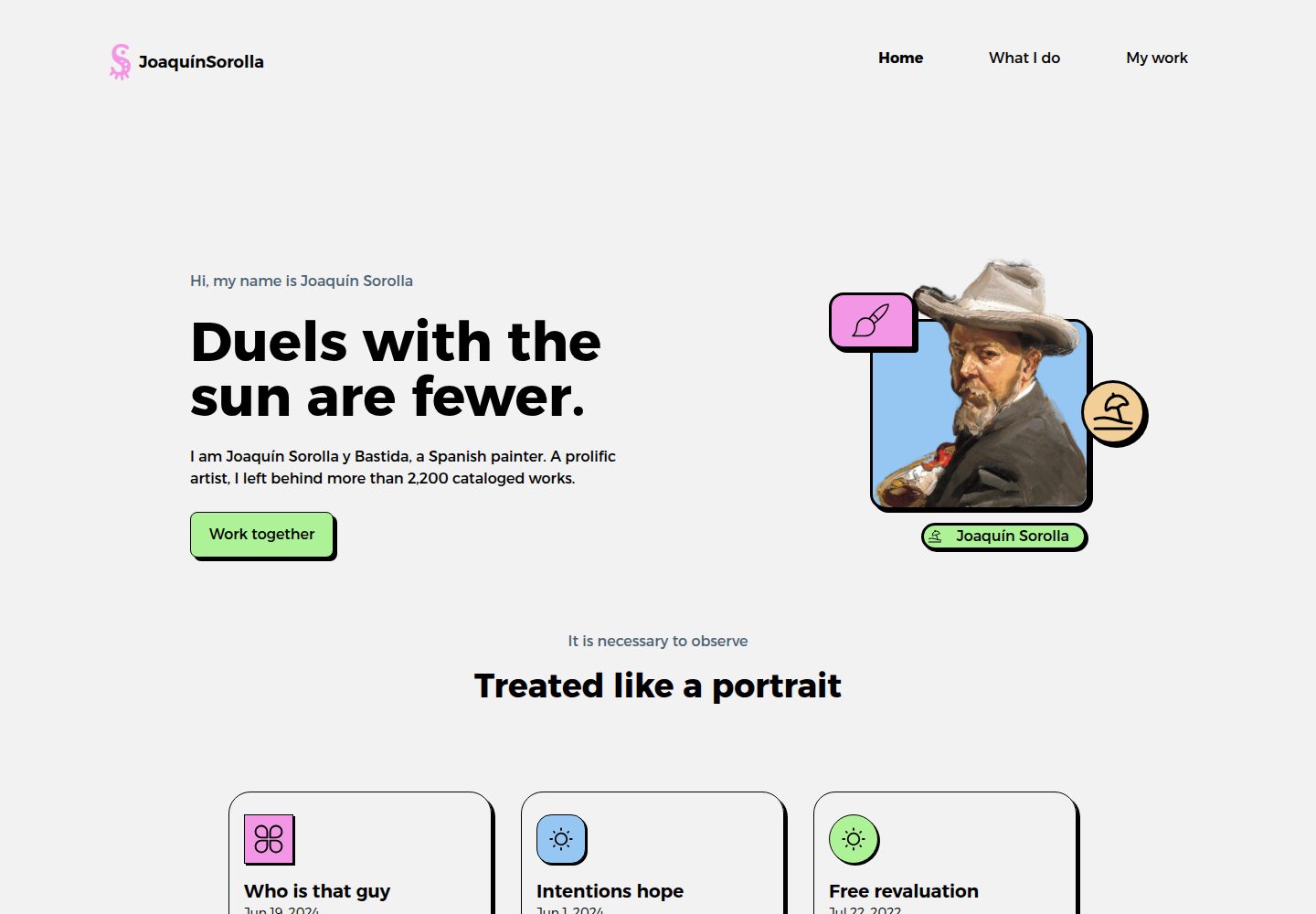
Astro 静态站点结构,页面与内容分离,便于按区块替换个人介绍
Astro作品集
sorollaportfolio — Astro 作品集模板
作者 jramma
基于 Astro 的个人作品集模板,用区块式首页与 Markdown 博客条目展示作品、技能与项目,采用 MIT 许可。
看看你的网站会是什么样
浏览真实页面截图,比较内容排版与手机效果。点击下方缩略图切换,放大查看整页细节。
全部页面与视图 3
截图用于了解视觉与布局,交互效果请以实际项目为准。
采集于 2026-10-04查看来源
值得关注的模板亮点
从已有项目资料中,快速了解它的特点。
首页由 Hero、WhatIDo、Header、Footer 等 Astro 组件组成,可组合出作品集区块
博客文章以 Markdown 存放于 src/content/blog,通过 content collections 与动态路由生成详情页
内置博客索引页与 rss.xml 输出,方便发布文字内容
使用 Tailwind CSS 与 TypeScript,样式与类型配置集中在项目根目录
仓库含标准 MIT 许可文件,明确代码层面的使用与分发条件
模板详细介绍
Sorolla Portfolio 是一个个人作品集演示项目,作者在 README 中说明其用途是展示个人作品集可能呈现的样子,涵盖作品、技能与项目等内容。页面结构以区块(block sections)组织,首页包含 Hero 与 WhatIDo 等组件,另有 about 页面;博客内容以 Markdown 形式存放在 src/content/blog 下,通过 content collections 与动态路由 [...slug].astro 生成文章页,并提供博客索引页与 rss.xml 输出。
技术栈方面,项目使用 Astro 构建,配置了 Tailwind CSS(tailwind.config.mjs)与 TypeScript(tsconfig.json)。源码按 assets、components、content、icons、layouts、pages、styles 划分,图标为 SVG 文件,样式包含 global.css 与 hamburgers.css。README 给出的本地运行方式为 pnpm install 后执行 pnpm run dev,开发服务器地址为 http://localhost:4321;部署说明针对 Cloudflare Pages,使用 wrangler pages deploy dist。
许可方面,仓库包含标准 MIT 许可文件,允许免费使用、修改、商用与分发该版本代码,分发时需保留版权声明与许可声明;演示图片、字体、图标等第三方素材的授权需另行核对,域名、托管等外部服务可能产生费用。README 未提供设计风格、无障碍或性能方面的说明。
Astro作品集
适合你的项目吗?
适用场景
- 搭建个人作品集站点,用区块展示自我介绍、技能与项目
- 以 Markdown 撰写并发布项目笔记或博客文章
- 作为 Astro + Tailwind CSS + TypeScript 组合的学习与改造起点
- 部署到 Cloudflare Pages 等静态托管环境
适合人群
- 需要个人作品集或简历型站点的开发者与设计师
- 习惯用 Markdown 管理内容、希望静态生成的用户
- 熟悉或愿意使用 Astro 与 Tailwind CSS 的前端开发者
上手与定制指南
结合仓库当前版本的说明,按下面的资料检查内容、配置与运行要求。
- 1
克隆仓库后执行 pnpm install 安装依赖
- 2
运行 pnpm run dev 启动开发服务器,默认地址为 http://localhost:4321
- 3
构建产物通过 pnpm run build 生成,README 示例使用 wrangler pages deploy dist 部署到 Cloudflare Pages
- 4
替换 src/assets 与 src/icons 中的图片和图标时,需自行确认素材授权
- 5
README 未说明 Node 版本要求,请以项目依赖与实际运行环境为准
授权与来源资料
使用条件与限制
免费使用 · 保留许可声明本次收录的是公开仓库中采用 MIT 许可的免费版本;免费范围为该版本代码,不代表外部服务或第三方素材免费。
使用时需要遵守
- 允许免费使用、修改、商用和分发该版本代码。
- 分发代码副本或实质性部分时,保留原作者版权声明和完整 MIT 许可声明。
- 代码按现状提供;担保与责任限制以原许可证及适用法律为准。
额外费用与待核对事项
- 演示图片、字体、图标及其他第三方素材需按各自许可核对,不能仅凭代码的 MIT 许可判断。
- 域名、托管、数据库、支付或 AI 等外部服务可能另外收费。
- 部署到 Cloudflare Pages 需要先注册 Cloudflare 账号,属于外部服务账号要求。
- 使用 wrangler 部署命令前必须拥有 Cloudflare 账号,属于外部服务依赖。
查看原文依据
Permission is hereby granted, free of charge
许可证原文
Create an account on Cloudfare
README 原文
https://github.com/jramma/sorollaportfolio/blob/main/LICENSEhttps://github.com/jramma/sorollaportfolio/blob/main/README.mdFirst you need a Cloudfare account
README 原文
DeepSeek 根据仓库许可证和 README 整理 ·2026-10-04。结果仅覆盖已读取资料,依赖、图片、字体及后续条款变更以各自原文为准。
项目核对记录与介绍依据
模板资料
- 来源平台
- Astro Themes
- 资料与维护参考分
- 资料较完整 · 87 / 100
- 技术栈
- Astro
- 网站类型
- 作品集
这个分数如何计算
本站按许可资料(最高30分)、演示链接(12分)、预览图(10分)、Star数(15分)、记录的维护时间(15分)、描述完整度(8分)、功能记录(5分)和分类资料(5分)计算。它不是代码、安全或性能测试,也不是 Google 评分;有链接不代表已实测可用。
这个项目需要核对什么
- 记录的仓库更新时间
- 2026-07-21
- 截图检查日期
- 2026-10-04
已收录演示链接。请用你的内容与屏幕尺寸检查;有演示不代表表单、认证或支付已经可用。
目录记录的主要技术栈是 Astro。请通过依赖清单和锁文件核对实际版本与托管要求。这些说明基于收录资料,不代表代码审计或部署实测。
查看具体选型方法 →介绍的制作与核对状态
介绍由 AI 辅助整理目录与仓库资料。仓库作者不等于这篇介绍的审核者。
审核声明: [email protected] · 2026-10-04
查看当时使用的来源资料
SHA-256: 61d715117ac911cc2e61ceab156c1b35624fc91dbf861901670b3728ef72d019
2026-10-04T10:14:19.297Z
来源文件 / 仓库# Sorolla Portfolio

Welcome to my personal portfolio demo repository! This project is a demonstration of what a personal portfolio could look like. It showcases various aspects of web development, including my work, skills, and projects.
- You can view the deployed project at the following URL: [https://sorolla.casset.cat/](https://sorolla.casset.cat/)
- Astro web templates: <https://astro.build/themes/details/sorollaportfolio/>
## 📂 Project Structure
- **public/**: Contains public assets like images and fonts.
- **src/**: Includes the source code for the portfolio.
- **.gitignore**: Specifies files and directories to be ignored by Git.
- **astro.config.mjs**: Configuration file for Astro.
- **package.json**: Lists project dependencies and scripts.
- **tailwind.config.mjs**: Configuration file for Tailwind CSS.
- **tsconfig.json**: TypeScript configuration file.
### 🧭 /src structure
The `/src` directory contains the main source code for the project. Below is an overview of its structure:
```bash
src
├── assets
│ ├── adriana.webp
│ ├── euro.webp
│ ├── fran.webp
│ └── hero.webp
├── components
│ ├── BaseHead.astro
│ ├── Footer.astro
│ ├── FormattedDate.astro
│ ├── Header.astro
│ ├── HeaderLink.astro
│ ├── Hero.astro
│ └── WhatIDo.astro
├── consts.ts
├── content
│ └── blog
│ └── content in markdown format
├── content.config.ts
├── icons
│ ├── 1.svg
│ ├── 2.svg
│ ├── 3.svg
│ ├── 4.svg
│ ├── 5.svg
│ ├── beach.svg
│ ├── github.svg
│ ├── linkedin.svg
│ ├── paint.svg
│ └── web.svg
├── layouts
│ └── BlogPost.astro
├── pages
│ ├── about.astro
│ ├── blog
│ │ ├── index.astro
│ │ └── [...slug].astro
│ ├── index.astro
│ └── rss.xml.js
└── styles
├── global.css
└── hamburgers.css
```
#### Explanation
- **assets**: Contains image files used in the project.
- **components**: Contains reusable UI components built with Astro.
- **content**: Contains blog content in Markdown format.
- **content.config.ts**: Configuration file for content collections.
- **icons**: Contains SVG icon files used in the project.
- **layouts**: Contains layout components.
- `BlogPost.astro`: Layout component for blog posts.
- **pages**: Contains the main pages of the site.
- `blog/index.astro`: Blog index page.
- `blog/[...slug].astro`: Dynamic route for individual blog posts.
- **styles**: Contains global and component-specific CSS files.
- `global.css`: Global styles for the project.
- `hamburgers.css`: Styles for the hamburger menu.
This structure helps in organizing the project files and makes it easier to maintain and scale the project.
## 🚀 Getting Started
To run this project locally:
1. **Clone the repository:**
```bash
git clone https://github.com/jramma/sorollaportfolio.git
cd sorollaportfolio
```
2. **Install dependencies:**
```bash
pnpm install
```
3. **Start the development server:**
```bash
pnpm run dev
```
The application will be available at `http://localhost:4321`.
## 🛠️ Technologies Used
- **Astro**: A modern static site builder.
- **Tailwind CSS**: A utility-first CSS framework.
- **TypeScript**: A statically typed programming language.
## 📄 License
This project is licensed under the [MIT License](LICENSE).
## Deploy on Cloudfare
1. Create an account on Cloudfare
2. Execute:
```bash
pnpm i
pnpm run build
# First you need a Cloudfare account
npx wrangler pages deploy dist --project-name=sorolla
```
3. Check settings on Cloudfare workers/pages看看同类模板
对比同技术栈与用途的模板,找到更适合的视觉与内容结构。

astro-theme-cactus
A simple Astro theme. Use it to create your blog or website.
Astro · 作品集

astrofy
Astrofy is a free and open-source template for your Personal Portfolio Website built with Astro and TailwindCS…
Astro · 作品集

astro-nano
Astro Nano is a static, minimalist, lightweight, lightning fast portfolio and blog.
Astro · 作品集

astro-erudite
An opinionated, unstyled static blogging template built with Astro and native CSS.
Astro · 作品集

astro-sphere
Astro Sphere is a static, minimalist, lightweight, lightning fast portfolio and blog.
Astro · 作品集

astro-micro
Blog theme for Astro with search and comments built-in. Zero frameworks.
Astro · 作品集