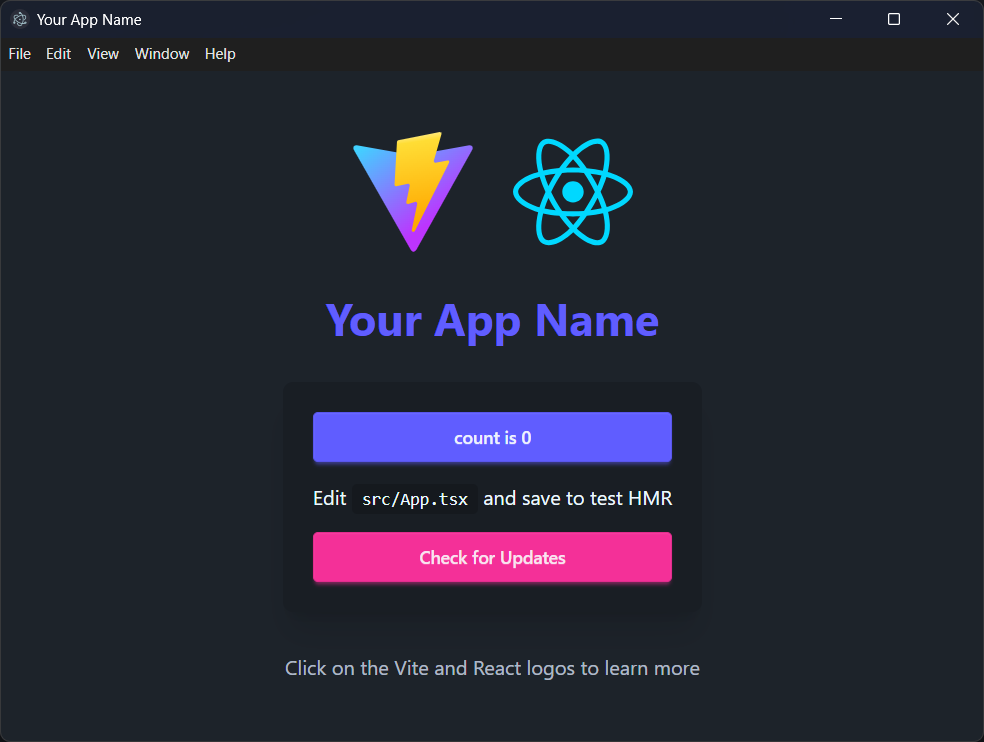
集成 Vite 开发服务器与 Electron 主进程,npm run dev 可同时启动并支持渲染进程热更新
ViteReact启动器
electron-vite-react-boilerplate — Vite 启动器模板
作者 kethakav
基于 Vite、React、TypeScript 与 DaisyUI 的 Electron 桌面应用启动器,内置 electron-builder NSIS 打包与 electron-updater 自动更新配置。
看看你的网站会是什么样
浏览真实页面截图,比较内容排版与手机效果。点击下方缩略图切换,放大查看整页细节。
目前有 1 张原始预览,可打开完整图片查看设计细节。
截图用于了解视觉与布局,交互效果请以实际项目为准。
采集于 2026-10-04查看来源
值得关注的模板亮点
从已有项目资料中,快速了解它的特点。
使用 React 与 TypeScript 编写渲染进程,主进程与 preload 脚本同样为 TypeScript
引入 DaisyUI 组件库,基于 Tailwind CSS 提供按钮、卡片、表单等界面组件
预置 electron-builder 的 NSIS 打包配置,可产出 Windows 安装包、macOS dmg 与 Linux AppImage/deb
内置 electron-updater 自动更新逻辑,包含更新检查、下载进度与错误处理
附带 GitHub Actions 发布流程,推送 v* 标签后自动构建并发布到指定仓库
模板详细介绍
这是一个 Electron 桌面应用启动模板,技术组合为 Vite、React、TypeScript 和 DaisyUI。作者在 README 中说明,创建该模板的原因是当时缺少关于 electron-builder NSIS 打包和 electron-updater 自动更新的完整文档,因此把这两部分预先配置好,供他人直接在此基础上开发。
项目结构把 Electron 主进程代码放在 electron/ 目录(main.ts、preload.ts、update.ts、electron-env.d.ts),React 渲染进程代码放在 src/ 目录,构建产物分别输出到 dist/ 与 dist-electron/,发布包输出到 release/。开发时通过 npm run dev 同时启动 Vite 开发服务器和 Electron,渲染进程改动支持热更新,主进程改动需要重启应用。
模板包含 ESLint 配置、面向 Windows、macOS、Linux 的跨平台构建脚本,以及一套基于 GitHub Releases 的自动更新流程:在 electron-builder.json 中配置 publish 的 owner 与 repo,配合 GitHub Actions 在推送 v* 标签时构建并发布。使用前需要按 README 修改 package.json、electron-builder.json、index.html、src/App.tsx 和 electron/main.ts 中的名称、appId、图标等占位信息。
ViteReact启动器
适合你的项目吗?
适用场景
- 需要快速搭建 Electron + React + TypeScript 桌面应用骨架时
- 希望参考 electron-builder NSIS 打包与 electron-updater 自动更新的具体配置方式时
- 准备用 GitHub Releases 分发桌面应用并实现版本更新时
- 想以 DaisyUI 作为界面组件库开发 Electron 应用界面时
适合人群
- 熟悉 React 与 TypeScript、需要 Electron 桌面端起步模板的开发者
- 需要跨平台打包配置参考的个人或小团队项目
- 希望减少自动更新与发布流程配置成本的桌面应用项目
上手与定制指南
结合仓库当前版本的说明,按下面的资料检查内容、配置与运行要求。
- 1
环境要求 Node.js 18+,使用 npm 或 yarn 安装依赖
- 2
克隆仓库后执行 npm install,再用 npm run dev 启动开发模式
- 3
使用前需替换 package.json、electron-builder.json、index.html、src/App.tsx、electron/main.ts 中的名称、appId、图标等占位内容
- 4
自动更新与发布需要在 electron-builder.json 中填写 publish 的 owner 与 repo,并在 GitHub 仓库添加具有 repo 权限的 RELEASE_PUSH_TOKEN
- 5
代码采用 MIT 许可,但演示图片、字体、图标等第三方素材需单独核对许可
授权与来源资料
使用条件与限制
免费使用 · 保留许可声明本次收录的是公开仓库中采用 MIT 许可的免费版本;免费范围为该版本代码,不代表外部服务或第三方素材免费。
使用时需要遵守
- 允许免费使用、修改、商用和分发该版本代码。
- 分发代码副本或实质性部分时,保留原作者版权声明和完整 MIT 许可声明。
- 代码按现状提供;担保与责任限制以原许可证及适用法律为准。
额外费用与待核对事项
- 使用自动发布/自动更新功能需要创建具有 repo 权限的 GitHub 个人访问令牌,属于外部服务账号要求。
- 需在 GitHub 仓库设置中添加 RELEASE_PUSH_TOKEN 密钥,发布流程依赖该外部服务配置。
- 自动更新与发布需额外建立一个独立的发布仓库,属于外部服务依赖。
- 自动更新功能要求配置 GitHub 发布仓库,未配置则无法使用该能力。
- 演示图片、字体、图标及其他第三方素材需按各自许可核对,不能仅凭代码的 MIT 许可判断。
- 域名、托管、数据库、支付或 AI 等外部服务可能另外收费。
查看原文依据
Permission is hereby granted, free of charge
许可证原文
Create a personal access token with `repo` permissions
README 原文
Add your token as `RELEASE_PUSH_TOKEN` in your repository settings
README 原文
Set up a separate repository for releases (e.g., `your-app-releases`)
README 原文
https://github.com/kethakav/electron-vite-react-boilerplate/blob/main/LICENSEhttps://github.com/kethakav/electron-vite-react-boilerplate/blob/main/README.mdSet up a GitHub repository for releases
README 原文
DeepSeek 根据仓库许可证和 README 整理 ·2026-10-04。结果仅覆盖已读取资料,依赖、图片、字体及后续条款变更以各自原文为准。
项目核对记录与介绍依据
模板资料
- 来源平台
- GitHub
- 资料与维护参考分
- 资料较完整 · 76 / 100
- 技术栈
- Vite · React
- 网站类型
- 启动器
这个分数如何计算
本站按许可资料(最高30分)、演示链接(12分)、预览图(10分)、Star数(15分)、记录的维护时间(15分)、描述完整度(8分)、功能记录(5分)和分类资料(5分)计算。它不是代码、安全或性能测试,也不是 Google 评分;有链接不代表已实测可用。
这个项目需要核对什么
- 记录的仓库更新时间
- 2026-01-23
- 截图检查日期
- 2026-10-04
目前没有记录演示链接。请依据仓库说明在本地评估;仅凭截图无法确认交互行为。
目录记录的主要技术栈是 Vite。请通过依赖清单和锁文件核对实际版本与托管要求。这些说明基于收录资料,不代表代码审计或部署实测。
查看具体选型方法 →介绍的制作与核对状态
介绍由 AI 辅助整理目录与仓库资料。仓库作者不等于这篇介绍的审核者。
审核声明: [email protected] · 2026-10-04
查看当时使用的来源资料
SHA-256: c53b98963303486db2b2d15a0dddec1277d41d1b31ec5dbd4aaa5dbf734d4f14
2026-10-04T02:28:38.829Z
来源文件 / 仓库# Electron + Vite + React + TypeScript + DaisyUI Boilerplate
[](https://opensource.org/licenses/MIT)
[](https://nodejs.org/)
[](https://electronjs.org/)
[](https://vitejs.dev/)
[](https://react.dev/)
[](https://www.typescriptlang.org/)
[](https://daisyui.com/)
A modern Electron application boilerplate built with Vite, React, TypeScript, and DaisyUI. This template provides a complete development environment with hot reload, auto-updater functionality, and a beautiful UI framework.

## 💡 Motivation
I created this boilerplate because I couldn't find thorough documentation on **electron-builder NSIS** and **electron-updater auto updates**. Setting up these features can be quite a headache, so I built this template with everything properly configured to help others avoid the same struggles.
## 🚀 Features
- **⚡️ Vite** - Lightning fast build tool and dev server
- **⚛️ React 18** - Modern React with hooks
- **📝 TypeScript** - Type safety and better developer experience
- **🎨 DaisyUI** - Beautiful component library built on Tailwind CSS
- **🔄 Hot Reload** - Instant updates during development
- **📦 Auto Updater** - Built-in update mechanism using electron-updater
- **🔧 ESLint** - Code linting and formatting
- **📱 Cross-platform** - Build for Windows, macOS, and Linux
## 📋 Prerequisites
- Node.js 18+
- npm or yarn
- Git
## 🛠️ Quick Start
### 1. Clone the Repository
```bash
git clone https://github.com/kethakav/electron-vite-react-boilerplate.git
cd electron-vite-react-boilerplate
```
### 2. Install Dependencies
```bash
npm install
```
### 3. Start Development
```bash
npm run dev
```
This will start both the Vite dev server and Electron in development mode with hot reload.
## 📁 Project Structure
```
├── electron/ # Electron main process files
│ ├── main.ts # Main process entry point
│ ├── preload.ts # Preload script for IPC
│ ├── update.ts # Auto-updater logic
│ └── electron-env.d.ts # TypeScript definitions
├── src/ # React application source
│ ├── App.tsx # Main React component
│ ├── main.tsx # React entry point
│ ├── App.css # Component styles
│ └── assets/ # Static assets
├── public/ # Public assets
├── dist/ # Built renderer files
├── dist-electron/ # Built main process files
├── release/ # Release builds
├── electron-builder.json # Electron Builder configuration
├── vite.config.ts # Vite configuration
└── package.json # Project dependencies and scripts
```
## 🔧 Configuration
### Required Changes
Before using this boilerplate for your project, you need to update the following files:
#### 1. `package.json`
```json
{
"name": "your-app-name",
"version": "1.0.0",
"description": "Your app description"
}
```
#### 2. `electron-builder.json`
```json
{
"appId": "com.yourcompany.yourapp",
"productName": "Your App Name",
"publish": {
"provider": "github",
"owner": "yourusername",
"repo": "your-repo-name"
}
}
```
#### 3. `index.html`
```html
<title>Your App Name</title>
```
#### 4. `src/App.tsx`
Update the app title and branding:
```tsx
<h1 className="text-4xl font-bold text-center mb-8 text-primary">Your App Name</h1>
```
#### 5. `electron/main.ts`
Update the window icon:
```ts
icon: path.join(process.env.VITE_PUBLIC, 'your-icon.png'),
```
### Optional Changes
#### 1. App Icon
Replace the icons in the `public/` directory:
- `vite.svg` - Your app icon
- `electron-vite.svg` - Alternative icon
#### 2. Window Configuration
Modify `electron/main.ts` to customize the window:
```ts
win = new BrowserWindow({
width: 1200,
height: 800,
minWidth: 800,
minHeight: 600,
// ... other options
})
```
#### 3. Auto Updater
The auto-updater is configured in `electron/update.ts`. You can customize:
- Update check frequency
- Download behavior
- Update notifications
## 🚀 Available Scripts
- `npm run dev` - Start development server with hot reload
- `npm run build` - Build for production
- `npm run preview` - Preview production build
- `npm run lint` - Run ESLint
## 📦 Building for Production
### Development Build
```bash
npm run build
```
### Release Build
The build process will create distributable packages in the `release/` directory:
- Windows: `.exe` installer
- macOS: `.dmg` disk image
- Linux: `.AppImage` and `.deb` packages
## 🔄 Auto Updater
This boilerplate includes a complete auto-update system:
### Features
- Automatic update checking
- Progress tracking
- Error handling
- User notifications
### Configuration
1. Set up a GitHub repository for releases
2. Update `electron-builder.json` with your repository details
3. Configure GitHub Actions for automated releases
### Usage
The update system is automatically integrated. Users can check for updates via the UI button.
## 🚀 Releasing Updates
This boilerplate includes automated release publishing via GitHub Actions. Here's how to release a new version:
### Prerequisites
1. **GitHub Token**: Create a personal access token with `repo` permissions
2. **Repository Secret**: Add your token as `RELEASE_PUSH_TOKEN` in your repository settings
3. **Release Repository**: Set up a separate repository for releases (e.g., `your-app-releases`)
### Release Process
1. **Update Version**
```bash
# Update version in package.json
npm version patch # or minor, major
```
2. **Create and Push Tag**
```bash
# Create a new tag (GitHub Actions will trigger on v* tags)
git tag v1.0.1
git push origin v1.0.1
```
3. **Automated Build**
- GitHub Actions will automatically:
- Build the application
- Create Windows installer
- Publish to your release repository
- Update the auto-updater
### Configuration Files
Update these files for your release setup:
#### `electron-builder.json`
```json
{
"publish": {
"provider": "github",
"owner": "yourusername",
"repo": "your-app-releases"
}
}
```
#### GitHub Repository Settings
1. Go to Settings → Secrets and variables → Actions
2. Add `RELEASE_PUSH_TOKEN` with your GitHub token
3. Ensure the token has `repo` permissions
### Release Workflow
The workflow triggers on tags matching `v*` pattern and:
- Builds the application
- Creates Windows installer
- Publishes to your release repository
- Enables auto-updates for users
## 🎨 Styling with DaisyUI
This boilerplate uses DaisyUI, a component library built on Tailwind CSS:
### Available Components
- Buttons, cards, modals
- Forms and inputs
- Navigation and layout
- Theming and customization
### Customization
Modify `src/App.css` or create new CSS files for custom styles.
## 🔧 Development Tips
### Hot Reload
- Main process changes require app restart
- Renderer process changes are hot-reloaded automatically
### Debugging
- Use Chrome DevTools for renderer process
- Use VS Code debugger for main process
### IPC Communication
The boilerplate includes pre-configured IPC handlers for:
- Update checking
- Download progress
- Error handling
## 📚 Resources
### Core Technologies
- [Electron Documentation](https://www.electronjs.org/docs)
- [Vite Documentation](https://vitejs.dev/guide/)
- [React Documentation](https://react.dev/)
- [DaisyUI Documentation](https://daisyui.com/)
- [Electron Builder Documentation](https://www.electron.build/)
## 🤝 Contributing
1. Fork the repository
2. Create a feature branch
3. Make your changes
4. Submit a pull request
## 📄 License
This project is licensed under the MIT License - see the LICENSE file for details.
## 🙏 Acknowledgments
This boilerplate was inspired by and built upon the excellent work of:
- [Electron⚡️Vite](https://electron-vite.github.io/) - The best practice integration solution between Electron and Vite, providing the foundation for modern Electron development
- [electron-vite-react](https://github.com/electron-vite/electron-vite-react) - The Electron + Vite + React boilerplate that served as the primary inspiration and reference for this project
- [DaisyUI](https://daisyui.com/) - For the beautiful component library built on Tailwind CSS
- [Vite](https://vitejs.dev/) - For the lightning-fast build tool and development server
- [React](https://react.dev/) - For the amazing UI library
看看同类模板
对比同技术栈与用途的模板,找到更适合的视觉与内容结构。

react-starter-kit
Modern React starter kit with Bun, TypeScript, Tailwind CSS, tRPC, Stripe, and Cloudflare Workers. Production-…
Vite · SaaS

cove
The Cove Stack: 🏝️ minimal TanStack Start template with Vite+, Better Auth, Drizzle ORM, shadcn/ui
Vite · SaaS

vite-react-boilerplate
A production ready, scalable starter template for Vite + React
Vite · 启动器

react-vite-admin
This Starter utilizes React, Recoil, React Query, React Hooks, Typescript, Axios And Vite. 全新技术栈的后台管理系统
Vite · 后台

typescript-react_best_practices-vite_template
<⚡⚛️> Start your React project with Vite following code best practices (TypeScript, Linting, testing, CI/CD…)
Vite · 启动器

cloudflare-starter-kit
Template (boilerplate) repository for scaffolding Cloudflare Workers projects
Vite · 启动器