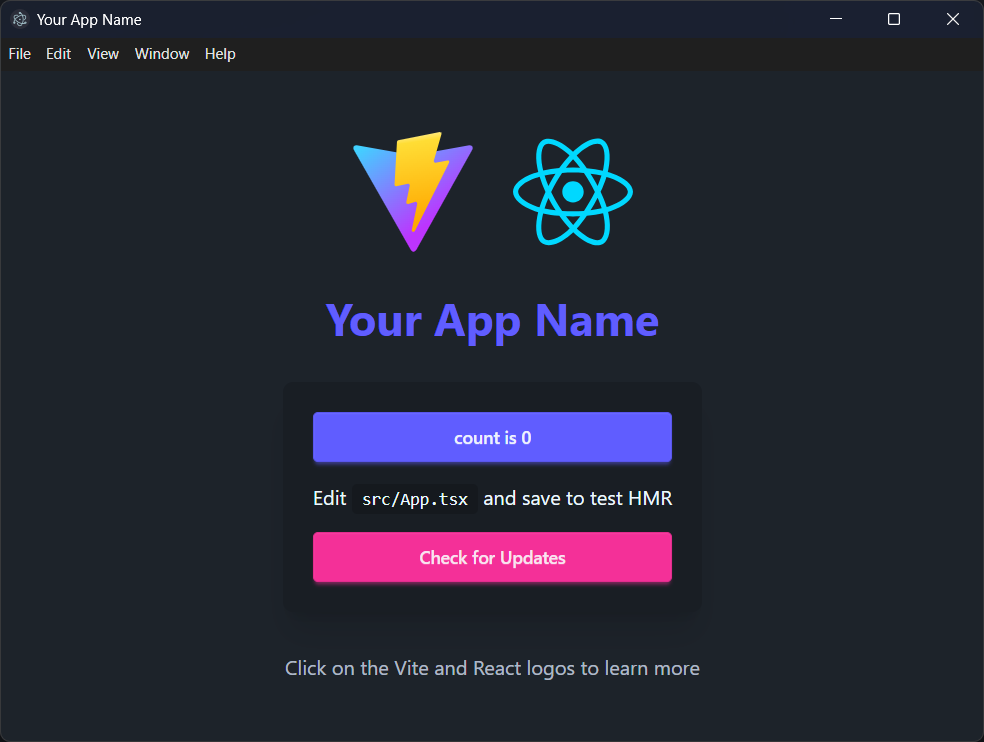
Integrates the Vite dev server with the Electron main process; npm run dev starts both and supports renderer hot reload
ViteReactStarter
electron-vite-react-boilerplate — Vite Starter Template
By kethakav
An Electron desktop application starter based on Vite, React, TypeScript, and DaisyUI, with preconfigured electron-builder NSIS packaging and electron-updater auto-update.
Explore the design
Compare the page layouts and mobile experience. Open any screenshot for a closer look.
Author preview
Author-provided previewTop of page
Preview provided in the project README.
One original preview is available. Open the full image to inspect the design.
Screenshots show visual appearance; interactive behavior may differ.
Recorded 2026-10-04View source
What stands out
A quick read of the recorded project description.
Uses React and TypeScript for the renderer, with the main process and preload scripts also in TypeScript
Includes the DaisyUI component library, providing buttons, cards, forms, and other UI components based on Tailwind CSS
Preconfigures electron-builder NSIS packaging to produce Windows installers, macOS dmg, and Linux AppImage/deb
Built-in electron-updater auto-update logic, including update checks, download progress, and error handling
Comes with a GitHub Actions release workflow that automatically builds and publishes to the specified repository when a v* tag is pushed
Template Details
This is an Electron desktop application starter template combining Vite, React, TypeScript, and DaisyUI. The author explains in the README that the template was created because complete documentation for electron-builder NSIS packaging and electron-updater auto-update was lacking at the time, so these two parts are preconfigured for others to build on directly.
The project structure places Electron main process code in the electron/ directory (main.ts, preload.ts, update.ts, electron-env.d.ts), React renderer code in the src/ directory, build outputs in dist/ and dist-electron/, and release packages in release/. During development, npm run dev starts both the Vite dev server and Electron; renderer changes support hot reload, while main process changes require restarting the app.
The template includes ESLint configuration, cross-platform build scripts for Windows, macOS, and Linux, and an auto-update workflow based on GitHub Releases: configure the publish owner and repo in electron-builder.json, and use GitHub Actions to build and publish when a v* tag is pushed. Before use, you need to follow the README to replace placeholder information such as names, appId, and icons in package.json, electron-builder.json, index.html, src/App.tsx, and electron/main.ts.
ViteReactStarter
Is it right for your project?
Use Cases
- When you need to quickly set up an Electron + React + TypeScript desktop application skeleton
- When you want to reference specific configuration approaches for electron-builder NSIS packaging and electron-updater auto-update
- When preparing to distribute a desktop application via GitHub Releases and implement version updates
- When you want to develop an Electron application UI using DaisyUI as the component library
Suitable For
- Developers familiar with React and TypeScript who need an Electron desktop starter template
- Personal or small-team projects that need cross-platform packaging configuration references
- Desktop application projects looking to reduce the configuration cost of auto-update and release workflows
Getting started & customization
Use these recorded setup notes alongside the repository instructions for your chosen version.
- 1
Requires Node.js 18+; install dependencies with npm or yarn
- 2
After cloning the repository, run npm install, then start development mode with npm run dev
- 3
Before use, replace placeholder content such as names, appId, and icons in package.json, electron-builder.json, index.html, src/App.tsx, and electron/main.ts
- 4
Auto-update and publishing require filling in the publish owner and repo in electron-builder.json and adding a RELEASE_PUSH_TOKEN with repo permission to the GitHub repository
- 5
The code is MIT licensed, but third-party assets such as demo images, fonts, and icons need separate license verification
License & source material
Usage conditions & limitations
Free to use · keep license noticeThis entry covers the free version under the MIT license in the public repository; the free scope is the code of this version and does not mean external services or third-party assets are free.
Must comply with when using
- You may freely use, modify, commercialize, and distribute the code of this version.
- When distributing copies or substantial portions of the code, retain the original author's copyright notice and the full MIT license notice.
- The code is provided as is; warranties and limitations of liability are governed by the original license and applicable law.
Additional costs & items to verify
- Using the auto-publish/auto-update features requires creating a GitHub personal access token with repo permission, which is an external service account requirement.
- You need to add a RELEASE_PUSH_TOKEN secret in the GitHub repository settings; the release workflow depends on this external service configuration.
- Auto-update and publishing require setting up an additional separate release repository, which is an external service dependency.
- The auto-update feature requires configuring a GitHub release repository; without it, this capability cannot be used.
- Demo images, fonts, icons, and other third-party assets must be checked against their respective licenses and cannot be judged solely by the code's MIT license.
- External services such as domains, hosting, databases, payments, or AI may incur additional charges.
View Original Text Basis
Permission is hereby granted, free of charge
Original License Text
Create a personal access token with `repo` permissions
Original README
Add your token as `RELEASE_PUSH_TOKEN` in your repository settings
Original README
Set up a separate repository for releases (e.g., `your-app-releases`)
Original README
https://github.com/kethakav/electron-vite-react-boilerplate/blob/main/LICENSEhttps://github.com/kethakav/electron-vite-react-boilerplate/blob/main/README.mdSet up a GitHub repository for releases
Original README
Compiled by DeepSeek based on repository license and README ·2026-10-04. Results only cover the materials read; dependencies, images, fonts, and subsequent term changes are subject to their respective original texts.
Project checks & description sources
Template Information
- Source platforms
- GitHub
- Documentation and maintenance reference score
- More documented · 76 / 100
- Technologies
- Vite · React
- Website type
- Starter
How this score is calculated
Our heuristic uses license records (up to 30), a demo link (12), a preview (10), stars (15), recorded maintenance (15), description completeness (8), feature records (5) and classification data (5). It is not a code, security or performance test, or a Google score. A link does not establish tested functionality.
What to verify for this project
- Repository update recorded
- 2026-01-23
- Screenshot last checked
- 2026-10-04
No demo link is recorded. Use the repository instructions to evaluate the project locally; the screenshot alone cannot establish interactive behavior.
The catalog identifies Vite as the primary stack. Check the actual dependency manifest and lockfile for versions and hosting requirements. These notes use recorded metadata, not a code audit or a deployment test.
Use a selection guide →How this description was prepared
AI-assisted description based on catalog records and repository material. Repository authors are not automatically the reviewers of this description.
Review declaration: [email protected] · 2026-10-04
Inspect the recorded source material
SHA-256: c53b98963303486db2b2d15a0dddec1277d41d1b31ec5dbd4aaa5dbf734d4f14
2026-10-04T02:28:38.829Z
Source file / repository# Electron + Vite + React + TypeScript + DaisyUI Boilerplate
[](https://opensource.org/licenses/MIT)
[](https://nodejs.org/)
[](https://electronjs.org/)
[](https://vitejs.dev/)
[](https://react.dev/)
[](https://www.typescriptlang.org/)
[](https://daisyui.com/)
A modern Electron application boilerplate built with Vite, React, TypeScript, and DaisyUI. This template provides a complete development environment with hot reload, auto-updater functionality, and a beautiful UI framework.

## 💡 Motivation
I created this boilerplate because I couldn't find thorough documentation on **electron-builder NSIS** and **electron-updater auto updates**. Setting up these features can be quite a headache, so I built this template with everything properly configured to help others avoid the same struggles.
## 🚀 Features
- **⚡️ Vite** - Lightning fast build tool and dev server
- **⚛️ React 18** - Modern React with hooks
- **📝 TypeScript** - Type safety and better developer experience
- **🎨 DaisyUI** - Beautiful component library built on Tailwind CSS
- **🔄 Hot Reload** - Instant updates during development
- **📦 Auto Updater** - Built-in update mechanism using electron-updater
- **🔧 ESLint** - Code linting and formatting
- **📱 Cross-platform** - Build for Windows, macOS, and Linux
## 📋 Prerequisites
- Node.js 18+
- npm or yarn
- Git
## 🛠️ Quick Start
### 1. Clone the Repository
```bash
git clone https://github.com/kethakav/electron-vite-react-boilerplate.git
cd electron-vite-react-boilerplate
```
### 2. Install Dependencies
```bash
npm install
```
### 3. Start Development
```bash
npm run dev
```
This will start both the Vite dev server and Electron in development mode with hot reload.
## 📁 Project Structure
```
├── electron/ # Electron main process files
│ ├── main.ts # Main process entry point
│ ├── preload.ts # Preload script for IPC
│ ├── update.ts # Auto-updater logic
│ └── electron-env.d.ts # TypeScript definitions
├── src/ # React application source
│ ├── App.tsx # Main React component
│ ├── main.tsx # React entry point
│ ├── App.css # Component styles
│ └── assets/ # Static assets
├── public/ # Public assets
├── dist/ # Built renderer files
├── dist-electron/ # Built main process files
├── release/ # Release builds
├── electron-builder.json # Electron Builder configuration
├── vite.config.ts # Vite configuration
└── package.json # Project dependencies and scripts
```
## 🔧 Configuration
### Required Changes
Before using this boilerplate for your project, you need to update the following files:
#### 1. `package.json`
```json
{
"name": "your-app-name",
"version": "1.0.0",
"description": "Your app description"
}
```
#### 2. `electron-builder.json`
```json
{
"appId": "com.yourcompany.yourapp",
"productName": "Your App Name",
"publish": {
"provider": "github",
"owner": "yourusername",
"repo": "your-repo-name"
}
}
```
#### 3. `index.html`
```html
<title>Your App Name</title>
```
#### 4. `src/App.tsx`
Update the app title and branding:
```tsx
<h1 className="text-4xl font-bold text-center mb-8 text-primary">Your App Name</h1>
```
#### 5. `electron/main.ts`
Update the window icon:
```ts
icon: path.join(process.env.VITE_PUBLIC, 'your-icon.png'),
```
### Optional Changes
#### 1. App Icon
Replace the icons in the `public/` directory:
- `vite.svg` - Your app icon
- `electron-vite.svg` - Alternative icon
#### 2. Window Configuration
Modify `electron/main.ts` to customize the window:
```ts
win = new BrowserWindow({
width: 1200,
height: 800,
minWidth: 800,
minHeight: 600,
// ... other options
})
```
#### 3. Auto Updater
The auto-updater is configured in `electron/update.ts`. You can customize:
- Update check frequency
- Download behavior
- Update notifications
## 🚀 Available Scripts
- `npm run dev` - Start development server with hot reload
- `npm run build` - Build for production
- `npm run preview` - Preview production build
- `npm run lint` - Run ESLint
## 📦 Building for Production
### Development Build
```bash
npm run build
```
### Release Build
The build process will create distributable packages in the `release/` directory:
- Windows: `.exe` installer
- macOS: `.dmg` disk image
- Linux: `.AppImage` and `.deb` packages
## 🔄 Auto Updater
This boilerplate includes a complete auto-update system:
### Features
- Automatic update checking
- Progress tracking
- Error handling
- User notifications
### Configuration
1. Set up a GitHub repository for releases
2. Update `electron-builder.json` with your repository details
3. Configure GitHub Actions for automated releases
### Usage
The update system is automatically integrated. Users can check for updates via the UI button.
## 🚀 Releasing Updates
This boilerplate includes automated release publishing via GitHub Actions. Here's how to release a new version:
### Prerequisites
1. **GitHub Token**: Create a personal access token with `repo` permissions
2. **Repository Secret**: Add your token as `RELEASE_PUSH_TOKEN` in your repository settings
3. **Release Repository**: Set up a separate repository for releases (e.g., `your-app-releases`)
### Release Process
1. **Update Version**
```bash
# Update version in package.json
npm version patch # or minor, major
```
2. **Create and Push Tag**
```bash
# Create a new tag (GitHub Actions will trigger on v* tags)
git tag v1.0.1
git push origin v1.0.1
```
3. **Automated Build**
- GitHub Actions will automatically:
- Build the application
- Create Windows installer
- Publish to your release repository
- Update the auto-updater
### Configuration Files
Update these files for your release setup:
#### `electron-builder.json`
```json
{
"publish": {
"provider": "github",
"owner": "yourusername",
"repo": "your-app-releases"
}
}
```
#### GitHub Repository Settings
1. Go to Settings → Secrets and variables → Actions
2. Add `RELEASE_PUSH_TOKEN` with your GitHub token
3. Ensure the token has `repo` permissions
### Release Workflow
The workflow triggers on tags matching `v*` pattern and:
- Builds the application
- Creates Windows installer
- Publishes to your release repository
- Enables auto-updates for users
## 🎨 Styling with DaisyUI
This boilerplate uses DaisyUI, a component library built on Tailwind CSS:
### Available Components
- Buttons, cards, modals
- Forms and inputs
- Navigation and layout
- Theming and customization
### Customization
Modify `src/App.css` or create new CSS files for custom styles.
## 🔧 Development Tips
### Hot Reload
- Main process changes require app restart
- Renderer process changes are hot-reloaded automatically
### Debugging
- Use Chrome DevTools for renderer process
- Use VS Code debugger for main process
### IPC Communication
The boilerplate includes pre-configured IPC handlers for:
- Update checking
- Download progress
- Error handling
## 📚 Resources
### Core Technologies
- [Electron Documentation](https://www.electronjs.org/docs)
- [Vite Documentation](https://vitejs.dev/guide/)
- [React Documentation](https://react.dev/)
- [DaisyUI Documentation](https://daisyui.com/)
- [Electron Builder Documentation](https://www.electron.build/)
## 🤝 Contributing
1. Fork the repository
2. Create a feature branch
3. Make your changes
4. Submit a pull request
## 📄 License
This project is licensed under the MIT License - see the LICENSE file for details.
## 🙏 Acknowledgments
This boilerplate was inspired by and built upon the excellent work of:
- [Electron⚡️Vite](https://electron-vite.github.io/) - The best practice integration solution between Electron and Vite, providing the foundation for modern Electron development
- [electron-vite-react](https://github.com/electron-vite/electron-vite-react) - The Electron + Vite + React boilerplate that served as the primary inspiration and reference for this project
- [DaisyUI](https://daisyui.com/) - For the beautiful component library built on Tailwind CSS
- [Vite](https://vitejs.dev/) - For the lightning-fast build tool and development server
- [React](https://react.dev/) - For the amazing UI library
Explore similar templates
Compare previews and descriptions within the same stack and category.

react-starter-kit
A full-stack SaaS monorepo starter built on Vite and React, with Bun, TypeScript, tRPC, Drizzle ORM, Better Auth, Stripe, and Cloudflare Workers. It includes email OTP, passkey, Google OAuth, organizations, subscription billing, Drizzle migrations, seed scripts, and Terraform infrastructure.
Vite · SaaS

cove
Cove is a minimal TanStack Start starter template maintained by mugnavo, integrating React, TanStack Router/Query, Tailwind CSS, shadcn/ui, Drizzle ORM with PostgreSQL, Better Auth, Vite Plus, and Nitro.
Vite · SaaS

vite-react-boilerplate
A production-ready Vite + React starter template with TypeScript, Tailwind CSS, TanStack Router/Query/Table, Storybook, React Hook Form + Zod, Vitest and Playwright testing, plus Husky/Commitizen/Commitlint commit conventions.
Vite · Starter

react-vite-admin
A backend management starter built on Vite and React, integrating Recoil, React Query, TypeScript, and Axios, with Ant Design-style interface screenshots. Suitable as a starting point for management-side projects, licensed under MIT, with Chinese documentation and common scripts.
Vite · Admin dashboard

typescript-react_best_practices-vite_template
A Vite + React + TypeScript starter template by CodelyTV, preconfigured with Jest and React Testing Library unit tests, Cypress end-to-end tests, ESLint and Prettier using Codely's shared configuration, GitHub Actions workflows, a Makefile, and Sass.
Vite · Starter

cloudflare-starter-kit
A Cloudflare Workers project scaffolding template maintained by kriasoft, using Vite and TypeScript, with three built-in workspaces: api, app, and edge, and preconfigured local testing, multiple environments, and a GitHub Actions deployment workflow.
Vite · Starter