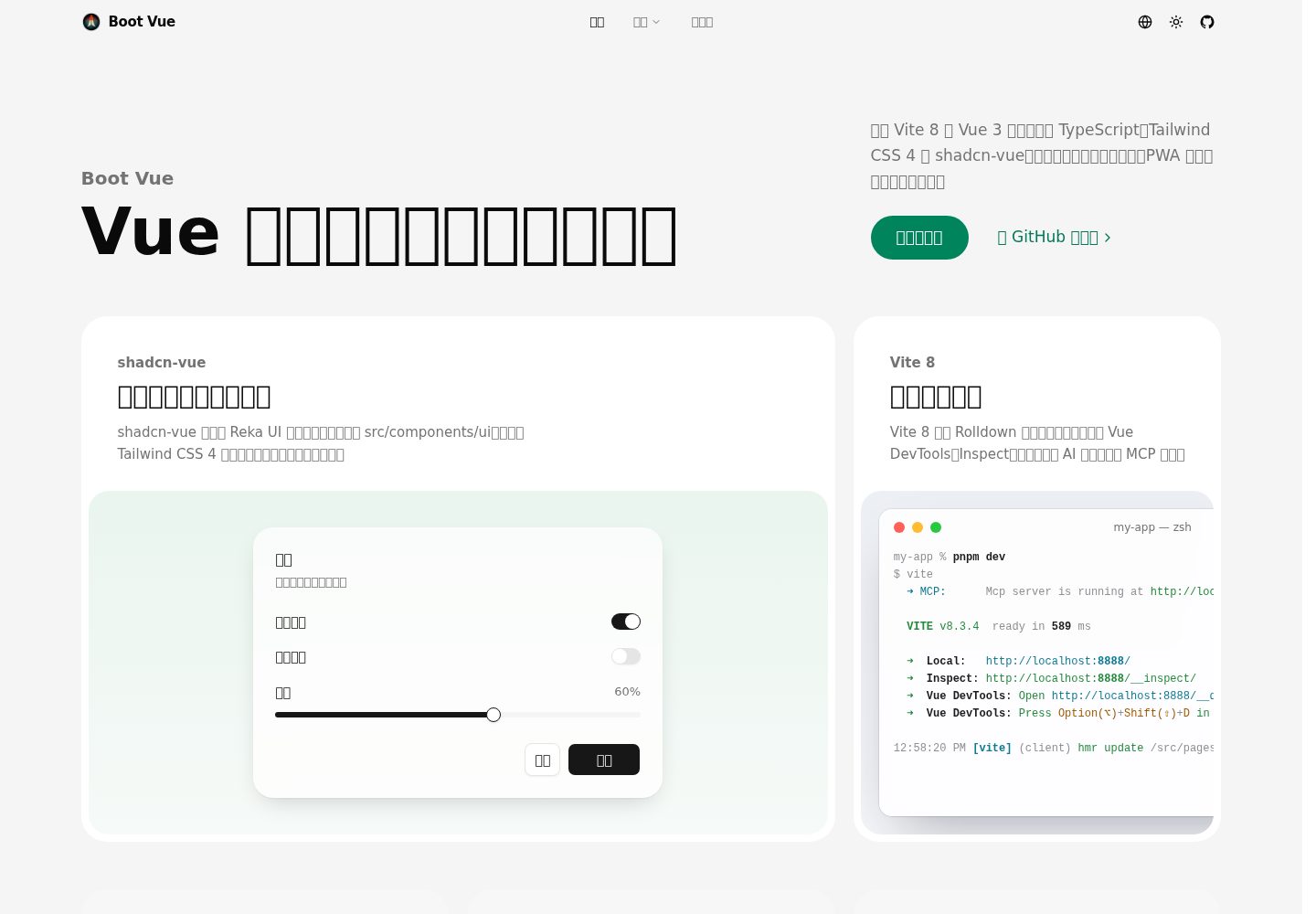
基于 Vue 3 与 Vite 的启动器,使用 TypeScript 编写
VueVite启动器
boot-vue — Vue 启动器模板
作者 kirklin
基于 Vue 3 与 Vite 的启动器模板,集成 TypeScript、Tailwind CSS、shadcn-vue、Pinia、vue-i18n 和 PWA,附带示例页面与部署配置。
看看你的网站会是什么样
浏览真实页面截图,比较内容排版与手机效果。点击下方缩略图切换,放大查看整页细节。
目前有 1 张原始预览,可打开完整图片查看设计细节。
截图用于了解视觉与布局,交互效果请以实际项目为准。
采集于 2026-10-11查看来源
值得关注的模板亮点
从已有项目资料中,快速了解它的特点。
集成 Tailwind CSS 与 shadcn-vue,组件源码复制到 src/components/ui 可直接修改
内置 Pinia 状态管理、vue-i18n 多语言与明暗主题切换
通过 unplugin 系列插件实现 API、组件与图标自动导入,类型声明生成到 types 目录
支持 PWA,生产构建注册 Workbox Service Worker 并可离线访问
提供 Netlify 配置与 Docker 生产构建方式,路由使用 hash 模式适配静态托管
模板详细介绍
boot-vue 是一个 Vue 3 启动器模板,构建工具为 Vite,使用 TypeScript 编写,样式层采用 Tailwind CSS 与 shadcn-vue 组件。模板内置 Pinia 状态管理、vue-i18n 多语言、明暗主题切换以及 PWA 支持,并提供首页、计数器等示例页面,可用于快速搭建中后台或前端应用的基础骨架。
组件方面,shadcn-vue 会把基于 Reka UI 的可访问组件复制到 src/components/ui,主题变量集中在 src/styles/main.css,模板自带按钮、卡片、下拉菜单、提示、头像、开关、滑块和标签等组件,其余可通过其 CLI 添加。开发环境提供 Vue DevTools、Inspect 与 MCP 服务入口,构建产物输出到 dist。
工程配置上,unplugin-auto-import、unplugin-vue-components 与 unplugin-icons 分别处理 API、组件和图标自动导入,类型声明生成到 types 目录;路由使用 hash 模式,因此静态托管无需重写规则,仓库同时提供 netlify.toml 与 Docker 构建方式。
使用限制:运行需要指定的 Node.js 版本范围,包管理器固定为 pnpm;PWA 的 Service Worker 仅在生产构建中注册;演示图片、字体、图标等第三方素材需按各自许可单独核对,域名、托管等外部服务可能另行收费。
VueVite启动器
适合你的项目吗?
适用场景
- 需要 Vue 3 + TypeScript 项目骨架时,直接以该模板初始化仓库
- 希望使用 shadcn-vue 组件并自行掌控组件源码样式的项目
- 需要多语言、明暗主题和 PWA 能力的 Web 应用
- 部署到静态托管或容器环境的前端项目
适合人群
- 熟悉 Vue 3 与 TypeScript 的前端开发者
- 需要可修改组件源码而非仅引入组件库的团队
- 计划在静态托管或 Docker 中部署 Vue 应用的项目
上手与定制指南
结合仓库当前版本的说明,按下面的资料检查内容、配置与运行要求。
- 1
需要 Node.js ^22.22.2、^24.15.0 或 >=26.0.0,包管理器固定为 pnpm
- 2
可通过 GitHub 模板创建仓库,或用 npx degit kirklin/boot-vue my-app 复制后执行 pnpm i 与 pnpm dev
- 3
开发服务器默认运行在 http://localhost:8888
- 4
新增 shadcn-vue 组件使用 pnpm shadcn-vue add <name>,随后执行 pnpm lint:fix 统一格式
- 5
Docker 构建使用 docker buildx build . -t boot-vue:latest,运行后由 nginx 提供服务
授权与来源资料
使用条件与限制
免费使用 · 保留许可声明本次收录的是公开仓库中采用 MIT 许可的免费版本;免费范围为该版本代码,不代表外部服务或第三方素材免费。
使用时需要遵守
- 允许免费使用、修改、商用和分发该版本代码。
- 分发代码副本或实质性部分时,保留原作者版权声明和完整 MIT 许可声明。
- 代码按现状提供;担保与责任限制以原许可证及适用法律为准。
额外费用与待核对事项
- 演示图片、字体、图标及其他第三方素材需按各自许可核对,不能仅凭代码的 MIT 许可判断。
- 域名、托管、数据库、支付或 AI 等外部服务可能另外收费。
- 运行环境限制:需要 Node.js ^22.22.2、^24.15.0 或 >=26.0.0;包管理器固定为 pnpm 12.11.2,pnpm 10.34.5 及以上会自动切换,旧版 pnpm 需先执行 npm i -g pnpm 升级。
- PWA 离线能力限制:Service Worker 仅在生产构建中注册,开发环境不具备离线缓存行为。
- 路由限制:使用 hash 模式,URL 带 # 片段;静态托管无需重写规则,但无法使用无 hash 的干净路径。
- 部署配置限制:netlify.toml 将 Netlify 构建环境固定为 Node 24,与本地要求的 Node 版本范围可能不一致。
查看原文依据
Permission is hereby granted, free of charge
许可证原文
Boot Vue needs Node.js `^22.22.2`, `^24.15.0` or `>=26.0.0`. The `packageManager` field pins pnpm 12.11.2, and pnpm 10.34.5 or later switches to it by itself; with an older pnpm, update it first with `npm i -g pnpm`.
README 原文
The service worker is only registered in production builds.
README 原文
The router uses hash history, so the app needs no rewrite rules on any static host.
README 原文
https://github.com/kirklin/boot-vue/blob/master/LICENSEhttps://github.com/kirklin/boot-vue/blob/master/README.md`netlify.toml` sets the build command and Node 24 for Netlify.
README 原文
DeepSeek 根据仓库许可证和 README 整理 ·2026-10-11。结果仅覆盖已读取资料,依赖、图片、字体及后续条款变更以各自原文为准。
项目核对记录与介绍依据
模板资料
- 来源平台
- GitHub
- 资料与维护参考分
- 资料较完整 · 96 / 100
- 技术栈
- Vue · Vite
- 网站类型
- 启动器
这个分数如何计算
本站按许可资料(最高30分)、演示链接(12分)、预览图(10分)、Star数(15分)、记录的维护时间(15分)、描述完整度(8分)、功能记录(5分)和分类资料(5分)计算。它不是代码、安全或性能测试,也不是 Google 评分;有链接不代表已实测可用。
这个项目需要核对什么
- 记录的仓库更新时间
- 2026-10-11
- 截图检查日期
- 2026-10-11
已收录演示链接。请用你的内容与屏幕尺寸检查;有演示不代表表单、认证或支付已经可用。
目录记录的主要技术栈是 Vue。请通过依赖清单和锁文件核对实际版本与托管要求。这些说明基于收录资料,不代表代码审计或部署实测。
查看具体选型方法 →介绍的制作与核对状态
介绍由 AI 辅助整理目录与仓库资料。仓库作者不等于这篇介绍的审核者。
审核声明: [email protected] · 2026-10-11
查看当时使用的来源资料
SHA-256: a947c03f80ebaf8ec1345d1f48a3845220bfd7ee5db2a4c72979f4e1f581607d
2026-10-11T12:58:29.196Z
来源文件 / 仓库<div align="center"><a name="readme-top"></a>
[![Boot Vue][image-banner]][github-link]
# Boot Vue
A Vue 3 starter on Vite 8, with Tailwind CSS 4 and shadcn-vue.<br/>
**English** · [简体中文](./README.zh-CN.md) · [Live demo][demo-link] · [Feedback][github-issues-link]
<!-- SHIELD GROUP -->
[![Vue 3.5][vue-shield]][vue-link]
[![Vite 8][vite-shield]][vite-link]
[![TypeScript 6][typescript-shield]][typescript-link]
[![Tailwind CSS 4][tailwind-shield]][tailwind-link]<br/>
[![CI][ci-shield]][ci-link]
[![GitHub stars][github-stars-shield]][github-stars-link]
[![License][github-license-shield]][github-license-link]
</div>
<details>
<summary><kbd>Table of contents</kbd></summary>
- [✨ Features](#-features)
- [Components you own](#components-you-own)
- [Ready in a blink](#ready-in-a-blink)
- [Light by day, dark by night](#light-by-day-dark-by-night)
- [State that stays](#state-that-stays)
- [Every language, one codebase](#every-language-one-codebase)
- [No import lines](#no-import-lines)
- [Punctuation, set right](#punctuation-set-right)
- [Installs like an app](#installs-like-an-app)
- [Ship it anywhere](#ship-it-anywhere)
- [🚀 Getting started](#-getting-started)
- [🛠️ Usage](#️-usage)
- [Add components](#add-components)
- [Docker production build](#docker-production-build)
- [📁 Project structure](#-project-structure)
- [🤝 Feedback](#-feedback)
<br/>
</details>
## ✨ Features
![Components you own][image-feature-components]
### Components you own
[shadcn-vue][shadcn-vue-link] copies accessible components built on [Reka UI][reka-ui-link] into `src/components/ui`. They are styled with Tailwind CSS 4 and the theme variables in `src/styles/main.css`, and the code is yours to change. The template comes with button, card, dropdown menu, tooltip, avatar, switch, slider and label, and the CLI adds the rest, see [Add components](#add-components).
<div align="right">
[![Back to top][back-to-top]](#readme-top)
</div>
![Ready in a blink][image-feature-dev-server]
### Ready in a blink
Vite 8 builds with Rolldown. `pnpm dev` opens the app on <http://localhost:8888>, with [Vue DevTools][vue-devtools-link] at `/__devtools__/`, [Inspect][vite-inspect-link] at `/__inspect/` to see how each module is transformed, and an [MCP server][vite-mcp-link] at `/__mcp/sse` for AI assistants.
<div align="right">
[![Back to top][back-to-top]](#readme-top)
</div>
![Light by day, dark by night][image-feature-dark-mode]
### Light by day, dark by night
The site bar switches between light, dark and the system theme. VueUse's `useColorMode` stores the choice, a short script in `index.html` applies it before the first paint so a dark page never flashes white, and the new theme spreads from the click with a view transition (`src/composables/theme.ts`).
<div align="right">
[![Back to top][back-to-top]](#readme-top)
</div>
![State that stays][image-feature-state]
### State that stays
[Pinia][pinia-link] stores live in `src/store` and are imported automatically. The tile on the home page and the counter page both call `counter()`, so they share one count.
```ts
// src/store/counter.ts
export const counter = defineStore("counter", () => {
const count = ref<number>(1);
function increment() {
count.value++;
}
return { count, increment };
});
```
<div align="right">
[![Back to top][back-to-top]](#readme-top)
</div>
![Every language, one codebase][image-feature-i18n]
### Every language, one codebase
Messages live in `src/locales/<language>.json` and are compiled at build time by [@intlify/unplugin-vue-i18n][unplugin-vue-i18n-link]. To add a language, add a file: the language menu lists every file in the folder, remembers the visitor's choice and sets the `lang` of the page.
<div align="right">
[![Back to top][back-to-top]](#readme-top)
</div>
![No import lines][image-feature-auto-imports]
### No import lines
[unplugin-auto-import][auto-import-link] brings in the APIs of Vue, Vue Router, vue-i18n and VueUse, and everything exported from `src/composables` and `src/store`. [unplugin-vue-components][vue-components-link] registers the components in `src/components`, and [unplugin-icons][icons-link] turns names such as `<IMdiGithub />` into icons from Iconify. The type declarations are generated into `types/`.
<div align="right">
[![Back to top][back-to-top]](#readme-top)
</div>
![Punctuation, set right][image-feature-typography]
### Punctuation, set right
Chinese and Latin text share the code points of quotation marks, dashes and ellipses, so a Latin font in front draws them narrow and in Latin style. The font stack in `src/styles/main.css` puts a `Punctuation Chinese` face first. It covers only these marks and takes them from PingFang SC, Noto Sans CJK SC or Microsoft YaHei, while Latin text keeps the system UI font.
<div align="right">
[![Back to top][back-to-top]](#readme-top)
</div>
![Installs like an app][image-feature-pwa]
### Installs like an app
[vite-plugin-pwa][pwa-link] generates the web app manifest and a Workbox service worker that updates itself. After the first visit, a production build keeps working offline. The service worker is only registered in production builds.
<div align="right">
[![Back to top][back-to-top]](#readme-top)
</div>
![Ship it anywhere][image-feature-deploy]
### Ship it anywhere
[![Deploy to Netlify][netlify-button]][netlify-deploy-link]
[![Deploy with Vercel][vercel-button]][vercel-deploy-link]
`netlify.toml` sets the build command and Node 24 for Netlify. Vercel finds the Vite settings by itself. The router uses hash history, so the app needs no rewrite rules on any static host. For a container, see [Docker production build](#docker-production-build).
<div align="right">
[![Back to top][back-to-top]](#readme-top)
</div>
## 🚀 Getting started
> [!NOTE]
> Boot Vue needs Node.js `^22.22.2`, `^24.15.0` or `>=26.0.0`. The `packageManager` field pins pnpm 12.11.2, and pnpm 10.34.5 or later switches to it by itself; with an older pnpm, update it first with `npm i -g pnpm`.
[Create a repository from this template][template-link], or copy it with degit:
```bash
npx degit kirklin/boot-vue my-app
cd my-app
pnpm i
pnpm dev
```
<div align="right">
[![Back to top][back-to-top]](#readme-top)
</div>
## 🛠️ Usage
| Command | What it does |
| ---------------- | ------------------------------------------------------- |
| `pnpm dev` | Starts the dev server on <http://localhost:8888> |
| `pnpm build` | Builds the app into `dist` |
| `pnpm preview` | Serves the build locally |
| `pnpm test` | Runs the tests with Vitest |
| `pnpm lint` | Lints with [@kirklin/eslint-config][eslint-config-link] |
| `pnpm lint:fix` | Lints and fixes what can be fixed |
| `pnpm typecheck` | Checks the types with vue-tsc |
Each commit runs ESLint on the staged files and checks the message against [Conventional Commits][conventional-commits-link].
### Add components
Add [shadcn-vue components][shadcn-vue-components-link] with the CLI the template installs, then format the new files in the project's style:
```bash
pnpm shadcn-vue add dialog
pnpm lint:fix
```
When a component builds on one you already have, such as dialog on button, the CLI asks before it overwrites your copy.
### Docker production build
Build the image from the project root:
```bash
docker buildx build . -t boot-vue:latest
```
Run it and map a port with `-p`:
```bash
docker run --rm -it -p 8080:80 boot-vue:latest
```
The app is then served by nginx on <http://localhost:8080>.
<div align="right">
[![Back to top][back-to-top]](#readme-top)
</div>
## 📁 Project structure
| Path | What it holds |
| ------------------------ | --------------------------------------------------------- |
| `src/components/ui` | shadcn-vue components, added by its CLI |
| `src/components/landing` | The tiles of the home page |
| `src/composables` | Composables, imported automatically |
| `src/layouts` | The site bar with its menu, and the footer |
| `src/locales` | One JSON file of messages for each language |
| `src/pages` | Pages, routed in `src/router/routes/modules` |
| `src/store` | Pinia stores, imported automatically |
| `src/styles/main.css` | Tailwind CSS entry, theme variables and the font stack |
| `types` | Generated declarations of the auto imports and components |
| `public` | Files served as they are, such as the icons of the PWA |
For the editor, [WebStorm][webstorm-link] works out of the box, and VS Code needs the [Vue - Official][vue-official-link] extension.
<div align="right">
[![Back to top][back-to-top]](#readme-top)
</div>
## 🤝 Feedback
If you have any questions or issues, please report them on [GitHub Issues][github-issues-link].
---
[MIT](./LICENSE) License © 2023-PRESENT [Kirk Lin](https://github.com/kirklin)
<!-- LINK GROUP -->
[auto-import-link]: https://github.com/unplugin/unplugin-auto-import
[back-to-top]: https://img.shields.io/badge/-BACK_TO_TOP-151515?style=flat-square
[ci-link]: https://github.com/kirklin/boot-vue/actions/workflows/ci.yml
[ci-shield]: https://img.shields.io/github/actions/workflow/status/kirklin/boot-vue/ci.yml?branch=master&label=ci&labelColor=black&style=flat-square
[conventional-commits-link]: https://www.conventionalcommits.org
[demo-link]: https://boot-vue.vercel.app
[eslint-config-link]: https://github.com/kirklin/eslint-config
[github-issues-link]: https://github.com/kirklin/boot-vue/issues
[github-license-link]: https://github.com/kirklin/boot-vue/blob/master/LICENSE
[github-license-shield]: https://img.shields.io/github/license/kirklin/boot-vue?color=white&labelColor=black&style=flat-square
[github-link]: https://github.com/kirklin/boot-vue
[github-stars-link]: https://github.com/kirklin/boot-vue/stargazers
[github-stars-shield]: https://img.shields.io/github/stars/kirklin/boot-vue?color=ffcb47&labelColor=black&style=flat-square
[icons-link]: https://github.com/unplugin/unplugin-icons
[image-banner]: ./README.assets/banner.png
[image-feature-auto-imports]: ./README.assets/feature-auto-imports.png
[image-feature-components]: ./README.assets/feature-components.png
[image-feature-dark-mode]: ./README.assets/feature-dark-mode.png
[image-feature-deploy]: ./README.assets/feature-deploy.png
[image-feature-dev-server]: ./README.assets/feature-dev-server.png
[image-feature-i18n]: ./README.assets/feature-i18n.png
[image-feature-pwa]: ./README.assets/feature-pwa.png
[image-feature-state]: ./README.assets/feature-state.png
[image-feature-typography]: ./README.assets/feature-typography.png
[netlify-button]: https://www.netlify.com/img/deploy/button.svg
[netlify-deploy-link]: https://app.netlify.com/start/deploy?repository=https://github.com/kirklin/boot-vue
[pinia-link]: https://pinia.vuejs.org
[pwa-link]: https://vite-pwa-org.netlify.app
[reka-ui-link]: https://reka-ui.com
[shadcn-vue-components-link]: https://www.shadcn-vue.com/docs/components
[shadcn-vue-link]: https://www.shadcn-vue.com
[tailwind-link]: https://tailwindcss.com
[tailwind-shield]: https://img.shields.io/badge/tailwind_css-4-38bdf8?labelColor=black&logo=tailwindcss&logoColor=white&style=flat-square
[template-link]: https://github.com/kirklin/boot-vue/generate
[typescript-link]: https://www.typescriptlang.org
[typescript-shield]: https://img.shields.io/badge/typescript-6-3178c6?labelColor=black&logo=typescript&logoColor=white&style=flat-square
[unplugin-vue-i18n-link]: https://github.com/intlify/bundle-tools/tree/main/packages/unplugin-vue-i18n
[vercel-button]: https://vercel.com/button
[vercel-deploy-link]: https://vercel.com/new/clone?repository-url=https%3A%2F%2Fgithub.com%2Fkirklin%2Fboot-vue
[vite-inspect-link]: https://github.com/antfu-collective/vite-plugin-inspect
[vite-link]: https://vite.dev
[vite-mcp-link]: https://github.com/antfu/nuxt-mcp/tree/main/packages/vite-plugin-mcp
[vite-shield]: https://img.shields.io/badge/vite-8-646cff?labelColor=black&logo=vite&logoColor=white&style=flat-square
[vue-components-link]: https://github.com/unplugin/unplugin-vue-components
[vue-devtools-link]: https://devtools.vuejs.org
[vue-link]: https://vuejs.org
[vue-official-link]: https://marketplace.visualstudio.com/items?itemName=Vue.volar
[vue-shield]: https://img.shields.io/badge/vue-3.5-42b883?labelColor=black&logo=vuedotjs&logoColor=white&style=flat-square
[webstorm-link]: https://www.jetbrains.com/webstorm/
看看同类模板
对比同技术栈与用途的模板,找到更适合的视觉与内容结构。

vitesse
🏕 Opinionated Vite + Vue Starter Template
Vue · 启动器

vitesse-webext
⚡️ WebExtension Vite Starter Template
Vue · 启动器

laravel-vue-spa
A Laravel-Vue SPA starter kit.
Vue · 启动器

vue3-h5-template
vue3-h5-template 是一个面向移动端 H5 项目的启动模板,基于 Vue3、Vite 和 Vant4 构建,同时集成了 TypeScript、Tailwindcss、Pinia、Vue-router 等常用…
Vue · 启动器

tov-template
vite + vue3 + ts 开箱即用现代开发模板 | vite + vue3 + ts out-of-the-box modern development template
Vue · 启动器

shadcn-vue-landing-page
New design 🎉 Vue + Shadcn-vue + TypeScript + Tailwind. Landing page template ease-to-use
Vue · 企业官网