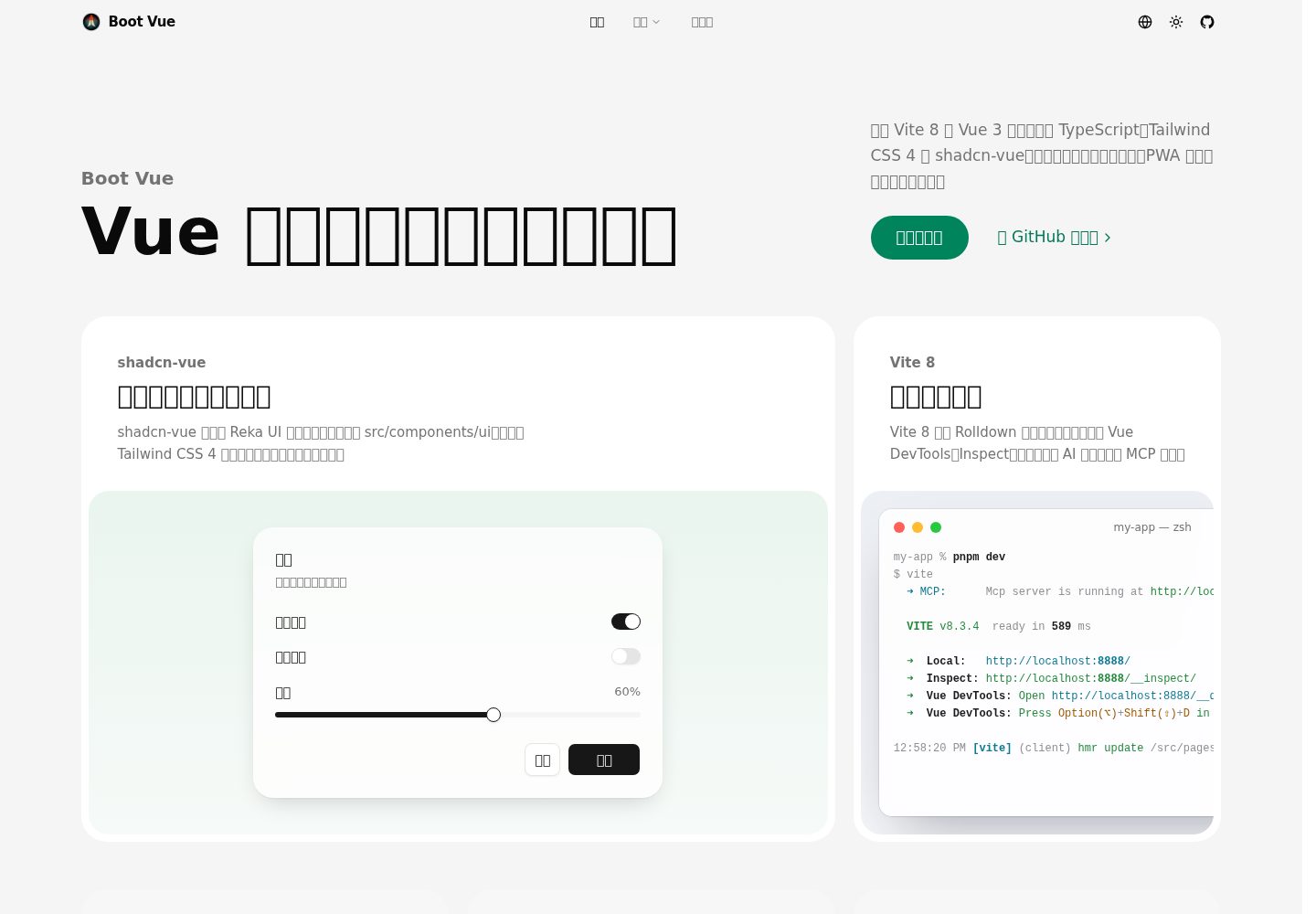
A starter based on Vue 3 and Vite, written in TypeScript
VueViteStarter
boot-vue — Vue Starter Template
By kirklin
A Vue 3 and Vite starter template that integrates TypeScript, Tailwind CSS, shadcn-vue, Pinia, vue-i18n and PWA, with example pages and deployment configuration.
Explore the design
Compare the page layouts and mobile experience. Open any screenshot for a closer look.
Desktop homepage
Desktop captureTop of page
Actual screenshot captured by the server browser.
One original preview is available. Open the full image to inspect the design.
Screenshots show visual appearance; interactive behavior may differ.
Recorded 2026-10-11View source
What stands out
A quick read of the recorded project description.
Integrates Tailwind CSS and shadcn-vue, with component source copied into src/components/ui for direct modification
Built-in Pinia state management, vue-i18n internationalization and light/dark theme switching
Automatic imports of APIs, components and icons via the unplugin series, with type declarations generated into the types directory
PWA support, registering a Workbox Service Worker in production builds for offline access
Provides Netlify configuration and a Docker production build method, with hash-mode routing suited to static hosting
Template Details
boot-vue is a Vue 3 starter template built with Vite and written in TypeScript, using Tailwind CSS and shadcn-vue components for styling. The template includes Pinia state management, vue-i18n internationalization, light and dark theme switching, and PWA support, and provides example pages such as a home page and a counter. It can be used to quickly set up a foundation for admin dashboards or front-end applications.
For components, shadcn-vue copies accessible components based on Reka UI into src/components/ui, with theme variables centralized in src/styles/main.css. The template includes buttons, cards, dropdown menus, tooltips, avatars, switches, sliders and labels; additional components can be added via its CLI. The development environment provides entry points for Vue DevTools, Inspect and MCP services, and build output goes to dist.
For project configuration, unplugin-auto-import, unplugin-vue-components and unplugin-icons handle automatic imports of APIs, components and icons respectively, with type declarations generated into the types directory. Routing uses hash mode, so static hosting requires no rewrite rules. The repository also provides netlify.toml and a Docker build method.
Usage limitations: running requires a specified Node.js version range, and the package manager is fixed to pnpm. The PWA Service Worker is registered only in production builds. Third-party assets such as demo images, fonts and icons must be checked separately under their respective licenses. External services such as domains and hosting may incur additional charges.
VueViteStarter
Is it right for your project?
Use Cases
- Initializing a repository directly from this template when a Vue 3 + TypeScript project skeleton is needed
- Projects that want to use shadcn-vue components and control component source styles themselves
- Web applications that need internationalization, light/dark themes and PWA capabilities
- Front-end projects deployed to static hosting or container environments
Suitable For
- Front-end developers familiar with Vue 3 and TypeScript
- Teams that need modifiable component source rather than only importing a component library
- Projects planning to deploy Vue applications on static hosting or in Docker
Getting started & customization
Use these recorded setup notes alongside the repository instructions for your chosen version.
- 1
Requires Node.js ^22.22.2, ^24.15.0 or >=26.0.0; the package manager is fixed to pnpm
- 2
Create a repository via the GitHub template, or copy with npx degit kirklin/boot-vue my-app, then run pnpm i and pnpm dev
- 3
The development server runs at http://localhost:8888 by default
- 4
Add shadcn-vue components with pnpm shadcn-vue add <name>, then run pnpm lint:fix to unify formatting
- 5
For Docker, build with docker buildx build . -t boot-vue:latest; after running, nginx serves the application
License & source material
Usage conditions & limitations
Free to use · keep license noticeThis entry covers the free version under the MIT license in the public repository; the free scope is the code of that version and does not mean external services or third-party assets are free.
Must comply with when using
- The code of this version may be used, modified, used commercially and distributed free of charge.
- When distributing copies or substantial portions of the code, retain the original author's copyright notice and the complete MIT license notice.
- The code is provided as is; warranties and limitations of liability are governed by the original license and applicable law.
Additional costs & items to verify
- Demo images, fonts, icons and other third-party assets must be checked under their respective licenses; they cannot be judged solely by the code's MIT license.
- External services such as domains, hosting, databases, payments or AI may incur additional charges.
- Runtime limitations: requires Node.js ^22.22.2, ^24.15.0 or >=26.0.0; the package manager is fixed to pnpm 12.11.2, pnpm 10.34.5 and above will switch automatically, and older pnpm versions require running npm i -g pnpm first to upgrade.
- PWA offline limitation: the Service Worker is registered only in production builds, and the development environment does not have offline caching behavior.
- Routing limitation: hash mode is used, so URLs contain a # fragment; static hosting requires no rewrite rules, but clean paths without a hash cannot be used.
- Deployment configuration limitation: netlify.toml fixes the Netlify build environment to Node 24, which may differ from the locally required Node version range.
View Original Text Basis
Permission is hereby granted, free of charge
Original License Text
Boot Vue needs Node.js `^22.22.2`, `^24.15.0` or `>=26.0.0`. The `packageManager` field pins pnpm 12.11.2, and pnpm 10.34.5 or later switches to it by itself; with an older pnpm, update it first with `npm i -g pnpm`.
Original README
The service worker is only registered in production builds.
Original README
The router uses hash history, so the app needs no rewrite rules on any static host.
Original README
https://github.com/kirklin/boot-vue/blob/master/LICENSEhttps://github.com/kirklin/boot-vue/blob/master/README.md`netlify.toml` sets the build command and Node 24 for Netlify.
Original README
Compiled by DeepSeek based on repository license and README ·2026-10-11. Results only cover the materials read; dependencies, images, fonts, and subsequent term changes are subject to their respective original texts.
Project checks & description sources
Template Information
- Source platforms
- GitHub
- Documentation and maintenance reference score
- More documented · 96 / 100
- Technologies
- Vue · Vite
- Website type
- Starter
How this score is calculated
Our heuristic uses license records (up to 30), a demo link (12), a preview (10), stars (15), recorded maintenance (15), description completeness (8), feature records (5) and classification data (5). It is not a code, security or performance test, or a Google score. A link does not establish tested functionality.
What to verify for this project
- Repository update recorded
- 2026-10-11
- Screenshot last checked
- 2026-10-11
A demo link is listed. Check it with your own content and viewport sizes; its presence does not confirm that forms, authentication or payments work.
The catalog identifies Vue as the primary stack. Check the actual dependency manifest and lockfile for versions and hosting requirements. These notes use recorded metadata, not a code audit or a deployment test.
Use a selection guide →How this description was prepared
AI-assisted description based on catalog records and repository material. Repository authors are not automatically the reviewers of this description.
Review declaration: [email protected] · 2026-10-11
Inspect the recorded source material
SHA-256: a947c03f80ebaf8ec1345d1f48a3845220bfd7ee5db2a4c72979f4e1f581607d
2026-10-11T12:58:29.196Z
Source file / repository<div align="center"><a name="readme-top"></a>
[![Boot Vue][image-banner]][github-link]
# Boot Vue
A Vue 3 starter on Vite 8, with Tailwind CSS 4 and shadcn-vue.<br/>
**English** · [简体中文](./README.zh-CN.md) · [Live demo][demo-link] · [Feedback][github-issues-link]
<!-- SHIELD GROUP -->
[![Vue 3.5][vue-shield]][vue-link]
[![Vite 8][vite-shield]][vite-link]
[![TypeScript 6][typescript-shield]][typescript-link]
[![Tailwind CSS 4][tailwind-shield]][tailwind-link]<br/>
[![CI][ci-shield]][ci-link]
[![GitHub stars][github-stars-shield]][github-stars-link]
[![License][github-license-shield]][github-license-link]
</div>
<details>
<summary><kbd>Table of contents</kbd></summary>
- [✨ Features](#-features)
- [Components you own](#components-you-own)
- [Ready in a blink](#ready-in-a-blink)
- [Light by day, dark by night](#light-by-day-dark-by-night)
- [State that stays](#state-that-stays)
- [Every language, one codebase](#every-language-one-codebase)
- [No import lines](#no-import-lines)
- [Punctuation, set right](#punctuation-set-right)
- [Installs like an app](#installs-like-an-app)
- [Ship it anywhere](#ship-it-anywhere)
- [🚀 Getting started](#-getting-started)
- [🛠️ Usage](#️-usage)
- [Add components](#add-components)
- [Docker production build](#docker-production-build)
- [📁 Project structure](#-project-structure)
- [🤝 Feedback](#-feedback)
<br/>
</details>
## ✨ Features
![Components you own][image-feature-components]
### Components you own
[shadcn-vue][shadcn-vue-link] copies accessible components built on [Reka UI][reka-ui-link] into `src/components/ui`. They are styled with Tailwind CSS 4 and the theme variables in `src/styles/main.css`, and the code is yours to change. The template comes with button, card, dropdown menu, tooltip, avatar, switch, slider and label, and the CLI adds the rest, see [Add components](#add-components).
<div align="right">
[![Back to top][back-to-top]](#readme-top)
</div>
![Ready in a blink][image-feature-dev-server]
### Ready in a blink
Vite 8 builds with Rolldown. `pnpm dev` opens the app on <http://localhost:8888>, with [Vue DevTools][vue-devtools-link] at `/__devtools__/`, [Inspect][vite-inspect-link] at `/__inspect/` to see how each module is transformed, and an [MCP server][vite-mcp-link] at `/__mcp/sse` for AI assistants.
<div align="right">
[![Back to top][back-to-top]](#readme-top)
</div>
![Light by day, dark by night][image-feature-dark-mode]
### Light by day, dark by night
The site bar switches between light, dark and the system theme. VueUse's `useColorMode` stores the choice, a short script in `index.html` applies it before the first paint so a dark page never flashes white, and the new theme spreads from the click with a view transition (`src/composables/theme.ts`).
<div align="right">
[![Back to top][back-to-top]](#readme-top)
</div>
![State that stays][image-feature-state]
### State that stays
[Pinia][pinia-link] stores live in `src/store` and are imported automatically. The tile on the home page and the counter page both call `counter()`, so they share one count.
```ts
// src/store/counter.ts
export const counter = defineStore("counter", () => {
const count = ref<number>(1);
function increment() {
count.value++;
}
return { count, increment };
});
```
<div align="right">
[![Back to top][back-to-top]](#readme-top)
</div>
![Every language, one codebase][image-feature-i18n]
### Every language, one codebase
Messages live in `src/locales/<language>.json` and are compiled at build time by [@intlify/unplugin-vue-i18n][unplugin-vue-i18n-link]. To add a language, add a file: the language menu lists every file in the folder, remembers the visitor's choice and sets the `lang` of the page.
<div align="right">
[![Back to top][back-to-top]](#readme-top)
</div>
![No import lines][image-feature-auto-imports]
### No import lines
[unplugin-auto-import][auto-import-link] brings in the APIs of Vue, Vue Router, vue-i18n and VueUse, and everything exported from `src/composables` and `src/store`. [unplugin-vue-components][vue-components-link] registers the components in `src/components`, and [unplugin-icons][icons-link] turns names such as `<IMdiGithub />` into icons from Iconify. The type declarations are generated into `types/`.
<div align="right">
[![Back to top][back-to-top]](#readme-top)
</div>
![Punctuation, set right][image-feature-typography]
### Punctuation, set right
Chinese and Latin text share the code points of quotation marks, dashes and ellipses, so a Latin font in front draws them narrow and in Latin style. The font stack in `src/styles/main.css` puts a `Punctuation Chinese` face first. It covers only these marks and takes them from PingFang SC, Noto Sans CJK SC or Microsoft YaHei, while Latin text keeps the system UI font.
<div align="right">
[![Back to top][back-to-top]](#readme-top)
</div>
![Installs like an app][image-feature-pwa]
### Installs like an app
[vite-plugin-pwa][pwa-link] generates the web app manifest and a Workbox service worker that updates itself. After the first visit, a production build keeps working offline. The service worker is only registered in production builds.
<div align="right">
[![Back to top][back-to-top]](#readme-top)
</div>
![Ship it anywhere][image-feature-deploy]
### Ship it anywhere
[![Deploy to Netlify][netlify-button]][netlify-deploy-link]
[![Deploy with Vercel][vercel-button]][vercel-deploy-link]
`netlify.toml` sets the build command and Node 24 for Netlify. Vercel finds the Vite settings by itself. The router uses hash history, so the app needs no rewrite rules on any static host. For a container, see [Docker production build](#docker-production-build).
<div align="right">
[![Back to top][back-to-top]](#readme-top)
</div>
## 🚀 Getting started
> [!NOTE]
> Boot Vue needs Node.js `^22.22.2`, `^24.15.0` or `>=26.0.0`. The `packageManager` field pins pnpm 12.11.2, and pnpm 10.34.5 or later switches to it by itself; with an older pnpm, update it first with `npm i -g pnpm`.
[Create a repository from this template][template-link], or copy it with degit:
```bash
npx degit kirklin/boot-vue my-app
cd my-app
pnpm i
pnpm dev
```
<div align="right">
[![Back to top][back-to-top]](#readme-top)
</div>
## 🛠️ Usage
| Command | What it does |
| ---------------- | ------------------------------------------------------- |
| `pnpm dev` | Starts the dev server on <http://localhost:8888> |
| `pnpm build` | Builds the app into `dist` |
| `pnpm preview` | Serves the build locally |
| `pnpm test` | Runs the tests with Vitest |
| `pnpm lint` | Lints with [@kirklin/eslint-config][eslint-config-link] |
| `pnpm lint:fix` | Lints and fixes what can be fixed |
| `pnpm typecheck` | Checks the types with vue-tsc |
Each commit runs ESLint on the staged files and checks the message against [Conventional Commits][conventional-commits-link].
### Add components
Add [shadcn-vue components][shadcn-vue-components-link] with the CLI the template installs, then format the new files in the project's style:
```bash
pnpm shadcn-vue add dialog
pnpm lint:fix
```
When a component builds on one you already have, such as dialog on button, the CLI asks before it overwrites your copy.
### Docker production build
Build the image from the project root:
```bash
docker buildx build . -t boot-vue:latest
```
Run it and map a port with `-p`:
```bash
docker run --rm -it -p 8080:80 boot-vue:latest
```
The app is then served by nginx on <http://localhost:8080>.
<div align="right">
[![Back to top][back-to-top]](#readme-top)
</div>
## 📁 Project structure
| Path | What it holds |
| ------------------------ | --------------------------------------------------------- |
| `src/components/ui` | shadcn-vue components, added by its CLI |
| `src/components/landing` | The tiles of the home page |
| `src/composables` | Composables, imported automatically |
| `src/layouts` | The site bar with its menu, and the footer |
| `src/locales` | One JSON file of messages for each language |
| `src/pages` | Pages, routed in `src/router/routes/modules` |
| `src/store` | Pinia stores, imported automatically |
| `src/styles/main.css` | Tailwind CSS entry, theme variables and the font stack |
| `types` | Generated declarations of the auto imports and components |
| `public` | Files served as they are, such as the icons of the PWA |
For the editor, [WebStorm][webstorm-link] works out of the box, and VS Code needs the [Vue - Official][vue-official-link] extension.
<div align="right">
[![Back to top][back-to-top]](#readme-top)
</div>
## 🤝 Feedback
If you have any questions or issues, please report them on [GitHub Issues][github-issues-link].
---
[MIT](./LICENSE) License © 2023-PRESENT [Kirk Lin](https://github.com/kirklin)
<!-- LINK GROUP -->
[auto-import-link]: https://github.com/unplugin/unplugin-auto-import
[back-to-top]: https://img.shields.io/badge/-BACK_TO_TOP-151515?style=flat-square
[ci-link]: https://github.com/kirklin/boot-vue/actions/workflows/ci.yml
[ci-shield]: https://img.shields.io/github/actions/workflow/status/kirklin/boot-vue/ci.yml?branch=master&label=ci&labelColor=black&style=flat-square
[conventional-commits-link]: https://www.conventionalcommits.org
[demo-link]: https://boot-vue.vercel.app
[eslint-config-link]: https://github.com/kirklin/eslint-config
[github-issues-link]: https://github.com/kirklin/boot-vue/issues
[github-license-link]: https://github.com/kirklin/boot-vue/blob/master/LICENSE
[github-license-shield]: https://img.shields.io/github/license/kirklin/boot-vue?color=white&labelColor=black&style=flat-square
[github-link]: https://github.com/kirklin/boot-vue
[github-stars-link]: https://github.com/kirklin/boot-vue/stargazers
[github-stars-shield]: https://img.shields.io/github/stars/kirklin/boot-vue?color=ffcb47&labelColor=black&style=flat-square
[icons-link]: https://github.com/unplugin/unplugin-icons
[image-banner]: ./README.assets/banner.png
[image-feature-auto-imports]: ./README.assets/feature-auto-imports.png
[image-feature-components]: ./README.assets/feature-components.png
[image-feature-dark-mode]: ./README.assets/feature-dark-mode.png
[image-feature-deploy]: ./README.assets/feature-deploy.png
[image-feature-dev-server]: ./README.assets/feature-dev-server.png
[image-feature-i18n]: ./README.assets/feature-i18n.png
[image-feature-pwa]: ./README.assets/feature-pwa.png
[image-feature-state]: ./README.assets/feature-state.png
[image-feature-typography]: ./README.assets/feature-typography.png
[netlify-button]: https://www.netlify.com/img/deploy/button.svg
[netlify-deploy-link]: https://app.netlify.com/start/deploy?repository=https://github.com/kirklin/boot-vue
[pinia-link]: https://pinia.vuejs.org
[pwa-link]: https://vite-pwa-org.netlify.app
[reka-ui-link]: https://reka-ui.com
[shadcn-vue-components-link]: https://www.shadcn-vue.com/docs/components
[shadcn-vue-link]: https://www.shadcn-vue.com
[tailwind-link]: https://tailwindcss.com
[tailwind-shield]: https://img.shields.io/badge/tailwind_css-4-38bdf8?labelColor=black&logo=tailwindcss&logoColor=white&style=flat-square
[template-link]: https://github.com/kirklin/boot-vue/generate
[typescript-link]: https://www.typescriptlang.org
[typescript-shield]: https://img.shields.io/badge/typescript-6-3178c6?labelColor=black&logo=typescript&logoColor=white&style=flat-square
[unplugin-vue-i18n-link]: https://github.com/intlify/bundle-tools/tree/main/packages/unplugin-vue-i18n
[vercel-button]: https://vercel.com/button
[vercel-deploy-link]: https://vercel.com/new/clone?repository-url=https%3A%2F%2Fgithub.com%2Fkirklin%2Fboot-vue
[vite-inspect-link]: https://github.com/antfu-collective/vite-plugin-inspect
[vite-link]: https://vite.dev
[vite-mcp-link]: https://github.com/antfu/nuxt-mcp/tree/main/packages/vite-plugin-mcp
[vite-shield]: https://img.shields.io/badge/vite-8-646cff?labelColor=black&logo=vite&logoColor=white&style=flat-square
[vue-components-link]: https://github.com/unplugin/unplugin-vue-components
[vue-devtools-link]: https://devtools.vuejs.org
[vue-link]: https://vuejs.org
[vue-official-link]: https://marketplace.visualstudio.com/items?itemName=Vue.volar
[vue-shield]: https://img.shields.io/badge/vue-3.5-42b883?labelColor=black&logo=vuedotjs&logoColor=white&style=flat-square
[webstorm-link]: https://www.jetbrains.com/webstorm/
Explore similar templates
Compare previews and descriptions within the same stack and category.

vitesse
Vitesse is an opinionated Vite + Vue 3 starter template maintained by antfu-collective, offering file-based routing, component and API auto-import, Pinia, UnoCSS, PWA, i18n, Markdown, vite-ssg, TypeScript, Vitest, and Cypress.
Vue · Starter

vitesse-webext
vitesse-webext is a Vite-powered WebExtension starter template using Vue 3 and TypeScript, with built-in popup, options, and content script examples. It targets Chrome and Firefox, integrates webextension-polyfill, webext-bridge, UnoCSS, VueUse, and unplugin tools, and supports hot reload during development.
Vue · Starter

laravel-vue-spa
A Laravel + Vue SPA starter kit for quickly building a decoupled web application skeleton. It includes login, registration, email verification, and password reset flows, uses JWT for authentication, and integrates Laravel Socialite with GitHub as an example provider.
Vue · Starter

vue3-h5-template
A mobile H5 starter template built on Vue3, Vite, and Vant4, with TypeScript by default and JavaScript and i18n branches.
Vue · Starter

tov-template
tov-template is an MIT-licensed Vite + Vue 3 + TypeScript starter maintained by dishait. It bundles file-based routing, layouts, Mock, auto-imports, UnoCSS, Pinia, vue-request, Vitest, i18n, dark mode, Dockerfile, and engineering scripts.
Vue · Starter

shadcn-vue-landing-page
A Vue + Shadcn-Vue + TypeScript + Tailwind landing page template with sections like Navbar, Hero, Pricing, FAQ, Team, and Contact, plus dark mode and responsive layout.
Vue · Corporate Website