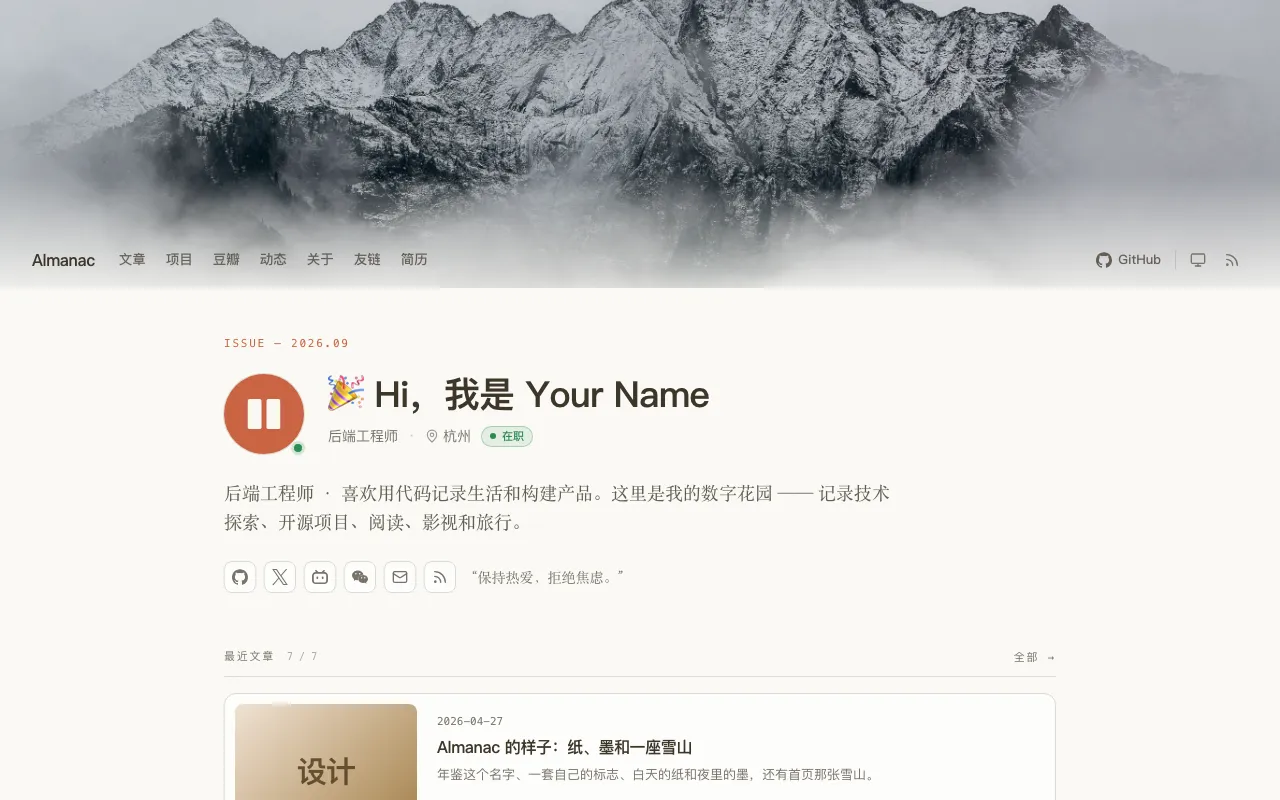
首页采用杂志刊头加卡片信息流,展示最新文章与全部文章入口
HTML作品集博客
theme-almanac — HTML 作品集模板
作者 kite-plus
Almanac 是 Kite 的个人主页主题,用杂志式刊头搭配卡片信息流,并提供项目、书影、动态、友链和简历等独立页面,支持日间与夜间模式。
看看你的网站会是什么样
浏览真实页面截图,比较内容排版与手机效果。点击下方缩略图切换,放大查看整页细节。
目前有 1 张原始预览,可打开完整图片查看设计细节。
截图用于了解视觉与布局,交互效果请以实际项目为准。
采集于 2026-10-02查看来源
值得关注的模板亮点
从已有项目资料中,快速了解它的特点。
提供 about、projects、douban、moments、links、resume、feed、search 等独立版式页面
文章页显示分类、阅读时长、字数、更新日期、目录和阅读进度条
支持日间、夜间和跟随系统三种模式,浏览器会记住选择
无脚本时页面仍可工作,默认不加载第三方资源,除非启用网络字体或自行嵌入
样式为预编译 Tailwind CSS,站点运行不需要 Node
模板详细介绍
Almanac 是面向 Kite 的个人枢纽主题,以杂志刊头加卡片信息流组织首页,并围绕个人内容提供多个独立版式的页面。首页包含刊头、头像与状态点、标题、所在地与职业、简介、社交链接和格言,下方展示最新文章卡片及全部文章入口。文章页显示分类、阅读时长、字数与更新日期,宽屏下在正文旁放置目录,页头下方有阅读进度条。归档页位于 /posts/ 并按年份分组,同时提供标签页和分类页。
主题通过页面 front matter 中的 layout 字段选择特殊版式:about 展示个人资料与社交链接;projects 按状态分组展示项目,设置 github_user 后显示 GitHub 数据;project 是单个项目页;douban 用两个书架展示书籍和电影;moments 按天分组短动态;links 展示友链卡片、申请方式与链接列表;resume 按 A4 打印排版;feed 展示订阅地址并提供复制按钮;search 提供打开搜索插件的按钮。
写作方面,文章可用 cardSize 指定首页卡片样式(feature、standard、right、compact、note),用 cover 指定封面图,coverMedium 指定封面类型;未指定封面时取正文第一张图,cover: false 则不显示封面。图集、Logo 网格以及 Bilibili、YouTube、网易云音乐播放器需在文章中写 HTML,并要求 kite.yaml 中开启 markdown.unsafeHTML: true。搜索和评论分别依赖 Kite 官方插件,评论可通过 comments: false 在单篇文章中关闭。
主题样式使用 Tailwind CSS 预编译为 static/almanac/almanac.css 并提交到仓库,站点运行无需 Node。开发时 example/ 目录是一个通过链接使用该主题的 Kite 站点,修改模板类名或 src/ 后需运行 npm install 和 npm run build 重新构建。发布由 scripts/package.sh 调用 kite theme pack 打包为 dist/almanac-<version>.zip。主题要求 Kite 0.1.4 或更高版本,打包需要 Kite 0.1.5 或更高版本。
HTML作品集博客
适合你的项目吗?
适用场景
- 搭建个人主页,集中展示文章、项目、书影、动态和友链
- 为博客添加按年份分组的归档页以及标签页和分类页
- 制作可打印为 A4 的个人简历页面
- 在首页用不同卡片尺寸突出特定文章或笔记
- 在文章内嵌入 Bilibili、YouTube 或网易云音乐播放器
适合人群
- 使用 Kite 搭建个人站点的用户
- 需要作品集与博客结合的个人主页
- 希望用 front matter 配置页面版式而不写模板的用户
- 需要日间与夜间模式切换的站点
上手与定制指南
结合仓库当前版本的说明,按下面的资料检查内容、配置与运行要求。
- 1
将发布包上传到 Kite studio 的 Settings → Theme,或解压到站点的 themes 目录并在 kite.yaml 中设置 theme.name 为 almanac
- 2
主题要求 Kite 0.1.4 或更高版本,打包需要 Kite 0.1.5 或更高版本
- 3
特殊页面需在 front matter 中指定 layout,并按对应版式填写数据字段
- 4
文章内嵌 HTML 图集或播放器需在 kite.yaml 中设置 markdown.unsafeHTML: true
- 5
搜索和评论功能分别需要安装 Kite 官方 Search 和 Comments 插件
授权与来源资料
使用条件与限制
免费使用 · 保留许可声明本次收录的是公开仓库中采用 MIT 许可的免费版本;免费范围为该版本代码,不代表外部服务或第三方素材免费。
使用时需要遵守
- 允许免费使用、修改、商用和分发该版本代码。
- 分发代码副本或实质性部分时,保留原作者版权声明和完整 MIT 许可声明。
- 代码按现状提供;担保与责任限制以原许可证及适用法律为准。
额外费用与待核对事项
- 使用该主题需要 Kite 0.1.4 或更高版本,低于此版本无法正常使用。
- 打包发布主题需要 Kite 0.1.5 或更高版本,版本不足时无法执行打包脚本。
- 在文章中嵌入 HTML 图集或播放器,必须在 kite.yaml 中开启 markdown.unsafeHTML: true,否则嵌入内容不会渲染。
- 搜索与评论功能依赖 Kite 官方插件,需另行安装对应插件后才能使用。
- 默认不加载第三方资源,但启用网络字体或自行嵌入播放器等外部内容时会引入第三方请求。
- 演示图片、字体、图标及其他第三方素材需按各自许可核对,不能仅凭代码的 MIT 许可判断。
- 域名、托管、数据库、支付或 AI 等外部服务可能另外收费。
查看原文依据
Permission is hereby granted, free of charge
许可证原文
Almanac asks for Kite 0.1.4 or later.
README 原文
which needs Kite 0.1.5 or later, to pack
README 原文
which needs `markdown.unsafeHTML: true` in `kite.yaml`
README 原文
Almanac leaves search and comments to Kite's official plugins.
README 原文
https://github.com/kite-plus/theme-almanac/blob/main/LICENSEhttps://github.com/kite-plus/theme-almanac/blob/main/README.mdnothing is loaded from a third party unless you turn on web fonts or write an embed yourself.
README 原文
DeepSeek 根据仓库许可证和 README 整理 ·2026-10-02。结果仅覆盖已读取资料,依赖、图片、字体及后续条款变更以各自原文为准。
项目核对记录与介绍依据
模板资料
- 来源平台
- GitHub
- 资料与维护参考分
- 资料一般 · 73 / 100
- 技术栈
- HTML
- 网站类型
- 作品集 · 博客
这个分数如何计算
本站按许可资料(最高30分)、演示链接(12分)、预览图(10分)、Star数(15分)、记录的维护时间(15分)、描述完整度(8分)、功能记录(5分)和分类资料(5分)计算。它不是代码、安全或性能测试,也不是 Google 评分;有链接不代表已实测可用。
这个项目需要核对什么
- 记录的仓库更新时间
- 2026-10-01
- 截图检查日期
- 2026-10-02
目前没有记录演示链接。请依据仓库说明在本地评估;仅凭截图无法确认交互行为。
目录记录的主要技术栈是 HTML。请通过依赖清单和锁文件核对实际版本与托管要求。这些说明基于收录资料,不代表代码审计或部署实测。
查看具体选型方法 →介绍的制作与核对状态
介绍由 AI 辅助整理目录与仓库资料。仓库作者不等于这篇介绍的审核者。
已完成服务器许可规则与 AI 来源核对;未经过人工编辑审核。
查看当时使用的来源资料
SHA-256: e0d5b79499723e397558b202c3736100fe8b738514e1523d39994f8877fbdff6
2026-10-02T06:37:28.845Z
来源文件 / 仓库# Almanac
A minimal, content-rich personal hub theme for [Kite](https://github.com/kite-plus/kite):
a magazine masthead over a feed of cards, and shelves for projects, books and
films, moments, friend links and a resume, on cream paper by day and warm ink
by night.
English · [简体中文](README.zh-CN.md)

An almanac is a yearly book, a record of dates and small markers of the year
past. This theme is the same: a place to leave traces of what you read, watch,
build and write.
## What it draws
- **A home page**: an issue line, your avatar with a status dot, a headline,
where you are and what you do, an introduction, your social links and a
motto, under a banner the header floats over. Then the newest posts as
cards and a link to all of them.
- **Posts** with their category, reading time, word count and the day they
were updated, a table of contents beside them on a wide screen, and a bar
under the header that shows how far a reader has read.
- **An archive** at `/posts/`, grouped by year, and tag and category pages.
- **Special pages**, each a page that names a layout in its front matter:
about, projects, books and films, moments, friend links, a resume that
prints on A4, a page to subscribe and a page to search.
- **Code blocks** with a bar that names the language and a button that copies
the code, headings with anchors, pictures that open in a viewer, and tables
that scroll.
- **Day and night**: the button in the header steps through day, night and
the reader's system, and the browser remembers the choice.
Every page works without a script, as Kite's preview in the studio shows it,
and nothing is loaded from a third party unless you turn on web fonts or
write an embed yourself.
## Using it
Drop the zip of a release on the upload tile under **Settings → Theme** in
Kite's studio, or unzip it into a site's `themes` folder and set `theme.name`
to `almanac` in `kite.yaml`. Almanac asks for Kite 0.1.4 or later.
Its settings are grouped in the studio as Profile, Look, Navigation, Social,
Home page, Posts, Special pages and Footer.
[The example site's kite.yaml](example/kite.yaml) sets most of them.
The header draws the site's main menu, which Kite keeps in `kite.yaml` and
the studio edits under **Settings → Menus**. A link's `icon` param picks its
icon in the menu of a narrow screen, as `params: {icon: book-open}`, and
otherwise one is guessed from its address. Until the site writes a main menu,
the header shows the links set under Navigation.
### Special pages
A page chooses a layout in its front matter, or from the Template menu in the
editor. The data a layout draws is written in the same front matter:
| Layout | Draws | Front matter |
|---|---|---|
| `about` | Your profile over the page's text, and your social links | none |
| `projects` | Projects grouped by status, with GitHub numbers when `github_user` is set | `projects` |
| `project` | One project's own page, which a projects entry can lead to with `link` | `status`, `summary`, `tech`, `repo`, `homepage`, `demo` |
| `douban` | Books and films on two shelves | `books`, `movies` |
| `moments` | Short entries grouped by day | `moments` |
| `links` | Your site's card to copy, how to ask for a link, and the links | `groups`, `apply` |
| `resume` | A resume laid out to print on A4 | `profile`, `skills`, `experience`, `projects`, `education`, `summary`, `links` |
| `feed` | The feed's address with a button that copies it | none |
| `search` | A button that opens the Search plugin's box | none |
For example, a projects page:
```yaml
---
title: Projects
layout: projects
projects:
- title: fluxa
status: active # maintained, experimental, archived, or any word
summary: A self-hosted gateway for AI models.
tech: [Go, TypeScript]
repo: https://github.com/you/fluxa
homepage: https://fluxa.dev
---
```
Each layout's template starts with the full list of what it reads, and
[the example site](example/content/pages) has a page for each.
### Writing
A post can ask for the card it is drawn with on the home page with
`cardSize`: `feature`, `standard`, `right`, `compact` or `note`, and give a
`cover`, a picture beside it in its folder or an address. The cover's
`coverMedium` is `photo`, `logo` or `shot`. A post that names no cover is
drawn with the first picture of its text, and one with `cover: false`, which
is what the No cover button in Kite's editor writes, with none. Both need
Kite 0.1.2 or later, whose listings carry a post's front matter.
Pictures in a grid, a grid of logos and players from Bilibili, YouTube or
NetEase Cloud Music are written as HTML in a post, which needs
`markdown.unsafeHTML: true` in `kite.yaml`. Leave a blank line around any
Markdown inside:
```html
<div class="gallery" data-cols="3">


</div>
<div class="embed"><iframe src="https://player.bilibili.com/player.html?bvid=BV1uv411q7Mv&autoplay=0" allowfullscreen></iframe></div>
<div class="embed music"><iframe src="https://music.163.com/outchain/player?type=2&id=1974443814&auto=0&height=66"></iframe></div>
<div class="pic-grid" data-cols="3">
<div class="cell"><img src="kite.svg" alt="Kite"><span class="name">Kite</span></div>
<div class="cell"><img src="go.svg" alt="Go"><span class="name">Go</span></div>
<div class="cell"><img src="tailwind.svg" alt="Tailwind CSS"><span class="name">Tailwind CSS</span></div>
</div>
```
### Plugins
Almanac leaves search and comments to Kite's official plugins. With
[Search](https://github.com/kite-plus/plugin-search) on the site, a search box
appears in the header and opens the plugin's search of every post. With
[Comments](https://github.com/kite-plus/plugin-comments), the thread goes under
a post, drawn in the theme's colors; a post leaves it out with
`comments: false`.
## Developing it
[`example/`](example) is a Kite site that uses the theme through a link,
`themes/almanac` to the root of this repository:
```sh
cd example
kite run
```
The stylesheet is Tailwind CSS, compiled ahead of time into
`static/almanac/almanac.css`, which is committed, so a site needs no Node.
After changing a class in a template or anything in `src/`:
```sh
npm install
npm run build
```
A change is ready when both of these pass:
```sh
kite theme verify .
(cd example && kite build --verify)
```
## Releasing
`scripts/package.sh` runs `kite theme pack`, which needs Kite 0.1.5 or
later, to pack `dist/almanac-<version>.zip`: one folder named `almanac`
holding `theme.yaml` and what the theme is made of, which the studio installs
as it is. Set `KITE` to use another kite binary than the one on `PATH`. Tag
the release and attach the zip.
## Design
The theme's pages, settings and look, and what Kite has to add for the rest of
it, are in [docs/design/README.md](docs/design/README.md).
## License
[MIT](LICENSE).
看看同类模板
对比同技术栈与用途的模板,找到更适合的视觉与内容结构。

simplefolio
⚡️ A minimal portfolio template for Developers
HTML · 作品集

Freelancer
Freelancer 是 Start Bootstrap 出品的单页作品集模板,专为自由职业者、设计师和小型工作室设计。 页面结构清晰,包含多个内容区块、响应式作品集网格,每个作品项目配有模态窗口展示详情。
HTML · 作品集

Casper
Casper 是 Ghost 官方出品的经典主题,曾长期作为默认主题,现在仍持续维护。 它的定位很纯粹:一套结构清晰、注释详尽的博客主题,适合直接使用,也适合作为学习 Ghost 主题开发的入门范本。
HTML · 杂志资讯

Resume
Resume 是 Start Bootstrap 推出的简历与 CV 主题,基于 Bootstrap 构建,采用固定侧边栏加内容区块的结构。
HTML · 作品集

Creative
Creative 是 Start Bootstrap 团队维护的一款单页营销模板,定位明确:为创意机构或产品服务提供一个以作品展示和行动号召为核心的落地页。
HTML · 企业官网
startbootstrap-clean-blog
A clean Bootstrap blog theme created by Start Bootstrap
HTML · 博客