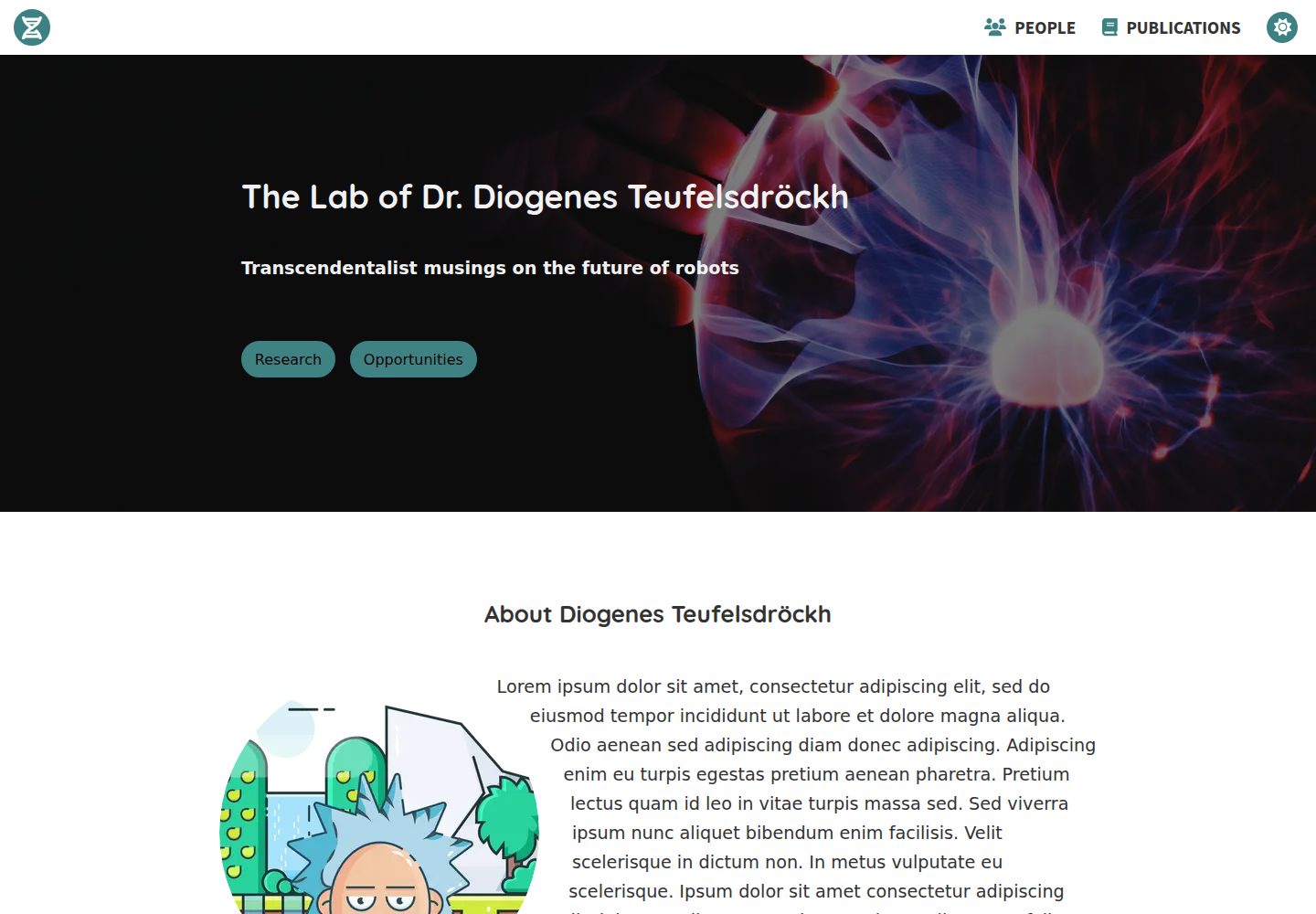
内容以 src/markdown 下的 Markdown 文件维护,About、Research、Opportunities、Contact、People 各区块可独立增删
GatsbyReact启动器
gatsby-starter-scientist — Gatsby 启动器模板
作者 knightjdr
基于 Gatsby 的科学家或实验室个人主页启动器,用 Markdown 维护简介、研究方向、成员与联系方式,并从 PubMed 按 PMID 自动抓取论文列表。
看看你的网站会是什么样
浏览真实页面截图,比较内容排版与手机效果。点击下方缩略图切换,放大查看整页细节。
全部页面与视图 2
截图用于了解视觉与布局,交互效果请以实际项目为准。
采集于 2026-09-30查看来源
值得关注的模板亮点
从已有项目资料中,快速了解它的特点。
Publications 页面通过 gatsby-config.js 中填写的 PMID 从 PubMed 自动获取并按发表日期排序
首页背景图、About 与 Research 配图、favicon、logo 均在 src/images 下替换指定文件即可更换
主题色在 src/components/layout/layout.css 中通过修改 color-primary 变量调整,需自行确认明暗两种模式下的对比度
默认部署到 GitHub Pages,使用 npm run build 构建、npm run deploy 发布
采用 MIT 许可,允许免费使用、修改、商用和分发该版本代码
模板详细介绍
这是一个用 Gatsby 构建的网站模板,面向科学家个人或实验室的简介/作品集页面。内容以 Markdown 文件为主:About 简介、Research 研究方向子章节、Opportunities 招聘信息、Contact 联系方式、People 成员页分别对应 src/markdown 下的不同文件与目录,每个成员或研究方向各占一个文件,并可指定显示顺序。Publications 页面不手工维护,而是在 gatsby-config.js 的 siteMetadata 中填写 PMID,由模板从 PubMed 自动获取并按发表日期排序。首页背景图、About 与 Research 配图、favicon、导航栏 logo 均通过替换 src/images 下的指定文件修改,主题色在 layout.css 中调整。模板默认部署到 GitHub Pages,构建与发布分别使用 npm run build 和 npm run deploy。About、Research、Opportunities、Contact、People、Publications 各区块都可单独删除或重命名对应文件来移除,导航栏链接会随之调整。
Gatsby启动器
适合你的项目吗?
适用场景
- 为实验室搭建包含研究方向、成员名单和招聘信息的对外主页
- 为科研人员建立个人学术简介页,并自动同步 PubMed 上的论文列表
- 在 GitHub Pages 上免费托管实验室或个人的静态站点
- 以 Markdown 方式维护科研站点内容,避免直接编辑页面代码
适合人群
- 需要快速上线实验室或科研人员简介页的研究团队
- 已使用 GitHub 并希望用 GitHub Pages 托管站点的用户
- 习惯用 Markdown 维护内容、不依赖可视化编辑器的开发者
- 需要按 PMID 自动展示 PubMed 论文列表的科研主页
上手与定制指南
结合仓库当前版本的说明,按下面的资料检查内容、配置与运行要求。
- 1
需要预先安装 Node.js、git,并准备 GitHub 账号和代码编辑器
- 2
在 GitHub 上 Fork 仓库后克隆到本地,进入项目目录执行 npm install 安装依赖
- 3
本地开发使用 npm run develop,默认访问 http://localhost:8000
- 4
发布前执行 npm run build 构建,再执行 npm run deploy 部署到 GitHub Pages,过程中会要求输入 GitHub 凭据
- 5
若站点部署在子路径下(如 GitHub Pages 默认的仓库名路径),需在 gatsby-config.js 中启用并填写 pathPrefix
授权与来源资料
使用条件与限制
免费使用 · 保留许可声明本次收录的是公开仓库中采用 MIT 许可的免费版本;免费范围为该版本代码,不代表外部服务或第三方素材免费。
使用时需要遵守
- 允许免费使用、修改、商用和分发该版本代码。
- 分发代码副本或实质性部分时,保留原作者版权声明和完整 MIT 许可声明。
- 代码按现状提供;担保与责任限制以原许可证及适用法律为准。
额外费用与待核对事项
- Publications 页面依赖 PubMed 外部服务:需在 gatsby-config.js 中填写 PMID,构建时从 PubMed 自动抓取论文数据,无法离线或脱离该外部服务生成论文列表。
- 默认部署依赖 GitHub Pages 托管,需具备 GitHub 账号;npm run deploy 过程中会要求输入 GitHub 凭据。
- 模板自带的图片素材来自 Unsplash、Pexels、Lukasz Adam、FontAwesome 等第三方来源,其授权与 MIT 代码许可相互独立,替换或商用前需自行核实各素材的许可条款。
- 演示图片、字体、图标及其他第三方素材需按各自许可核对,不能仅凭代码的 MIT 许可判断。
- 域名、托管、数据库、支付或 AI 等外部服务可能另外收费。
查看原文依据
Permission is hereby granted, free of charge
许可证原文
Publications for this page are automatically retrieved from PubMed via PMIDs specified in the `gatsby-config.js` file.
README 原文
The site is hosted by default on GitHub, which is free.
README 原文
https://github.com/knightjdr/gatsby-starter-scientist/blob/master/LICENSEhttps://github.com/knightjdr/gatsby-starter-scientist/blob/master/README.mdYou can find royalty free images at [unsplash.com](https://unsplash.com) and [pexels.com](https://www.pexels.com).
README 原文
DeepSeek 根据仓库许可证和 README 整理 ·2026-10-01。结果仅覆盖已读取资料,依赖、图片、字体及后续条款变更以各自原文为准。
项目核对记录与介绍依据
模板资料
- 来源平台
- GitHub
- 资料与维护参考分
- 资料一般 · 72 / 100
- 技术栈
- Gatsby · React
- 网站类型
- 启动器
这个分数如何计算
本站按许可资料(最高30分)、演示链接(12分)、预览图(10分)、Star数(15分)、记录的维护时间(15分)、描述完整度(8分)、功能记录(5分)和分类资料(5分)计算。它不是代码、安全或性能测试,也不是 Google 评分;有链接不代表已实测可用。
这个项目需要核对什么
- 记录的仓库更新时间
- 2024-02-15
- 截图检查日期
- 2026-10-01
已收录演示链接。请用你的内容与屏幕尺寸检查;有演示不代表表单、认证或支付已经可用。
目录记录的主要技术栈是 Gatsby。请通过依赖清单和锁文件核对实际版本与托管要求。这些说明基于收录资料,不代表代码审计或部署实测。
查看具体选型方法 →介绍的制作与核对状态
介绍由 AI 辅助整理目录与仓库资料。仓库作者不等于这篇介绍的审核者。
已完成服务器许可规则与 AI 来源核对;未经过人工编辑审核。
查看当时使用的来源资料
SHA-256: 55ad7695c65c955c9ce9360058e02f7f606e5b1166f0015965ef9241374ac9f9
2026-10-01T13:49:02.732Z
来源文件 / 仓库# gatsby-starter-scientist
This is a website template built with Gatsby for a typical scientist or laboratory profile/portfolio site.
[Demo](https://knightjdr.github.io/gatsby-starter-scientist)
## Setup
### Prerequisites
* [Node.js](https://nodejs.org/en/download/)
* [git](https://git-scm.com/downloads)
* [GitHub account](https://github.com/)
* code editor, e.g [VS Code](https://code.visualstudio.com/)
### Project creation
1. Fork this project on GitHub by navigating to the project page `https://github.com/knightjdr/gatsby-starter-scientist` and clicking the `Fork` button in the upper right corner.
2. (Optional) Rename the repository from the `Settings` menu. For example to `yourname-lab`.
3. Clone repository from command line. If you changed the repository name in step 2, be sure to update the url. This will create a folder on your machine in the current directory with the project's code.
```
git clone https://github.com/[your-user-name]/gatsby-starter-scientist.git
```
4. Move into project directory and install dependencies.
```
cd gatsby-starter-scientist
npm install
```
## Development server
`npm run develop` will start a local development server that you can access from `http://localhost:8000`. Any changes you make to project files will be automatically reflected in your browser.
Any changes you make will only affect files on your local machine. It is a good idea to sync those changes with GitHub. This can be done from the command line by committing your changes
```
git add .
git commit -m "Description of the changes"
```
And pushing them to GitHub
```
git push
```
You can also do this using [GitHub's Desktop client](https://desktop.github.com/).
## Deployment
After making changes to your site, you need to build an optimized version and deploy it to the hosting server. The site is hosted by default on GitHub, which is free.
1. Build the site for production
```
npm run build
```
2. Deploy the site. You will be asked for your GitHub credentials.
```
npm run deploy
```
The site can now be accessed at `https://[your-user-name].github.io/gatsby-starter-scientist`. If you changed the repository name, the URL will be adjusted accordingly.
## Customization
### gatsby-config.js
Basic configuration for the site is found in the `siteMetadata` object in this file. The `author` and `description` fields are used to construct the text on the landing image. Update the `siteUrl` to the site's final address. The `title` field is displayed in browser tabs and search results as the title of the site. The other `siteMetadata` fields have comments to explain their purpose.
If the starting page for your site will have a path prefix, for example `https://mysite.org/path-prefix`, be sure to uncomment the `pathPrefix` field in this file and add in the correct prefix. If it will not have a prefix, for example `https://mysite.org`, delete this field. If you are hosting on Github as described above, your site will have a path prefix which is the name of the repository (`gatsby-starter-scientist` if you have not changed the name.)
Do not change any of the other fields in this file.
### Background/landing image
The background image on the homepage can be changed by replacing the image `src/images/hero.png`. Make sure the image is big to ensure it will look good on large 4K monitors. The image in this starter is 5184 × 3456 pixels. The image has to be a `png`, so convert from other formats if needed.
It should be dark so that text will have sufficient contrast (a filter will be automatically applied to darken it further, so simply avoiding light images should be fine). You can find royalty free images at [unsplash.com](https://unsplash.com) and [pexels.com](https://www.pexels.com).
### General notes about text
The text for many of the sections described below is located in `src/markdown`. You can enter plain text as you'd like it to appear on the site or add links and other html elements using markdown styling. For example, you can specify a linkg with `[link text](https://link-to-whatever.com)`. See [Markdown cheatsheet](https://github.com/adam-p/markdown-here/wiki/Markdown-Cheatsheet) for details.
### About section
The title, text and image in the `About` section can be customized in the markdown file `src/markdown/about.md`. The image for this section should be placed in the `src/images` folder and its path specified as `../images/[your-picture.png]`. The image should be square and at least 1050 x 1050 pixels and either PNG or JPG. The image will be automatically converted to a circle.
This section is optional, as is the section title and image. Delete or rename the `about.md` file if you do not want this section or delete the title and/or image fields if you do not want them.
### Research subsection
The research subsections are declared in the `src/markdown/research` folder. You should create one file for each subsection with an optional title and image. You must specify the order of each subsection in its corresponding file.
The images for each subsection should be placed in the `src/images/reaserch` folder and its path specified as `../../images/research/[your-picture.png]`. The image should be square and at least 900 x 900 pi and either PNG or JPG.
This section is optional, as are the subsection titles and images. Delete all files in this folder if you do not want this section or delete the title and/or image fields if you do not want them.
### Opportunities section
The text in this section can be customized in the markdown file `src/markdown/opportunities.md`.
This section is optional. Delete or rename the `opportunities.md` file if you do not want it.
### Contact section
The text in this section can be customized in the markdown file `src/markdown/contact.md`.
This section is optional. Delete or rename the `contact.md` file if you do not want it.
### Footer
Links in the footer are declared in the `gatsby-config.js` file. You can include any links you like.
### People page
The people page is built from markdown files in `src/markdown/people` and images in `src/images/people`. Each person in the lab should have his/her own file in the markdown folder. The person's name and order of appearance are required, while the e-mail, image and title fields are optional.
Images should be square and at least 900 x 900 pixels and either PNG or JPG.
This page is optional. Delete all files in this folder if you do not want this page. This will also remove the `People` link from the navigation bar.
### Publications page
Publications for this page are automatically retrieved from PubMed via PMIDs specified in the `gatsby-config.js` file. They will be ordered by publication date. The IDs should be placed in the `publications` field in the `siteMetadata` object.
This page is optional. Delete all links from the array or delete the field to remove the page. This will also remove the `Publications` link from the navigation bar.
### Favicon
The favourite icon (favicon) is used in a few places. Most notably it is the small icon present in the browser tab and located next to the website title on bookmarks.
It can be changed by replacing the image `src/images/favicon.png`. It should be a square image 512 x 512 pixels in `png` format. To be consistent with the style of the current icon, create a background circle with the hex colour `#ffffff` and give the foreground image the colour `#3d8183`.
### Logo
The site logo is located in the top left of the navigation bar and can be changed by replacing the image `src/images/logo.inline.svg`. It should be an svg to allow the site to colour the image based on the theme (light/dark) and mouse state (hover or focus).
### Theme
The colour theme can be changed by editing `src/components/layout/layout.css`. You should only edit the `color-primary` variables and ensure the resulting selections have sufficient contrast with the background colour in both the light and dark modes. You can use a site like [contrast finder](https://app.contrast-finder.org/?lang=en) to test the contrast of your theme.
```
body.light-mode {
--color-background: #fff;
--color-primary: #3d8183;
}
body.dark-mode {
--color-background: #252429;
--color-primary: #ff7A8A;
}
```
## Custom URL
A custom URL that you purchased can be configured for the site by following the instructions at [GitHub - managing-a-custom-domain](https://help.github.com/en/github/working-with-github-pages/managing-a-custom-domain-for-your-github-pages-site#configuring-an-apex-domain)
## Troubleshooting
If you run into issues with images not displaying correctly in the development server, try running the command `npm run clean` and restarting the development server.
## Credits
* Vector cartoons are by [Lukasz Adam](https://lukaszadam.com/)
* Icons are from the free repository at [FontAwesome](https://fontawesome.com/)
* Hero image is courtesy of [Ramón Salinero on Unsplash](https://unsplash.com/photos/vEE00Hx5d0Q).
* Wooden robot image is courtesy of [Kaboompics.com from Pexels](https://www.pexels.com/photo/wooden-robot-6069/)
* Hourglass image is courtesy of [Aron Visuals on Unsplash](https://unsplash.com/photos/BXOXnQ26B7o)
* Robot army image is courtesy of [Mina FC on Unsplash](https://unsplash.com/photos/3QKsG0fDrC8)
看看同类模板
对比同技术栈与用途的模板,找到更适合的视觉与内容结构。

gatsby-starter-gcn
gatsby-starter-gcn 是一个面向静态网站构建的 Gatsby 启动器,将内容管理、部署和前端开发串联起来。
Gatsby · 博客

gatsby-starter-morning-dew
:rocket: A Gatsby theme/starter to build lightning-fast blog/websites
Gatsby · 博客

starter-gatsby-blog
这是一个由 Contentful 社区维护的 Gatsby 博客启动器,目标是把静态站点的低维护成本与 Contentful 的友好编辑界面结合起来。
Gatsby · 社区

automatic-gatsbyjs-app-landing-page
Automatic GatsbyJS App Landing Page - Automatically generate iOS app landing page using GatsbyJS
Gatsby · 工具站
gatsby-starter-cv
A simple starter to get up and developing your digital curriculum with GatsbyJS
Gatsby · 启动器

clay-theme
Image-centric Gatsby theme for publishers, portfolios, photographers blogs and more.
Gatsby · 作品集