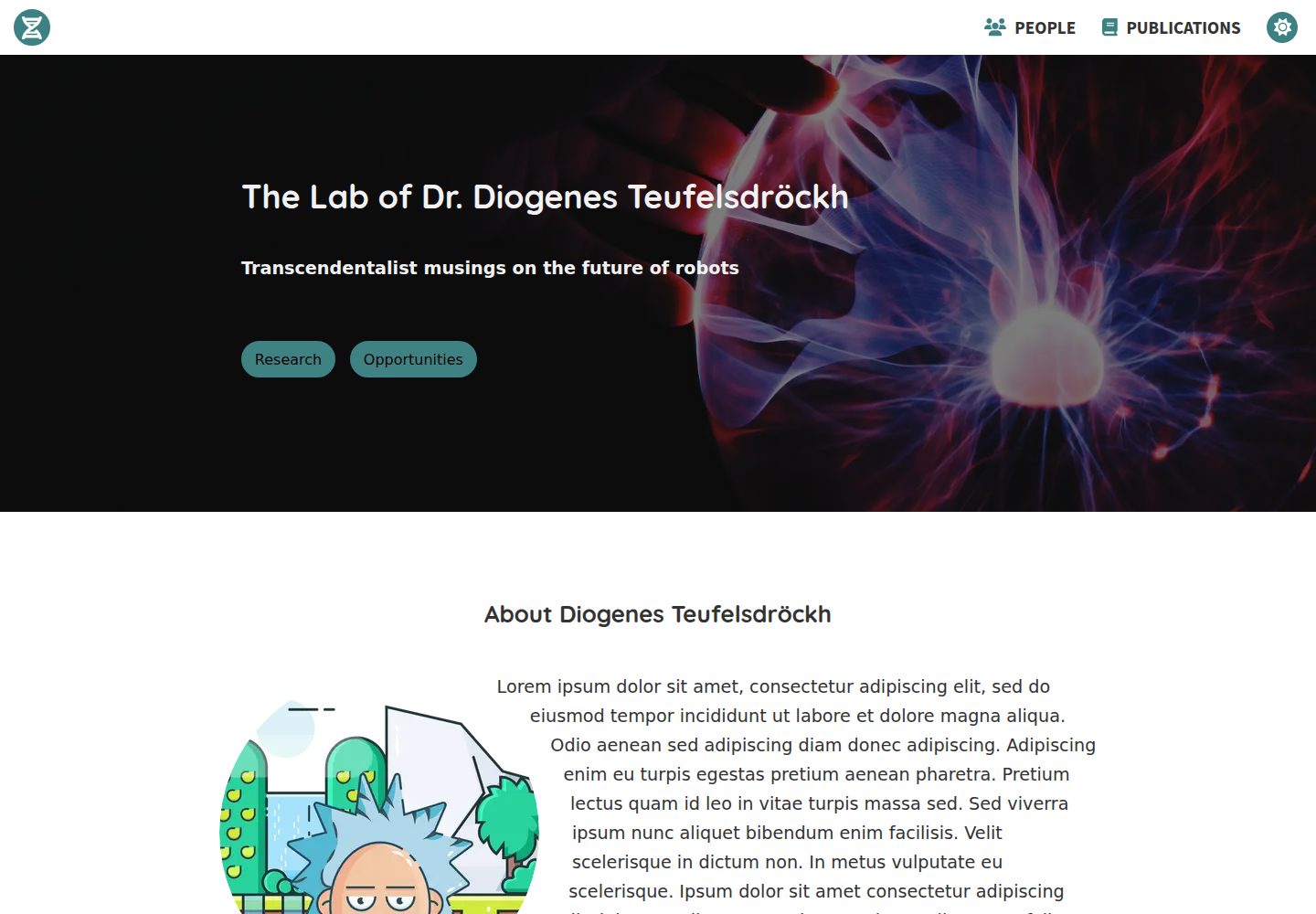
Content is maintained as Markdown files under src/markdown; About, Research, Opportunities, Contact, and People sections can be added or removed independently
GatsbyReactStarter
gatsby-starter-scientist — Gatsby Starter Template
By knightjdr
A Gatsby-based starter for a scientist or lab homepage, with Markdown-maintained bio, research areas, members, and contact details, and a publication list automatically fetched from PubMed by PMID.
Explore the design
Compare the page layouts and mobile experience. Open any screenshot for a closer look.
Desktop homepage1 / 2
Desktop captureTop of page
Actual screenshot captured by the server browser.
All pages & views 2
Screenshots show visual appearance; interactive behavior may differ.
Recorded 2026-09-30View source
What stands out
A quick read of the recorded project description.
The Publications page automatically fetches from PubMed using PMIDs entered in gatsby-config.js and sorts by publication date
The homepage background image, About and Research images, favicon, and logo are replaced by swapping specified files under src/images
The theme color is adjusted in src/components/layout/layout.css by modifying the color-primary variable; you must verify contrast in both light and dark modes yourself
Deploys to GitHub Pages by default, using npm run build to build and npm run deploy to publish
Licensed under MIT, permitting free use, modification, commercial use, and distribution of this version of the code
Template Details
This is a website template built with Gatsby, intended for a scientist's personal or lab profile/portfolio page. Content is primarily Markdown files: About bio, Research sub-sections, Opportunities listings, Contact details, and People member pages correspond to different files and directories under src/markdown, with each member or research area in its own file and a configurable display order. The Publications page is not maintained by hand; instead, PMIDs are entered in siteMetadata in gatsby-config.js, and the template automatically retrieves publications from PubMed and sorts them by publication date. The homepage background image, About and Research images, favicon, and navbar logo are changed by replacing specified files under src/images, and the theme color is adjusted in layout.css. The template deploys to GitHub Pages by default, using npm run build for building and npm run deploy for publishing. Each section—About, Research, Opportunities, Contact, People, Publications—can be removed individually by deleting or renaming its corresponding file, and the navbar links adjust accordingly.
GatsbyStarter
Is it right for your project?
Use Cases
- Building a public-facing homepage for a lab with research areas, member roster, and recruitment information
- Creating a personal academic profile page for a researcher and automatically syncing their publication list from PubMed
- Hosting a lab or personal static site for free on GitHub Pages
- Maintaining research site content in Markdown, avoiding direct editing of page code
Suitable For
- Research teams that need to quickly launch a lab or researcher profile page
- Users who already use GitHub and want to host the site with GitHub Pages
- Developers who prefer maintaining content in Markdown and do not rely on a visual editor
- Research homepages that need to automatically display a PubMed publication list by PMID
Getting started & customization
Use these recorded setup notes alongside the repository instructions for your chosen version.
- 1
Requires Node.js and git preinstalled, plus a GitHub account and a code editor
- 2
Fork the repository on GitHub, clone it locally, enter the project directory, and run npm install to install dependencies
- 3
For local development, use npm run develop, accessible by default at http://localhost:8000
- 4
Before publishing, run npm run build to build, then npm run deploy to deploy to GitHub Pages; you will be prompted for GitHub credentials during the process
- 5
If the site is deployed under a subpath (such as the default repository-name path on GitHub Pages), enable and fill in pathPrefix in gatsby-config.js
License & source material
Usage conditions & limitations
Free to use · keep license noticeThis entry covers the free version in the public repository under the MIT license; the free scope applies to this version of the code and does not imply that external services or third-party assets are free.
Must comply with when using
- Permits free use, modification, commercial use, and distribution of this version of the code.
- When distributing copies or substantial portions of the code, retain the original author's copyright notice and the full MIT license notice.
- The code is provided as is; warranties and limitations of liability are governed by the original license and applicable law.
Additional costs & items to verify
- The Publications page depends on the external PubMed service: PMIDs must be entered in gatsby-config.js, and publication data is automatically fetched from PubMed at build time; the publication list cannot be generated offline or without this external service.
- Default deployment relies on GitHub Pages hosting and requires a GitHub account; npm run deploy will prompt for GitHub credentials.
- The template's bundled image assets come from third-party sources such as Unsplash, Pexels, Lukasz Adam, and FontAwesome; their licensing is independent of the MIT code license, and you must verify each asset's license terms before replacement or commercial use.
- Demo images, fonts, icons, and other third-party assets must be checked against their respective licenses and cannot be judged solely by the code's MIT license.
- External services such as domains, hosting, databases, payments, or AI may incur separate charges.
View Original Text Basis
Permission is hereby granted, free of charge
Original License Text
Publications for this page are automatically retrieved from PubMed via PMIDs specified in the `gatsby-config.js` file.
Original README
The site is hosted by default on GitHub, which is free.
Original README
https://github.com/knightjdr/gatsby-starter-scientist/blob/master/LICENSEhttps://github.com/knightjdr/gatsby-starter-scientist/blob/master/README.mdYou can find royalty free images at [unsplash.com](https://unsplash.com) and [pexels.com](https://www.pexels.com).
Original README
Compiled by DeepSeek based on repository license and README ·2026-10-01. Results only cover the materials read; dependencies, images, fonts, and subsequent term changes are subject to their respective original texts.
Project checks & description sources
Template Information
- Source platforms
- GitHub
- Documentation and maintenance reference score
- Partly documented · 72 / 100
- Technologies
- Gatsby · React
- Website type
- Starter
How this score is calculated
Our heuristic uses license records (up to 30), a demo link (12), a preview (10), stars (15), recorded maintenance (15), description completeness (8), feature records (5) and classification data (5). It is not a code, security or performance test, or a Google score. A link does not establish tested functionality.
What to verify for this project
- Repository update recorded
- 2024-02-15
- Screenshot last checked
- 2026-10-01
A demo link is listed. Check it with your own content and viewport sizes; its presence does not confirm that forms, authentication or payments work.
The catalog identifies Gatsby as the primary stack. Check the actual dependency manifest and lockfile for versions and hosting requirements. These notes use recorded metadata, not a code audit or a deployment test.
Use a selection guide →How this description was prepared
AI-assisted description based on catalog records and repository material. Repository authors are not automatically the reviewers of this description.
Automatically checked against source and license rules; no manual editorial review.
Inspect the recorded source material
SHA-256: 55ad7695c65c955c9ce9360058e02f7f606e5b1166f0015965ef9241374ac9f9
2026-10-01T13:49:02.732Z
Source file / repository# gatsby-starter-scientist
This is a website template built with Gatsby for a typical scientist or laboratory profile/portfolio site.
[Demo](https://knightjdr.github.io/gatsby-starter-scientist)
## Setup
### Prerequisites
* [Node.js](https://nodejs.org/en/download/)
* [git](https://git-scm.com/downloads)
* [GitHub account](https://github.com/)
* code editor, e.g [VS Code](https://code.visualstudio.com/)
### Project creation
1. Fork this project on GitHub by navigating to the project page `https://github.com/knightjdr/gatsby-starter-scientist` and clicking the `Fork` button in the upper right corner.
2. (Optional) Rename the repository from the `Settings` menu. For example to `yourname-lab`.
3. Clone repository from command line. If you changed the repository name in step 2, be sure to update the url. This will create a folder on your machine in the current directory with the project's code.
```
git clone https://github.com/[your-user-name]/gatsby-starter-scientist.git
```
4. Move into project directory and install dependencies.
```
cd gatsby-starter-scientist
npm install
```
## Development server
`npm run develop` will start a local development server that you can access from `http://localhost:8000`. Any changes you make to project files will be automatically reflected in your browser.
Any changes you make will only affect files on your local machine. It is a good idea to sync those changes with GitHub. This can be done from the command line by committing your changes
```
git add .
git commit -m "Description of the changes"
```
And pushing them to GitHub
```
git push
```
You can also do this using [GitHub's Desktop client](https://desktop.github.com/).
## Deployment
After making changes to your site, you need to build an optimized version and deploy it to the hosting server. The site is hosted by default on GitHub, which is free.
1. Build the site for production
```
npm run build
```
2. Deploy the site. You will be asked for your GitHub credentials.
```
npm run deploy
```
The site can now be accessed at `https://[your-user-name].github.io/gatsby-starter-scientist`. If you changed the repository name, the URL will be adjusted accordingly.
## Customization
### gatsby-config.js
Basic configuration for the site is found in the `siteMetadata` object in this file. The `author` and `description` fields are used to construct the text on the landing image. Update the `siteUrl` to the site's final address. The `title` field is displayed in browser tabs and search results as the title of the site. The other `siteMetadata` fields have comments to explain their purpose.
If the starting page for your site will have a path prefix, for example `https://mysite.org/path-prefix`, be sure to uncomment the `pathPrefix` field in this file and add in the correct prefix. If it will not have a prefix, for example `https://mysite.org`, delete this field. If you are hosting on Github as described above, your site will have a path prefix which is the name of the repository (`gatsby-starter-scientist` if you have not changed the name.)
Do not change any of the other fields in this file.
### Background/landing image
The background image on the homepage can be changed by replacing the image `src/images/hero.png`. Make sure the image is big to ensure it will look good on large 4K monitors. The image in this starter is 5184 × 3456 pixels. The image has to be a `png`, so convert from other formats if needed.
It should be dark so that text will have sufficient contrast (a filter will be automatically applied to darken it further, so simply avoiding light images should be fine). You can find royalty free images at [unsplash.com](https://unsplash.com) and [pexels.com](https://www.pexels.com).
### General notes about text
The text for many of the sections described below is located in `src/markdown`. You can enter plain text as you'd like it to appear on the site or add links and other html elements using markdown styling. For example, you can specify a linkg with `[link text](https://link-to-whatever.com)`. See [Markdown cheatsheet](https://github.com/adam-p/markdown-here/wiki/Markdown-Cheatsheet) for details.
### About section
The title, text and image in the `About` section can be customized in the markdown file `src/markdown/about.md`. The image for this section should be placed in the `src/images` folder and its path specified as `../images/[your-picture.png]`. The image should be square and at least 1050 x 1050 pixels and either PNG or JPG. The image will be automatically converted to a circle.
This section is optional, as is the section title and image. Delete or rename the `about.md` file if you do not want this section or delete the title and/or image fields if you do not want them.
### Research subsection
The research subsections are declared in the `src/markdown/research` folder. You should create one file for each subsection with an optional title and image. You must specify the order of each subsection in its corresponding file.
The images for each subsection should be placed in the `src/images/reaserch` folder and its path specified as `../../images/research/[your-picture.png]`. The image should be square and at least 900 x 900 pi and either PNG or JPG.
This section is optional, as are the subsection titles and images. Delete all files in this folder if you do not want this section or delete the title and/or image fields if you do not want them.
### Opportunities section
The text in this section can be customized in the markdown file `src/markdown/opportunities.md`.
This section is optional. Delete or rename the `opportunities.md` file if you do not want it.
### Contact section
The text in this section can be customized in the markdown file `src/markdown/contact.md`.
This section is optional. Delete or rename the `contact.md` file if you do not want it.
### Footer
Links in the footer are declared in the `gatsby-config.js` file. You can include any links you like.
### People page
The people page is built from markdown files in `src/markdown/people` and images in `src/images/people`. Each person in the lab should have his/her own file in the markdown folder. The person's name and order of appearance are required, while the e-mail, image and title fields are optional.
Images should be square and at least 900 x 900 pixels and either PNG or JPG.
This page is optional. Delete all files in this folder if you do not want this page. This will also remove the `People` link from the navigation bar.
### Publications page
Publications for this page are automatically retrieved from PubMed via PMIDs specified in the `gatsby-config.js` file. They will be ordered by publication date. The IDs should be placed in the `publications` field in the `siteMetadata` object.
This page is optional. Delete all links from the array or delete the field to remove the page. This will also remove the `Publications` link from the navigation bar.
### Favicon
The favourite icon (favicon) is used in a few places. Most notably it is the small icon present in the browser tab and located next to the website title on bookmarks.
It can be changed by replacing the image `src/images/favicon.png`. It should be a square image 512 x 512 pixels in `png` format. To be consistent with the style of the current icon, create a background circle with the hex colour `#ffffff` and give the foreground image the colour `#3d8183`.
### Logo
The site logo is located in the top left of the navigation bar and can be changed by replacing the image `src/images/logo.inline.svg`. It should be an svg to allow the site to colour the image based on the theme (light/dark) and mouse state (hover or focus).
### Theme
The colour theme can be changed by editing `src/components/layout/layout.css`. You should only edit the `color-primary` variables and ensure the resulting selections have sufficient contrast with the background colour in both the light and dark modes. You can use a site like [contrast finder](https://app.contrast-finder.org/?lang=en) to test the contrast of your theme.
```
body.light-mode {
--color-background: #fff;
--color-primary: #3d8183;
}
body.dark-mode {
--color-background: #252429;
--color-primary: #ff7A8A;
}
```
## Custom URL
A custom URL that you purchased can be configured for the site by following the instructions at [GitHub - managing-a-custom-domain](https://help.github.com/en/github/working-with-github-pages/managing-a-custom-domain-for-your-github-pages-site#configuring-an-apex-domain)
## Troubleshooting
If you run into issues with images not displaying correctly in the development server, try running the command `npm run clean` and restarting the development server.
## Credits
* Vector cartoons are by [Lukasz Adam](https://lukaszadam.com/)
* Icons are from the free repository at [FontAwesome](https://fontawesome.com/)
* Hero image is courtesy of [Ramón Salinero on Unsplash](https://unsplash.com/photos/vEE00Hx5d0Q).
* Wooden robot image is courtesy of [Kaboompics.com from Pexels](https://www.pexels.com/photo/wooden-robot-6069/)
* Hourglass image is courtesy of [Aron Visuals on Unsplash](https://unsplash.com/photos/BXOXnQ26B7o)
* Robot army image is courtesy of [Mina FC on Unsplash](https://unsplash.com/photos/3QKsG0fDrC8)
Explore similar templates
Compare previews and descriptions within the same stack and category.

gatsby-starter-gcn
A Gatsby starter for building static blogs with Contentful and Netlify.
Gatsby · Blog

gatsby-starter-morning-dew
A Gatsby and React blog starter/theme that uses Markdown or MDX for posts, supports multilingual content, dark mode, tag grouping, PWA, and Disqus comments, and is MIT licensed.
Gatsby · Blog

starter-gatsby-blog
A community-maintained Gatsby blog starter for Contentful, with a simple content model, npm run setup import, Sync API support, and gatsby-plugin-image. Suitable for quickly building a CMS-driven static blog or learning Gatsby and Headless CMS integration.
Gatsby · 社区

automatic-gatsbyjs-app-landing-page
A GatsbyJS template for iOS app landing pages, ported from Emil Baehr's Automatic App Landing Page. Configure content in site-config.js without writing HTML or CSS, upload video previews or screenshots, and deploy via Netlify or build for GitHub Pages.
Gatsby · Tool Site
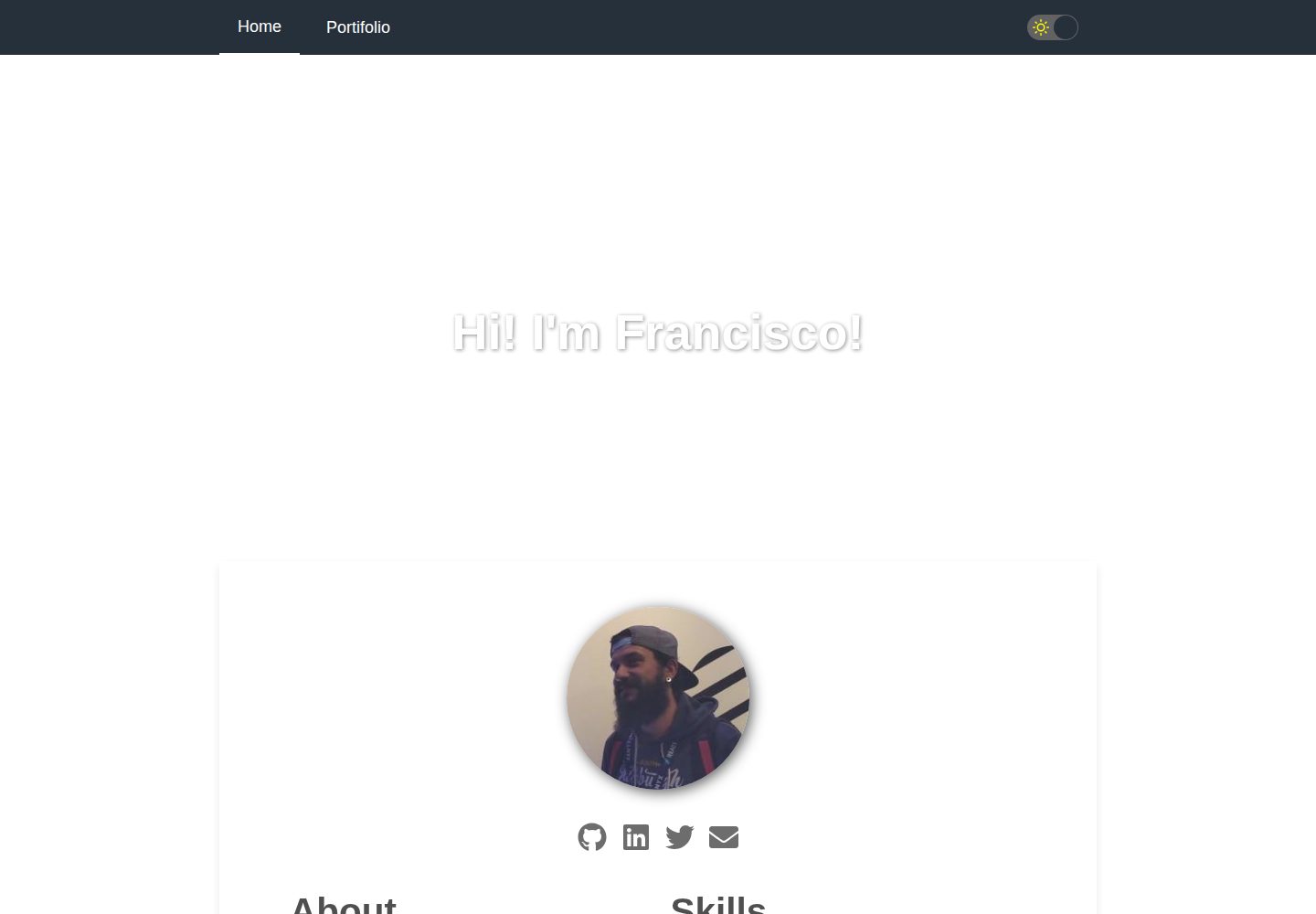
gatsby-starter-cv
A Gatsby and React starter for building a responsive personal digital resume. It includes sections for About, Skills, Job experiences, GitHub repositories, and Portfolio, with all personal data configured in data/siteConfig.js.
Gatsby · Starter

clay-theme
Clay is an image-centric Gatsby theme for publishers, portfolios, and photography blogs. It includes PWA support, a preconfigured Netlify/Decap CMS, PurgeCSS, Netlify deployment settings, and Netlify Forms.
Gatsby · Portfolio