基于 Vite 与 React 的单页应用,使用 TanStack Router 管理路由
ViteReact博客启动器
starter-vite-react — Vite 博客模板
作者 kookee-dot-dev
Kookee 官方提供的 Vite + React 单页应用启动器,用于在浏览器中实时读取并展示帮助中心、更新日志、博客、自定义页面和只读路线图。
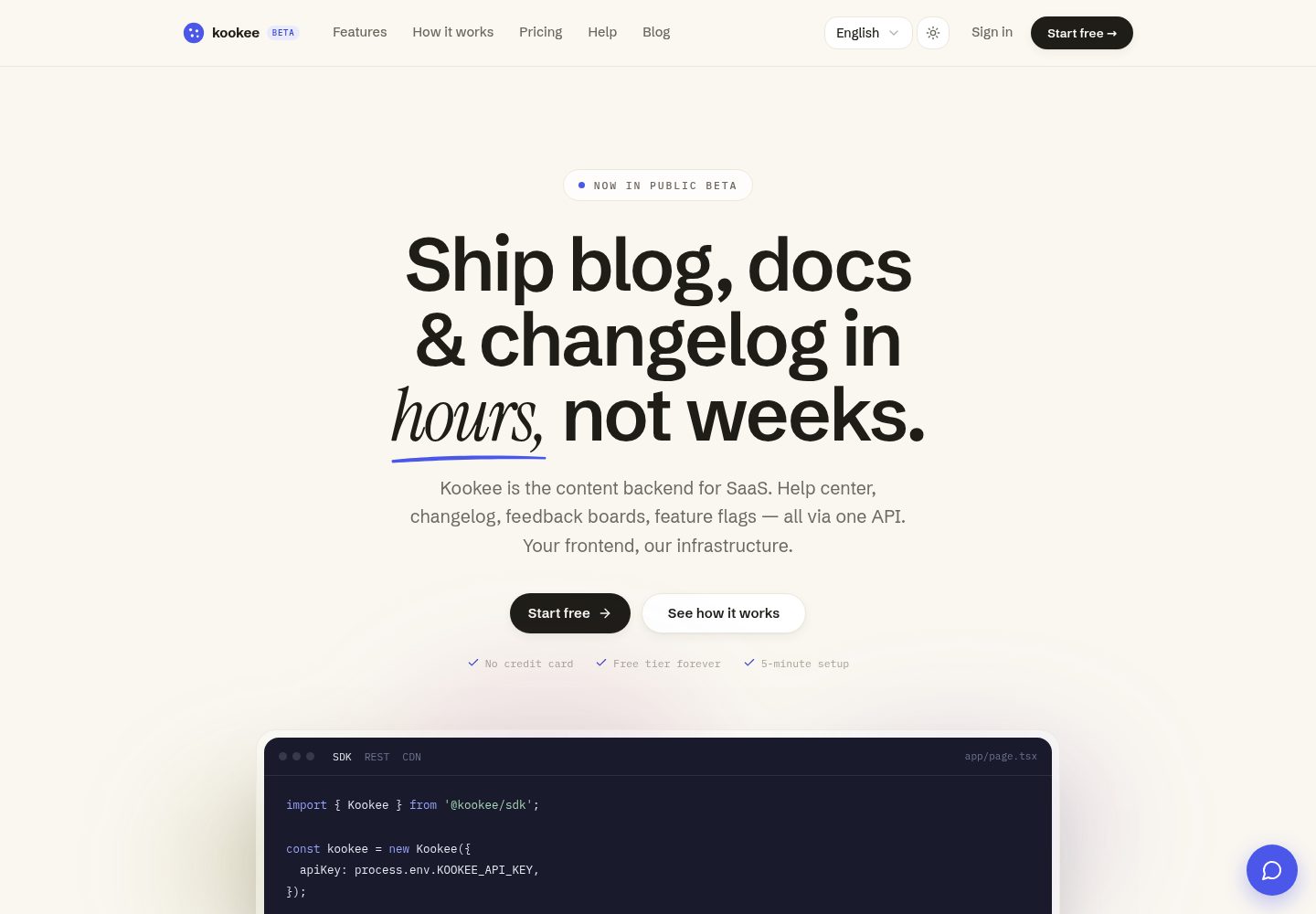
看看你的网站会是什么样
浏览真实页面截图,比较内容排版与手机效果。点击下方缩略图切换,放大查看整页细节。
全部页面与视图 3
截图用于了解视觉与布局,交互效果请以实际项目为准。
采集于 2026-10-11查看来源
值得关注的模板亮点
从已有项目资料中,快速了解它的特点。
通过 @kookee/sdk 与 @kookee/react 在浏览器中实时读取 Kookee 内容
内置帮助中心搜索、博客与更新日志列表及详情、只读路线图和自定义页面
头部提供最新更新日志的 What's new 徽章,并集成 Kookee 站点小组件
样式集中在单个 src/site.css,未使用 Tailwind,便于按设计令牌调整外观
构建产物为静态站点,可部署到 Vercel、Netlify 或 Cloudflare 等静态托管
模板详细介绍
这是 Kookee 为 Vite 与 React 项目提供的官方启动器,把 Kookee 项目中的内容渲染成一个单页应用。它覆盖帮助中心(含即时搜索)、更新日志、博客、自定义页面和只读路线图,并集成 Kookee 站点小组件。页面在每次访问时从浏览器直接读取 Kookee 数据,可部署到任意静态托管。
技术构成上,项目使用 Vite、React、TanStack Router 以及 @kookee/sdk 和 @kookee/react,样式集中在单个 src/site.css 中,没有使用 Tailwind。路由包括首页、博客列表与详情、更新日志列表与详情、帮助分类与文章、路线图以及自定义页面。头部带有最新更新日志的“What's new”徽章,站点小组件在 Kookee 后台保存设置后出现。
需要注意的限制:由于是客户端渲染,搜索引擎在 JavaScript 执行前看到的是空页面,因此不适合以搜索排名为主要目标的页面,官方建议这类场景改用其 Next.js、TanStack Start 或 Astro 启动器。API 密钥会打包进 JavaScript,任何访问者都能复制;Allowed Origins 可限制浏览器来源,但无法阻止不带 Origin 头的脚本。内容不做缓存,每次访问都实时读取,每次读取都计入项目所有者的月度请求配额。应用只读取项目的默认语言,帮助文章必须归属分类才有 URL,slug 为 blog、changelog、help 或 roadmap 的自定义页面会被对应路由遮蔽。
ViteReact博客启动器
适合你的项目吗?
适用场景
- 为已有产品搭建帮助中心,并希望内容在 Kookee 中集中维护
- 发布产品更新日志,并在页面头部展示最新条目入口
- 运营产品博客,支持文章目录、表情回应和分页加载
- 展示来自用户反馈的只读路线图,可按列查看开放中的反馈
- 在站点中嵌入 Kookee 站点小组件,提供帮助、AI 问答与反馈入口
适合人群
- 已经使用或计划使用 Kookee 管理帮助中心、更新日志与博客内容的团队
- 接受客户端渲染、不依赖搜索引擎抓取内容页面的项目
- 希望用静态托管部署内容站点、并能自行配置环境变量的开发者
- 需要按设计令牌自定义外观、且偏好不使用 Tailwind 的 React 项目
上手与定制指南
结合仓库当前版本的说明,按下面的资料检查内容、配置与运行要求。
- 1
在 Kookee 中创建或打开项目,于 API keys 页面创建密钥,并在 Settings → Project 的 Allowed Origins 中加入 http://localhost 与生产域名
- 2
通过 GitHub 的 Use this template 或克隆仓库获取代码,运行 npm install
- 3
复制 .env.example 为 .env.local 并设置 KOOKEE_API_KEY;可选设置 KOOKEE_ROADMAP=false 隐藏路线图
- 4
运行 npm run dev 后访问 http://localhost:5173;未配置密钥时应用会显示设置指引,npm run build 仍可通过
- 5
部署时确保所有路径都回退到 index.html:Vercel 已由 vercel.json 处理,Netlify 需添加 public/_redirects,Cloudflare 需设置 not_found_handling 为 single-page-application
授权与来源资料
使用条件与限制
免费使用 · 保留许可声明本次收录的是公开仓库中采用 MIT 许可的免费版本;免费范围为该版本代码,不代表外部服务或第三方素材免费。
使用时需要遵守
- 允许免费使用、修改、商用和分发该版本代码。
- 分发代码副本或实质性部分时,保留原作者版权声明和完整 MIT 许可声明。
- 代码按现状提供;担保与责任限制以原许可证及适用法律为准。
额外费用与待核对事项
- 演示图片、字体、图标及其他第三方素材需按各自许可核对,不能仅凭代码的 MIT 许可判断。
- 域名、托管、数据库、支付或 AI 等外部服务可能另外收费。
- 客户端渲染导致搜索引擎在 JavaScript 执行前看到空页面,因此不适合以搜索排名为主要目标的页面;官方建议这类场景改用 Next.js、TanStack Start 或 Astro 启动器。
- API 密钥会打包进 JavaScript,任何访问者都能复制;持有者可读取已发布内容、添加回应与有用投票、搜索帮助中心、使用 AI 助手并通过小组件发送反馈,但不能读取草稿或修改内容。
- Allowed Origins 列表非空时,API 会以 403 ORIGIN_NOT_ALLOWED 拒绝其他站点的浏览器;列表为空时任何站点都能使用该密钥。列表属于项目,必须列出所有从浏览器使用该项目密钥的站点。Allowed Origins 无法阻止不发送 Origin 头的脚本。
- 内容不做缓存,每次访问都实时读取,因此每次读取都计入项目所有者账户的月度请求配额,且该配额由其所有项目共享。
- 免费计划每月 100,000 次请求和 50 次 AI 回答;单个项目所有访问者合计每分钟最多 300 次请求。
- 应用只读取项目的默认语言,因此每个条目只有一个 URL。
- 不显示没有分类的帮助文章(在此没有 URL),以及 slug 为 blog、changelog、help 或 roadmap 的自定义页面,这些页面会被对应路由遮蔽。
查看原文依据
Permission is hereby granted, free of charge
许可证原文
Search engines see an empty page until the JavaScript runs, so for pages meant to rank, use the [Next.js](https://github.com/kookee-dot-dev/starter-nextjs), [TanStack Start](https://github.com/kookee-dot-dev/starter-tanstack-start) or [Astro](https://github.com/kookee-dot-dev/starter-astro) starter instead.
README 原文
The key ships in the JavaScript, so anyone can copy it from your site. With it they can read your published content, add reactions and helpful votes, search the help center, ask the AI assistant and send feedback through the widget. It cannot read drafts or change content.
README 原文
Once the **Allowed Origins** list holds an address, the API refuses browsers on other sites with `403 ORIGIN_NOT_ALLOWED`; while it is empty, any site can use the key. The list belongs to the project, so it has to name every site that uses the project's keys from a browser, such as a widget on your product's own site. Allowed origins do not stop scripts, which send no `Origin` header.
README 原文
Nothing is cached: content is read live on every visit, so a change in Kookee shows on the next page load. Every read is one request against the monthly quota of the project owner's account, shared by all their projects:
README 原文
The Free plan has 100,000 requests a month and 50 AI answers, and a project takes at most 300 requests a minute from all visitors together.
README 原文
**Languages:** the app reads your project's default language only, so every entry has one URL.
README 原文
https://github.com/kookee-dot-dev/starter-vite-react/blob/main/LICENSEhttps://github.com/kookee-dot-dev/starter-vite-react/blob/main/README.md**Not shown:** help articles without a category (they have no URL here), and a page whose slug is `blog`, `changelog`, `help` or `roadmap`, which those routes would hide.
README 原文
DeepSeek 根据仓库许可证和 README 整理 ·2026-10-11。结果仅覆盖已读取资料,依赖、图片、字体及后续条款变更以各自原文为准。
项目核对记录与介绍依据
模板资料
- 来源平台
- GitHub
- 资料与维护参考分
- 资料较完整 · 85 / 100
- 技术栈
- Vite · React
- 网站类型
- 博客 · 启动器
这个分数如何计算
本站按许可资料(最高30分)、演示链接(12分)、预览图(10分)、Star数(15分)、记录的维护时间(15分)、描述完整度(8分)、功能记录(5分)和分类资料(5分)计算。它不是代码、安全或性能测试,也不是 Google 评分;有链接不代表已实测可用。
这个项目需要核对什么
- 记录的仓库更新时间
- 2026-10-11
- 截图检查日期
- 2026-10-11
已收录演示链接。请用你的内容与屏幕尺寸检查;有演示不代表表单、认证或支付已经可用。
目录记录的主要技术栈是 Vite。请通过依赖清单和锁文件核对实际版本与托管要求。这些说明基于收录资料,不代表代码审计或部署实测。
查看具体选型方法 →介绍的制作与核对状态
介绍由 AI 辅助整理目录与仓库资料。仓库作者不等于这篇介绍的审核者。
审核声明: [email protected] · 2026-10-11
查看当时使用的来源资料
SHA-256: 4321eb84272a8d3bca715bbc48f881861d5c894a250d0d76693190dd34167402
2026-10-11T09:39:38.516Z
来源文件 / 仓库# Kookee starter for Vite and React
A single-page app for the content of a [Kookee](https://kookee.dev) project: a help center with
search, a changelog, a blog, your pages and a read-only roadmap, plus the Kookee site widget. It
reads Kookee from the browser on every visit and deploys to any static host.
[](https://vercel.com/new/clone?repository-url=https%3A%2F%2Fgithub.com%2Fkookee-dot-dev%2Fstarter-vite-react&env=KOOKEE_API_KEY&envDescription=A%20standard%20API%20key%20from%20your%20Kookee%20project%20(API%20keys%20%E2%86%92%20Create%20Key)&envLink=https%3A%2F%2Fkookee.dev%2Fhelp%2Fsdk-amp-integration%2Fstart-a-help-center-from-the-vite-react-starter&project-name=kookee-help&repository-name=kookee-help)
Built with Vite 8, React 19, [TanStack Router](https://tanstack.com/router),
[`@kookee/sdk`](https://www.npmjs.com/package/@kookee/sdk) and
[`@kookee/react`](https://www.npmjs.com/package/@kookee/react). No Tailwind: one stylesheet,
`src/site.css`.
**Pick it for** a help center or changelog that sits inside or next to your product. Search
engines see an empty page until the JavaScript runs, so for pages meant to rank, use the
[Next.js](https://github.com/kookee-dot-dev/starter-nextjs), [TanStack
Start](https://github.com/kookee-dot-dev/starter-tanstack-start) or
[Astro](https://github.com/kookee-dot-dev/starter-astro) starter instead.
## What you get
| Path | What it shows |
| --- | --- |
| `/` | The newest posts and changelog entries, and the help categories |
| `/blog`, `/blog/{slug}` | Blog posts, 12 at a time with "Load more"; a post with its table of contents and reactions |
| `/changelog`, `/changelog/{slug}` | Changelog entries; an entry with reactions |
| `/help`, `/help/{category}`, `/help/{category}/{slug}` | Help categories and search as you type; a category's articles; an article with its table of contents and the "Was this article helpful?" vote |
| `/roadmap` | The open feedback posts by column, read-only. `KOOKEE_ROADMAP=false` hides it |
| `/{slug}` | Your pages, such as `/about` or `/privacy` |
The header carries a "What's new" badge with the latest changelog entries, and a link to your
hosted portal when the project has it switched on. The site widget appears once you save its
settings in the Kookee dashboard (**Site widget → Customize**), with the tabs you chose there.
## Quick start
1. In [Kookee](https://kookee.dev), create a project (or open one), go to **API keys** and press
**Create Key**.
2. Open **Settings → Project** and add `http://localhost` and your production domain to the
**Allowed Origins** card. `http://localhost` covers every port; an origin with a port is not
accepted.
3. Get the code with **Use this template** on GitHub, or clone it, and run `npm install`.
4. Copy `.env.example` to `.env.local` and set `KOOKEE_API_KEY`.
5. Run `npm run dev` and open http://localhost:5173.
Without a key the app shows a short setup guide, and `npm run build` still passes.
## Environment variables
Both are read at build time and written into the bundle. Changing one takes a rebuild.
| Name | Required | Default | What it does |
| --- | --- | --- | --- |
| `KOOKEE_API_KEY` | yes | | A standard API key of your project |
| `KOOKEE_ROADMAP` | no | `true` | `false` hides `/roadmap` and its header link |
`vite.config.ts` passes only these two to the browser code, so other variables in the environment,
such as a secret copied from another project, never reach the bundle.
## Deploy
`npm run build` writes a static site to `dist/`. Every path has to serve `index.html`, so the
router can show the page:
- **Vercel:** press **Deploy with Vercel** above. `vercel.json` already rewrites every path.
- **Netlify:** add a `public/_redirects` file with the line `/* /index.html 200`.
- **Cloudflare:** set `not_found_handling = "single-page-application"` in the `assets` block of
your Wrangler configuration.
Then add the production domain under **Allowed Origins**, if you have not yet.
## The key in the bundle
The key ships in the JavaScript, so anyone can copy it from your site. With it they can read your
published content, add reactions and helpful votes, search the help center, ask the AI assistant
and send feedback through the widget. It cannot read drafts or change content.
Once the **Allowed Origins** list holds an address, the API refuses browsers on other sites with
`403 ORIGIN_NOT_ALLOWED`; while it is empty, any site can use the key. The list belongs to the
project, so it has to name every site that uses the project's keys from a browser, such as a
widget on your product's own site. Allowed origins do not stop scripts, which send no `Origin`
header. If the key is abused, create a new one, put it in `KOOKEE_API_KEY`, rebuild and deploy,
and then revoke the old one (**Revoke key** on the **API keys** page).
## API usage
Nothing is cached: content is read live on every visit, so a change in Kookee shows on the next
page load. Every read is one request against the monthly quota of the project owner's account,
shared by all their projects:
- opening the app reads the project, the newest changelog entries and your pages, for the header
and footer;
- each page then reads what it shows: a list, an entry, the help categories, or the roadmap's
columns and posts;
- each help search, the widget's Help tab and article reader, and a reaction or helpful vote when
clicked.
Moving between pages keeps the header and footer, so their three reads happen once per visit, not
once per page. The widget's settings and its AI chat are not API requests; each chat answer uses
the account's AI answers. The Free plan has 100,000 requests a month and 50 AI answers, and a
project takes at most 300 requests a minute from all visitors together.
Every reader who opens a blog post, page or help article counts a view in Kookee, and help article
views order the popular articles in the widget and on the portal. Changelog entries count no
views.
## Customizing
- **Look:** the tokens at the top of `src/site.css`. The `.kookee-content` rule hands them to
every Kookee component; dark mode follows the operating system.
- **URLs:** `src/lib/paths.ts`. `getPath` decides where each entry lives, and `KookeeProvider`
uses it for the links inside entry
bodies; `hrefs` gives the same paths to the lists, search and "What's new". Change both when you
change a route.
- **Pages:** the routes in `src/routes/` read Kookee with the `@kookee/react` hooks. The hooks and
components are documented in the [`@kookee/react`
README](https://www.npmjs.com/package/@kookee/react).
- **Languages:** the app reads your project's default language only, so every entry has one URL.
- **Not shown:** help articles without a category (they have no URL here), and a page whose slug
is `blog`, `changelog`, `help` or `roadmap`, which those routes would hide.
## Troubleshooting
| Error | What it means |
| --- | --- |
| `401 API_KEY_INVALID` | The key is wrong, or it was deleted. Copy it again from **API keys** and rebuild |
| `403 ORIGIN_NOT_ALLOWED` | The page's domain is missing from **Allowed Origins**. Add it, including `http://localhost` for development |
| `429 RATE_LIMIT_EXCEEDED` | More than the per-minute limit, counted across all visitors |
| `429 MONTHLY_API_LIMIT_EXCEEDED` | The account used its monthly requests. Pages show "Something went wrong" until the quota resets or the plan grows |
More in the Kookee help center: [API keys and
security](https://kookee.dev/help/account-and-operations/api-keys-and-security) and [rate limits
and plans](https://kookee.dev/help/account-and-operations/rate-limits-plans-and-error-handling).
## License
MIT
看看同类模板
对比同技术栈与用途的模板,找到更适合的视觉与内容结构。

react-starter-kit
Modern React starter kit with Bun, TypeScript, Tailwind CSS, tRPC, Stripe, and Cloudflare Workers. Production-…
Vite · SaaS

cove
The Cove Stack: 🏝️ minimal TanStack Start template with Vite+, Better Auth, Drizzle ORM, shadcn/ui
Vite · SaaS

vite-react-boilerplate
A production ready, scalable starter template for Vite + React
Vite · 启动器

react-vite-admin
This Starter utilizes React, Recoil, React Query, React Hooks, Typescript, Axios And Vite. 全新技术栈的后台管理系统
Vite · 后台

typescript-react_best_practices-vite_template
<⚡⚛️> Start your React project with Vite following code best practices (TypeScript, Linting, testing, CI/CD…)
Vite · 启动器

cloudflare-starter-kit
Template (boilerplate) repository for scaffolding Cloudflare Workers projects
Vite · 启动器