Single-page app based on Vite and React, using TanStack Router for routing
ViteReactBlogStarter
starter-vite-react — Vite Blog Template
By kookee-dot-dev
The official Kookee starter for a Vite + React single-page app that reads and displays a help center, changelog, blog, custom pages and a read-only roadmap live in the browser.
Explore the design
Compare the page layouts and mobile experience. Open any screenshot for a closer look.
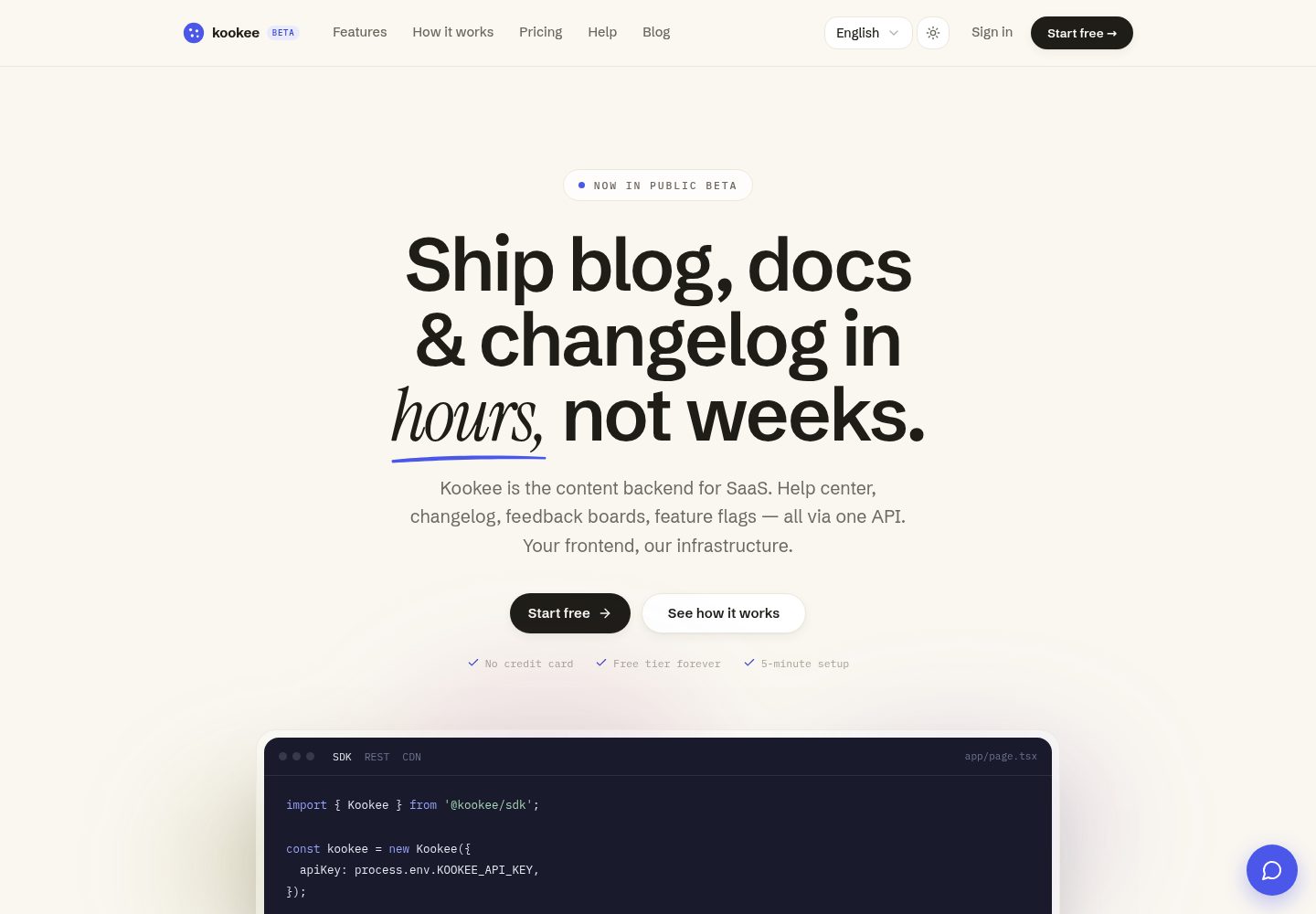
Desktop homepage1 / 3
Desktop captureTop of page
Actual screenshot captured by the server browser.
All pages & views 3
Screenshots show visual appearance; interactive behavior may differ.
Recorded 2026-10-11View source
What stands out
A quick read of the recorded project description.
Reads Kookee content live in the browser via @kookee/sdk and @kookee/react
Built-in help center search, blog and changelog lists and details, read-only roadmap and custom pages
Header provides a What's new badge for the latest changelog entry and integrates the Kookee site widget
Styles centralized in a single src/site.css without Tailwind, making it easy to adjust appearance via design tokens
Build output is a static site that can be deployed to static hosts such as Vercel, Netlify or Cloudflare
Template Details
This is the official Kookee starter for Vite and React projects, rendering content from a Kookee project as a single-page app. It covers the help center (with instant search), changelog, blog, custom pages and a read-only roadmap, and integrates the Kookee site widget. Pages read Kookee data directly from the browser on every visit and can be deployed to any static host.
Technically, the project uses Vite, React, TanStack Router, @kookee/sdk and @kookee/react, with styles centralized in a single src/site.css and no Tailwind. Routes include home, blog list and detail, changelog list and detail, help category and article, roadmap, and custom pages. The header has a "What's new" badge for the latest changelog entry, and the site widget appears after settings are saved in the Kookee dashboard.
Limitations to note: because it is client-rendered, search engines see an empty page before JavaScript runs, so it is not suitable for pages whose main goal is search ranking; for those cases, Kookee recommends its Next.js, TanStack Start or Astro starters. The API key is bundled into JavaScript and can be copied by any visitor; Allowed Origins can restrict browser origins but cannot stop scripts that omit the Origin header. Content is not cached and is read live on every visit, and each read counts toward the project owner's monthly request quota. The app only reads the project's default language, help articles must belong to a category to have a URL, and custom pages with slugs blog, changelog, help or roadmap are shadowed by the corresponding routes.
ViteReactBlogStarter
Is it right for your project?
Use Cases
- Building a help center for an existing product while keeping content centrally managed in Kookee
- Publishing a product changelog with an entry point to the latest item in the page header
- Running a product blog with article table of contents, emoji reactions and paginated loading
- Displaying a read-only roadmap from user feedback, viewable by column for open feedback
- Embedding the Kookee site widget in the site to provide help, AI Q&A and feedback entry points
Suitable For
- Teams already using or planning to use Kookee to manage help center, changelog and blog content
- Projects that accept client-side rendering and do not rely on search engines crawling content pages
- Developers who want to deploy a content site to static hosting and can configure environment variables themselves
- React projects that need to customize appearance via design tokens and prefer not to use Tailwind
Getting started & customization
Use these recorded setup notes alongside the repository instructions for your chosen version.
- 1
Create or open a project in Kookee, create a key on the API keys page, and add http://localhost and the production domain to Allowed Origins under Settings → Project
- 2
Get the code via GitHub's Use this template or by cloning the repository, then run npm install
- 3
Copy .env.example to .env.local and set KOOKEE_API_KEY; optionally set KOOKEE_ROADMAP=false to hide the roadmap
- 4
Run npm run dev and visit http://localhost:5173; without a configured key the app shows setup guidance, and npm run build still passes
- 5
When deploying, ensure all paths fall back to index.html: Vercel is handled by vercel.json, Netlify requires adding public/_redirects, and Cloudflare requires setting not_found_handling to single-page-application
License & source material
Usage conditions & limitations
Free to use · keep license noticeThis entry covers the free version under the MIT license in the public repository; the free scope is that version's code and does not mean external services or third-party assets are free.
Must comply with when using
- You may use, modify, commercialize and distribute this version's code for free.
- When distributing copies or substantial portions of the code, retain the original author's copyright notice and the full MIT license notice.
- The code is provided as is; warranties and limitations of liability are governed by the original license and applicable law.
Additional costs & items to verify
- Demo images, fonts, icons and other third-party assets must be checked against their own licenses and cannot be judged solely by the code's MIT license.
- External services such as domains, hosting, databases, payments or AI may incur separate charges.
- Client-side rendering causes search engines to see an empty page before JavaScript runs, so it is not suitable for pages whose main goal is search ranking; Kookee recommends its Next.js, TanStack Start or Astro starters for those cases.
- The API key is bundled into JavaScript and can be copied by any visitor; holders can read published content, add reactions and helpful votes, search the help center, use the AI assistant and send feedback via the widget, but cannot read drafts or modify content.
- When the Allowed Origins list is non-empty, the API rejects browsers from other sites with 403 ORIGIN_NOT_ALLOWED; when the list is empty, any site can use the key. The list belongs to the project and must include all sites that use the project key from the browser. Allowed Origins cannot stop scripts that do not send an Origin header.
- Content is not cached and is read live on every visit, so each read counts toward the monthly request quota of the project owner's account, and that quota is shared across all their projects.
- The free plan includes 100,000 requests and 50 AI answers per month; a single project is limited to 300 requests per minute across all visitors.
- The app only reads the project's default language, so each entry has only one URL.
- Help articles without a category are not displayed (they have no URL here), and custom pages with slugs blog, changelog, help or roadmap are not displayed because they are shadowed by the corresponding routes.
View Original Text Basis
Permission is hereby granted, free of charge
Original License Text
Search engines see an empty page until the JavaScript runs, so for pages meant to rank, use the [Next.js](https://github.com/kookee-dot-dev/starter-nextjs), [TanStack Start](https://github.com/kookee-dot-dev/starter-tanstack-start) or [Astro](https://github.com/kookee-dot-dev/starter-astro) starter instead.
Original README
The key ships in the JavaScript, so anyone can copy it from your site. With it they can read your published content, add reactions and helpful votes, search the help center, ask the AI assistant and send feedback through the widget. It cannot read drafts or change content.
Original README
Once the **Allowed Origins** list holds an address, the API refuses browsers on other sites with `403 ORIGIN_NOT_ALLOWED`; while it is empty, any site can use the key. The list belongs to the project, so it has to name every site that uses the project's keys from a browser, such as a widget on your product's own site. Allowed origins do not stop scripts, which send no `Origin` header.
Original README
Nothing is cached: content is read live on every visit, so a change in Kookee shows on the next page load. Every read is one request against the monthly quota of the project owner's account, shared by all their projects:
Original README
The Free plan has 100,000 requests a month and 50 AI answers, and a project takes at most 300 requests a minute from all visitors together.
Original README
**Languages:** the app reads your project's default language only, so every entry has one URL.
Original README
https://github.com/kookee-dot-dev/starter-vite-react/blob/main/LICENSEhttps://github.com/kookee-dot-dev/starter-vite-react/blob/main/README.md**Not shown:** help articles without a category (they have no URL here), and a page whose slug is `blog`, `changelog`, `help` or `roadmap`, which those routes would hide.
Original README
Compiled by DeepSeek based on repository license and README ·2026-10-11. Results only cover the materials read; dependencies, images, fonts, and subsequent term changes are subject to their respective original texts.
Project checks & description sources
Template Information
- Source platforms
- GitHub
- Documentation and maintenance reference score
- More documented · 85 / 100
- Technologies
- Vite · React
- Website type
- Blog · Starter
How this score is calculated
Our heuristic uses license records (up to 30), a demo link (12), a preview (10), stars (15), recorded maintenance (15), description completeness (8), feature records (5) and classification data (5). It is not a code, security or performance test, or a Google score. A link does not establish tested functionality.
What to verify for this project
- Repository update recorded
- 2026-10-11
- Screenshot last checked
- 2026-10-11
A demo link is listed. Check it with your own content and viewport sizes; its presence does not confirm that forms, authentication or payments work.
The catalog identifies Vite as the primary stack. Check the actual dependency manifest and lockfile for versions and hosting requirements. These notes use recorded metadata, not a code audit or a deployment test.
Use a selection guide →How this description was prepared
AI-assisted description based on catalog records and repository material. Repository authors are not automatically the reviewers of this description.
Review declaration: [email protected] · 2026-10-11
Inspect the recorded source material
SHA-256: 4321eb84272a8d3bca715bbc48f881861d5c894a250d0d76693190dd34167402
2026-10-11T09:39:38.516Z
Source file / repository# Kookee starter for Vite and React
A single-page app for the content of a [Kookee](https://kookee.dev) project: a help center with
search, a changelog, a blog, your pages and a read-only roadmap, plus the Kookee site widget. It
reads Kookee from the browser on every visit and deploys to any static host.
[](https://vercel.com/new/clone?repository-url=https%3A%2F%2Fgithub.com%2Fkookee-dot-dev%2Fstarter-vite-react&env=KOOKEE_API_KEY&envDescription=A%20standard%20API%20key%20from%20your%20Kookee%20project%20(API%20keys%20%E2%86%92%20Create%20Key)&envLink=https%3A%2F%2Fkookee.dev%2Fhelp%2Fsdk-amp-integration%2Fstart-a-help-center-from-the-vite-react-starter&project-name=kookee-help&repository-name=kookee-help)
Built with Vite 8, React 19, [TanStack Router](https://tanstack.com/router),
[`@kookee/sdk`](https://www.npmjs.com/package/@kookee/sdk) and
[`@kookee/react`](https://www.npmjs.com/package/@kookee/react). No Tailwind: one stylesheet,
`src/site.css`.
**Pick it for** a help center or changelog that sits inside or next to your product. Search
engines see an empty page until the JavaScript runs, so for pages meant to rank, use the
[Next.js](https://github.com/kookee-dot-dev/starter-nextjs), [TanStack
Start](https://github.com/kookee-dot-dev/starter-tanstack-start) or
[Astro](https://github.com/kookee-dot-dev/starter-astro) starter instead.
## What you get
| Path | What it shows |
| --- | --- |
| `/` | The newest posts and changelog entries, and the help categories |
| `/blog`, `/blog/{slug}` | Blog posts, 12 at a time with "Load more"; a post with its table of contents and reactions |
| `/changelog`, `/changelog/{slug}` | Changelog entries; an entry with reactions |
| `/help`, `/help/{category}`, `/help/{category}/{slug}` | Help categories and search as you type; a category's articles; an article with its table of contents and the "Was this article helpful?" vote |
| `/roadmap` | The open feedback posts by column, read-only. `KOOKEE_ROADMAP=false` hides it |
| `/{slug}` | Your pages, such as `/about` or `/privacy` |
The header carries a "What's new" badge with the latest changelog entries, and a link to your
hosted portal when the project has it switched on. The site widget appears once you save its
settings in the Kookee dashboard (**Site widget → Customize**), with the tabs you chose there.
## Quick start
1. In [Kookee](https://kookee.dev), create a project (or open one), go to **API keys** and press
**Create Key**.
2. Open **Settings → Project** and add `http://localhost` and your production domain to the
**Allowed Origins** card. `http://localhost` covers every port; an origin with a port is not
accepted.
3. Get the code with **Use this template** on GitHub, or clone it, and run `npm install`.
4. Copy `.env.example` to `.env.local` and set `KOOKEE_API_KEY`.
5. Run `npm run dev` and open http://localhost:5173.
Without a key the app shows a short setup guide, and `npm run build` still passes.
## Environment variables
Both are read at build time and written into the bundle. Changing one takes a rebuild.
| Name | Required | Default | What it does |
| --- | --- | --- | --- |
| `KOOKEE_API_KEY` | yes | | A standard API key of your project |
| `KOOKEE_ROADMAP` | no | `true` | `false` hides `/roadmap` and its header link |
`vite.config.ts` passes only these two to the browser code, so other variables in the environment,
such as a secret copied from another project, never reach the bundle.
## Deploy
`npm run build` writes a static site to `dist/`. Every path has to serve `index.html`, so the
router can show the page:
- **Vercel:** press **Deploy with Vercel** above. `vercel.json` already rewrites every path.
- **Netlify:** add a `public/_redirects` file with the line `/* /index.html 200`.
- **Cloudflare:** set `not_found_handling = "single-page-application"` in the `assets` block of
your Wrangler configuration.
Then add the production domain under **Allowed Origins**, if you have not yet.
## The key in the bundle
The key ships in the JavaScript, so anyone can copy it from your site. With it they can read your
published content, add reactions and helpful votes, search the help center, ask the AI assistant
and send feedback through the widget. It cannot read drafts or change content.
Once the **Allowed Origins** list holds an address, the API refuses browsers on other sites with
`403 ORIGIN_NOT_ALLOWED`; while it is empty, any site can use the key. The list belongs to the
project, so it has to name every site that uses the project's keys from a browser, such as a
widget on your product's own site. Allowed origins do not stop scripts, which send no `Origin`
header. If the key is abused, create a new one, put it in `KOOKEE_API_KEY`, rebuild and deploy,
and then revoke the old one (**Revoke key** on the **API keys** page).
## API usage
Nothing is cached: content is read live on every visit, so a change in Kookee shows on the next
page load. Every read is one request against the monthly quota of the project owner's account,
shared by all their projects:
- opening the app reads the project, the newest changelog entries and your pages, for the header
and footer;
- each page then reads what it shows: a list, an entry, the help categories, or the roadmap's
columns and posts;
- each help search, the widget's Help tab and article reader, and a reaction or helpful vote when
clicked.
Moving between pages keeps the header and footer, so their three reads happen once per visit, not
once per page. The widget's settings and its AI chat are not API requests; each chat answer uses
the account's AI answers. The Free plan has 100,000 requests a month and 50 AI answers, and a
project takes at most 300 requests a minute from all visitors together.
Every reader who opens a blog post, page or help article counts a view in Kookee, and help article
views order the popular articles in the widget and on the portal. Changelog entries count no
views.
## Customizing
- **Look:** the tokens at the top of `src/site.css`. The `.kookee-content` rule hands them to
every Kookee component; dark mode follows the operating system.
- **URLs:** `src/lib/paths.ts`. `getPath` decides where each entry lives, and `KookeeProvider`
uses it for the links inside entry
bodies; `hrefs` gives the same paths to the lists, search and "What's new". Change both when you
change a route.
- **Pages:** the routes in `src/routes/` read Kookee with the `@kookee/react` hooks. The hooks and
components are documented in the [`@kookee/react`
README](https://www.npmjs.com/package/@kookee/react).
- **Languages:** the app reads your project's default language only, so every entry has one URL.
- **Not shown:** help articles without a category (they have no URL here), and a page whose slug
is `blog`, `changelog`, `help` or `roadmap`, which those routes would hide.
## Troubleshooting
| Error | What it means |
| --- | --- |
| `401 API_KEY_INVALID` | The key is wrong, or it was deleted. Copy it again from **API keys** and rebuild |
| `403 ORIGIN_NOT_ALLOWED` | The page's domain is missing from **Allowed Origins**. Add it, including `http://localhost` for development |
| `429 RATE_LIMIT_EXCEEDED` | More than the per-minute limit, counted across all visitors |
| `429 MONTHLY_API_LIMIT_EXCEEDED` | The account used its monthly requests. Pages show "Something went wrong" until the quota resets or the plan grows |
More in the Kookee help center: [API keys and
security](https://kookee.dev/help/account-and-operations/api-keys-and-security) and [rate limits
and plans](https://kookee.dev/help/account-and-operations/rate-limits-plans-and-error-handling).
## License
MIT
Explore similar templates
Compare previews and descriptions within the same stack and category.

react-starter-kit
A full-stack SaaS monorepo starter built on Vite and React, with Bun, TypeScript, tRPC, Drizzle ORM, Better Auth, Stripe, and Cloudflare Workers. It includes email OTP, passkey, Google OAuth, organizations, subscription billing, Drizzle migrations, seed scripts, and Terraform infrastructure.
Vite · SaaS

cove
Cove is a minimal TanStack Start starter template maintained by mugnavo, integrating React, TanStack Router/Query, Tailwind CSS, shadcn/ui, Drizzle ORM with PostgreSQL, Better Auth, Vite Plus, and Nitro.
Vite · SaaS

vite-react-boilerplate
A production-ready Vite + React starter template with TypeScript, Tailwind CSS, TanStack Router/Query/Table, Storybook, React Hook Form + Zod, Vitest and Playwright testing, plus Husky/Commitizen/Commitlint commit conventions.
Vite · Starter

react-vite-admin
A backend management starter built on Vite and React, integrating Recoil, React Query, TypeScript, and Axios, with Ant Design-style interface screenshots. Suitable as a starting point for management-side projects, licensed under MIT, with Chinese documentation and common scripts.
Vite · Admin dashboard

typescript-react_best_practices-vite_template
A Vite + React + TypeScript starter template by CodelyTV, preconfigured with Jest and React Testing Library unit tests, Cypress end-to-end tests, ESLint and Prettier using Codely's shared configuration, GitHub Actions workflows, a Makefile, and Sass.
Vite · Starter

cloudflare-starter-kit
A Cloudflare Workers project scaffolding template maintained by kriasoft, using Vite and TypeScript, with three built-in workspaces: api, app, and edge, and preconfigured local testing, multiple environments, and a GitHub Actions deployment workflow.
Vite · Starter