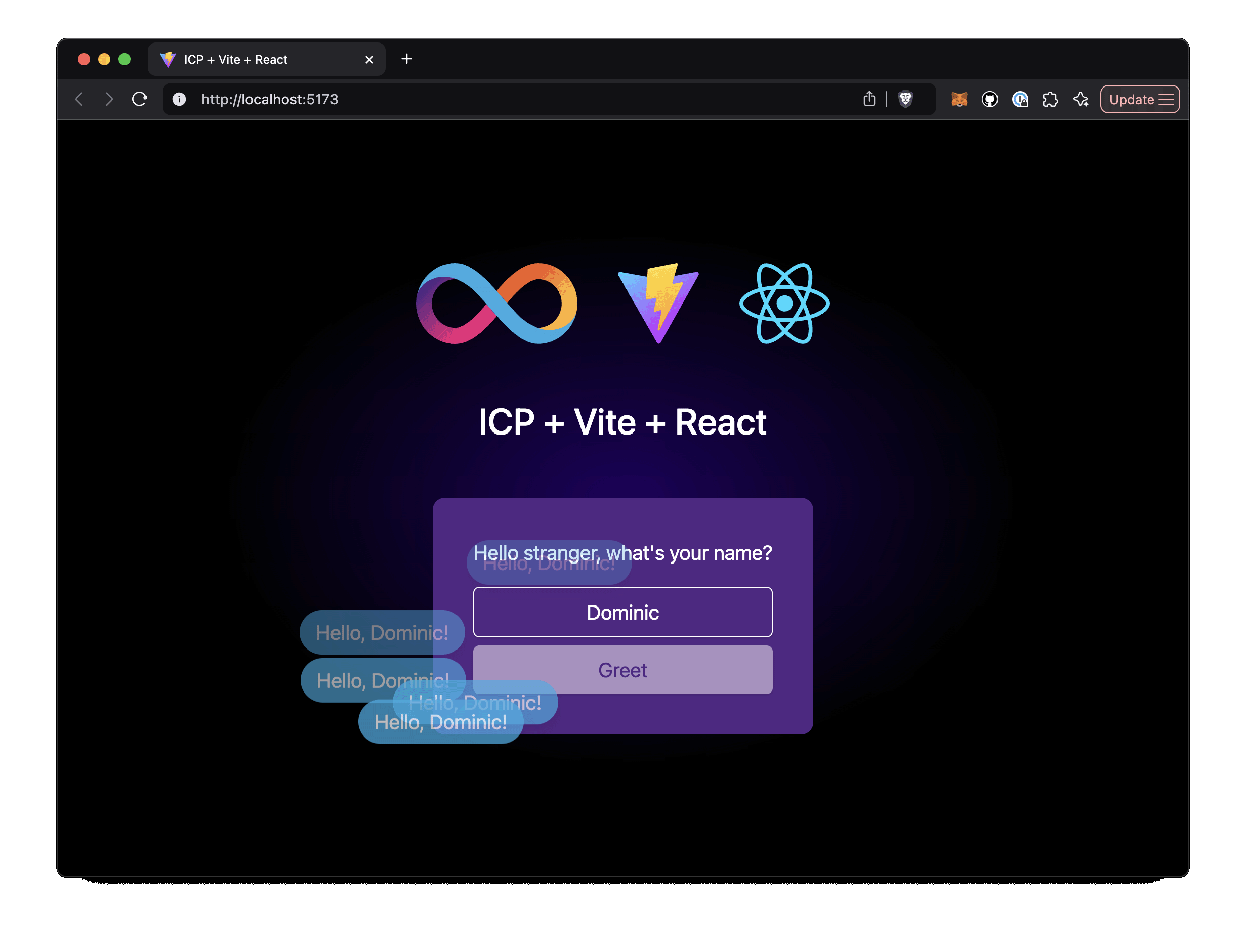
前端基于 Vite + React + TypeScript,样式使用 Tailwind CSS 与 shadcn/ui
ViteReact启动器
ic-vite-react-next — Vite 启动器模板
作者 kristoferlund
基于 Vite 与 React 的 Internet Computer(ICP)启动器模板,集成 Tailwind、shadcn/ui、TanStack Query/Router,并附带一个 Rust 后端 canister 示例。
看看你的网站会是什么样
浏览真实页面截图,比较内容排版与手机效果。点击下方缩略图切换,放大查看整页细节。
目前有 1 张原始预览,可打开完整图片查看设计细节。
截图用于了解视觉与布局,交互效果请以实际项目为准。
采集于 2026-10-03查看来源
值得关注的模板亮点
从已有项目资料中,快速了解它的特点。
使用 TanStack Query 做数据获取与缓存,TanStack Router 做路由
构建与检查工具链包含 SWC 和 ESLint
附带 Rust 后端 canister,仅暴露 greet 函数作为前后端调用示例
提供 VS Code Dev Container 配置,可一键在容器中打开项目
另有使用 ic-reactor 替代 TanStack Query 的分支版本
模板详细介绍
这是一个面向 Internet Computer(ICP)的启动器模板,前端使用 Vite + React + TypeScript,样式层使用 Tailwind CSS 与 shadcn/ui,数据获取与路由分别使用 TanStack Query 和 TanStack Router,构建工具链包含 SWC 与 ESLint。仓库同时提供一个 Rust 编写的后端 canister,仅暴露一个 greet 函数,返回问候消息;前端页面允许输入名字并点击按钮,从后端获取该问候消息,构成一条完整的前后端调用示例。
模板提供两种开发环境搭建方式:一是使用仓库内置的 VS Code Dev Container 配置,在 Docker 容器中打开项目;二是手动安装本地 Internet Computer 开发环境与 pnpm,然后克隆仓库。运行流程为:先用 dfx start --background 启动本地 IC 环境,执行 pnpm install 安装依赖,再用 dfx deploy 部署 canister,开发时通过 pnpm run dev 以 Vite 热重载运行前端。仓库还提供一个使用 ic-reactor 替代 TanStack Query 的分支版本。
使用限制:模板功能范围仅覆盖上述单个 greet 示例,不包含其他业务模块;演示图片、字体、图标等第三方素材需按各自许可单独核对;域名、托管、数据库、支付或 AI 等外部服务可能另行收费。代码以 MIT 许可发布,可免费使用、修改、商用和分发,但分发时需保留版权声明与完整 MIT 许可声明,且代码按现状提供。
ViteReact启动器
适合你的项目吗?
适用场景
- 作为 ICP 上 React 前端项目的起始仓库,直接 fork 后扩展业务
- 学习 ICP 前后端(Rust canister + React 前端)如何通过 dfx 部署与调用
- 在本地用 Dev Container 快速获得预装工具链的 ICP 开发环境
- 作为 Tailwind + shadcn/ui + TanStack Query/Router 组合的参考配置
适合人群
- 准备在 Internet Computer 上开发 React 应用的开发者
- 需要 Rust canister 与 React 前端联调示例的团队
- 希望使用 Dev Container 统一开发环境的项目
- 想参考 Tailwind、shadcn/ui 与 TanStack 组合配置的前端开发者
上手与定制指南
结合仓库当前版本的说明,按下面的资料检查内容、配置与运行要求。
- 1
方式一:安装 Docker、VS Code 与 Dev Containers 扩展,通过仓库提供的 Dev Container 配置在容器中打开项目
- 2
方式二:手动安装本地 Internet Computer 开发环境与 pnpm,然后克隆仓库
- 3
启动本地 IC:dfx start --background
- 4
安装依赖:pnpm install
- 5
部署 canister:dfx deploy;开发时运行 pnpm run dev 以热重载方式启动前端
授权与来源资料
使用条件与限制
免费使用 · 保留许可声明本次收录的是公开仓库中采用 MIT 许可的免费版本;免费范围为该版本代码,不代表外部服务或第三方素材免费。
使用时需要遵守
- 允许免费使用、修改、商用和分发该版本代码。
- 分发代码副本或实质性部分时,保留原作者版权声明和完整 MIT 许可声明。
- 代码按现状提供;担保与责任限制以原许可证及适用法律为准。
额外费用与待核对事项
- 需自行安装并运行本地 Internet Computer 开发环境(dfx),并执行 dfx start --background 与 dfx deploy 才能运行后端 canister。
- 需使用 pnpm 包管理器安装依赖,未提供 npm/yarn 的替代说明。
- 若采用 Dev Container 方式搭建环境,需预先安装 Docker 与 VS Code Dev Containers 扩展。
- 后端功能范围仅限单个 greet 函数示例,不含其他业务模块,需自行扩展。
- 演示图片、字体、图标及其他第三方素材需按各自许可核对,不能仅凭代码的 MIT 许可判断。
- 域名、托管、数据库、支付或 AI 等外部服务可能另外收费。
查看原文依据
Permission is hereby granted, free of charge
许可证原文
Local Internet Computer dev environment
README 原文
[pnpm](https://pnpm.io/installation)
README 原文
[Docker](https://www.docker.com/products/docker-desktop)
README 原文
https://github.com/kristoferlund/ic-vite-react-next/blob/main/LICENSEhttps://github.com/kristoferlund/ic-vite-react-next/blob/main/README.mdThe Rust based backend exposes one endpoint only, the `greet` function that returns a greeting message.
README 原文
DeepSeek 根据仓库许可证和 README 整理 ·2026-10-03。结果仅覆盖已读取资料,依赖、图片、字体及后续条款变更以各自原文为准。
项目核对记录与介绍依据
模板资料
- 来源平台
- GitHub
- 资料与维护参考分
- 资料较完整 · 92 / 100
- 技术栈
- Vite · React
- 网站类型
- 启动器
这个分数如何计算
本站按许可资料(最高30分)、演示链接(12分)、预览图(10分)、Star数(15分)、记录的维护时间(15分)、描述完整度(8分)、功能记录(5分)和分类资料(5分)计算。它不是代码、安全或性能测试,也不是 Google 评分;有链接不代表已实测可用。
这个项目需要核对什么
- 记录的仓库更新时间
- 2025-11-12
- 截图检查日期
- 2026-10-03
已收录演示链接。请用你的内容与屏幕尺寸检查;有演示不代表表单、认证或支付已经可用。
目录记录的主要技术栈是 Vite。请通过依赖清单和锁文件核对实际版本与托管要求。这些说明基于收录资料,不代表代码审计或部署实测。
查看具体选型方法 →介绍的制作与核对状态
介绍由 AI 辅助整理目录与仓库资料。仓库作者不等于这篇介绍的审核者。
已完成服务器许可规则与 AI 来源核对;未经过人工编辑审核。
查看当时使用的来源资料
SHA-256: a5f204c32c68b69cc3fba85dfc5b2e7e24781005fb07e9576297bd1c4b806f49
2026-10-03T02:49:16.045Z
来源文件 / 仓库# ICP + React + TypeScript + Vite + Tailwind + Shadcn/UI + Tanstack Query/Router
This template provides a batteries included setup for an ICP/React application with the latest versions of Vite, TypeScript, Tailwind CSS, Shadcn/UI, SWC, Eslint and Tanstack Query/Router.
> [!TIP]
> Fork this repository as a starting point for your next ICP project.
>
> Live demo: <https://upacy-bqaaa-aaaal-qr7qa-cai.icp0.io>
> [!TIP]
> This template is also available in a version using [ic-reactor](https://www.npmjs.com/package/@ic-reactor/react) instead of Tanstack Query. Check out that version from the [ic-reactor branch](https://github.com/kristoferlund/ic-vite-react-next/tree/ic-reactor).
[![Contributors][contributors-shield]][contributors-url]
[![Forks][forks-shield]][forks-url]
[![Stargazers][stars-shield]][stars-url]
[![Issues][issues-shield]][issues-url]
[![MIT License][license-shield]](LICENSE)

## Features
### Backend
The Rust based backend exposes one endpoint only, the `greet` function that returns a greeting message.
### Frontend
The React/Vite/TS based frontend allows the user to input a name and click a button to fetch the greeting message from the backend.
Dependencies:
- [React 19](https://react.dev): The long awaited upgrade brings form actions, optimistic UI updates while mutating, etc etc.
- [Vite 6](https://vite.dev/): The most significant major release since Vite 2, featuring a new Environment API for enhanced flexibility, extended framework support, and streamlined performance for modern web development.
- [Tailwind 4](https://tailwindcss.com/docs/v4-beta): The new version of Tailwind CSS is a ground-up rewrite of the framework, providing faster builds, great new CSS classes and better performance.
- [Tanstack Query 5](https://tanstack.com/query/latest): The template uses Tanstack Query for data fetching, caching and loading state management.
- [Tanstack Router](https://tanstack.com/router/latest): Modern and scalable routing for React and Solid applications
- [SWC](https://swc.rs/): The Rust based compiler and bundler that provides up to 70x faster build times than Babel.
- [Eslint 9](https://eslint.org/): The latest release of Eslint introduces the flat configuration API along with new rules and bug fixes.
- [shadcn/ui](https://ui.shadcn.com/): Yes, shadcn support for Tailwind 4 is finally here!
## Setup, dev environment
There are two main ways to set up the dev environment:
### 1. Using a VS Code Dev Container
The dev containers extension lets you use a Docker container as a full-featured
development environment. This repository includes a dev container configuration
that you can use to open the project with all the necessary tools and
dependencies pre-installed.
Pre-requisites:
- [Docker](https://www.docker.com/products/docker-desktop)
- [Visual Studio Code](https://code.visualstudio.com/)
- [Dev Containers Extension](https://marketplace.visualstudio.com/items?itemName=ms-vscode-remote.remote-containers)
Once Docker, Visual Studio Code and the Dev Containers Extension are installed,
you can open the project in a container by clicking the button below:
[](https://vscode.dev/redirect?url=vscode://ms-vscode-remote.remote-containers/cloneInVolume?url=https://github.com/kristoferlund/ic-vite-react-next)
### 2. Setup manually
Pre-requisites:
- [Local Internet Computer dev environment](https://internetcomputer.org/docs/current/developer-docs/backend/rust/dev-env)
- [pnpm](https://pnpm.io/installation)
Once you have the prerequisites installed, you can clone this repository and run
the project.
## Running the project
### 1. Start the Internet Computer
```bash
dfx start --background
```
### 2. Install dependencies
```
pnpm install
```
### 3. Deploy the canisters
```
dfx deploy
```
## Develop
During development, you can run the frontend with hot reloading using Vite.
```bash
pnpm run dev
```
## Contributors
<!-- readme: collaborators,contributors -start -->
<table>
<tbody>
<tr>
<td align="center">
<a href="https://github.com/kristoferlund">
<img src="https://avatars.githubusercontent.com/u/9698363?v=4" width="100;" alt="kristoferlund"/>
<br />
<sub><b>Kristofer</b></sub>
</a>
</td>
</tr>
<tbody>
</table>
<!-- readme: collaborators,contributors -end -->
## License
This project is licensed under the MIT License. See the LICENSE file for more
details.
## Contributing
Contributions are welcome! Please open an issue or submit a pull request if you
have any suggestions or improvements.
[contributors-shield]: https://img.shields.io/github/contributors/kristoferlund/ic-vite-react-next.svg?style=for-the-badge
[contributors-url]: https://github.com/kristoferlund/ic-vite-react-next/graphs/contributors
[forks-shield]: https://img.shields.io/github/forks/kristoferlund/ic-vite-react-next.svg?style=for-the-badge
[forks-url]: https://github.com/kristoferlund/ic-vite-react-next/network/members
[stars-shield]: https://img.shields.io/github/stars/kristoferlund/ic-vite-react-next?style=for-the-badge
[stars-url]: https://github.com/kristoferlund/ic-vite-react-next/stargazers
[issues-shield]: https://img.shields.io/github/issues/kristoferlund/ic-vite-react-next.svg?style=for-the-badge
[issues-url]: https://github.com/kristoferlund/ic-vite-react-next/issues
[license-shield]: https://img.shields.io/github/license/kristoferlund/ic-vite-react-next.svg?style=for-the-badge
看看同类模板
对比同技术栈与用途的模板,找到更适合的视觉与内容结构。

react-starter-kit
Modern React starter kit with Bun, TypeScript, Tailwind CSS, tRPC, Stripe, and Cloudflare Workers. Production-…
Vite · SaaS

cove
The Cove Stack: 🏝️ minimal TanStack Start template with Vite+, Better Auth, Drizzle ORM, shadcn/ui
Vite · SaaS

vite-react-boilerplate
A production ready, scalable starter template for Vite + React
Vite · 启动器

react-vite-admin
This Starter utilizes React, Recoil, React Query, React Hooks, Typescript, Axios And Vite. 全新技术栈的后台管理系统
Vite · 后台

typescript-react_best_practices-vite_template
<⚡⚛️> Start your React project with Vite following code best practices (TypeScript, Linting, testing, CI/CD…)
Vite · 启动器

cloudflare-starter-kit
Template (boilerplate) repository for scaffolding Cloudflare Workers projects
Vite · 启动器