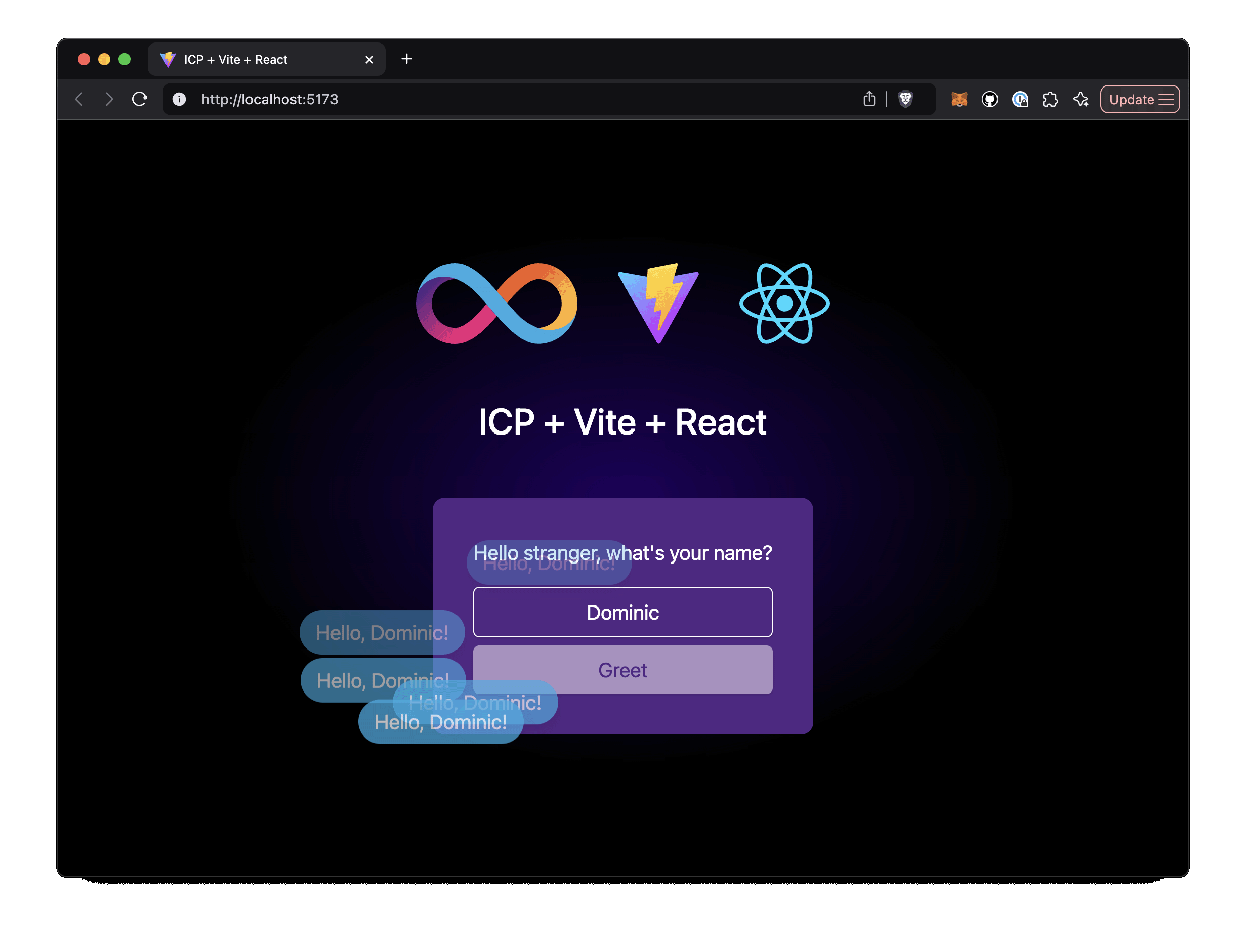
Frontend based on Vite + React + TypeScript, with styling using Tailwind CSS and shadcn/ui
ViteReactStarter
ic-vite-react-next — Vite Starter Template
By kristoferlund
An Internet Computer (ICP) starter template based on Vite and React, integrating Tailwind, shadcn/ui, TanStack Query/Router, and including a Rust backend canister example.
Explore the design
Compare the page layouts and mobile experience. Open any screenshot for a closer look.
Author preview
Author-provided previewTop of page
Preview provided in the project README.
One original preview is available. Open the full image to inspect the design.
Screenshots show visual appearance; interactive behavior may differ.
Recorded 2026-10-03View source
What stands out
A quick read of the recorded project description.
Uses TanStack Query for data fetching and caching, and TanStack Router for routing
Build and lint toolchain includes SWC and ESLint
Includes a Rust backend canister that exposes only a greet function as a frontend-backend call example
Provides a VS Code Dev Container configuration to open the project in a container with one click
Also has a branch version that uses ic-reactor instead of TanStack Query
Template Details
This is a starter template for the Internet Computer (ICP). The frontend uses Vite + React + TypeScript, the styling layer uses Tailwind CSS and shadcn/ui, data fetching and routing use TanStack Query and TanStack Router respectively, and the build toolchain includes SWC and ESLint. The repository also provides a backend canister written in Rust that exposes only a single greet function returning a greeting message; the frontend page allows entering a name and clicking a button to fetch that greeting message from the backend, forming a complete frontend-backend call example.
The template offers two ways to set up the development environment: first, use the repository's built-in VS Code Dev Container configuration to open the project in a Docker container; second, manually install the local Internet Computer development environment and pnpm, then clone the repository. The workflow is: first start the local IC environment with dfx start --background, run pnpm install to install dependencies, then use dfx deploy to deploy the canister, and during development run the frontend with Vite hot reload via pnpm run dev. The repository also provides a branch version that uses ic-reactor instead of TanStack Query.
Usage limitations: the template's functionality covers only the single greet example described above and does not include other business modules; third-party assets such as demo images, fonts, and icons must be checked separately under their respective licenses; external services such as domains, hosting, databases, payments, or AI may incur separate charges. The code is released under the MIT license, allowing free use, modification, commercial use, and distribution, but when distributing, the copyright notice and the complete MIT license notice must be retained, and the code is provided as is.
ViteReactStarter
Is it right for your project?
Use Cases
- As a starting repository for React frontend projects on ICP, fork it and extend business logic directly
- Learn how ICP frontend and backend (Rust canister + React frontend) are deployed and called via dfx
- Quickly obtain a pre-installed toolchain ICP development environment locally using Dev Container
- As a reference configuration for the combination of Tailwind + shadcn/ui + TanStack Query/Router
Suitable For
- Developers preparing to build React applications on the Internet Computer
- Teams needing an example of Rust canister and React frontend integration
- Projects wanting to use Dev Container to unify the development environment
- Frontend developers wanting a reference configuration for Tailwind, shadcn/ui, and TanStack
Getting started & customization
Use these recorded setup notes alongside the repository instructions for your chosen version.
- 1
Option 1: Install Docker, VS Code, and the Dev Containers extension, then open the project in a container using the Dev Container configuration provided by the repository
- 2
Option 2: Manually install the local Internet Computer development environment and pnpm, then clone the repository
- 3
Start local IC: dfx start --background
- 4
Install dependencies: pnpm install
- 5
Deploy canister: dfx deploy; during development, run pnpm run dev to start the frontend with hot reload
License & source material
Usage conditions & limitations
Free to use · keep license noticeThis entry covers the free version under the MIT license in the public repository; the free scope is the code of this version and does not mean external services or third-party assets are free.
Must comply with when using
- Free use, modification, commercial use, and distribution of this version's code are permitted.
- When distributing copies or substantial portions of the code, retain the original author's copyright notice and the complete MIT license notice.
- The code is provided as is; warranties and limitations of liability are governed by the original license and applicable law.
Additional costs & items to verify
- You need to install and run the local Internet Computer development environment (dfx) yourself, and execute dfx start --background and dfx deploy to run the backend canister.
- You need to use the pnpm package manager to install dependencies; no alternative instructions for npm/yarn are provided.
- If using the Dev Container approach, Docker and the VS Code Dev Containers extension must be installed in advance.
- The backend functionality is limited to a single greet function example and does not include other business modules; you need to extend it yourself.
- Demo images, fonts, icons, and other third-party assets must be checked under their respective licenses; they cannot be judged solely by the code's MIT license.
- External services such as domains, hosting, databases, payments, or AI may incur separate charges.
View Original Text Basis
Permission is hereby granted, free of charge
Original License Text
Local Internet Computer dev environment
Original README
[pnpm](https://pnpm.io/installation)
Original README
[Docker](https://www.docker.com/products/docker-desktop)
Original README
https://github.com/kristoferlund/ic-vite-react-next/blob/main/LICENSEhttps://github.com/kristoferlund/ic-vite-react-next/blob/main/README.mdThe Rust based backend exposes one endpoint only, the `greet` function that returns a greeting message.
Original README
Compiled by DeepSeek based on repository license and README ·2026-10-03. Results only cover the materials read; dependencies, images, fonts, and subsequent term changes are subject to their respective original texts.
Project checks & description sources
Template Information
- Source platforms
- GitHub
- Documentation and maintenance reference score
- More documented · 92 / 100
- Technologies
- Vite · React
- Website type
- Starter
How this score is calculated
Our heuristic uses license records (up to 30), a demo link (12), a preview (10), stars (15), recorded maintenance (15), description completeness (8), feature records (5) and classification data (5). It is not a code, security or performance test, or a Google score. A link does not establish tested functionality.
What to verify for this project
- Repository update recorded
- 2025-11-12
- Screenshot last checked
- 2026-10-03
A demo link is listed. Check it with your own content and viewport sizes; its presence does not confirm that forms, authentication or payments work.
The catalog identifies Vite as the primary stack. Check the actual dependency manifest and lockfile for versions and hosting requirements. These notes use recorded metadata, not a code audit or a deployment test.
Use a selection guide →How this description was prepared
AI-assisted description based on catalog records and repository material. Repository authors are not automatically the reviewers of this description.
Automatically checked against source and license rules; no manual editorial review.
Inspect the recorded source material
SHA-256: a5f204c32c68b69cc3fba85dfc5b2e7e24781005fb07e9576297bd1c4b806f49
2026-10-03T02:49:16.045Z
Source file / repository# ICP + React + TypeScript + Vite + Tailwind + Shadcn/UI + Tanstack Query/Router
This template provides a batteries included setup for an ICP/React application with the latest versions of Vite, TypeScript, Tailwind CSS, Shadcn/UI, SWC, Eslint and Tanstack Query/Router.
> [!TIP]
> Fork this repository as a starting point for your next ICP project.
>
> Live demo: <https://upacy-bqaaa-aaaal-qr7qa-cai.icp0.io>
> [!TIP]
> This template is also available in a version using [ic-reactor](https://www.npmjs.com/package/@ic-reactor/react) instead of Tanstack Query. Check out that version from the [ic-reactor branch](https://github.com/kristoferlund/ic-vite-react-next/tree/ic-reactor).
[![Contributors][contributors-shield]][contributors-url]
[![Forks][forks-shield]][forks-url]
[![Stargazers][stars-shield]][stars-url]
[![Issues][issues-shield]][issues-url]
[![MIT License][license-shield]](LICENSE)

## Features
### Backend
The Rust based backend exposes one endpoint only, the `greet` function that returns a greeting message.
### Frontend
The React/Vite/TS based frontend allows the user to input a name and click a button to fetch the greeting message from the backend.
Dependencies:
- [React 19](https://react.dev): The long awaited upgrade brings form actions, optimistic UI updates while mutating, etc etc.
- [Vite 6](https://vite.dev/): The most significant major release since Vite 2, featuring a new Environment API for enhanced flexibility, extended framework support, and streamlined performance for modern web development.
- [Tailwind 4](https://tailwindcss.com/docs/v4-beta): The new version of Tailwind CSS is a ground-up rewrite of the framework, providing faster builds, great new CSS classes and better performance.
- [Tanstack Query 5](https://tanstack.com/query/latest): The template uses Tanstack Query for data fetching, caching and loading state management.
- [Tanstack Router](https://tanstack.com/router/latest): Modern and scalable routing for React and Solid applications
- [SWC](https://swc.rs/): The Rust based compiler and bundler that provides up to 70x faster build times than Babel.
- [Eslint 9](https://eslint.org/): The latest release of Eslint introduces the flat configuration API along with new rules and bug fixes.
- [shadcn/ui](https://ui.shadcn.com/): Yes, shadcn support for Tailwind 4 is finally here!
## Setup, dev environment
There are two main ways to set up the dev environment:
### 1. Using a VS Code Dev Container
The dev containers extension lets you use a Docker container as a full-featured
development environment. This repository includes a dev container configuration
that you can use to open the project with all the necessary tools and
dependencies pre-installed.
Pre-requisites:
- [Docker](https://www.docker.com/products/docker-desktop)
- [Visual Studio Code](https://code.visualstudio.com/)
- [Dev Containers Extension](https://marketplace.visualstudio.com/items?itemName=ms-vscode-remote.remote-containers)
Once Docker, Visual Studio Code and the Dev Containers Extension are installed,
you can open the project in a container by clicking the button below:
[](https://vscode.dev/redirect?url=vscode://ms-vscode-remote.remote-containers/cloneInVolume?url=https://github.com/kristoferlund/ic-vite-react-next)
### 2. Setup manually
Pre-requisites:
- [Local Internet Computer dev environment](https://internetcomputer.org/docs/current/developer-docs/backend/rust/dev-env)
- [pnpm](https://pnpm.io/installation)
Once you have the prerequisites installed, you can clone this repository and run
the project.
## Running the project
### 1. Start the Internet Computer
```bash
dfx start --background
```
### 2. Install dependencies
```
pnpm install
```
### 3. Deploy the canisters
```
dfx deploy
```
## Develop
During development, you can run the frontend with hot reloading using Vite.
```bash
pnpm run dev
```
## Contributors
<!-- readme: collaborators,contributors -start -->
<table>
<tbody>
<tr>
<td align="center">
<a href="https://github.com/kristoferlund">
<img src="https://avatars.githubusercontent.com/u/9698363?v=4" width="100;" alt="kristoferlund"/>
<br />
<sub><b>Kristofer</b></sub>
</a>
</td>
</tr>
<tbody>
</table>
<!-- readme: collaborators,contributors -end -->
## License
This project is licensed under the MIT License. See the LICENSE file for more
details.
## Contributing
Contributions are welcome! Please open an issue or submit a pull request if you
have any suggestions or improvements.
[contributors-shield]: https://img.shields.io/github/contributors/kristoferlund/ic-vite-react-next.svg?style=for-the-badge
[contributors-url]: https://github.com/kristoferlund/ic-vite-react-next/graphs/contributors
[forks-shield]: https://img.shields.io/github/forks/kristoferlund/ic-vite-react-next.svg?style=for-the-badge
[forks-url]: https://github.com/kristoferlund/ic-vite-react-next/network/members
[stars-shield]: https://img.shields.io/github/stars/kristoferlund/ic-vite-react-next?style=for-the-badge
[stars-url]: https://github.com/kristoferlund/ic-vite-react-next/stargazers
[issues-shield]: https://img.shields.io/github/issues/kristoferlund/ic-vite-react-next.svg?style=for-the-badge
[issues-url]: https://github.com/kristoferlund/ic-vite-react-next/issues
[license-shield]: https://img.shields.io/github/license/kristoferlund/ic-vite-react-next.svg?style=for-the-badge
Explore similar templates
Compare previews and descriptions within the same stack and category.

react-starter-kit
A full-stack SaaS monorepo starter built on Vite and React, with Bun, TypeScript, tRPC, Drizzle ORM, Better Auth, Stripe, and Cloudflare Workers. It includes email OTP, passkey, Google OAuth, organizations, subscription billing, Drizzle migrations, seed scripts, and Terraform infrastructure.
Vite · SaaS

cove
Cove is a minimal TanStack Start starter template maintained by mugnavo, integrating React, TanStack Router/Query, Tailwind CSS, shadcn/ui, Drizzle ORM with PostgreSQL, Better Auth, Vite Plus, and Nitro.
Vite · SaaS

vite-react-boilerplate
A production-ready Vite + React starter template with TypeScript, Tailwind CSS, TanStack Router/Query/Table, Storybook, React Hook Form + Zod, Vitest and Playwright testing, plus Husky/Commitizen/Commitlint commit conventions.
Vite · Starter

react-vite-admin
A backend management starter built on Vite and React, integrating Recoil, React Query, TypeScript, and Axios, with Ant Design-style interface screenshots. Suitable as a starting point for management-side projects, licensed under MIT, with Chinese documentation and common scripts.
Vite · Admin dashboard

typescript-react_best_practices-vite_template
A Vite + React + TypeScript starter template by CodelyTV, preconfigured with Jest and React Testing Library unit tests, Cypress end-to-end tests, ESLint and Prettier using Codely's shared configuration, GitHub Actions workflows, a Makefile, and Sass.
Vite · Starter

cloudflare-starter-kit
A Cloudflare Workers project scaffolding template maintained by kriasoft, using Vite and TypeScript, with three built-in workspaces: api, app, and edge, and preconfigured local testing, multiple environments, and a GitHub Actions deployment workflow.
Vite · Starter