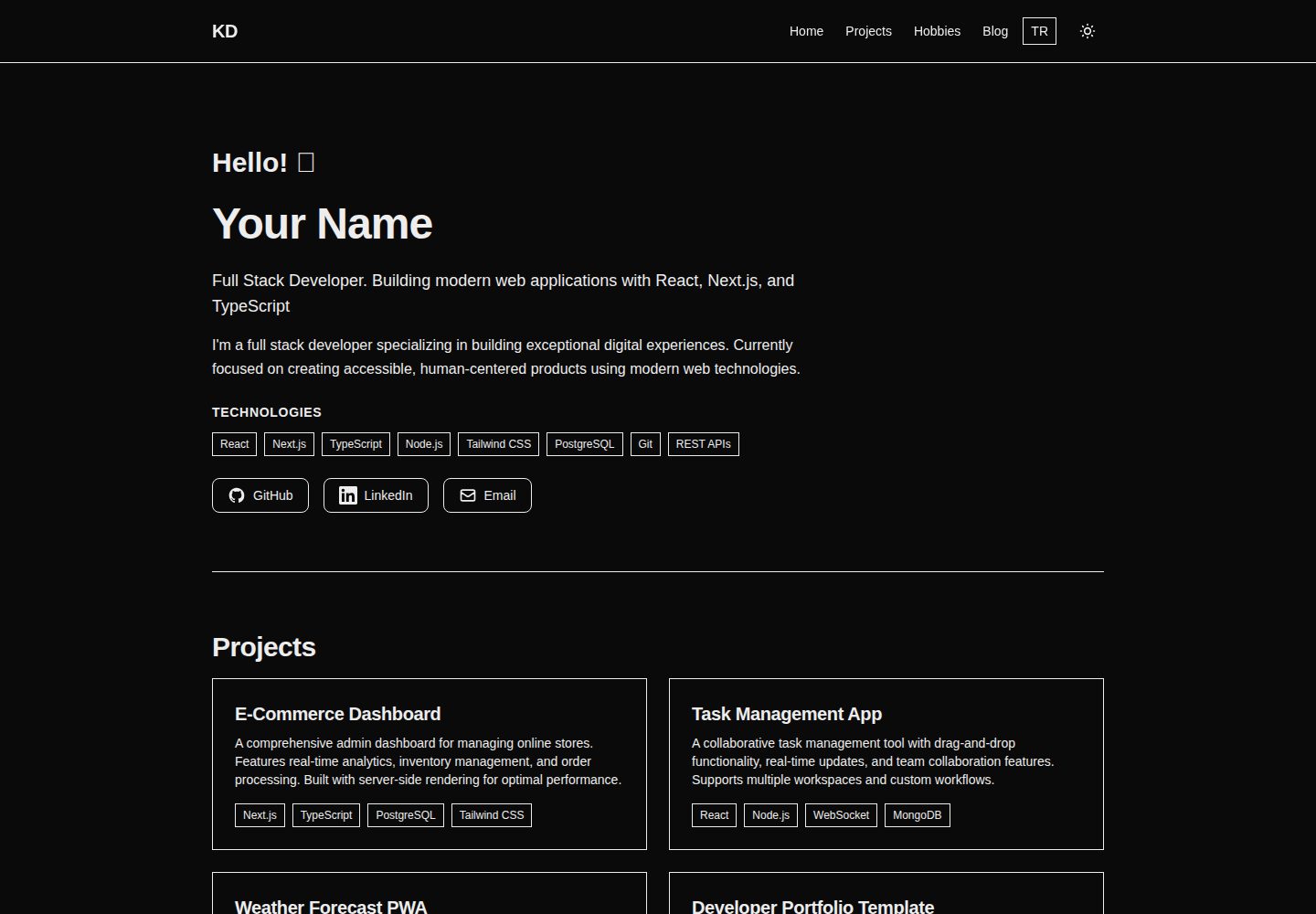
使用 Next.js App Router 与 TypeScript 构建,页面位于 src/app/[locale] 下
Next.jsReact作品集博客
nextjs-personal-site-template — Next.js 作品集模板
作者 kursatdemirdelen
面向开发者的个人网站模板,基于 Next.js App Router 与 TypeScript,包含 MDX 博客、项目展示、暗色模式与土耳其语/英语双语支持。
看看你的网站会是什么样
浏览真实页面截图,比较内容排版与手机效果。点击下方缩略图切换,放大查看整页细节。
全部页面与视图 3
截图用于了解视觉与布局,交互效果请以实际项目为准。
采集于 2026-10-14查看来源
值得关注的模板亮点
从已有项目资料中,快速了解它的特点。
博客内容以 MDX 文件形式存放在 content/blog/,支持 Markdown 与 React 组件
内置土耳其语和英语两种语言,翻译文件位于 messages/ 目录
暗色模式通过 next-themes 实现,可跟随系统偏好切换
项目展示数据在 src/data/projects.ts 中配置,支持标签与筛选
README 说明会自动生成 sitemap、RSS 与 meta 标签,并需要设置 NEXT_PUBLIC_SITE_URL
模板详细介绍
这是一个用于搭建个人网站的开源模板,README 说明其目标是让开发者展示作品、发布博客并建立线上形象。技术栈包括 Next.js 16(App Router)、React 19、TypeScript 5、Tailwind CSS 4、MDX、next-intl 和 next-themes。
模板内置的功能有:带动画打字效果的问候语、以 MDX 编写的博客、跟随系统偏好的暗色模式、土耳其语与英语双语、带标签与筛选的项目展示,以及自动生成 sitemap、RSS 和 meta 标签的 SEO 配置。页面按 [locale] 目录组织,站点信息、项目与爱好分别放在 src/data 下的 site.ts、projects.ts、hobbies.ts,博客文章放在 content/blog/,翻译文件放在 messages/。
使用前需要设置 NEXT_PUBLIC_SITE_URL 环境变量,README 说明它用于 SEO、sitemap 和 RSS。部署方面 README 提供 Vercel 一键部署按钮与 Netlify 部署按钮,并说明也适用于 Cloudflare Pages、Railway 等支持 Next.js 的平台。README 未提供关于性能基准、可访问性测试结果或生产环境验证的具体说明。
Next.jsReact作品集博客
适合你的项目吗?
适用场景
- 开发者搭建个人主页,集中展示项目与博客文章
- 需要中英以外双语(土耳其语/英语)个人站点的场景
- 希望用 MDX 编写技术博客并嵌入 React 组件的场景
- 通过 Vercel 或 Netlify 一键部署个人静态站点的场景
适合人群
- 熟悉 Next.js 与 TypeScript、希望快速起步个人网站的开发者
- 需要项目展示、博客与双语支持的独立开发者
- 接受以修改 src/data 下配置文件来维护站点内容的用户
上手与定制指南
结合仓库当前版本的说明,按下面的资料检查内容、配置与运行要求。
- 1
克隆仓库后执行 npm install,再用 npm run dev 启动本地开发服务器
- 2
复制 .env.example 为 .env.local,并设置 NEXT_PUBLIC_SITE_URL 为你的站点地址
- 3
在 src/data/site.ts 修改站点名称、标题、标语与社交链接
- 4
在 src/data/projects.ts 添加项目,在 content/blog/ 下新建 MDX 文件写博客
- 5
部署到 Vercel 时需在项目设置的环境变量中配置 NEXT_PUBLIC_SITE_URL
授权与来源资料
使用条件与限制
免费使用 · 保留许可声明本次收录的是公开仓库中采用 MIT 许可的免费版本;免费范围为该版本代码,不代表外部服务或第三方素材免费。
使用时需要遵守
- 允许免费使用、修改、商用和分发该版本代码。
- 分发代码副本或实质性部分时,保留原作者版权声明和完整 MIT 许可声明。
- 代码按现状提供;担保与责任限制以原许可证及适用法律为准。
额外费用与待核对事项
- 演示图片、字体、图标及其他第三方素材需按各自许可核对,不能仅凭代码的 MIT 许可判断。
- 域名、托管、数据库、支付或 AI 等外部服务可能另外收费。
- 使用前必须设置 NEXT_PUBLIC_SITE_URL 环境变量,用于 SEO、sitemap 与 RSS 生成。
- 部署后需在项目设置中将 NEXT_PUBLIC_SITE_URL 设置为自己的域名。
- 部署到 Vercel 时需在环境变量中配置 NEXT_PUBLIC_SITE_URL 为实际域名。
查看原文依据
Permission is hereby granted, free of charge
许可证原文
| `NEXT_PUBLIC_SITE_URL` | Yes | Your site URL (for SEO, sitemap, RSS) |
README 原文
> After deployment, set `NEXT_PUBLIC_SITE_URL` to your domain in project settings.
README 原文
https://github.com/kursatdemirdelen/nextjs-personal-site-template/blob/main/LICENSEhttps://github.com/kursatdemirdelen/nextjs-personal-site-template/blob/main/README.md3. Add environment variable: `NEXT_PUBLIC_SITE_URL` = `https://your-domain.vercel.app`
README 原文
DeepSeek 根据仓库许可证和 README 整理 ·2026-10-14。结果仅覆盖已读取资料,依赖、图片、字体及后续条款变更以各自原文为准。
项目核对记录与介绍依据
模板资料
- 来源平台
- GitHub
- 资料与维护参考分
- 资料较完整 · 85 / 100
- 技术栈
- Next.js · React
- 网站类型
- 作品集 · 博客
这个分数如何计算
本站按许可资料(最高30分)、演示链接(12分)、预览图(10分)、Star数(15分)、记录的维护时间(15分)、描述完整度(8分)、功能记录(5分)和分类资料(5分)计算。它不是代码、安全或性能测试,也不是 Google 评分;有链接不代表已实测可用。
这个项目需要核对什么
- 记录的仓库更新时间
- 2026-01-02
- 截图检查日期
- 2026-10-14
已收录演示链接。请用你的内容与屏幕尺寸检查;有演示不代表表单、认证或支付已经可用。
目录记录的主要技术栈是 Next.js。请通过依赖清单和锁文件核对实际版本与托管要求。这些说明基于收录资料,不代表代码审计或部署实测。
查看具体选型方法 →介绍的制作与核对状态
介绍由 AI 辅助整理目录与仓库资料。仓库作者不等于这篇介绍的审核者。
审核声明: codex-user-requested-batch-review-20261015 · 2026-10-15
查看当时使用的来源资料
SHA-256: 4876d0d3762fb38c690b3ffaca7b304080b0b1a05ba60431111ccca8d63f2a85
2026-10-14T15:17:18.154Z
来源文件 / 仓库# Next.js Personal Website Template
A clean, modern template for developers to showcase their work, share blog posts, and build their online presence. Built with Next.js 16, React 19, and TypeScript.
[](LICENSE)
[](https://nextjs.org/)
[](https://www.typescriptlang.org/)
**[Live Demo](https://nextjs-personal-site-template.vercel.app)** • **[Türkçe](./README.tr.md)** • **[Documentation](./SETUP.md)** • **[Report Bug](https://github.com/kursatdemirdelen/nextjs-personal-site-template/issues)**
## 🚀 One-Click Deploy
Deploy your own copy of this template with one click:
[](https://vercel.com/new/clone?repository-url=https://github.com/kursatdemirdelen/nextjs-personal-site-template&project-name=my-personal-site&repository-name=my-personal-site&env=NEXT_PUBLIC_SITE_URL&envDescription=Your%20site%20URL%20for%20SEO%20(sitemap,%20canonical%20URLs)&envLink=https://github.com/kursatdemirdelen/nextjs-personal-site-template%23environment-variables)
[](https://app.netlify.com/start/deploy?repository=https://github.com/kursatdemirdelen/nextjs-personal-site-template)
> After deployment, set `NEXT_PUBLIC_SITE_URL` to your domain in project settings.
## 📸 Screenshots
<p align="center">
<img src="public/images/ss1.png" width="49%" />
<img src="public/images/ss2.png" width="49%" />
</p>
<p align="center">
<img src="public/images/ss3.png" width="49%" />
<img src="public/images/ss4.png" width="49%" />
</p>
<p align="center">
<img src="public/images/ss5.png" width="49%" />
</p>
---
## Features
- ✨ **Animated Greeting** - Typewriter effect with customizable messages
- 📝 **MDX Blog** - Write posts in Markdown with React components
- 🎨 **Dark Mode** - Automatic theme switching with system preference detection
- 🌍 **i18n Support** - Turkish and English built-in, easy to add more
- 📊 **Project Showcase** - Display your work with tags and filtering
- 🎯 **SEO Optimized** - Auto-generated sitemap, RSS feed, and meta tags
- ⚡ **Fast Performance** - Server components and static generation
- 📱 **Fully Responsive** - Mobile-first design that works everywhere
- ♿ **Accessible** - ARIA labels, keyboard navigation, semantic HTML
## Quick Start
```bash
# Clone the template
git clone https://github.com/kursatdemirdelen/nextjs-personal-site-template.git my-website
# Install dependencies
cd my-website
npm install
# Start development server
npm run dev
```
Open [http://localhost:3000](http://localhost:3000) to see your site.
## Customization
### 1. Set Environment Variables
Copy `.env.example` to `.env.local` and update:
```bash
NEXT_PUBLIC_SITE_URL=https://your-domain.com
```
> **Vercel Users**: Set this in Project Settings → Environment Variables
### 2. Update Site Information
Edit `src/data/site.ts`:
```typescript
export const siteConfig = {
name: "Your Name",
title: "Your Professional Title",
tagline: "Your tagline here",
// URL is set via NEXT_PUBLIC_SITE_URL env variable
socialLinks: { ... },
};
```
### 3. Add Your Projects
Edit `src/data/projects.ts`:
```typescript
export const projects: Project[] = [
{
title: "Project Name",
description: "What it does and why it matters",
url: "https://github.com/you/project",
tags: ["React", "TypeScript"],
slug: "project-name",
},
];
```
### 4. Write Blog Posts
Create MDX files in `content/blog/`:
```mdx
---
title: "Post Title"
description: "Post description"
date: "December 22, 2025"
tags: ["Next.js", "React"]
---
Your content here...
```
See the [Setup Guide](./SETUP.md) for detailed instructions.
## Tech Stack
- **Framework**: [Next.js 16](https://nextjs.org/) with App Router
- **Language**: [TypeScript 5](https://www.typescriptlang.org/)
- **Styling**: [Tailwind CSS 4](https://tailwindcss.com/)
- **Content**: [MDX](https://mdxjs.com/)
- **i18n**: [next-intl](https://next-intl-docs.vercel.app/)
- **Theme**: [next-themes](https://github.com/pacocoursey/next-themes)
## Project Structure
```
src/
├── app/
│ ├── [locale]/ # Internationalized pages
│ │ ├── page.tsx # Homepage
│ │ ├── blog/ # Blog pages
│ │ ├── projects/ # Project pages
│ │ └── hobbies/ # Hobbies page
│ └── api/ # API routes
├── components/
│ ├── layout/ # Header, Footer, etc.
│ ├── ui/ # Reusable components
│ └── blog/ # Blog-specific components
├── data/ # Site content
│ ├── site.ts # Main config
│ ├── projects.ts # Your projects
│ └── hobbies.ts # Your hobbies
└── i18n/ # Internationalization
content/blog/ # MDX blog posts
messages/ # Translation files
```
## Environment Variables
| Variable | Required | Description |
|----------|----------|-------------|
| `NEXT_PUBLIC_SITE_URL` | Yes | Your site URL (for SEO, sitemap, RSS) |
Create `.env.local` for local development:
```bash
cp .env.example .env.local
```
## Deployment
### Vercel (Recommended)
1. Push to GitHub
2. Import your repo on [vercel.com](https://vercel.com)
3. Add environment variable: `NEXT_PUBLIC_SITE_URL` = `https://your-domain.vercel.app`
4. Click Deploy
That's it! Vercel handles build, deployment, and automatic updates.
### Other Platforms
Works on any platform that supports Next.js:
- [Netlify](https://www.netlify.com/)
- [Cloudflare Pages](https://pages.cloudflare.com/)
- [Railway](https://railway.app/)
## Scripts
```bash
npm run dev # Development server
npm run build # Production build
npm run start # Start production server
npm run lint # Run ESLint
npm run type-check # TypeScript validation
```
## Documentation
See **[SETUP.md](./SETUP.md)** for detailed configuration guide.
## Customization Examples
### Change Colors
Edit `src/app/globals.css`:
```css
:root {
--accent: 0 84% 60%; /* Your brand color */
}
```
### Add a Section
Create a new page in `src/app/[locale]/your-section/page.tsx`. Use existing pages as reference.
### Remove Features
Don't need hobbies? Delete the page and remove navigation links. Everything is modular.
## Contributing
Contributions welcome!
1. Fork the repo
2. Create a feature branch (`git checkout -b feature/amazing-feature`)
3. Commit your changes (`git commit -m 'Add amazing feature'`)
4. Push to the branch (`git push origin feature/amazing-feature`)
5. Open a Pull Request
## License
MIT License - see [LICENSE](./LICENSE) for details.
You're free to use this template for personal or commercial projects. Attribution appreciated but not required.
## Support
- 📧 **Issues**: [GitHub Issues](https://github.com/kursatdemirdelen/nextjs-personal-site-template/issues)
- 💬 **Discussions**: [GitHub Discussions](https://github.com/kursatdemirdelen/nextjs-personal-site-template/discussions)
- ⭐ **Star the repo** if you find it useful!
---
Built by [@kursatdemirdelen](https://github.com/kursatdemirdelen) • Star if you find it useful!
看看同类模板
对比同技术栈与用途的模板,找到更适合的视觉与内容结构。

tailwind-nextjs-starter-blog
tailwind-nextjs-starter-blog 是一个面向个人技术博客的 Next.js 与 Tailwind CSS 启动模板,其 v2 版本基于 App Router 与 React Server Comp…
Next.js · 博客

react-resume-template
A personal resume website template built with React.js, Typescript, Next.js, and styled with Tailwind css
Next.js · 作品集

Nextjs-tailwindcss-blog-template
使用 Tailwind CSS 的 Next.js 博客。当前分支通过 Velite 处理 Markdown,早期 Contentlayer 实现保留在单独的历史分支中。
Next.js · 博客

Next-js-Blog-Boilerplate
Next-js-Blog-Boilerplate 是一套面向个人与技术博客的启动代码,基于 Next.js 12 与 Tailwind CSS 3 构建,同时集成了 TypeScript、ESLint、Prettier …
Next.js · 博客

nextjs-blog-theme
nextjs-blog-theme 是 Netlify 团队维护的一个博客启动模板,基于 Next.js 15(Pages Router)和 Tailwind CSS 4.x 构建,设计由 Bejamas 机构完成。
Next.js · 博客

blog
🚀 My personal blog made with Tailwind CSS and NextJS. Template from Timlrx. Feel free to fork, follow and use…
Next.js · 博客