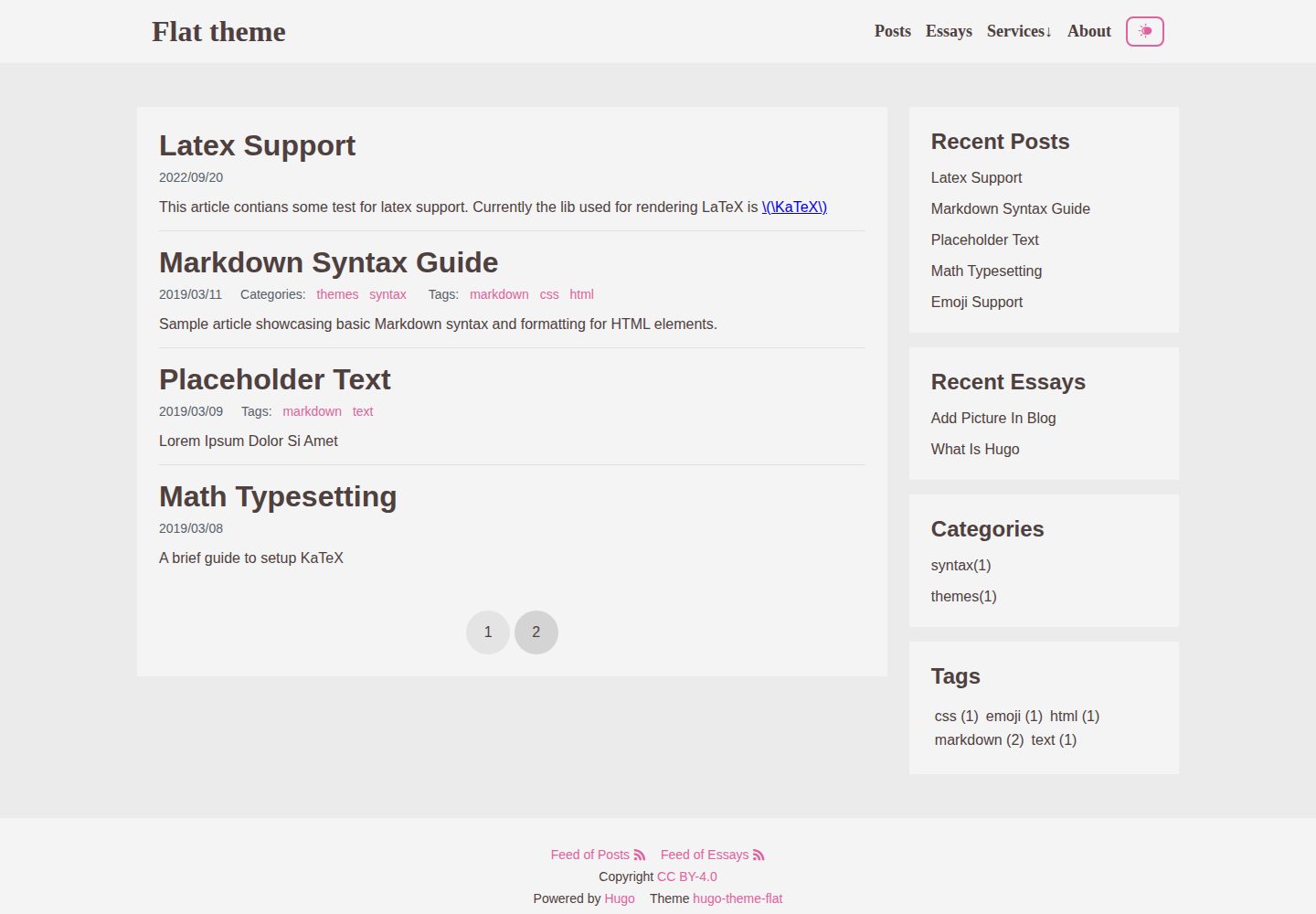
深色与浅色主题支持,默认按 CSS 媒体查询自动切换
HugoWordPress启动器
hugo-theme-flat — Hugo 启动器模板
作者 leafee98
hugo-theme-flat 是一个模仿 WordPress 主题 Allium 的 Hugo 主题,支持深浅色切换、多 section 与响应式布局,采用 MIT 许可。
看看你的网站会是什么样
浏览真实页面截图,比较内容排版与手机效果。点击下方缩略图切换,放大查看整页细节。
全部页面与视图 3
截图用于了解视觉与布局,交互效果请以实际项目为准。
采集于 2026-10-03查看来源
值得关注的模板亮点
从已有项目资料中,快速了解它的特点。
可在配置中指定默认主题,并启用用户端主题切换按钮
响应式布局,适配桌面与移动端
支持 Hugo 多 section,侧边卡片展示最近更新内容
支持子菜单
MIT 许可,允许免费使用、修改、商用与分发
模板详细介绍
hugo-theme-flat 由 leafee98 开发,是一个用 Hugo 重写的主题,设计上参考了 WordPress 主题 Allium。作者在 README 中说明这是其个人使用的主题,并参考了 Hugo 主题 jane 与 mini 的项目结构。
主题提供深色与浅色主题支持,默认通过 CSS 媒体查询自动切换,也可以在配置文件中将 themeMode 设为 auto、dark 或 light 来指定默认主题,并通过 themeToggle 控制是否显示用户端切换按钮。布局为响应式,支持多 section 内容组织:底部 RSS 与侧边 Recent 卡片可展示各 section 的内容,菜单链接需要在 config.toml 中手动指向对应目标,section 排序通过在对应目录的 _index.md front matter 中设置 weight 实现。
限制方面,README 明确指出尚未实现按 section 分离 taxonomy。若不同 section 的文章共用同一标签,标签索引页会混合列出所有 section 下的文章,因此建议只在单一 section 内使用 taxonomy。主题采用 MIT 许可,允许免费使用、修改、商用与分发,但演示图片、字体、图标等第三方素材需单独核对许可。
HugoWordPress启动器
适合你的项目吗?
适用场景
- 为 Hugo 站点套用类似 WordPress Allium 的扁平风格外观
- 需要深色/浅色主题自动切换或手动切换按钮的博客
- 按多个 section 组织内容,并希望侧边展示最近更新
- 需要子菜单导航的个人站点或文档型站点
适合人群
- 使用 Hugo 构建个人博客或小型内容站点的用户
- 偏好扁平、简洁视觉风格并希望接近 Allium 观感的用户
- 需要深浅色主题与响应式布局的站点作者
- 接受在 config.toml 中手动配置菜单与 section 排序的用户
上手与定制指南
结合仓库当前版本的说明,按下面的资料检查内容、配置与运行要求。
- 1
在 config.toml 的 [params] 中设置 themeMode(auto/dark/light)与 themeToggle(true/false)以控制主题模式与切换按钮
- 2
多 section 使用时需在 config.toml 中配置菜单链接指向对应目标
- 3
调整 section 顺序需在对应目录的 _index.md front matter 中设置 weight
- 4
taxonomy 尚未按 section 分离,建议只在单一 section 内使用标签等分类
- 5
演示图片、字体、图标等第三方素材需按各自许可单独核对
授权与来源资料
使用条件与限制
免费使用 · 保留许可声明本次收录的是公开仓库中采用 MIT 许可的免费版本;免费范围为该版本代码,不代表外部服务或第三方素材免费。
使用时需要遵守
- 允许免费使用、修改、商用和分发该版本代码。
- 分发代码副本或实质性部分时,保留原作者版权声明和完整 MIT 许可声明。
- 代码按现状提供;担保与责任限制以原许可证及适用法律为准。
额外费用与待核对事项
- 尚未实现按 section 分离 taxonomy:不同 section 的文章若共用同一标签,标签索引页会混合列出所有 section 下的文章,因此建议只在单一 section 内使用 taxonomy。
- 多 section 使用时需自行在 config.toml 中配置菜单链接指向正确目标,主题不会自动生成。
- 调整 section 顺序需在对应目录的 _index.md front matter 中手动设置 weight。
- 演示图片、字体、图标及其他第三方素材需按各自许可核对,不能仅凭代码的 MIT 许可判断。
- 域名、托管、数据库、支付或 AI 等外部服务可能另外收费。
查看原文依据
Permission is hereby granted, free of charge
许可证原文
separating taxonomies according to different sections is not implemented yet. So better to only use taxonomies inside a specific section.
README 原文
you will need to set up your menu at `config.toml` to point the hyperlink to proper destination.
README 原文
https://github.com/leafee98/hugo-theme-flat/blob/main/LICENSEhttps://github.com/leafee98/hugo-theme-flat/blob/main/README.mdyou need a `_index.md` at the directory of the section to set proper weight at front matter
README 原文
DeepSeek 根据仓库许可证和 README 整理 ·2026-10-03。结果仅覆盖已读取资料,依赖、图片、字体及后续条款变更以各自原文为准。
项目核对记录与介绍依据
模板资料
- 来源平台
- Hugo Themes
- 资料与维护参考分
- 资料较完整 · 92 / 100
- 技术栈
- Hugo · WordPress
- 网站类型
- 启动器
这个分数如何计算
本站按许可资料(最高30分)、演示链接(12分)、预览图(10分)、Star数(15分)、记录的维护时间(15分)、描述完整度(8分)、功能记录(5分)和分类资料(5分)计算。它不是代码、安全或性能测试,也不是 Google 评分;有链接不代表已实测可用。
这个项目需要核对什么
- 记录的仓库更新时间
- 2026-02-12
- 截图检查日期
- 2026-10-03
已收录演示链接。请用你的内容与屏幕尺寸检查;有演示不代表表单、认证或支付已经可用。
目录记录的主要技术栈是 Hugo。请通过依赖清单和锁文件核对实际版本与托管要求。这些说明基于收录资料,不代表代码审计或部署实测。
查看具体选型方法 →介绍的制作与核对状态
介绍由 AI 辅助整理目录与仓库资料。仓库作者不等于这篇介绍的审核者。
审核声明: [email protected] · 2026-10-04
查看当时使用的来源资料
SHA-256: 3955db6758f49ef2217da989e18ab9ce82ce0a2a60b20aa195677762f9ade987
2026-10-03T18:48:10.228Z
来源文件 / 仓库# hugo-theme-flat This is a theme I personally use. ## Features - Dark theme support (auto switch by css media query) - Muti-Section supports - Side card to display recent updated sections - Responsive layout - Sub-menu support ## Dark & Light Theme Support By default, dark or light theme will be set according to CSS media query. You can for default light or dark theme as well as add a user-side theme toggle button by adding the following parameters to your config file. ```toml [params] themeMode = "auto" # sets default theme, options are "auto", "dark", or "light" themeToggle = false # sets presence of theme toggle, options are "true" or "false" ``` ## Multi Section Supports If you use multi sections (with the concept from hugo), the RSS at bottom and *Recent* at side are ready for displaying those content. However, you will need to set up your menu at `config.toml` to point the hyperlink to proper destination. If you want to re-order those sections, you need a `_index.md` at the directory of the section to set proper weight at front matter, just alike what was done at the exampleSite, see `/exampleSite/content/essays/_index.md`. See the predefined variable `weight` at [docs](https://gohugo.io/content-management/front-matter/#front-matter-variables). **Note** that separating taxonomies according to different sections is not implemented yet. So better to only use taxonomies inside a specific section. For a better understand, if you have to posts *A* and *B* in section *S1* and *S2*, both of the posts has the same tag *T1*, like the follow. ``` post A: section S1, tag T1, tag T2 post B: section S2, tag T2 ``` When you open the index page of *T1*, there will be two posts, rathor than post *A* when you are in section *S1* and post *B* when you are in section *S2*. ``` tag T1: post A, post B tag T2: post A ``` ## Special Thanks The wordpress theme [Allium](https://wordpress.org/themes/allium/), and [here](https://templatelens.com/allium/) is its home page. I like this theme very much when I'm using wordpress, but I don't have it on hugo, so I try my best to write a theme similar with it. There are many designs in this theme refers to it. The hugo theme [jane](https://github.com/xianmin/hugo-theme-jane) and [mini](https://github.com/nodejh/hugo-theme-mini/), this is my first time to write a hugo theme, I referred this two themes' project structure and way of handling problems.
看看同类模板
对比同技术栈与用途的模板,找到更适合的视觉与内容结构。

hugo-xmin
eXtremely Minimal Hugo theme: about 140 lines of code in total, including HTML and CSS (with no dependencies)
Hugo · 启动器

hugo-theme-gallery
Gallery Theme for Hugo
Hugo · 启动器

reveal-hugo
📽️ Create rich HTML-based presentations with Hugo and Reveal.js
Hugo · 启动器

anatole
Anatole is a minimalistic two-column theme for Hugo.
Hugo · 启动器

hugo-theme-diary
Moments piled up. A Hugo theme ported from SumiMakito/hexo-theme-Journal.
Hugo · 启动器

risotto
A minimalist, responsive hugo theme inspired by terminal ricing aesthetics.
Hugo · 启动器