单页静态仪表盘,无需构建步骤、后端或安装,打开 index.html 即可运行
HTML后台
pm-dashboard-public — HTML 后台模板
作者 lenumiranda
面向自动化项目管理的单页静态仪表盘模板,用虚构数据展示项目组合、路线图、工时消耗、RAID 日志与进度偏差。
看看你的网站会是什么样
浏览真实页面截图,比较内容排版与手机效果。点击下方缩略图切换,放大查看整页细节。
全部页面与视图 2
截图用于了解视觉与布局,交互效果请以实际项目为准。
采集于 2026-10-02查看来源
值得关注的模板亮点
从已有项目资料中,快速了解它的特点。
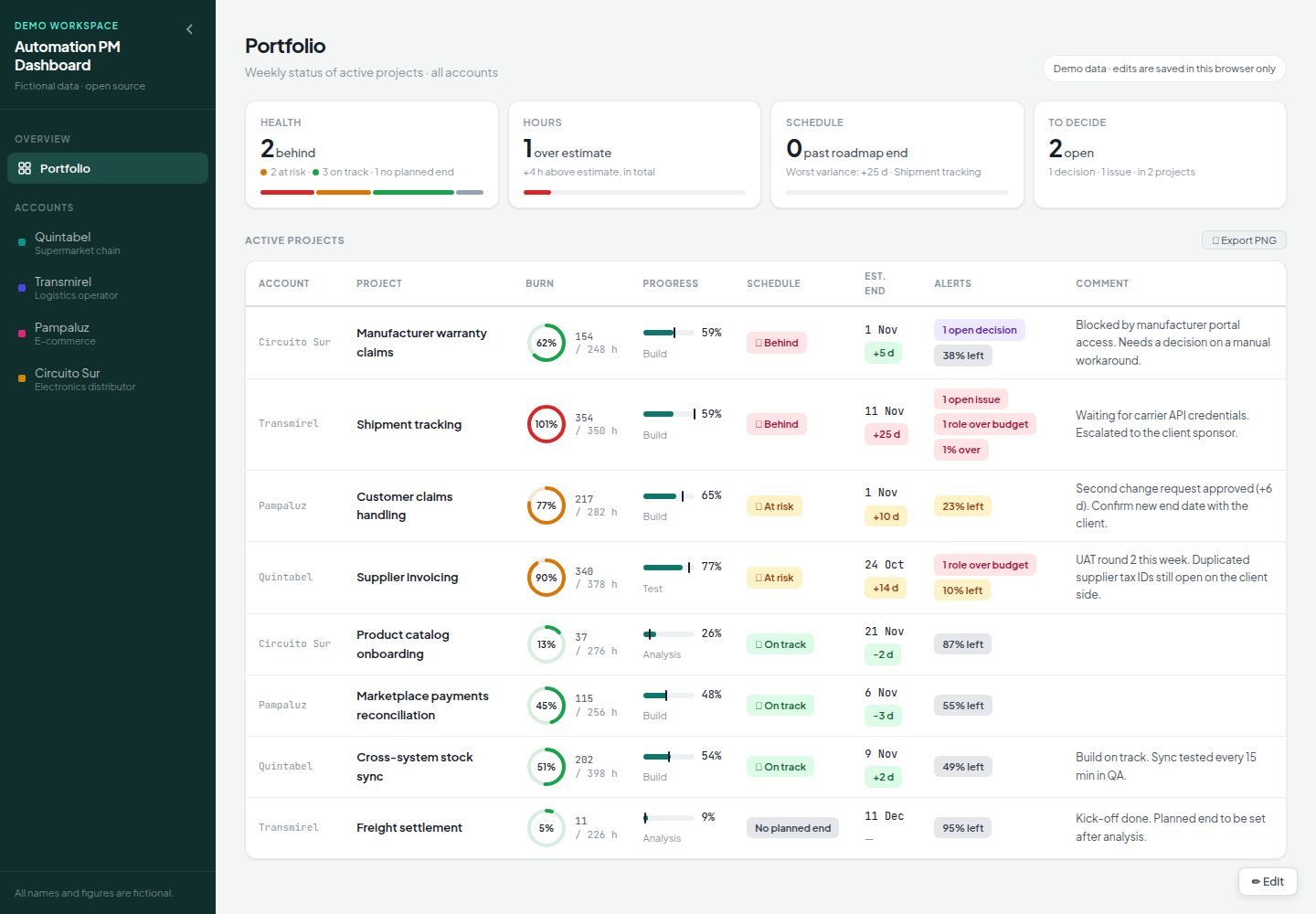
项目组合视图包含健康度、工时、进度与待决策四张 PMO 卡片,以及按红黄绿排序的活跃项目表
账户看板提供甘特图路线图(日/周视图、里程碑、阻塞项、PNG 导出)、进度表、进度指标与 RAID 日志
工时标签页展示总燃烧、阶段胶囊、角色卡片与角色×阶段矩阵
编辑模式支持修改路线图、进度、评论、文档清单与链接,更改立即保存在浏览器中
明暗主题跟随系统设置,阈值、阶段、节假日与角色顺序可在 config.js 中配置
模板详细介绍
这是一个用于自动化项目(RPA、工作流与集成类项目)的单页仪表盘模板,以静态站点方式运行,无需构建步骤、后端或安装。演示数据为虚构内容,包含四个零售与物流客户、九个项目。
页面分为项目组合视图与账户看板两部分。项目组合视图提供四张 PMO 卡片(健康度、工时、进度、待决策)和一张按红黄绿排序的活跃项目表,每行显示燃烧环、路线图进度、进度徽章、预计结束日期与偏差、来自 RAID 日志和工时的告警以及每周评论。点击行可进入项目详情。账户看板按账户组织,包含路线图(甘特图,支持日/周视图、今日线、里程碑、阻塞项、项目关闭标记与 PNG 导出)、进度表、进度指标、进度徽章、RAID 日志、工时标签页(总燃烧、阶段胶囊、角色卡片与角色×阶段矩阵)、运行/文档/链接标签页以及带日期的评论日志。
编辑功能通过右下角编辑按钮进入,可编辑路线图(增删排序阶段、设置日期、颜色与标记、添加阻塞项、里程碑与关闭日期)、进度百分比、评论、文档清单与链接,以及 RAID 条目。所有更改立即保存,但仅保存 UI 可编辑字段;工时、角色与状态始终来自数据文件。
模板提供明暗主题并跟随系统设置,阈值、阶段、节假日、角色顺序与清单可在 config.js 中配置,已保存编辑的版本历史可从浏览器控制台恢复。
使用限制明确:无登录与权限,任何能打开页面的人都能使用编辑模式;无数据库,编辑仅保存在访问者浏览器中且不共享,清除浏览器数据会删除;工时不可从 UI 编辑,需在 data/projects.js 中修改,且不支持从工时表工具导入;项目状态需在数据文件中手工填写;一旦从 UI 编辑过路线图,数据文件中该项目的后续路线图更改将被忽略,直到清除已保存数据;项目为单文件且无测试,设计目标是直接阅读和修改,而非作为库使用;阶段、月份与日期名称为英文,没有翻译层。
HTML后台
适合你的项目吗?
适用场景
- 同时管理多个客户或业务单元下自动化项目的 PM 与交付负责人,需要集中查看项目状态
- 希望以免费方式托管一个轻量级状态页面,并通过编辑纯 JavaScript 进行适配的团队
- 需要将路线图、工时消耗、RAID 日志与进度偏差并排展示,以快速回答是否按计划、已用多少工时、什么在阻塞等问题
- 需要导出表格 PNG 用于状态报告,或导出路线图 PNG 用于沟通的场合
适合人群
- 管理 RPA、工作流与集成类自动化项目的项目经理
- 需要跨客户或业务单元查看多个项目组合状态的交付负责人
- 接受无登录、无数据库、编辑仅保存在本地浏览器这一限制的团队
- 愿意直接编辑 data/projects.js 与 config.js 来适配自有数据的开发者或技术型 PM
上手与定制指南
结合仓库当前版本的说明,按下面的资料检查内容、配置与运行要求。
- 1
下载或克隆仓库后,直接在浏览器中打开 index.html 即可运行
- 2
使用自有数据需编辑 data/projects.js,字段说明见 docs/data-schema.md
- 3
调整阈值或阶段需编辑 config.js,指标说明见 docs/metrics.md
- 4
发布时在仓库设置中启用 GitHub Pages,从 main 分支根目录部署
- 5
编辑仅保存在访问者浏览器中,清除浏览器数据会删除;如需共享编辑需自行连接带认证的数据库
授权与来源资料
使用条件与限制
免费使用 · 保留许可声明本次收录的是公开仓库中采用 MIT 许可的免费版本;免费范围为该版本代码,不代表外部服务或第三方素材免费。
使用时需要遵守
- 允许免费使用、修改、商用和分发该版本代码。
- 分发代码副本或实质性部分时,保留原作者版权声明和完整 MIT 许可声明。
- 代码按现状提供;担保与责任限制以原许可证及适用法律为准。
额外费用与待核对事项
- 无登录与权限控制:任何能打开页面的人都可以进入编辑模式并修改内容,不适合需要访问控制或多人协作权限管理的场景。
- 无数据库,编辑仅保存在访问者本地浏览器中,不共享;清除浏览器数据会丢失编辑内容。如需共享编辑需自行连接带认证的数据库。
- 工时不可从界面编辑,估算、已用工时与角色需在 data/projects.js 中修改,且不支持从工时表工具导入。
- 项目状态需在数据文件中手工填写,状态筛选依赖该字段;进度等级与告警为自动计算。
- 已保存的路线图优先:一旦从界面编辑过某项目路线图,数据文件中该项目的后续路线图更改将被忽略,直到清除已保存数据。
- 单文件且无测试,设计目标是直接阅读和修改,不适合作为库使用。
- 阶段、月份与日期名称为英文,没有翻译层,非英语用户需自行修改。
- 依赖外部资源:Google Fonts 与 html2canvas(用于 PNG 导出),需联网加载;离线环境可能影响字体与导出功能。
- 演示图片、字体、图标及其他第三方素材需按各自许可核对,不能仅凭代码的 MIT 许可判断。
- 域名、托管、数据库、支付或 AI 等外部服务可能另外收费。
查看原文依据
Permission is hereby granted, free of charge
许可证原文
**No login and no permissions.** Anyone who can open the page can use Edit mode.
README 原文
**No database: browser storage only.** Edits are saved in the visitor's browser (mock backend) and are not shared.
README 原文
**Hours are not editable from the UI.** Estimates, spent hours and roles are edited in `data/projects.js`. There is no import from timesheet tools.
README 原文
**Project statuses are written by hand** in the data file (they drive the status filter); schedule levels and alerts are calculated.
README 原文
**Saved roadmaps take priority.** Once a roadmap is edited from the UI, later changes to that project's roadmap in the data file are ignored until the saved data is cleared.
README 原文
**Single file, no tests.** It is designed to be read and modified directly, not as a library.
README 原文
Stage, month and day names are in English; there is no translation layer.
README 原文
https://github.com/lenumiranda/pm-dashboard-public/blob/main/LICENSEhttps://github.com/lenumiranda/pm-dashboard-public/blob/main/README.mdExternal resources: Google Fonts and [html2canvas](https://html2canvas.hertzen.com/) for PNG export, pinned with an integrity hash.
README 原文
DeepSeek 根据仓库许可证和 README 整理 ·2026-10-03。结果仅覆盖已读取资料,依赖、图片、字体及后续条款变更以各自原文为准。
项目核对记录与介绍依据
模板资料
- 来源平台
- GitHub
- 资料与维护参考分
- 资料较完整 · 80 / 100
- 技术栈
- HTML
- 网站类型
- 后台
这个分数如何计算
本站按许可资料(最高30分)、演示链接(12分)、预览图(10分)、Star数(15分)、记录的维护时间(15分)、描述完整度(8分)、功能记录(5分)和分类资料(5分)计算。它不是代码、安全或性能测试,也不是 Google 评分;有链接不代表已实测可用。
这个项目需要核对什么
- 记录的仓库更新时间
- 2026-10-02
- 截图检查日期
- 2026-10-03
已收录演示链接。请用你的内容与屏幕尺寸检查;有演示不代表表单、认证或支付已经可用。
目录记录的主要技术栈是 HTML。请通过依赖清单和锁文件核对实际版本与托管要求。这些说明基于收录资料,不代表代码审计或部署实测。
查看具体选型方法 →介绍的制作与核对状态
介绍由 AI 辅助整理目录与仓库资料。仓库作者不等于这篇介绍的审核者。
审核声明: [email protected] · 2026-10-04
查看当时使用的来源资料
SHA-256: 9f966479fcdc9ff8077c7c0b9772ee84dc7a7fc404bdae8a3bd38ac9c0a20c18
2026-10-03T20:26:38.666Z
来源文件 / 仓库# Automation PM Dashboard **English** · [Español](README.es.md) A single-page dashboard template for project managers who run automation projects (RPA, workflow and integration projects). In one place it shows each project's roadmap, hours burn, RAID log and schedule variance against the planned end. It runs as a static site: no build step, no backend and no install. The demo ships with **fictional data** (four made-up retail and logistics accounts, nine projects). **Live demo:** https://lenumiranda.github.io/pm-dashboard-public/   ## The problem it solves In automation projects the status usually lives in several places: the roadmap in a slide, hours in a timesheet export, risks in a spreadsheet, and the planned date in someone's head. This template puts them side by side for every project, so you can answer three questions quickly: - Are we on schedule compared with the planned end? - How much of the estimated effort have we used, by stage and by role? - What is blocking us, and who owns it? ## Who it is for - PMs and delivery leads with several automation projects across clients or business units. - Teams that want a lightweight status page they can host for free and adapt by editing plain JavaScript. ## Features **Portfolio view** (weekly status of active projects) - Four PMO cards: **Health** (behind / at risk / on track / no planned end), **Hours** (projects over estimate and extra hours), **Schedule** (projects past their roadmap end and the worst variance) and **To decide** (open decisions and issues). - A table of active projects, sorted 🔴 → 🟡 → 🟢 by default, with: - a burn ring; - roadmap progress with a burn marker and the current stage; - the schedule badge; - the estimated end with its variance; - alerts calculated from the RAID log and hours; - a weekly comment. - Click a row to open the project. In Edit mode you can reorder rows (▲▼) and edit the comment. **Export PNG** downloads the table, dated, for a status report. **Account boards** (one per account, with status filter chips) - **Roadmap:** a gantt chart with Day and Week views, today's line, milestones, blockers (lost working days), project close marker and PNG export. - **Progress table:** for each stage, time elapsed on the roadmap vs. hours spent vs. manual progress %. - **Schedule metrics:** planned end, estimated end, schedule variance (days and %) and scope changes (count and day impact). - **Schedule badge:** 🟢 On track / 🟡 At risk / 🔴 Behind, plus Closed, No dates and No planned end. - **RAID log:** Actions, Risks, Issues, Decisions and Changes, with status, owner, due date, overdue flag, filters and a collapsible "Closed" list. - **Hours tab:** total burn, stage pills, one card per role (with a stage breakdown and team members), and a role × stage matrix. - **Runs, Docs and Links tabs:** production schedule, a delivery checklist, and backlog/estimate links. - **Comments:** a dated log per project. **Editing** (✏️ Edit button, bottom right) - Roadmap editor: add, remove and reorder stages, set dates, color and flag, and add blockers, milestones and close date. You can also set the planned end; changing it requires a reason, and each change is kept in a history. - Edit progress %, comments, docs checklist and links. RAID items can be added and edited at any time. - Portfolio: weekly comment per project and manual row order. - Every change is saved right away. Only UI-editable fields are saved; hours, roles and statuses always come from the data file. **Other** - Light and dark themes, following your system setting. - Configurable thresholds, stages, holidays, roles order and checklist in `config.js`. - Version history of saved edits, restorable from the browser console. ## Quick start 1. Download or clone the repository. 2. Open `index.html` in a browser. That's it. To use your own data, edit `data/projects.js` (see [docs/data-schema.md](docs/data-schema.md)). To change thresholds or stages, edit `config.js` (see [docs/metrics.md](docs/metrics.md)). To publish it, enable GitHub Pages on the repository (Settings → Pages → deploy from the `main` branch, root folder). ## Documentation - [Usage guide](docs/usage.md): navigation, editing, storage and restoring versions. - [Metrics](docs/metrics.md): every formula, threshold and how to read it. - [Data schema](docs/data-schema.md): how to load your own accounts and projects. - [Security](SECURITY.md): what this tool does not protect, and how to use it safely. ## Limitations - **No login and no permissions.** Anyone who can open the page can use Edit mode. - **No database: browser storage only.** Edits are saved in the visitor's browser (mock backend) and are not shared. Clearing the browser data deletes them. To share edits, connect your own database with authentication (see [Connecting your own database](docs/usage.md#connecting-your-own-database)). - **Hours are not editable from the UI.** Estimates, spent hours and roles are edited in `data/projects.js`. There is no import from timesheet tools. - **Project statuses are written by hand** in the data file (they drive the status filter); schedule levels and alerts are calculated. - **Saved roadmaps take priority.** Once a roadmap is edited from the UI, later changes to that project's roadmap in the data file are ignored until the saved data is cleared. - **Single file, no tests.** It is designed to be read and modified directly, not as a library. - Stage, month and day names are in English; there is no translation layer. ## Tech Plain HTML, CSS and JavaScript. No backend and no network calls (enforced by a Content-Security-Policy). External resources: Google Fonts and [html2canvas](https://html2canvas.hertzen.com/) for PNG export, pinned with an integrity hash. ## License [MIT](LICENSE) © Elena Miranda
看看同类模板
对比同技术栈与用途的模板,找到更适合的视觉与内容结构。

gentelella
Free admin dashboard template — vanilla JS, SCSS, Vite 8. No Bootstrap, no jQuery.
HTML · 后台

coreui-free-bootstrap-admin-template
Free Bootstrap Admin & Dashboard Template Built for AI-Assisted Development
HTML · 后台

dashboards
Responsive dashboard templates 📊✨
HTML · 后台

SB Admin 2
SB Admin 2 是 Start Bootstrap 推出的开源后台模板,基于 Bootstrap 构建,整体风格偏向经典管理界面。
HTML · 后台

Adminator-admin-dashboard
Adminator is easy to use and well design admin dashboard template with dark mode for web apps, websites, servi…
HTML · 后台

SB Admin
SB Admin 是 Start Bootstrap 推出的开源后台管理模板,基于 Bootstrap 构建,定位是简洁、实用的管理界面。
HTML · 后台