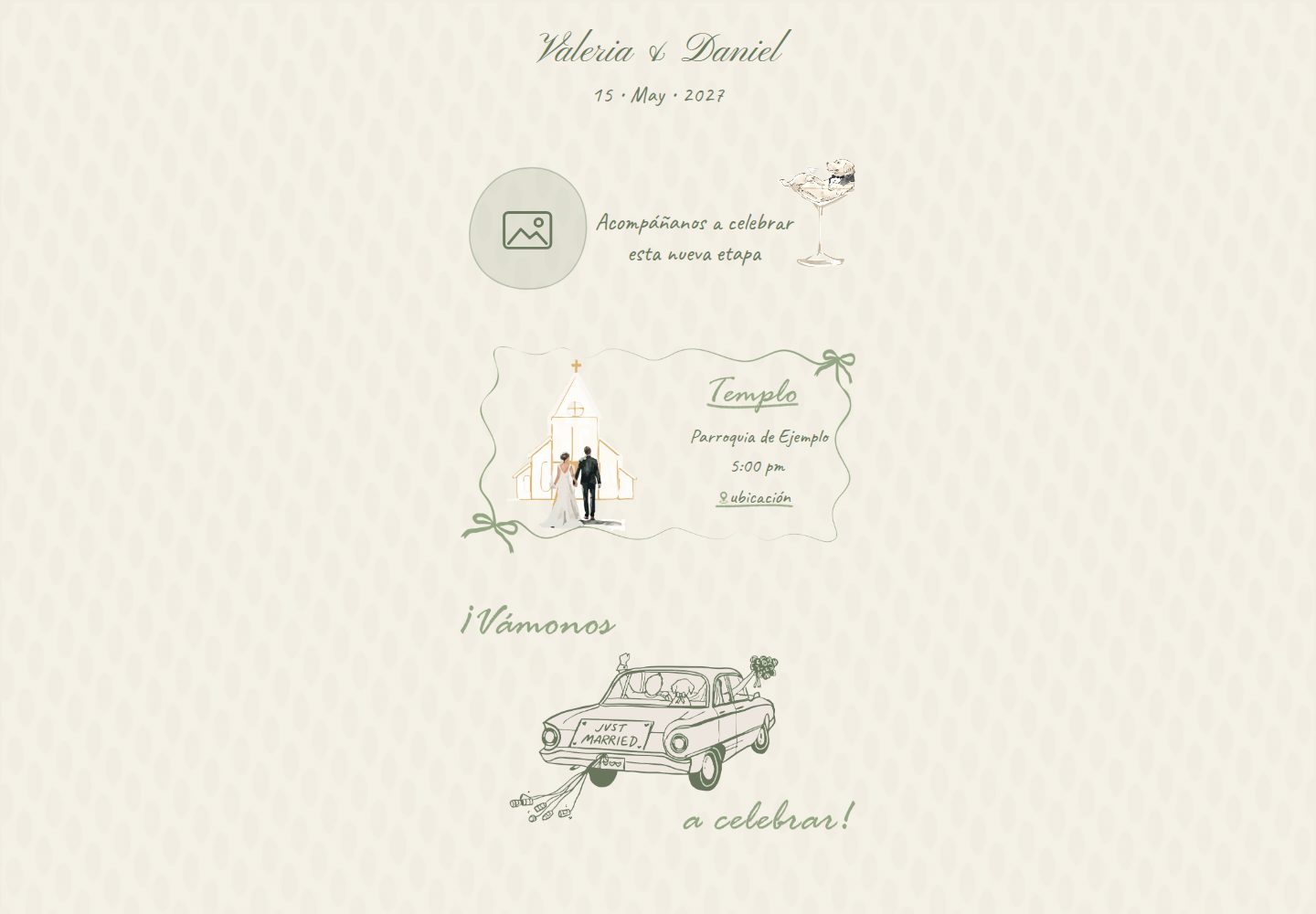
内容集中在 src/invitation.config.js 单个配置文件,构建时生成静态 HTML
ViteHTML启动器
wedding-invitation-template — Vite 启动器模板
作者 lfrocharod
移动优先的婚礼邀请函网站模板,内容集中在单个配置文件,构建时生成静态 HTML,支持滚动动画、倒计时与 RSVP 表单。
看看你的网站会是什么样
浏览真实页面截图,比较内容排版与手机效果。点击下方缩略图切换,放大查看整页细节。
全部页面与视图 2
截图用于了解视觉与布局,交互效果请以实际项目为准。
采集于 2026-10-11查看来源
值得关注的模板亮点
从已有项目资料中,快速了解它的特点。
移动优先单列布局,文字以百分比定位、容器查询单位随插画缩放
滚动显现动画基于 IntersectionObserver,仅在允许动效且 JS 运行时隐藏内容
RSVP 表单支持 Sí/No 逐场次选择、电话格式化与校验,并提供 demo 与 Google Apps Script 两种后端
页面标题与 Open Graph 标签在构建时生成,适配不执行 JS 的链接预览抓取程序
模板详细介绍
这是一个基于 Vite 的婚礼邀请函网站模板,面向手机浏览设计。页面采用单列布局(最大宽度 480px),文字叠加在插画之上,位置用百分比定位、尺寸用容器查询单位,随插画一起缩放。所有内容(新人姓名、日期、场地、着装要求、礼物、RSVP 文案)集中在 src/invitation.config.js 一个配置文件中,并在构建时写入静态 HTML。
功能上包含基于 IntersectionObserver 的滚动显现动画、读取配置的婚礼倒计时、以及带 Sí/No 逐场次选择的 RSVP 表单。表单支持电话号码格式化与校验,并带有隐藏的蜜罐字段防机器人。RSVP 后端在构建时通过 VITE_RSVP_MODE 选择:demo 模式不发起网络请求,仅在控制台输出本应保存的数据;apps-script 模式将 JSON POST 到 Google Apps Script 网页应用,把每条回复追加到 Google 表格。
链接预览方面,页面标题与 Open Graph 标签由一个小型 Vite 插件在构建时从配置生成并写入静态 HTML,以适应不执行 JavaScript 的预览抓取程序。无障碍处理包括真实的 h1 与分节标题、带标签的表单控件与切换组、焦点移至确认消息,以及 autocomplete 提示。
使用前需注意:站点文案为西班牙语,代码与文档为英语;插画上的标题文字绘制在图片中,HTML 中对应标题使用 visually-hidden 类,若替换为不含文字的插画需在 index.html 中移除该类,并调整 main.scss 中的文字定位。演示图片、字体、图标等第三方素材需按各自许可核对,代码本身采用 MIT 许可。
ViteHTML启动器
适合你的项目吗?
适用场景
- 为婚礼制作一个以手机访问为主的邀请函页面
- 需要把 RSVP 回复收集到 Google 表格的婚礼
- 希望用单个配置文件管理姓名、日期、场地与文案的邀请函项目
适合人群
- 熟悉基本前端构建流程、能编辑 JavaScript 配置文件的用户
- 需要西班牙语邀请函文案、并接受自行翻译或替换文案的婚礼
- 愿意自行准备插画与照片、并按模板尺寸调整素材的用户
上手与定制指南
结合仓库当前版本的说明,按下面的资料检查内容、配置与运行要求。
- 1
需要 Node.js 20.19+ 或 22.12+,安装依赖后运行 npm run dev 启动开发服务器
- 2
替换 public/assets/images/ 下的图片时保持文件名,或同步更新 index.html 中的路径
- 3
若使用 apps-script 模式,需部署 Google Apps Script 网页应用并设置 VITE_RSVP_MODE 与 VITE_RSVP_ENDPOINT
- 4
替换 og-image.jpg(1200×630)并设置 site.url,部署后用链接预览调试工具检查效果
授权与来源资料
使用条件与限制
免费使用 · 保留许可声明本次收录的是公开仓库中采用 MIT 许可的免费版本;免费范围为该版本代码,不代表外部服务或第三方素材免费。
使用时需要遵守
- 允许免费使用、修改、商用和分发该版本代码。
- 分发代码副本或实质性部分时,保留原作者版权声明和完整 MIT 许可声明。
- 代码按现状提供;担保与责任限制以原许可证及适用法律为准。
额外费用与待核对事项
- 演示图片、字体、图标及其他第三方素材需按各自许可核对,不能仅凭代码的 MIT 许可判断。
- 域名、托管、数据库、支付或 AI 等外部服务可能另外收费。
- 插画版权归 Pao Lepe,经许可使用,不在本仓库许可证覆盖范围内,且不可复用;替换插画时需自行取得授权。
- public/assets/images/ 中的插画及其衍生的链接预览图与 docs/screenshots/ 截图均被排除在 MIT 许可之外,不可按 MIT 条款复用。
- apps-script 模式依赖外部 Google Apps Script 网页应用与 Google 表格服务,需自行部署并承担相应服务成本。
- 使用 apps-script 后端需创建 Google 表格并授权 Apps Script 权限,涉及 Google 账号与外部服务。
- VITE_* 环境变量会被内联进公开的 JavaScript 包,端点等值会暴露给访问者,不应放入机密信息。
- WhatsApp 会缓存链接预览,测试变更时需通过附加查询字符串等方式绕过缓存。
查看原文依据
Permission is hereby granted, free of charge
许可证原文
Illustrations © Pao Lepe, used with permission. Not covered by this repo's license and not for reuse.
README 原文
The illustrations in `public/assets/images/`, and the images made from them (the link-preview image and the screenshots in `docs/screenshots/`), are excluded (see [Credits](#credits)).
README 原文
POSTs the answer as JSON to `VITE_RSVP_ENDPOINT`, a Google Apps Script web app that appends a row to a Google Sheet.
README 原文
Create a Google Sheet for the answers.
README 原文
`VITE_*` variables are inlined into the public JavaScript bundle.
README 原文
https://github.com/lfrocharod/wedding-invitation-template/blob/main/LICENSEhttps://github.com/lfrocharod/wedding-invitation-template/blob/main/README.mdWhatsApp caches previews, so when testing changes share the URL with a query string like `?v=2`.
README 原文
DeepSeek 根据仓库许可证和 README 整理 ·2026-10-11。结果仅覆盖已读取资料,依赖、图片、字体及后续条款变更以各自原文为准。
项目核对记录与介绍依据
模板资料
- 来源平台
- GitHub
- 资料与维护参考分
- 资料较完整 · 85 / 100
- 技术栈
- Vite · HTML
- 网站类型
- 启动器
这个分数如何计算
本站按许可资料(最高30分)、演示链接(12分)、预览图(10分)、Star数(15分)、记录的维护时间(15分)、描述完整度(8分)、功能记录(5分)和分类资料(5分)计算。它不是代码、安全或性能测试,也不是 Google 评分;有链接不代表已实测可用。
这个项目需要核对什么
- 记录的仓库更新时间
- 2026-10-11
- 截图检查日期
- 2026-10-11
已收录演示链接。请用你的内容与屏幕尺寸检查;有演示不代表表单、认证或支付已经可用。
目录记录的主要技术栈是 Vite。请通过依赖清单和锁文件核对实际版本与托管要求。这些说明基于收录资料,不代表代码审计或部署实测。
查看具体选型方法 →介绍的制作与核对状态
介绍由 AI 辅助整理目录与仓库资料。仓库作者不等于这篇介绍的审核者。
审核声明: [email protected] · 2026-10-11
查看当时使用的来源资料
SHA-256: e7bcc494b29e69d2d23eadd5b6b50ac310f4b7dea9fd9eb6a5bfac27583bd508
2026-10-11T09:38:53.137Z
来源文件 / 仓库# Wedding Invitation Template
[](https://github.com/lfrocharod/wedding-invitation-template/actions/workflows/ci.yml)
A mobile-first wedding invitation website with scroll animations, a live countdown, an RSVP form and link-preview metadata. All of the content (names, date, venues, dress code, gifts, RSVP texts) lives in one config file and is baked into static HTML at build time.
The site copy is in Spanish; the code and documentation are in English.
**Live demo:** [lfrocharod.github.io/wedding-invitation-template](https://lfrocharod.github.io/wedding-invitation-template/)
## Screenshots
Phone viewport (390px wide) with the placeholder content.
| Hero and ceremony | Dress code, gifts and countdown | RSVP |
| :------------------------------------------------------------------------------------------------------------------------------------------------------: | :-----------------------------------------------------------------------------------------------------------------------------------------------------: | :---------------------------------------------------------------------------------------------------------------------: |
| <img src="docs/screenshots/hero-and-ceremony.jpg" width="260" alt="Header with the couple's names and the date, the welcome text and the ceremony card"> | <img src="docs/screenshots/dress-code-gifts-countdown.jpg" width="260" alt="Dress code panel, gift table with example bank details, and the countdown"> | <img src="docs/screenshots/rsvp.jpg" width="260" alt="RSVP form with name, phone and the Sí/No toggles for each event"> |
## Features
- **Mobile-first illustrated layout:** a single column (480px max) where text sits on top of the illustrations, positioned with percentages and sized with container query units (`cqw`), so it scales with the artwork on any screen.
- **Scroll-reveal animations** with `IntersectionObserver`. They are opt-in: sections only start hidden when the visitor allows motion (`prefers-reduced-motion: no-preference`) and JavaScript is running, so the content is never stuck invisible.
- **Live countdown** to the ceremony, read from the config.
- **RSVP form** with Sí/No toggles per event, phone formatting (`+52 555 000 00 00`), validation, a honeypot field against bots and two backends: a network-free **demo** mode and a **Google Apps Script** mode that writes each answer to a Google Sheet.
- **Link previews that work on WhatsApp:** the page title and Open Graph tags are in the static HTML, generated from the config by a small Vite plugin. Link-preview crawlers don't run JavaScript.
- **One config file:** `src/invitation.config.js`. A placeholder without a matching value fails the build instead of shipping `{{ … }}` to guests.
- **Accessible:** a real `<h1>` and section headings for screen readers (the visible titles are drawn into the artwork), labelled form controls and toggle groups, focus moved to the confirmation message, and `autocomplete` hints.
- **Lightweight:** no framework, about 5 KB of JavaScript, and illustrations compressed to 256-color lossless WebP (the image folder went from 3.4 MB to about 0.8 MB).
- **Tooling:** ESLint, Stylelint, Prettier, a Husky + lint-staged pre-commit hook and GitHub Actions CI that deploys `main` to GitHub Pages.
## Quick start
Requires Node.js 20.19+ or 22.12+.
```bash
npm install
npm run dev # then open the URL Vite prints (it includes the base path from site.url)
```
## Customize it
### 1. Content: `src/invitation.config.js`
| Key | What it controls |
| ----------------------------------------------------- | ----------------------------------------------------------------------------------------------------------------------------------------------------------------------------------------------------------------------- |
| `site.url` | Public URL of the deployed site, without a trailing slash. Used for `og:url` and for the absolute `og:image` URL that WhatsApp needs. Its path is also the base the site is built for, e.g. `/<repo>/` on GitHub Pages. |
| `site.description` | Meta description and link-preview text. |
| `site.ogImage`, `site.ogImageAlt` | Link-preview image (1200×630) and its alt text. |
| `couple.partner1`, `couple.partner2`, `couple.joiner` | Names, joined as "Valeria & Daniel" in the page title, link preview and header. |
| `couple.photo` | Photo next to the welcome text (586×612 frame; other shapes are cropped, not stretched). |
| `date` | Ceremony start in ISO 8601 with the venue's UTC offset, e.g. `2027-05-15T17:00:00-06:00`. Drives the countdown and every displayed date. |
| `intro` | Welcome text next to the photo. |
| `ceremony`, `reception` | Venue name, time and Google Maps link. |
| `dressCode` | Dress code (read by screen readers), the note, and the inspiration links behind the "Mujer" / "Hombre" buttons. |
| `gifts` | Message and bank or gift-registry details, one line each. |
| `rsvp` | Intro text, note (e.g. "¡No niños!") and confirmation message. |
In text values, `\n` is a line break; arrays render one item per line.
### 2. Images: `public/assets/images/`
Replace the files (keeping their names, or updating the paths in `index.html`). The text over each illustration is positioned with percentages, so artwork with a different composition needs those positions tuned in `src/styles/main.scss`.
The section titles and labels ("Templo", "Mujer", "ceremonia", …) are drawn into the illustrations, so their HTML counterparts carry the `visually-hidden` class: screen readers still get them, sighted visitors don't see them twice. If your artwork has no lettering, remove that class in `index.html` and the titles render in place.
### 3. Link preview
Replace `og-image.jpg` (1200×630; keep it small, as WhatsApp may skip images over roughly 300 KB), set `site.url`, deploy, and check the result with a link-preview debugger such as Facebook's Sharing Debugger. WhatsApp caches previews, so when testing changes share the URL with a query string like `?v=2`.
## RSVP setup
The RSVP backend is chosen at build time with `VITE_RSVP_MODE`. Locally, copy `.env.example` to `.env.local`; on your host, set the same variables in its dashboard and redeploy.
| Mode | Behavior |
| ---------------- | --------------------------------------------------------------------------------------------------------------------------------------------------------------------------------------------------------- |
| `demo` (default) | No network call. After a short delay the normal confirmation appears, and the payload that would have been saved is logged to the browser console. Safe for a public demo. |
| `apps-script` | POSTs the answer as JSON to `VITE_RSVP_ENDPOINT`, a Google Apps Script web app that appends a row to a Google Sheet. The build fails if the endpoint is missing, and a failed save is shown to the guest. |
### Google Apps Script backend
1. Create a Google Sheet for the answers.
2. Open **Extensions → Apps Script**, replace the contents of `Code.gs` with [`apps-script/Code.gs`](apps-script/Code.gs) and save.
3. Click **Deploy → New deployment**, select the type **Web app** and set:
- **Execute as:** Me
- **Who has access:** Anyone
4. Click **Deploy**, authorize the requested permissions and copy the **Web app URL** (it ends in `/exec`). Opening it in a browser should show `{"ok":true,…}`.
5. Set the variables in `.env.local` and on your host:
```bash
VITE_RSVP_MODE=apps-script
VITE_RSVP_ENDPOINT=<your web app URL>
```
6. Rebuild or redeploy, send a test RSVP and check the **RSVP** tab of the sheet. It is created on the first submission, with a header row.
After editing the script, publish the change with **Deploy → Manage deployments → Edit → Version: New version**, which keeps the same URL.
Good to know:
- `VITE_*` variables are inlined into the public JavaScript bundle. The endpoint isn't a secret; keeping it out of the repo keeps the template generic and away from scrapers.
- "Anyone" access is what lets the browser read the script's reply. The script validates every field, drops honeypot submissions, uses a lock so simultaneous answers don't collide, and stores values starting with `=`, `+`, `-` or `@` as plain text so Sheets never evaluates them as formulas (phone numbers like `+52 …` included).
### Spam protection
The form has a hidden `website` field. People never see it, but bots that fill in every field do. Those submissions get a fake success message and are never sent; the Apps Script drops them too, in case a bot posts to the endpoint directly.
## Scripts
| Command | Description |
| ---------------------- | -------------------------------------------- |
| `npm run dev` | Start the Vite dev server |
| `npm run build` | Build the static site into `dist/` |
| `npm run preview` | Serve the production build locally |
| `npm run lint` | Run ESLint, Stylelint and the Prettier check |
| `npm run lint:js` | Run ESLint only |
| `npm run lint:css` | Run Stylelint only |
| `npm run format` | Format all files with Prettier |
| `npm run format:check` | Check formatting without writing |
A pre-commit hook (Husky + lint-staged) lints and formats the staged files. GitHub Actions runs ESLint, Stylelint, the Prettier check and the production build on every push and pull request, and deploys `main` to GitHub Pages once they pass.
## Tech stack
- [Vite](https://vite.dev) 8, with a custom `transformIndexHtml` plugin
- Vanilla JavaScript (ES modules), no framework
- SCSS (Dart Sass) with BEM naming and container query units
- Google Apps Script and Google Sheets for RSVPs
- ESLint, Stylelint (`stylelint-config-standard-scss`) and Prettier
- Husky + lint-staged, GitHub Actions
## Project structure
```text
.
├── apps-script/
│ └── Code.gs # RSVP backend (Google Apps Script web app)
├── docs/screenshots/ # README screenshots
├── plugins/
│ └── vite-plugin-invitation.js # Injects the config into index.html at build time
├── public/ # Copied as-is: favicon and images
├── src/
│ ├── invitation.config.js # All of the invitation content
│ ├── scripts/ # main.js (entry), reveal.js, countdown.js, rsvp.js
│ └── styles/main.scss
├── .env.example # RSVP mode and endpoint
├── index.html # Page template with {{ placeholders }}
└── vite.config.js # Registers the plugin, sets the base path, checks the RSVP variables
```
## How the config gets into the HTML
`index.html` contains placeholders such as `{{ couple.names }}` and `{{ ceremony.venue }}`. The plugin in `plugins/vite-plugin-invitation.js` hooks into Vite's `transformIndexHtml` before Vite resolves asset URLs and replaces each placeholder with the matching value from `src/invitation.config.js`. Values are HTML-escaped, and line breaks are handled differently in text and in attributes. The plugin also derives a few values, such as the couple's display name and the Spanish date parts used in the title and preview.
Doing this at build time rather than in the browser means the page title, the Open Graph tags and every visible text are in the static HTML that WhatsApp's crawler fetches, and the content doesn't depend on JavaScript to appear.
## Deployment
The CI workflow deploys `main` to **GitHub Pages** after the checks pass. To do the same with your copy:
1. In the repository settings, open **Pages** and set **Source** to **GitHub Actions**.
2. Set `site.url` to `https://<user>.github.io/<repo>`. The build picks up `/<repo>/` as its base path from it.
3. Push to `main`.
`npm run build` writes a static site to `dist/`, so any other static host works too. On Vercel or Netlify, import the repository (the Vite preset is detected automatically: build command `npm run build`, output directory `dist`), set `site.url` to your domain, and add the RSVP environment variables if you use the Apps Script mode.
## Credits
Illustrations © Pao Lepe, used with permission. Not covered by this repo's license and not for reuse.
## License
The code is released under the [MIT License](LICENSE). The illustrations in `public/assets/images/`, and the images made from them (the link-preview image and the screenshots in `docs/screenshots/`), are excluded (see [Credits](#credits)).
看看同类模板
对比同技术栈与用途的模板,找到更适合的视觉与内容结构。

react-starter-kit
Modern React starter kit with Bun, TypeScript, Tailwind CSS, tRPC, Stripe, and Cloudflare Workers. Production-…
Vite · SaaS

cove
The Cove Stack: 🏝️ minimal TanStack Start template with Vite+, Better Auth, Drizzle ORM, shadcn/ui
Vite · SaaS

vite-react-boilerplate
A production ready, scalable starter template for Vite + React
Vite · 启动器

react-vite-admin
This Starter utilizes React, Recoil, React Query, React Hooks, Typescript, Axios And Vite. 全新技术栈的后台管理系统
Vite · 后台

typescript-react_best_practices-vite_template
<⚡⚛️> Start your React project with Vite following code best practices (TypeScript, Linting, testing, CI/CD…)
Vite · 启动器

cloudflare-starter-kit
Template (boilerplate) repository for scaffolding Cloudflare Workers projects
Vite · 启动器