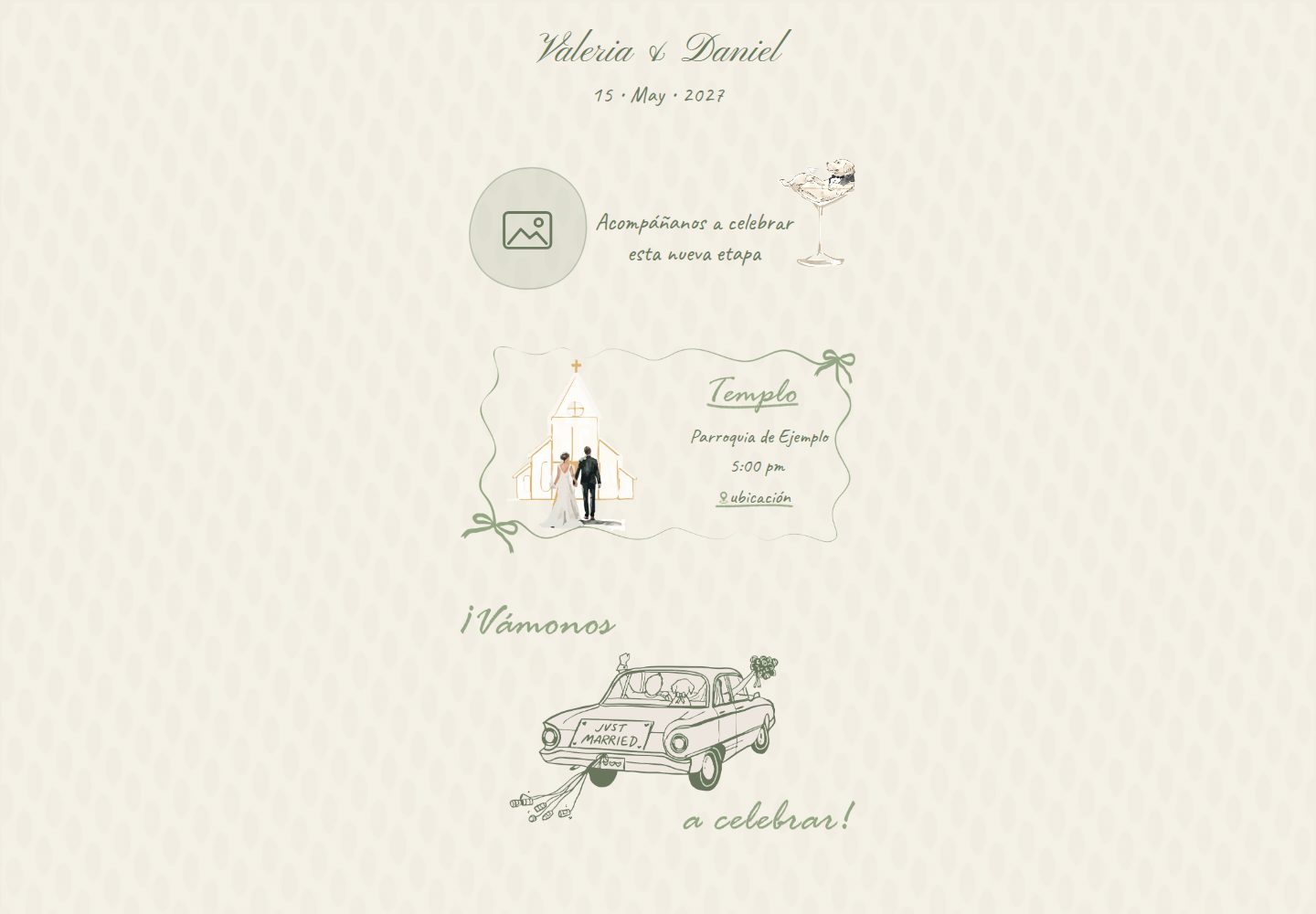
Content is centralized in a single configuration file, src/invitation.config.js, and generates static HTML at build time
ViteHTMLStarter
wedding-invitation-template — Vite Starter Template
By lfrocharod
A mobile-first wedding invitation website template with content centralized in a single configuration file. It generates static HTML at build time and supports scroll animations, a countdown, and an RSVP form.
Explore the design
Compare the page layouts and mobile experience. Open any screenshot for a closer look.
Desktop homepage1 / 2
Desktop captureTop of page
Actual screenshot captured by the server browser.
All pages & views 2
Screenshots show visual appearance; interactive behavior may differ.
Recorded 2026-10-11View source
What stands out
A quick read of the recorded project description.
Mobile-first single-column layout, with text positioned using percentages and container query units that scale with the illustrations
Scroll-reveal animations based on IntersectionObserver, hiding content only when motion is allowed and JavaScript is running
RSVP form supports per-event Sí/No selection, phone formatting and validation, and offers both demo and Google Apps Script backends
Page title and Open Graph tags are generated at build time, accommodating link preview scrapers that do not execute JavaScript
Template Details
This is a Vite-based wedding invitation website template designed for mobile browsing. The page uses a single-column layout (maximum width 480px), with text overlaid on illustrations, positioned using percentages and sized with container query units so it scales along with the illustrations. All content (couple names, date, venue, dress code, gifts, RSVP copy) is centralized in a single configuration file, src/invitation.config.js, and written into static HTML at build time.
Functionally, it includes scroll-reveal animations based on IntersectionObserver, a wedding countdown that reads from the configuration, and an RSVP form with per-event Sí/No selection. The form supports phone number formatting and validation, and includes a hidden honeypot field to deter bots. The RSVP backend is selected at build time via VITE_RSVP_MODE: demo mode makes no network requests and only logs to the console the data that would have been saved; apps-script mode sends a JSON POST to a Google Apps Script web app, appending each response to a Google Sheet.
For link previews, the page title and Open Graph tags are generated at build time from the configuration by a small Vite plugin and written into static HTML, accommodating preview scrapers that do not execute JavaScript. Accessibility handling includes a real h1 and section headings, labeled form controls and toggle groups, focus moved to the confirmation message, and autocomplete hints.
Before use, note: the site copy is in Spanish, while code and documentation are in English; the heading text on the illustrations is drawn into the images, and the corresponding headings in HTML use the visually-hidden class. If you replace them with illustrations that do not contain text, remove that class in index.html and adjust the text positioning in main.scss. Third-party assets such as demo images, fonts, and icons must be checked against their respective licenses; the code itself is under the MIT license.
ViteHTMLStarter
Is it right for your project?
Use Cases
- Creating a mobile-first invitation page for a wedding
- A wedding that needs to collect RSVP responses into a Google Sheet
- An invitation project where names, date, venue, and copy are managed in a single configuration file
Suitable For
- Users familiar with a basic front-end build workflow who can edit a JavaScript configuration file
- Weddings that need Spanish invitation copy and are willing to translate or replace the text themselves
- Users willing to prepare their own illustrations and photos and adjust assets to the template dimensions
Getting started & customization
Use these recorded setup notes alongside the repository instructions for your chosen version.
- 1
Requires Node.js 20.19+ or 22.12+; after installing dependencies, run npm run dev to start the development server
- 2
When replacing images under public/assets/images/, keep the file names or update the paths in index.html accordingly
- 3
If using apps-script mode, deploy a Google Apps Script web app and set VITE_RSVP_MODE and VITE_RSVP_ENDPOINT
- 4
Replace og-image.jpg (1200×630) and set site.url; after deployment, check the result with a link preview debugging tool
License & source material
Usage conditions & limitations
Free to use · keep license noticeThis entry covers the free version in a public repository under the MIT license; the free scope is the code of that version and does not imply that external services or third-party assets are free.
Must comply with when using
- You may use, modify, commercialize, and distribute the code of this version for free.
- When distributing copies or substantial portions of the code, retain the original author's copyright notice and the full MIT license notice.
- The code is provided as is; warranties and limitations of liability are governed by the original license and applicable law.
Additional costs & items to verify
- Demo images, fonts, icons, and other third-party assets must be checked against their respective licenses; the code's MIT license alone is not sufficient to determine this.
- External services such as domains, hosting, databases, payments, or AI may incur additional charges.
- The illustration copyright belongs to Pao Lepe and is used under license; it is not covered by this repository's license and may not be reused. You must obtain your own authorization when replacing the illustration.
- The illustrations in public/assets/images/, the link preview images derived from them, and the screenshots in docs/screenshots/ are excluded from the MIT license and may not be reused under MIT terms.
- The apps-script mode depends on an external Google Apps Script web app and Google Sheets service; you must deploy them yourself and bear the corresponding service costs.
- Using the apps-script backend requires creating a Google Sheet and authorizing Apps Script permissions, involving a Google account and external services.
- VITE_* environment variables are inlined into the public JavaScript bundle, so values such as endpoints are exposed to visitors and should not contain confidential information.
- WhatsApp caches link previews; when testing changes, bypass the cache by appending a query string or similar means.
View Original Text Basis
Permission is hereby granted, free of charge
Original License Text
Illustrations © Pao Lepe, used with permission. Not covered by this repo's license and not for reuse.
Original README
The illustrations in `public/assets/images/`, and the images made from them (the link-preview image and the screenshots in `docs/screenshots/`), are excluded (see [Credits](#credits)).
Original README
POSTs the answer as JSON to `VITE_RSVP_ENDPOINT`, a Google Apps Script web app that appends a row to a Google Sheet.
Original README
Create a Google Sheet for the answers.
Original README
`VITE_*` variables are inlined into the public JavaScript bundle.
Original README
https://github.com/lfrocharod/wedding-invitation-template/blob/main/LICENSEhttps://github.com/lfrocharod/wedding-invitation-template/blob/main/README.mdWhatsApp caches previews, so when testing changes share the URL with a query string like `?v=2`.
Original README
Compiled by DeepSeek based on repository license and README ·2026-10-11. Results only cover the materials read; dependencies, images, fonts, and subsequent term changes are subject to their respective original texts.
Project checks & description sources
Template Information
- Source platforms
- GitHub
- Documentation and maintenance reference score
- More documented · 85 / 100
- Technologies
- Vite · HTML
- Website type
- Starter
How this score is calculated
Our heuristic uses license records (up to 30), a demo link (12), a preview (10), stars (15), recorded maintenance (15), description completeness (8), feature records (5) and classification data (5). It is not a code, security or performance test, or a Google score. A link does not establish tested functionality.
What to verify for this project
- Repository update recorded
- 2026-10-11
- Screenshot last checked
- 2026-10-11
A demo link is listed. Check it with your own content and viewport sizes; its presence does not confirm that forms, authentication or payments work.
The catalog identifies Vite as the primary stack. Check the actual dependency manifest and lockfile for versions and hosting requirements. These notes use recorded metadata, not a code audit or a deployment test.
Use a selection guide →How this description was prepared
AI-assisted description based on catalog records and repository material. Repository authors are not automatically the reviewers of this description.
Review declaration: [email protected] · 2026-10-11
Inspect the recorded source material
SHA-256: e7bcc494b29e69d2d23eadd5b6b50ac310f4b7dea9fd9eb6a5bfac27583bd508
2026-10-11T09:38:53.137Z
Source file / repository# Wedding Invitation Template
[](https://github.com/lfrocharod/wedding-invitation-template/actions/workflows/ci.yml)
A mobile-first wedding invitation website with scroll animations, a live countdown, an RSVP form and link-preview metadata. All of the content (names, date, venues, dress code, gifts, RSVP texts) lives in one config file and is baked into static HTML at build time.
The site copy is in Spanish; the code and documentation are in English.
**Live demo:** [lfrocharod.github.io/wedding-invitation-template](https://lfrocharod.github.io/wedding-invitation-template/)
## Screenshots
Phone viewport (390px wide) with the placeholder content.
| Hero and ceremony | Dress code, gifts and countdown | RSVP |
| :------------------------------------------------------------------------------------------------------------------------------------------------------: | :-----------------------------------------------------------------------------------------------------------------------------------------------------: | :---------------------------------------------------------------------------------------------------------------------: |
| <img src="docs/screenshots/hero-and-ceremony.jpg" width="260" alt="Header with the couple's names and the date, the welcome text and the ceremony card"> | <img src="docs/screenshots/dress-code-gifts-countdown.jpg" width="260" alt="Dress code panel, gift table with example bank details, and the countdown"> | <img src="docs/screenshots/rsvp.jpg" width="260" alt="RSVP form with name, phone and the Sí/No toggles for each event"> |
## Features
- **Mobile-first illustrated layout:** a single column (480px max) where text sits on top of the illustrations, positioned with percentages and sized with container query units (`cqw`), so it scales with the artwork on any screen.
- **Scroll-reveal animations** with `IntersectionObserver`. They are opt-in: sections only start hidden when the visitor allows motion (`prefers-reduced-motion: no-preference`) and JavaScript is running, so the content is never stuck invisible.
- **Live countdown** to the ceremony, read from the config.
- **RSVP form** with Sí/No toggles per event, phone formatting (`+52 555 000 00 00`), validation, a honeypot field against bots and two backends: a network-free **demo** mode and a **Google Apps Script** mode that writes each answer to a Google Sheet.
- **Link previews that work on WhatsApp:** the page title and Open Graph tags are in the static HTML, generated from the config by a small Vite plugin. Link-preview crawlers don't run JavaScript.
- **One config file:** `src/invitation.config.js`. A placeholder without a matching value fails the build instead of shipping `{{ … }}` to guests.
- **Accessible:** a real `<h1>` and section headings for screen readers (the visible titles are drawn into the artwork), labelled form controls and toggle groups, focus moved to the confirmation message, and `autocomplete` hints.
- **Lightweight:** no framework, about 5 KB of JavaScript, and illustrations compressed to 256-color lossless WebP (the image folder went from 3.4 MB to about 0.8 MB).
- **Tooling:** ESLint, Stylelint, Prettier, a Husky + lint-staged pre-commit hook and GitHub Actions CI that deploys `main` to GitHub Pages.
## Quick start
Requires Node.js 20.19+ or 22.12+.
```bash
npm install
npm run dev # then open the URL Vite prints (it includes the base path from site.url)
```
## Customize it
### 1. Content: `src/invitation.config.js`
| Key | What it controls |
| ----------------------------------------------------- | ----------------------------------------------------------------------------------------------------------------------------------------------------------------------------------------------------------------------- |
| `site.url` | Public URL of the deployed site, without a trailing slash. Used for `og:url` and for the absolute `og:image` URL that WhatsApp needs. Its path is also the base the site is built for, e.g. `/<repo>/` on GitHub Pages. |
| `site.description` | Meta description and link-preview text. |
| `site.ogImage`, `site.ogImageAlt` | Link-preview image (1200×630) and its alt text. |
| `couple.partner1`, `couple.partner2`, `couple.joiner` | Names, joined as "Valeria & Daniel" in the page title, link preview and header. |
| `couple.photo` | Photo next to the welcome text (586×612 frame; other shapes are cropped, not stretched). |
| `date` | Ceremony start in ISO 8601 with the venue's UTC offset, e.g. `2027-05-15T17:00:00-06:00`. Drives the countdown and every displayed date. |
| `intro` | Welcome text next to the photo. |
| `ceremony`, `reception` | Venue name, time and Google Maps link. |
| `dressCode` | Dress code (read by screen readers), the note, and the inspiration links behind the "Mujer" / "Hombre" buttons. |
| `gifts` | Message and bank or gift-registry details, one line each. |
| `rsvp` | Intro text, note (e.g. "¡No niños!") and confirmation message. |
In text values, `\n` is a line break; arrays render one item per line.
### 2. Images: `public/assets/images/`
Replace the files (keeping their names, or updating the paths in `index.html`). The text over each illustration is positioned with percentages, so artwork with a different composition needs those positions tuned in `src/styles/main.scss`.
The section titles and labels ("Templo", "Mujer", "ceremonia", …) are drawn into the illustrations, so their HTML counterparts carry the `visually-hidden` class: screen readers still get them, sighted visitors don't see them twice. If your artwork has no lettering, remove that class in `index.html` and the titles render in place.
### 3. Link preview
Replace `og-image.jpg` (1200×630; keep it small, as WhatsApp may skip images over roughly 300 KB), set `site.url`, deploy, and check the result with a link-preview debugger such as Facebook's Sharing Debugger. WhatsApp caches previews, so when testing changes share the URL with a query string like `?v=2`.
## RSVP setup
The RSVP backend is chosen at build time with `VITE_RSVP_MODE`. Locally, copy `.env.example` to `.env.local`; on your host, set the same variables in its dashboard and redeploy.
| Mode | Behavior |
| ---------------- | --------------------------------------------------------------------------------------------------------------------------------------------------------------------------------------------------------- |
| `demo` (default) | No network call. After a short delay the normal confirmation appears, and the payload that would have been saved is logged to the browser console. Safe for a public demo. |
| `apps-script` | POSTs the answer as JSON to `VITE_RSVP_ENDPOINT`, a Google Apps Script web app that appends a row to a Google Sheet. The build fails if the endpoint is missing, and a failed save is shown to the guest. |
### Google Apps Script backend
1. Create a Google Sheet for the answers.
2. Open **Extensions → Apps Script**, replace the contents of `Code.gs` with [`apps-script/Code.gs`](apps-script/Code.gs) and save.
3. Click **Deploy → New deployment**, select the type **Web app** and set:
- **Execute as:** Me
- **Who has access:** Anyone
4. Click **Deploy**, authorize the requested permissions and copy the **Web app URL** (it ends in `/exec`). Opening it in a browser should show `{"ok":true,…}`.
5. Set the variables in `.env.local` and on your host:
```bash
VITE_RSVP_MODE=apps-script
VITE_RSVP_ENDPOINT=<your web app URL>
```
6. Rebuild or redeploy, send a test RSVP and check the **RSVP** tab of the sheet. It is created on the first submission, with a header row.
After editing the script, publish the change with **Deploy → Manage deployments → Edit → Version: New version**, which keeps the same URL.
Good to know:
- `VITE_*` variables are inlined into the public JavaScript bundle. The endpoint isn't a secret; keeping it out of the repo keeps the template generic and away from scrapers.
- "Anyone" access is what lets the browser read the script's reply. The script validates every field, drops honeypot submissions, uses a lock so simultaneous answers don't collide, and stores values starting with `=`, `+`, `-` or `@` as plain text so Sheets never evaluates them as formulas (phone numbers like `+52 …` included).
### Spam protection
The form has a hidden `website` field. People never see it, but bots that fill in every field do. Those submissions get a fake success message and are never sent; the Apps Script drops them too, in case a bot posts to the endpoint directly.
## Scripts
| Command | Description |
| ---------------------- | -------------------------------------------- |
| `npm run dev` | Start the Vite dev server |
| `npm run build` | Build the static site into `dist/` |
| `npm run preview` | Serve the production build locally |
| `npm run lint` | Run ESLint, Stylelint and the Prettier check |
| `npm run lint:js` | Run ESLint only |
| `npm run lint:css` | Run Stylelint only |
| `npm run format` | Format all files with Prettier |
| `npm run format:check` | Check formatting without writing |
A pre-commit hook (Husky + lint-staged) lints and formats the staged files. GitHub Actions runs ESLint, Stylelint, the Prettier check and the production build on every push and pull request, and deploys `main` to GitHub Pages once they pass.
## Tech stack
- [Vite](https://vite.dev) 8, with a custom `transformIndexHtml` plugin
- Vanilla JavaScript (ES modules), no framework
- SCSS (Dart Sass) with BEM naming and container query units
- Google Apps Script and Google Sheets for RSVPs
- ESLint, Stylelint (`stylelint-config-standard-scss`) and Prettier
- Husky + lint-staged, GitHub Actions
## Project structure
```text
.
├── apps-script/
│ └── Code.gs # RSVP backend (Google Apps Script web app)
├── docs/screenshots/ # README screenshots
├── plugins/
│ └── vite-plugin-invitation.js # Injects the config into index.html at build time
├── public/ # Copied as-is: favicon and images
├── src/
│ ├── invitation.config.js # All of the invitation content
│ ├── scripts/ # main.js (entry), reveal.js, countdown.js, rsvp.js
│ └── styles/main.scss
├── .env.example # RSVP mode and endpoint
├── index.html # Page template with {{ placeholders }}
└── vite.config.js # Registers the plugin, sets the base path, checks the RSVP variables
```
## How the config gets into the HTML
`index.html` contains placeholders such as `{{ couple.names }}` and `{{ ceremony.venue }}`. The plugin in `plugins/vite-plugin-invitation.js` hooks into Vite's `transformIndexHtml` before Vite resolves asset URLs and replaces each placeholder with the matching value from `src/invitation.config.js`. Values are HTML-escaped, and line breaks are handled differently in text and in attributes. The plugin also derives a few values, such as the couple's display name and the Spanish date parts used in the title and preview.
Doing this at build time rather than in the browser means the page title, the Open Graph tags and every visible text are in the static HTML that WhatsApp's crawler fetches, and the content doesn't depend on JavaScript to appear.
## Deployment
The CI workflow deploys `main` to **GitHub Pages** after the checks pass. To do the same with your copy:
1. In the repository settings, open **Pages** and set **Source** to **GitHub Actions**.
2. Set `site.url` to `https://<user>.github.io/<repo>`. The build picks up `/<repo>/` as its base path from it.
3. Push to `main`.
`npm run build` writes a static site to `dist/`, so any other static host works too. On Vercel or Netlify, import the repository (the Vite preset is detected automatically: build command `npm run build`, output directory `dist`), set `site.url` to your domain, and add the RSVP environment variables if you use the Apps Script mode.
## Credits
Illustrations © Pao Lepe, used with permission. Not covered by this repo's license and not for reuse.
## License
The code is released under the [MIT License](LICENSE). The illustrations in `public/assets/images/`, and the images made from them (the link-preview image and the screenshots in `docs/screenshots/`), are excluded (see [Credits](#credits)).
Explore similar templates
Compare previews and descriptions within the same stack and category.

react-starter-kit
A full-stack SaaS monorepo starter built on Vite and React, with Bun, TypeScript, tRPC, Drizzle ORM, Better Auth, Stripe, and Cloudflare Workers. It includes email OTP, passkey, Google OAuth, organizations, subscription billing, Drizzle migrations, seed scripts, and Terraform infrastructure.
Vite · SaaS

cove
Cove is a minimal TanStack Start starter template maintained by mugnavo, integrating React, TanStack Router/Query, Tailwind CSS, shadcn/ui, Drizzle ORM with PostgreSQL, Better Auth, Vite Plus, and Nitro.
Vite · SaaS

vite-react-boilerplate
A production-ready Vite + React starter template with TypeScript, Tailwind CSS, TanStack Router/Query/Table, Storybook, React Hook Form + Zod, Vitest and Playwright testing, plus Husky/Commitizen/Commitlint commit conventions.
Vite · Starter

react-vite-admin
A backend management starter built on Vite and React, integrating Recoil, React Query, TypeScript, and Axios, with Ant Design-style interface screenshots. Suitable as a starting point for management-side projects, licensed under MIT, with Chinese documentation and common scripts.
Vite · Admin dashboard

typescript-react_best_practices-vite_template
A Vite + React + TypeScript starter template by CodelyTV, preconfigured with Jest and React Testing Library unit tests, Cypress end-to-end tests, ESLint and Prettier using Codely's shared configuration, GitHub Actions workflows, a Makefile, and Sass.
Vite · Starter

cloudflare-starter-kit
A Cloudflare Workers project scaffolding template maintained by kriasoft, using Vite and TypeScript, with three built-in workspaces: api, app, and edge, and preconfigured local testing, multiple environments, and a GitHub Actions deployment workflow.
Vite · Starter