基于 Astro 的内容集合与文件路由,src/pages 下的文件按路径生成路由
Astro博客
Refined — Astro 博客模板
作者 loliblogs
Refined 是一个基于 Astro 的博客主题,改编自 Hexo 主题 concise,使用内容集合与文件路由组织文章、分类和标签。
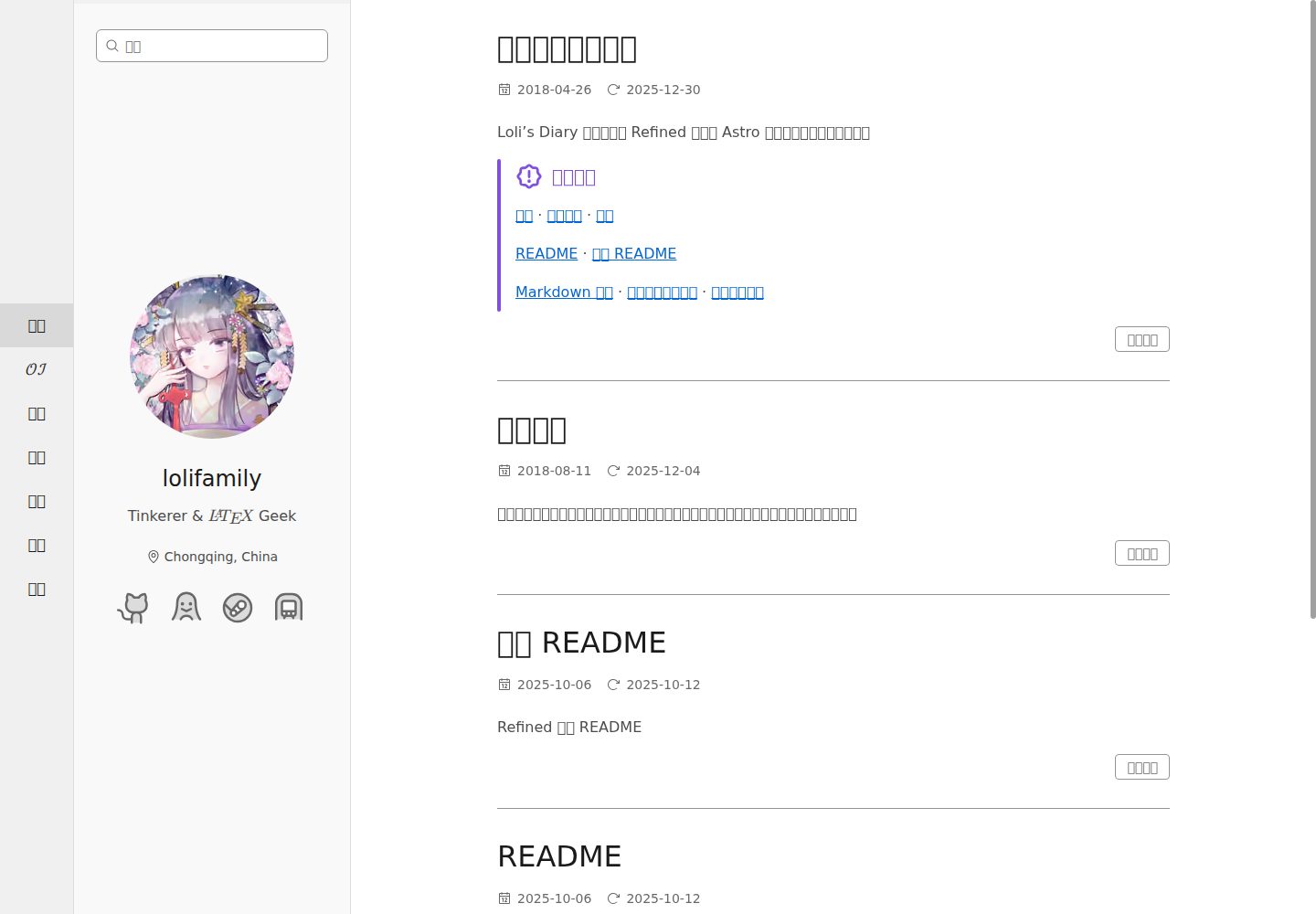
看看你的网站会是什么样
浏览真实页面截图,比较内容排版与手机效果。点击下方缩略图切换,放大查看整页细节。
全部页面与视图 3
截图用于了解视觉与布局,交互效果请以实际项目为准。
采集于 2026-10-02查看来源
值得关注的模板亮点
从已有项目资料中,快速了解它的特点。
改编自 Hexo 主题 concise,保留其编辑式排版思路并适配 Astro
post 与 oi 集合共用 frontmatter 模式,支持分类/标签层级、草稿、置顶、摘要与阅读更多标记
通过 :postlink 指令在 .md 与 .mdx 中链接其他文章,支持自定义锚点
同时支持 Markdown 与 MDX,共用 remark/rehype 管线与语法高亮
提供 pnpm 脚本用于开发、构建、预览、类型同步、类型检查与 ESLint
模板详细介绍
Refined 是 loliblogs 维护的 Astro 博客主题,在 README 中说明其重新实现并改进了 sanonz/hexo-theme-concise 的结构与样式,以适配 Astro 的内容集合和路由。项目使用 pnpm 管理依赖,提供开发、构建、预览、类型同步、类型检查与 ESLint 等脚本。内容集合在 src/content.config.ts 中通过 defineCollection 与 glob 加载器定义,post 与 oi 共用一套 frontmatter 模式,page 与 oiPage 只需较少字段。文章支持分类与标签的层级写法、草稿、置顶、摘要与阅读更多标记,并可通过 :postlink 指令在文章间建立链接。项目同时支持 MDX,并说明加密文章解密需要 Safari 16+ 等浏览器条件。
仓库未提供主题功能、性能或生产就绪程度的额外说明,本介绍仅依据 README、许可证与截图资料整理。
Astro博客
适合你的项目吗?
适用场景
- 用 Astro 搭建以文章列表和分类标签为主的个人博客
- 需要将 Hexo concise 主题的排版迁移到 Astro 内容集合
- 在 Markdown 与 MDX 混用的内容库中维护文章并建立站内链接
- 为文章设置草稿、置顶、摘要和阅读更多标记来控制列表展示
适合人群
- 熟悉 Astro 内容集合与文件路由的前端开发者
- 希望以 MIT 许可使用并修改博客主题代码的个人或团队
- 需要 Markdown/MDX 写作与分类标签组织的博客作者
上手与定制指南
结合仓库当前版本的说明,按下面的资料检查内容、配置与运行要求。
- 1
克隆仓库后运行 pnpm install 安装依赖
- 2
pnpm dev 启动本地开发服务器,默认地址为 http://localhost:3000
- 3
pnpm build 生成生产站点到 ./dist/,pnpm preview 在 http://localhost:4321 预览
- 4
内容集合或模式变更后可运行 pnpm sync 同步 Astro 生成的类型
- 5
加密文章解密需要 Safari 16+(iOS 16+),因 Argon2 WASM 使用 SIMD 指令
授权与来源资料
使用条件与限制
免费使用 · 保留许可声明本次收录的是公开仓库中采用 MIT 许可的免费版本;免费范围为该版本代码,不代表外部服务或第三方素材免费。
使用时需要遵守
- 允许免费使用、修改、商用和分发该版本代码。
- 分发代码副本或实质性部分时,保留原作者版权声明和完整 MIT 许可声明。
- 代码按现状提供;担保与责任限制以原许可证及适用法律为准。
额外费用与待核对事项
- 演示图片、字体、图标及其他第三方素材需按各自许可核对,不能仅凭代码的 MIT 许可判断。
- 域名、托管、数据库、支付或 AI 等外部服务可能另外收费。
- 项目不支持国际化或多语言路由,站点语言硬编码为 zh-CN,无法直接用于其他语言站点。
- MathJax 数学渲染管线为内置功能,没有开关;如需禁用必须修改源码。
- 没有插件系统、主题预设矩阵或详尽开关,默认配置较为固定,定制需改代码。
- 不提供多内容集合的管理脚手架或界面,增删集合需按 schema 手动操作,属于项目范围外。
- 加密文章解密在 Safari 上需要 16+(iOS 16+),因 Argon2 WASM 使用 SIMD 指令,旧版浏览器无法解密。
- 加密功能依赖服务端环境变量提供密钥(SECRET_PASSWORDS、SECRET_ENCRYPTION_PASSWORD、SECRET_ENCRYPTION_SALT),部署时必须自行配置。
- 部署到 Cloudflare Pages 时需通过 wrangler 等工具配置同名项目密钥,涉及外部平台配置。
- 作者声明这是个人项目,定位为自用够用而非通用主题,部分需求可能被有意排除。
- 增加复杂度且无明确日常价值的过度设计改动可能被拒绝,贡献范围受限。
- 被拒提案的协助仅为作者酌情提供,不构成义务,自行实现改动需自行承担。
查看原文依据
Permission is hereby granted, free of charge
许可证原文
No i18n or multi‑locale routing. The site is hardcoded to `zh-CN`.
README 原文
No feature toggle for MathJax; the math pipeline is built‑in. Disabling it requires code edits.
README 原文
No plugin system, theme preset matrix, or exhaustive switches; defaults are opinionated.
README 原文
No multi‑collection management scaffolding/UI; defining, adding, and removing collections follow the same manual, schema‑based pattern and are out of scope.
README 原文
**Encrypted post decryption**: Requires Safari 16+ (iOS 16+) due to SIMD instructions in Argon2 WASM.
README 原文
Server‑side secrets are read with `getSecret()` and must be provided via environment variables.
README 原文
For Cloudflare Pages, configure the same names as project secrets (for example with `wrangler pages secret put SECRET_PASSWORDS`, and likewise for the other two).
README 原文
This is a personal project. Here, “personal” means good‑enough for my own use rather than a general‑purpose theme.
README 原文
Over‑engineered changes that add complexity without clear day‑to‑day value are likely to be declined.
README 原文
https://github.com/loliblogs/Refined/blob/main/LICENSEhttps://github.com/loliblogs/Refined/blob/main/README.mdIf a proposal is declined due to project philosophy or scope, the author may—at their discretion—offer pointers to relevant files/modules, high‑level direction, or suggested edits to help you implement the change yourself; this is the best‑effort courtesy, not an obligation.
README 原文
DeepSeek 根据仓库许可证和 README 整理 ·2026-10-04。结果仅覆盖已读取资料,依赖、图片、字体及后续条款变更以各自原文为准。
项目核对记录与介绍依据
模板资料
- 来源平台
- GitHub
- 资料与维护参考分
- 资料较完整 · 75 / 100
- 技术栈
- Astro
- 网站类型
- 博客
这个分数如何计算
本站按许可资料(最高30分)、演示链接(12分)、预览图(10分)、Star数(15分)、记录的维护时间(15分)、描述完整度(8分)、功能记录(5分)和分类资料(5分)计算。它不是代码、安全或性能测试,也不是 Google 评分;有链接不代表已实测可用。
这个项目需要核对什么
- 记录的仓库更新时间
- 2026-09-24
- 截图检查日期
- 2026-10-04
已收录演示链接。请用你的内容与屏幕尺寸检查;有演示不代表表单、认证或支付已经可用。
目录记录的主要技术栈是 Astro。请通过依赖清单和锁文件核对实际版本与托管要求。这些说明基于收录资料,不代表代码审计或部署实测。
查看具体选型方法 →介绍的制作与核对状态
介绍由 AI 辅助整理目录与仓库资料。仓库作者不等于这篇介绍的审核者。
审核声明: [email protected] · 2026-10-04
查看当时使用的来源资料
SHA-256: d08427a3fc0378f3c005a6113b944506cf57d46170db12e2fa582ff9e79167dc
2026-10-04T17:25:22.077Z
来源文件 / 仓库[Chinese README](./README-zh.md)
# Refined Starter Guide
This project refines and re-implements the excellent [sanonz/hexo-theme-concise](https://github.com/sanonz/hexo-theme-concise) with Astro. Credit to the original theme; ideas, structure and styles are adapted for Astro's content collections and routing.
| Desktop | Mobile |
|----------------------------------|--------------------------------|
|  |  |
## ⚡ Quick Start
Start here with the most common tasks:
- Clone and install
```sh
git clone https://github.com/loliblogs/Refined
pnpm install
```
- Start the dev server
```sh
pnpm dev
```
Open `http://localhost:3000`.
- Build and preview
```sh
pnpm build && pnpm preview
```
Open `http://localhost:4321`.
- Sync types (when content collections or schemas change; dev/build run type generation automatically)
```sh
pnpm sync
```
Note: dev/build already generate types; this is mainly for CI or after schema changes.
More commands are listed in the table below.
| Command | Action |
|:-----------------------|:------------------------------------------------------------|
| `pnpm install` | Installs dependencies |
| `pnpm dev` | Starts local dev server at `localhost:3000` |
| `pnpm dev:full` | Starts dev server with a full cold start (no cache) |
| `pnpm build` | Build your production site to `./dist/` |
| `pnpm build:full` | Full clean build (ignores cache) to `./dist/` |
| `pnpm sync` | Synchronize Astro-generated types |
| `pnpm preview` | Preview your build locally at `localhost:4321` |
| `pnpm typecheck` | Run type checks via Astro (Including .astro files!) |
| `pnpm lint` | Lint project files with ESLint |
| `pnpm lint:fix` | Automatically fix fixable ESLint issues |
| `pnpm astro ...` | Run CLI commands like `astro add`, `astro sync` |
| `pnpm astro -- --help` | Get help using the Astro CLI |
**CI note:** The GitHub Actions workflow detects `[full]` in the commit title (first line) and runs `pnpm build:full` instead of `pnpm build`. This is rarely needed—only for edge cases like renaming files between `.md` and `.mdx` where stale cache causes build failures:
```bash
git commit -m "refactor: migrate files from mdx to md [full]"
```
## 🌐 Browser Support
- Chrome 99+
- Firefox 97+
- Safari 15.4+ (iOS 15+)
Notes:
- Windows: Works on Windows 7 and newer. Use the latest Chrome/Firefox available for Win7.
- Android: Chrome requires Android 6.0+; Firefox works on Android 5.0+.
- **Encrypted post decryption**: Requires Safari 16+ (iOS 16+) due to SIMD instructions in Argon2 WASM.
## 🚀 Project Structure
Inside your Astro project, you'll see the following folders and files:
```text
/
├── LICENSE
├── astro.config.ts
├── eslint.config.ts
├── ec.config.mjs
├── tsconfig.json
├── package.json
├── pnpm-lock.yaml
├── pnpm-workspace.yaml
├── .env.example
├── .env (gitignored, copy from .env.example)
├── public/
├── db/
│ └── config.ts
└── src/
├── content.config.ts
├── assets/
├── components/
│ └── pages/
├── config/
│ ├── base.config.tsx
│ ├── site.config.ts
│ ├── paths.config.ts
│ └── comments.config.tsx
├── content/
│ ├── post/
│ ├── oi/
│ ├── page/
│ └── oiPage/
├── layouts/
│ ├── BaseLayout.astro
│ └── RSSLayout.astro
├── pages/
│ ├── index.astro
│ ├── [...slug].astro
│ ├── category/
│ ├── tag/
│ ├── oi/
│ ├── rss.xml.ts
│ └── rss-styles.xsl.ts
├── plugins/
├── styles/
├── types/
└── utils/
```
Astro uses file-based routing: any .astro, .md, .mdx, or .ts file under `src/pages` is exposed as a route based on its file path, and nested directories become nested URLs. Dynamic and catch-all routes such as `src/pages/[...slug].astro` and pagination patterns like `**/[page].astro` are supported. Server endpoints implemented as `.ts` files (for example `src/pages/rss.xml.ts`) export a handler returning a `Response` and are emitted as dynamic assets.
Content Collections are defined in `src/content.config.ts` via `defineCollection` with the `glob` loader from `astro/loaders`; each collection maps to a folder under `src/content/<collection>` where Markdown/MDX entries provide frontmatter validated at dev/build time. Strong types are generated for safe access and can be synchronized with `pnpm sync`, and content is queried with utilities like `getCollection('post')` in pages and components.
Content rendering is optimized in `src/utils/data-loader.ts`: it pre-fetches the `Content` component for each post using Astro's `render()` at load time, so page templates receive a ready-to-use component rather than calling `render()` themselves. Additionally, `src/components/CachedContent.astro` caches rendered HTML during build, avoiding duplicate renders when the same content appears multiple times (e.g., article body and table of contents). This cache is skipped in dev mode to preserve hot-reload behavior.
This project keeps routes thin in `src/pages`, implements reusable page templates under `src/components/pages`, shares layout chrome in `src/layouts`, centralizes site settings in `src/config`, and places rendering and taxonomy helpers in `src/utils`. Put only unreferenced files in `public`; any asset imported from code or Markdown (including images) can live under `src` (for example `src/assets`) and will be compressed and bundled. In Markdown/MDX, images can be referenced via relative paths or imports; any import-resolvable alias works, including `@/` which maps to `src` (configured in `tsconfig.json`).
## 📝 Frontmatter
Content frontmatter is validated by `src/content.config.ts`. Collections `post` and `oi` share the same schema (title, dates, categories/tags and meta), while `page` and `oiPage` only require minimal fields like `title` and optional dates. The example below shows a typical Markdown entry with inline comments explaining each field. Both singular and plural keys are accepted for categories and tags, and multiple hierarchical values are supported by using `/` in a path-like notation.
```md
---
title: Building a Fast Astro Blog
description: Optional, used for SEO summaries.
excerpt: Optional, short teaser for lists.
date: 2025-03-10
updated: 2025-09-15
# You can use either `category` or `categories`. Multiple values are supported.
# Hierarchies are written with slashes, and you can mix multiple hierarchies.
categories:
- Frontend/React
- DevOps/Kubernetes
# You can use either `tags` or `tag`. Multiple and hierarchical tags are supported.
tags:
- javascript
- react/hooks
- kubernetes/networking
# Category/tag names are auto-normalized for display:
# - Already has uppercase → kept as-is (FFmpeg, JavaScript)
# - Lowercase brand words → kept as-is (npm, pnpm, npm-cli)
# - Other lowercase → capitalized (frontend → Frontend)
# URLs are always lowercase regardless of display name.
# Brand word list: strings starting with "npm" or "pnpm".
# Draft posts are rendered but excluded from production indexes/lists (e.g., home, archive).
draft: false
# Sticky is optional. Omitted defaults to 0. Higher numbers surface earlier; negatives push to the bottom.
sticky: 10
# Optional author override; falls back to site defaults if omitted.
author: Jane Doe
# Enables comment system if configured for the site.
comments: true
## encryption-related fields are documented in a dedicated section later.
---
Intro paragraph for index pages.
Note: The read-more marker below only affects the home index when no `excerpt` is set in frontmatter.
::more
Remaining content…
```
Excerpts and previews:
- description: Optional SEO summary; auto-generated from body if omitted.
- excerpt: If present, used on all list pages (home/tag/category). If both `excerpt` and a read-more marker exist, excerpt wins (marker ignored). If absent: Home renders from body (before the first read-more marker if present; otherwise full body). Tag/Category pages show no body preview. If multiple read-more markers exist, only the first is respected.
Read-more markers (use one of the following):
```md
::more
```
Recommended syntax that works in both `.md` and `.mdx` files.
```html
<!--more-->
```
Legacy syntax that only works in `.md` files; not supported in `.mdx` due to MDX parsing.
For a comprehensive guide to Markdown syntax and features supported in this project, see the live example: [Markdown Syntax Guide](https://blog.lolifamily.js.org/post/markdown-example)
This frontmatter maps directly to the Zod schemas in `src/content.config.ts`. Dates are coerced to `Date`. Categories and tags accept either a single string or an array; during processing they are normalized to arrays, and each string may represent a multi-level path such as `Frontend/React`. Display names are auto-capitalized (e.g., `frontend` becomes `Frontend`) unless they already contain uppercase letters or are recognized brand words like `npm` and `pnpm`; URLs are always generated in lowercase to prevent duplicate taxonomies. Draft entries still render but are hidden from index-style pages (like the home and archives) in production. `sticky` is optional (default 0). It controls pinning and sort priority in lists: larger values appear earlier; negative values explicitly sink to the bottom.
## 🧩 MDX (Markdown + JSX)
MDX lets you write Markdown and JSX in the same file. This project enables MDX via `@astrojs/mdx` (see `astro.config.ts`). A few quick notes:
- MDX is supported alongside Markdown in content collections under `src/content/**`. You can typically rename existing `.md` files to `.mdx` and they will almost always work as‑is; the same frontmatter schema and generated types apply.
- The same remark/rehype pipeline runs for MDX, including math support and Shiki syntax highlighting. See the MathJax section for details.
- You can import and render `.astro` or `.tsx` components in MDX. Interactive components follow Astro's standard client directives when needed.
Example:
````mdx
---
title: Using MDX
---
export const date = '2025-09-18' // frontmatter-equivalent; can be used for computations with {} below
export const tags = ['mdx', 'tips'] // frontmatter-equivalent; can be used for computations
import MediumZoom from '@/components/MediumZoom.tsx'
# Hello MDX
Published on {new Date(date).toLocaleDateString()}
Tags: {tags.join(', ')}
<MediumZoom />
```js
console.log('fenced code is syntax highlighted');
```
````
Learn more:
- Astro guide: [MDX integration](https://docs.astro.build/en/guides/integrations-guide/mdx/)
- MDX official docs: [mdxjs.com/docs](https://mdxjs.com/docs/)
## 🔗 Cross-Post Links
Use the `:postlink` directive to link between posts. This is a remark directive (not an MDX component), so it works in both `.md` and `.mdx` files without requiring JSX imports.
```md
Check out :postlink[my other article]{id="oi/example-post.md"} for details.
With custom anchor: :postlink[section link]{id="post/guide.md" anchor="setup"}
```
The `id` attribute uses the format `<collection>/<filename>` where filename includes the extension.
How it works under the hood:
1. **Build-time slug mapping** (`src/plugins/postlink-integration.ts`): An Astro integration runs at `astro:config:setup` (before any content is processed). It scans all `.md/.mdx` files under `src/content`, parses frontmatter with `gray-matter`, computes slugs using `github-slugger` (or uses custom `slug` from frontmatter), and builds a lookup table: `{ "oi/article.md": "/oi/post/article", ... }`. This map is exported as a module-level variable.
2. **Directive transformation** (`src/plugins/remark-directive-rehype.ts`): During Markdown processing, the remark plugin intercepts `:postlink` directives, looks up the URL from the pre-built map, and transforms the node into an `<a href="...">` element. If the id is not found, it renders a warning span instead.
Why a directive instead of an MDX component? MDX compiles all content to JSX AST, which is slow for files that don't actually use JSX features. By using a remark directive, plain `.md` files stay fast (no JSX compilation), and the same syntax works uniformly across both formats. This approach reduced MDX transform time from ~2600ms to ~50ms per file.
## ⚙ Configuration
Start with `astro.config.ts`. Set `site` to your canonical URL. This project supports non-root bases (for example `base: '/blog/'`). Per-collection URL paths are defined in `src/config/paths.config.ts`.
The primary configuration lives in `src/config/base.config.tsx` (raw config with JSX components) and `src/config/site.config.ts` (entry point that processes MathJax). It provides per‑collection settings (e.g., `post` and `oi`) including site identity (title, subtitle, description), navigation menu, pagination, a global comments toggle, favicon links, and sensible defaults for encrypted content prompts. The file is heavily documented—skim the top for key options and consult the inline comments for the complete list.
Collection URL paths are centralized in `src/config/paths.config.ts`. This file defines `COLLECTION_PATHS` (mapping collections to their URL segments like `post` → `'post'`, `oi` → `'oi/post'`) and `BASE_PATHS` (for collection root paths). Modify these when adding new collections or changing URL structures. Path config is intentionally separated from site config because Astro integrations (like the postlink slug mapper) need to import path definitions at build time without pulling in SolidJS/JSX dependencies from the main site config.
Comments are wired through `src/config/comments.config.tsx`. Despite the name, this file is a component entry point, not a rigid schema: you can replace its contents with any comment provider (Giscus, Disqus, Gitalk, or a custom widget). It is rendered by the post page and respects `comments` in site config. If you swap providers, keep the default export as a SolidJS component.
## 🔐 Encryption
Encrypted posts use a password‑derived key to protect the rendered HTML. On the server, a 32‑byte key is derived with Argon2id (memory 64MB, time 3, parallelism 1) from a per‑post password and a unique salt, then the content is encrypted using AES‑256‑GCM with a random 12‑byte nonce. The encrypted payload is emitted as JSON that includes the salt, nonce and ciphertext with an authentication tag. On the client, a small web worker derives the same key from the password and salt, and the browser WebCrypto API performs authenticated decryption locally.
Implementation lives in `src/utils/encrypt-processor.ts` and `src/components/EncryptWrapper.astro` for server‑side encryption, `src/utils/argon2-worker.ts` and `src/components/DecryptClient.tsx` for client‑side derivation and decryption, `src/utils/argon2-cache.ts` for server key derivation and caching (which stores encrypted derived keys and metadata in a local SQLite database via Node's built-in `node:sqlite`). The post page integrates these pieces in `src/components/pages/PostPage.astro`.
The Argon2 cache is a build‑time optimization only—losing it simply means recalculating keys (a few seconds of CPU time), with no data loss. The cache uses a local SQLite file (`.cache/argon2-cache.db`) through Node's built‑in `node:sqlite`, with no extra dependencies. Sensitive fields are protected at the application layer: derived keys are sealed with AES‑256‑GCM and passwords are stored as HMAC‑SHA256 digests, both keyed via HKDF from `SECRET_ENCRYPTION_PASSWORD` and `SECRET_ENCRYPTION_SALT`—so the database file itself needs no file‑level encryption. In CI the `.cache` directory is persisted across builds via the Actions cache, so keys are computed once and reused.
To mark a post as protected, set encryption fields in frontmatter. The password itself is never stored in content; instead, secrets supply it at build or runtime.
```md
---
title: Encrypted Example
date: 2025-09-15
encrypted: true
# Optional UI text; both fields are optional and fall back to site defaults
# defined in src/config/base.config.tsx
prompt: This content is protected. Enter the password to view.
hint: The password you received privately.
---
Body content will be encrypted at build time when served to the client.
```
Server‑side secrets are read with `getSecret()` and must be provided via environment variables. On first install, the `postinstall` script attempts to copy `.env.example` to `.env` if `.env` is missing; otherwise copy it manually. Only `.env` is loaded locally. Define `SECRET_PASSWORDS`, `SECRET_ENCRYPTION_PASSWORD` and `SECRET_ENCRYPTION_SALT`. `SECRET_PASSWORDS` is a JSON object mapping `<collection>:<entry id>` to the clear‑text password used to derive the per‑post key; the entry id is the content slug without file extension (for example `src/content/post/encrypted-test.mdx` has the id `encrypted-test`). `SECRET_ENCRYPTION_PASSWORD` and `SECRET_ENCRYPTION_SALT` are used to HKDF‑derive an AES‑GCM key that encrypts derived keys at rest in the SQLite cache.
> [!CAUTION]
> The `SECRET_PASSWORDS` key format has changed. Entry IDs no longer include the file extension (Astro 6 content collection migration). Update your `.env` and CI/deployment secrets accordingly:
> - `post:encrypted-test.mdx` → `post:encrypted-test`
> - `oi:binary-search.md` → `oi:binary-search`
```dotenv
# Map content entries to their passwords. Keys are "<collection>:<entry id>".
# Examples:
# post:encrypted-test → src/content/post/encrypted-test.mdx
# oi:binary-search → src/content/oi/binary-search.md
SECRET_PASSWORDS='{"post:encrypted-test":"change-me","oi:binary-search":"change-me-too"}'
# Derives an AES-GCM key (and HMAC key) protecting cached keys and passwords
# at rest, so the SQLite cache file needs no file-level encryption.
SECRET_ENCRYPTION_PASSWORD='please-generate-a-strong-random-string'
SECRET_ENCRYPTION_SALT='another-strong-random-string-or-base64'
```
For local development, place these in `.env` (the `.env.example` file is just a template and not loaded). For Cloudflare Pages, configure the same names as project secrets (for example with `wrangler pages secret put SECRET_PASSWORDS`, and likewise for the other two). Secrets are never sent to the browser; only encrypted payloads are shipped, and decryption happens client‑side using the user‑entered password.
## 🧮 MathJax
Math rendering is handled in two layers. For Markdown/MDX content, math is parsed at the remark/rehype stage and converted to static HTML using a customized pipeline in `src/plugins`. The remark plugin `remark-math.ts` mirrors the official plugin and adds one small extension: when a single‑line inline math segment is wrapped by sufficiently wide `$` delimiters (configurable via `flowSingleLineMinDelimiter`), it is promoted to display mode by setting the resulting node’s class to `math-display`. The rehype plugin `rehype-mathjax.ts` keeps the same external behavior as upstream but is re‑implemented on top of MathJax v4; it converts math (including fenced \`\`\`math code blocks) to HTML, injects the generated stylesheet without font URLs, and defers font‑face CSS to `src/styles/mathjax.css` (imported by `src/styles/global.css`) for easier bundling.
For UI chrome like the Navigation and Sidebar, math may appear in dynamic strings (titles, menu labels). Those are processed at build time by `src/utils/mathjax-processor.ts` (called from `src/config/site.config.ts`). Each collection gets its own processor instance to ensure CSS isolation, and the same font‑CSS cleanup is applied so that UI chrome matches the content pipeline.
## 👀 Want to learn more?
Check the [Astro documentation](https://docs.astro.build) or join the [Astro Discord](https://astro.build/chat). For this project specifically, please use [Issues](https://github.com/loliblogs/Refined/issues) for reproducible bugs, regressions, and well‑scoped feature requests. Use [Discussions](https://github.com/loliblogs/Refined/discussions) for questions, how‑to help, ideas, design proposals, and general feedback—this keeps the issue tracker focused and actionable.
This is a personal project. Here, “personal” means good‑enough for my own use rather than a general‑purpose theme. To keep the code small, readable, and easy to maintain, some requests are intentionally out of scope:
- No i18n or multi‑locale routing. The site is hardcoded to `zh-CN`.
- No feature toggle for MathJax; the math pipeline is built‑in. Disabling it requires code edits.
- No plugin system, theme preset matrix, or exhaustive switches; defaults are opinionated.
- No multi‑collection management scaffolding/UI; defining, adding, and removing collections follow the same manual, schema‑based pattern and are out of scope.
- Over‑engineered changes that add complexity without clear day‑to‑day value are likely to be declined.
Note: The items above are illustrative rather than exhaustive; they include—but are not limited to—the examples listed here.
Bug fixes and small, focused improvements are welcome. For non‑trivial changes, please open a Discussion first to confirm fit. If a proposal is declined due to project philosophy or scope, the author may—at their discretion—offer pointers to relevant files/modules, high‑level direction, or suggested edits to help you implement the change yourself; this is the best‑effort courtesy, not an obligation. If the current direction doesn’t meet your needs, feel free to fork under the LICENSE.
看看同类模板
对比同技术栈与用途的模板,找到更适合的视觉与内容结构。

astrowind
⭕️ AstroWind: A free template using Astro v7 and Tailwind CSS v4. Astro starter theme.
Astro · 博客

astro-paper
A minimal, accessible and SEO-friendly Astro blog theme.
Astro · 博客

fuwari
✨A static blog template built with Astro.
Astro · 博客

Firefly
Firefly 是一款基于 Astro 的静态博客主题,由 CuteLeaf 在 saicaca 的 Fuwari 模板基础上二次开发,主打清新美观的视觉风格。
Astro · 博客

astro-theme-cactus
A simple Astro theme. Use it to create your blog or website.
Astro · 作品集

astrofy
Astrofy is a free and open-source template for your Personal Portfolio Website built with Astro and TailwindCS…
Astro · 作品集