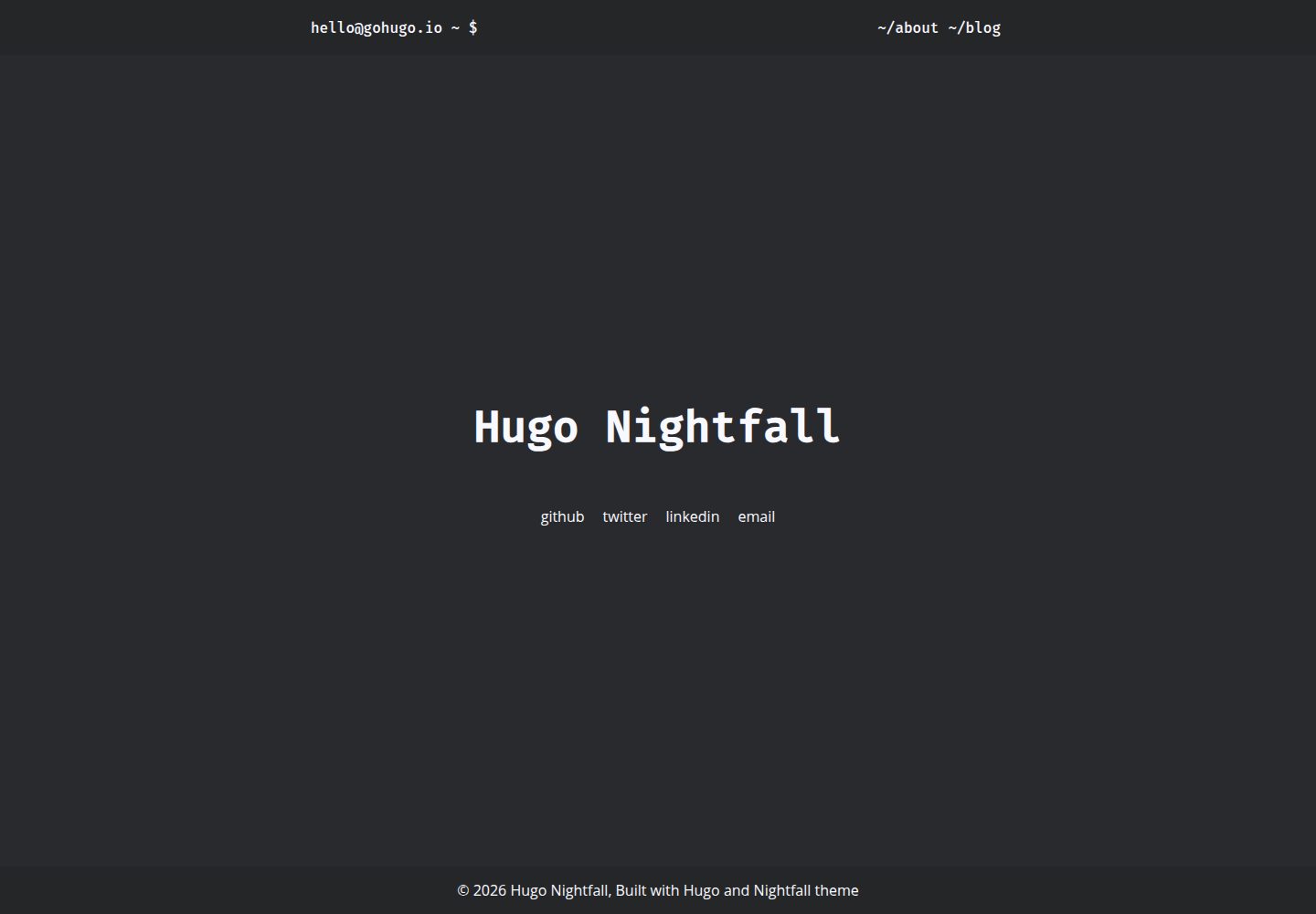
Hugo 极简深色主题,MIT 许可,仓库含演示站点
Hugo启动器
hugo-theme-nightfall — Hugo 启动器模板
作者 lordmathis
Nightfall 是一个面向 Hugo 的极简深色主题,通过 Hugo Module 或手动克隆安装,提供作者信息、社交链接、配色、文章元数据与分页等配置项。
看看你的网站会是什么样
浏览真实页面截图,比较内容排版与手机效果。点击下方缩略图切换,放大查看整页细节。
全部页面与视图 3
截图用于了解视觉与布局,交互效果请以实际项目为准。
采集于 2026-10-02查看来源
值得关注的模板亮点
从已有项目资料中,快速了解它的特点。
支持 Hugo Module 引入或手动克隆到 themes/nightfall 两种安装方式
可配置作者信息、社交链接、外部链接新标签打开与日期显示格式
params.styles.color 支持预设色(blue、orange、green、red)或自定义十六进制颜色
文章元数据(日期、阅读时间、标签、作者、分类)支持站点级与单篇 front matter 覆盖,false 优先
提供菜单、站点/文章描述、页脚 HTML 与自定义 head 等配置入口
模板详细介绍
Nightfall 是 lordmathis 维护的 Hugo 主题,定位为极简深色风格,仓库采用 MIT 许可。主题以 Hugo Module 形式引入,也可以手动克隆到 themes/nightfall 并在 hugo.toml 中设置 theme = "nightfall"。构建需要安装 Hugo 与 dart-sass;README 说明自 v0.146.0 起主题适配 Hugo 新模板系统,构建站点要求 Hugo >= 0.146.0,若此前在 /layouts 下做过覆盖改动,需要按新目录结构迁移(_default 内容移到 /layouts,_markup、_partials、_shortcodes 重命名,index.html 改为 home.html)。
配置集中在 hugo.toml 的 params 段:可设置 user、hostname、作者姓名/头像/头像尺寸/邮箱/头像优先显示,openLinksInNewTab 控制外部链接是否新标签打开,displayDateFormat 自定义日期显示格式,[pagination] pagerSize 调整文章分页数量(默认 10)。社交链接通过 [[params.social]] 数组配置,支持 name、url、icon、target、aria、rel 等字段;使用图标字体需自行在 layouts/partials/custom-head.html 中引入。
外观与内容方面,params.styles.color 可指定十六进制颜色或 blue、orange、green、red 预设色,默认蓝色。文章元数据(标签、发布日期、阅读时间、作者、分类)由 showMetadata 总开关及 showPublishedDate、showReadingTime、showTags、showAuthors、showCategories 控制,可在站点级或单篇文章 front matter 中覆盖,规则为“false 优先”,showMetadata 为 false 时全部隐藏。站点描述用 params.sitedescription,单篇描述用 front matter 的 description;菜单通过 [[menu.header]] 添加;页脚文本用 params.footerHtml 自定义,内容渲染在 span 标签内。
限制方面:主题本身不包含图标字体等第三方资源,需自行引入;演示图片、字体、图标等素材的许可需单独核对,MIT 许可仅覆盖该版本代码;域名、托管等外部服务可能另行收费。
Hugo启动器
适合你的项目吗?
适用场景
- 为个人博客搭建深色阅读界面
- 用 Hugo 构建以文章列表与单页阅读为主的内容站点
- 需要在站点级统一控制文章元数据展示、并允许单篇覆盖的写作场景
- 希望通过社交链接与自定义页脚展示作者信息的站点
适合人群
- 使用 Hugo 并接受 Hugo >= 0.146.0 构建要求的开发者
- 偏好深色、极简排版且愿意通过 hugo.toml 配置的博客作者
- 需要 MIT 许可代码、可自行核对第三方素材许可的使用者
上手与定制指南
结合仓库当前版本的说明,按下面的资料检查内容、配置与运行要求。
- 1
安装 Hugo 与 dart-sass;自 v0.146.0 起构建站点要求 Hugo >= 0.146.0
- 2
在 hugo.toml 中通过 [module] imports 引入 github.com/LordMathis/hugo-theme-nightfall,或 git clone 到 themes/nightfall 后设置 theme = "nightfall"
- 3
若此前在 /layouts 下做过覆盖,需按新模板系统迁移:_default 内容移到 /layouts,_markup/_partials/_shortcodes 重命名,index.html 改为 home.html
- 4
社交图标需自行在 layouts/partials/custom-head.html 引入图标字体链接
- 5
完整配置示例见仓库 exampleSite/hugo.toml;演示图片、字体、图标等第三方素材许可需单独核对
授权与来源资料
使用条件与限制
免费使用 · 保留许可声明本次收录的是公开仓库中采用 MIT 许可的免费版本;免费范围为该版本代码,不代表外部服务或第三方素材免费。
使用时需要遵守
- 允许免费使用、修改、商用和分发该版本代码。
- 分发代码副本或实质性部分时,保留原作者版权声明和完整 MIT 许可声明。
- 代码按现状提供;担保与责任限制以原许可证及适用法律为准。
额外费用与待核对事项
- 使用该主题构建站点必须自行安装 Hugo 与 dart-sass 两个外部工具,主题本身不包含它们。
- 自该版本起构建站点要求 Hugo 版本不低于 0.146.0,低版本 Hugo 无法正常构建。
- 若此前在 /layouts 目录做过模板覆盖,升级后必须按新模板系统迁移目录结构,否则自定义布局会失效。
- 社交链接图标依赖图标字体,需自行在 custom-head.html 中引入字体链接,主题不内置该资源。
- 演示图片、字体、图标及其他第三方素材需按各自许可核对,不能仅凭代码的 MIT 许可判断。
- 域名、托管、数据库、支付或 AI 等外部服务可能另外收费。
查看原文依据
Permission is hereby granted, free of charge
许可证原文
Install [Hugo](https://gohugo.io/installation/) and **[dart-sass](https://gohugo.io/functions/resources/tocss/#dart-sass)**.
README 原文
building the site now requires Hugo **>= 0.146.0**
README 原文
If you have made manual layout modifications (overrides in your `/layouts` folder), you will need to adjust them:
README 原文
https://github.com/lordmathis/hugo-theme-nightfall/blob/main/LICENSEhttps://github.com/lordmathis/hugo-theme-nightfall/blob/main/README.mdTo use icons for social links, you also need to add the link to icon font to custom-head.html
README 原文
DeepSeek 根据仓库许可证和 README 整理 ·2026-10-02。结果仅覆盖已读取资料,依赖、图片、字体及后续条款变更以各自原文为准。
项目核对记录与介绍依据
模板资料
- 来源平台
- Hugo Themes
- 资料与维护参考分
- 资料较完整 · 83 / 100
- 技术栈
- Hugo
- 网站类型
- 启动器
这个分数如何计算
本站按许可资料(最高30分)、演示链接(12分)、预览图(10分)、Star数(15分)、记录的维护时间(15分)、描述完整度(8分)、功能记录(5分)和分类资料(5分)计算。它不是代码、安全或性能测试,也不是 Google 评分;有链接不代表已实测可用。
这个项目需要核对什么
- 记录的仓库更新时间
- 2026-03-21
- 截图检查日期
- 2026-10-02
已收录演示链接。请用你的内容与屏幕尺寸检查;有演示不代表表单、认证或支付已经可用。
目录记录的主要技术栈是 Hugo。请通过依赖清单和锁文件核对实际版本与托管要求。这些说明基于收录资料,不代表代码审计或部署实测。
查看具体选型方法 →介绍的制作与核对状态
介绍由 AI 辅助整理目录与仓库资料。仓库作者不等于这篇介绍的审核者。
已完成服务器许可规则与 AI 来源核对;未经过人工编辑审核。
查看当时使用的来源资料
SHA-256: 4f2bd9b9c680fe0ec14412969792b6cafe1d00fb86f233b8cddad3097a89b3e1
2026-10-02T22:21:03.915Z
来源文件 / 仓库# Nightfall
[](https://app.netlify.com/sites/hugo-theme-nightfall/deploys)
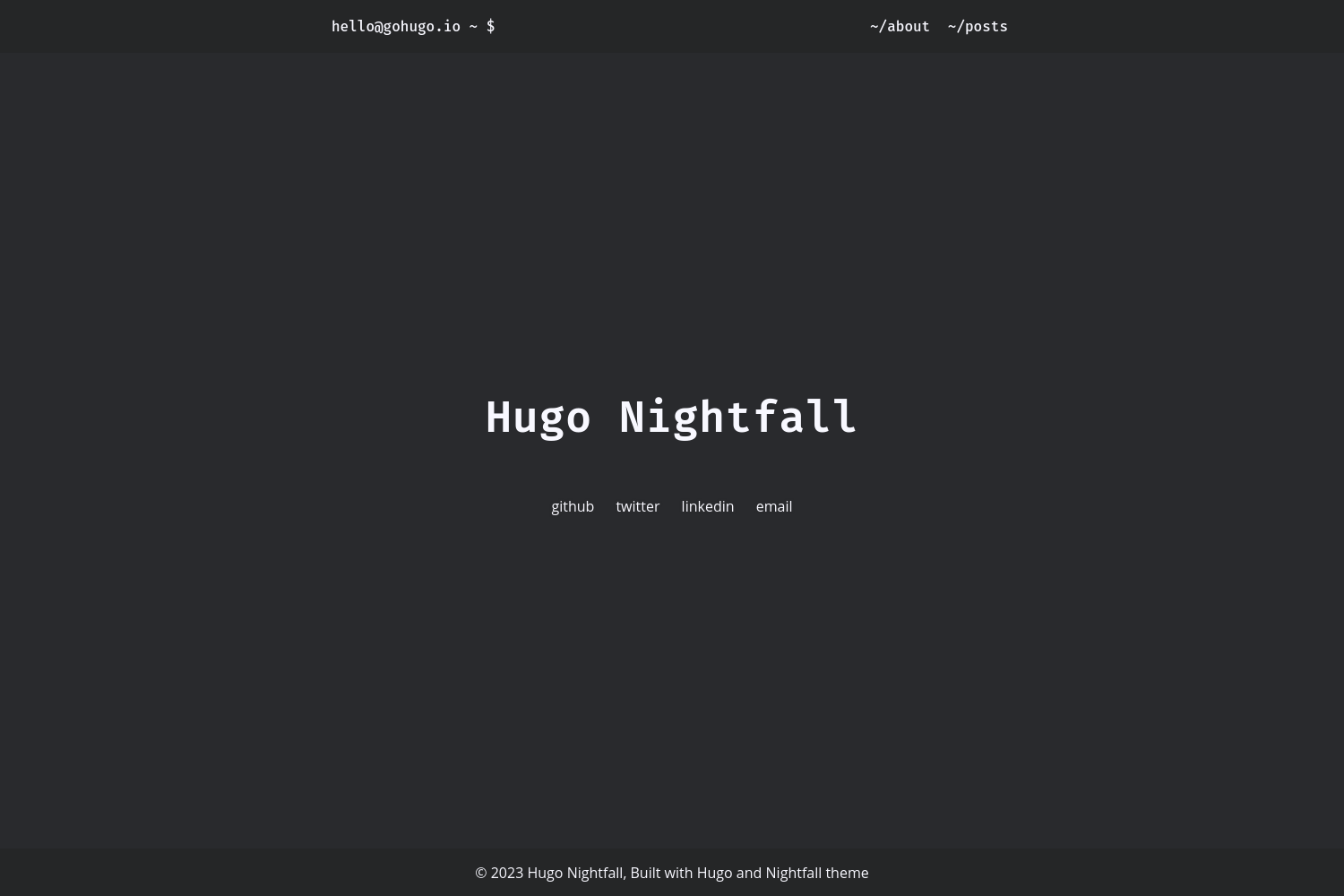
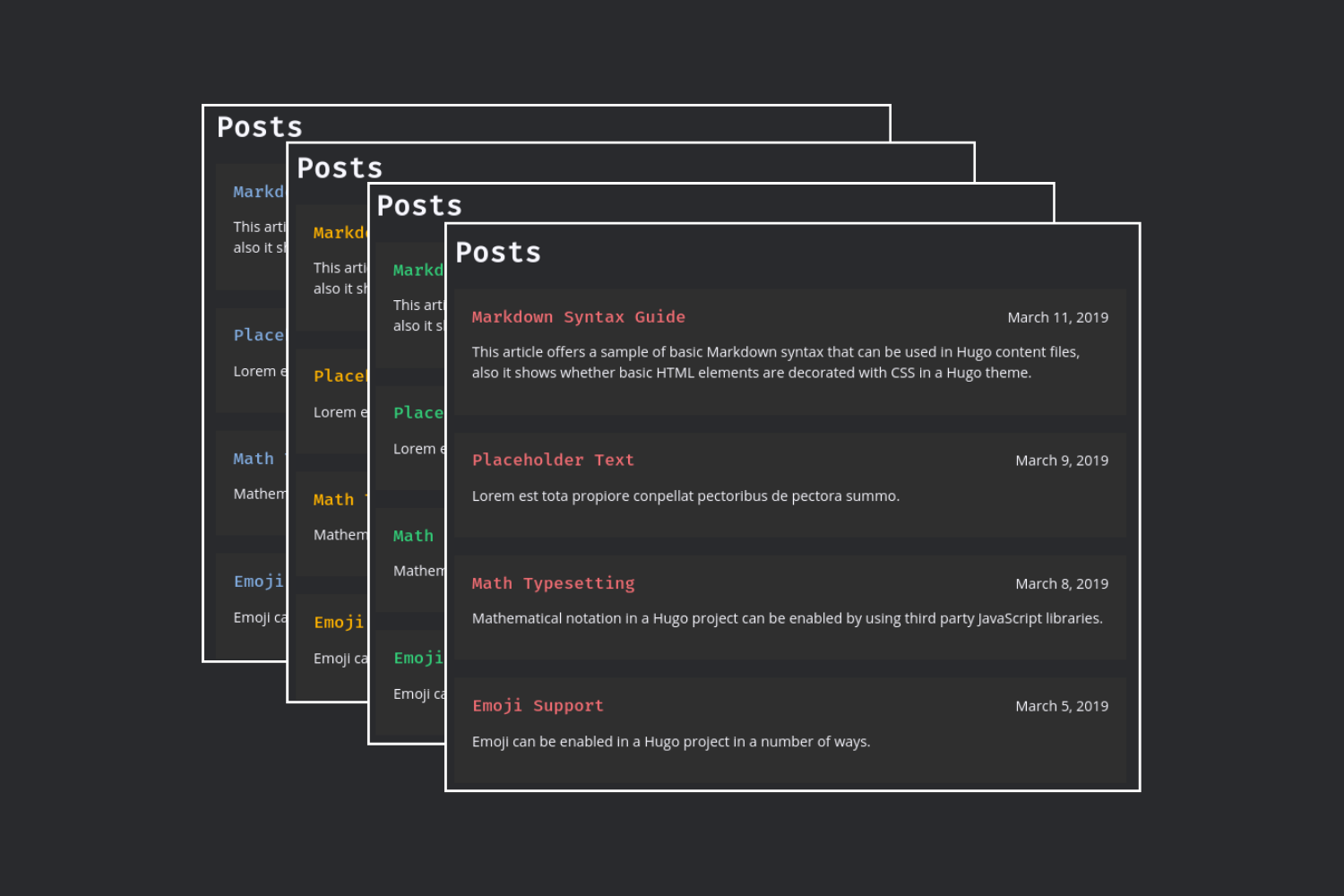
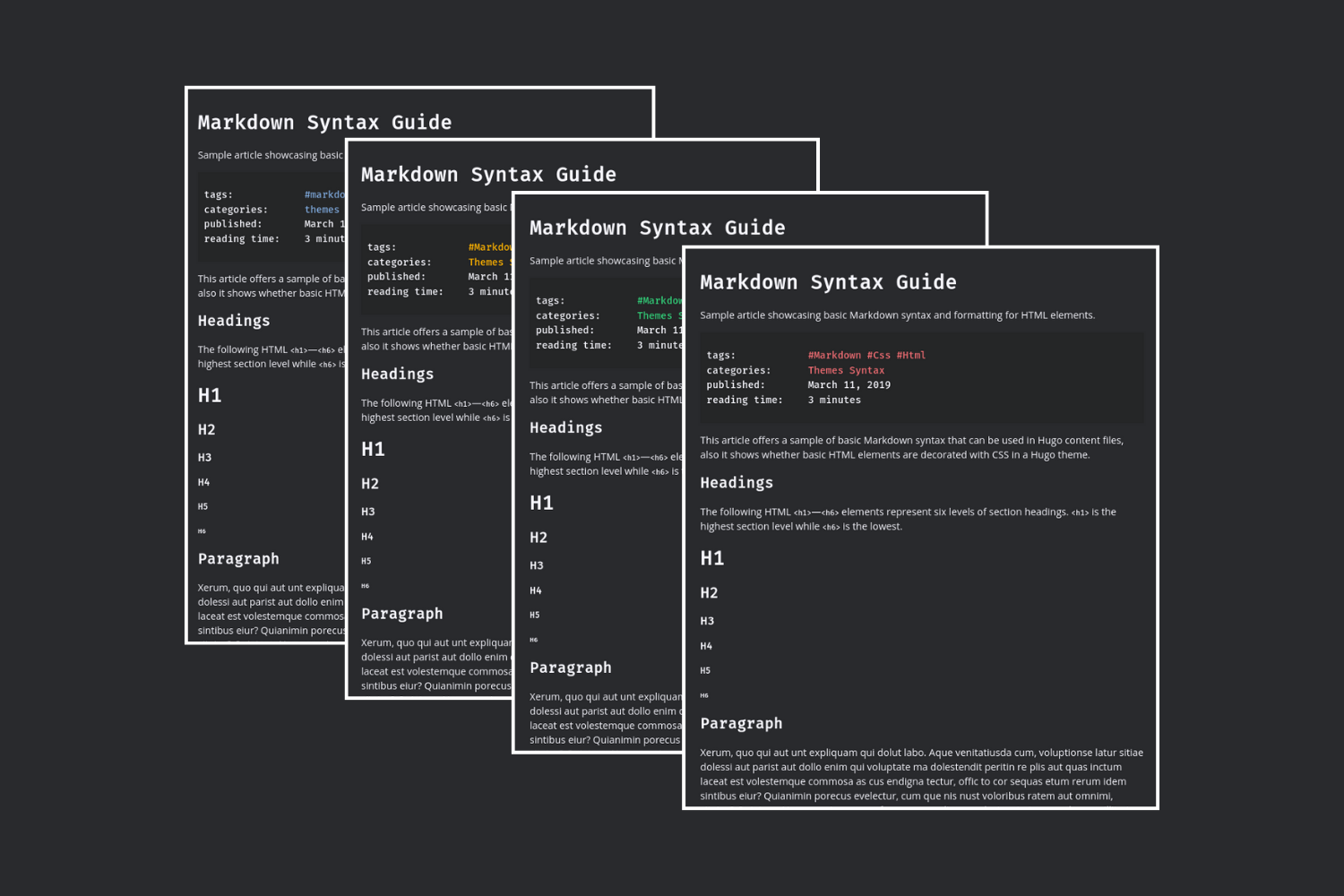
Nightfall is a minimal dark theme for Hugo. [Demo](https://hugo-theme-nightfall.netlify.app)
## Get the theme
Install [Hugo](https://gohugo.io/installation/) and **[dart-sass](https://gohugo.io/functions/resources/tocss/#dart-sass)**.
Import as [hugo module](https://gohugo.io/hugo-modules/use-modules/#use-a-module-for-a-theme) in `hugo.toml`:
```toml
[module]
[[module.imports]]
path = 'github.com/LordMathis/hugo-theme-nightfall'
```
OR
Import manually:
1. `git clone https://github.com/LordMathis/hugo-theme-nightfall themes/nightfall`
2. Add `theme = "nightfall"` in your `hugo.toml`:
## Hugo Theme Update Notice (v0.146.0)
The theme has been adapted for Hugo’s new template system starting with version **0.146.0**.
With this theme update, building the site now requires Hugo **>= 0.146.0**.
If you have made manual layout modifications (overrides in your `/layouts` folder), you will need to adjust them:
1. All files that were previously located in `/layouts/_default` must be moved directly to `/layouts`. The `_default` subfolder can be deleted if it is empty.
2. If you had a `/layouts/_default/_markup` folder, this must also be moved to `/layouts/_markup`.
3. If you had `partials` or `shortcodes` as subfolders within `/layouts`, they must be renamed to `_partials` and `_shortcodes`.
4. If there is an `index.html` under `/layouts`, it must be renamed to `home.html`.
For more details, please refer to the Hugo documentation:
👉 [Hugo New Template System Overview](https://gohugo.io/templates/new-templatesystem-overview/)
## Configuration
For full example check `exampleSite/hugo.toml`
Add these params to your `hugo.toml`
```toml
[params]
user = "hello"
hostname = "gohugo.io"
[params.author]
name = "Mr Hugo"
avatar = "/avatar.png"
avatarSize = "size-m"
email = "[email protected]"
avatarFirst = false
```
### External Links
You can configure external links to open in new tabs by adding this parameter:
```toml
[params]
openLinksInNewTab = true
```
When enabled, all external links (links which using http(s) in the markdown-destination) will automatically open in a new tab. Internal links will continue to open in the same tab.
### Configurable Date Format
You can configure the Date-Format for display
default:
```toml
[params]
displayDateFormat = "2006-01-02"
```
example in german:
```toml
[params]
displayDateFormat = "02.01.2006"
```
### Pagination for Posts
The default is 10 per page. To change this adding this to the config:
```toml
[pagination]
pagerSize = 3
```
### Social links
You can also add social links. To use icons for social links, you also need to add the link to icon font to custom-head.html
```toml
[[params.social]]
key = 0
name = "github"
url = "https://github.com/gohugoio"
icon = "fa-brands fa-github" # Add link to your icon font to `layouts/partials/custom-head.html`
target = "_blank" # Defines your target option in a-href. _blank for a new Tab for example.
aria = "GitHub Profile" # Define the aria label for accessibility like page reader - this is better for your SEO
[[params.social]]
key = 1
name = "twitter"
url = "https://www.example.com"
[[params.social]]
key = 2
name = "mastodon"
url = "https://www.example.com"
rel = "me" # You can also add rel to social link
[[params.social]]
key = 3
name = "email"
url = "mailto:[email protected]"
```
### Color
You can customize post title and link color
```toml
[params.styles]
color = "orange"
```
Specify your own color with hex value or use one of the predefined colors (blue, orange, green or red). The default color is blue. Best contrast is provided by orange.
### Post metadata
Post metadata such as tags, published date, reading time, authors, and categories can be displayed on post pages. The theme provides flexible control over metadata display with both global and per-post settings.
#### Global Metadata Settings
Add these parameters to your `hugo.toml` to control metadata display site-wide:
```toml
[params]
# Global metadata display settings
showMetadata = true # Master switch for all metadata display (default: true)
showPublishedDate = true # Show published date on post page (default: true)
showReadingTime = true # Show reading time on post page (default: true)
showTags = true # Show tags on post page (default: true)
showAuthors = true # Show authors on post page (default: true)
showCategories = true # Show categories on post page (default: true)
# Legacy settings (still supported for backward compatibility):
# published = true # Use showPublishedDate instead (recommended)
# readingTime = true # Use showReadingTime instead (recommended)
```
#### Per-Post Metadata Control
You can override any global setting for individual posts by adding the same parameters to the post's frontmatter:
```yaml
---
title: 'My Post'
date: 2024-01-15
tags: ['hugo', 'theme']
categories: ['web development']
# Override global settings for this post
showMetadata: true # Master switch
showPublishedDate: true # Hide published date for this post
showReadingTime: true # Hide reading time for this post
showTags: true # Show tags
showAuthors: true # Hide authors
showCategories: true # Show categories
---
```
#### Setting Precedence
The metadata display follows a simple "false wins" approach:
1. Default behavior: All metadata is shown (true)
2. Any false setting hides the metadata
3. Master switch override: If showMetadata is false, no metadata is shown regardless of individual settings
#### Master Switch
The `showMetadata` setting acts as a master switch. If set to `false`, no metadata will be displayed regardless of other individual settings. This is useful for pages like "About" where you don't want any metadata shown.
### Description
To add a site wide description, add `sitedescription` to `hugo.toml`. For example:
```toml
[params]
sitedescription = 'Your website description'
```
You can also add a description to individual posts in you website by adding `description` to the front matter. For example:
```toml
+++
title = 'This is the post title'
draft = false
date = 2024-01-23
description = 'This is the description'
+++
```
### Menu
To add a menu item add `[[menu.header]]` item to `hugo.toml`. For example:
```toml
[menu]
[[menu.header]]
name = "posts"
weight = 0
url = "/posts"
```
### Custom Head
To use custom icons, css, js or other resources create `layouts/partials/custom-head.html` and add your links there.
### Custom footer
You can customize the text displayed in footer with `footerHtml` in `[params]` section. The value will be rendered inside `<span>` tag. For example:
```toml
[params]
footerHtml = 'CC-0, Built with <a href="https://gohugo.io" class="footerLink">Hugo</a> and <a href="https://github.com/LordMathis/hugo-theme-nightfall" class="footerLink">Nightfall</a> theme'
```
看看同类模板
对比同技术栈与用途的模板,找到更适合的视觉与内容结构。

hugo-xmin
eXtremely Minimal Hugo theme: about 140 lines of code in total, including HTML and CSS (with no dependencies)
Hugo · 启动器

hugo-theme-gallery
Gallery Theme for Hugo
Hugo · 启动器

reveal-hugo
📽️ Create rich HTML-based presentations with Hugo and Reveal.js
Hugo · 启动器

anatole
Anatole is a minimalistic two-column theme for Hugo.
Hugo · 启动器

hugo-theme-diary
Moments piled up. A Hugo theme ported from SumiMakito/hexo-theme-Journal.
Hugo · 启动器

risotto
A minimalist, responsive hugo theme inspired by terminal ricing aesthetics.
Hugo · 启动器