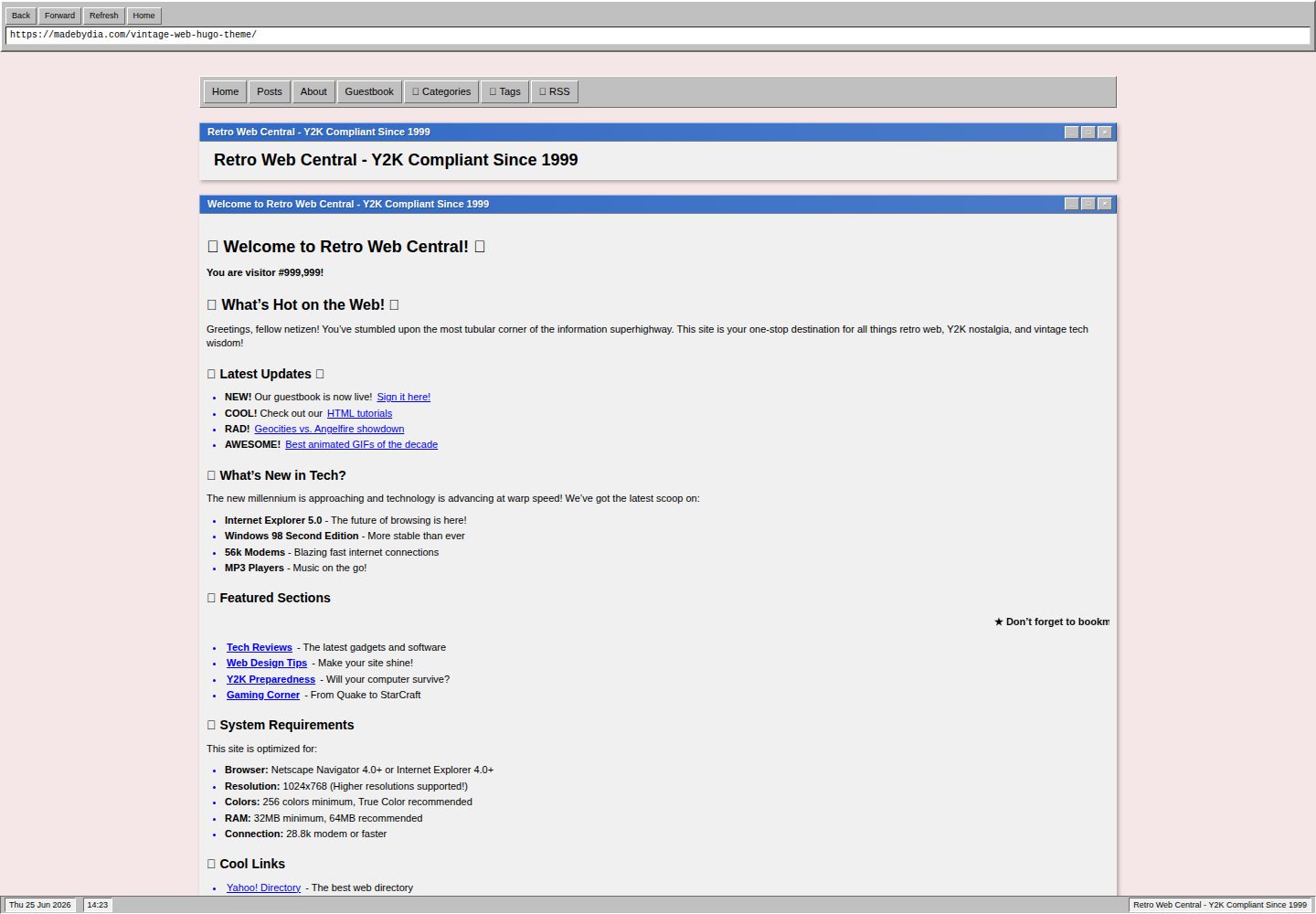
窗口式界面:标题栏、窗口控制按钮、状态栏与浏览器外框效果
Hugo启动器
vintage-web-hugo-theme — Hugo 启动器模板
作者 madebydia
一个受 90 年代末至 2000 年代初网页风格启发的 Hugo 主题,用经典操作系统窗口界面包装现代 Hugo 内容功能,采用 MIT 许可。
看看你的网站会是什么样
浏览真实页面截图,比较内容排版与手机效果。点击下方缩略图切换,放大查看整页细节。
全部页面与视图 3
截图用于了解视觉与布局,交互效果请以实际项目为准。
采集于 2026-10-03查看来源
值得关注的模板亮点
从已有项目资料中,快速了解它的特点。
复古视觉元素:90 年代配色与字体、闪烁文字、跑马灯动画、仿旧按钮与表单控件
交互功能:窗口最小化/最大化/关闭、Konami 代码彩蛋、键盘导航快捷键、图片灯箱、代码块复制
内容能力:Markdown、代码高亮、目录生成、分类/标签/系列、特色图片、列表/网格/归档多种列表视图
附带 exampleSite,含复古首页、教程文章、Y2K 指南、动图合集、关于页与留言簿示例
通过 hugo.toml 参数与 CSS 自定义属性调整外观和功能开关
模板详细介绍
这个主题把 90 年代末到 2000 年代初的网页视觉语言搬进 Hugo:窗口式界面带标题栏和窗口控制按钮、复古配色与字体、状态栏与浏览器外框效果、闪烁文字和跑马灯动画,以及仿旧式按钮和表单控件。它同时保留现代站点所需的常规能力,包括响应式布局、结构化数据、RSS 与社交分享、代码高亮、目录生成、分类/标签/系列分类法、特色图片和多种文章列表视图(列表、网格、归档)。
交互方面提供窗口控制(最小化、最大化、关闭)、Konami 代码彩蛋、键盘导航快捷键、带灯箱的图片画廊以及代码块复制按钮。主题附带一个 exampleSite,内含复古首页、HTML 教程文章、Y2K 生存指南、动图合集、关于页和留言簿等示例内容,可用于本地预览全部特性。
使用限制:主题通过 hugo.toml 的 params 控制浏览器外框、状态栏、侧边栏、欢迎语、统计、分享、复古页脚等开关,并可注入自定义 CSS 与 JavaScript;颜色通过 CSS 自定义属性覆盖。README 中提到的性能与浏览器兼容性描述属于作者自述,未在本资料中独立验证。演示图片、字体(Google Fonts)和图标(Unicode emoji)等第三方素材需按各自许可单独核对。
Hugo启动器
适合你的项目吗?
适用场景
- 制作带有 90 年代操作系统窗口风格的怀旧个人博客
- 搭建以复古网页美学为主题的展示型站点或作品集
- 用 exampleSite 中的示例内容快速预览和试验主题各项特性
- 为已有 Hugo 站点替换一套复古视觉风格
适合人群
- 希望站点呈现 90 年代末至 2000 年代初网页风格的 Hugo 用户
- 需要窗口式界面、复古配色和跑马灯等怀旧元素的个人项目
- 愿意通过 hugo.toml 参数和自定义 CSS/JS 调整主题的开发者
- 想用示例站点了解主题内容结构与配置方式的 Hugo 使用者
上手与定制指南
结合仓库当前版本的说明,按下面的资料检查内容、配置与运行要求。
- 1
通过 git submodule、git clone 或下载发布包将主题放入 themes/vintage-web-hugo-theme 目录
- 2
在 hugo.toml 中设置 theme = "vintage-web-hugo-theme",并按需配置 baseURL、菜单、分页和分类法
- 3
在 [params] 中开关浏览器外框、状态栏、侧边栏、欢迎语、统计、分享和复古页脚等选项
- 4
可通过 params.custom_css 与 params.custom_js 注入自定义样式和脚本,或覆盖 CSS 自定义属性调整配色
- 5
在 exampleSite 目录运行 hugo server 可在本地预览主题示例内容
授权与来源资料
使用条件与限制
免费使用 · 保留许可声明本次收录的是公开仓库中采用 MIT 许可的免费版本;免费范围为该版本代码,不代表外部服务或第三方素材免费。
使用时需要遵守
- 允许免费使用、修改、商用和分发该版本代码。
- 分发代码副本或实质性部分时,保留原作者版权声明和完整 MIT 许可声明。
- 代码按现状提供;担保与责任限制以原许可证及适用法律为准。
额外费用与待核对事项
- 主题使用 Google Fonts 字体,属于第三方外部资源,需自行核对其许可与可用性,可能涉及外部服务依赖。
- 图标来自 Unicode emoji 集,属于第三方素材,需按各自许可单独核对。
- 配置中提供 Google Analytics 参数,启用后会将访问数据发送至 Google 外部服务,需自行评估隐私与合规成本。
- 演示图片、字体、图标及其他第三方素材需按各自许可核对,不能仅凭代码的 MIT 许可判断。
- 域名、托管、数据库、支付或 AI 等外部服务可能另外收费。
查看原文依据
Permission is hereby granted, free of charge
许可证原文
Fonts from Google Fonts
README 原文
Icons from Unicode emoji set
README 原文
https://github.com/madebydia/vintage-web-hugo-theme/blob/master/LICENSEhttps://github.com/madebydia/vintage-web-hugo-theme/blob/master/README.mdgoogle_analytics = "G-XXXXXXXXXX"
README 原文
DeepSeek 根据仓库许可证和 README 整理 ·2026-10-03。结果仅覆盖已读取资料,依赖、图片、字体及后续条款变更以各自原文为准。
项目核对记录与介绍依据
模板资料
- 来源平台
- Hugo Themes
- 资料与维护参考分
- 资料较完整 · 87 / 100
- 技术栈
- Hugo
- 网站类型
- 启动器
这个分数如何计算
本站按许可资料(最高30分)、演示链接(12分)、预览图(10分)、Star数(15分)、记录的维护时间(15分)、描述完整度(8分)、功能记录(5分)和分类资料(5分)计算。它不是代码、安全或性能测试,也不是 Google 评分;有链接不代表已实测可用。
这个项目需要核对什么
- 记录的仓库更新时间
- 2026-06-25
- 截图检查日期
- 2026-10-03
已收录演示链接。请用你的内容与屏幕尺寸检查;有演示不代表表单、认证或支付已经可用。
目录记录的主要技术栈是 Hugo。请通过依赖清单和锁文件核对实际版本与托管要求。这些说明基于收录资料,不代表代码审计或部署实测。
查看具体选型方法 →介绍的制作与核对状态
介绍由 AI 辅助整理目录与仓库资料。仓库作者不等于这篇介绍的审核者。
审核声明: [email protected] · 2026-10-04
查看当时使用的来源资料
SHA-256: c8af644b5fb18abc26f282d9ce64625254abc21265b2aced1cdb3e286c8ef5bf
2026-10-03T19:25:40.448Z
来源文件 / 仓库# Vintage Web Hugo Theme
Built by [@madebydia](https://x.com/madebydia)
A nostalgic Hugo theme inspired by late 90s/early 2000s web design with modern functionality. Experience the charm of classic operating system interfaces with contemporary web standards.

## Features
✨ **Retro Design Elements**
- Classic window-style interface with title bars and controls
- 90s-inspired color palette and typography
- Retro status bar and browser chrome effects
- Blinking text and marquee animations
- Vintage button styling and form controls
🎮 **Interactive Features**
- Functional window controls (minimize, maximize, close)
- Konami code easter egg (↑↑↓↓←→←→BA)
- Keyboard navigation shortcuts
- Interactive image galleries with lightbox
- Copy-to-clipboard for code blocks
📱 **Modern Functionality**
- Fully responsive design
- SEO optimized with structured data
- Fast loading with optimized assets
- Accessibility features
- RSS feeds and social sharing
- Multiple post list views (list, grid, archive)
🎨 **Content Support**
- Complete Markdown support
- Syntax highlighting for code
- Image galleries and media embedding
- Table of contents generation
- Categories, tags, and series support
- Featured images and post metadata
## Installation
### Option 1: Git Submodule (Recommended)
```bash
git submodule add https://github.com/madebydia/vintage-web-hugo-theme.git themes/vintage-web-hugo-theme
```
### Option 2: Git Clone
```bash
git clone https://github.com/madebydia/vintage-web-hugo-theme.git themes/vintage-web-hugo-theme
```
### Option 3: Download
Download the latest release and extract to your `themes/vintage-web-hugo-theme` directory.
## Configuration
Add the theme to your `hugo.toml`:
```toml
theme = "vintage-web-hugo-theme"
```
### Basic Configuration
```toml
baseURL = "https://yoursite.com"
locale = "en-US"
title = "Your Vintage Website"
theme = "vintage-web-hugo-theme"
# Pagination
[pagination]
pagerSize = 10
path = "page"
# Taxonomies
[taxonomies]
category = "categories"
tag = "tags"
series = "series"
# Menu
[[menu.main]]
name = "Home"
url = "/"
weight = 10
[[menu.main]]
name = "Posts"
url = "/posts/"
weight = 20
[[menu.main]]
name = "About"
url = "/about/"
weight = 30
# Theme Parameters
[params]
# Site Description
description = "A nostalgic journey through the early web"
author = "Your Name"
# Retro Features
show_browser_chrome = true
show_status_bar = true
show_sidebar = true
show_welcome_message = true
welcome_message = "Welcome to our vintage web experience!"
# Content Display
show_featured_sections = true
show_stats = true
show_retro_elements = true
show_sharing = true
# Footer Options
show_retro_footer = true
show_build_info = false
# Sidebar Options
show_sidebar_stats = true
show_retro_sidebar = true
sidebar_content = "Welcome to our retro corner of the internet!"
# Social Links
[params.social]
twitter = "username"
github = "madebydia"
linkedin = "username"
email = "[email protected]"
mastodon = "https://mastodon.social/@username"
youtube = "channelname"
instagram = "username"
# SEO and Analytics
google_analytics = "G-XXXXXXXXXX"
# Repository (for edit links)
repo_url = "https://github.com/madebydia/vintage-web-hugo-theme"
edit_page = true
```
## Content Structure
### Front Matter Options
#### Posts (`content/posts/`)
```yaml
---
title: "Your Post Title"
date: 2024-01-01T10:00:00Z
draft: false
description: "Post description for SEO"
author: "Author Name"
categories: ["category1", "category2"]
tags: ["tag1", "tag2", "tag3"]
series: ["series-name"]
featured_image: "https://example.com/image.jpg"
toc: true
weight: 1
---
```
#### Pages (`content/about.md`, etc.)
```yaml
---
title: "About"
date: 2024-01-01T10:00:00Z
draft: false
description: "About page description"
---
```
### Special Content Types
The theme includes comprehensive test content showcasing:
- **Typography Showcase** - All heading levels, text formatting, quotes
- **Media Content** - Images, videos, audio, galleries, responsive media
- **Code Examples** - Syntax highlighting, multiple languages
- **Tables and Lists** - Data tables, ordered/unordered lists
- **Interactive Elements** - Forms, buttons, navigation
## Customization
### Theme Colors
Override CSS custom properties in your site's CSS:
```css
:root {
--bg-primary: #F5E6E8;
--bg-secondary: #E8D5D7;
--bg-window: #F0F0F0;
--text-primary: #000000;
--text-link: #0000EE;
--highlight: #316AC5;
}
```
### Custom CSS
Add custom styles in your `hugo.toml`:
```toml
[params]
custom_css = """
.custom-style {
background: linear-gradient(45deg, #ff00ff, #00ffff);
}
"""
```
### Custom JavaScript
Add custom JavaScript:
```toml
[params]
custom_js = """
console.log('Custom JavaScript loaded!');
"""
```
## Content Creation Tips
### Image Optimization
- Use responsive images with appropriate alt text
- Featured images work best at 1200x600 pixels
- Gallery images should be consistent in aspect ratio
### Code Blocks
Use fenced code blocks with language specification:
````markdown
```javascript
function retroFunction() {
console.log('Welcome to 1999!');
}
```
````
### Series Organization
Group related posts using the `series` front matter:
```yaml
series: ["hugo-tutorial", "web-development"]
```
## Development
### Testing with exampleSite
The theme includes a complete exampleSite with vintage 90s content to showcase all features:
```bash
# Navigate to the exampleSite directory
cd exampleSite
# Serve the site locally
hugo server
# Or serve with drafts and future posts
hugo server --buildDrafts --buildFuture
```
The exampleSite will be available at `http://localhost:1313` and includes:
- Retro homepage with authentic 90s styling
- HTML tutorial blog post with vintage code examples
- Y2K survival guide with period-appropriate warnings
- Animated GIF collection showcase
- About page with team profiles and tech specs
- Interactive guestbook with sample entries
### Local Development
```bash
hugo server --theme=vintage-web-hugo-theme --buildDrafts
```
### Building for Production
```bash
hugo --theme=vintage-web-hugo-theme --minify
```
## Browser Support
- Modern browsers (Chrome, Firefox, Safari, Edge)
- Graceful degradation for older browsers
- Mobile responsive design
- Progressive enhancement approach
## Accessibility
- Semantic HTML structure
- ARIA labels where appropriate
- Keyboard navigation support
- High contrast color schemes
- Screen reader friendly
## Performance
- Optimized CSS and JavaScript
- Image lazy loading
- Minified assets in production
- Efficient Hugo templating
- Fast loading times
## Contributing
1. Fork the repository
2. Create a feature branch (`git checkout -b feature/amazing-feature`)
3. Commit your changes (`git commit -m 'Add amazing feature'`)
4. Push to the branch (`git push origin feature/amazing-feature`)
5. Open a Pull Request
## License
This theme is released under the MIT License. See [LICENSE](LICENSE) for details.
## Credits
- Inspired by classic operating system interfaces
- Built with [Hugo](https://gohugo.io)
- Fonts from Google Fonts
- Icons from Unicode emoji set
## Support
- 📖 [Documentation](https://github.com/madebydia/vintage-web-hugo-theme/blob/master/README.md)
- 🐛 [Issues](https://github.com/madebydia/vintage-web-hugo-theme/issues)
---
Made with 💾 by [madebydia](https://github.com/madebydia)
*Remember: This site is Y2K compliant and best viewed in 1024x768! 🖥️*
看看同类模板
对比同技术栈与用途的模板,找到更适合的视觉与内容结构。

hugo-xmin
eXtremely Minimal Hugo theme: about 140 lines of code in total, including HTML and CSS (with no dependencies)
Hugo · 启动器

hugo-theme-gallery
Gallery Theme for Hugo
Hugo · 启动器

reveal-hugo
📽️ Create rich HTML-based presentations with Hugo and Reveal.js
Hugo · 启动器

anatole
Anatole is a minimalistic two-column theme for Hugo.
Hugo · 启动器

hugo-theme-diary
Moments piled up. A Hugo theme ported from SumiMakito/hexo-theme-Journal.
Hugo · 启动器

risotto
A minimalist, responsive hugo theme inspired by terminal ricing aesthetics.
Hugo · 启动器