基于 Nuxt 4 与 Vue 3,使用 TypeScript 编写
NuxtVue启动器
nuxt4-template — Nuxt 启动器模板
作者 manuelhintermayr
基于 Nuxt 4 的启动器模板,集成 Nuxt UI、i18n 多语言与鼠标跟随光标效果,附带示例页面与开发脚本。
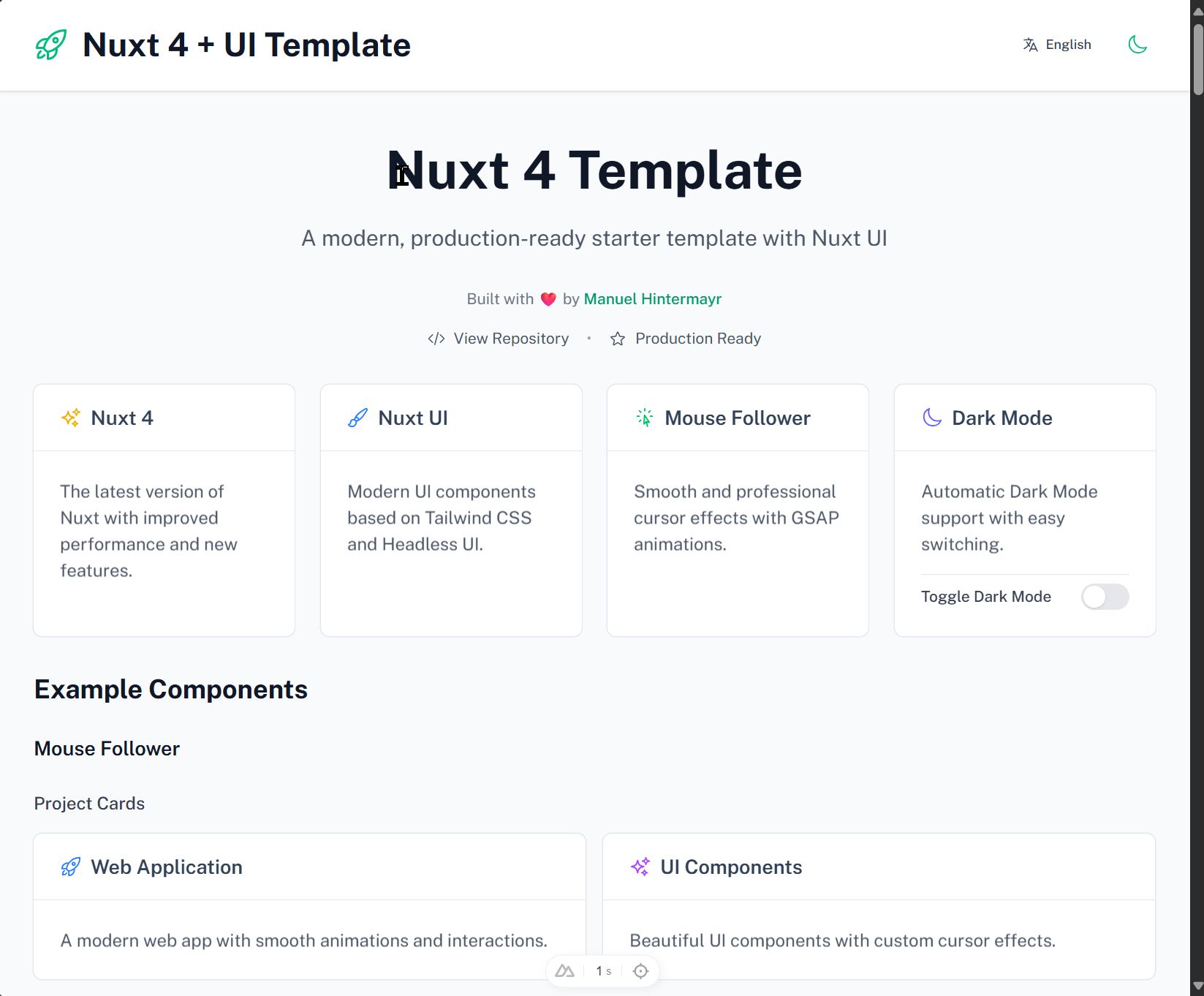
看看你的网站会是什么样
浏览真实页面截图,比较内容排版与手机效果。点击下方缩略图切换,放大查看整页细节。
目前有 1 张原始预览,可打开完整图片查看设计细节。
截图用于了解视觉与布局,交互效果请以实际项目为准。
采集于 2026-10-04查看来源
值得关注的模板亮点
从已有项目资料中,快速了解它的特点。
集成 Nuxt UI 与 Tailwind CSS 组件样式
内置 @nuxtjs/i18n,提供英语和德语翻译文件与语言切换组件
通过客户端插件集成 Cuberto Mouse Follower 与 GSAP 动画
提供未使用变量检查与 i18n 字符串清理等维护脚本
包含深色/浅色模式切换与响应式布局示例
模板详细介绍
这是一个 Nuxt 4 启动器模板,仓库采用 MIT 许可。模板在 Nuxt 4 与 Vue 3 基础上,集成 Nuxt UI 组件库与 Tailwind CSS,并配置 @nuxtjs/i18n 提供英语和德语两种语言支持,翻译文件按需懒加载。界面部分包含默认布局、首页示例、语言切换组件以及深色/浅色模式切换。
交互效果方面,模板通过客户端插件引入 Cuberto 的 Mouse Follower 与 GSAP(含 ScrollTrigger),为按钮、链接、表单输入等元素提供自定义光标状态和滚动动画。示例代码展示了通过 data 属性控制光标行为的方式。
开发辅助上,模板提供 TypeScript 配置、VS Code 集成设置,以及若干 npm 脚本用于检查未使用变量、分析并清理未使用的 i18n 字符串。项目结构将应用代码放在 app/ 目录,i18n 配置与语言文件放在 i18n/ 目录,维护脚本放在 scripts/ 目录。
需要注意,模板中的演示图片、字体、图标等第三方素材需按各自许可核对;外部托管、域名等服务可能产生额外费用。模板定位为起始脚手架,具体功能以仓库实际代码为准。
Nuxt启动器
适合你的项目吗?
适用场景
- 快速搭建需要多语言支持的 Nuxt 4 项目原型
- 为网站添加自定义鼠标光标与滚动动画效果
- 作为学习 Nuxt UI、i18n 与 GSAP 集成的参考项目
- 在已有 Nuxt 项目中复用语言切换与深色模式实现
适合人群
- 熟悉 Vue 与 Nuxt 的前端开发者
- 需要英语和德语双语起步配置的项目
- 希望参考鼠标跟随与 GSAP 动画集成方式的开发者
- 使用 TypeScript 与 VS Code 的团队
上手与定制指南
结合仓库当前版本的说明,按下面的资料检查内容、配置与运行要求。
- 1
克隆仓库后使用 npm、pnpm、yarn 或 bun 安装依赖
- 2
运行 npm run dev 等命令启动开发服务器,默认端口 3000
- 3
新增语言需在 i18n/locales/ 添加 JSON 文件并在 nuxt.config.ts 中注册
- 4
演示图片、字体、图标等第三方素材需单独核对许可
- 5
生产构建使用 npm run build,本地预览使用 npm run preview
授权与来源资料
使用条件与限制
免费使用 · 保留许可声明本次收录的是公开仓库中采用 MIT 许可的免费版本;免费范围为该版本代码,不代表外部服务或第三方素材免费。
使用时需要遵守
- 允许免费使用、修改、商用和分发该版本代码。
- 分发代码副本或实质性部分时,保留原作者版权声明和完整 MIT 许可声明。
- 代码按现状提供;担保与责任限制以原许可证及适用法律为准。
额外费用与待核对事项
- 演示图片、字体、图标及其他第三方素材需按各自许可核对,不能仅凭代码的 MIT 许可判断。
- 域名、托管、数据库、支付或 AI 等外部服务可能另外收费。
查看原文依据
https://github.com/manuelhintermayr/nuxt4-template/blob/main/LICENSEhttps://github.com/manuelhintermayr/nuxt4-template/blob/main/README.mdPermission is hereby granted, free of charge
许可证原文
DeepSeek 根据仓库许可证和 README 整理 ·2026-10-04。结果仅覆盖已读取资料,依赖、图片、字体及后续条款变更以各自原文为准。
项目核对记录与介绍依据
模板资料
- 来源平台
- GitHub
- 资料与维护参考分
- 资料一般 · 74 / 100
- 技术栈
- Nuxt · Vue
- 网站类型
- 启动器
这个分数如何计算
本站按许可资料(最高30分)、演示链接(12分)、预览图(10分)、Star数(15分)、记录的维护时间(15分)、描述完整度(8分)、功能记录(5分)和分类资料(5分)计算。它不是代码、安全或性能测试,也不是 Google 评分;有链接不代表已实测可用。
这个项目需要核对什么
- 记录的仓库更新时间
- 2025-09-08
- 截图检查日期
- 2026-10-04
已收录演示链接。请用你的内容与屏幕尺寸检查;有演示不代表表单、认证或支付已经可用。
目录记录的主要技术栈是 Nuxt。请通过依赖清单和锁文件核对实际版本与托管要求。这些说明基于收录资料,不代表代码审计或部署实测。
查看具体选型方法 →介绍的制作与核对状态
介绍由 AI 辅助整理目录与仓库资料。仓库作者不等于这篇介绍的审核者。
审核声明: [email protected] · 2026-10-04
查看当时使用的来源资料
SHA-256: 96fc36d2ad43233c6b0dea3845c21de7d3026f5efb445e29bbcf9dad153b162d
2026-10-04T00:43:54.253Z
来源文件 / 仓库# Nuxt 4 Template
A modern, production-ready Nuxt 4 starter template with comprehensive configurations and internationalization support. Perfect for building modern web applications with cutting-edge technologies.

**🌐 Live Demo:** [http://projects.manuelhintermayr.com/nuxt4-template](http://projects.manuelhintermayr.com/nuxt4-template)
**Developed by:** [Manuel Hintermayr](https://github.com/manuelhintermayr)
**Repository:** https://github.com/manuelhintermayr/nuxt4-template
## 🚀 Features
- ⚡️ **Nuxt 4** - Latest version with improved performance and new features
- 🎨 **Nuxt UI** - Modern UI components based on Tailwind CSS and Headless UI
- 🌍 **Internationalization** - Full i18n support with @nuxtjs/i18n
- 🌙 **Dark Mode** - Built-in dark/light mode toggle
- 📱 **Responsive Design** - Mobile-first approach
- 🔧 **TypeScript** - Full TypeScript support with type safety
- 🎯 **Component Architecture** - Modular, reusable Vue components
- 🎭 **Heroicons** - Beautiful SVG icons from the Heroicons library
- 🐭 **Mouse Follower** - Smooth mouse cursor effects with GSAP animations
- 🏗️ **Developer Experience** - Hot module replacement and fast refresh
- 🔍 **Code Quality Tools** - Automated unused variable detection and i18n management
- ⚙️ **VS Code Integration** - Pre-configured settings for optimal development experience

## 🛠️ Technology Stack
### Core Frameworks
- **[Nuxt 4](https://nuxt.com/)** - The Intuitive Vue Framework
- **[Vue 3](https://vuejs.org/)** - Progressive JavaScript Framework
### UI & Styling
- **[Nuxt UI](https://ui.nuxt.com/)** - Fully styled and customizable components
- **[Tailwind CSS](https://tailwindcss.com/)** - Utility-first CSS framework
- **All UI components implemented based on [Nuxt UI Documentation](https://ui.nuxt.com/components/app)**
### Animation & Effects
- **[GSAP](https://greensock.com/gsap/)** - Professional-grade animation library
- **[ScrollTrigger](https://greensock.com/scrolltrigger/)** - Scroll-based animation trigger
- **[Mouse Follower](https://github.com/Cuberto/mouse-follower)** - Smooth mouse cursor effects
### Internationalization
- **[@nuxtjs/i18n](https://i18n.nuxtjs.org/)** - Internationalization module
- **Support for:** English (en) and German (de) out of the box
- **Lazy loading** - Translation files loaded on demand
### Icons & Assets
- **[@iconify-json/heroicons](https://iconify.design/)** - Heroicons icon collection
- **[@nuxt/icon](https://github.com/nuxt/icon)** - Icon component with 200k+ icons
### Development Tools
- **TypeScript** - Full type safety and IntelliSense
- **VS Code Integration** - Automatic code cleanup and unused import removal
- **Utility Scripts** - i18n management and code quality checks
## 📦 Installation
```bash
# Clone the repository
git clone https://github.com/manuelhintermayr/nuxt4-template.git
cd nuxt4-template
# Install dependencies
npm install
# or
pnpm install
# or
yarn install
# or
bun install
```
## 🚦 Development
Start the development server on `http://localhost:3000`:
```bash
npm run dev
# or
pnpm dev
# or
yarn dev
# or
bun run dev
```
### Additional Development Commands
```bash
# Code Quality Checks
npm run check:unused-vars # Check for unused variables
npm run check:unused-vars-enhanced # Enhanced unused variable analysis
npm run lint:check # Run all code quality checks
# i18n Management
npm run analyze:i18n # Analyze i18n string usage
npm run cleanup:i18n # Remove unused i18n strings
# Production Build
npm run build # Build for production
npm run preview # Preview production build
```
## 🏗️ Project Structure
```
nuxt4-template/
├── app/
│ ├── app.config.ts # App configuration
│ ├── app.vue # Root application component
│ ├── assets/
│ │ └── css/ # Global styles and CSS files
│ ├── components/ # Reusable Vue components for showcase (including a language switcher)
│ ├── layouts/
│ │ └── default.vue # Default layout template
│ ├── pages/
│ │ └── index.vue # Main landing page
│ └── plugins/
│ ├── mouse-follower.client.ts # Mouse cursor effects initialization
│ └── gsap-animations.client.ts # GSAP animations and scroll effects
├── i18n/
│ ├── i18n.config.ts # i18n configuration
│ └── locales/ # Translation files
│ ├── en.json # English translations
│ └── de.json # German translations
├── scripts/ # Utility scripts for development and maintenance
│ ├── analyze-i18n-strings.js # Analyze i18n string usage across codebase
│ ├── cleanup-i18n-strings.js # Remove unused i18n strings automatically
│ ├── check-unused-vars.js # Check for unused variables in all files
│ ├── check-unused-vars-enhanced.js # Enhanced unused variable analysis
│ └── README.md # Documentation for utility scripts
├── public/ # Static assets
├── nuxt.config.ts # Nuxt configuration
├── package.json # Dependencies and scripts
├── package-lock.json # Lock file for dependencies
└── tsconfig.json # TypeScript configuration
```
## 🎨 Component Architecture
### Modular Design
All UI elements are extracted into reusable components following Vue.js best practices:
- **Props-based components** - `FeatureCard.vue` accepts title, description, icon, and color props
- **Composable integration** - Uses Nuxt's auto-imported composables like `useI18n`
- **TypeScript interfaces** - Fully typed props and component APIs
- **Scoped styling** - Component-specific styles when needed
### Available Components
#### Layout Components
- `AppHeader` - Navigation header with logo, title, language switcher, and dark mode toggle
- `WelcomeSection` - Hero section with internationalized welcome message
## 🐭 Mouse Follower Integration
This template includes **Mouse Follower** by Cuberto, providing smooth and professional cursor effects.
### Features:
- **Pointer Detection** - Automatic cursor changes on interactive elements (buttons, links)
- **State Detection** - Custom cursor states for different element types
- **GSAP Integration** - Smooth animations powered by GreenSock
- **Performance Optimized** - Efficient animation loops and event handling
### Usage:
Add data attributes to elements for custom cursor behavior:
```html
<!-- Pointer cursor -->
<button data-cursor-pointer>Click me</button>
<!-- Text cursor -->
<p data-cursor-text>Selectable text</p>
<!-- Hidden cursor -->
<div data-cursor="-hidden">No cursor here</div>
<!-- Inverse cursor -->
<div data-cursor="-inverse">Inverted cursor</div>
```
The cursor automatically detects:
- `a, button` elements → pointer cursor
- Form inputs → text cursor
- Custom data attributes → specific states
## 🎭 GSAP Animations
This template includes a comprehensive **GSAP (GreenSock Animation Platform)** integration with advanced scroll-based animations and interactive effects.
## 🌍 Internationalization
### Supported Languages
- **English (en)** - Default language
- **German (de)** - Secondary language
### Language Persistence
The `LanguageSwitcher` component includes advanced locale management:
- **Default Behavior**: Always defaults to English on first visit
- **Persistence**: User's language choice is saved to localStorage
- **Restoration**: Automatically restores saved language preference on page reload
- **Type Safety**: Only accepts valid locale codes ('en', 'de')
- **Props Support**: Accepts `isBlack` prop for styling variations
### Translation Structure
```json
{
"header": {
"title": "Page title"
},
"welcome": {
"title": "Welcome message",
"subtitle": "Description"
},
"features": {
"nuxt4": {
"title": "Feature title",
"description": "Feature description"
}
}
}
```
### Adding New Languages
1. Create a new JSON file in `i18n/locales/` (e.g., `fr.json`)
2. Add the locale configuration in `nuxt.config.ts`:
```typescript
locales: [
{ code: 'en', name: 'English', file: 'en.json' },
{ code: 'de', name: 'Deutsch', file: 'de.json' },
{ code: 'fr', name: 'Français', file: 'fr.json' }
]
```
### Maintenance Scripts
The template includes utility scripts for development and maintenance:
#### i18n Management:
- **`scripts/analyze-i18n-strings.js`** - Analyze string usage and identify unused translations
- **`scripts/cleanup-i18n-strings.js`** - Automatically remove unused strings from translation files
#### Code Quality:
- **`scripts/check-unused-vars.js`** - Check for unused variables across all TypeScript/Vue files
- **`scripts/check-unused-vars-enhanced.js`** - Enhanced analysis with import checking
See [`scripts/README.md`](scripts/README.md) for detailed usage instructions.
## 🏭 Production
Build the application for production:
```bash
npm run build
# or
pnpm build
# or
yarn build
# or
bun run build
```
Preview the production build locally:
```bash
npm run preview
# or
pnpm preview
# or
yarn preview
# or
bun run preview
```
## 📚 Documentation
- **[Nuxt 4 Documentation](https://nuxt.com/docs/getting-started/introduction)** - Learn about Nuxt features
- **[Nuxt UI Documentation](https://ui.nuxt.com/)** - UI component library
- **[Vue 3 Documentation](https://vuejs.org/guide/)** - Vue.js framework guide
- **[Tailwind CSS Documentation](https://tailwindcss.com/docs)** - Utility-first CSS
- **[GSAP Documentation](https://greensock.com/docs/)** - Animation library guide
- **[ScrollTrigger Documentation](https://greensock.com/docs/v3/Plugins/ScrollTrigger)** - Scroll animations
- **[Nuxt i18n Documentation](https://i18n.nuxtjs.org/)** - Internationalization guide
- **[TypeScript Documentation](https://www.typescriptlang.org/docs/)** - TypeScript handbook
- **[Mouse Follower Documentation](https://github.com/Cuberto/mouse-follower/blob/dev/README.MD)** - Smooth cursor effects library
## 🤝 Contributing
This template is designed to be a starting point for Nuxt 4 projects. Feel free to:
- Fork the repository
- Customize components and styling
- Add new features and integrations
- Submit pull requests for improvements
- Report issues and suggestions
## 📄 License
This project is open source and available under the [MIT License](LICENSE).
## 💝 Acknowledgments
- **Nuxt Team** for the amazing framework
- **Tailwind Labs** for Tailwind CSS and Headless UI
- **Heroicons** for the beautiful icon set
- **Vue.js Team** for the progressive framework
- **GreenSock** for the incredible [GSAP](https://greensock.com/) animation library
- **Cuberto** for the incredible [Mouse Follower](https://github.com/Cuberto/mouse-follower) library
---
**Happy coding!** 🚀
Built with ❤️ by [Manuel Hintermayr](https://github.com/manuelhintermayr)
看看同类模板
对比同技术栈与用途的模板,找到更适合的视觉与内容结构。

laravel-nuxt
A Laravel-Nuxt starter kit.
Nuxt · 启动器

canvas
Portfolio template made with Nuxt 3, Nuxt Content v3, NuxtUI v3 and TailwindCSS v4
Nuxt · 作品集

nuxt3-starter
💚 A Better Nuxt 3 Starter Template,generate by nuxi.
Nuxt · 启动器

starter
Nuxt Starter Template for Nuxt UI.
Nuxt · 启动器

bloggrify
Run a blog from Markdown files. Themes, SEO, analytics, newsletter and comments preconfigured. Like Docus, but…
Nuxt · 博客
vitify-nuxt
🔽🏔 Vuetify + Nuxt Starter Template
Nuxt · 后台