Built on Nuxt 4 and Vue 3, written in TypeScript
NuxtVueStarter
nuxt4-template — Nuxt Starter Template
By manuelhintermayr
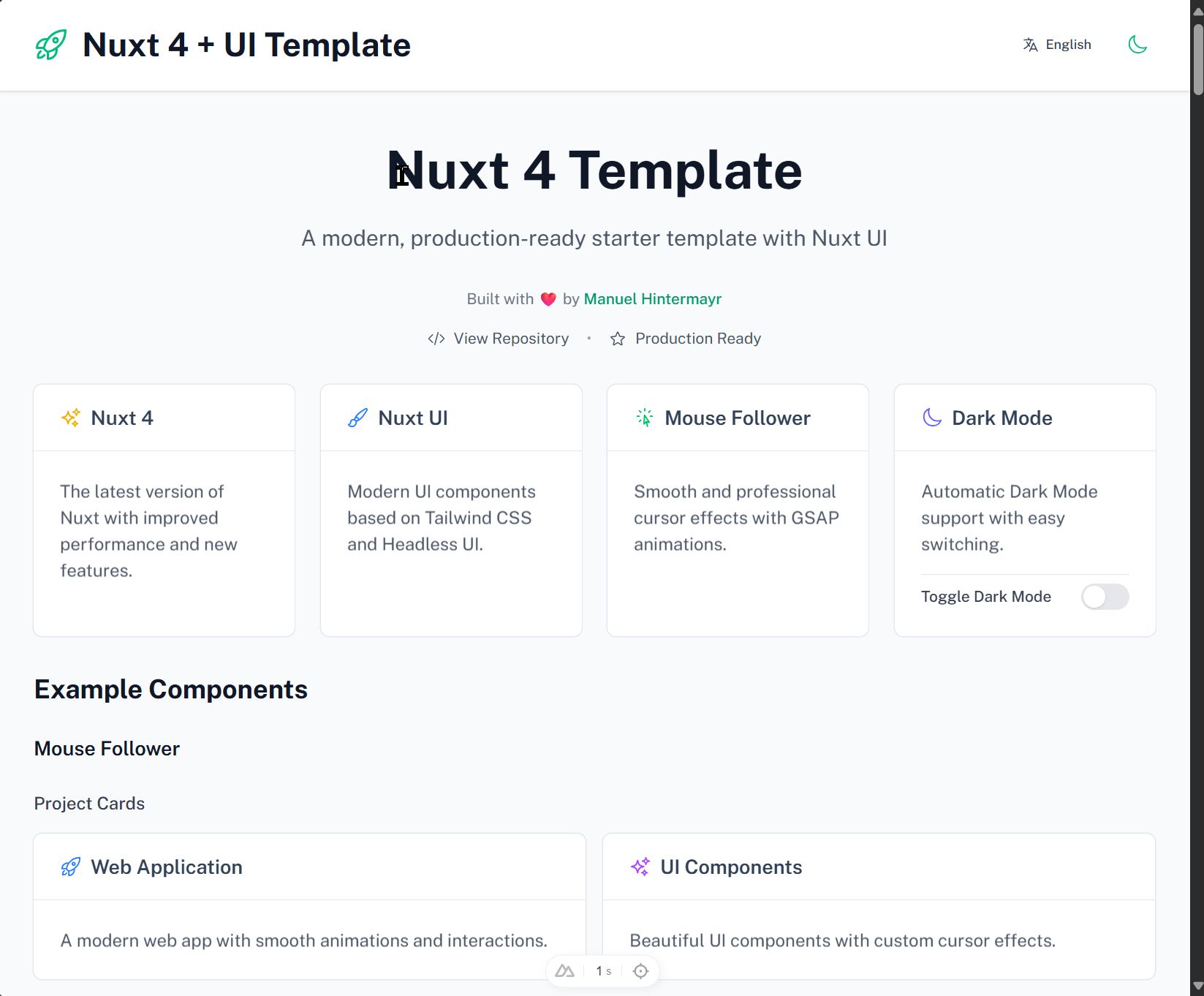
A Nuxt 4 starter template that integrates Nuxt UI, i18n multilingual support, and a mouse-follower cursor effect, with example pages and development scripts.
Explore the design
Compare the page layouts and mobile experience. Open any screenshot for a closer look.
Author preview
Author-provided previewTop of page
Preview provided in the project README.
One original preview is available. Open the full image to inspect the design.
Screenshots show visual appearance; interactive behavior may differ.
Recorded 2026-10-04View source
What stands out
A quick read of the recorded project description.
Integrates Nuxt UI and Tailwind CSS for component styling
Includes @nuxtjs/i18n with English and German translation files and a language switcher component
Integrates Cuberto Mouse Follower and GSAP animations via a client-side plugin
Provides maintenance scripts for checking unused variables and cleaning up i18n strings
Includes dark/light mode toggle and responsive layout examples
Template Details
This is a Nuxt 4 starter template, and the repository is under the MIT license. Built on Nuxt 4 and Vue 3, the template integrates the Nuxt UI component library and Tailwind CSS, and configures @nuxtjs/i18n to provide English and German language support, with translation files lazy-loaded on demand. The interface includes a default layout, a home page example, a language switcher component, and a dark/light mode toggle.
For interactions, the template uses a client-side plugin to bring in Cuberto's Mouse Follower and GSAP (including ScrollTrigger), providing custom cursor states and scroll animations for elements such as buttons, links, and form inputs. The example code demonstrates controlling cursor behavior through data attributes.
For development support, the template provides TypeScript configuration, VS Code integration settings, and several npm scripts for checking unused variables and analyzing and cleaning up unused i18n strings. The project structure places application code in the app/ directory, i18n configuration and language files in the i18n/ directory, and maintenance scripts in the scripts/ directory.
Note that third-party assets in the template, such as demo images, fonts, and icons, must be checked against their respective licenses; external hosting, domains, and other services may incur additional costs. The template is positioned as a starting scaffold, and specific functionality is subject to the actual code in the repository.
NuxtStarter
Is it right for your project?
Use Cases
- Quickly building a Nuxt 4 project prototype that requires multilingual support
- Adding a custom mouse cursor and scroll animation effects to a website
- Using it as a reference project for learning Nuxt UI, i18n, and GSAP integration
- Reusing the language switcher and dark mode implementation in an existing Nuxt project
Suitable For
- Front-end developers familiar with Vue and Nuxt
- Projects that need an English and German bilingual starting configuration
- Developers who want to reference how mouse-follow and GSAP animations are integrated
- Teams using TypeScript and VS Code
Getting started & customization
Use these recorded setup notes alongside the repository instructions for your chosen version.
- 1
After cloning the repository, install dependencies with npm, pnpm, yarn, or bun
- 2
Run commands such as npm run dev to start the development server, default port 3000
- 3
To add a language, add a JSON file in i18n/locales/ and register it in nuxt.config.ts
- 4
Third-party assets such as demo images, fonts, and icons must be checked separately for licensing
- 5
Use npm run build for production builds and npm run preview for local preview
License & source material
Usage conditions & limitations
Free to use · keep license noticeThis entry covers the free version in a public repository under the MIT license; the free scope is the code of this version and does not mean that external services or third-party assets are free.
Must comply with when using
- The code of this version may be used, modified, used commercially, and distributed free of charge.
- When distributing copies or substantial portions of the code, retain the original author's copyright notice and the full MIT license notice.
- The code is provided as is; warranties and limitations of liability are governed by the original license and applicable law.
Additional costs & items to verify
- Demo images, fonts, icons, and other third-party assets must be checked against their respective licenses and cannot be judged solely by the code's MIT license.
- External services such as domains, hosting, databases, payments, or AI may incur separate charges.
View Original Text Basis
https://github.com/manuelhintermayr/nuxt4-template/blob/main/LICENSEhttps://github.com/manuelhintermayr/nuxt4-template/blob/main/README.mdPermission is hereby granted, free of charge
Original License Text
Compiled by DeepSeek based on repository license and README ·2026-10-04. Results only cover the materials read; dependencies, images, fonts, and subsequent term changes are subject to their respective original texts.
Project checks & description sources
Template Information
- Source platforms
- GitHub
- Documentation and maintenance reference score
- Partly documented · 74 / 100
- Technologies
- Nuxt · Vue
- Website type
- Starter
How this score is calculated
Our heuristic uses license records (up to 30), a demo link (12), a preview (10), stars (15), recorded maintenance (15), description completeness (8), feature records (5) and classification data (5). It is not a code, security or performance test, or a Google score. A link does not establish tested functionality.
What to verify for this project
- Repository update recorded
- 2025-09-08
- Screenshot last checked
- 2026-10-04
A demo link is listed. Check it with your own content and viewport sizes; its presence does not confirm that forms, authentication or payments work.
The catalog identifies Nuxt as the primary stack. Check the actual dependency manifest and lockfile for versions and hosting requirements. These notes use recorded metadata, not a code audit or a deployment test.
Use a selection guide →How this description was prepared
AI-assisted description based on catalog records and repository material. Repository authors are not automatically the reviewers of this description.
Review declaration: [email protected] · 2026-10-04
Inspect the recorded source material
SHA-256: 96fc36d2ad43233c6b0dea3845c21de7d3026f5efb445e29bbcf9dad153b162d
2026-10-04T00:43:54.253Z
Source file / repository# Nuxt 4 Template
A modern, production-ready Nuxt 4 starter template with comprehensive configurations and internationalization support. Perfect for building modern web applications with cutting-edge technologies.

**🌐 Live Demo:** [http://projects.manuelhintermayr.com/nuxt4-template](http://projects.manuelhintermayr.com/nuxt4-template)
**Developed by:** [Manuel Hintermayr](https://github.com/manuelhintermayr)
**Repository:** https://github.com/manuelhintermayr/nuxt4-template
## 🚀 Features
- ⚡️ **Nuxt 4** - Latest version with improved performance and new features
- 🎨 **Nuxt UI** - Modern UI components based on Tailwind CSS and Headless UI
- 🌍 **Internationalization** - Full i18n support with @nuxtjs/i18n
- 🌙 **Dark Mode** - Built-in dark/light mode toggle
- 📱 **Responsive Design** - Mobile-first approach
- 🔧 **TypeScript** - Full TypeScript support with type safety
- 🎯 **Component Architecture** - Modular, reusable Vue components
- 🎭 **Heroicons** - Beautiful SVG icons from the Heroicons library
- 🐭 **Mouse Follower** - Smooth mouse cursor effects with GSAP animations
- 🏗️ **Developer Experience** - Hot module replacement and fast refresh
- 🔍 **Code Quality Tools** - Automated unused variable detection and i18n management
- ⚙️ **VS Code Integration** - Pre-configured settings for optimal development experience

## 🛠️ Technology Stack
### Core Frameworks
- **[Nuxt 4](https://nuxt.com/)** - The Intuitive Vue Framework
- **[Vue 3](https://vuejs.org/)** - Progressive JavaScript Framework
### UI & Styling
- **[Nuxt UI](https://ui.nuxt.com/)** - Fully styled and customizable components
- **[Tailwind CSS](https://tailwindcss.com/)** - Utility-first CSS framework
- **All UI components implemented based on [Nuxt UI Documentation](https://ui.nuxt.com/components/app)**
### Animation & Effects
- **[GSAP](https://greensock.com/gsap/)** - Professional-grade animation library
- **[ScrollTrigger](https://greensock.com/scrolltrigger/)** - Scroll-based animation trigger
- **[Mouse Follower](https://github.com/Cuberto/mouse-follower)** - Smooth mouse cursor effects
### Internationalization
- **[@nuxtjs/i18n](https://i18n.nuxtjs.org/)** - Internationalization module
- **Support for:** English (en) and German (de) out of the box
- **Lazy loading** - Translation files loaded on demand
### Icons & Assets
- **[@iconify-json/heroicons](https://iconify.design/)** - Heroicons icon collection
- **[@nuxt/icon](https://github.com/nuxt/icon)** - Icon component with 200k+ icons
### Development Tools
- **TypeScript** - Full type safety and IntelliSense
- **VS Code Integration** - Automatic code cleanup and unused import removal
- **Utility Scripts** - i18n management and code quality checks
## 📦 Installation
```bash
# Clone the repository
git clone https://github.com/manuelhintermayr/nuxt4-template.git
cd nuxt4-template
# Install dependencies
npm install
# or
pnpm install
# or
yarn install
# or
bun install
```
## 🚦 Development
Start the development server on `http://localhost:3000`:
```bash
npm run dev
# or
pnpm dev
# or
yarn dev
# or
bun run dev
```
### Additional Development Commands
```bash
# Code Quality Checks
npm run check:unused-vars # Check for unused variables
npm run check:unused-vars-enhanced # Enhanced unused variable analysis
npm run lint:check # Run all code quality checks
# i18n Management
npm run analyze:i18n # Analyze i18n string usage
npm run cleanup:i18n # Remove unused i18n strings
# Production Build
npm run build # Build for production
npm run preview # Preview production build
```
## 🏗️ Project Structure
```
nuxt4-template/
├── app/
│ ├── app.config.ts # App configuration
│ ├── app.vue # Root application component
│ ├── assets/
│ │ └── css/ # Global styles and CSS files
│ ├── components/ # Reusable Vue components for showcase (including a language switcher)
│ ├── layouts/
│ │ └── default.vue # Default layout template
│ ├── pages/
│ │ └── index.vue # Main landing page
│ └── plugins/
│ ├── mouse-follower.client.ts # Mouse cursor effects initialization
│ └── gsap-animations.client.ts # GSAP animations and scroll effects
├── i18n/
│ ├── i18n.config.ts # i18n configuration
│ └── locales/ # Translation files
│ ├── en.json # English translations
│ └── de.json # German translations
├── scripts/ # Utility scripts for development and maintenance
│ ├── analyze-i18n-strings.js # Analyze i18n string usage across codebase
│ ├── cleanup-i18n-strings.js # Remove unused i18n strings automatically
│ ├── check-unused-vars.js # Check for unused variables in all files
│ ├── check-unused-vars-enhanced.js # Enhanced unused variable analysis
│ └── README.md # Documentation for utility scripts
├── public/ # Static assets
├── nuxt.config.ts # Nuxt configuration
├── package.json # Dependencies and scripts
├── package-lock.json # Lock file for dependencies
└── tsconfig.json # TypeScript configuration
```
## 🎨 Component Architecture
### Modular Design
All UI elements are extracted into reusable components following Vue.js best practices:
- **Props-based components** - `FeatureCard.vue` accepts title, description, icon, and color props
- **Composable integration** - Uses Nuxt's auto-imported composables like `useI18n`
- **TypeScript interfaces** - Fully typed props and component APIs
- **Scoped styling** - Component-specific styles when needed
### Available Components
#### Layout Components
- `AppHeader` - Navigation header with logo, title, language switcher, and dark mode toggle
- `WelcomeSection` - Hero section with internationalized welcome message
## 🐭 Mouse Follower Integration
This template includes **Mouse Follower** by Cuberto, providing smooth and professional cursor effects.
### Features:
- **Pointer Detection** - Automatic cursor changes on interactive elements (buttons, links)
- **State Detection** - Custom cursor states for different element types
- **GSAP Integration** - Smooth animations powered by GreenSock
- **Performance Optimized** - Efficient animation loops and event handling
### Usage:
Add data attributes to elements for custom cursor behavior:
```html
<!-- Pointer cursor -->
<button data-cursor-pointer>Click me</button>
<!-- Text cursor -->
<p data-cursor-text>Selectable text</p>
<!-- Hidden cursor -->
<div data-cursor="-hidden">No cursor here</div>
<!-- Inverse cursor -->
<div data-cursor="-inverse">Inverted cursor</div>
```
The cursor automatically detects:
- `a, button` elements → pointer cursor
- Form inputs → text cursor
- Custom data attributes → specific states
## 🎭 GSAP Animations
This template includes a comprehensive **GSAP (GreenSock Animation Platform)** integration with advanced scroll-based animations and interactive effects.
## 🌍 Internationalization
### Supported Languages
- **English (en)** - Default language
- **German (de)** - Secondary language
### Language Persistence
The `LanguageSwitcher` component includes advanced locale management:
- **Default Behavior**: Always defaults to English on first visit
- **Persistence**: User's language choice is saved to localStorage
- **Restoration**: Automatically restores saved language preference on page reload
- **Type Safety**: Only accepts valid locale codes ('en', 'de')
- **Props Support**: Accepts `isBlack` prop for styling variations
### Translation Structure
```json
{
"header": {
"title": "Page title"
},
"welcome": {
"title": "Welcome message",
"subtitle": "Description"
},
"features": {
"nuxt4": {
"title": "Feature title",
"description": "Feature description"
}
}
}
```
### Adding New Languages
1. Create a new JSON file in `i18n/locales/` (e.g., `fr.json`)
2. Add the locale configuration in `nuxt.config.ts`:
```typescript
locales: [
{ code: 'en', name: 'English', file: 'en.json' },
{ code: 'de', name: 'Deutsch', file: 'de.json' },
{ code: 'fr', name: 'Français', file: 'fr.json' }
]
```
### Maintenance Scripts
The template includes utility scripts for development and maintenance:
#### i18n Management:
- **`scripts/analyze-i18n-strings.js`** - Analyze string usage and identify unused translations
- **`scripts/cleanup-i18n-strings.js`** - Automatically remove unused strings from translation files
#### Code Quality:
- **`scripts/check-unused-vars.js`** - Check for unused variables across all TypeScript/Vue files
- **`scripts/check-unused-vars-enhanced.js`** - Enhanced analysis with import checking
See [`scripts/README.md`](scripts/README.md) for detailed usage instructions.
## 🏭 Production
Build the application for production:
```bash
npm run build
# or
pnpm build
# or
yarn build
# or
bun run build
```
Preview the production build locally:
```bash
npm run preview
# or
pnpm preview
# or
yarn preview
# or
bun run preview
```
## 📚 Documentation
- **[Nuxt 4 Documentation](https://nuxt.com/docs/getting-started/introduction)** - Learn about Nuxt features
- **[Nuxt UI Documentation](https://ui.nuxt.com/)** - UI component library
- **[Vue 3 Documentation](https://vuejs.org/guide/)** - Vue.js framework guide
- **[Tailwind CSS Documentation](https://tailwindcss.com/docs)** - Utility-first CSS
- **[GSAP Documentation](https://greensock.com/docs/)** - Animation library guide
- **[ScrollTrigger Documentation](https://greensock.com/docs/v3/Plugins/ScrollTrigger)** - Scroll animations
- **[Nuxt i18n Documentation](https://i18n.nuxtjs.org/)** - Internationalization guide
- **[TypeScript Documentation](https://www.typescriptlang.org/docs/)** - TypeScript handbook
- **[Mouse Follower Documentation](https://github.com/Cuberto/mouse-follower/blob/dev/README.MD)** - Smooth cursor effects library
## 🤝 Contributing
This template is designed to be a starting point for Nuxt 4 projects. Feel free to:
- Fork the repository
- Customize components and styling
- Add new features and integrations
- Submit pull requests for improvements
- Report issues and suggestions
## 📄 License
This project is open source and available under the [MIT License](LICENSE).
## 💝 Acknowledgments
- **Nuxt Team** for the amazing framework
- **Tailwind Labs** for Tailwind CSS and Headless UI
- **Heroicons** for the beautiful icon set
- **Vue.js Team** for the progressive framework
- **GreenSock** for the incredible [GSAP](https://greensock.com/) animation library
- **Cuberto** for the incredible [Mouse Follower](https://github.com/Cuberto/mouse-follower) library
---
**Happy coding!** 🚀
Built with ❤️ by [Manuel Hintermayr](https://github.com/manuelhintermayr)
Explore similar templates
Compare previews and descriptions within the same stack and category.

laravel-nuxt
A Laravel + Nuxt decoupled starter kit with built-in login, registration, email verification, password reset, and Socialite third-party login (GitHub example), switchable between SPA and SSR.
Nuxt · Starter

canvas
Canvas is a Nuxt-based portfolio template that uses Nuxt Content for content management and Nuxt UI with Tailwind CSS for pages.
Nuxt · Portfolio

nuxt3-starter
A Nuxt 3 starter template generated by nuxi, preconfigured with UnoCSS, unplugin-icons, Pinia, and VueUse. It suits developers who need a quick Nuxt 3 project skeleton with atomic CSS and auto-import workflows, and is available under the MIT license.
Nuxt · Starter

starter
The official Nuxt starter template for Nuxt UI, based on Nuxt and Vue. It provides a runnable project skeleton, an online demo, and Nuxt UI installation documentation, with README commands for creating, installing, developing, building, and previewing.
Nuxt · Starter

bloggrify
Bloggrify is a Nuxt layer that turns Markdown files into a blog site, built on Nuxt Content with preconfigured analytics, newsletter, comments, SEO, RSS, and content components.
Nuxt · Blog
vitify-nuxt
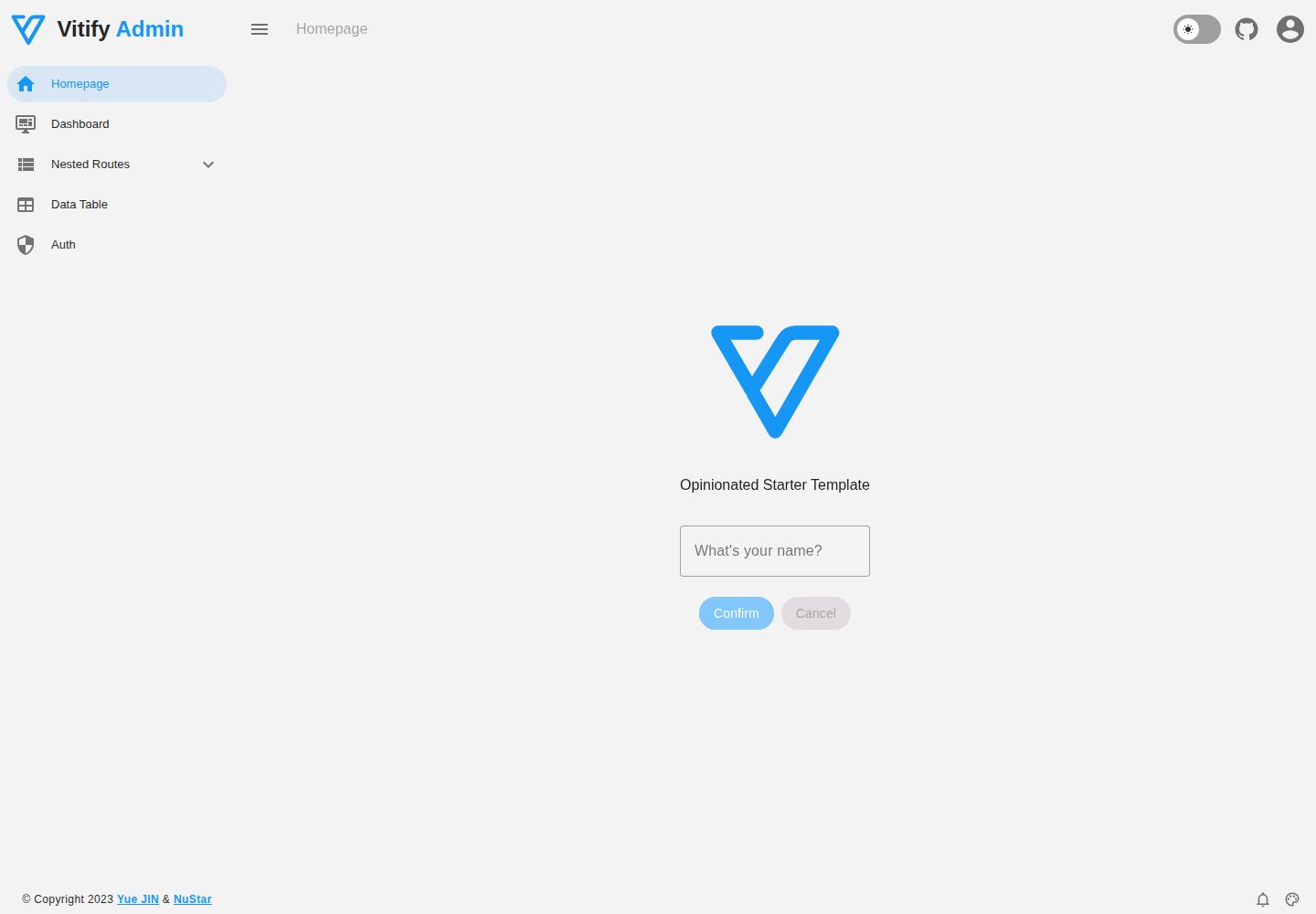
Vitify Nuxt is an admin dashboard starter template built on Nuxt and Vuetify, featuring a drawer layout, automatic navigation and breadcrumbs, notification state, ECharts charts, theming and dark mode, and authentication via nuxt-auth-utils.
Nuxt · Admin dashboard