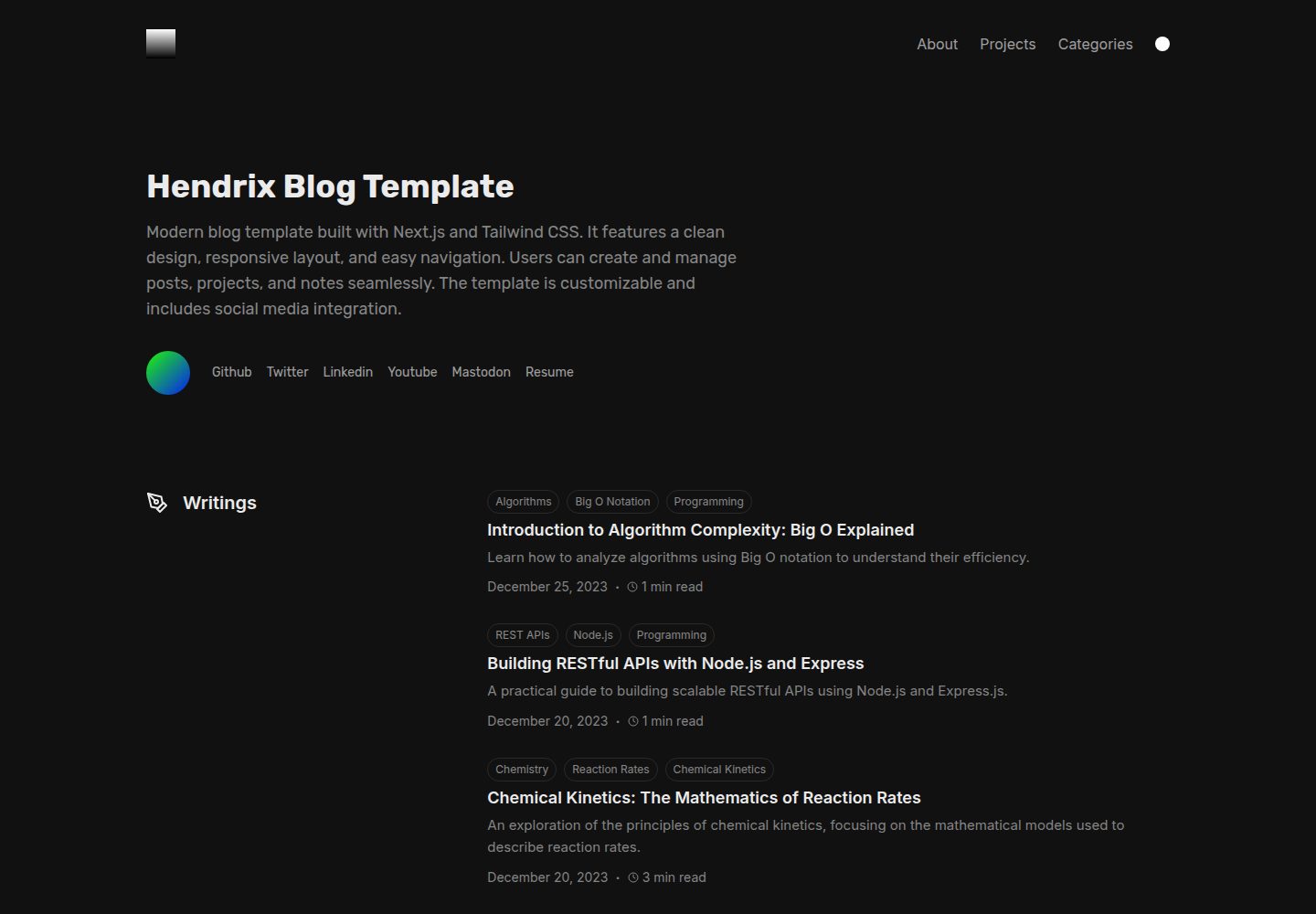
使用 Next.js 与 TailwindCSS 构建,README 说明其页面加载速度表现良好
Next.jsReact作品集博客
hendrix — Next.js 作品集模板
作者 marpeand
Hendrix 是一个使用 Next.js 与 TailwindCSS 构建的个人博客与作品集模板,通过 ContentLayer 编译 MDX 内容,支持深色/浅色主题、数学公式与代码高亮。
看看你的网站会是什么样
浏览真实页面截图,比较内容排版与手机效果。点击下方缩略图切换,放大查看整页细节。
全部页面与视图 3
截图用于了解视觉与布局,交互效果请以实际项目为准。
采集于 2026-10-14查看来源
值得关注的模板亮点
从已有项目资料中,快速了解它的特点。
通过 ContentLayer 编译 MDX 内容
支持深色与浅色主题切换
使用 rehypeKatex 支持数学语法,使用 rehypePrettyCode 支持代码高亮
内置 RSS feed、sitemap 和 robots.txt
站点配置集中在 blog.config.js 文件中
模板详细介绍
Hendrix 是一个个人博客与作品集模板,README 说明其使用 Next.js 与 TailwindCSS 构建,并通过 ContentLayer 编译 MDX。模板提供深色与浅色两种主题,内置 RSS feed、sitemap 和 robots.txt。内容组织上,博客文章放在 content/writing 目录,项目放在 content/projects 目录,笔记放在 content/notes 目录,个人简介通过 content/about.mdx 修改;站点信息集中在 blog.config.js 中配置。文章支持数学语法(rehypeKatex)与代码高亮(rehypePrettyCode)。README 未提供关于性能、生产就绪程度或具体框架版本号的说明,也未列出依赖清单。
Next.jsReact作品集博客
适合你的项目吗?
适用场景
- 搭建个人博客并发布 Markdown/MDX 文章
- 展示个人项目列表,可附带 GitHub 链接
- 记录并发布个人笔记
- 撰写包含数学公式或代码片段的文章
适合人群
- 希望使用 Next.js 与 TailwindCSS 搭建个人博客的开发者
- 需要作品集与博客结合的个人站点
- 偏好用 Markdown/MDX 管理内容的用户
- 需要数学公式或代码高亮支持的写作场景
上手与定制指南
结合仓库当前版本的说明,按下面的资料检查内容、配置与运行要求。
- 1
克隆仓库后使用 pnpm install 安装依赖
- 2
编辑 blog.config.js 填入站点标题、描述、baseURL 等个人信息
- 3
在 content/writing 写博客文章,在 content/projects 添加项目,在 content/notes 添加笔记
- 4
修改 content/about.mdx 更新个人简介
- 5
文章图片建议存放在 public/static 目录,favicon 可在 app/favicon.ico 修改
授权与来源资料
使用条件与限制
免费使用 · 保留许可声明本次收录的是公开仓库中采用 MIT 许可的免费版本;免费范围为该版本代码,不代表外部服务或第三方素材免费。
使用时需要遵守
- 允许免费使用、修改、商用和分发该版本代码。
- 分发代码副本或实质性部分时,保留原作者版权声明和完整 MIT 许可声明。
- 代码按现状提供;担保与责任限制以原许可证及适用法律为准。
额外费用与待核对事项
- 演示图片、字体、图标及其他第三方素材需按各自许可核对,不能仅凭代码的 MIT 许可判断。
- 域名、托管、数据库、支付或 AI 等外部服务可能另外收费。
查看原文依据
https://github.com/marpeand/hendrix/blob/main/LICENSEhttps://github.com/marpeand/hendrix/blob/main/README.mdPermission is hereby granted, free of charge
许可证原文
DeepSeek 根据仓库许可证和 README 整理 ·2026-10-14。结果仅覆盖已读取资料,依赖、图片、字体及后续条款变更以各自原文为准。
项目核对记录与介绍依据
模板资料
- 来源平台
- GitHub
- 资料与维护参考分
- 资料较完整 · 82 / 100
- 技术栈
- Next.js · React
- 网站类型
- 作品集 · 博客
这个分数如何计算
本站按许可资料(最高30分)、演示链接(12分)、预览图(10分)、Star数(15分)、记录的维护时间(15分)、描述完整度(8分)、功能记录(5分)和分类资料(5分)计算。它不是代码、安全或性能测试,也不是 Google 评分;有链接不代表已实测可用。
这个项目需要核对什么
- 记录的仓库更新时间
- 2025-03-29
- 截图检查日期
- 2026-10-14
已收录演示链接。请用你的内容与屏幕尺寸检查;有演示不代表表单、认证或支付已经可用。
目录记录的主要技术栈是 Next.js。请通过依赖清单和锁文件核对实际版本与托管要求。这些说明基于收录资料,不代表代码审计或部署实测。
查看具体选型方法 →介绍的制作与核对状态
介绍由 AI 辅助整理目录与仓库资料。仓库作者不等于这篇介绍的审核者。
审核声明: codex-user-requested-batch-review-20261015 · 2026-10-15
查看当时使用的来源资料
SHA-256: a8b246ad789d867037ce6ee8bf7760fbd1a414e5b5800958f8e5239c9931c290
2026-10-14T01:46:51.949Z
来源文件 / 仓库<br>
<div align="center">
<a href="https://github.com/marpeand/hendrix">
<img src="public/logo.png" alt="Logo" width="120" height="120">
</a>
</br>
<h1 align=center> Hendrix Template</h1>
<p align="center">
Personal Blog and Portfolio template build using NextJS & TailwindCSS. :rocket:
<br />
<a href="https://hendrix-template.vercel.app"><strong>(https://hendrix-template.vercel.app/)</strong></a>
<br />
<br />
<a href="https://github.com/marpeand/hendrix/issues/new">Report Bug</a>
·
<a href="https://github.com/marpeand/hendrix/issues/new">Request Feature</a>
</p>
</div>
<br />
<div style="display: flex; justify-content: center">
[](https://vercel.com/new/clone?repository-url=https%3A%2F%2Fgithub.com%2Fmarpeand%2Fhendrix)
<span style="margin-left:5px"></span>
[](https://app.netlify.com/start/deploy?repository=https://github.com/marpeand/hendrix)
<span style="margin-left:5px"></span>
</div>
| Dark mode | Light mode |
| ----------------------------------------- | ------------------------------------------- |
|  |  |
### Key Features
- Great page load speed
- Use [ContentLayer](https://www.contentlayer.dev/) to compile mdx
- Responsive for all devices
- Fast configuration, only edit the `blog.config.js` file
- Math syntax support using [rehypeKatex](https://katex.org/)
- Code support using **rehypePrettyCode**
- RSS feed, sitemap, and robots.txt
- Dark and light themes
# Getting Started
This is an example of how you may give instructions on setting up your project locally.
To get a local copy up and running follow these simple example steps.
## Installation
1. Clone the repo
```sh
git clone https://github.com/marpeand/hendrix.git
```
2. Install packages
```sh
pnpm install
```
3. Personalize the `blog.config.js` file with your own information
```js
const CONFIG = {
// Site config
title: "Hendrix",
siteDescription: "Blog and portfolio created with Next.js and Tailwind CSS",
baseURL: "https://hendrix-template.vercel.app",
...
...
}
```
4. Write your own blog posts using Markdown in `content/writing` folder. Also, you can add your own projects in `content/projects` folder and notes in `content/notes` folder.
5. Modify the `content/about.mdx` file to update your biography.
## Content and Config
### Post
Every post is crafted using [ContentLayer](https://www.contentlayer.dev/). To ensure compilation, it must adhere to specific required and optional fields, as exemplified below:
```
title (required)
description (optional but recommended)
date (required)
draft (required)
tags (optional)
```
An example:
```
---
title: "Decoding Signal Processing Basics: A Practical Guide"
date: 2023-11-30
description: "An introduction to signal processing concepts and their applications in engineering and everyday life."
draft: false
tags:
- Mathematics
- Signal Processing
- Engineering
---
```

### Projects
List your personal side projects in the `content/projects` folder, here it's an example of these.
```
title (required)
description (optional but recommended)
date (required)
draft (required)
github (optional)
```
```
---
title: "Gamify Your Life"
description: "A productivity application that turns daily tasks and goals into a gamified experience with levels, achievements, and rewards."
date: 2023-12-15
github: https://github.com/marpeand/gamify-your-life
---
```
### Notes
List your notes in the `content/notes` folder, here it's an example of these.
```
---
title: "Note Title"
date: 2023-12-15
draft: false
---
```
### Static Files
When adding images to your blog post, it's recommended to store them in the `public/static` directory. This ensures accessibility and proper linking. Follow these steps:
To reference an image in your project, use the path starting from the root of the `public` directory.
Example: If your image is in `public/static/my-blog-post/myimage.png`
You can change the favicon in the `app/favicon.ico` file.
# License
By contributing to the project, you agree to license your contributions under the same license as the project itself. See the [LICENSE](LICENSE) file for more information.
看看同类模板
对比同技术栈与用途的模板,找到更适合的视觉与内容结构。

tailwind-nextjs-starter-blog
tailwind-nextjs-starter-blog 是一个面向个人技术博客的 Next.js 与 Tailwind CSS 启动模板,其 v2 版本基于 App Router 与 React Server Comp…
Next.js · 博客

react-resume-template
A personal resume website template built with React.js, Typescript, Next.js, and styled with Tailwind css
Next.js · 作品集

Nextjs-tailwindcss-blog-template
使用 Tailwind CSS 的 Next.js 博客。当前分支通过 Velite 处理 Markdown,早期 Contentlayer 实现保留在单独的历史分支中。
Next.js · 博客

Next-js-Blog-Boilerplate
Next-js-Blog-Boilerplate 是一套面向个人与技术博客的启动代码,基于 Next.js 12 与 Tailwind CSS 3 构建,同时集成了 TypeScript、ESLint、Prettier …
Next.js · 博客

nextjs-blog-theme
nextjs-blog-theme 是 Netlify 团队维护的一个博客启动模板,基于 Next.js 15(Pages Router)和 Tailwind CSS 4.x 构建,设计由 Bejamas 机构完成。
Next.js · 博客

blog
🚀 My personal blog made with Tailwind CSS and NextJS. Template from Timlrx. Feel free to fork, follow and use…
Next.js · 博客