使用 Next.js 与 TypeScript 构建,README 称其利用服务端渲染和静态站点生成能力
Next.jsReact作品集
simplefolio-next — Next.js 作品集模板
作者 Masniper
基于 Next.js 与 TypeScript 的轻量级个人作品集模板,内容由 JSON 驱动,支持主题切换、响应式布局、滚动动画与 SCSS 样式。
看看你的网站会是什么样
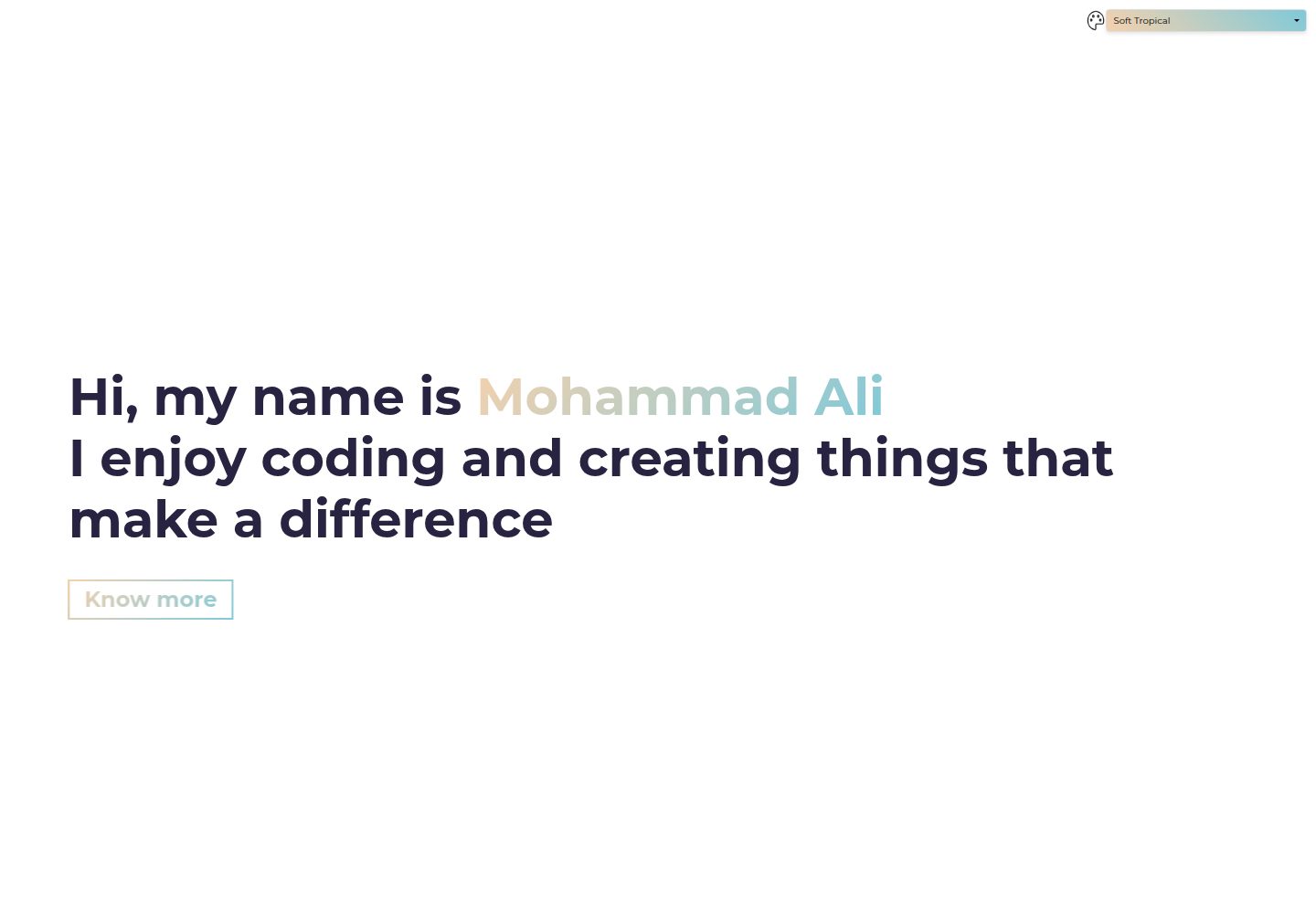
浏览真实页面截图,比较内容排版与手机效果。点击下方缩略图切换,放大查看整页细节。
全部页面与视图 2
截图用于了解视觉与布局,交互效果请以实际项目为准。
采集于 2026-10-14查看来源
值得关注的模板亮点
从已有项目资料中,快速了解它的特点。
作品集数据集中在 src/constants/userData.json,便于修改 hero、about、projects 和 contact 内容
在 src/styles/theme.scss 中提供多套预定义主题,可通过 JSON 的 Theme 字段切换或自行扩展
集成 scrollReveal 与 tilt 动画效果,并使用模块化 SCSS 组织样式
页脚支持配置社交链接、GitHub 按钮和版权信息
README 声明元数据会动态更新,以改善搜索引擎可见性
模板详细介绍
simplefolio-next 是一个用 Next.js 和 TypeScript 构建的个人作品集模板,灵感来自 Simplefolio。README 说明其数据集中存放在 src/constants/userData.json 中,便于更新 hero、about、projects、contact 等内容;主题在 src/styles/theme.scss 中定义,可通过 JSON 的 Theme 字段选择,也支持自行扩展。项目使用 SCSS 模块化样式,集成 scrollReveal 与 tilt 效果,并声明元数据会动态更新以改善搜索引擎可见性。页脚可配置社交链接、GitHub 按钮和版权信息。
README 未提供模板的完整页面结构、组件清单、构建产物大小、浏览器兼容范围或生产部署步骤,也未说明是否包含博客、CMS 或表单后端等扩展能力。安装说明仅覆盖本地开发:需要 Node.js v16 或更高版本,使用 yarn 或 npm 安装依赖后运行开发服务器,并在 http://localhost:3000 查看。
Next.js作品集
适合你的项目吗?
适用场景
- 搭建个人作品集网站,集中展示项目、简介和联系方式
- 需要以 JSON 文件维护作品集内容、避免频繁改动组件代码的场景
- 希望从多套预定义主题中选择配色,或通过 SCSS 自定义主题的开发者
- 使用 Next.js 与 TypeScript 技术栈进行前端项目起步的练习或原型
适合人群
- 熟悉 Next.js 与 TypeScript 的前端开发者
- 需要轻量级、可自行修改样式的个人作品集模板的用户
- 接受通过编辑 JSON 和 SCSS 文件来定制内容的用户
上手与定制指南
结合仓库当前版本的说明,按下面的资料检查内容、配置与运行要求。
- 1
环境要求:Node.js v16 或更高版本,以及 yarn 或 npm
- 2
克隆仓库后进入项目目录,运行 yarn install 或 npm install 安装依赖
- 3
运行 yarn dev 或 npm run dev 启动开发服务器,并在 http://localhost:3000 查看
- 4
修改 src/constants/userData.json 更新作品集内容、社交链接和 GitHub 按钮
- 5
如需预览全部主题并启用动态主题切换,README 提示需取消 app/page.tsx 中 Header 组件的注释
授权与来源资料
使用条件与限制
免费使用 · 保留许可声明本次收录的是公开仓库中采用 MIT 许可的免费版本;免费范围为该版本代码,不代表外部服务或第三方素材免费。
使用时需要遵守
- 允许免费使用、修改、商用和分发该版本代码。
- 分发代码副本或实质性部分时,保留原作者版权声明和完整 MIT 许可声明。
- 代码按现状提供;担保与责任限制以原许可证及适用法律为准。
额外费用与待核对事项
- 演示图片、字体、图标及其他第三方素材需按各自许可核对,不能仅凭代码的 MIT 许可判断。
- 域名、托管、数据库、支付或 AI 等外部服务可能另外收费。
- 要预览全部主题并启用动态主题切换,必须取消 app/page.tsx 中 Header 组件的注释;否则主题切换功能不可用。
查看原文依据
Permission is hereby granted, free of charge
许可证原文
https://github.com/Masniper/simplefolio-next/blob/my-portfolio/LICENSEhttps://github.com/Masniper/simplefolio-next/blob/my-portfolio/README.mdNote: To preview all themes and enable dynamic theme switching, you must uncomment the Header component in app/page.tsx. The Header provides a dropdown menu for theme selection and displays the current theme.
README 原文
DeepSeek 根据仓库许可证和 README 整理 ·2026-10-14。结果仅覆盖已读取资料,依赖、图片、字体及后续条款变更以各自原文为准。
项目核对记录与介绍依据
模板资料
- 来源平台
- GitHub
- 资料与维护参考分
- 资料较完整 · 77 / 100
- 技术栈
- Next.js · React
- 网站类型
- 作品集
这个分数如何计算
本站按许可资料(最高30分)、演示链接(12分)、预览图(10分)、Star数(15分)、记录的维护时间(15分)、描述完整度(8分)、功能记录(5分)和分类资料(5分)计算。它不是代码、安全或性能测试,也不是 Google 评分;有链接不代表已实测可用。
这个项目需要核对什么
- 记录的仓库更新时间
- 2025-10-12
- 截图检查日期
- 2026-10-14
已收录演示链接。请用你的内容与屏幕尺寸检查;有演示不代表表单、认证或支付已经可用。
目录记录的主要技术栈是 Next.js。请通过依赖清单和锁文件核对实际版本与托管要求。这些说明基于收录资料,不代表代码审计或部署实测。
查看具体选型方法 →介绍的制作与核对状态
介绍由 AI 辅助整理目录与仓库资料。仓库作者不等于这篇介绍的审核者。
审核声明: codex-user-requested-batch-review-20261015 · 2026-10-15
查看当时使用的来源资料
SHA-256: 71cef04f104c085e60dba8e0f6df5c945f19c1bc95272d4be7e4cc40a2e1c698
2026-10-14T04:39:48.150Z
来源文件 / 仓库# Simplefolio-Next
A modern, customizable, and lightweight portfolio template built with **Next.js** and **TypeScript**. This project is inspired by [Simplefolio](https://github.com/cobiwave/simplefolio) and reimagined with enhanced features, scalable structure, and dynamic content management.
## 🚀 Features
- **Next.js Framework**: Built using the latest features of Next.js for server-side rendering and static site generation.
- **TypeScript Support**: Ensures type safety and better development experience.
- **Dynamic Content Management**: All portfolio data is stored in a JSON file for easy updates and maintenance.
- **Theme Selection**: Choose from pre-defined themes or add your own using a theme palette.
- **Responsive Design**: Optimized for all devices, from desktops to mobile screens.
- **Animations**: Integrated `scrollReveal` and tilt effects for a modern and interactive UI.
- **SCSS Styling**: Retains the original styling structure with modular SCSS for flexibility.
- **SEO Friendly**: Metadata dynamically updates for better search engine visibility.
- **Customizable Footer**: Easily manage social links, GitHub buttons, and copyright details.
## 📂 Folder Structure
```
src/
├── app/ # Next.js App Router
├── components/ # Reusable React components
├── constants/ # JSON data and configuration files
├── libs/ # Custom utility libraries (e.g., animations)
├── styles/ # SCSS stylesheets
├── public/ # Static assets (e.g., images, PDFs)
└── pages/ # Next.js pages
```
## 🎨 Selectable Themes
Choose from a variety of pre-defined themes in `src/styles/theme.scss` or add your own:
- **Pastel Blue**
- **Pastel Green**
- **Pastel Purple**
- **Pastel Yellow**
- **Pastel Orange**
- **Pastel Pink**
- **Pastel Mint**
- **Pastel Lavender**
- **Pastel Red**
- **Pastel Aqua**
- **Pastel Gray**
- **Pastel Sunset**
- **Vintage Pastel**
- **Soft Tropical**
- **Earthy Pastel**
- **Modern Neutral**
- **Romantic Pastel**
- **Calming Sea**
- **Peachy Pastel**
To select a theme, update the `Theme` field in your JSON data:
```json
{
"Theme": "pastel-sunset",
...
}
```
To add a new theme, extend the `theme.scss` file:
```scss
[data-theme="your-custom-theme"] {
--primary-color: #yourPrimaryColor;
--secondary-color: #yourSecondaryColor;
}
Note: To preview all themes and enable dynamic theme switching, you must uncomment the Header component in app/page.tsx. The Header provides a dropdown menu for theme selection and displays the current theme.
```
## ✨ Customization
1. **Edit Portfolio Data**:
Update `src/constants/userData.json` to modify portfolio content (e.g., hero section, about section, projects, contact info).
2. **Manage Social Links**:
Add or remove links in the `socialLinks` array under the `footer` section of `userData.json`.
3. **Manage GitHub Buttons**:
Edit the `githubButtons` array under the `footer` section to add, remove, or customize buttons.
4. **Customize Styles**:
Modify SCSS files in `src/styles/` for advanced styling.
## 🛠️ Installation & Setup
### Prerequisites
- Node.js (v16 or later)
- Yarn or npm
### Steps
1. Clone the repository:
```bash
git clone https://github.com/masniper/simplefolio-next.git
```
2. Navigate to the project folder:
```bash
cd simplefolio-next
```
3. Install dependencies:
```bash
yarn install
# or
npm install
```
4. Start the development server:
```bash
yarn dev
# or
npm run dev
```
5. Open [http://localhost:3000](http://localhost:3000) in your browser to see the portfolio.
## 🌟 Inspiration
This project is inspired by [Simplefolio](https://github.com/cobiwave/simplefolio) and enhanced with modern tools like Next.js, TypeScript, and SCSS for performance, scalability, and customization.
## 📜 License
This project is licensed under the MIT License. See the [LICENSE](LICENSE) file for more details.
## 🤝 Contributing
Contributions, issues, and feature requests are welcome! Feel free to fork this repository and submit pull requests.
## 📧 Contact
If you have any questions or suggestions, feel free to contact me via my GitHub profile: [masniper](https://github.com/masniper).
---
### 🔗 Connect with Me
- [GitHub](https://github.com/masniper)
看看同类模板
对比同技术栈与用途的模板,找到更适合的视觉与内容结构。

react-resume-template
A personal resume website template built with React.js, Typescript, Next.js, and styled with Tailwind css
Next.js · 作品集

nxt-lnk
Custom bio links for creatives who love coding. A perfect custom alternative for linktree, bio and other short…
Next.js · 作品集

sylph
A minimal portfolio template.
Next.js · 作品集

sleek-portfolio
sleek-portfolio 是一个面向开发者个人品牌展示的现代作品集模板,基于 Next.js 15、TypeScript、Tailwind CSS 和 Shadcn UI 构建。
Next.js · 作品集

research-website-template
React + Next.js template for research websites (for PhD students, researchers, etc)
Next.js · 作品集

shadcn-portfolio
shadcn-portfolio 是一个面向开发者的作品集模板,技术栈为 Next.js 15、shadcn/ui、Tailwind CSS 和 Framer Motion。
Next.js · 作品集