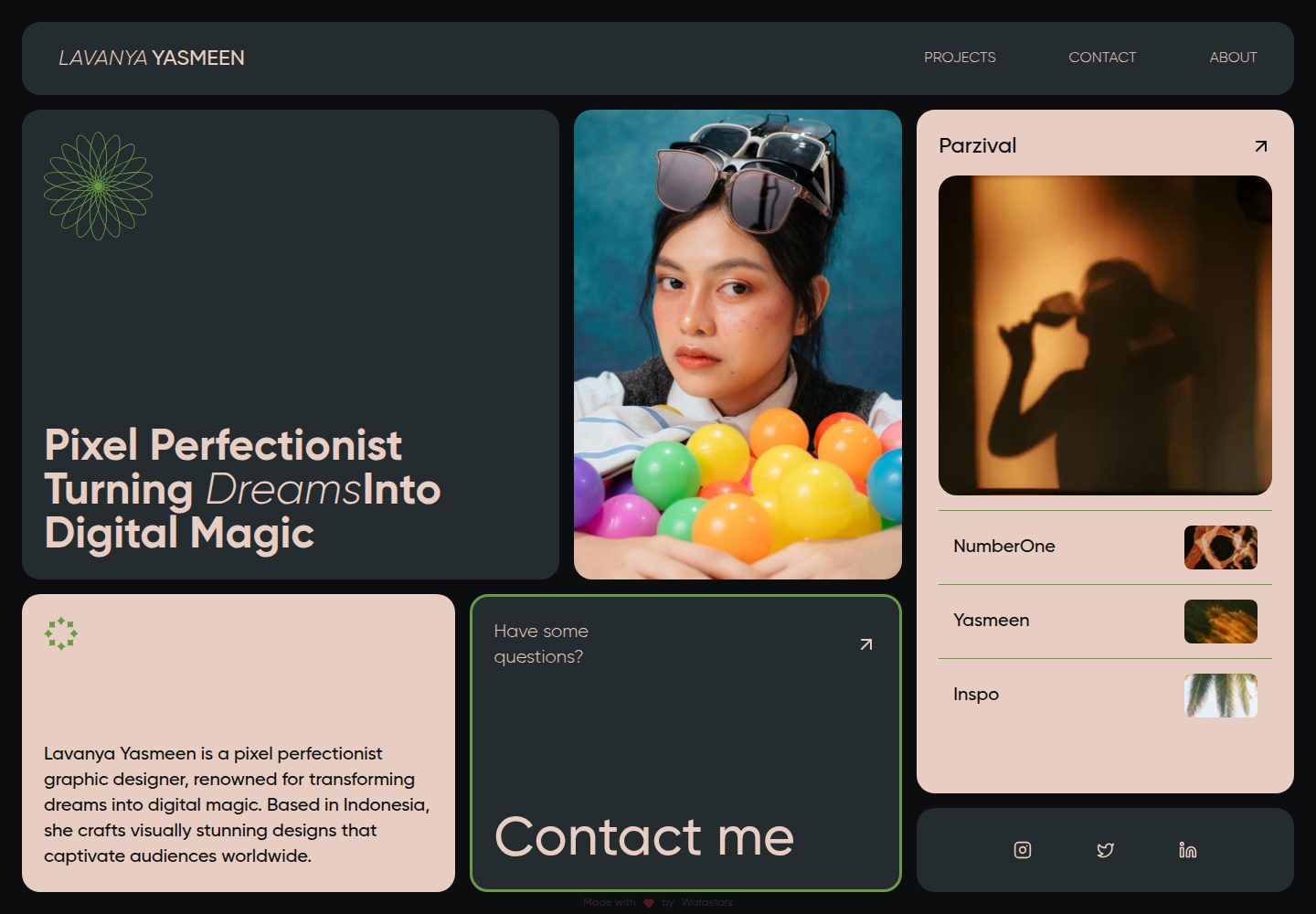
便当网格布局,包含 Hero、人物图片、项目、关于与联系等区块
Next.jsReact作品集
bentofolio — Next.js 作品集模板
作者 mkhoirulwafa18
Bentofolio 是一个基于 Next.js 15、React 19、Tailwind CSS v4 和 Motion 构建的动画便当网格风格个人作品集模板,内容集中在 src/lib/constants 目录中便于修改。
看看你的网站会是什么样
浏览真实页面截图,比较内容排版与手机效果。点击下方缩略图切换,放大查看整页细节。
全部页面与视图 2
截图用于了解视觉与布局,交互效果请以实际项目为准。
采集于 2026-10-14查看来源
值得关注的模板亮点
从已有项目资料中,快速了解它的特点。
使用 Next.js 15(Turbopack)、React 19、Tailwind CSS v4 和 Motion 动画
内容集中存放在 src/lib/constants 目录,便于替换个人信息与项目数据
通过 src/app/globals.css 中的 CSS 变量自定义主题颜色与间距
使用 next/font 加载本地 Gilroy 字体,并支持替换 public/fonts 中的字体文件
README 列出 ARIA 无障碍特性与 SEO 元数据配置说明
模板详细介绍
Bentofolio 是一个个人作品集网站模板,采用便当网格(bento-grid)布局,README 描述其面向希望展示作品的开发者和设计师。模板使用 Next.js 15(Turbopack)、React 19、Tailwind CSS v4、Motion(Framer Motion API)、Lucide React 图标以及 clsx、tailwind-merge 工具库。页面结构包含 HeroSection、PersonImageSection、ProjectsSection、AboutContactSection、Navbar、MobileNav、HamburgerButton 和 ContactModal 等组件,导航状态由 useNavigation 钩子管理。README 列出响应式布局、基于 Next.js 的 SEO 优化、CSS 变量自定义主题、next/font 本地字体优化以及 ARIA 无障碍特性。内容集中存放在 src/lib/constants 下的 siteContent.ts、contact.ts、socials.ts、projects.ts 和 navItems.ts,样式变量位于 src/app/globals.css,字体文件位于 public/fonts,图片位于 public/person2.jpg 和 public/projects。README 未说明具体部署平台配置、环境变量含义或生产环境下的实际表现,仅提供 npm run build 和 npm run start 等脚本命令。
Next.jsReact作品集
适合你的项目吗?
适用场景
- 开发者或设计师搭建个人作品集页面,展示项目与联系方式
- 需要便当网格布局与 Motion 动画效果的静态个人主页
- 希望将内容与组件分离、通过 constants 文件集中管理个人数据的项目
- 以 Next.js 15 和 Tailwind CSS v4 为基础进行二次开发的前端练习
适合人群
- 熟悉 Next.js 与 React 的前端开发者
- 需要可自定义主题与内容结构的个人作品集用户
- 希望参考便当网格布局与 Motion 动画实现方式的学习者
上手与定制指南
结合仓库当前版本的说明,按下面的资料检查内容、配置与运行要求。
- 1
需要 Node.js 18 或更高版本,以及 npm 或 yarn
- 2
克隆仓库后运行 npm install 或 yarn install 安装依赖
- 3
复制 .env.example 为 .env.local 并按需编辑配置
- 4
运行 npm run dev 启动开发服务器,默认访问 http://localhost:3000
- 5
运行 npm run build 构建生产版本,npm run start 启动生产服务器
授权与来源资料
使用条件与限制
免费使用 · 保留许可声明本次收录的是公开仓库中采用 MIT 许可的免费版本;免费范围为该版本代码,不代表外部服务或第三方素材免费。
使用时需要遵守
- 允许免费使用、修改、商用和分发该版本代码。
- 分发代码副本或实质性部分时,保留原作者版权声明和完整 MIT 许可声明。
- 代码按现状提供;担保与责任限制以原许可证及适用法律为准。
额外费用与待核对事项
- 演示图片、字体、图标及其他第三方素材需按各自许可核对,不能仅凭代码的 MIT 许可判断。
- 域名、托管、数据库、支付或 AI 等外部服务可能另外收费。
查看原文依据
https://github.com/mkhoirulwafa18/bentofolio/blob/master/LICENSEhttps://github.com/mkhoirulwafa18/bentofolio/blob/master/README.mdPermission is hereby granted, free of charge
许可证原文
DeepSeek 根据仓库许可证和 README 整理 ·2026-10-14。结果仅覆盖已读取资料,依赖、图片、字体及后续条款变更以各自原文为准。
项目核对记录与介绍依据
模板资料
- 来源平台
- GitHub
- 资料与维护参考分
- 资料较完整 · 82 / 100
- 技术栈
- Next.js · React
- 网站类型
- 作品集
这个分数如何计算
本站按许可资料(最高30分)、演示链接(12分)、预览图(10分)、Star数(15分)、记录的维护时间(15分)、描述完整度(8分)、功能记录(5分)和分类资料(5分)计算。它不是代码、安全或性能测试,也不是 Google 评分;有链接不代表已实测可用。
这个项目需要核对什么
- 记录的仓库更新时间
- 2025-09-10
- 截图检查日期
- 2026-10-14
已收录演示链接。请用你的内容与屏幕尺寸检查;有演示不代表表单、认证或支付已经可用。
目录记录的主要技术栈是 Next.js。请通过依赖清单和锁文件核对实际版本与托管要求。这些说明基于收录资料,不代表代码审计或部署实测。
查看具体选型方法 →介绍的制作与核对状态
介绍由 AI 辅助整理目录与仓库资料。仓库作者不等于这篇介绍的审核者。
审核声明: codex-user-requested-batch-review-20261015 · 2026-10-15
查看当时使用的来源资料
SHA-256: 49b62366ca37a472394a36da6cb07440508f7d5c311cf1dc3d302ec36b3a3b6e
2026-10-14T11:38:13.591Z
来源文件 / 仓库<div align="center"> # 🍱 Bentofolio [](https://opensource.org/licenses/MIT) [](https://nextjs.org/) [](https://reactjs.org/) [](https://tailwindcss.com/) A modern, animated bento-style portfolio template built with cutting-edge web technologies. Perfect for developers and designers who want to showcase their work with style. [View Demo](https://lavanya-bentofolio.vercel.app) · [Report Bug](https://github.com/mkhoirulwafa18/bentofolio/issues) · [Request Feature](https://github.com/mkhoirulwafa18/bentofolio/issues) </div> ## ✨ Preview <p align="center"> <video src="docs/preview/lavanya-bento-preview.webm" autoplay loop muted playsinline alt="Bentofolio — homepage overview"></video> </p> ## 📸 Screenshots <p align="center"> <img src="docs/preview/lavanya-bento-desktop.png" alt="Home Desktop" width="40%" /> <img src="docs/preview/lavanya-bento-desktop-contact.png" alt="Contact modal Desktop" width="40%" /> </p> <p align="center"> <img src="docs/preview/lavanya-bento-tab.png" alt="Home Tab" width="28%" /> <img src="docs/preview/lavanya-bento-tab-contact.png" alt="Contact modal Tab" width="28%" /> <img src="docs/preview/lavanya-bento-mobile.png" alt="Home Mobile" width="18%" /> <img src="docs/preview/lavanya-bento-mobile-contact.png" alt="Contact modal Mobile" width="18%" /> </p> ## 🚀 Features ### Core Features - 📱 Fully responsive bento-grid layout - 🎯 SEO optimized with Next.js - 🎨 Modern UI with Tailwind CSS - ✨ Smooth animations powered by Motion - 📦 Zero-config deployment ### Technical Highlights - 🔥 Server-side rendering with Next.js 15 - 🎭 Animated interactions via Motion variants - 📱 Mobile-first responsive design - ♿ ARIA-compliant accessibility features - 🎨 Custom theming with CSS variables - 🔤 Local font optimization with `next/font` ## 🛠️ Tech Stack - **Framework:** Next.js 15 (Turbopack) - **UI Library:** React 19 - **Styling:** Tailwind CSS v4 - **Animation:** Motion (Framer Motion API) - **Icons:** Lucide React - **Utilities:** clsx, tailwind-merge ## 📦 Getting Started ### Prerequisites - Node.js 18 or later - npm or yarn package manager ### Installation 1. Clone the repository ```bash git clone https://github.com/mkhoirulwafa18/bentofolio.git cd bentofolio ``` 2. Install dependencies ```bash npm install # or yarn install ``` 3. Set up environment variables ```bash cp .env.example .env.local ``` Then edit `.env.local` with your configuration 4. Start the development server ```bash npm run dev # or yarn dev ``` 5. Open [http://localhost:3000](http://localhost:3000) in your browser ### Build for Production ```bash npm run build # or yarn build ``` ## 📁 Project Structure ``` bentofolio/ ├── public/ │ ├── fonts/ # Local Gilroy font files │ ├── projects/ # Project thumbnail images │ ├── svgs/ # SVG icons and graphics │ └── person2.jpg # Profile image ├── src/ │ ├── app/ │ │ ├── globals.css # Global styles and CSS variables │ │ ├── layout.tsx # Root layout with metadata │ │ └── page.tsx # Home page composition │ ├── components/ │ │ ├── AboutContactSection.tsx │ │ ├── ContactModal.tsx │ │ ├── HamburgerButton.tsx │ │ ├── HeroSection.tsx │ │ ├── MobileNav.tsx │ │ ├── Navbar.tsx │ │ ├── PersonImageSection.tsx │ │ └── ProjectsSection.tsx │ ├── hooks/ │ │ └── useNavigation.ts # Navigation state management │ └── lib/ │ ├── animation/ # Motion variants and animations │ ├── constants/ # Centralized data (contact, projects, etc.) │ └── utils/ # Utility functions ├── .gitignore ├── eslint.config.mjs ├── next.config.ts ├── package.json ├── postcss.config.mjs ├── README.md └── tsconfig.json ``` ## 🔧 Available Scripts - `npm run dev` - Start development server with Turbopack - `npm run build` - Build for production with Turbopack - `npm run start` - Start production server - `npm run lint` - Run ESLint for code quality ## 🎨 Customization ### Content Management All content is centralized in `src/lib/constants/` for easy customization: - **Hero Content**: Edit `src/lib/constants/siteContent.ts` - **Contact Info**: Edit `src/lib/constants/contact.ts` - **Social Links**: Edit `src/lib/constants/socials.ts` - **Projects**: Edit `src/lib/constants/projects.ts` - **Navigation**: Edit `src/lib/constants/navItems.ts` ### Styling & Theming - **CSS Variables**: Modify `src/app/globals.css` for colors and spacing - **Fonts**: Replace files in `public/fonts/` and update `src/app/layout.tsx` - **Images**: Replace `public/person2.jpg` and project images in `public/projects/` ### SEO & Metadata Update metadata in `src/app/layout.tsx` for: - Page title and description - Open Graph tags - Twitter card settings - Author information ## 🤝 Contributing Contributions are welcome! Please follow these steps: 1. **Fork the repository** ```bash git clone https://github.com/mkhoirulwafa18/bentofolio.git ``` 2. **Create a feature branch** ```bash git checkout -b feature/amazing-feature ``` 3. **Install dependencies** ```bash npm install ``` 4. **Make your changes** - Follow the existing code style - Add comments for complex logic - Test your changes locally 5. **Commit your changes** ```bash git commit -m "feat: add amazing feature" ``` 6. **Push to your branch** ```bash git push origin feature/amazing-feature ``` 7. **Open a Pull Request** ### Development Guidelines - Use TypeScript for type safety - Follow the existing component structure - Maintain responsive design principles - Test on multiple screen sizes - Ensure accessibility standards ## 📄 License This project is licensed under the MIT License - see the [LICENSE](LICENSE) file for details. ### MIT License Summary - ✅ Commercial use - ✅ Modification - ✅ Distribution - ✅ Private use - ❌ Liability - ❌ Warranty ## 🙏 Acknowledgments - [Next.js](https://nextjs.org/) - The React framework for production - [Tailwind CSS](https://tailwindcss.com/) - Utility-first CSS framework - [Motion](https://motion.dev/) - Animation library - [Lucide React](https://lucide.dev/) - Beautiful & consistent icons - [Vercel](https://vercel.com/) - Deployment platform --- <div align="center"> <p>Made with ❤️ by <a href="https://github.com/mkhoirulwafa18">Wafastarz</a></p> <p>⭐ Star this repo if you found it helpful!</p> </div>
看看同类模板
对比同技术栈与用途的模板,找到更适合的视觉与内容结构。

react-resume-template
A personal resume website template built with React.js, Typescript, Next.js, and styled with Tailwind css
Next.js · 作品集

nxt-lnk
Custom bio links for creatives who love coding. A perfect custom alternative for linktree, bio and other short…
Next.js · 作品集

sylph
A minimal portfolio template.
Next.js · 作品集

sleek-portfolio
sleek-portfolio 是一个面向开发者个人品牌展示的现代作品集模板,基于 Next.js 15、TypeScript、Tailwind CSS 和 Shadcn UI 构建。
Next.js · 作品集

research-website-template
React + Next.js template for research websites (for PhD students, researchers, etc)
Next.js · 作品集

shadcn-portfolio
shadcn-portfolio 是一个面向开发者的作品集模板,技术栈为 Next.js 15、shadcn/ui、Tailwind CSS 和 Framer Motion。
Next.js · 作品集