使用 Vue 3 与 Bootstrap 5 构建的响应式网站模板
Vue启动器
Rust-Server-Website-Template — Vue 启动器模板
作者 Mo45
基于 Vue 3 与 Bootstrap 5 的 Rust 服务器网站模板,通过 Rust-Servers.Net API 动态展示服务器状态,支持最多四个服务器配置。
看看你的网站会是什么样
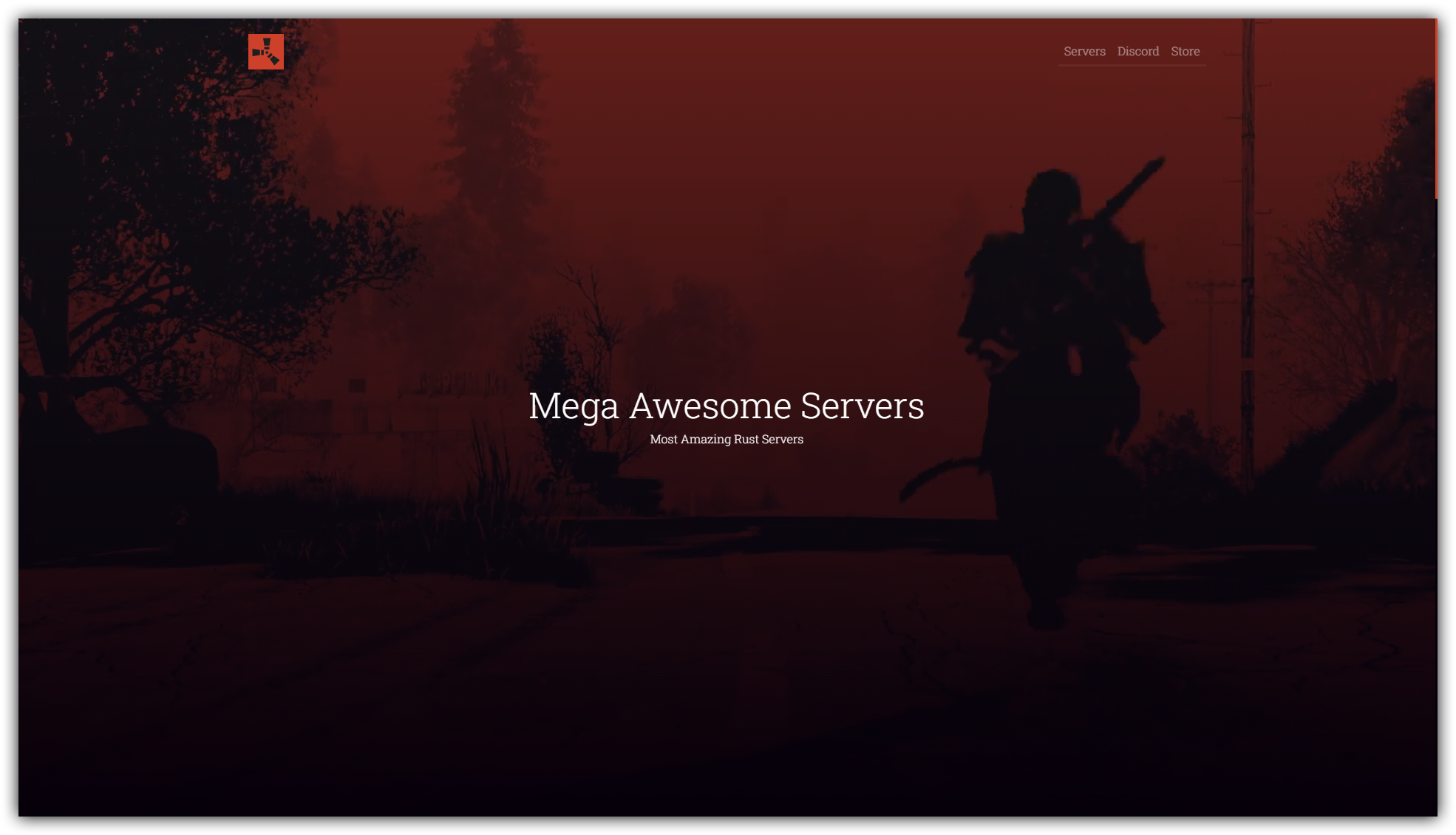
浏览真实页面截图,比较内容排版与手机效果。点击下方缩略图切换,放大查看整页细节。
目前有 1 张原始预览,可打开完整图片查看设计细节。
截图用于了解视觉与布局,交互效果请以实际项目为准。
采集于 2026-10-02查看来源
值得关注的模板亮点
从已有项目资料中,快速了解它的特点。
通过 Rust-Servers.Net API 动态获取并展示服务器信息
在 src/config.json 中集中配置最多四个服务器的 API Key、横幅与描述
提供 Docker 构建与运行方式,支持 docker compose 部署
包含 FAQ、规则、管理团队、商店等可编辑的 Vue 组件板块
模板详细介绍
该模板面向 Rust 游戏服务器运营者,用于搭建展示服务器信息、规则、FAQ、管理团队与商店等内容的响应式网站。项目使用 Vue 3 与 Bootstrap 5 构建,并通过 Rust-Servers.Net API 动态获取服务器数据,实现页面内容的自动更新。
模板的核心配置集中在 src/config.json 中,可设置网站标题、副标题、Discord 服务器 ID,以及最多四个服务器的 API Key、横幅图片和简短描述。FAQ、规则、管理团队和商店等板块分别位于对应的 Vue 组件中,需按注释手动编辑。
部署方面,项目提供 Docker 构建与运行方式,可通过 docker build 和 docker run 启动,也支持使用 docker compose 进行构建与后台运行。默认映射宿主机的 80 端口,如需更换端口可修改 .env 文件中的 APP_PORT。README 中提供了面向 Reg.ru 或 timeweb.cloud 的部署指引链接,以及 Digital Ocean 的推荐配置。
Vue启动器
适合你的项目吗?
适用场景
- 为 Rust 游戏服务器搭建展示服务器状态与信息的网站
- 需要同时展示多个 Rust 服务器并动态更新数据的场景
- 希望通过 Docker 快速部署静态网站模板的运维环境
- 需要自定义 FAQ、规则、管理团队和商店内容的社区站点
适合人群
- Rust 服务器运营者或社区管理员
- 具备基本 Vue 组件编辑与 Docker 使用经验的开发者
- 需要快速搭建服务器信息展示页的个人或团队
上手与定制指南
结合仓库当前版本的说明,按下面的资料检查内容、配置与运行要求。
- 1
克隆仓库时需指定 rswt-vue 分支,并安装 npm 依赖
- 2
在 src/config.json 中填写 Rust-Servers.Net API Key、Discord ID 及服务器描述等信息
- 3
FAQ、规则、管理团队和商店等板块需分别编辑对应的 Vue 组件文件
- 4
使用 docker build 构建镜像后运行容器,或通过 docker compose up -d --build 启动
- 5
如需更换端口,修改 .env 文件中的 APP_PORT 值
授权与来源资料
使用条件与限制
免费使用 · 保留许可声明本次收录的是公开仓库中采用 MIT 许可的免费版本;免费范围为该版本代码,不代表外部服务或第三方素材免费。
使用时需要遵守
- 允许免费使用、修改、商用和分发该版本代码。
- 分发代码副本或实质性部分时,保留原作者版权声明和完整 MIT 许可声明。
- 代码按现状提供;担保与责任限制以原许可证及适用法律为准。
额外费用与待核对事项
- MIT 许可证要求在所有副本或实质性部分中保留上述版权声明和许可声明,因此不得移除项目文件中的版权与许可声明。
- 作者表示若需从项目页面移除版权声明,需先通过 Boosty 打赏;但 MIT 许可证本身并未强制要求打赏,此条为作者附加请求。
- 模板依赖 Rust-Servers.Net API,需自行申请并填写 API Key 才能动态获取服务器数据。
- 需提供 Discord 服务器 ID 以获取服务器统计数据。
- 部署需要 VPS/VDS 或自托管服务器;README 推荐通过其 Digital Ocean 推荐链接购买,可能产生外部服务费用。
- 演示图片、字体、图标及其他第三方素材需按各自许可核对,不能仅凭代码的 MIT 许可判断。
- 域名、托管、数据库、支付或 AI 等外部服务可能另外收费。
查看原文依据
Permission is hereby granted, free of charge
许可证原文
The above copyright notice and this permission notice shall be included in all copies or substantial portions of the Software.
README 原文
If you really need to remove copyright from your project page, Send me at least a tip [Boosty](https://boosty.to/krasinkirill/donate).
README 原文
"S1_API_KEY": "YOUR_API_KEY", <-- Rust-Servers.Net API Key for first server
README 原文
"DISCORD_ID": "XXXXXXXXXXXXXXXXXX", <-- Your Discord server ID, used to get server stats
README 原文
https://github.com/Mo45/Rust-Server-Website-Template/blob/rswt-vue/LICENSEhttps://github.com/Mo45/Rust-Server-Website-Template/blob/rswt-vue/README.mdIf you don't have **VPS/VDS** or self-hosted server buy new one at Digital Ocean, you can use [my link](https://m.do.co/c/15b90cac0063) and get a $200, 60-day credit to try it.
README 原文
DeepSeek 根据仓库许可证和 README 整理 ·2026-10-02。结果仅覆盖已读取资料,依赖、图片、字体及后续条款变更以各自原文为准。
项目核对记录与介绍依据
模板资料
- 来源平台
- GitHub
- 资料与维护参考分
- 资料一般 · 72 / 100
- 技术栈
- Vue
- 网站类型
- 启动器
这个分数如何计算
本站按许可资料(最高30分)、演示链接(12分)、预览图(10分)、Star数(15分)、记录的维护时间(15分)、描述完整度(8分)、功能记录(5分)和分类资料(5分)计算。它不是代码、安全或性能测试,也不是 Google 评分;有链接不代表已实测可用。
这个项目需要核对什么
- 记录的仓库更新时间
- 2024-09-04
- 截图检查日期
- 2026-10-02
已收录演示链接。请用你的内容与屏幕尺寸检查;有演示不代表表单、认证或支付已经可用。
目录记录的主要技术栈是 Vue。请通过依赖清单和锁文件核对实际版本与托管要求。这些说明基于收录资料,不代表代码审计或部署实测。
查看具体选型方法 →介绍的制作与核对状态
介绍由 AI 辅助整理目录与仓库资料。仓库作者不等于这篇介绍的审核者。
已完成服务器许可规则与 AI 来源核对;未经过人工编辑审核。
查看当时使用的来源资料
SHA-256: 8819d907ee6255bb8ca867315e917500890e799112e259ee369676419d584c38
2026-10-02T16:07:27.642Z
来源文件 / 仓库[](https://github.com/Mo45/Rust-Server-Website-Template/blob/master/LICENSE) [](https://github.com/Mo45/Rust-Server-Website-Template/issues) [](https://github.com/Mo45/Rust-Server-Website-Template/stargazers) [](https://twitter.com/Mo_45)
# Rust-Server-Website-Template
**Rust-Server-Website-Template** is a responsive, dynamically updated Vue 3 template for Rust server website. It is build with Bootstrap 5 and **Rust-Servers.Net** API.
If you don't have **VPS/VDS** or self-hosted server buy new one at Digital Ocean, you can use [my link](https://m.do.co/c/15b90cac0063) and get a $200, 60-day credit to try it. Regular 1GB/1CPU 25GB SSD will be enough to start with. Select **Docker on Ubuntu 22.04** image at marketplace while creating your droplet.
[](https://i.imgur.com/sBn5mJH.png)
## Как развернуть на Рег.ру или timeweb.cloud
Для того, чтобы запустить (развернуть) RSWT будет достаточно самого простого VPS с предустановленным Docker. Где и какой именно выбрать, а так-же пошаговая инструкция [вот тут](https://teletype.in/@kirillkrasin/deploy-rswt-vue-docker).
## Demo
See a live demo at https://dev.mosharust.com/
## Prepare env and clone repo
```
apt update
```
```
git clone --branch rswt-vue https://github.com/Mo45/Rust-Server-Website-Template.git rswt
```
```
apt install npm -y
```
## Project setup
```
cd rswt
```
```
npm install
```
### Build docker image:
```
docker build -t rswt-vue .
```
### Run Docker container
```
docker run -p 80:80 rswt-vue
```
This command will run the container with default configuration, mapping port 80 on your host to port 80 in the container. Your rswt.js app should now be accessible at http://your_vps_ip:80. Check it running and all works, then stop the container by pressing ```ctrl+c```.
## Customize your website
To do so edit ```src\config.json``` and follow comments:
```
{
"TITLE_SHORT": "RSWT Vue App", <-- Short title, used for example as page title tag, etc.
"TITLE_FULL": "Mega Awesome Servers", <-- Main title, used as h1 title, footer copytright, etc.
"PRJ_SLOGAN": "Most Amazing Rust Servers", <-- Subtitle used as h2 title, etc
"DISCORD_ID": "XXXXXXXXXXXXXXXXXX", <-- Your Discord server ID, used to get server stats
"S1_API_KEY": "YOUR_API_KEY", <-- Rust-Servers.Net API Key for first server
"S1_BANNER": "mosharust.png", <-- Banner image for first server
"S1_DESC": "The original experience", <-- Short description of first server
"S2_API_KEY": "YOUR_API_KEY", <-- Rust-Servers.Net API Key for second server
"S2_BANNER": "mosharust.png", <-- Banner image for second server
"S2_DESC": "Another cool description", <-- Short description of second server
"S3_API_KEY": "YOUR_API_KEY",
"S3_BANNER": "mosharust.png",
"S3_DESC": "Another cool description",
"S4_API_KEY": "YOUR_API_KEY",
"S4_BANNER": "mosharust.png",
"S4_DESC": "Another cool description"
}
```
Don't forget to edit another components, like **FAQ**, **Staff**, **Rules** etc. To do so edit ```components\faqSection.vue```, ```components\rulesSection.vue```, ```components\staffSection.vue```, ```components\storeSection.vue``` by following comments. It's self explanatory basic HTML.
### Run Docker container after your changes
```
docker compose up -d --build
```
This command will force build and run the container in detached mode, mapping port 80 on your host to port 80 in the container. Your rswt.js app should now be accessible at http://your_vps_ip:80.
If you need to bind app to another port (not **80**) edit **.env** file in rswt folder:
```
#!/usr/bin/env bash
APP_NAME=rswt-vue
APP_PORT=80 <-- Change to desired port
APP_VER=0.0.2
```
## Copyright :copyright:
> The above copyright notice and this permission notice shall be included in all copies or substantial portions of the Software.
> - MIT License
This is the reason why you're seeing these notices above. So legally, these notices shouldn't be removed from the works/files in which they're found.
If you really need to remove copyright from your project page, Send me at least a tip [Boosty](https://boosty.to/krasinkirill/donate).看看同类模板
对比同技术栈与用途的模板,找到更适合的视觉与内容结构。

vitesse
🏕 Opinionated Vite + Vue Starter Template
Vue · 启动器

vitesse-webext
⚡️ WebExtension Vite Starter Template
Vue · 启动器

laravel-vue-spa
A Laravel-Vue SPA starter kit.
Vue · 启动器

vue3-h5-template
vue3-h5-template 是一个面向移动端 H5 项目的启动模板,基于 Vue3、Vite 和 Vant4 构建,同时集成了 TypeScript、Tailwindcss、Pinia、Vue-router 等常用…
Vue · 启动器

tov-template
vite + vue3 + ts 开箱即用现代开发模板 | vite + vue3 + ts out-of-the-box modern development template
Vue · 启动器

shadcn-vue-landing-page
New design 🎉 Vue + Shadcn-vue + TypeScript + Tailwind. Landing page template ease-to-use
Vue · 企业官网