Responsive website template built with Vue 3 and Bootstrap 5
VueStarter
Rust-Server-Website-Template — Vue Starter Template
By Mo45
A Rust server website template built with Vue 3 and Bootstrap 5 that dynamically displays server status via the Rust-Servers.Net API and supports configuration for up to four servers.
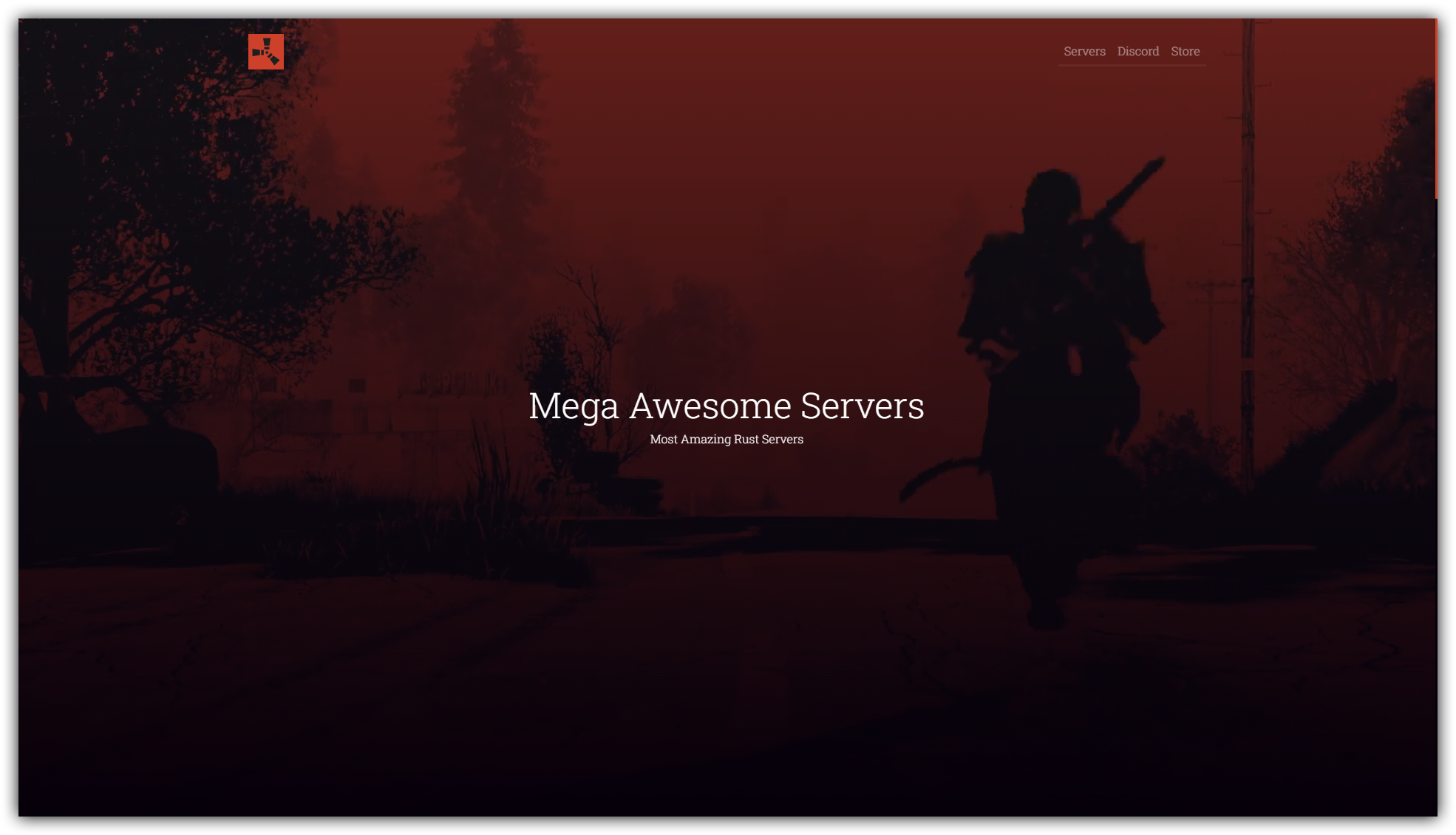
Explore the design
Compare the page layouts and mobile experience. Open any screenshot for a closer look.
Author preview
Author-provided preview
Preview provided in the project README.
One original preview is available. Open the full image to inspect the design.
Screenshots show visual appearance; interactive behavior may differ.
Recorded 2026-10-02View source
What stands out
A quick read of the recorded project description.
Dynamically retrieves and displays server information via the Rust-Servers.Net API
Centralized configuration in src/config.json for up to four servers' API Keys, banners, and descriptions
Provides Docker build and run methods, with docker compose deployment support
Includes editable Vue component sections for FAQ, rules, management team, and shop
Template Details
This template is aimed at Rust game server operators for building a responsive website that presents server information, rules, FAQ, management team, and shop content. The project is built with Vue 3 and Bootstrap 5 and dynamically retrieves server data through the Rust-Servers.Net API, enabling automatic updates of page content.
The core configuration is centralized in src/config.json, where you can set the website title, subtitle, Discord server ID, and the API Key, banner image, and short description for up to four servers. Sections such as FAQ, rules, management team, and shop are located in their respective Vue components and must be edited manually according to the comments.
For deployment, the project provides Docker build and run methods, which can be started via docker build and docker run, and also supports building and running in the background using docker compose. By default, it maps host port 80; to change the port, modify APP_PORT in the .env file. The README provides links to deployment guides for Reg.ru or timeweb.cloud, as well as recommended Digital Ocean configurations.
VueLauncher
Is it right for your project?
Use Cases
- Building a website to display server status and information for a Rust game server
- Scenarios requiring simultaneous display of multiple Rust servers with dynamic data updates
- Operations environments seeking quick deployment of a static website template via Docker
- Community sites needing customizable FAQ, rules, management team, and shop content
Suitable For
- Rust server operators or community administrators
- Developers with basic Vue component editing and Docker experience
- Individuals or teams needing to quickly set up a server information display page
Getting started & customization
Use these recorded setup notes alongside the repository instructions for your chosen version.
- 1
When cloning the repository, specify the rswt-vue branch and install npm dependencies
- 2
Fill in the Rust-Servers.Net API Key, Discord ID, and server descriptions in src/config.json
- 3
Sections such as FAQ, rules, management team, and shop must be edited in their respective Vue component files
- 4
Build the image with docker build and run the container, or start via docker compose up -d --build
- 5
To change the port, modify the APP_PORT value in the .env file
License & source material
Usage conditions & limitations
Free to use · keep license noticeThis entry covers the free version under the MIT license from the public repository; the free scope is the code of this version and does not imply that external services or third-party assets are free.
Must comply with when using
- Free use, modification, commercial use, and distribution of this version's code are permitted.
- When distributing copies or substantial portions of the code, retain the original author's copyright notice and the full MIT license notice.
- The code is provided as is; warranties and limitations of liability are governed by the original license and applicable law.
Additional costs & items to verify
- The MIT license requires retaining the above copyright and license notices in all copies or substantial portions, so copyright and license notices in project files must not be removed.
- The author states that removing the copyright notice from the project page requires a donation via Boosty first; however, the MIT license itself does not mandate a donation, and this is an additional request by the author.
- The template depends on the Rust-Servers.Net API; you must apply for and enter an API Key yourself to dynamically retrieve server data.
- A Discord server ID must be provided to obtain server statistics.
- Deployment requires a VPS/VDS or self-hosted server; the README recommends purchasing through its Digital Ocean referral link, which may incur external service costs.
- Demo images, fonts, icons, and other third-party assets must be checked against their respective licenses and cannot be judged solely by the code's MIT license.
- External services such as domains, hosting, databases, payments, or AI may incur additional charges.
View Original Text Basis
Permission is hereby granted, free of charge
Original License Text
The above copyright notice and this permission notice shall be included in all copies or substantial portions of the Software.
Original README
If you really need to remove copyright from your project page, Send me at least a tip [Boosty](https://boosty.to/krasinkirill/donate).
Original README
"S1_API_KEY": "YOUR_API_KEY", <-- Rust-Servers.Net API Key for first server
Original README
"DISCORD_ID": "XXXXXXXXXXXXXXXXXX", <-- Your Discord server ID, used to get server stats
Original README
https://github.com/Mo45/Rust-Server-Website-Template/blob/rswt-vue/LICENSEhttps://github.com/Mo45/Rust-Server-Website-Template/blob/rswt-vue/README.mdIf you don't have **VPS/VDS** or self-hosted server buy new one at Digital Ocean, you can use [my link](https://m.do.co/c/15b90cac0063) and get a $200, 60-day credit to try it.
Original README
Compiled by DeepSeek based on repository license and README ·2026-10-02. Results only cover the materials read; dependencies, images, fonts, and subsequent term changes are subject to their respective original texts.
Project checks & description sources
Template Information
- Source platforms
- GitHub
- Documentation and maintenance reference score
- Partly documented · 72 / 100
- Technologies
- Vue
- Website type
- Starter
How this score is calculated
Our heuristic uses license records (up to 30), a demo link (12), a preview (10), stars (15), recorded maintenance (15), description completeness (8), feature records (5) and classification data (5). It is not a code, security or performance test, or a Google score. A link does not establish tested functionality.
What to verify for this project
- Repository update recorded
- 2024-09-04
- Screenshot last checked
- 2026-10-02
A demo link is listed. Check it with your own content and viewport sizes; its presence does not confirm that forms, authentication or payments work.
The catalog identifies Vue as the primary stack. Check the actual dependency manifest and lockfile for versions and hosting requirements. These notes use recorded metadata, not a code audit or a deployment test.
Use a selection guide →How this description was prepared
AI-assisted description based on catalog records and repository material. Repository authors are not automatically the reviewers of this description.
Automatically checked against source and license rules; no manual editorial review.
Inspect the recorded source material
SHA-256: 8819d907ee6255bb8ca867315e917500890e799112e259ee369676419d584c38
2026-10-02T16:07:27.642Z
Source file / repository[](https://github.com/Mo45/Rust-Server-Website-Template/blob/master/LICENSE) [](https://github.com/Mo45/Rust-Server-Website-Template/issues) [](https://github.com/Mo45/Rust-Server-Website-Template/stargazers) [](https://twitter.com/Mo_45)
# Rust-Server-Website-Template
**Rust-Server-Website-Template** is a responsive, dynamically updated Vue 3 template for Rust server website. It is build with Bootstrap 5 and **Rust-Servers.Net** API.
If you don't have **VPS/VDS** or self-hosted server buy new one at Digital Ocean, you can use [my link](https://m.do.co/c/15b90cac0063) and get a $200, 60-day credit to try it. Regular 1GB/1CPU 25GB SSD will be enough to start with. Select **Docker on Ubuntu 22.04** image at marketplace while creating your droplet.
[](https://i.imgur.com/sBn5mJH.png)
## Как развернуть на Рег.ру или timeweb.cloud
Для того, чтобы запустить (развернуть) RSWT будет достаточно самого простого VPS с предустановленным Docker. Где и какой именно выбрать, а так-же пошаговая инструкция [вот тут](https://teletype.in/@kirillkrasin/deploy-rswt-vue-docker).
## Demo
See a live demo at https://dev.mosharust.com/
## Prepare env and clone repo
```
apt update
```
```
git clone --branch rswt-vue https://github.com/Mo45/Rust-Server-Website-Template.git rswt
```
```
apt install npm -y
```
## Project setup
```
cd rswt
```
```
npm install
```
### Build docker image:
```
docker build -t rswt-vue .
```
### Run Docker container
```
docker run -p 80:80 rswt-vue
```
This command will run the container with default configuration, mapping port 80 on your host to port 80 in the container. Your rswt.js app should now be accessible at http://your_vps_ip:80. Check it running and all works, then stop the container by pressing ```ctrl+c```.
## Customize your website
To do so edit ```src\config.json``` and follow comments:
```
{
"TITLE_SHORT": "RSWT Vue App", <-- Short title, used for example as page title tag, etc.
"TITLE_FULL": "Mega Awesome Servers", <-- Main title, used as h1 title, footer copytright, etc.
"PRJ_SLOGAN": "Most Amazing Rust Servers", <-- Subtitle used as h2 title, etc
"DISCORD_ID": "XXXXXXXXXXXXXXXXXX", <-- Your Discord server ID, used to get server stats
"S1_API_KEY": "YOUR_API_KEY", <-- Rust-Servers.Net API Key for first server
"S1_BANNER": "mosharust.png", <-- Banner image for first server
"S1_DESC": "The original experience", <-- Short description of first server
"S2_API_KEY": "YOUR_API_KEY", <-- Rust-Servers.Net API Key for second server
"S2_BANNER": "mosharust.png", <-- Banner image for second server
"S2_DESC": "Another cool description", <-- Short description of second server
"S3_API_KEY": "YOUR_API_KEY",
"S3_BANNER": "mosharust.png",
"S3_DESC": "Another cool description",
"S4_API_KEY": "YOUR_API_KEY",
"S4_BANNER": "mosharust.png",
"S4_DESC": "Another cool description"
}
```
Don't forget to edit another components, like **FAQ**, **Staff**, **Rules** etc. To do so edit ```components\faqSection.vue```, ```components\rulesSection.vue```, ```components\staffSection.vue```, ```components\storeSection.vue``` by following comments. It's self explanatory basic HTML.
### Run Docker container after your changes
```
docker compose up -d --build
```
This command will force build and run the container in detached mode, mapping port 80 on your host to port 80 in the container. Your rswt.js app should now be accessible at http://your_vps_ip:80.
If you need to bind app to another port (not **80**) edit **.env** file in rswt folder:
```
#!/usr/bin/env bash
APP_NAME=rswt-vue
APP_PORT=80 <-- Change to desired port
APP_VER=0.0.2
```
## Copyright :copyright:
> The above copyright notice and this permission notice shall be included in all copies or substantial portions of the Software.
> - MIT License
This is the reason why you're seeing these notices above. So legally, these notices shouldn't be removed from the works/files in which they're found.
If you really need to remove copyright from your project page, Send me at least a tip [Boosty](https://boosty.to/krasinkirill/donate).Explore similar templates
Compare previews and descriptions within the same stack and category.

vitesse
Vitesse is an opinionated Vite + Vue 3 starter template maintained by antfu-collective, offering file-based routing, component and API auto-import, Pinia, UnoCSS, PWA, i18n, Markdown, vite-ssg, TypeScript, Vitest, and Cypress.
Vue · Starter

vitesse-webext
vitesse-webext is a Vite-powered WebExtension starter template using Vue 3 and TypeScript, with built-in popup, options, and content script examples. It targets Chrome and Firefox, integrates webextension-polyfill, webext-bridge, UnoCSS, VueUse, and unplugin tools, and supports hot reload during development.
Vue · Starter

laravel-vue-spa
A Laravel + Vue SPA starter kit for quickly building a decoupled web application skeleton. It includes login, registration, email verification, and password reset flows, uses JWT for authentication, and integrates Laravel Socialite with GitHub as an example provider.
Vue · Starter

vue3-h5-template
A mobile H5 starter template built on Vue3, Vite, and Vant4, with TypeScript by default and JavaScript and i18n branches.
Vue · Starter

tov-template
tov-template is an MIT-licensed Vite + Vue 3 + TypeScript starter maintained by dishait. It bundles file-based routing, layouts, Mock, auto-imports, UnoCSS, Pinia, vue-request, Vitest, i18n, dark mode, Dockerfile, and engineering scripts.
Vue · Starter

shadcn-vue-landing-page
A Vue + Shadcn-Vue + TypeScript + Tailwind landing page template with sections like Navbar, Hero, Pricing, FAQ, Team, and Contact, plus dark mode and responsive layout.
Vue · Corporate Website