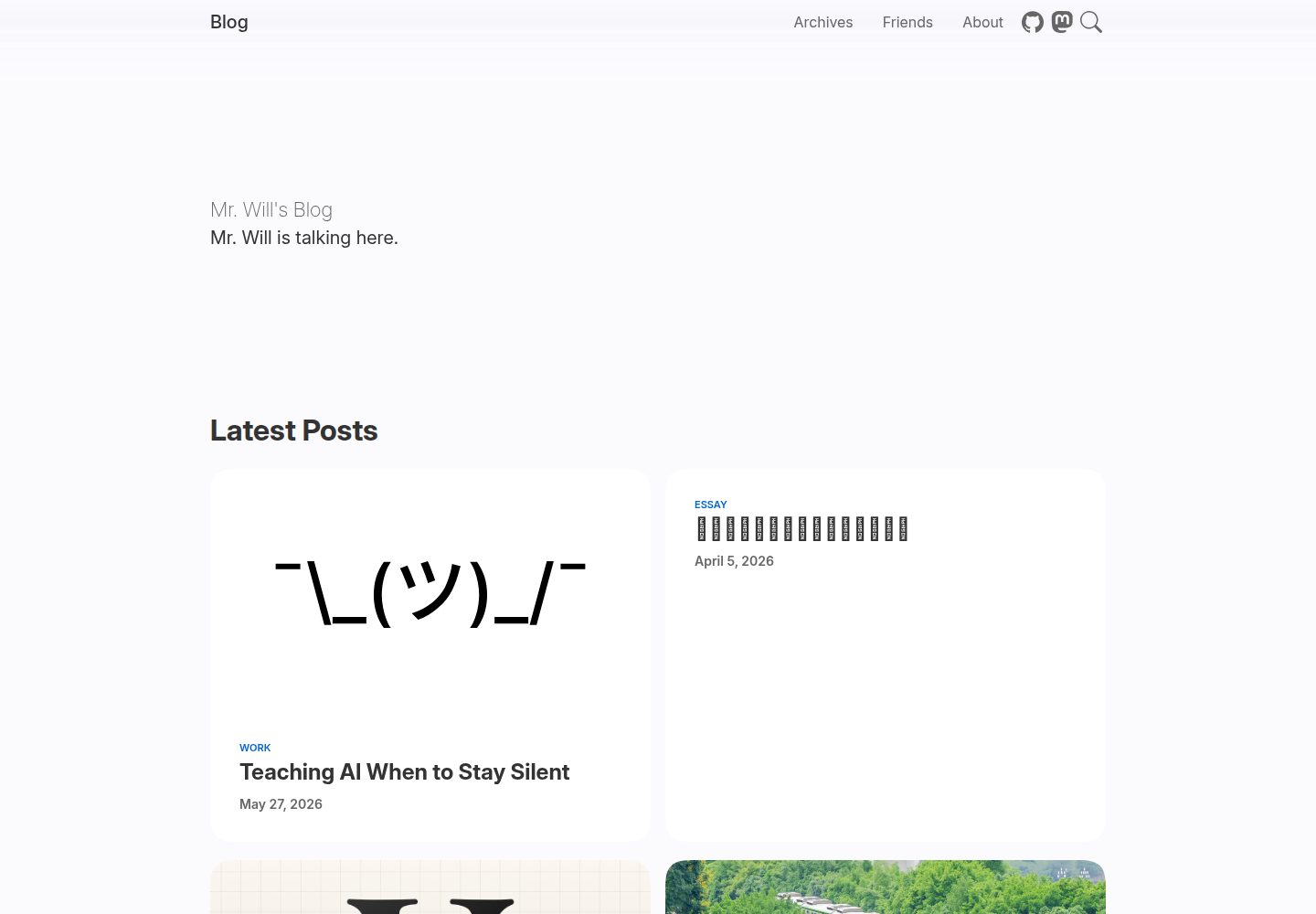
基于 Cupertino 设计,官方说明外观接近 Apple Newsroom
Hexo博客
hexo-theme-cupertino — Hexo 博客模板
作者 MrWillCom
Hexo 博客主题,采用 Cupertino 设计风格,视觉上接近 Apple Newsroom,支持 npm 安装或克隆到 themes 目录使用。
看看你的网站会是什么样
浏览真实页面截图,比较内容排版与手机效果。点击下方缩略图切换,放大查看整页细节。
全部页面与视图 3
截图用于了解视觉与布局,交互效果请以实际项目为准。
采集于 2026-10-01查看来源
值得关注的模板亮点
从已有项目资料中,快速了解它的特点。
自 v2 起支持通过 npm 安装,也可克隆到 themes/cupertino 目录
使用独立的 _config.cupertino.yml 覆盖主题默认配置
提供在线预览与独立文档站点
采用 MIT 许可发布,允许免费使用、修改、商用和分发代码
模板详细介绍
hexo-theme-cupertino 是 MrWillCom 为 Hexo 博客开发的免费主题,采用 MIT 许可发布。主题基于 Cupertino 设计语言,官方说明其外观与 Apple Newsroom 相似,定位是让 Hexo 博客获得更接近苹果风格的排版与细节。
安装方式有两种:自 v2 起可通过 npm 安装 hexo-theme-cupertino,也可以把仓库克隆到博客的 themes/cupertino 目录并安装依赖;随后在博客 _config.yml 中把 theme 设为 cupertino。配置方面,需要在 _config.yml 同级放置 _config.cupertino.yml 文件来覆盖默认配置,更详细的说明指向独立的主题文档站点。
仓库提供在线预览(blog.mrwillcom.com)和文档站(cupertino.mrwillcom.com),README 中还有 Product Hunt、npm 下载量、GitHub Release 等徽章,以及贡献与捐赠入口。主题的第三方素材(演示图片、字体、图标等)需按各自许可单独核对,代码的 MIT 许可不覆盖这些内容。
Hexo博客
适合你的项目吗?
适用场景
- 为已有 Hexo 博客更换一套苹果风格的博客主题
- 搭建以文章阅读为主、视觉偏简洁的 Hexo 个人博客
- 在本地克隆主题源码后按需修改样式与配置
- 参考其 Cupertino 风格排版用于 Hexo 站点原型
适合人群
- 已经搭建好 Hexo 博客、希望更换主题的用户
- 偏好 Apple Newsroom 式视觉风格的博客作者
- 能接受通过 npm 或 git 管理主题依赖的开发者
- 需要 MIT 许可下可修改、可商用主题代码的站点维护者
上手与定制指南
结合仓库当前版本的说明,按下面的资料检查内容、配置与运行要求。
- 1
需先准备好 Hexo 博客环境
- 2
npm 安装:npm install hexo-theme-cupertino;或 git clone 到 themes/cupertino 后在该目录执行 npm install
- 3
在博客 _config.yml 中设置 theme: cupertino
- 4
在 _config.yml 同级创建 _config.cupertino.yml 写入自定义配置以覆盖默认值
- 5
更新时 npm 安装方式执行 npm install hexo-theme-cupertino@latest,克隆方式在主题目录 git pull 并重新安装依赖
授权与来源资料
使用条件与限制
免费使用 · 保留许可声明本次收录的是公开仓库中采用 MIT 许可的免费版本;免费范围为该版本代码,不代表外部服务或第三方素材免费。
使用时需要遵守
- 允许免费使用、修改、商用和分发该版本代码。
- 分发代码副本或实质性部分时,保留原作者版权声明和完整 MIT 许可声明。
- 代码按现状提供;担保与责任限制以原许可证及适用法律为准。
额外费用与待核对事项
- 演示图片、字体、图标及其他第三方素材需按各自许可核对,不能仅凭代码的 MIT 许可判断。
- 域名、托管、数据库、支付或 AI 等外部服务可能另外收费。
查看原文依据
https://github.com/MrWillCom/hexo-theme-cupertino/blob/master/LICENSEhttps://github.com/MrWillCom/hexo-theme-cupertino/blob/master/README.mdPermission is hereby granted, free of charge
许可证原文
DeepSeek 根据仓库许可证和 README 整理 ·2026-10-01。结果仅覆盖已读取资料,依赖、图片、字体及后续条款变更以各自原文为准。
项目核对记录与介绍依据
模板资料
- 来源平台
- GitHub
- 资料与维护参考分
- 资料较完整 · 91 / 100
- 技术栈
- Hexo
- 网站类型
- 博客
这个分数如何计算
本站按许可资料(最高30分)、演示链接(12分)、预览图(10分)、Star数(15分)、记录的维护时间(15分)、描述完整度(8分)、功能记录(5分)和分类资料(5分)计算。它不是代码、安全或性能测试,也不是 Google 评分;有链接不代表已实测可用。
这个项目需要核对什么
- 记录的仓库更新时间
- 2026-08-11
- 截图检查日期
- 2026-10-01
已收录演示链接。请用你的内容与屏幕尺寸检查;有演示不代表表单、认证或支付已经可用。
目录记录的主要技术栈是 Hexo。请通过依赖清单和锁文件核对实际版本与托管要求。这些说明基于收录资料,不代表代码审计或部署实测。
查看具体选型方法 →介绍的制作与核对状态
介绍由 AI 辅助整理目录与仓库资料。仓库作者不等于这篇介绍的审核者。
已完成服务器许可规则与 AI 来源核对;未经过人工编辑审核。
查看当时使用的来源资料
SHA-256: e3d63454ecedb7980b3688621155d7e5b1852f5481094a7acd7e9801c504ce77
2026-10-01T03:12:09.755Z
来源文件 / 仓库<p align="center">
<img src="./assets/logo-v2.svg" width="128">
</p>
<h1 align="center">Hexo Theme Cupertino</h1>
<p align="center">The Hexo Blog Theme Cupertino.</p>
<p align="center"><a href="https://blog.mrwillcom.com/"><strong>Preview</strong></a> / <a href="https://cupertino.mrwillcom.com/">Docs</a></p>
<p align="center"><a href="https://www.producthunt.com/products/hexo-theme-cupertino?embed=true&utm_source=badge-featured&utm_medium=badge&utm_campaign=badge-hexo-theme-cupertino" target="_blank" rel="noopener noreferrer"><img alt="Product Hunt Badge" width="200" height="40.5" src="https://api.producthunt.com/widgets/embed-image/v1/featured.svg?post_id=1067113&theme=light&t=1769262103936"></a></p>
<p align="center">
<a href="https://github.com/MrWillCom/hexo-theme-cupertino/releases/latest">
<img alt="GitHub Release" src="https://img.shields.io/github/v/release/MrWillCom/hexo-theme-cupertino?style=for-the-badge&logo=github&logoColor=181717&labelColor=EEEEEE">
</a>
<a href="https://www.npmjs.com/package/hexo-theme-cupertino">
<img alt="NPM Downloads" src="https://img.shields.io/npm/dm/hexo-theme-cupertino?style=for-the-badge&logo=npm&logoColor=CB3837&labelColor=EEEEEE&color=8A56FF">
</a>
<img alt="GitHub Repo stars" src="https://img.shields.io/github/stars/MrWillCom/hexo-theme-cupertino?style=for-the-badge&logo=github&logoColor=181717&labelColor=EEEEEE&color=F7D76E">
</p>
<p align="center">
<a href="https://pkg.pr.new/">
<img alt="Continuous Releases" src="https://img.shields.io/github/actions/workflow/status/MrWillCom/hexo-theme-cupertino/continuous-releases.yml?style=for-the-badge&logo=stackblitz&logoColor=1269D3&label=Continuous%20Releases&labelColor=EEEEEE&color=1269D3">
</a>
<a href="https://github.com/changesets/changesets">
<img alt="Changesets" src="https://img.shields.io/badge/🦋-Changesets-0195FE?style=for-the-badge&labelColor=EEEEEE">
</a>
</p>
<p align="center">✨ <em>Give a star if you like this!</em> ✨</p>

This is a modern and elegant theme for your Hexo blog, which is beautifully designed and has gorgeous details. It's based on Cupertino Design, so it looks similar to [Apple Newsroom](https://www.apple.com/newsroom/).
With Theme Cupertino, your blogging experience will be hugely elevated, and your ideas can be shared in an effortless way.
## Installation
Before getting started, make sure you have already set up a [Hexo](https://hexo.io/) blog.
Since v2, you can install via npm:
```sh
$ npm install hexo-theme-cupertino
```
Or, you may clone Theme Cupertino to `themes/cupertino`:
```sh
$ git clone https://github.com/MrWillCom/hexo-theme-cupertino.git themes/cupertino
# install dependencies
$ cd themes/cupertino
$ npm install
```
Then, go to your blog configuration `_config.yml` and set:
```yaml
theme: cupertino
```
## Update
If you installed Theme Cupertino via npm, run:
```sh
$ npm install hexo-theme-cupertino@latest
```
Or if you cloned it via Git, go to the theme directory and pull the latest changes:
```sh
$ cd themes/cupertino
$ git pull
# install latest dependencies
$ npm install
```
## Configuration
You need a `_config.cupertino.yml` file beside `_config.yml` to contain your configuration, which will override the defaults.
For more detailed guides, visit [Theme Cupertino Docs](https://cupertino.mrwillcom.com/).
## Contributing
All friendly contributions are welcome! Start contributing by following the existing issues or little fixes.
Not familiar with code? It's okay, feel free to report bugs or suggest something.
## Donating
If you like Theme Cupertino, please consider donating to encourage me. Your support is greatly appreciated! Starring and sharing this repository will also help a lot.
<p>
<a href="https://liberapay.com/MrWillCom/donate">
<img alt="Donate using Liberapay" src="https://liberapay.com/assets/widgets/donate.svg">
</a>
<a href="https://www.patreon.com/MrWillCom">
<img alt="Donate using Patreon" src="https://img.shields.io/badge/Patreon-F96754?style=for-the-badge&logo=patreon&logoColor=FFFFFF">
</a>
</p>
## Activities
## Contributors
Theme Cupertino would not be possible without the help from the contributors.
<a href="https://github.com/MrWillCom/hexo-theme-cupertino/graphs/contributors">
<img src="https://contrib.rocks/image?repo=MrWillCom/hexo-theme-cupertino">
</a>
看看同类模板
对比同技术栈与用途的模板,找到更适合的视觉与内容结构。

hexo-theme-matery
A beautiful hexo blog theme with material design and responsive design.一个基于材料设计和响应式设计而成的全面、美观的Hexo主题。
Hexo · 博客

hexo-theme-cactus
:cactus: A responsive, clean and simple theme for Hexo.
Hexo · 博客

hexo-theme-volantis
A Wonderful Theme for Hexo.
Hexo · 博客

hexo-theme-aurora
Hexo Theme Aurora 是一款以极光色彩和渐变 UI 为核心的 Hexo 博客主题,整体走未来感路线。 它的首页采用杂志式网格布局,文章列表与精选区域层次分明,视觉上更接近个人媒体站点而非传统博客。
Hexo · 博客

hexo-theme-Claudia
Claudia 是一款为 Hexo 设计的博客主题,主打简洁外观与易配置。 它支持自动跟随设备深色模式,并在 README 中宣称拥有 90+ 的 Lighthouse 评分,适合追求轻量与性能的博客作者。
Hexo · 博客

hexo-theme-A4
A hexo theme that looks like an A4 paper.(一个类A4纸张质感的hexo博客主题。 )
Hexo · 博客