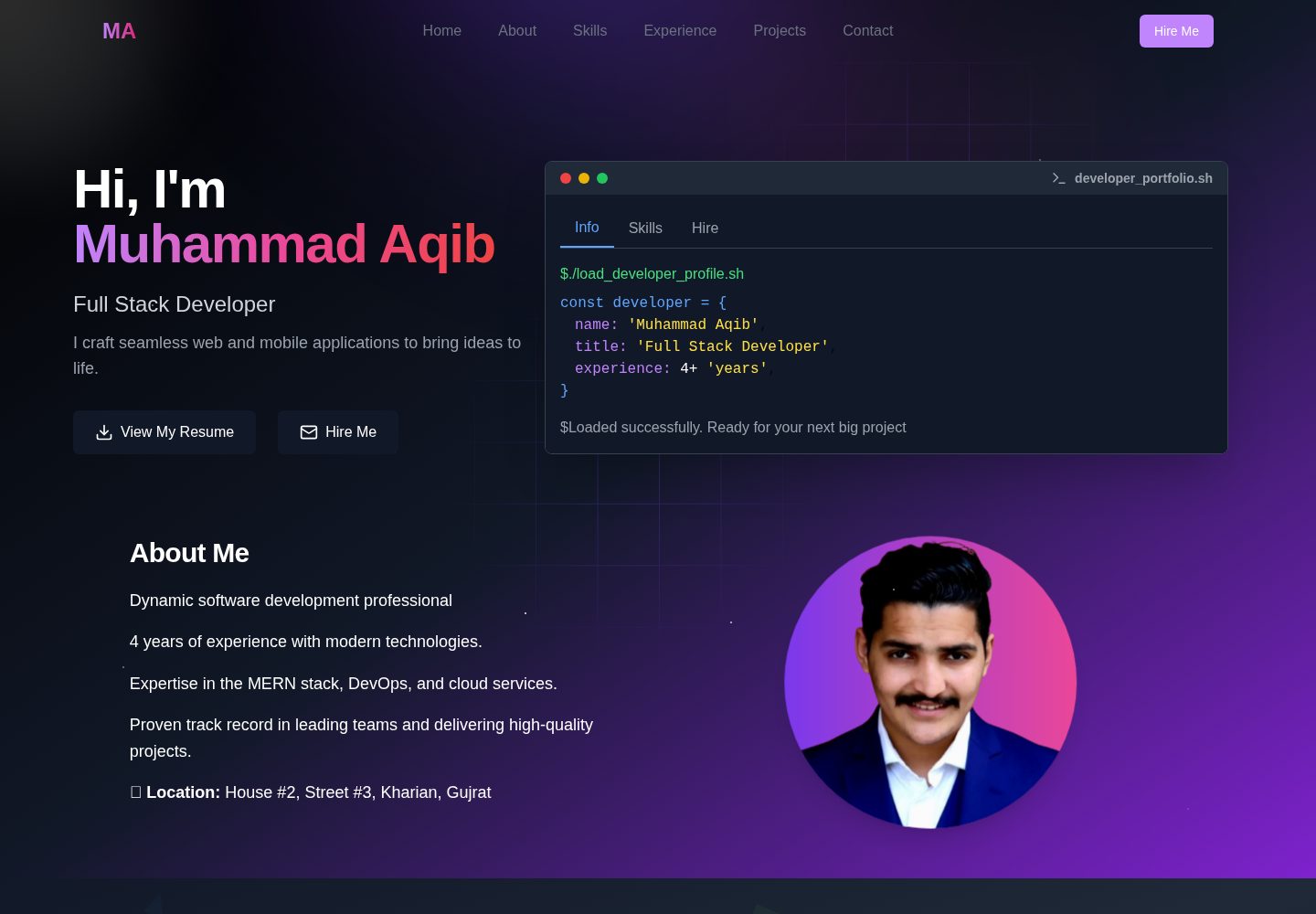
内容完全由 src/utils/data/ 下的对象数据驱动,修改对象值即可更新作品集
Next.jsReact作品集
portfolio-template (muhammada86) — Next.js 作品集模板
作者 muhammada86
基于 Next.js 的动态作品集模板,通过修改 src/utils/data/ 下的对象数据来定制个人主页内容,README 给出了本地运行与 Vercel/Netlify 部署步骤。
看看你的网站会是什么样
浏览真实页面截图,比较内容排版与手机效果。点击下方缩略图切换,放大查看整页细节。
全部页面与视图 2
截图用于了解视觉与布局,交互效果请以实际项目为准。
采集于 2026-10-14查看来源
值得关注的模板亮点
从已有项目资料中,快速了解它的特点。
personalData.ts 集中管理姓名、职位、简介、联系方式与多个社交平台链接
metaData 对象用于配置网站标题、描述和 SEO 关键词
README 说明需集成 Resend 并在 .env 中配置 API Key 以接收联系邮件
提供从 Fork、克隆、安装依赖到本地运行的完整命令步骤
部署说明覆盖 Vercel 与 Netlify,并提示在 Vercel 环境变量中配置 Resend API 值
模板详细介绍
这是一个用 Next.js 构建的动态作品集模板,README 说明其内容全部由 src/utils/data/ 目录下的对象数据驱动,无需复杂配置即可快速生成并定制个人作品集。
定制方式:编辑 personalData.ts 中的对象值,包括姓名、头像路径、职位、简介、工作年限、邮箱、电话、地址以及 GitHub、Facebook、LinkedIn、Twitter、Stack Overflow、LeetCode、dev.to 等社交链接和简历链接;同一文件中的 metaData 对象用于设置网站标题、描述和 SEO 关键词。README 还提示需集成 Resend 以接收联系邮件,将 API Key 写入 .env 文件,并可用 favicon 生成工具替换 src/app 下的 icon.ico。
运行与部署:README 要求先 Fork 并克隆仓库,进入项目目录后执行 npm install 安装依赖,用 npm run dev 启动开发服务器,默认访问 http://localhost:3000。部署时可将改动推送到 GitHub,再在 Vercel 或 Netlify 导入仓库,并在 Vercel 环境变量中添加 Resend API 值。项目采用 MIT 许可证。
README 未提供页面区块构成、组件清单、依赖版本、浏览器兼容性、性能或无障碍方面的说明,也未说明除 Resend 之外的其他集成。
Next.js作品集
适合你的项目吗?
适用场景
- 个人开发者或设计师搭建并维护自己的作品集主页
- 通过修改数据文件快速替换姓名、简介、社交链接和简历地址
- 按 README 步骤在本地启动开发服务器预览作品集
- 将仓库推送到 GitHub 后导入 Vercel 或 Netlify 完成部署
- 配置 Resend 以接收访客通过联系表单发送的邮件
适合人群
- 希望用对象数据而非页面代码来维护作品集内容的开发者
- 熟悉 Node.js 与 npm 基本命令、能按 README 完成本地运行的用户
- 计划使用 Vercel 或 Netlify 部署静态站点的个人用户
- 愿意注册 Resend 并配置 API Key 以启用联系邮件功能的用户
上手与定制指南
结合仓库当前版本的说明,按下面的资料检查内容、配置与运行要求。
- 1
README 要求先 Fork 仓库,再执行 git clone、cd portfolio-template 和 npm install
- 2
本地预览使用 npm run dev,默认地址为 http://localhost:3000
- 3
需编辑 src/utils/data/ 下的 personalData.ts 与 metaData 对象完成内容定制
- 4
接收联系邮件需集成 Resend,并在 .env 文件中添加 API Key
- 5
部署到 Vercel 时需在环境变量中添加 Resend API 值;README 未说明其他部署配置细节
授权与来源资料
使用条件与限制
免费使用 · 保留许可声明本次收录的是公开仓库中采用 MIT 许可的免费版本;免费范围为该版本代码,不代表外部服务或第三方素材免费。
使用时需要遵守
- 允许免费使用、修改、商用和分发该版本代码。
- 分发代码副本或实质性部分时,保留原作者版权声明和完整 MIT 许可声明。
- 代码按现状提供;担保与责任限制以原许可证及适用法律为准。
额外费用与待核对事项
- 演示图片、字体、图标及其他第三方素材需按各自许可核对,不能仅凭代码的 MIT 许可判断。
- 域名、托管、数据库、支付或 AI 等外部服务可能另外收费。
- 接收联系邮件必须集成 Resend 服务,需注册账号并获取 API Key 写入 .env 文件,否则联系表单无法发送邮件。
- 部署到 Vercel 时必须在环境变量中添加 Resend API 值,否则线上联系邮件功能不可用。
查看原文依据
Permission is hereby granted, free of charge
许可证原文
5. You have to integrate [Resend](https://resend.com/) to receive contact emails. You can signup and get the api key and add it in `.env` file.
README 原文
https://github.com/muhammada86/portfolio-template/blob/main/LICENSEhttps://github.com/muhammada86/portfolio-template/blob/main/README.md4. You will have to add resend API value in Vercel Environment Variable
README 原文
DeepSeek 根据仓库许可证和 README 整理 ·2026-10-14。结果仅覆盖已读取资料,依赖、图片、字体及后续条款变更以各自原文为准。
项目核对记录与介绍依据
模板资料
- 来源平台
- GitHub
- 资料与维护参考分
- 资料较完整 · 83 / 100
- 技术栈
- Next.js · React
- 网站类型
- 作品集
这个分数如何计算
本站按许可资料(最高30分)、演示链接(12分)、预览图(10分)、Star数(15分)、记录的维护时间(15分)、描述完整度(8分)、功能记录(5分)和分类资料(5分)计算。它不是代码、安全或性能测试,也不是 Google 评分;有链接不代表已实测可用。
这个项目需要核对什么
- 记录的仓库更新时间
- 2026-01-15
- 截图检查日期
- 2026-10-14
已收录演示链接。请用你的内容与屏幕尺寸检查;有演示不代表表单、认证或支付已经可用。
目录记录的主要技术栈是 Next.js。请通过依赖清单和锁文件核对实际版本与托管要求。这些说明基于收录资料,不代表代码审计或部署实测。
查看具体选型方法 →介绍的制作与核对状态
介绍由 AI 辅助整理目录与仓库资料。仓库作者不等于这篇介绍的审核者。
审核声明: codex-user-requested-batch-review-20261015 · 2026-10-15
查看当时使用的来源资料
SHA-256: 5dd4bfa3d3a71e02368ef80afd45383122e43fd8cb59a3ecd5d4eb0e8848f06e
2026-10-14T04:39:21.353Z
来源文件 / 仓库```markdown
# Dynamic Portfolio Template
This is a dynamic portfolio template built with NextJS. By simply editing the object values in the `src/utils/data/` folder, you can quickly create and customize a portfolio tailored to your needs without any complex configurations. Everything is dynamic and easy to update!
---
## ✨ Features
- Fully dynamic content
- Easy to customize by editing JSON-like objects
- Responsive design
- Ready to deploy
---
## 🚀 Quick Start
### 1. Fork the Repository
Click on the Fork button in the top-right corner of this repository to create your own copy.
### 2. Clone the Repository
After forking, clone the repository to your local machine:
```
```bash
git clone https://github.com/muhammada86/portfolio-template.git
```
### 3. Navigate to the Project Directory
```bash
cd portfolio-template
```
### 4. Install Dependencies
Make sure you have Node.js installed on your machine. Then run:
```bash
npm install
```
### 5. Run the Development Server
Start the development server to preview your portfolio:
```bash
npm run dev
```
Your portfolio should now be accessible at `http://localhost:3000` in your browser.
---
## 🛠️ How to Customize
1. Open the `src/utils/data/` folder.
2. Update the object values in the `personalData.ts` file:
### Example of `personalData.ts`:
```typescript
export const personalData = {
name: "Your Name",
profile: "/profile.png", // Replace the image with your transparent public/profile.png
designation: "Your Designation",
description: `A short bio about yourself`,
experience: 5, // Years of experience
email: "[email protected]",
phone: "+123456789",
address: "Your Address",
github: "https://github.com/yourusername",
facebook: "https://www.facebook.com/yourusername",
linkedIn: "https://www.linkedin.com/in/yourusername/",
twitter: "https://twitter.com/yourusername",
stackOverflow: "https://stackoverflow.com/users/yourid",
leetcode: "https://leetcode.com/yourusername/",
devUsername: "yourDev.toUsername",
resume: "https://your-resume-link",
};
```
3. Update the `metaData` object in the same file to personalize the website's metadata (title, description, and SEO keywords).
### Example of `metaData`:
```typescript
export const metaData = {
title: "Your Name - Your Designation",
description: "A brief overview of your skills and expertise",
keywords: [
"Your Name",
"Your Designation",
"Portfolio Website",
"JavaScript Developer",
],
};
```
4. Save the file and reload your development server. Your custom portfolio is now ready!
5. You have to integrate [Resend](https://resend.com/) to receive contact emails. You can signup and get the api key and add it in `.env` file.
6. To update the icon.ico in src/app, you can generate it from [Fav Icon Generator](https://favicon.io/favicon-converter/)
---
## 🌟 Deployment
Once you're happy with your portfolio, deploy it to a hosting service like [Vercel](https://vercel.com/) or [Netlify](https://www.netlify.com/).
### Example Deployment on Vercel:
1. Push your changes to GitHub:
```bash
git add .
git commit -m "Customized my portfolio"
git push origin main
```
2. Go to [Vercel](https://vercel.com/) and import your repository.
3. Follow the instructions to deploy.
4. You will have to add resend API value in Vercel Environment Variable
Your portfolio will be live in minutes!
---
## 📄 License
This project is open-source and available under the MIT License.
---
🎉 Happy Coding!
看看同类模板
对比同技术栈与用途的模板,找到更适合的视觉与内容结构。

react-resume-template
A personal resume website template built with React.js, Typescript, Next.js, and styled with Tailwind css
Next.js · 作品集

nxt-lnk
Custom bio links for creatives who love coding. A perfect custom alternative for linktree, bio and other short…
Next.js · 作品集

sylph
A minimal portfolio template.
Next.js · 作品集

sleek-portfolio
sleek-portfolio 是一个面向开发者个人品牌展示的现代作品集模板,基于 Next.js 15、TypeScript、Tailwind CSS 和 Shadcn UI 构建。
Next.js · 作品集

research-website-template
React + Next.js template for research websites (for PhD students, researchers, etc)
Next.js · 作品集

shadcn-portfolio
shadcn-portfolio 是一个面向开发者的作品集模板,技术栈为 Next.js 15、shadcn/ui、Tailwind CSS 和 Framer Motion。
Next.js · 作品集