Eleventy 静态站点生成器,内容可用 HTML 或 Markdown 编写
Eleventy工具站启动器
getzeropoint.com — Eleventy 工具站模板
作者 MWDelaney
ZeroPoint 是一个基于 Eleventy 的静态网站启动器,其公开官网仓库展示了页面、导航、样式与部署配置的组织方式。
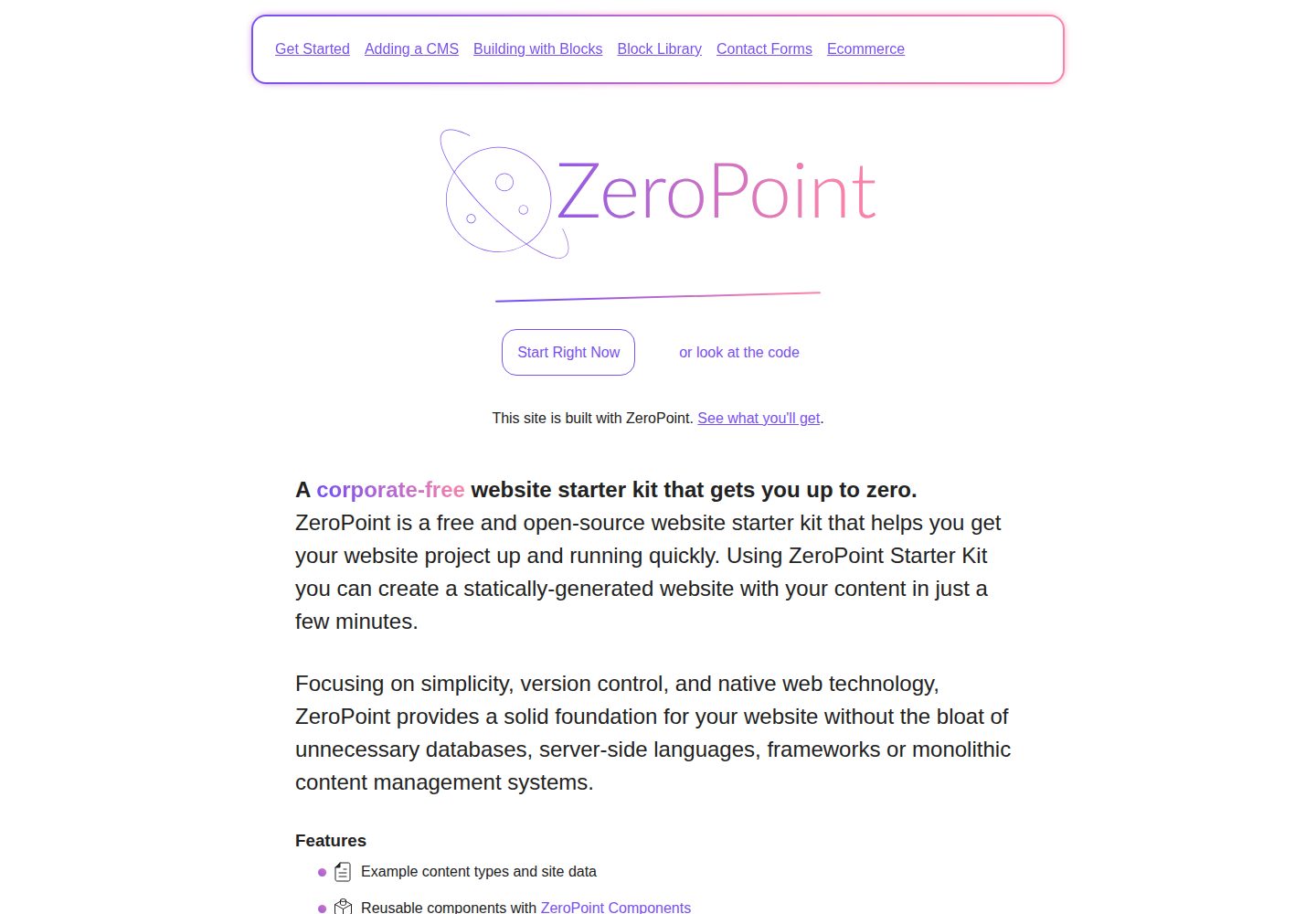
看看你的网站会是什么样
浏览真实页面截图,比较内容排版与手机效果。点击下方缩略图切换,放大查看整页细节。
全部页面与视图 2
截图用于了解视觉与布局,交互效果请以实际项目为准。
采集于 2026-09-30查看来源
值得关注的模板亮点
从已有项目资料中,快速了解它的特点。
Eleventy 配置按集合、过滤器、透传、插件、短代码等拆分到 src/config/ 目录
导航与站点品牌分别由 src/data/navigation.json 和 src/data/site.json 管理
样式支持 CSS、SCSS 与 CSS 变量,品牌变量集中在 _branding.scss
README 提供 GitHub Pages 与 Netlify 两种部署配置说明
MIT 许可,允许免费使用、修改、商用与分发该版本代码
模板详细介绍
getzeropoint.com 是 ZeroPoint 这个 Eleventy 启动器的公开网站仓库,采用 MIT 许可。仓库本身既是该启动器的展示站点,也作为可直接复用的项目骨架:内容放在 src/content/pages,站点数据放在 src/data(navigation.json 与 site.json),Eleventy 的集合、过滤器、插件、短代码等配置从 .eleventy.js 拆分到 src/config/ 下按文件管理。样式使用 CSS、SCSS 与 CSS 变量,品牌相关变量集中在 _branding.scss,脚本入口为 src/assets/scripts/main.js。README 提供了 GitHub Pages 与 Netlify 两种部署路径,并给出 npm i、npm run dev、npm run staging、npm run production 等命令。仓库未在资料中说明具体依赖版本、浏览器兼容范围或无障碍支持程度,使用前需自行核对。
Eleventy工具站启动器
适合你的项目吗?
适用场景
- 作为 Eleventy 项目的起始骨架,直接在其目录结构上添加页面与内容
- 在 GitHub 网页端或 github.dev 编辑器中修改页面、导航与样式
- 通过 GitHub Actions 部署到 GitHub Pages,或使用 Netlify 按钮一键部署
- 需要按 staging 与 production 两种模式分别构建静态站点
适合人群
- 希望用 Eleventy 搭建静态站点并接受 Markdown/HTML 内容工作流的开发者
- 偏好将 Eleventy 配置拆分到多个文件而非集中在 .eleventy.js 的项目
- 需要 GitHub Pages 或 Netlify 部署路径的静态站点项目
- 可接受 MIT 许可条款并会自行核对第三方素材许可的使用者
上手与定制指南
结合仓库当前版本的说明,按下面的资料检查内容、配置与运行要求。
- 1
安装依赖使用 npm i,本地开发使用 npm run dev。
- 2
构建命令:npm run staging 会为每个页面标记 noindex,npm run production 用于生产构建。
- 3
部署到 GitHub Pages 需在仓库设置中启用 Pages 并选择 GitHub Actions 作为来源,同时为工作流开启读写权限。
- 4
部署到 Netlify 可通过 README 中的 Deploy to Netlify 按钮关联仓库完成。
- 5
演示图片、字体、图标等第三方素材需按各自许可核对,不能仅凭代码的 MIT 许可判断。
授权与来源资料
使用条件与限制
免费使用 · 保留许可声明本次收录的是公开仓库中采用 MIT 许可的免费版本;免费范围为该版本代码,不代表外部服务或第三方素材免费。
使用时需要遵守
- 允许免费使用、修改、商用和分发该版本代码。
- 分发代码副本或实质性部分时,保留原作者版权声明和完整 MIT 许可声明。
- 代码按现状提供;担保与责任限制以原许可证及适用法律为准。
额外费用与待核对事项
- 部署到 Netlify 需使用 Netlify 账号并通过其平台托管站点,属于外部服务依赖,非代码许可限制。
- 部署到 GitHub Pages 需在 GitHub 仓库设置中启用 Pages 并选择 GitHub Actions 作为来源,依赖 GitHub 平台。
- GitHub Actions 工作流需在仓库设置中开启读写权限,属于平台配置要求。
- 演示图片、字体、图标及其他第三方素材需按各自许可核对,不能仅凭代码的 MIT 许可判断。
- 域名、托管、数据库、支付或 AI 等外部服务可能另外收费。
查看原文依据
Permission is hereby granted, free of charge
许可证原文
Deploy to Netlify
README 原文
Enable GitHub Pages
README 原文
https://github.com/MWDelaney/getzeropoint.com/blob/main/LICENSEhttps://github.com/MWDelaney/getzeropoint.com/blob/main/README.mdAllow "Read and write permissions" for GitHub Workflows
README 原文
DeepSeek 根据仓库许可证和 README 整理 ·2026-10-02。结果仅覆盖已读取资料,依赖、图片、字体及后续条款变更以各自原文为准。
项目核对记录与介绍依据
模板资料
- 来源平台
- GitHub
- 资料与维护参考分
- 资料较完整 · 92 / 100
- 技术栈
- Eleventy
- 网站类型
- 工具站 · 启动器
这个分数如何计算
本站按许可资料(最高30分)、演示链接(12分)、预览图(10分)、Star数(15分)、记录的维护时间(15分)、描述完整度(8分)、功能记录(5分)和分类资料(5分)计算。它不是代码、安全或性能测试,也不是 Google 评分;有链接不代表已实测可用。
这个项目需要核对什么
- 记录的仓库更新时间
- 2026-07-01
- 截图检查日期
- 2026-10-02
已收录演示链接。请用你的内容与屏幕尺寸检查;有演示不代表表单、认证或支付已经可用。
目录记录的主要技术栈是 Eleventy。请通过依赖清单和锁文件核对实际版本与托管要求。这些说明基于收录资料,不代表代码审计或部署实测。
查看具体选型方法 →介绍的制作与核对状态
介绍由 AI 辅助整理目录与仓库资料。仓库作者不等于这篇介绍的审核者。
已完成服务器许可规则与 AI 来源核对;未经过人工编辑审核。
查看当时使用的来源资料
SHA-256: c42702fdc7b2e64639a3188cc647a4b70dcabf02d3d3a0c9bf7fc7493a1428d4
2026-10-02T14:17:09.260Z
来源文件 / 仓库# Get ZeroPoint ## Start building your website Create and edit your site **right from this readme file!**. 🪐 Or edit your entire site in a web-based editor by [clicking here](https://github.dev/mwdelaney/Get ZeroPoint/). <details> <summary><strong>📝 Creating and editing pages</strong></summary> ## Creating and editing pages and content ### Pages Create your site's main content! Pages can be written in HTML or [Markdown](https://www.markdownguide.org/basic-syntax/)! * [Edit the homepage](https://github.com/mwdelaney/Get ZeroPoint/edit/main/src/content/pages/index.md) * [Create a new page](https://github.com/mwdelaney/Get ZeroPoint/new/main/?filename=/src/content/pages/&value=---%0Atitle%3A%20Enter%20page%20title%20here%0A---) <!-- --- #### Posts Blog posts * [Create a new post](https://github.com/mwdelaney/Get ZeroPoint/new/main/?filename=/src/content/posts/&value=----%0Atitle%3A%20%22Enter%20post%20title%22%0Adate%3A%20%222025-01-01%0A---) --> </details> <details> <summary><strong>🎨 Look and Feel</strong></summary> ## Look and Feel ### Navigation Your site's navigation is how your users will get around! Edit the site's navigation menu in [JSON format](https://developer.mozilla.org/en-US/docs/Learn/JavaScript/Objects/JSON)! * [Edit the navigation](https://github.com/mwdelaney/Get ZeroPoint/edit/main/src/data/navigation.json) ### Styles Colors, spacing, and fonts, oh my! You can edit your branding and styles here using CSS, SCSS, and CSS variables! * [Edit your branding](https://github.com/mwdelaney/get-zeropoint/edit/main/src/assets/styles/_branding.scss) * [Edit your overall styles](https://github.com/mwdelaney/get-zeropoint/edit/main/src/assets/styles/styles.scss) Learning CSS can be daunting but there are a ton of useful resources on the web. Check out [SmolCSS](https://smolcss.dev) to get started! ### Javascript **Optional!** Add javascript functionality to your site * [Add Javascript](https://github.com/mwdelaney/get-zeropoint/edit/main/src/assets/scripts/main.js) </details> <details> <summary><strong>🚀 Deploy Get ZeroPoint</strong></summary> ## Deploy Get ZeroPoint Once you set up deployment, any time you commit to your repository's `main` branch, GitHub will build and deploy your site. <details> <summary><strong>Deploy to GitHub Pages</strong></summary> ### Setup: 1. [Enable GitHub Pages](https://github.com/mwdelaney/Get ZeroPoint/settings/pages) in your repository settings, choose "GitHub Actions" as the source. 2. [Allow "Read and write permissions" for GitHub Workflows](https://github.com/mwdelaney/Get ZeroPoint/settings/actions) in your repository settings for the GitHub Actions workflow to run. </details> <details> <summary><strong>Deploy to Netlify</strong></summary> ### Setup: [](https://app.netlify.com/start/deploy?repository=https://github.com/mwdelaney/Get ZeroPoint/) </details> </details> --- ## Get to Know Get ZeroPoint Ready to go deeper? Here's how Get ZeroPoint is laid out: ```sh example.com # → Root of your project ├── src/ # → Source directory │ ├── assets/ # → Site assets │ │ ├── fonts/ │ │ ├── images/ │ │ ├── scripts/ │ │ ├── styles/ │ │ ├── views/ │ │ │ └── layouts/ │ │ │ └── partials/ │ │ └── assets.json # → Shared attributes for files in the assets directory │ ├── config/ # → Eleventy configuration │ │ ├── build.js # → Javascript and CSS build and bundler configuration │ │ ├── collections.js # → Add and configure collections (https://www.11ty.dev/docs/collections/) │ │ ├── filters.js # → Add and configure filters (https://www.11ty.dev/docs/filters/) │ │ ├── passthroughs.js # → Add and configure passthroughs (https://www.11ty.dev/docs/copy/) │ │ ├── plugins.js # → Add and configure plugins (https://www.11ty.dev/docs/plugins/) │ │ ├── shortcodes.js # → Add and configure shortcodes (https://www.11ty.dev/docs/shortcodes/) │ │ ├── templateLanguages.js # → Configure custom template languages (https://www.11ty.dev/docs/languages/custom/) │ │ ├── watchtargets.js # → Add and configure watch targets (https://www.11ty.dev/docs/watch-serve/) │ │ └── config.json # → Shared attributes for files in the config directory │ ├── content # → A nice, organized, recommended place for all site content │ │ └── pages # → Add "pages" collection items here │ └── data # → Customize site data (https://www.11ty.dev/docs/data/) │ ├── navigation.json # → Site navigation configuration │ └── site.json # → Site branding configuration ├── .eleventy.js # → Core Eleventy config file ├── netlify.toml # → Netlify deployment and plugin configuration (optional) ├── README.Get ZeroPoint.md # → Template repository readme └── README.md ``` ## Eleventy Configuration Eleventy configuration is abstracted from the typical `.eleventy.js` file and moved to `/src/config/` for easy organization and configuration of collections, filters, passthroughs, etc. ## Install project dependencies ```bash npm i ``` ## Run the project locally ```bash npm run dev ``` ## Build for staging (The same as production except every page is flagged `noindex`) ```bash npm run staging ``` ## Build for production ```bash npm run production ```
看看同类模板
对比同技术栈与用途的模板,找到更适合的视觉与内容结构。

eleventy-base-blog
A starter repository for a blog web site using the Eleventy static site generator.
Eleventy · 博客

eleventy-garden
:seedling: A starter site for building a mind garden with eleventy
Eleventy · 启动器

eleventastic
An Eleventy Starter Kit
Eleventy · 启动器

neat-starter
Starter Template for Netlify CMS, Eleventy, Alpine JS & Tailwind CSS
Eleventy · 启动器

Eleventy-Starter-Boilerplate
🚀 Eleventy Starter is production-ready with SEO-friendly for quickly starting a blog. ⚡ Built with Eleventy, …
Eleventy · 博客

eleventy-plus-vite
A clean and fast Eleventy Starter Project with Vite
Eleventy · 启动器