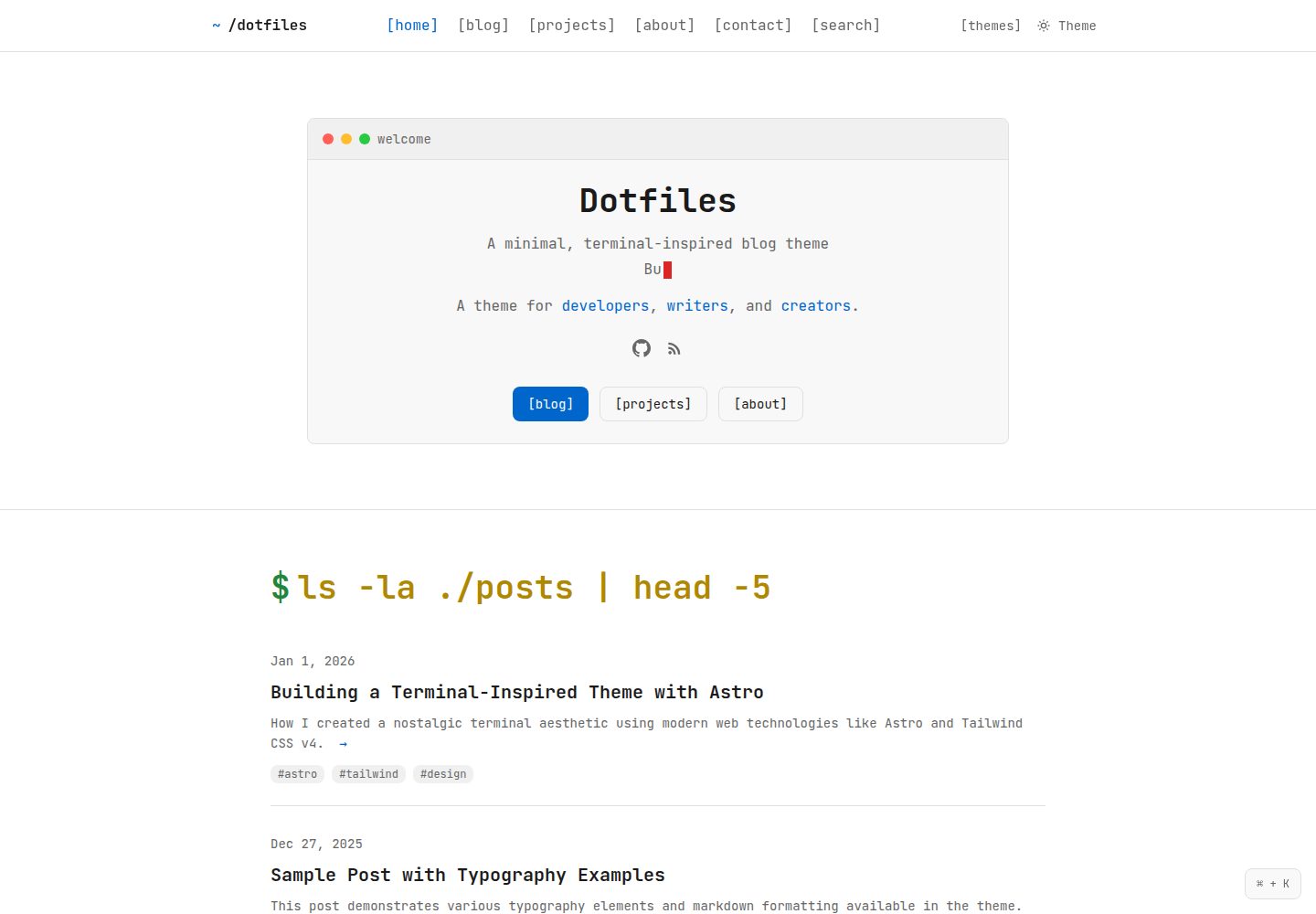
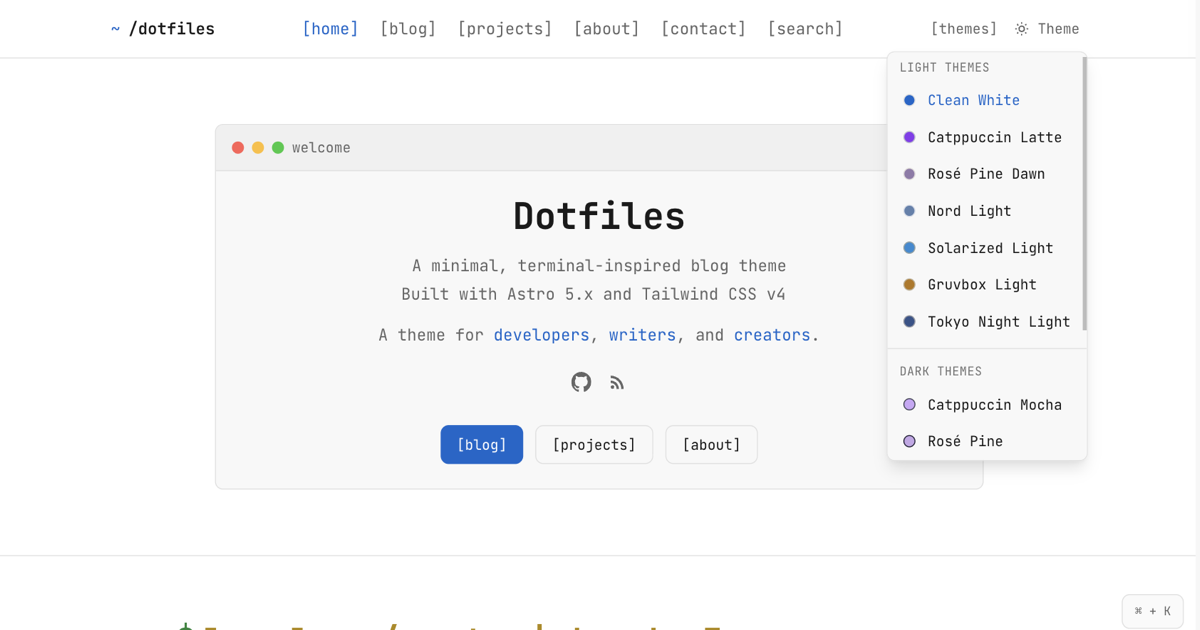
内置 14 套配色方案,涵盖 Catppuccin、Nord、Dracula、Rosé Pine、Gruvbox、Solarized、Tokyo Night 等,并区分深色与浅色变体
Astro博客
dotfiles-astro-theme — Astro 博客模板
作者 nabsiddiqui
Dotfiles 是一个面向 Astro 的终端风格博客主题,内置 14 套开发者常用配色,支持 Markdown/MDX 写作与 RSS、搜索、SEO。
看看你的网站会是什么样
浏览真实页面截图,比较内容排版与手机效果。点击下方缩略图切换,放大查看整页细节。
全部页面与视图 3
截图用于了解视觉与布局,交互效果请以实际项目为准。
采集于 2026-10-03查看来源
值得关注的模板亮点
从已有项目资料中,快速了解它的特点。
终端风格界面,提供命令行式标题、等宽字体细节以及 MDX 中可直接使用的 <Terminal> 终端窗口组件
内容驱动,博客文章与页面分别放在 src/content/blog/ 和 src/content/pages/,支持 Markdown 与 MDX
站点标题、描述、作者、hero 文案、社交链接、项目列表和默认主题集中在 src/config.ts 中配置
内置 RSS、搜索和 SEO 功能,并使用 TypeScript 与 Tailwind CSS 构建
模板详细介绍
Dotfiles 是一个以终端界面为视觉灵感的 Astro 博客主题。它把命令行式的标题、等宽字体细节和终端窗口组件融入博客页面,适合记录开发笔记、个人项目或技术随笔。主题自带 14 套配色方案,包括 Catppuccin、Nord、Dracula、Rosé Pine、Gruvbox、Solarized 和 Tokyo Night,每套都提供深色或浅色变体,默认使用 clean-white 浅色主题。站点信息、首页 hero、社交链接、项目列表和默认主题都在 src/config.ts 中集中配置。内容方面,博客文章以 Markdown 放在 src/content/blog/,页面以 Markdown 或 MDX 放在 src/content/pages/,页面会自动出现在导航中,也可以通过 hideFromNav 隐藏。MDX 中可以直接使用 <Terminal> 组件把内容包裹成终端窗口样式,组件无需手动导入。主题还内置 RSS、搜索和 SEO 相关功能,并使用 TypeScript 与 Tailwind CSS 构建。使用前需要 Node.js 18+ 和 npm 9+,通过 npm run dev 启动本地开发服务器。
Astro博客
适合你的项目吗?
适用场景
- 搭建个人技术博客,发布开发笔记、教程或项目记录
- 为喜欢终端与命令行美学的开发者提供风格统一的写作站点
- 在 MDX 页面中使用 <Terminal> 组件展示个人简介、技能列表或配置片段
- 通过 src/config.ts 集中管理站点信息、首页 hero 和项目展示
适合人群
- 使用 Astro 并希望快速获得终端风格博客界面的开发者
- 习惯用 Markdown 或 MDX 写作、需要 RSS 与搜索功能的个人博主
- 偏好 Catppuccin、Nord、Dracula 等开发者配色并希望自由切换主题的用户
上手与定制指南
结合仓库当前版本的说明,按下面的资料检查内容、配置与运行要求。
- 1
需要 Node.js 18+ 和 npm 9+
- 2
克隆仓库后执行 npm install,再用 npm run dev 启动本地开发服务器(默认 localhost:4321)
- 3
站点信息、hero 文案、社交链接、项目和默认主题在 src/config.ts 中修改
- 4
博客文章放入 src/content/blog/,页面放入 src/content/pages/,页面可通过 hideFromNav 隐藏
- 5
代码采用 MIT 许可,可免费使用、修改、商用和分发,但需保留版权与许可声明;演示图片、字体、图标等第三方素材需单独核对许可
授权与来源资料
使用条件与限制
免费使用 · 保留许可声明本次收录的是公开仓库中采用 MIT 许可的免费版本;免费范围为该版本代码,不代表外部服务或第三方素材免费。
使用时需要遵守
- 允许免费使用、修改、商用和分发该版本代码。
- 分发代码副本或实质性部分时,保留原作者版权声明和完整 MIT 许可声明。
- 代码按现状提供;担保与责任限制以原许可证及适用法律为准。
额外费用与待核对事项
- 演示图片、字体、图标及其他第三方素材需按各自许可核对,不能仅凭代码的 MIT 许可判断。
- 域名、托管、数据库、支付或 AI 等外部服务可能另外收费。
查看原文依据
https://github.com/nabsiddiqui/dotfiles-astro-theme/blob/main/LICENSEhttps://github.com/nabsiddiqui/dotfiles-astro-theme/blob/main/README.mdPermission is hereby granted, free of charge
许可证原文
DeepSeek 根据仓库许可证和 README 整理 ·2026-10-03。结果仅覆盖已读取资料,依赖、图片、字体及后续条款变更以各自原文为准。
项目核对记录与介绍依据
模板资料
- 来源平台
- GitHub
- 资料与维护参考分
- 资料较完整 · 83 / 100
- 技术栈
- Astro
- 网站类型
- 博客
这个分数如何计算
本站按许可资料(最高30分)、演示链接(12分)、预览图(10分)、Star数(15分)、记录的维护时间(15分)、描述完整度(8分)、功能记录(5分)和分类资料(5分)计算。它不是代码、安全或性能测试,也不是 Google 评分;有链接不代表已实测可用。
这个项目需要核对什么
- 记录的仓库更新时间
- 2026-01-07
- 截图检查日期
- 2026-10-03
已收录演示链接。请用你的内容与屏幕尺寸检查;有演示不代表表单、认证或支付已经可用。
目录记录的主要技术栈是 Astro。请通过依赖清单和锁文件核对实际版本与托管要求。这些说明基于收录资料,不代表代码审计或部署实测。
查看具体选型方法 →介绍的制作与核对状态
介绍由 AI 辅助整理目录与仓库资料。仓库作者不等于这篇介绍的审核者。
已完成服务器许可规则与 AI 来源核对;未经过人工编辑审核。
查看当时使用的来源资料
SHA-256: 93ea9697158ca2d49ff0889a0c2c358f5951f5574cee7ccb5cbd43edf3d78a6c
2026-10-03T00:43:30.729Z
来源文件 / 仓库# Dotfiles
A terminal-inspired blog theme for Astro with 14 developer-favorite color palettes.
**[View Live Demo →](https://dotfiles-astro-theme.netlify.app)**
## Features
- **14 themes** - Catppuccin, Nord, Dracula, Rosé Pine, Gruvbox, Solarized, Tokyo Night
- **Clean default** - Light theme for readability, dark themes for vibes
- **Terminal aesthetic** - Command-style headers, monospace touches
- **Content-driven** - Write pages in markdown or MDX
- **RSS, search, SEO** - All built in
- **TypeScript** - Full type safety
- **Tailwind v4** - Latest utility-first CSS
## Quick Start
```bash
# Clone the theme
git clone https://github.com/nabsiddiqui/dotfiles-astro-theme.git my-blog
cd my-blog
# Install dependencies
npm install
# Start dev server
npm run dev
```
Open [localhost:4321](http://localhost:4321) to see your site.
## Configuration
Everything lives in `src/config.ts`:
```typescript
export const siteConfig = {
title: "Your Name",
description: "What you're about",
author: "Your Name",
siteUrl: "https://yoursite.com",
hero: {
title: "Your Name",
typewriterLines: ["What you do", "Where you work"],
description: "I build **things** and write about **stuff**.",
ctaButtons: [
{ text: "Read Blog", href: "/blog", isPrimary: true },
{ text: "About Me", href: "/about", isPrimary: false }
]
},
social: {
github: "https://github.com/you",
twitter: "https://twitter.com/you"
},
theme: {
defaultTheme: "clean-white" // or any of the 14 themes
}
};
```
## Available Themes
| Theme | Style |
|-------|-------|
| `clean-white` | Light (default) |
| `catppuccin-mocha` | Dark |
| `catppuccin-latte` | Light |
| `rose-pine` | Dark |
| `rose-pine-dawn` | Light |
| `nord` | Dark |
| `nord-light` | Light |
| `dracula` | Dark |
| `solarized-dark` | Dark |
| `solarized-light` | Light |
| `gruvbox-dark` | Dark |
| `gruvbox-light` | Light |
| `tokyo-night` | Dark |
| `tokyo-night-light` | Light |
## Writing Content
### Blog Posts
Add markdown files to `src/content/blog/`:
```markdown
---
title: "My First Post"
description: "What this post is about"
date: "2025-01-15"
tags: ["web", "astro"]
---
Your content here.
```
### Pages
Add pages to `src/content/pages/` (markdown or MDX):
```markdown
---
title: "About"
description: "About me"
---
Regular markdown content here.
```
Pages show in navigation automatically. To hide one, add `hideFromNav: true`.
### Terminal Chrome
Use `<Terminal>` in MDX files to wrap content in a terminal window. No import needed:
```mdx
---
title: "About"
---
Some intro text here.
<Terminal title="~/.profile">
**Name** Your Name
**Role** Developer
- Skill one
- Skill two
</Terminal>
More content outside the terminal.
```
Markdown works inside `<Terminal>` - just write normally.
### Projects
Define projects in `src/config.ts`:
```typescript
projects: {
items: [
{
title: "My Project",
description: "What it does",
link: "https://github.com/you/project",
tags: ["TypeScript", "React"]
}
]
}
```
## Project Structure
```
src/
├── config.ts # Site configuration
├── content/
│ ├── blog/ # Blog posts (markdown)
│ └── pages/ # Site pages (markdown/MDX)
├── components/ # Reusable UI components
├── pages/ # Route files
└── styles/
└── globals.css # Theme colors & styles
```
## Deploy
### Vercel
```bash
npx vercel
```
### Netlify
```bash
npx netlify deploy --prod
```
### Cloudflare Pages
Connect your GitHub repo in Cloudflare dashboard.
## Commands
| Command | Description |
|---------|-------------|
| `npm run dev` | Start dev server at localhost:4321 |
| `npm run build` | Build for production |
| `npm run preview` | Preview production build |
## Requirements
- Node.js 18+
- npm 9+
## License
MIT - Created by [Nabeel Siddiqui](https://nabeelsiddiqui.net)
---
Built with [Astro](https://astro.build) and [Tailwind CSS](https://tailwindcss.com)
看看同类模板
对比同技术栈与用途的模板,找到更适合的视觉与内容结构。

astrowind
⭕️ AstroWind: A free template using Astro v7 and Tailwind CSS v4. Astro starter theme.
Astro · 博客

astro-paper
A minimal, accessible and SEO-friendly Astro blog theme.
Astro · 博客

fuwari
✨A static blog template built with Astro.
Astro · 博客

Firefly
Firefly 是一款基于 Astro 的静态博客主题,由 CuteLeaf 在 saicaca 的 Fuwari 模板基础上二次开发,主打清新美观的视觉风格。
Astro · 博客

astro-theme-cactus
A simple Astro theme. Use it to create your blog or website.
Astro · 作品集

astrofy
Astrofy is a free and open-source template for your Personal Portfolio Website built with Astro and TailwindCS…
Astro · 作品集