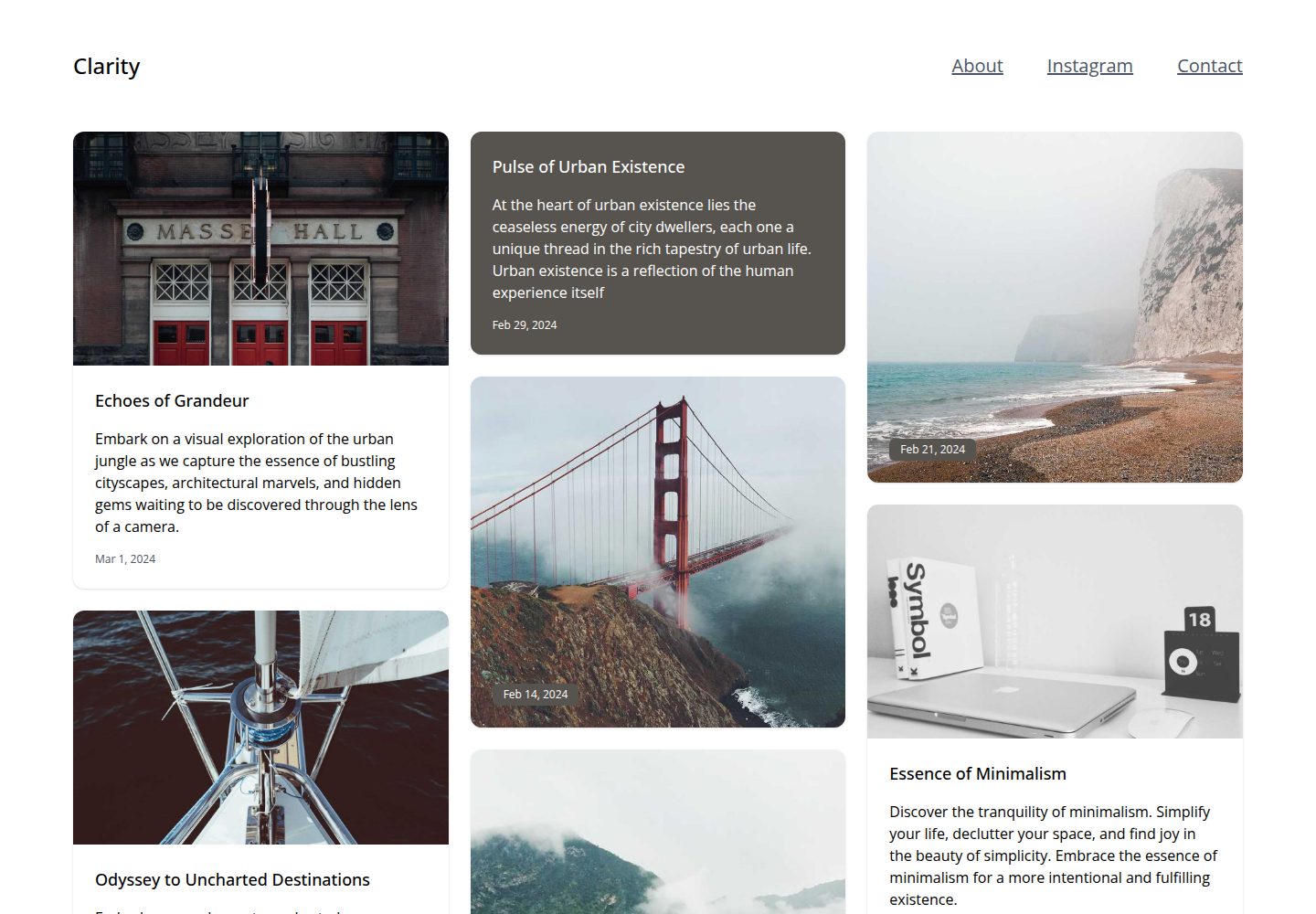
轻量版瀑布流(Masonry)文章布局
Astro博客
clarity — Astro 博客模板
作者 nice
Clarity 是一个基于 Astro 的极简博客主题,采用瀑布流卡片布局,支持 Markdown 与 MDX 内容,并提供 RSS、站点地图和可自定义主题色。
看看你的网站会是什么样
浏览真实页面截图,比较内容排版与手机效果。点击下方缩略图切换,放大查看整页细节。
全部页面与视图 3
截图用于了解视觉与布局,交互效果请以实际项目为准。
采集于 2026-10-03查看来源
值得关注的模板亮点
从已有项目资料中,快速了解它的特点。
卡片支持默认、纯文字、纯图片三种类型,以及小、中、大三种尺寸
可在 src/consts.ts 中自定义强调色、菜单项与每页文章数
支持 Markdown 与 MDX 内容写作
内置 RSS Feed 与 Sitemap 支持
图片淡入动画并提供 noscript 回退
模板详细介绍
Clarity 是发布在 GitHub 上的 Astro 博客主题,仓库描述为「Minimal blog theme for Astro!」,采用 MIT 许可。它面向以文章列表为核心的博客站点,首页使用轻量版瀑布流(Masonry)布局展示文章卡片,卡片提供默认、纯文字、纯图片三种类型,以及小、中、大三种尺寸,可在配置中调整。主题支持 Markdown 与 MDX 写作,内置 RSS Feed 与 Sitemap 支持,并可通过配置切换强调色、菜单项和每页文章数。图片带有淡入动画,并提供 noscript 回退。视图过渡(View Transitions)默认未启用,README 给出了在 Layout.astro 中引入 ViewTransitions、添加标签与 transition:animate 属性并注册主题脚本的具体步骤。
使用方式为克隆仓库后执行 npm install 安装依赖,npm run dev 启动开发服务器,npm run build 构建生产版本。主题配置集中在 src/consts.ts,README 特别提醒需修改默认邮箱、站点标题与描述。仓库资料未说明内容管理后台、评论系统、多语言或部署平台绑定等能力,这些方面需自行确认。演示站点为 clarity-astro-theme.netlify.app,可查看桌面端首页、手机端首页与内页的实际效果。
Astro博客
适合你的项目吗?
适用场景
- 搭建以文章卡片列表为主的个人博客
- 用 Markdown 或 MDX 维护内容并需要 RSS 订阅的站点
- 希望调整主题色与菜单结构以匹配自身品牌的博客
- 需要按步骤启用 Astro 视图过渡效果的站点
适合人群
- 使用 Astro 并希望快速起步的博客作者
- 偏好极简、卡片式文章列表排版的站点
- 需要 RSS 与 Sitemap 输出的内容站点
- 愿意直接修改 src/consts.ts 完成配置的开发者
上手与定制指南
结合仓库当前版本的说明,按下面的资料检查内容、配置与运行要求。
- 1
克隆仓库后依次执行 npm install 安装依赖、npm run dev 启动开发服务器、npm run build 构建生产版本。
- 2
主题配置位于 src/consts.ts,README 提醒务必更新默认邮箱、站点标题与描述。
- 3
强调色、菜单项和每页文章数同样在 src/consts.ts 中修改。
- 4
视图过渡需手动启用:在 src/layouts/Layout.astro 中引入 ViewTransitions、在 head 内添加该标签、为 html 标签加上 transition:animate 属性,并在 html 结束前注册 initGrid、initAppear、initMenu 三个 astro:after-swap 事件监听。
- 5
代码采用 MIT 许可,可免费使用、修改、商用和分发,但分发时需保留版权与许可声明;演示图片、字体、图标等第三方素材需按各自许可单独核对。
授权与来源资料
使用条件与限制
免费使用 · 保留许可声明本次收录的是公开仓库中采用 MIT 许可的免费版本;免费范围为该版本代码,不代表外部服务或第三方素材免费。
使用时需要遵守
- 允许免费使用、修改、商用和分发该版本代码。
- 分发代码副本或实质性部分时,保留原作者版权声明和完整 MIT 许可声明。
- 代码按现状提供;担保与责任限制以原许可证及适用法律为准。
额外费用与待核对事项
- 演示图片、字体、图标及其他第三方素材需按各自许可核对,不能仅凭代码的 MIT 许可判断。
- 域名、托管、数据库、支付或 AI 等外部服务可能另外收费。
查看原文依据
https://github.com/nice/clarity/blob/master/LICENSEhttps://github.com/nice/clarity/blob/master/README.mdPermission is hereby granted, free of charge
许可证原文
DeepSeek 根据仓库许可证和 README 整理 ·2026-10-03。结果仅覆盖已读取资料,依赖、图片、字体及后续条款变更以各自原文为准。
项目核对记录与介绍依据
模板资料
- 来源平台
- GitHub
- 资料与维护参考分
- 资料一般 · 69 / 100
- 技术栈
- Astro
- 网站类型
- 博客
这个分数如何计算
本站按许可资料(最高30分)、演示链接(12分)、预览图(10分)、Star数(15分)、记录的维护时间(15分)、描述完整度(8分)、功能记录(5分)和分类资料(5分)计算。它不是代码、安全或性能测试,也不是 Google 评分;有链接不代表已实测可用。
这个项目需要核对什么
- 记录的仓库更新时间
- 2025-01-22
- 截图检查日期
- 2026-10-03
已收录演示链接。请用你的内容与屏幕尺寸检查;有演示不代表表单、认证或支付已经可用。
目录记录的主要技术栈是 Astro。请通过依赖清单和锁文件核对实际版本与托管要求。这些说明基于收录资料,不代表代码审计或部署实测。
查看具体选型方法 →介绍的制作与核对状态
介绍由 AI 辅助整理目录与仓库资料。仓库作者不等于这篇介绍的审核者。
已完成服务器许可规则与 AI 来源核对;未经过人工编辑审核。
查看当时使用的来源资料
SHA-256: 7f7401767898c6d890afe5f31b9b110b27e134fcc096ee7cfe737edb58b3ed27
2026-10-03T00:47:21.108Z
来源文件 / 仓库# Clarity: Minimal blog theme for Astro! Demo: https://clarity-astro-theme.netlify.app/  # Features - ✅ Masonry layout (lightweight version) - ✅ 3 card types (default, text only, image only) - ✅ 3 card sizes (small, medium, large) - ✅ Customizable accent colors (see configuration) - ✅ Image fade in animation (with. noscript fallback) - ✅ Good Lighthouse performance - ✅ SEO-friendly - ✅ Sitemap support - ✅ RSS Feed support - ✅ Markdown & MDX support - ✅ View transitions support (see configuration) Lighthouse performance  # Usage ### 1. Clone this repo. ``` git clone [email protected]:nice/clarity.git ``` ### 2. Switch to the cloned folder ``` cd clarity/ ``` ### 3. Install dependencies ``` npm install ``` ### 4. Starting development server ``` npm run dev ``` ## Building for production ``` npm run build ``` ## Configuration Theme configuration can be found inside `src/consts.ts` **!!! Important !!!** Please make sure to update the default email ids, site title and descriptions. You can also change the theme accent colors, menu items and posts per page from the `src/consts.ts` file. ### View transitions Enable view transitions for Clarity theme with the below few steps 1. Import `ViewTransitions` in `src/layouts/Layout.astro` ``` --- import { ViewTransitions } from 'astro:transitions'; --- ``` 2. Add the `<ViewTransitions />` tag inside `<head>` of the same file ``` <head> <ViewTransitions /> </head> ``` 3. Add `transition:animate` attribute to opening `<html>` tag in the same file. ``` <html transition:animate="fade"> </html> ``` 4. Add the below Clarity theme specific script just before the closing `</html>` tag in the same file. ``` <!-- other scripts --> <script> document.addEventListener("astro:after-swap", initGrid); document.addEventListener("astro:after-swap", initAppear); document.addEventListener("astro:after-swap", initMenu); </script> ```
看看同类模板
对比同技术栈与用途的模板,找到更适合的视觉与内容结构。

astrowind
⭕️ AstroWind: A free template using Astro v7 and Tailwind CSS v4. Astro starter theme.
Astro · 博客

astro-paper
A minimal, accessible and SEO-friendly Astro blog theme.
Astro · 博客

fuwari
✨A static blog template built with Astro.
Astro · 博客

Firefly
Firefly 是一款基于 Astro 的静态博客主题,由 CuteLeaf 在 saicaca 的 Fuwari 模板基础上二次开发,主打清新美观的视觉风格。
Astro · 博客

astro-theme-cactus
A simple Astro theme. Use it to create your blog or website.
Astro · 作品集

astrofy
Astrofy is a free and open-source template for your Personal Portfolio Website built with Astro and TailwindCS…
Astro · 作品集