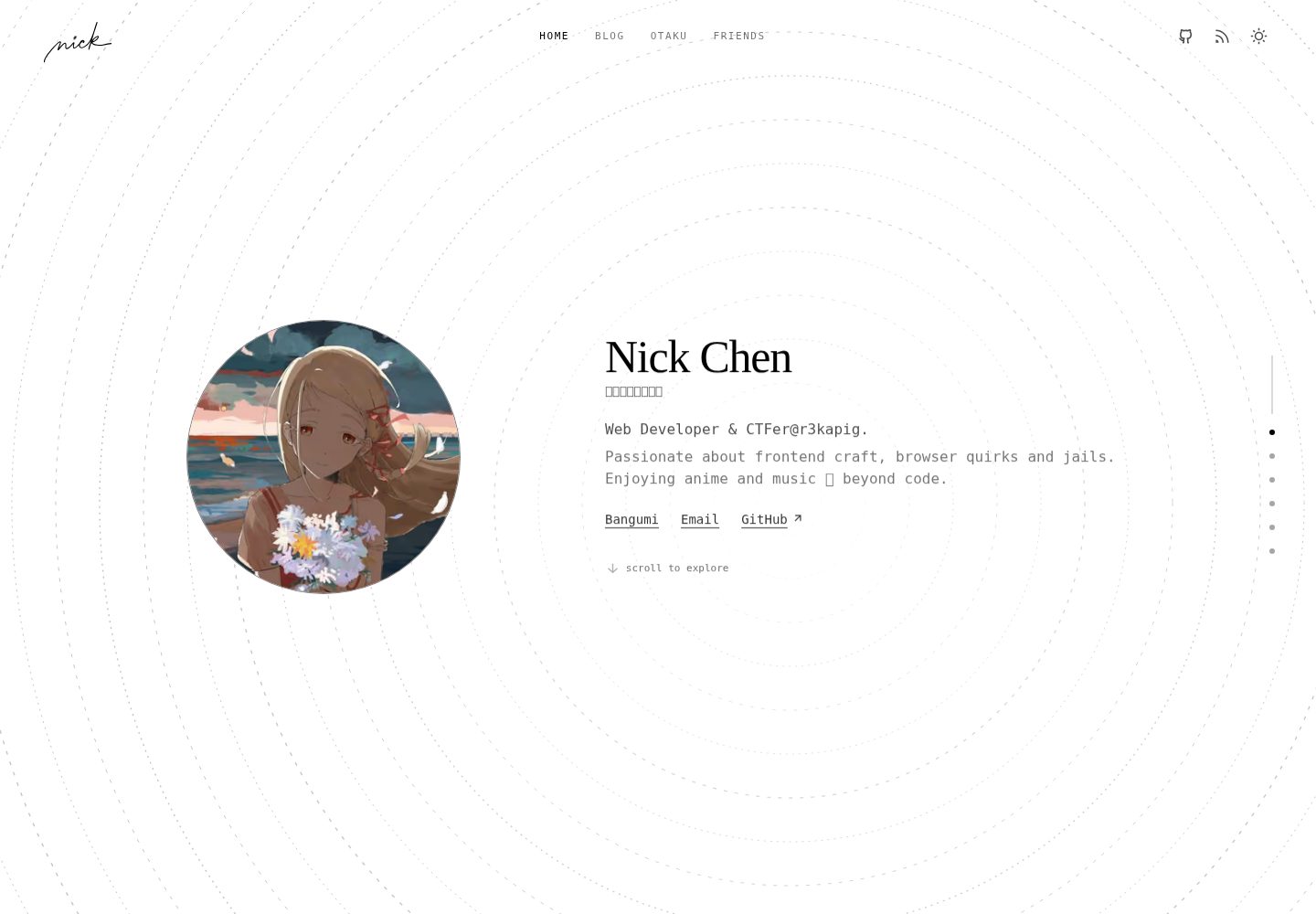
基于 Astro 构建的博客模板,内容以 Markdown / MDX 存放于 src/content/blog
Astro博客
astro-theme-hiro — Astro 博客模板
作者 nick-cjyx9
Hiro 是一个基于 Astro 的极简博客模板,内置 Decap CMS、Pagefind 搜索,并提供 Cloudflare Workers + D1 后端以支持点赞与评论。
看看你的网站会是什么样
浏览真实页面截图,比较内容排版与手机效果。点击下方缩略图切换,放大查看整页细节。
全部页面与视图 2
截图用于了解视觉与布局,交互效果请以实际项目为准。
采集于 2026-10-02查看来源
值得关注的模板亮点
从已有项目资料中,快速了解它的特点。
内置 Decap CMS 后台,可在浏览器中编辑博客文章
集成 Pagefind 提供站内搜索
通过 Cloudflare Workers + D1 实现点赞与评论,并提供好友链接与评论的邮件通知
集中式配置:src/consts.ts 管理站点信息、首页文案与功能开关
提供 pnpm build:static 生成纯静态输出,以及 D1 数据同步命令
模板详细介绍
Hiro 是一个面向个人博客的 Astro 模板,代码采用 MIT 许可发布。模板将站点身份、首页文案和功能开关集中在 src/consts.ts,内容分别放在 src/content/blog、src/content/project 和 src/content/friend 三个目录,支持 Markdown 与 MDX。
模板自带 Decap CMS 后台用于编辑文章,并集成 Pagefind 提供站内搜索。点赞与评论依赖 Cloudflare Workers 和 D1 数据库,可选的邮件通知使用 Resend,反垃圾验证使用 Cloudflare Turnstile,Decap CMS 的 GitHub 登录需要配置 OAuth 应用。这些外部服务需要自行申请账号和密钥,模板本身不提供这些服务。
使用前需要准备 Node.js 20+ 与 pnpm 10+,复制 .env.example 和 .dev.vars.example 后启动开发服务器。部署到 Cloudflare Workers 时需创建 D1 数据库、推送 Drizzle schema,并通过 wrangler secret 配置 JWT、Turnstile、Resend 和 GitHub OAuth 等运行时密钥。仓库当前星标数较少,演示图片、字体、图标等第三方素材的许可需单独核对。
Astro博客
适合你的项目吗?
适用场景
- 搭建个人技术博客并希望使用 Astro 与 Markdown / MDX 写作
- 需要可视化后台编辑文章,而不想直接修改仓库文件
- 希望点赞、评论等交互数据由 Cloudflare Workers + D1 承载
- 需要站内搜索、RSS 和 sitemap 等基础博客功能
- 想展示项目作品集或维护友情链接列表
适合人群
- 熟悉 Astro 或愿意按文档配置 Cloudflare 服务的开发者
- 使用 Cloudflare 部署个人站点并接受 D1 数据库依赖的用户
- 偏好极简博客布局、以文字内容为主的自媒体作者
- 需要中文文档参考的开发者(仓库提供 README.zh-CN.md)
上手与定制指南
结合仓库当前版本的说明,按下面的资料检查内容、配置与运行要求。
- 1
本地开发需要 Node.js 20+ 与 pnpm 10+,安装依赖后复制 .env.example 和 .dev.vars.example 再运行 pnpm dev
- 2
部署到 Cloudflare Workers 前需创建 D1 数据库,并把 database_name、database_id 同步到 wrangler.jsonc 与 .env
- 3
JWT_KEY、CF_CAPTCHA_SECRETKEY、RESEND_API_KEY 和 GitHub OAuth 凭据等运行时密钥需通过 wrangler secret 配置,且仅在启用对应功能时才需要
- 4
pnpm build 会额外执行 D1 内容同步脚本,纯静态输出可使用 pnpm build:static
- 5
演示图片、字体、图标等第三方素材的许可需单独核对,不能仅依据代码的 MIT 许可判断
授权与来源资料
使用条件与限制
免费使用 · 保留许可声明本次收录的是公开仓库中采用 MIT 许可的免费版本;免费范围为该版本代码,不代表外部服务或第三方素材免费。
使用时需要遵守
- 允许免费使用、修改、商用和分发该版本代码。
- 分发代码副本或实质性部分时,保留原作者版权声明和完整 MIT 许可声明。
- 代码按现状提供;担保与责任限制以原许可证及适用法律为准。
额外费用与待核对事项
- 点赞与评论功能依赖 Cloudflare Workers 与 D1 数据库,需自行注册 Cloudflare 账号并创建 D1 数据库,模板本身不提供该后端服务。
- 邮件通知功能依赖第三方服务 Resend,需自行申请 Resend 账号并配置 RESEND_API_KEY 等密钥,模板不提供邮件发送服务。
- 反垃圾验证使用 Cloudflare Turnstile,需自行在 Cloudflare 后台申请站点密钥并配置 CF_CAPTCHA_SECRETKEY。
- Decap CMS 后台登录依赖 GitHub OAuth 应用,需自行在 GitHub 创建 OAuth App 并配置 GITHUB_CLIENT_ID 与 GITHUB_CLIENT_SECRET。
- 部署与数据库同步需要具备 D1 Edit 权限的 Cloudflare API Token,需自行在 Cloudflare 账户中创建。
- 部署流程要求通过 Wrangler CLI 登录 Cloudflare 账号,属于外部服务账号依赖。
- 演示图片、字体、图标及其他第三方素材需按各自许可核对,不能仅凭代码的 MIT 许可判断。
- 域名、托管、数据库、支付或 AI 等外部服务可能另外收费。
查看原文依据
Permission is hereby granted, free of charge
许可证原文
D1 + Workers-powered backend enabling likes and comments at zero cost.
README 原文
Automatic email notifications for new friend-link requests and comments.
README 原文
Optional: For Cloudflare Turnstile (Anti-spam) - Get it from https://dash.cloudflare.com/?to=/:account/turnstile
README 原文
Optional: For Decap CMS GitHub OAuth - Get it from https://github.com/settings/developers (OAuth Apps)
README 原文
APP_CF_API_TOKEN`: Cloudflare API Token with **D1 Edit** permissions.
README 原文
https://github.com/nick-cjyx9/astro-theme-hiro/blob/master/LICENSEhttps://github.com/nick-cjyx9/astro-theme-hiro/blob/master/README.mdAuthenticate the Wrangler CLI locally:
README 原文
DeepSeek 根据仓库许可证和 README 整理 ·2026-10-02。结果仅覆盖已读取资料,依赖、图片、字体及后续条款变更以各自原文为准。
项目核对记录与介绍依据
模板资料
- 来源平台
- GitHub
- 资料与维护参考分
- 资料较完整 · 83 / 100
- 技术栈
- Astro
- 网站类型
- 博客
这个分数如何计算
本站按许可资料(最高30分)、演示链接(12分)、预览图(10分)、Star数(15分)、记录的维护时间(15分)、描述完整度(8分)、功能记录(5分)和分类资料(5分)计算。它不是代码、安全或性能测试,也不是 Google 评分;有链接不代表已实测可用。
这个项目需要核对什么
- 记录的仓库更新时间
- 2026-04-02
- 截图检查日期
- 2026-10-02
已收录演示链接。请用你的内容与屏幕尺寸检查;有演示不代表表单、认证或支付已经可用。
目录记录的主要技术栈是 Astro。请通过依赖清单和锁文件核对实际版本与托管要求。这些说明基于收录资料,不代表代码审计或部署实测。
查看具体选型方法 →介绍的制作与核对状态
介绍由 AI 辅助整理目录与仓库资料。仓库作者不等于这篇介绍的审核者。
已完成服务器许可规则与 AI 来源核对;未经过人工编辑审核。
查看当时使用的来源资料
SHA-256: 1bdc9043cc910e4411398966e78e8398b5101e88c70bf4d6214a015d569b1514
2026-10-02T21:01:30.326Z
来源文件 / 仓库[中文文档](./README.zh-CN.md)
# Astro Theme Hiro
<p align="center">
<img alt="Astro" src="https://img.shields.io/badge/Astro-FF5D01?style=for-the-badge&logo=astro&logoColor=white">
<img alt="Cloudflare" src="https://img.shields.io/badge/Cloudflare-F38020?style=for-the-badge&logo=Cloudflare&logoColor=white">
<img alt="TypeScript" src="https://img.shields.io/badge/TypeScript-3178C6?style=for-the-badge&logo=typescript&logoColor=white">
<img alt="Tailwind CSS" src="https://img.shields.io/badge/Tailwind_CSS-38B2AC?style=for-the-badge&logo=tailwind-css&logoColor=white">
</p>
Hiro is a minimalist yet powerful Astro blog template.
## Preview
<table>
<tr>
<td align="center">
<img src="./.github/readme/index-light.png" alt="Home light mode" /><br />
Home (Light)
</td>
<td align="center">
<img src="./.github/readme/index-dark.png" alt="Home dark mode" /><br />
Home (Dark)
</td>
</tr>
<tr>
<td align="center">
<img src="./.github/readme/post-content.png" alt="Post content page" /><br />
Post Content
</td>
<td align="center">
<img src="./.github/readme/decap-cms.png" alt="Decap CMS admin" /><br />
Decap CMS
</td>
</tr>
</table>
## Key Features
- Automatic email notifications for new friend-link requests and comments.
- D1 + Workers-powered backend enabling likes and comments at zero cost.
- Built-in Decap CMS for easier blog post editing.
- Pagefind integration for fast on-site search.
## Project Structure (Template User Perspective)
### Configuration Files
- `src/consts.ts`: Core site identity, homepage copy, and feature flags (`ENABLE_*`).
- `astro.config.ts`: Astro integrations, output mode, and markdown/search/sitemap settings.
- `wrangler.jsonc`: Cloudflare Worker configuration and D1 database bindings.
- `.env`: Build-time variables and API credentials (site URL, repo info, D1 config).
- `.dev.vars`: Runtime secrets for local Worker preview.
- `src/content.config.ts`: Content collection schemas and loader rules.
### Content Directory
- `src/content/blog/`: Your blog posts (`.md` / `.mdx`).
- `src/content/project/`: Portfolio and project showcase entries.
- `src/content/friend/`: Friend links and blogroll entries.
## Local Development Guide
### Prerequisites
- Node.js 20+
- pnpm 10+
### Quick Start
```bash
# Install dependencies
pnpm install
# Prepare environment variable files
cp .env.example .env
cp .dev.vars.example .dev.vars
# Start the development server
pnpm dev
```
After startup, visit `http://localhost:4321` in your browser.
## Deployment Tutorial (Cloudflare Worker + D1)
### 1) Prepare Your Cloudflare Account
1. Sign up or log in to your [Cloudflare Dashboard](https://dash.cloudflare.com/).
2. Authenticate the Wrangler CLI locally:
```bash
pnpm wrangler login
```
### 2) Configure Environment Variables
```bash
cp .env.example .env
cp .dev.vars.example .dev.vars
```
Update `.env` with your specific details before deploying:
- `SITE_URL`: Your final production URL.
- `GITHUB_REPO` / `REPO_BRANCH`: Your GitHub repository format (`username/repo`) and branch name.
- `CLOUDFLARE_ACCOUNT_ID`: Your Cloudflare Account ID (found on the right sidebar of the Cloudflare dashboard).
- `APP_CF_ACCOUNT_ID`: Same as above.
- `APP_CF_API_TOKEN`: Cloudflare API Token with **D1 Edit** permissions. [Create one here](https://dash.cloudflare.com/profile/api-tokens).
- `NODE_ENV=production`: Required for pushing schema to the remote D1 database.
### 3) Create and Bind the D1 Database
Create a new D1 database:
```bash
pnpm wrangler d1 create astro-blog-template
```
Update your `wrangler.jsonc` with the output provided by the command:
- Update `d1_databases[0].database_name` and `database_id`.
- Update `name` if you want a different Worker name.
**Important:** Also set `APP_CF_D1_DATABASE_ID` in your `.env` file to the same database ID.
### 4) Initialize the Database Schema
Push the Drizzle schema to your remote D1 database:
```bash
pnpm db:push
```
### 5) Configure Production Secrets
Depending on the features enabled in `src/consts.ts`, securely store your runtime secrets in Cloudflare using Wrangler:
```bash
# Optional: For JWT Authentication (Generate using `openssl rand -hex 32` or any random strong string)
pnpm wrangler secret put JWT_KEY
# Optional: For Cloudflare Turnstile (Anti-spam) - Get it from https://dash.cloudflare.com/?to=/:account/turnstile
pnpm wrangler secret put CF_CAPTCHA_SECRETKEY
# Optional: For Email Notifications via Resend - Get it from https://resend.com/api-keys
pnpm wrangler secret put RESEND_API_KEY
pnpm wrangler secret put RESEND_EMAIL_FROM
pnpm wrangler secret put RESEND_EMAIL_TO
# Optional: For Decap CMS GitHub OAuth - Get it from https://github.com/settings/developers (OAuth Apps)
pnpm wrangler secret put GITHUB_CLIENT_ID
pnpm wrangler secret put GITHUB_CLIENT_SECRET
```
### 6) Build and Deploy
```bash
# Generate the Astro production build
pnpm build
# Deploy to Cloudflare Workers
pnpm wrangler deploy
```
> **Note**: `pnpm build` not only generates Astro output, but also runs a D1 content sync script.
### 7) Post-Deployment Verification
1. Visit your deployed Worker URL to ensure the homepage and articles load correctly.
2. Verify system routes: `/rss.xml`, `/sitemap-index.xml`, and `/search`.
3. If enabled, test the comment system, friend link submissions, email notifications, and the CMS admin panel (`/admin`).
## Common Commands
```bash
pnpm dev # Start local development server
pnpm build # Generate production build (with wrangler types)
pnpm build:static # Generate static-only output
pnpm preview # Local Cloudflare-style preview
pnpm code:check # Run Astro check + Biome lint/format
pnpm db:push # Push database schema changes via Drizzle
pnpm sync # Sync remote D1 data to local SQLite database
```
## Documentation & Policies
- Contribution Guide: [`CONTRIBUTION.md`](./CONTRIBUTION.md)
- Contribution Guide (Chinese): [`CONTRIBUTION.zh-CN.md`](./CONTRIBUTION.zh-CN.md)
- Security Policy: [`SECURITY.md`](./SECURITY.md)
## License
This project is licensed under the terms described in the `LICENSE` file.
看看同类模板
对比同技术栈与用途的模板,找到更适合的视觉与内容结构。

astrowind
⭕️ AstroWind: A free template using Astro v7 and Tailwind CSS v4. Astro starter theme.
Astro · 博客

astro-paper
A minimal, accessible and SEO-friendly Astro blog theme.
Astro · 博客

fuwari
✨A static blog template built with Astro.
Astro · 博客

Firefly
Firefly 是一款基于 Astro 的静态博客主题,由 CuteLeaf 在 saicaca 的 Fuwari 模板基础上二次开发,主打清新美观的视觉风格。
Astro · 博客

astro-theme-cactus
A simple Astro theme. Use it to create your blog or website.
Astro · 作品集

astrofy
Astrofy is a free and open-source template for your Personal Portfolio Website built with Astro and TailwindCS…
Astro · 作品集