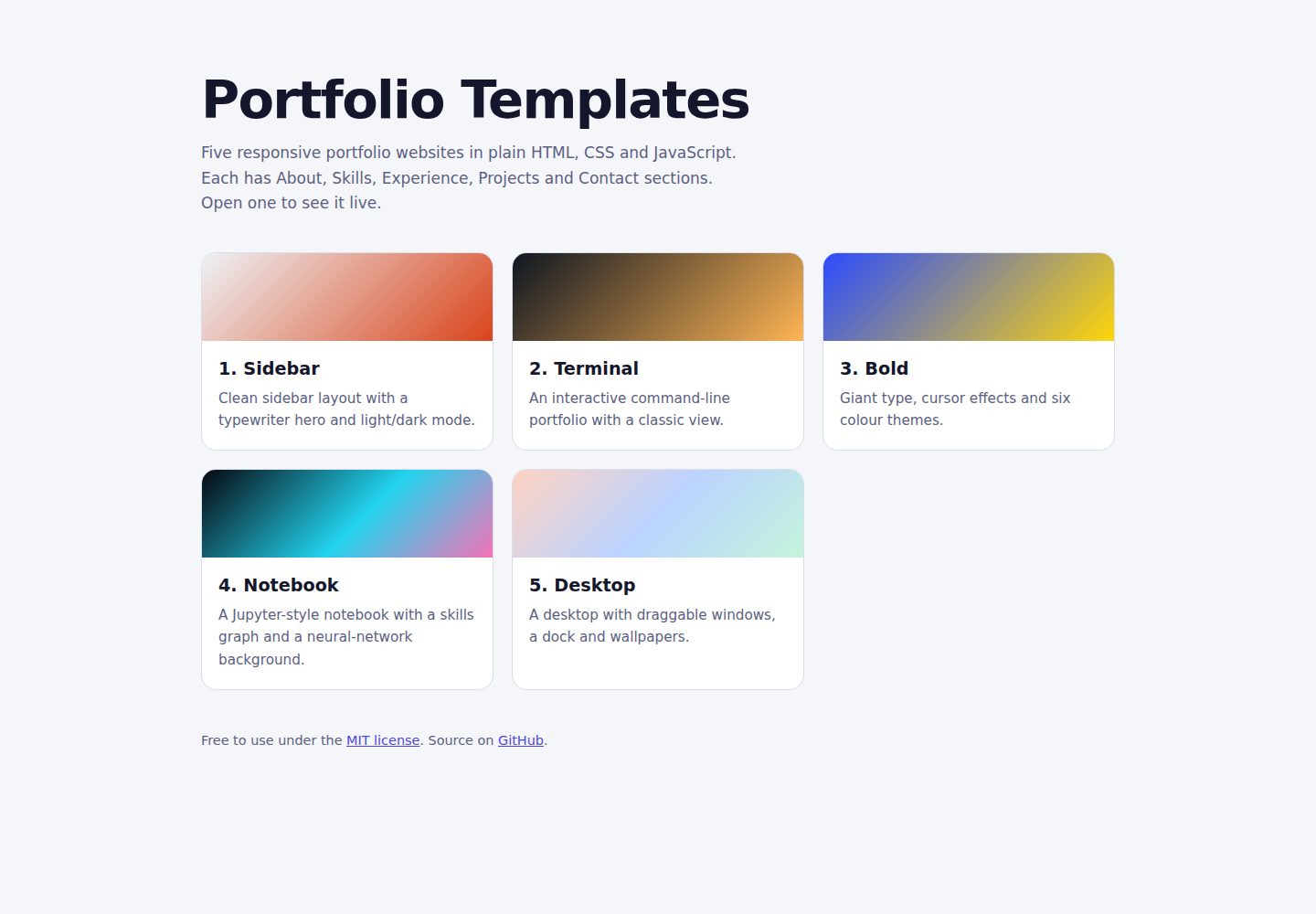
五个风格各异的作品集模板,均使用原生 HTML、CSS 和 JavaScript,无框架、无构建工具
HTML作品集
portfolio-templates — HTML 作品集模板
作者 Omkar210404
五个用纯 HTML、CSS 和 JavaScript 编写的免费响应式作品集模板,无需构建步骤或框架,编辑一个数据块即可使用。
看看你的网站会是什么样
浏览真实页面截图,比较内容排版与手机效果。点击下方缩略图切换,放大查看整页细节。
全部页面与视图 3
截图用于了解视觉与布局,交互效果请以实际项目为准。
采集于 2026-10-09查看来源
值得关注的模板亮点
从已有项目资料中,快速了解它的特点。
每个模板都包含 About、Skills、Experience、Projects、Contact 五个部分
模板 2 至 5 的内容集中在一个 DATA 对象中,编辑文本无需改动 HTML 或 CSS
模板 1 支持明暗模式并记住访客选择,模板 3 提供六套配色主题
模板 4 和 5 的技能计数与关系图根据项目 tags 自动计算
提供 GitHub Pages 免费部署步骤,并尊重 prefers-reduced-motion 设置
模板详细介绍
这个仓库提供五个作品集网站模板,全部使用原生 HTML、CSS 和 JavaScript,没有构建步骤、框架或依赖。每个模板都包含 About、Skills、Experience、Projects、Contact 五个部分,但外观和交互方式差异明显:Sidebar 采用固定侧边栏与打字机式首屏,支持明暗模式;Terminal 以命令行方式呈现,访客输入 help、about、skills 等命令查看内容;Bold 使用超大字号和六套配色主题;Notebook 模仿 Jupyter 笔记本,每个部分以代码单元形式在加载时“运行”;Desktop 模拟操作系统桌面,窗口可拖动、最小化和最大化。
自定义方式因模板而异:模板 2 至 5 的内容集中在 script.js 顶部的 DATA 对象中,模板 1 需要直接编辑 index.html。模板 3 和 5 的主题与壁纸分别由 script.js 中的 THEMES 和 WALLS 列表控制,模板 1 使用 style.css 顶部的 CSS 变量。模板 4 和 5 的技能计数与关系图根据项目 tags 计算,标签名需与技能名一致。
联系表单使用 Web3Forms,需要自行申请访问密钥并替换占位符;模板 2 没有表单,只提供邮箱和链接。模板可通过 GitHub Pages 免费部署。已知限制包括:光标效果仅在桌面端生效,触屏设备上关闭;模板 4 的“Python 内核”和 CSV 文件只是视觉主题,并不真正运行 Python;模板 3、4、5 的项目封面为生成图,不是真实截图;模板未经过正式的无障碍审计或全浏览器、全设备测试。仓库采用 MIT 许可,可免费使用、修改和分享,但演示图片、字体、图标等第三方素材需单独核对许可。
HTML作品集
适合你的项目吗?
适用场景
- 个人开发者或设计师需要一个无需构建步骤的静态作品集网站
- 想用命令行、笔记本或桌面操作系统等不同交互形式展示个人信息与项目
- 在 GitHub Pages 上免费托管一个多模板演示站点,或复制其中一个模板作为个人主页
- 作为学习原生 HTML、CSS 和 JavaScript 交互实现的参考项目
适合人群
- 希望快速搭建静态作品集、不想引入框架或构建工具的前端开发者
- 需要多个视觉风格备选、并愿意自行替换占位内容与截图的个人用户
- 对命令行、Jupyter 笔记本或桌面操作系统式交互感兴趣的展示型项目
上手与定制指南
结合仓库当前版本的说明,按下面的资料检查内容、配置与运行要求。
- 1
克隆仓库后直接用浏览器打开任意模板的 index.html,或用 python -m http.server 8000 在本地提供服务
- 2
模板 2 至 5 编辑 script.js 顶部的 DATA 对象;模板 1 直接编辑 index.html,打字机短语在 script.js 的 words 列表中
- 3
联系表单使用 Web3Forms,需在 web3forms.com 获取访问密钥并替换 YOUR_ACCESS_KEY;模板 2 没有表单
- 4
模板 4 和 5 的技能计数与关系图依赖项目 tags,标签名需与技能名一致(不区分大小写),否则计数为零
- 5
部署到 GitHub Pages 时,在仓库 Settings → Pages 中选择 Deploy from a branch、main 分支和 / (root) 目录
授权与来源资料
使用条件与限制
免费使用 · 保留许可声明本次收录的是公开仓库中采用 MIT 许可的免费版本;免费范围为该版本代码,不代表外部服务或第三方素材免费。
使用时需要遵守
- 允许免费使用、修改、商用和分发该版本代码。
- 分发代码副本或实质性部分时,保留原作者版权声明和完整 MIT 许可声明。
- 代码按现状提供;担保与责任限制以原许可证及适用法律为准。
额外费用与待核对事项
- 演示图片、字体、图标及其他第三方素材需按各自许可核对,不能仅凭代码的 MIT 许可判断。
- 域名、托管、数据库、支付或 AI 等外部服务可能另外收费。
- 联系表单依赖第三方服务 Web3Forms,需在 web3forms.com 注册并获取访问密钥,替换代码中的 YOUR_ACCESS_KEY 占位符后才能正常接收提交。
- 使用联系表单前必须自行申请 Web3Forms 访问密钥,属于外部服务账号要求。
- 字体从 Google Fonts 在线加载,离线时回退到系统字体;如需完全离线或自托管字体需自行处理。
- 模板 3、4、5 的光标交互效果仅在桌面端可用,触屏设备上会自动关闭。
- 模板 4 的“Python 内核”和 CSV 文件仅为视觉主题,不会真正执行 Python 代码。
- 模板 3、4、5 的项目封面为生成图而非真实截图,建议替换为实际作品截图。
- 模板未经过正式无障碍审计,也未在所有浏览器和设备上测试,发布前需自行验证。
- 项目由 AI 辅助生成后经作者审阅测试,复用者应在自己的设备上测试后再发布。
查看原文依据
Permission is hereby granted, free of charge
许可证原文
The forms use [Web3Forms](https://web3forms.com), which is free and needs no server.
README 原文
Get an access key at web3forms.com.
README 原文
Google Fonts (loaded from the internet; each template falls back to a system font if offline)
README 原文
Cursor effects (Templates 3, 4 and 5) are desktop-only and switch off on touch devices.
README 原文
Template 4's "Python kernel" and the CSV files in its code cells are a visual theme only. Nothing actually runs Python.
README 原文
Project cover images in Templates 3, 4 and 5 are generated artwork, not screenshots. Replace them with real screenshots of your work if you can.
README 原文
The templates have not been through a formal accessibility audit or testing on every browser and device.
README 原文
https://github.com/Omkar210404/portfolio-templates/blob/main/LICENSEhttps://github.com/Omkar210404/portfolio-templates/blob/main/README.mdBuilt with AI assistance (Claude by Anthropic), then reviewed and tested by me. If you reuse them, please test them on your own devices before publishing.
README 原文
DeepSeek 根据仓库许可证和 README 整理 ·2026-10-09。结果仅覆盖已读取资料,依赖、图片、字体及后续条款变更以各自原文为准。
项目核对记录与介绍依据
模板资料
- 来源平台
- GitHub
- 资料与维护参考分
- 资料较完整 · 80 / 100
- 技术栈
- HTML
- 网站类型
- 作品集
这个分数如何计算
本站按许可资料(最高30分)、演示链接(12分)、预览图(10分)、Star数(15分)、记录的维护时间(15分)、描述完整度(8分)、功能记录(5分)和分类资料(5分)计算。它不是代码、安全或性能测试,也不是 Google 评分;有链接不代表已实测可用。
这个项目需要核对什么
- 记录的仓库更新时间
- 2026-10-09
- 截图检查日期
- 2026-10-09
已收录演示链接。请用你的内容与屏幕尺寸检查;有演示不代表表单、认证或支付已经可用。
目录记录的主要技术栈是 HTML。请通过依赖清单和锁文件核对实际版本与托管要求。这些说明基于收录资料,不代表代码审计或部署实测。
查看具体选型方法 →介绍的制作与核对状态
介绍由 AI 辅助整理目录与仓库资料。仓库作者不等于这篇介绍的审核者。
审核声明: [email protected] · 2026-10-09
查看当时使用的来源资料
SHA-256: 21f04cc5f31e23b784126e9135f715a9217a6430d00753d6765c74f0ddfa998b
2026-10-09T08:58:57.066Z
来源文件 / 仓库# Portfolio Templates
Five free, responsive portfolio website templates built with plain HTML, CSS and JavaScript. No build step, no framework, no dependencies. Edit one data block, open `index.html`, and you have a portfolio.
Each template has the same five sections: **About, Skills, Experience, Projects, Contact**, but a very different look and feel.
## Live demos
Replace the screenshot placeholders with your own real screenshots.
| # | Template | Style | Demo |
|---|----------|-------|------|
| 1 | [Sidebar](template-1-sidebar/) | Clean sidebar layout, light and dark mode, typewriter hero | [Open](https://omkar210404.github.io/portfolio-templates/template-1-sidebar/) |
| 2 | [Terminal](template-2-terminal/) | Interactive command-line portfolio | [Open](https://omkar210404.github.io/portfolio-templates/template-2-terminal/) |
| 3 | [Bold](template-3-bold/) | Giant type, six colour themes including a dark one | [Open](https://omkar210404.github.io/portfolio-templates/template-3-bold/) |
| 4 | [Notebook](template-4-notebook/) | Looks and behaves like a Jupyter notebook | [Open](https://omkar210404.github.io/portfolio-templates/template-4-notebook/) |
| 5 | [Desktop](template-5-desktop/) | A desktop with draggable windows and a dock | [Open](https://omkar210404.github.io/portfolio-templates/template-5-desktop/) |
<!-- Add real screenshots here, for example:  -->
## What each template does
1. **Sidebar:** fixed sidebar with navigation, a typewriter hero over a generated dot-grid background, a timeline, project cards, and light/dark mode that remembers the visitor's choice.
2. **Terminal:** visitors type commands (`help`, `about`, `skills`, `projects`, `experience`, `contact`). It has Tab completion, command history, four colour themes, quick-command buttons for phones, and a plain "Classic view" for people who just want to read.
3. **Bold:** an oversized name whose letters react to the cursor on desktop, a skills marquee, project rows with a floating preview, and six full colour themes the visitor can switch between.
4. **Notebook:** each section is a code cell that "runs" on load. Skills show as a graph linking each skill to the projects that use it, projects are cards with generated cover art, and a neural-network background reacts to the cursor.
5. **Desktop:** an operating-system style page. Open About, Skills, Experience, Projects and Contact from the dock or menu bar, drag, minimise and maximise windows, and pick one of four wallpapers.
## Quick start
```bash
git clone https://github.com/Omkar210404/portfolio-templates.git
cd portfolio-templates
```
Open any template's `index.html` in a browser. To serve it locally instead:
```bash
python -m http.server 8000
# then visit http://localhost:8000/template-3-bold/
```
## Customise a template
- **Templates 2 to 5:** all content lives in one `DATA` object at the top of `script.js` (name, about, skills, experience, projects, contact). Edit the text there. You do not need to touch the HTML or CSS.
- **Template 1:** edit the text directly in `index.html`. The typewriter phrases are the `words` list near the top of `script.js`.
- **Colours and themes:** Template 3 has a `THEMES` list and Template 5 has a `WALLS` list in `script.js`. Template 1 uses CSS variables at the top of `style.css`.
- **Placeholder text:** every template ships with neutral placeholder content ("Your Name", "Project One", `[email protected]`). Replace all of it with your own real details, and only list real experience and projects.
### Skill counts and graphs
In Templates 4 and 5, the numbers and graph links on skills are calculated from your projects' `tags`. Keep tag names the same as your skill names (case does not matter), or the counts will show zero.
## Contact form
The forms use [Web3Forms](https://web3forms.com), which is free and needs no server.
1. Get an access key at web3forms.com.
2. Replace `YOUR_ACCESS_KEY`: in `index.html` for Templates 1 and 3, and in `script.js` (`contact.accessKey`) for Templates 4 and 5. Template 2 has no form, only email and links.
Never commit a key you want to keep private. A Web3Forms key is designed to be used in public pages, but you can restrict it to your domain in their dashboard.
## Deploy for free with GitHub Pages
1. Push this repo to GitHub.
2. Go to **Settings → Pages**.
3. Under **Build and deployment**, choose **Deploy from a branch**, select `main` and `/ (root)`, and save.
4. Your templates will be live at `https://<your-username>.github.io/portfolio-templates/template-1-sidebar/` and so on.
To use one as your own portfolio, copy that template's three files into a repo named `<your-username>.github.io`.
## Tech
- HTML, CSS and vanilla JavaScript only
- Google Fonts (loaded from the internet; each template falls back to a system font if offline)
- No frameworks, no build tools, no tracking
- Respects the `prefers-reduced-motion` setting, uses visible keyboard focus styles, and adapts to phones and tablets
## Known limitations
- Cursor effects (Templates 3, 4 and 5) are desktop-only and switch off on touch devices.
- Template 4's "Python kernel" and the CSV files in its code cells are a visual theme only. Nothing actually runs Python.
- Project cover images in Templates 3, 4 and 5 are generated artwork, not screenshots. Replace them with real screenshots of your work if you can.
- The templates have not been through a formal accessibility audit or testing on every browser and device.
## How these were made
Built with AI assistance (Claude by Anthropic), then reviewed and tested by me. If you reuse them, please test them on your own devices before publishing.
## License
[MIT](LICENSE) © 2026 Omkar Satish Nikam. Free to use, modify and share, including for your own portfolio.
看看同类模板
对比同技术栈与用途的模板,找到更适合的视觉与内容结构。

simplefolio
⚡️ A minimal portfolio template for Developers
HTML · 作品集

Freelancer
Freelancer 是 Start Bootstrap 出品的单页作品集模板,专为自由职业者、设计师和小型工作室设计。 页面结构清晰,包含多个内容区块、响应式作品集网格,每个作品项目配有模态窗口展示详情。
HTML · 作品集

Resume
Resume 是 Start Bootstrap 推出的简历与 CV 主题,基于 Bootstrap 构建,采用固定侧边栏加内容区块的结构。
HTML · 作品集

Creative
Creative 是 Start Bootstrap 团队维护的一款单页营销模板,定位明确:为创意机构或产品服务提供一个以作品展示和行动号召为核心的落地页。
HTML · 企业官网

Grayscale
Grayscale 是 Start Bootstrap 出品的深色系单页 HTML 模板,基于 Bootstrap 构建。 它的视觉重心放在大尺寸首屏和清晰的内容分区上,整体氛围偏暗,适合摄影、活动或品牌叙事类网站。
HTML · 企业官网

startbootstrap-stylish-portfolio
Stylish Portfolio 是 Start Bootstrap 维护的单页作品集主题,基于 Bootstrap 构建,采用多个内容区块加离屏导航菜单的结构。
HTML · 作品集