内容由 app/config 下的 index.ts、projects.ts、skills.ts、socials.tsx 配置文件驱动,便于替换个人信息、项目、技能与社交链接
Next.jsReact作品集
portfolio (PraveenGongada) — Next.js 作品集模板
作者 PraveenGongada
基于 Next.js 与 TypeScript 的个人作品集模板,内容通过 app/config 下的配置文件驱动,包含首页、关于、项目、技能与社交连接等区块。
看看你的网站会是什么样
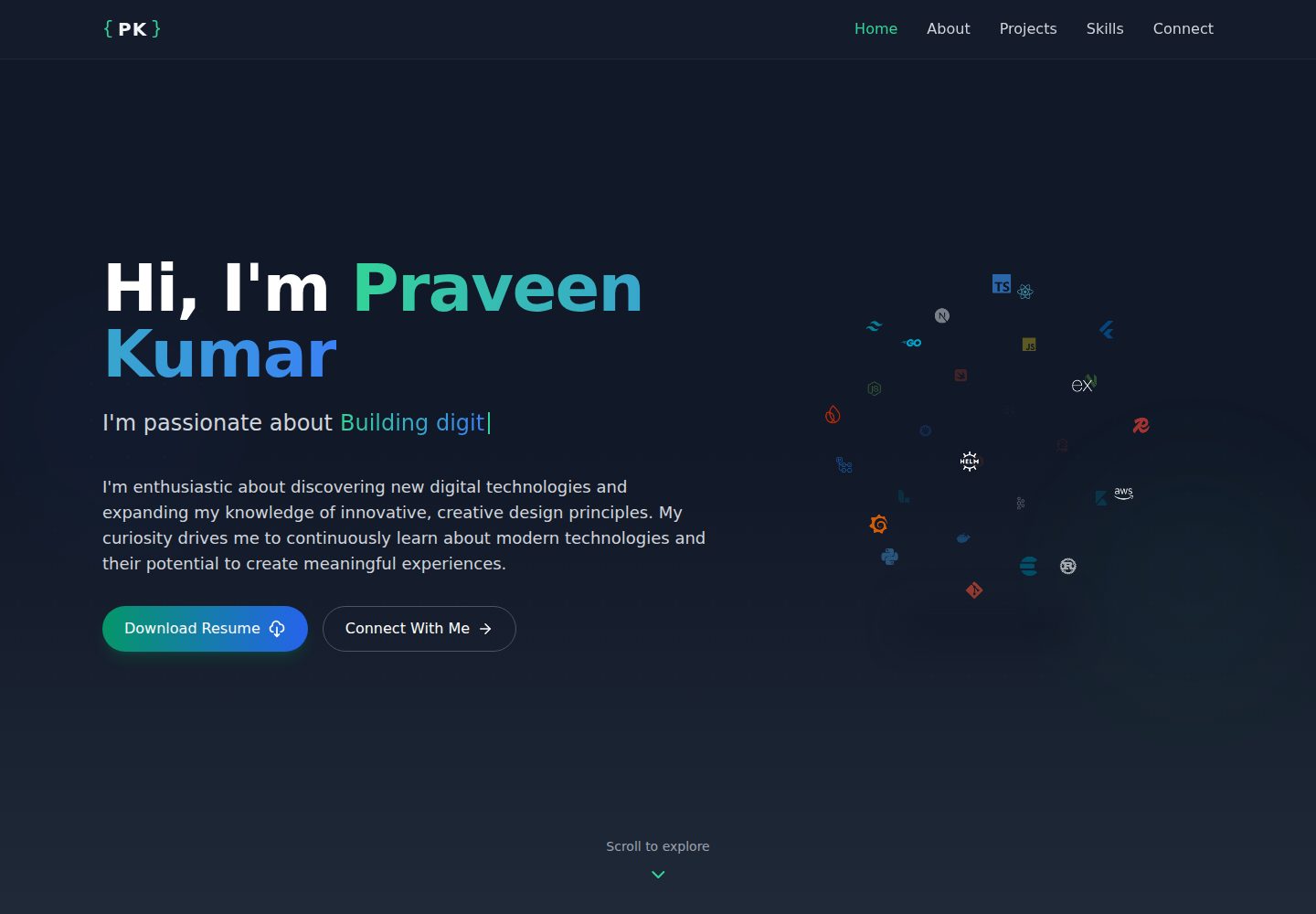
浏览真实页面截图,比较内容排版与手机效果。点击下方缩略图切换,放大查看整页细节。
全部页面与视图 2
截图用于了解视觉与布局,交互效果请以实际项目为准。
采集于 2026-10-14查看来源
值得关注的模板亮点
从已有项目资料中,快速了解它的特点。
包含首页、关于、项目、技能、社交连接等区块,项目卡片支持技术栈标签、演示与 GitHub 链接、轮播与悬停效果
技能区块提供交互式 3D 技术球体与分类图标展示
使用 Next.js、TypeScript、Tailwind CSS 构建,并采用组件化目录结构(components、sections、types、utils)
README 提及语义化 HTML、ARIA 属性、键盘导航与响应式适配
采用 emerald 与暗色配色方案及 Geist 字体
模板详细介绍
这是一个个人作品集网站模板,仓库为 PraveenGongada/portfolio,README 说明其使用 Next.js、TypeScript、Tailwind CSS 构建,并采用组件化结构。页面内容由 app/config 目录下的配置文件驱动,包括 index.ts(站点元信息、导航、首页文案等)、projects.ts(项目展示数据)、skills.ts(技能分类与技术图标)、socials.tsx(社交链接)。README 列出的主要区块有:Home 首页(问候语、姓名、轮换打字文本、简介与按钮)、About 关于(职业经历、核心能力、个人特质)、Projects 项目展示(项目卡片、技术栈标签、演示与 GitHub 链接、轮播与悬停效果)、Skills 技能可视化(交互式 3D 技术球体、分类技能与图标)、Connect 社交连接(品牌色社交链接与动画效果)。设计上采用 emerald 与暗色配色、Geist 字体,并提及语义化 HTML、ARIA 属性、键盘导航与响应式适配。README 未提供关于性能基准、浏览器兼容范围或生产环境部署配置的详细说明;部署方面仅通过徽章指向 GitHub Pages 部署状态,未给出具体部署步骤。
Next.js作品集
适合你的项目吗?
适用场景
- 开发者或设计师搭建个人作品集网站,集中展示项目、技能与联系方式
- 需要以配置文件方式维护作品集内容、避免频繁改动组件代码的场景
- 希望参考 Next.js + TypeScript + Tailwind CSS 组件化结构的个人站点项目
- 需要包含项目轮播、技能可视化与社交链接区块的展示型页面
适合人群
- 具备 Node.js 与 yarn 使用经验的前端开发者
- 希望基于现有模板快速替换个人信息的用户
- 需要可配置内容结构的个人作品集站点
- 对 Next.js 与 Tailwind CSS 技术栈有基本了解的开发者
上手与定制指南
结合仓库当前版本的说明,按下面的资料检查内容、配置与运行要求。
- 1
前置条件:Node.js 20+ 与 yarn
- 2
安装步骤:git clone 仓库、cd portfolio、yarn install、yarn dev
- 3
在 app/config/index.ts 中修改站点元信息、导航、首页问候语、姓名、轮换打字文本与简介
- 4
在 app/config/projects.ts、skills.ts、socials.tsx 中分别维护项目、技能与社交链接数据
- 5
替换 app/icon.svg 图标与 public/resume.pdf 简历文件,并将自定义图片放入 public 目录
授权与来源资料
使用条件与限制
免费使用 · 保留许可声明本次收录的是公开仓库中采用 Apache-2.0 许可的免费版本;免费范围为该版本代码,不代表外部服务或第三方素材免费。
使用时需要遵守
- 允许免费使用、修改、商用和分发;分发时需随附 Apache-2.0 许可证。
- 修改过的文件需显著标明改动,并保留相关版权、专利、商标及归属声明。
- 若原项目附有 NOTICE 文件,分发衍生作品时需保留其中适用的归属声明。
- 许可包含适用的贡献者专利授权;发起许可所述专利诉讼会终止该专利授权,且不授予商标使用权。
- 代码按现状提供;担保与责任限制以原许可证及适用法律为准。
额外费用与待核对事项
- 演示图片、字体、图标及其他第三方素材需按各自许可核对,不能仅凭代码的 Apache-2.0 许可判断。
- 域名、托管、数据库、支付或 AI 等外部服务可能另外收费。
查看原文依据
https://github.com/PraveenGongada/portfolio/blob/main/LICENSEhttps://github.com/PraveenGongada/portfolio/blob/main/README.mdno-charge, royalty-free, irrevocable copyright license
许可证原文
DeepSeek 根据仓库许可证和 README 整理 ·2026-10-14。结果仅覆盖已读取资料,依赖、图片、字体及后续条款变更以各自原文为准。
项目核对记录与介绍依据
模板资料
- 来源平台
- GitHub
- 资料与维护参考分
- 资料较完整 · 83 / 100
- 技术栈
- Next.js · React
- 网站类型
- 作品集
这个分数如何计算
本站按许可资料(最高30分)、演示链接(12分)、预览图(10分)、Star数(15分)、记录的维护时间(15分)、描述完整度(8分)、功能记录(5分)和分类资料(5分)计算。它不是代码、安全或性能测试,也不是 Google 评分;有链接不代表已实测可用。
这个项目需要核对什么
- 记录的仓库更新时间
- 2026-06-30
- 截图检查日期
- 2026-10-14
已收录演示链接。请用你的内容与屏幕尺寸检查;有演示不代表表单、认证或支付已经可用。
目录记录的主要技术栈是 Next.js。请通过依赖清单和锁文件核对实际版本与托管要求。这些说明基于收录资料,不代表代码审计或部署实测。
查看具体选型方法 →介绍的制作与核对状态
介绍由 AI 辅助整理目录与仓库资料。仓库作者不等于这篇介绍的审核者。
审核声明: codex-user-requested-batch-review-20261015 · 2026-10-15
查看当时使用的来源资料
SHA-256: d8cf46d58b283f486b0f1364c90d53d5be825eba60cb0ff2da13009e9d435b4a
2026-10-14T05:47:14.482Z
来源文件 / 仓库# Portfolio ✨
<div align="center">
[](https://github.com/PraveenGongada/portfolio/deployments)
[](https://nextjs.org)
[](https://www.typescriptlang.org)
[](https://tailwindcss.com)
[](LICENSE)
<div>
<p></p>
<p style="margin: 0; font-size: 16px; color: #eaeaea;">🚀 Showcase your journey with this modern, interactive portfolio template 🌟</p> <p></p>
<img src="https://raw.githubusercontent.com/PraveenGongada/portfolio/refs/heads/main/docs/images/home.png" alt="Portfolio Home" width="90%" style="border-radius: 12px; margin-bottom: 20px; box-shadow: 0 8px 16px rgba(0,0,0,0.2);" />
</div>
</div>
## 📸 Screenshots
<div align="center">
<div style="display: flex; justify-content: space-between; gap: 20px; margin-top: 20px;">
<div style="flex: 1;">
<img src="https://raw.githubusercontent.com/PraveenGongada/portfolio/refs/heads/main/docs/images/about.png" alt="About Section" width="100%" style="border-radius: 12px; box-shadow: 0 4px 8px rgba(0,0,0,0.1);" />
<p><em>About section with personal journey and qualities</em></p>
</div>
<div style="flex: 1;">
<img src="https://raw.githubusercontent.com/PraveenGongada/portfolio/refs/heads/main/docs/images/projects.png" alt="Projects Section" width="100%" style="border-radius: 12px; box-shadow: 0 4px 8px rgba(0,0,0,0.1);" />
<p><em>Projects showcase with carousel</em></p>
</div>
</div>
<div style="display: flex; justify-content: space-between; gap: 20px; margin-top: 10px;">
<div style="flex: 1;">
<img src="https://raw.githubusercontent.com/PraveenGongada/portfolio/refs/heads/main/docs/images/skills.png" alt="Skills Section" width="100%" style="border-radius: 12px; box-shadow: 0 4px 8px rgba(0,0,0,0.1);" />
<p><em>Skills visualization with interactive elements</em></p>
</div>
<div style="flex: 1;">
<img src="https://raw.githubusercontent.com/PraveenGongada/portfolio/refs/heads/main/docs/images/connect.png" alt="Connect Section" width="100%" style="border-radius: 12px; box-shadow: 0 4px 8px rgba(0,0,0,0.1);" />
<p><em>Connect section with animated social links</em></p>
</div>
</div>
</div>
## 🌈 Feature Highlights
### 🧠 About Me Section
- Professional journey highlights with responsive layout
- Core competencies with visual gradient indicators
- Personal qualities and areas of expertise
### 💻 Project Showcase
- Detailed project cards with:
- Technology stack tags with custom styling
- Live demo and GitHub links
- Interactive carousels with hover effects
- Animated project transitions
### 🛠️ Skills Visualization
- Interactive 3D technology sphere
- Categorized skill display with custom icons
- Visual representation of expertise areas
### 📞 Connect Section
- Social media integration with branded colors
- Animated interaction effects
- Professional contact information
## ✨ Key Design Principles
### Minimalist Elegance
- **UI/UX Approach**: Clean, purposeful design that prioritizes content and user experience
- **Color Palette**: Sophisticated emerald and dark mode color scheme with subtle gradient transitions
- **Typography**: Precision-crafted using Geist Font for maximum readability and modern aesthetics
### Interactive Storytelling
- Dynamic section transitions that guide users through my professional landscape
- Micro-interactions and hover effects that provide delightful user engagement
- Seamless navigation that feels more like a journey than a website
## 🚀 Technical Architecture
### Design Approach
- **Component-Driven Structure**: Modular, reusable components that maintain consistency throughout the site
- **Config-First Customization**: Core portfolio content and styling controlled through configuration files
- **Progressive Enhancement**: Core functionality works without JavaScript, enhanced with animations when available
### Performance Optimizations
- Optimized asset loading with automatic image optimization
- Efficient rendering with component memoization
- Smooth animations with hardware acceleration
### Accessibility & Responsiveness
- Semantic HTML structure with proper ARIA attributes
- Responsive design adapts to all device sizes
- Keyboard navigation support throughout the interface
- Color contrast ratios meeting WCAG guidelines
## 🔧 Getting Started
### Prerequisites
- Node.js 20+
- yarn
### Installation Steps
```bash
# Clone repository
git clone https://github.com/praveengongada/portfolio.git
# Navigate to project directory
cd portfolio
# Install dependencies
yarn install
# Run development server
yarn dev
```
## 🛠️ Creating Your Own Portfolio
This portfolio template is designed to be easily customizable. Follow these steps to personalize it for your own use:
### Configuration Overview
The entire portfolio is driven by configuration files located in the `app/config` directory:
- `index.ts`: Main portfolio configuration
- `projects.ts`: Your project showcase
- `skills.ts`: Your technical skills
- `socials.tsx`: Your social media profiles
### Step 1: Update Main Configuration
Edit `app/config/index.ts` to customize:
```typescript
// Personal information
siteMetadata: {
title: "Your Name",
description: "Your portfolio description",
author: "Your Name",
},
// Navigation
navigation: {
logo: {
text: "YN", // Your initials (should match what you put in logo.tsx)
},
// Navigation links (no need to change unless adding new sections)
},
// Home section (landing page)
sections: {
home: {
greeting: "Hi, I'm",
name: "Your Name",
typingTexts: [
"Your custom typing text",
"Add multiple lines",
"They will rotate automatically",
],
description: "Write a short engaging bio here...",
// Update button links as needed
},
// Continue customizing other sections...
}
```
### Step 2: Add Your Projects
Edit `app/config/projects.ts` to showcase your own work:
```typescript
export const projects: Project[] = [
{
id: 1,
title: 'Your Project Name',
description: 'Describe what your project does and its key features',
tags: ['React', 'TypeScript', 'Your Technologies'],
githubLink: 'https://github.com/yourusername/your-repo',
type: 'Web App', // Project type (Web, Mobile, Plugin, etc.)
liveLink: 'https://your-project-url.com', // Optional
thumbnail: 'https://your-image-url.com/image.jpg', // Main project thumbnail
// Optional: GIF to display when hovering over the project
gifUrl: 'https://your-project-animation.gif',
// Optional: Multiple images for carousel display
carouselImages: [
'https://your-image-url.com/slide1.jpg',
'https://your-image-url.com/slide2.jpg',
'https://your-image-url.com/slide3.jpg',
],
// Optional: Carousel configuration
carouselConfig: {
interval: 3000, // Time between slides in milliseconds
infinite: true, // Whether to loop the carousel
},
},
// Add more projects...
];
```
### Step 3: Update Your Skills
Edit `app/config/skills.ts` to reflect your technical expertise:
```typescript
export const skills: Skill[] = [
{
category: 'Your Category', // e.g., Frontend, Backend, Mobile
technologies: [
{
name: 'Technology Name',
color: '#HexColorCode', // Brand color of the technology
icon: 'https://cdn.jsdelivr.net/gh/devicons/devicon/icons/technology/technology-original.svg',
},
// Add more technologies...
],
},
// Add more skill categories...
];
```
### Step 4: Connect Your Social Media
Edit `app/config/socials.tsx` to link your social profiles:
```typescript
export const socials: Social[] = [
{
name: "GitHub",
icon: <Github size={20} />, // Using Lucide React icons
url: "https://github.com/yourusername",
color: "#333333",
},
// Add more social profiles...
];
```
### Step 5: Update Favicon
- Replace the `app/icon.svg` file with your own favicon containing your initials (the code brackets are a signature part of the design)
### Step 6: Customize Styling (Optional)
For deeper customization:
- Edit `app/globals.css` to adjust the color scheme
- Modify component files in the `app/sections` directory for structural changes
- Update `app/components` for UI element customization
### Step 7: Replace Assets
- Replace `/public/resume.pdf` with your own resume
- Add your custom images to the `/public` directory
## 🏗️ Project Structure
```
portfolio/
├── app/ # Next.js app directory
│ ├── config/ # Configuration files
│ │ ├── index.ts # Main portfolio config
│ │ ├── projects.ts # Projects data
│ │ ├── skills.ts # Skills data
│ │ └── socials.tsx # Social links
│ ├── components/ # Reusable UI components
│ │ ├── button.tsx # Custom button component
│ │ ├── logo.tsx # Portfolio logo
│ │ └── tech-sphere.tsx # 3D tech visualization
│ ├── sections/ # Main page sections
│ │ ├── about.tsx # About me section
│ │ ├── connect.tsx # Connect with me section
│ │ ├── home.tsx # Home section (hero)
│ │ ├── projects.tsx # Projects showcase
│ │ └── skills.tsx # Skills display
│ ├── types/ # TypeScript type definitions
| |-- utils/ # Utility functions
│ ├── globals.css # Global styles
│ └── layout.tsx # Root layout
└── public/ # Static assets
```
## 🙏 Acknowledgements
This portfolio project wouldn't be possible without these amazing technologies and libraries:
- [Next.js](https://nextjs.org/) - The React framework for production
- [React](https://reactjs.org/) - A JavaScript library for building user interfaces
- [TypeScript](https://www.typescriptlang.org/) - Typed JavaScript for better code quality
- [Tailwind CSS](https://tailwindcss.com/) - Utility-first CSS framework
- [Framer Motion](https://www.framer.com/motion/) - Animation library for React
- [Lucide React](https://lucide.dev/) - Beautiful & consistent icon toolkit
- [React Icon Cloud](https://icon-cloud.netlify.app/) - Interactive 3D icon rendering
- [Geist Font](https://vercel.com/font) - Beautiful, modern typeface by Vercel
## 📄 License
This project is licensed under the Apache License 2.0 - see the [LICENSE](LICENSE) file for details.
---
<div align="center">
<p>Made with ❤️ by <a href="https://github.com/PraveenGongada">Praveen Kumar</a></p>
<p>
<a href="https://linkedin.com/in/praveengongada">LinkedIn</a> •
<a href="https://praveengongada.com">Website</a>
</p>
</div>
看看同类模板
对比同技术栈与用途的模板,找到更适合的视觉与内容结构。

react-resume-template
A personal resume website template built with React.js, Typescript, Next.js, and styled with Tailwind css
Next.js · 作品集

nxt-lnk
Custom bio links for creatives who love coding. A perfect custom alternative for linktree, bio and other short…
Next.js · 作品集

sylph
A minimal portfolio template.
Next.js · 作品集

sleek-portfolio
sleek-portfolio 是一个面向开发者个人品牌展示的现代作品集模板,基于 Next.js 15、TypeScript、Tailwind CSS 和 Shadcn UI 构建。
Next.js · 作品集

research-website-template
React + Next.js template for research websites (for PhD students, researchers, etc)
Next.js · 作品集

shadcn-portfolio
shadcn-portfolio 是一个面向开发者的作品集模板,技术栈为 Next.js 15、shadcn/ui、Tailwind CSS 和 Framer Motion。
Next.js · 作品集