基于 Nuxt 与 Vue 的前端启动器,采用 MIT 许可,可免费使用、修改与商用
NuxtVue启动器
gp-vue-boilerplate — Nuxt 启动器模板
作者 prowebdev119
Grabarz & Partner 出品的 Nuxt/Vue 前端启动器,内置图片优化、i18n、PWA、SEO 与代码检查等构建配置。
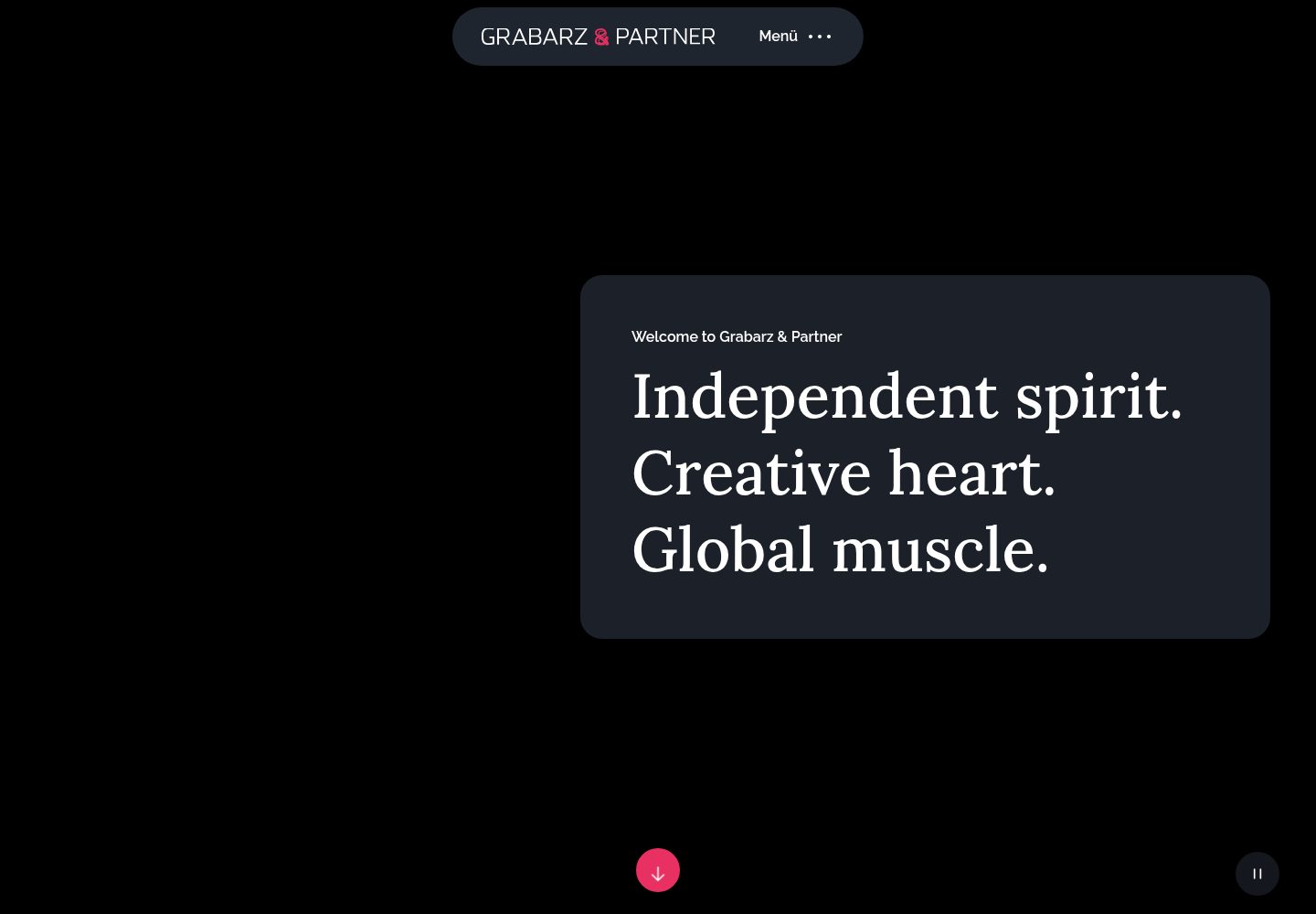
看看你的网站会是什么样
浏览真实页面截图,比较内容排版与手机效果。点击下方缩略图切换,放大查看整页细节。
全部页面与视图 3
截图用于了解视觉与布局,交互效果请以实际项目为准。
采集于 2026-10-12查看来源
值得关注的模板亮点
从已有项目资料中,快速了解它的特点。
图片处理覆盖 jpg、png、webp 优化与 webp 生成,svg 提供 sprite 生成与优化
断点全局定义,可在 JavaScript 与 PostCSS 中访问
i18n 支持全局语言文件、按语言划分的页面文件及 .lang 块加载
内置 sitemap、robots.txt 生成与可配置的 PWA 模块
集成 ESLint、stylelint、commitlint、semantic release 与 snyk 扫描
模板详细介绍
gp-vue-boilerplate 是 Grabarz & Partner 发布的前端启动器模板,基于 Nuxt 与 Vue,用于搭建 Web 应用或站点。仓库采用 MIT 许可,公开版本可免费使用、修改、商用和分发,但需保留版权与许可声明。
模板在构建层面集成了较多配置:图片处理覆盖 jpg、png、webp 的优化以及 webp 生成,svg 提供 sprite 生成与优化;断点支持全局定义,并可在 JavaScript 与 PostCSS 中访问;i18n 支持全局语言文件、按语言划分的页面文件,以及 .lang 块加载。SEO 方面提供 sitemap 与 robots.txt 生成,PWA 以模块形式嵌入并可通过 nuxt.config.js 配置。代码质量工具包括 ESLint、stylelint、branchlint、commitlint,版本管理使用 semantic release 与 changelog 生成,安全扫描接入 snyk。
仓库 README 提供了 macOS、Linux、Windows 的安装步骤与开发、静态构建、生产构建命令,并附有一份上线前检查清单,涵盖浏览器矩阵、多语言、表单校验、SEO、Lighthouse、安全与性能等条目。README 中 cypress 测试与 appveyor 持续集成标记为未完成,说明测试与 CI 部分并非开箱即用。
使用前需注意:演示图片、字体、图标等第三方素材的许可需单独核对,不能仅凭代码的 MIT 许可判断;域名、托管、数据库等外部服务可能产生额外费用。模板最后更新于 2022 年底,依赖与工具链的时效性需自行评估。
NuxtVue启动器
适合你的项目吗?
适用场景
- 需要多语言支持的 Nuxt 站点搭建
- 对图片与 svg 资源有优化和 sprite 需求的 Web 项目
- 需要 sitemap、robots.txt 等 SEO 基础配置的前端工程
- 希望统一代码检查、提交规范与版本发布流程的团队项目
适合人群
- 熟悉 Nuxt 与 Vue 的前端开发者
- 需要现成构建配置与多语言方案的项目
- 接受 MIT 许可并会核对第三方素材许可的团队
- 以 VSCode 为主要编辑器、愿意按 README 配置工作区的开发者
上手与定制指南
结合仓库当前版本的说明,按下面的资料检查内容、配置与运行要求。
- 1
README 要求使用 Node 12.1.0,并建议通过 nvm 安装
- 2
需先克隆仓库并执行 npm i 安装依赖,部分平台还需安装系统库与构建工具
- 3
开发模式运行 npm run dev,静态构建运行 npm run static,生产构建加服务运行 npm run production
- 4
默认访问地址为 http://localhost:8050
- 5
README 中 cypress 测试与 appveyor 持续集成标记为未完成,相关流程需自行补充
授权与来源资料
使用条件与限制
免费使用 · 保留许可声明本次收录的是公开仓库中采用 MIT 许可的免费版本;免费范围为该版本代码,不代表外部服务或第三方素材免费。
使用时需要遵守
- 允许免费使用、修改、商用和分发该版本代码。
- 分发代码副本或实质性部分时,保留原作者版权声明和完整 MIT 许可声明。
- 代码按现状提供;担保与责任限制以原许可证及适用法律为准。
额外费用与待核对事项
- 演示图片、字体、图标及其他第三方素材需按各自许可核对,不能仅凭代码的 MIT 许可判断。
- 域名、托管、数据库、支付或 AI 等外部服务可能另外收费。
- 安装流程要求全局安装 snyk 并执行 snyk auth 进行账号认证,使用该漏洞扫描功能需要注册并登录 Snyk 账户。
- README 的 Features 中 cypress 测试项标记为未勾选,说明测试功能尚未完成,并非开箱即用。
- 持续集成中的 appveyor 项标记为未勾选,说明该 CI 集成尚未完成,需自行配置。
- 上线检查清单要求自行核对所用依赖包的许可证,第三方依赖许可需使用者单独确认。
- 该条目为可选项,向客户安全部门发送许可证清单并非强制要求。
查看原文依据
Permission is hereby granted, free of charge
许可证原文
npm i snyk -g snyk auth
README 原文
- [ ] cypress
README 原文
- [ ] appveyor
README 原文
- [ ] check licences of used packages
README 原文
https://github.com/prowebdev119/gp-vue-boilerplate/blob/main/LICENSEhttps://github.com/prowebdev119/gp-vue-boilerplate/blob/main/README.md- [ ] send license list to the security department of your client (optional)
README 原文
DeepSeek 根据仓库许可证和 README 整理 ·2026-10-12。结果仅覆盖已读取资料,依赖、图片、字体及后续条款变更以各自原文为准。
项目核对记录与介绍依据
模板资料
- 来源平台
- GitHub
- 资料与维护参考分
- 资料一般 · 73 / 100
- 技术栈
- Nuxt · Vue
- 网站类型
- 启动器
这个分数如何计算
本站按许可资料(最高30分)、演示链接(12分)、预览图(10分)、Star数(15分)、记录的维护时间(15分)、描述完整度(8分)、功能记录(5分)和分类资料(5分)计算。它不是代码、安全或性能测试,也不是 Google 评分;有链接不代表已实测可用。
这个项目需要核对什么
- 记录的仓库更新时间
- 2022-12-30
- 截图检查日期
- 2026-10-12
已收录演示链接。请用你的内容与屏幕尺寸检查;有演示不代表表单、认证或支付已经可用。
目录记录的主要技术栈是 Nuxt。请通过依赖清单和锁文件核对实际版本与托管要求。这些说明基于收录资料,不代表代码审计或部署实测。
查看具体选型方法 →介绍的制作与核对状态
介绍由 AI 辅助整理目录与仓库资料。仓库作者不等于这篇介绍的审核者。
审核声明: [email protected] · 2026-10-13
查看当时使用的来源资料
SHA-256: e7eceda885c95042915214a9c78fe6e9196acd6d7ec1425db1170b748ca93247
2026-10-12T16:05:05.430Z
来源文件 / 仓库<p align="right">
share me:
<a href="https://twitter.com/intent/tweet?url=https://github.com/GrabarzUndPartner/gp-vue-boilerplate&text=Awesome full featured vue.js/nuxt.js boilerplate&via=grabarzpartner&hashtags=vue,nuxt,boilerplate">
<img width="24" height="24" src="https://raw.githubusercontent.com/edent/SuperTinyIcons/master/images/svg/twitter.svg?sanitize=true"/>
</a>
<a href="https://news.ycombinator.com/submitlink?u=https://github.com/GrabarzUndPartner/gp-vue-boilerplate&t=Awesome full featured vue.js/nuxt.js boilerplate">
<img width="24" height="24" src="https://raw.githubusercontent.com/edent/SuperTinyIcons/master/images/svg/hackernews.svg?sanitize=true"/>
</a>
<a href="https://reddit.com/submit?url=https://github.com/GrabarzUndPartner/gp-vue-boilerplate&title=Awesome full featured vue.js/nuxt.js boilerplate">
<img width="24" height="24" src="https://raw.githubusercontent.com/edent/SuperTinyIcons/master/images/svg/reddit.svg?sanitize=true"/>
</a>
<a href="https://www.facebook.com/sharer.php?u=https://github.com/GrabarzUndPartner/gp-vue-boilerplate">
<img width="24" height="24" src="https://raw.githubusercontent.com/edent/SuperTinyIcons/master/images/svg/facebook.svg?sanitize=true"/>
</a>
<a href="https://www.xing.com/spi/shares/new?url=https://github.com/GrabarzUndPartner/gp-vue-boilerplate">
<img width="24" height="24" src="https://raw.githubusercontent.com/edent/SuperTinyIcons/master/images/svg/xing.svg?sanitize=true"/>
</a>
<a href="https://www.linkedin.com/shareArticle?mini=true&url=https://github.com/GrabarzUndPartner/gp-vue-boilerplate&title=vue.js/nuxt.js boilerplate&summary=Awesome full featured vue.js/nuxt.js boilerplate">
<img width="24" height="24" src="https://raw.githubusercontent.com/edent/SuperTinyIcons/master/images/svg/linkedin.svg?sanitize=true"/>
</a>
</p>
# Grabarz & Partner - Boilerplate
[](https://github.com/GrabarzUndPartner/gp-vue-boilerplate)
[](https://github.com/GrabarzUndPartner/gp-vue-boilerplate)
[](https://github.com/GrabarzUndPartner/gp-vue-boilerplate/graphs/contributors)
[](https://renovatebot.com)
[](https://david-dm.org/GrabarzUndPartner/gp-vue-boilerplate)
[](https://david-dm.org/GrabarzUndPartner/gp-vue-boilerplate?type=dev)
[](https://snyk.io/test/github/GrabarzUndPartner/gp-vue-boilerplate)
[](https://www.codacy.com/app/stephan.gerbeth/gp-vue-boilerplate?utm_source=github.com&utm_medium=referral&utm_content=GrabarzUndPartner/gp-vue-boilerplate&utm_campaign=Badge_Grade)
[](https://ci.appveyor.com/project/StephanGerbeth/gp-vue-boilerplate/branch/master)
## Description
The Grabarz & Partner Boilerplate is a professional front-end template for building fast, robust, and adaptable web apps or sites with vuejs.
.
### Demo
- [website](https://grabarzundpartner.github.io/gp-vue-boilerplate/)
- [source code](https://github.com/GrabarzUndPartner/gp-vue-boilerplate/tree/gh-pages)
### Sandbox
[](https://codesandbox.io/s/gp-vue-boilerplate-ruwxe)
### Reports
- [webpack client](https://grabarzundpartner.github.io/gp-vue-boilerplate/reports/webpack/client.html)
- [webpack modern](https://grabarzundpartner.github.io/gp-vue-boilerplate/reports/webpack/modern.html)
- [webpack server](https://grabarzundpartner.github.io/gp-vue-boilerplate/reports/webpack/server.html)
- [packtracker modern](https://app.packtracker.io/organizations/310/projects/247)
***
## Quickstart
### IDE
It is recommended to use VSCode Editor. <https://code.visualstudio.com/>
Open the workspace by `config.code-workspace` and the recommended extensions, to use the boilerplate, can be installed by a notification.
### OSX - install
- install nvm <https://medium.com/@isaacjoe/best-way-to-install-and-use-nvm-on-mac-e3a3f6bc494d>
```bash
nvm install 12.1.0
git clone https://github.com/GrabarzUndPartner/gp-vue-boilerplate.git
cd gp-vue-boilerplate
npm i snyk -g
snyk auth
npm i
```
### Linux - install
- install nvm <https://github.com/nvm-sh/nvm#install--update-script>
```bash
sudo apt-get install libjpeg-dev libpng-dev libgif-dev libgtk2.0-0 libnotify-dev libgconf-2-4 libnss3 libxss1 libasound2
nvm install 12.1.0
git clone https://github.com/GrabarzUndPartner/gp-vue-boilerplate.git
cd gp-vue-boilerplate
npm i snyk -g
snyk auth
npm i
```
### Windows - install
- install nvm <https://github.com/coreybutler/nvm/releases>
- install git client <https://git-scm.com/download/win>
- install Visual C++ 2015 Build Tools <https://go.microsoft.com/fwlink/?LinkId=615460>
- install Rust <https://static.rust-lang.org/dist/rust-beta-x86_64-pc-windows-gnu.msi>
- restart Windows
- run command prompt as administrator
```bash
git clone -b msvc --recursive https://github.com/kornelski/pngquant.git
cd pngquant
cargo clean
set PNG_STATIC=1
cargo build --release
cd ..
git clone https://github.com/GrabarzUndPartner/gp-vue-boilerplate.git
cd gp-vue-boilerplate
nvm on
nvm install 12.1.0 64
nvm use 12.1.0
npm i snyk -g
# re-run command prompt as administrator
snyk auth
npm i
```
### Run boilerplate in dev-mode
```bash
npm run dev
```
### Run boilerplate production-build
```bash
npm run static
```
### Run boilerplate production-build + server
```bash
npm run production
```
### Open Page
```bash
http://localhost:8050
```
***
## Features
- browserslist support
- [x] > 1% in DE
- [x] Firefox ESR
- [x] IE 11
- images
- jpg
- [x] optimization
- png
- [x] optimization
- webp
- [x] generator (created by original source -> jpg, png)
- [x] optimization
- svg
- [x] sprite generator
- [x] optimization
- breakpoint
- [x] global definition
- [x] accessible in js
- [x] accessible in postcss
- i18n
- [x] global language files
- [x] page files by language
- [x] vue block support
- [x] exclusive language reference loader ".lang"
- PWA
- [x] module embedded - configurable by nuxt.config.js
- SEO
- [x] sitemap generator
- [x] robots.txt generator
- babel
- [x] embedded browserslist support
- postcss
- [x] embedded browserslist support
- plugins
- [x] postcss-preset-env
- [x] postcss-normalize
- [x] postcss-url
- [x] postcss-object-fit-images
- [x] @fullhuman/postcss-purgecss
- [x] postcss-momentum-scrolling
- [x] postcss-pseudo-content-insert
- [x] rucksack-css
- licenses
- [x] license extraction from build
- linter
- [x] eslint
- [x] stylelint
- [x] branchlint
- [x] commitlint
- versioning
- [x] semantic release
- [x] git release version
- [x] npm release version
- [x] changelog generator
- continous integration
- [ ] appveyor
- vulnerability scanner
- [x] snyk
- [x] greenkeeper
- IDE
- vscode workspace configuration
- [x] recommended project extensions
- [x] custom project settings
- [x] disabled prettier config
- [x] file association map
- testing
- [ ] cypress
- [x] components
- [x] load components lazy (vue-lazy-hydration)
***
## ToDo
-
***
## Checklist
All processes are working automatically. Nevertheless you should check before going live if all processes work correctly and the output is correct.
- project start
- [ ] browser matrix (IE11 support?)
- [ ] multilanguage (i18n)
- [ ] tracking concept
- [ ] webfonts
- prepare launch
- NO launch on friday
- deployment
- [ ] setup pipeline
- [ ] embed SonarQube
- [ ] test pipeline
- url/domain
- [ ] configured
- [ ] current ssl certificate
- before launch
- Build
- [ ] deployment pipeline
- [ ] no build errors
- Content
- [ ] favicon
- [ ] multilanguage
- [ ] complete
- [ ] no lorem ipsum
- [ ] disclaimer
- [ ] terms of use
- [ ] cookie notification
- [ ] contact
- [ ] 404-page
- [ ] 500-page
- Form validation
- [ ] prevent XSS (escape strings)
- [ ] input validation is configured
- Server
- [ ] language detection
- [ ] encrypted keys & secrets as environment variables
- [ ] prevent XSS by user inputs (escape strings)
- Device testing
- [ ] based on browser matrix
- [ ] on actual devices, not simulations
- [ ] in incognito mode
- [ ] activated adblocker
- SEO
- [ ] page title
- [ ] meta tags
- [ ] social meta tags
- [ ] added alt-texts to all images and links
- [ ] sitemap.xml
- [ ] robots.txt
- [ ] disabled noindex, nofollow on normal pages
- [ ] enabled noindex, nofollow on auth area pages
- Lighthouse
- [ ] a11y
- [ ] image optimization
- [ ] svg optimization
- [ ] PWA support
- [ ] cache durations on server
- [ ] time to first byte (TTFB)
- [ ] first meaningful paint (FMP)
- Security
- [ ] npm audit
- [ ] no keys & secrets embedded in frontend code
- [ ] different keys & secrets for test/prod environment
- [ ] valid ssl certificate
- Performance
- [ ] google chrome performance measurement (60fps)
- [ ] check js size
- [ ] check css size
- [ ] removed unused sources
- Tracking
- [ ] embedded
- [ ] different project ids for test/prod environment
- Licenses
- [ ] check licences of used packages
- [ ] send license list to the security department of your client (optional)
- Documentation
- [ ] technical concept
- [ ] git changelog with reference to ticket numbers (if applicable)
- [ ] deployment pipeline
- launch
- GOOD LUCK.
看看同类模板
对比同技术栈与用途的模板,找到更适合的视觉与内容结构。

laravel-nuxt
A Laravel-Nuxt starter kit.
Nuxt · 启动器

canvas
Portfolio template made with Nuxt 3, Nuxt Content v3, NuxtUI v3 and TailwindCSS v4
Nuxt · 作品集

nuxt3-starter
💚 A Better Nuxt 3 Starter Template,generate by nuxi.
Nuxt · 启动器

starter
Nuxt Starter Template for Nuxt UI.
Nuxt · 启动器

bloggrify
Run a blog from Markdown files. Themes, SEO, analytics, newsletter and comments preconfigured. Like Docus, but…
Nuxt · 博客
vitify-nuxt
🔽🏔 Vuetify + Nuxt Starter Template
Nuxt · 后台