Astro 构建,构建后输出静态 HTML 与 CSS
Astro作品集
shoebox — Astro 作品集模板
作者 radicazz
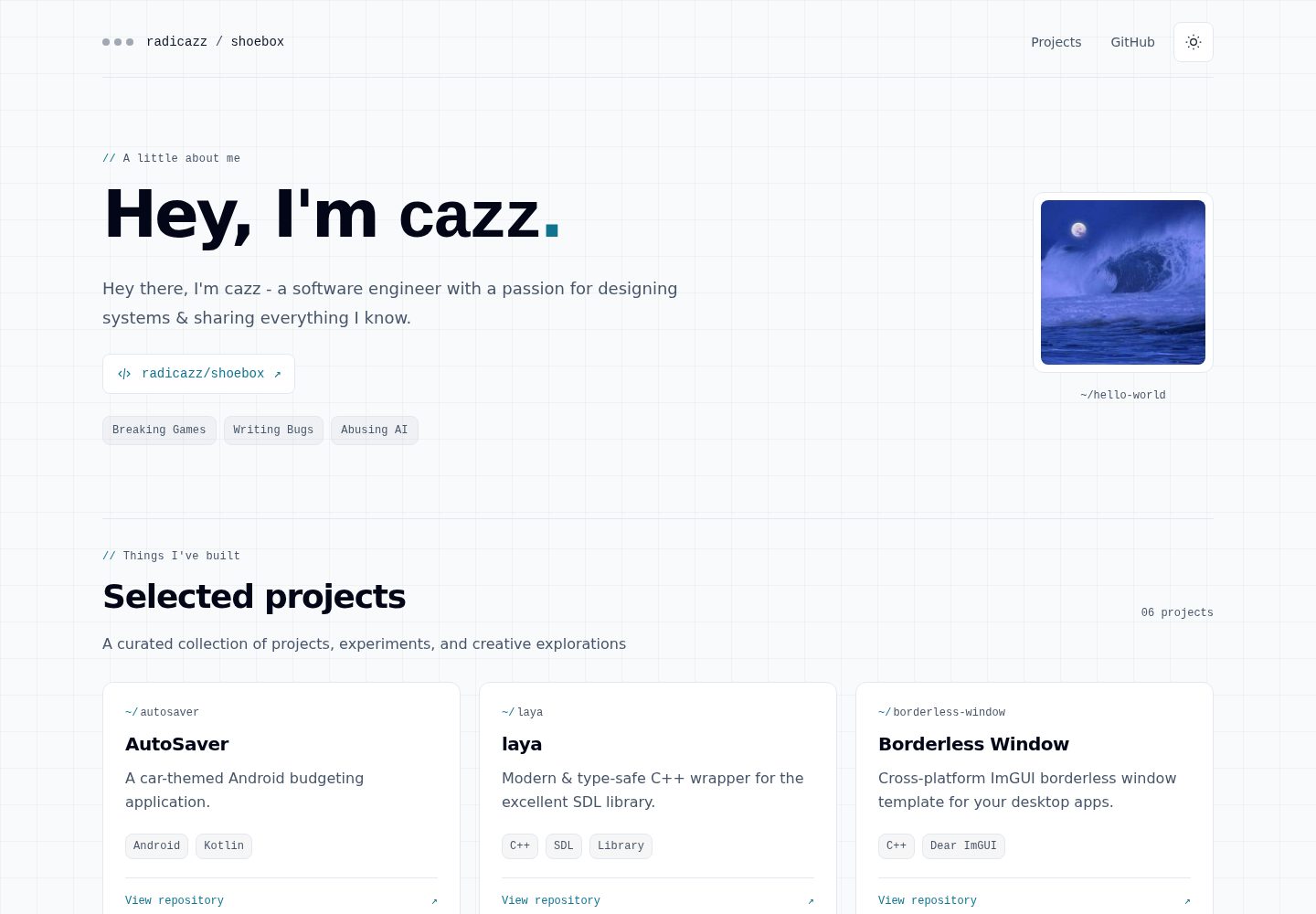
shoebox 是一个用 Astro 构建的轻量个人作品集模板,包含作者介绍与六个项目的响应式网格,支持明暗主题,构建后输出静态 HTML 与 CSS。
看看你的网站会是什么样
浏览真实页面截图,比较内容排版与手机效果。点击下方缩略图切换,放大查看整页细节。
全部页面与视图 2
截图用于了解视觉与布局,交互效果请以实际项目为准。
采集于 2026-10-13查看来源
值得关注的模板亮点
从已有项目资料中,快速了解它的特点。
作者介绍与六个项目组成响应式网格,项目按源数据顺序排列
提供浅色与深色两套主题
内容与链接在无 JavaScript 时仍可正常使用
作品图片在本地进行优化处理
内容集中在 src/data/gallery.json 配置,配图按项目 ID 映射浅色与深色导入
模板详细介绍
shoebox 是一个基于 Astro 的个人作品集网站模板。页面由作者介绍和六个项目组成,排列在响应式网格中,项目按源数据顺序逐行展示。站点提供浅色与深色两套主题,作品图片在本地进行优化处理。构建产物为静态 HTML 和 CSS,内容与链接在无 JavaScript 的情况下仍可正常使用。
内容集中在 src/data/gallery.json 中配置,包括作者信息、画廊标题、项目描述、标签和仓库链接。项目配图放在 src/assets/gallery/ 下,并在 src/pages/index.astro 中按项目 ID 映射浅色与深色两套导入。仓库提供 docs/IMPLEMENTATION.md、docs/FEATURES.md 和 docs/STACK.md 说明内容约定、站点行为与架构约束。
开发环境要求 Bash,Windows 需使用 WSL;Node 与 pnpm 版本分别固定在 .nvmrc 和 package.json 中,仅支持 pnpm 作为包管理器,并保留 pnpm-lock.yaml 作为唯一锁文件。开发服务器默认地址为 http://localhost:4321/shoebox/。仓库提供 dev、build、preview、check、validate:data、test、check:output 等命令,以及 scripts 目录下的 ci-test、setup、dev、doctor、clean 辅助脚本。CI 在拉取请求和推送到 main 时执行冻结安装的质量检查,只有推送 v* 标签才会发布,合并到 main 不会部署。
模板采用 MIT 许可,允许免费使用、修改、商用和分发该版本代码;分发代码副本或实质性部分时需保留原作者版权声明和完整 MIT 许可声明。演示图片、字体、图标等第三方素材需按各自许可单独核对,域名、托管等外部服务可能另外收费。
Astro作品集
适合你的项目吗?
适用场景
- 搭建个人作品集或项目展示页面
- 需要一个内容与链接在无 JavaScript 环境下仍可访问的静态站点
- 希望用 JSON 数据文件集中管理作者信息与项目条目
- 需要浅色与深色主题切换的展示型网站
适合人群
- 个人开发者或设计师的作品集站点
- 以少量项目条目为主的展示型页面
- 偏好 Astro 与静态导出的开发者
- 使用 pnpm 并接受固定 Node 版本工作流的项目
上手与定制指南
结合仓库当前版本的说明,按下面的资料检查内容、配置与运行要求。
- 1
需要 Bash 环境,Windows 用户使用 WSL
- 2
Node 与 pnpm 版本分别固定在 .nvmrc 和 package.json,仅支持 pnpm 并保留 pnpm-lock.yaml 为唯一锁文件
- 3
克隆仓库后执行 nvm install、nvm use、corepack enable pnpm、pnpm install --frozen-lockfile、pnpm dev,开发服务器地址为 http://localhost:4321/shoebox/
- 4
修改内容编辑 src/data/gallery.json,项目配图放在 src/assets/gallery/ 并在 src/pages/index.astro 中按项目 ID 映射浅色与深色导入
- 5
发布仅在推送 v* 标签时触发,合并到 main 不会部署
授权与来源资料
使用条件与限制
免费使用 · 保留许可声明本次收录的是公开仓库中采用 MIT 许可的免费版本;免费范围为该版本代码,不代表外部服务或第三方素材免费。
使用时需要遵守
- 允许免费使用、修改、商用和分发该版本代码。
- 分发代码副本或实质性部分时,保留原作者版权声明和完整 MIT 许可声明。
- 代码按现状提供;担保与责任限制以原许可证及适用法律为准。
额外费用与待核对事项
- 演示图片、字体、图标及其他第三方素材需按各自许可核对,不能仅凭代码的 MIT 许可判断。
- 域名、托管、数据库、支付或 AI 等外部服务可能另外收费。
- 使用该模板需要 Bash 环境;Windows 用户必须通过 WSL 运行,无法直接在原生 Windows 环境下开发。
- 仅支持 pnpm 作为包管理器,必须保留 pnpm-lock.yaml 作为唯一锁文件,不能改用 npm 或 yarn。
- 运行时脚本依赖 nvm 安装并激活固定版本的 Node;若未安装 nvm,则必须预先手动激活与 .nvmrc 一致的 Node 版本。
- 发布仅在推送 v* 标签时触发,合并到 main 分支不会自动部署,需按标签流程手动发布。
查看原文依据
Permission is hereby granted, free of charge
许可证原文
Use Bash and install [nvm](https://github.com/nvm-sh/nvm#installing-and-updating) once. On Windows, use WSL.
README 原文
pnpm is the only supported package manager; keep `pnpm-lock.yaml` as the single lockfile.
README 原文
Runtime scripts use nvm to install and activate the pinned Node version when a different version is active. Without nvm, the pinned Node version must already be active.
README 原文
https://github.com/radicazz/shoebox/blob/main/LICENSEhttps://github.com/radicazz/shoebox/blob/main/README.mdPublishing happens only when a `v*` tag is pushed; merging to `main` does not deploy.
README 原文
DeepSeek 根据仓库许可证和 README 整理 ·2026-10-13。结果仅覆盖已读取资料,依赖、图片、字体及后续条款变更以各自原文为准。
项目核对记录与介绍依据
模板资料
- 来源平台
- GitHub
- 资料与维护参考分
- 资料一般 · 72 / 100
- 技术栈
- Astro
- 网站类型
- 作品集
这个分数如何计算
本站按许可资料(最高30分)、演示链接(12分)、预览图(10分)、Star数(15分)、记录的维护时间(15分)、描述完整度(8分)、功能记录(5分)和分类资料(5分)计算。它不是代码、安全或性能测试,也不是 Google 评分;有链接不代表已实测可用。
这个项目需要核对什么
- 记录的仓库更新时间
- 2026-10-12
- 截图检查日期
- 2026-10-13
已收录演示链接。请用你的内容与屏幕尺寸检查;有演示不代表表单、认证或支付已经可用。
目录记录的主要技术栈是 Astro。请通过依赖清单和锁文件核对实际版本与托管要求。这些说明基于收录资料,不代表代码审计或部署实测。
查看具体选型方法 →介绍的制作与核对状态
介绍由 AI 辅助整理目录与仓库资料。仓库作者不等于这篇介绍的审核者。
审核声明: [email protected] · 2026-10-13
查看当时使用的来源资料
SHA-256: 768c873de0178288ff7d7ddc0cf25b1aa57df741df25484e827335d903019ee5
2026-10-13T00:13:26.646Z
来源文件 / 仓库# shoebox [](https://radicazz.github.io/shoebox/) [](./.nvmrc) [](https://github.com/radicazz/shoebox/actions/workflows/ci.yml) A lightweight personal portfolio built with Astro. An author introduction and six projects sit in a responsive grid, with light and dark themes and locally optimized artwork. The site exports static HTML and CSS; its content and links work without JavaScript. [View the site](https://radicazz.github.io/shoebox/). ## Quickstart Use Bash and install [nvm](https://github.com/nvm-sh/nvm#installing-and-updating) once. On Windows, use WSL. Node and pnpm versions are pinned in [`.nvmrc`](./.nvmrc) and [`package.json`](./package.json). ```bash git clone https://github.com/radicazz/shoebox.git cd shoebox nvm install nvm use corepack enable pnpm pnpm install --frozen-lockfile pnpm dev ``` Open **http://localhost:4321/shoebox/**. pnpm is the only supported package manager; keep `pnpm-lock.yaml` as the single lockfile. ## Commands | Command | Purpose | | --- | --- | | `pnpm dev` | Start the development server | | `pnpm build` | Export the site to `dist/` | | `pnpm preview` | Serve the production build at `/shoebox/` | | `pnpm check` | Check shell syntax, validate content, run tests, build, and validate output | | `pnpm validate:data` | Validate profile and gallery content | | `pnpm test` | Run the built-in Node test suite | | `pnpm check:output` | Check an existing build for missing local assets and the 16 MiB limit | | `./scripts/ci-test` | Install with a frozen lockfile, then run `pnpm check` | | `./scripts/setup` | Install dependencies and build | | `./scripts/dev` | Start development with tool-version checks | | `./scripts/doctor` | Check tools, dependencies, content, build, and output | | `./scripts/clean` | Remove this checkout's dependencies and generated build files | Runtime scripts use nvm to install and activate the pinned Node version when a different version is active. Without nvm, the pinned Node version must already be active. Setup, dev, doctor, and quality helpers also verify the exact pnpm version. Helpers resolve paths from the checkout, even when invoked from another directory. ## Customize the portfolio Edit [`src/data/gallery.json`](./src/data/gallery.json) for the author, gallery heading, descriptions, tags, and repository links. Projects appear in source order across rows. Add project artwork under `src/assets/gallery/` and map its light/dark imports to the project ID in [`src/pages/index.astro`](./src/pages/index.astro). See [implementation guidance](./docs/IMPLEMENTATION.md) for the content contract and image workflow, [features](./docs/FEATURES.md) for site behavior, and [stack](./docs/STACK.md) for architecture and constraints. ## CI and publishing Pull requests and pushes to `main` run the same frozen-install quality checks. Publishing happens only when a `v*` tag is pushed; merging to `main` does not deploy. See [GitHub Pages deployment](./.github/DEPLOYMENT.md) for setup, release steps, and troubleshooting. Keep changes in focused Conventional Commits such as `fix:`, `feat:`, `ci:`, and `docs:`. Contributor instructions are in [AGENTS.md](./AGENTS.md). ## License [MIT](./LICENSE).
看看同类模板
对比同技术栈与用途的模板,找到更适合的视觉与内容结构。

astro-theme-cactus
A simple Astro theme. Use it to create your blog or website.
Astro · 作品集

astrofy
Astrofy is a free and open-source template for your Personal Portfolio Website built with Astro and TailwindCS…
Astro · 作品集

astro-nano
Astro Nano is a static, minimalist, lightweight, lightning fast portfolio and blog.
Astro · 作品集

astro-erudite
An opinionated, unstyled static blogging template built with Astro and native CSS.
Astro · 作品集

astro-sphere
Astro Sphere is a static, minimalist, lightweight, lightning fast portfolio and blog.
Astro · 作品集

astro-micro
Blog theme for Astro with search and comments built-in. Zero frameworks.
Astro · 作品集