使用 Vite 提供开发服务器与构建流程,支持热模块替换(HMR)
ViteReact启动器
react-boilerplate — Vite 启动器模板
作者 RajaRakoto
基于 Vite 与 React 的 TypeScript 启动模板,内置 Bun、ESLint、Biome、Jest/Bun 测试、Playwright、Docker 等基础工具配置。
看看你的网站会是什么样
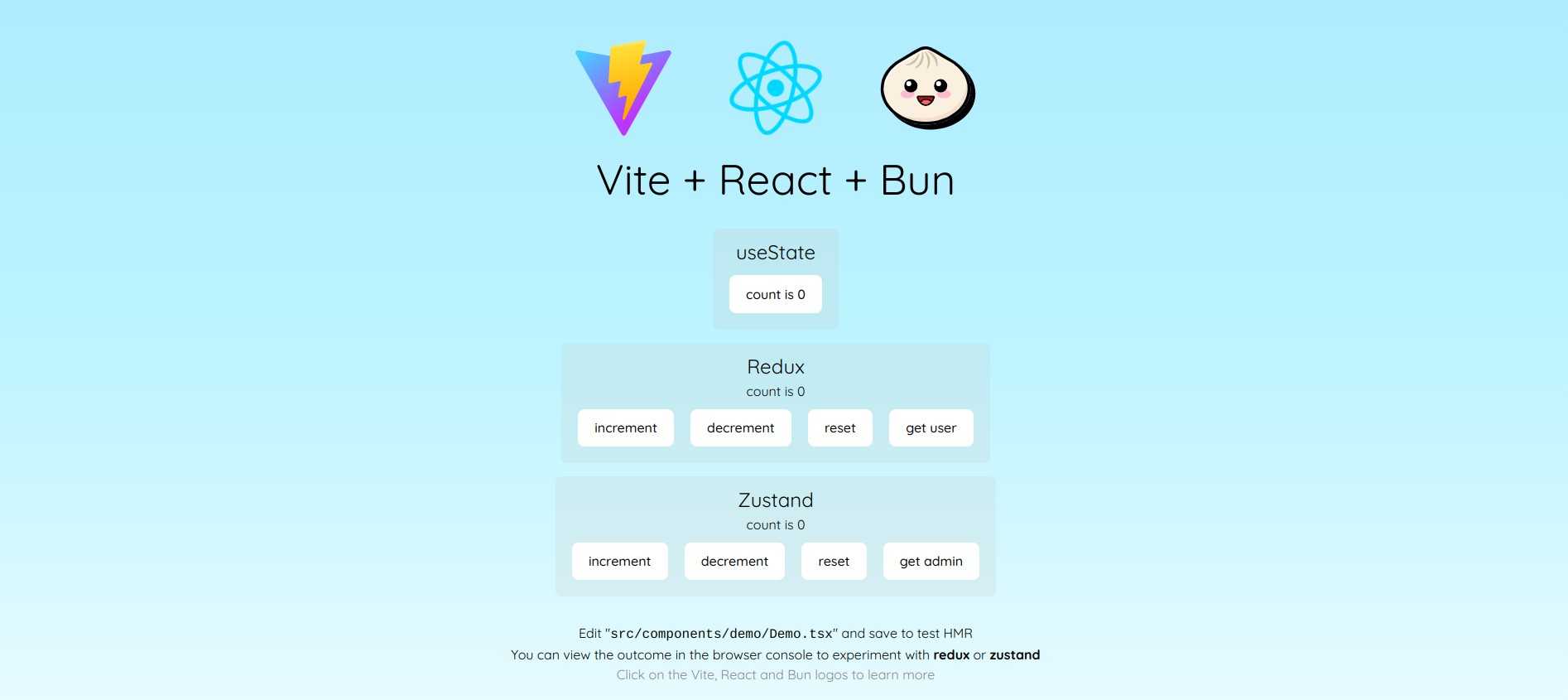
浏览真实页面截图,比较内容排版与手机效果。点击下方缩略图切换,放大查看整页细节。
目前有 1 张原始预览,可打开完整图片查看设计细节。
截图用于了解视觉与布局,交互效果请以实际项目为准。
采集于 2026-10-04查看来源
值得关注的模板亮点
从已有项目资料中,快速了解它的特点。
以 Bun 作为包管理器,并提供单元测试与覆盖率脚本
内置 ESLint(flat config)、Biome、Prettier、EditorConfig 等代码规范工具
提供 Playwright 端到端测试与基于 NGINX 的 Docker 部署配置
预置 Redux 或 Zustand 状态管理配置,可按需移除
支持 Tailwind CSS(CSS-first 配置)与 Sass
模板详细介绍
这是一个以 Vite 为构建工具、React 为 UI 库的 TypeScript 启动模板,定位为「开箱即用」的 React.js 项目起点。仓库使用 Bun 作为包管理器,采用 ESM 模块格式,并预先配置了 ESLint(flat config)、Biome、Prettier、EditorConfig 等代码规范工具,以及 Jest 或 Bun 测试、Playwright 端到端测试、Docker 容器化部署等环节。模板还提供了 Redux 或 Zustand 状态管理的预配置(可移除)、Tailwind CSS(通过 @tailwindcss/vite 插件以 CSS-first 方式配置,无需 tailwind.config.ts)和 Sass 支持。
使用方式上,README 给出的命令是 `bun create github.com/RajaRakoto/react-boilerplate <project-name>`,随后可运行 `bun run pkg-upgrade` 交互式升级依赖。部署分为无 Docker 与有 Docker 两种:无 Docker 时执行 `bun run build` 并将 Web 服务器指向 dist/index.html;有 Docker 时提供了基于 NGINX 的 Dockerfile,通过 docker build 与 docker run 启动。
需要注意的限制:README 中列出的部分版本号(如 TypeScript >= 6.0.x、React.js >= 19.x、ESLint >= 10、Biome >= 2、Tailwind CSS >= 4)来自项目自述,未在本次资料中通过依赖清单逐项核对;模板中的演示图片、字体、图标等第三方素材需按各自许可单独确认,不能仅凭代码的 MIT 许可判断。此外,模板附带 Grunt 备份、Ungit 图形化版本控制、NVM 管理等脚本,属于可选工具链,并非所有项目都需要。
ViteReact启动器
适合你的项目吗?
适用场景
- 需要快速搭建 React + TypeScript 项目骨架,并希望直接使用 Vite 与 Bun 的开发者
- 希望项目自带 ESLint、Biome、Prettier 等代码规范与格式化配置的团队
- 需要单元测试、端到端测试以及 Docker 部署脚本作为起点的项目
- 计划使用 Tailwind CSS 或 Sass 进行样式开发,并希望减少初始配置工作的场景
适合人群
- 使用 React 与 TypeScript 的前端项目起步阶段
- 偏好 Bun 作为包管理器和测试运行器的开发者
- 需要预置代码质量工具链(lint、format、测试)的团队
- 希望通过 Docker 或静态文件方式部署 Vite 构建产物的项目
上手与定制指南
结合仓库当前版本的说明,按下面的资料检查内容、配置与运行要求。
- 1
使用 `bun create github.com/RajaRakoto/react-boilerplate <project-name>` 创建项目,然后进入目录并可按需运行 `bun run pkg-upgrade` 升级依赖。
- 2
README 提示模板使用 MIT 许可并带有原作者姓名与 GitHub 链接,使用前应更新或移除;同时调整 package.json 中的 name、description、author 等字段。
- 3
src 下每个子目录都附有 README.md 说明其结构,可先阅读以了解组织方式。
- 4
部署时无 Docker 可执行 `bun run build` 并将 Web 服务器指向 dist/index.html;有 Docker 则构建镜像后运行容器,将容器 80 端口映射到所需端口。
- 5
模板中的演示图片、字体、图标等第三方素材需按各自许可单独核对,不能仅凭代码的 MIT 许可判断。
授权与来源资料
使用条件与限制
免费使用 · 保留许可声明本次收录的是公开仓库中采用 MIT 许可的免费版本;免费范围为该版本代码,不代表外部服务或第三方素材免费。
使用时需要遵守
- 允许免费使用、修改、商用和分发该版本代码。
- 分发代码副本或实质性部分时,保留原作者版权声明和完整 MIT 许可声明。
- 代码按现状提供;担保与责任限制以原许可证及适用法律为准。
额外费用与待核对事项
- MIT 许可要求在所有副本或实质性部分中保留原作者的版权声明与许可声明;若使用该模板,需保留或按说明更新版权署名,不能随意删除许可声明。
- PLUM 是可选的外部 SASS 工具集,并非模板内置依赖;如需使用需另行获取,且其许可与版本兼容性需自行确认。
- 部署需要自备托管平台(静态服务器或容器运行环境),模板本身不提供托管服务,可能产生外部平台费用。
- Docker 部署方式依赖 NGINX 基础镜像,使用前需确认镜像来源与许可,并自行承担容器运行环境成本。
- 演示图片、字体、图标及其他第三方素材需按各自许可核对,不能仅凭代码的 MIT 许可判断。
- 域名、托管、数据库、支付或 AI 等外部服务可能另外收费。
查看原文依据
Permission is hereby granted, free of charge
许可证原文
This starter kit uses the MIT license with my name and GitHub profile—update or remove if needed.
README 原文
You can customize your website faster with [PLUM](https://github.com/RajaRakoto/plum), a mixins toolset powered by SASS.
README 原文
Both options still require a platform to host the application.
README 原文
https://github.com/RajaRakoto/react-boilerplate/blob/master/LICENSEhttps://github.com/RajaRakoto/react-boilerplate/blob/master/README.mdA Dockerfile with an [NGINX](https://www.nginx.com/) base image is also provided for quick and easy deployments.
README 原文
DeepSeek 根据仓库许可证和 README 整理 ·2026-10-04。结果仅覆盖已读取资料,依赖、图片、字体及后续条款变更以各自原文为准。
项目核对记录与介绍依据
模板资料
- 来源平台
- GitHub
- 资料与维护参考分
- 资料较完整 · 76 / 100
- 技术栈
- Vite · React
- 网站类型
- 启动器
这个分数如何计算
本站按许可资料(最高30分)、演示链接(12分)、预览图(10分)、Star数(15分)、记录的维护时间(15分)、描述完整度(8分)、功能记录(5分)和分类资料(5分)计算。它不是代码、安全或性能测试,也不是 Google 评分;有链接不代表已实测可用。
这个项目需要核对什么
- 记录的仓库更新时间
- 2026-05-25
- 截图检查日期
- 2026-10-04
目前没有记录演示链接。请依据仓库说明在本地评估;仅凭截图无法确认交互行为。
目录记录的主要技术栈是 Vite。请通过依赖清单和锁文件核对实际版本与托管要求。这些说明基于收录资料,不代表代码审计或部署实测。
查看具体选型方法 →介绍的制作与核对状态
介绍由 AI 辅助整理目录与仓库资料。仓库作者不等于这篇介绍的审核者。
审核声明: [email protected] · 2026-10-04
查看当时使用的来源资料
SHA-256: d20a2106215176d722bfb5190b85286f4ebfba2d0e1ee4edb92788717a100a9e
2026-10-04T02:49:30.322Z
来源文件 / 仓库<div align="center"> <img src="https://rajarakoto.github.io/github-docs/boilerplate/react-boilerplate.jpg"> </div> # react-boilerplate 🚀 [](https://forthebadge.com) [](https://forthebadge.com) [](https://forthebadge.com) [](https://forthebadge.com) [](https://forthebadge.com)   **Developer Ready: A comprehensive template. Works out of the box for most React.js projects. This project is intended to be used with the latest active release of React.js.** Instant Value - All basic tools included and configured: - 🚀 Typescript >= 6.0.x - 🌐 React.js >= 19.x - 🧅 Use Bun as package manager - 🌈 ESM - 🧹 ESlint >= 10 with flat config and some initial rules recommendation - 🧪 Biome >= 2 for code formatting and linting - ✅ Jest or Bun test for fast unit testing and code coverage - 📚 Type definitions for Bun.js and Jest - 🎨 Prettier to enforce consistent code style - ⚙️ EditorConfig for consistent coding style - 📦 NPM scripts for common operations - 📝 Simple example of Tsx code - 🐗 Run tasks with Grunt (example for backup) - 🖥️ Ungit for version control (git) with a GUI - ⚡ Use Vite for lightning fast HMR (hot reload) - ⚡ Optimized build by Vite - 🧪 E2E test with Playwright - 🐳 Containerization for easy deployment and scaling with Docker - 🧺 Pre-configured setup for Redux or Zustand as state manager, easily removable if not needed - 🌀 Tailwind CSS >= 4 with CSS-first config via `@tailwindcss/vite` plugin (no `tailwind.config.ts` needed) - 🩷 Sass extends CSS with features like variables, nested rules, mixins, imports, inheritance, built-in functions, and more ... > You can customize your website faster with [PLUM](https://github.com/RajaRakoto/plum), a mixins toolset powered by SASS. Quickly produce consistent, scalable CSS output, regardless of project size. For the best experience, it is recommended to use SASS version `1.77.6` to ensure smooth integration with PLUM. --- ### 📌 Usage To use this template, use the following commands: ```bash bun create github.com/RajaRakoto/react-boilerplate <project-name> cd <project-name> bun run pkg-upgrade # to upgrade outdated dependencies in interactive mode ``` > 1. This starter kit uses the MIT license with my name and GitHub profile—update or remove if needed. > 2. Each subdirectory in `src` has a `README.md` to explain its structure. > 3. Adjust the `package.json` (name, description, author, etc.) to fit your project. --- ### 📌 Deployment Instructions are provided for deploying both with and without Docker. Both options still require a platform to host the application. **Without Docker**: Deploying is as easy as running the following command and pointing your web server to the generated `index.html` file found at `dist/index.html` ```bash bun run build ``` **With Docker**: A Dockerfile with an [NGINX](https://www.nginx.com/) base image is also provided for quick and easy deployments. Simply execute the following commands: ```bash bun run build docker build . -t <container_name> # eg: docker build . -t todo-app docker run -p <port_number>:80 <container_name> # eg: docker run todo-app -p 8080:80 ``` --- ### 📌 NPM Scripts **Preview** - 📜 `preview` - Run your app with preview mode. **Clean** - 📜 `clean` - Remove coverage data, prod folder, playwright-report ... **Development** - 📜 `dev` - Launch Vite.js development server using hot module remplacement (HMR). **Build** - 📜 `build` - Build faster with Vite.js. **Testing** - 📜 `test:unit` - Run unit testing with Bun.js. - 📜 `test:unit:watch` - Interactive watch mode to automatically re-run unit testing with Bun.js. - 📜 `test:e2e` - Run end to end (e2e) testing with Playwright. **Linting and Formatting** - 📜 `biome:start` - Starts the Biome daemon server. You can specify a custom configuration file path using the `--config-path` option. - 📜 `biome:stop` - Stops the Biome daemon server. - 📜 `biome:fix` - Runs a source code check and applies automatic fixes (linter & formatter) according to the defined rules. - 📜 `biome:unsafe` - Works like `biome:fix`, but may apply more invasive or risky changes. - 📜 `eslint` - Lints the project with ESLint and reports unhandled errors. - 📜 `prettier` - Formats code according to the `.prettierrc` rules. **Backup and Dependency Management** - 📜 `backup` - Backup files with Grunt. - 📜 `pkg-check` - Check useless dependencies with depcheck. - 📜 `pkg-upgrade` - Upgrade outdated dependencies (interactive mode) with npm-check-updates. **Versioning** - 📜 `versioning` - Start ungit server. **NPM Commands** - 📜 `npm-version:major` - Increments the major version number of your project using npm. - 📜 `npm-version:minor` - Increments the minor version number of your project using npm. - 📜 `npm-version:patch` - Increments the version patch number of your project using npm. **NVM** - 📜 `nvm` - Manage multiple node.js versions. Easily switch between node versions per project to ensure compatibility. **Scripts** - 📜 `script:sass-charset` - Adds the @charset "UTF-8" declaration at the beginning of all SCSS files in the project. --- ### 📌 Similar You can also check out my other starter projects: - 🚀 [bun-boilerplate](https://github.com/RajaRakoto/bun-boilerplate) - 🚀 [node-boilerplate](https://github.com/RajaRakoto/node-boilerplate) - 🚀 [next-boilerplate](https://github.com/RajaRakoto/next-boilerplate) - 🚀 [qwik-boilerplate](https://github.com/RajaRakoto/qwik-boilerplate) - 🚀 [vscode-boilerplate](https://github.com/RajaRakoto/vscode-boilerplate) - 🚀 [cli-boilerplate](https://github.com/RajaRakoto/cli-boilerplate) - 🚀 [rust-boilerplate](https://github.com/RajaRakoto/rust-boilerplate)
看看同类模板
对比同技术栈与用途的模板,找到更适合的视觉与内容结构。

react-starter-kit
Modern React starter kit with Bun, TypeScript, Tailwind CSS, tRPC, Stripe, and Cloudflare Workers. Production-…
Vite · SaaS

cove
The Cove Stack: 🏝️ minimal TanStack Start template with Vite+, Better Auth, Drizzle ORM, shadcn/ui
Vite · SaaS

vite-react-boilerplate
A production ready, scalable starter template for Vite + React
Vite · 启动器

react-vite-admin
This Starter utilizes React, Recoil, React Query, React Hooks, Typescript, Axios And Vite. 全新技术栈的后台管理系统
Vite · 后台

typescript-react_best_practices-vite_template
<⚡⚛️> Start your React project with Vite following code best practices (TypeScript, Linting, testing, CI/CD…)
Vite · 启动器

cloudflare-starter-kit
Template (boilerplate) repository for scaffolding Cloudflare Workers projects
Vite · 启动器