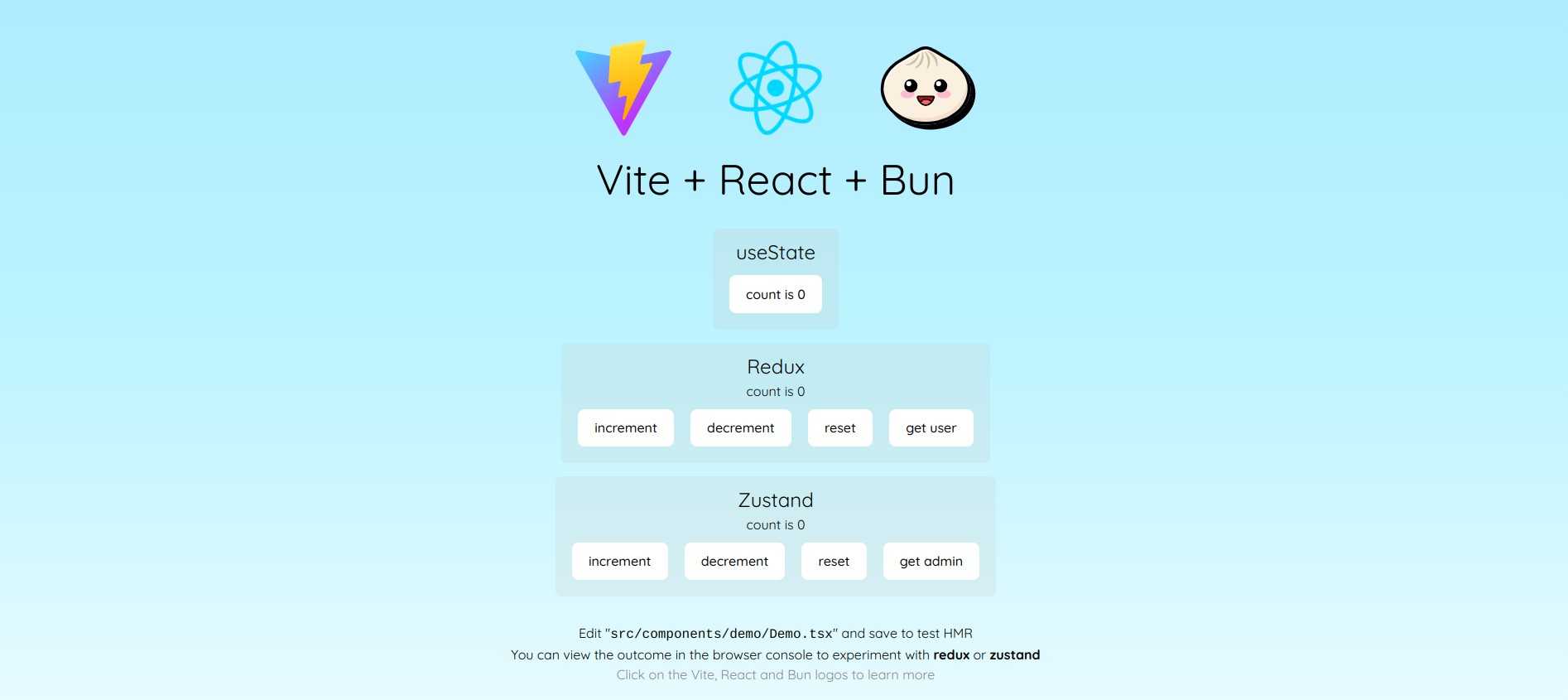
Uses Vite for the development server and build process, supporting hot module replacement (HMR)
ViteReactStarter
react-boilerplate — Vite Starter Template
By RajaRakoto
A TypeScript starter template based on Vite and React, with built-in configurations for Bun, ESLint, Biome, Jest/Bun testing, Playwright, Docker, and other foundational tools.
Explore the design
Compare the page layouts and mobile experience. Open any screenshot for a closer look.
Author preview
Author-provided preview
Preview provided in the project README.
One original preview is available. Open the full image to inspect the design.
Screenshots show visual appearance; interactive behavior may differ.
Recorded 2026-10-04View source
What stands out
A quick read of the recorded project description.
Uses Bun as the package manager and provides unit testing and coverage scripts
Includes code quality tools such as ESLint (flat config), Biome, Prettier, and EditorConfig
Provides Playwright end-to-end testing and NGINX-based Docker deployment configuration
Comes with preconfigured Redux or Zustand state management, removable as needed
Supports Tailwind CSS (CSS-first configuration) and Sass
Template Details
This is a TypeScript starter template using Vite as the build tool and React as the UI library, positioned as an out-of-the-box starting point for React.js projects. The repository uses Bun as the package manager, adopts ESM module format, and comes preconfigured with code quality tools such as ESLint (flat config), Biome, Prettier, and EditorConfig, as well as Jest or Bun testing, Playwright end-to-end testing, and Docker containerized deployment. The template also provides preconfigured Redux or Zustand state management (removable), Tailwind CSS (configured in a CSS-first way via the @tailwindcss/vite plugin, without needing tailwind.config.ts), and Sass support.
For usage, the README gives the command `bun create github.com/RajaRakoto/react-boilerplate <project-name>`, after which you can run `bun run pkg-upgrade` to interactively upgrade dependencies. Deployment is divided into two approaches: without Docker, run `bun run build` and point the web server to dist/index.html; with Docker, an NGINX-based Dockerfile is provided, started via docker build and docker run.
Limitations to note: some version numbers listed in the README (such as TypeScript >= 6.0.x, React.js >= 19.x, ESLint >= 10, Biome >= 2, Tailwind CSS >= 4) come from the project's own description and were not verified item by item against the dependency manifest in this material; third-party assets such as demo images, fonts, and icons in the template need to be confirmed separately under their respective licenses and cannot be judged solely by the code's MIT license. In addition, the template includes scripts for Grunt backup, Ungit graphical version control, and NVM management, which are optional toolchain components and not required by all projects.
ViteReactStarter
Is it right for your project?
Use Cases
- Developers who need to quickly set up a React + TypeScript project skeleton and want to use Vite and Bun directly
- Teams that want the project to include code quality and formatting configurations such as ESLint, Biome, and Prettier
- Projects that need unit testing, end-to-end testing, and Docker deployment scripts as a starting point
- Scenarios where you plan to use Tailwind CSS or Sass for styling and want to reduce initial configuration work
Suitable For
- The initial stage of front-end projects using React and TypeScript
- Developers who prefer Bun as the package manager and test runner
- Teams that need a preconfigured code quality toolchain (lint, format, test)
- Projects that plan to deploy Vite build output via Docker or as static files
Getting started & customization
Use these recorded setup notes alongside the repository instructions for your chosen version.
- 1
Create a project with `bun create github.com/RajaRakoto/react-boilerplate <project-name>`, then enter the directory and optionally run `bun run pkg-upgrade` to upgrade dependencies.
- 2
The README indicates the template uses the MIT license and includes the original author's name and GitHub link, which should be updated or removed before use; also adjust fields such as name, description, and author in package.json.
- 3
Each subdirectory under src includes a README.md explaining its structure; read these first to understand the organization.
- 4
For deployment without Docker, run `bun run build` and point the web server to dist/index.html; with Docker, build the image and run the container, mapping container port 80 to the desired port.
- 5
Third-party assets such as demo images, fonts, and icons in the template need to be checked separately under their respective licenses and cannot be judged solely by the code's MIT license.
License & source material
Usage conditions & limitations
Free to use · keep license noticeThis entry covers the free version under the MIT license in a public repository; the free scope is the code of that version and does not mean external services or third-party assets are free.
Must comply with when using
- Free use, modification, commercial use, and distribution of this version's code are permitted.
- When distributing copies or substantial portions of the code, retain the original author's copyright notice and the full MIT license notice.
- The code is provided as is; warranties and limitations of liability are governed by the original license and applicable law.
Additional costs & items to verify
- The MIT license requires retaining the original author's copyright notice and license notice in all copies or substantial portions; if you use this template, you must retain or update the copyright attribution as instructed and may not arbitrarily remove the license notice.
- PLUM is an optional external SASS toolset, not a built-in dependency of the template; if needed, it must be obtained separately, and its license and version compatibility must be confirmed independently.
- Deployment requires your own hosting platform (static server or container runtime environment); the template itself does not provide hosting services and may incur external platform costs.
- The Docker deployment method relies on an NGINX base image; before use, confirm the image source and license, and bear the container runtime environment costs yourself.
- Demo images, fonts, icons, and other third-party assets need to be checked under their respective licenses and cannot be judged solely by the code's MIT license.
- External services such as domain, hosting, database, payment, or AI may incur additional charges.
View Original Text Basis
Permission is hereby granted, free of charge
Original License Text
This starter kit uses the MIT license with my name and GitHub profile—update or remove if needed.
Original README
You can customize your website faster with [PLUM](https://github.com/RajaRakoto/plum), a mixins toolset powered by SASS.
Original README
Both options still require a platform to host the application.
Original README
https://github.com/RajaRakoto/react-boilerplate/blob/master/LICENSEhttps://github.com/RajaRakoto/react-boilerplate/blob/master/README.mdA Dockerfile with an [NGINX](https://www.nginx.com/) base image is also provided for quick and easy deployments.
Original README
Compiled by DeepSeek based on repository license and README ·2026-10-04. Results only cover the materials read; dependencies, images, fonts, and subsequent term changes are subject to their respective original texts.
Project checks & description sources
Template Information
- Source platforms
- GitHub
- Documentation and maintenance reference score
- More documented · 76 / 100
- Technologies
- Vite · React
- Website type
- Starter
How this score is calculated
Our heuristic uses license records (up to 30), a demo link (12), a preview (10), stars (15), recorded maintenance (15), description completeness (8), feature records (5) and classification data (5). It is not a code, security or performance test, or a Google score. A link does not establish tested functionality.
What to verify for this project
- Repository update recorded
- 2026-05-25
- Screenshot last checked
- 2026-10-04
No demo link is recorded. Use the repository instructions to evaluate the project locally; the screenshot alone cannot establish interactive behavior.
The catalog identifies Vite as the primary stack. Check the actual dependency manifest and lockfile for versions and hosting requirements. These notes use recorded metadata, not a code audit or a deployment test.
Use a selection guide →How this description was prepared
AI-assisted description based on catalog records and repository material. Repository authors are not automatically the reviewers of this description.
Review declaration: [email protected] · 2026-10-04
Inspect the recorded source material
SHA-256: d20a2106215176d722bfb5190b85286f4ebfba2d0e1ee4edb92788717a100a9e
2026-10-04T02:49:30.322Z
Source file / repository<div align="center"> <img src="https://rajarakoto.github.io/github-docs/boilerplate/react-boilerplate.jpg"> </div> # react-boilerplate 🚀 [](https://forthebadge.com) [](https://forthebadge.com) [](https://forthebadge.com) [](https://forthebadge.com) [](https://forthebadge.com)   **Developer Ready: A comprehensive template. Works out of the box for most React.js projects. This project is intended to be used with the latest active release of React.js.** Instant Value - All basic tools included and configured: - 🚀 Typescript >= 6.0.x - 🌐 React.js >= 19.x - 🧅 Use Bun as package manager - 🌈 ESM - 🧹 ESlint >= 10 with flat config and some initial rules recommendation - 🧪 Biome >= 2 for code formatting and linting - ✅ Jest or Bun test for fast unit testing and code coverage - 📚 Type definitions for Bun.js and Jest - 🎨 Prettier to enforce consistent code style - ⚙️ EditorConfig for consistent coding style - 📦 NPM scripts for common operations - 📝 Simple example of Tsx code - 🐗 Run tasks with Grunt (example for backup) - 🖥️ Ungit for version control (git) with a GUI - ⚡ Use Vite for lightning fast HMR (hot reload) - ⚡ Optimized build by Vite - 🧪 E2E test with Playwright - 🐳 Containerization for easy deployment and scaling with Docker - 🧺 Pre-configured setup for Redux or Zustand as state manager, easily removable if not needed - 🌀 Tailwind CSS >= 4 with CSS-first config via `@tailwindcss/vite` plugin (no `tailwind.config.ts` needed) - 🩷 Sass extends CSS with features like variables, nested rules, mixins, imports, inheritance, built-in functions, and more ... > You can customize your website faster with [PLUM](https://github.com/RajaRakoto/plum), a mixins toolset powered by SASS. Quickly produce consistent, scalable CSS output, regardless of project size. For the best experience, it is recommended to use SASS version `1.77.6` to ensure smooth integration with PLUM. --- ### 📌 Usage To use this template, use the following commands: ```bash bun create github.com/RajaRakoto/react-boilerplate <project-name> cd <project-name> bun run pkg-upgrade # to upgrade outdated dependencies in interactive mode ``` > 1. This starter kit uses the MIT license with my name and GitHub profile—update or remove if needed. > 2. Each subdirectory in `src` has a `README.md` to explain its structure. > 3. Adjust the `package.json` (name, description, author, etc.) to fit your project. --- ### 📌 Deployment Instructions are provided for deploying both with and without Docker. Both options still require a platform to host the application. **Without Docker**: Deploying is as easy as running the following command and pointing your web server to the generated `index.html` file found at `dist/index.html` ```bash bun run build ``` **With Docker**: A Dockerfile with an [NGINX](https://www.nginx.com/) base image is also provided for quick and easy deployments. Simply execute the following commands: ```bash bun run build docker build . -t <container_name> # eg: docker build . -t todo-app docker run -p <port_number>:80 <container_name> # eg: docker run todo-app -p 8080:80 ``` --- ### 📌 NPM Scripts **Preview** - 📜 `preview` - Run your app with preview mode. **Clean** - 📜 `clean` - Remove coverage data, prod folder, playwright-report ... **Development** - 📜 `dev` - Launch Vite.js development server using hot module remplacement (HMR). **Build** - 📜 `build` - Build faster with Vite.js. **Testing** - 📜 `test:unit` - Run unit testing with Bun.js. - 📜 `test:unit:watch` - Interactive watch mode to automatically re-run unit testing with Bun.js. - 📜 `test:e2e` - Run end to end (e2e) testing with Playwright. **Linting and Formatting** - 📜 `biome:start` - Starts the Biome daemon server. You can specify a custom configuration file path using the `--config-path` option. - 📜 `biome:stop` - Stops the Biome daemon server. - 📜 `biome:fix` - Runs a source code check and applies automatic fixes (linter & formatter) according to the defined rules. - 📜 `biome:unsafe` - Works like `biome:fix`, but may apply more invasive or risky changes. - 📜 `eslint` - Lints the project with ESLint and reports unhandled errors. - 📜 `prettier` - Formats code according to the `.prettierrc` rules. **Backup and Dependency Management** - 📜 `backup` - Backup files with Grunt. - 📜 `pkg-check` - Check useless dependencies with depcheck. - 📜 `pkg-upgrade` - Upgrade outdated dependencies (interactive mode) with npm-check-updates. **Versioning** - 📜 `versioning` - Start ungit server. **NPM Commands** - 📜 `npm-version:major` - Increments the major version number of your project using npm. - 📜 `npm-version:minor` - Increments the minor version number of your project using npm. - 📜 `npm-version:patch` - Increments the version patch number of your project using npm. **NVM** - 📜 `nvm` - Manage multiple node.js versions. Easily switch between node versions per project to ensure compatibility. **Scripts** - 📜 `script:sass-charset` - Adds the @charset "UTF-8" declaration at the beginning of all SCSS files in the project. --- ### 📌 Similar You can also check out my other starter projects: - 🚀 [bun-boilerplate](https://github.com/RajaRakoto/bun-boilerplate) - 🚀 [node-boilerplate](https://github.com/RajaRakoto/node-boilerplate) - 🚀 [next-boilerplate](https://github.com/RajaRakoto/next-boilerplate) - 🚀 [qwik-boilerplate](https://github.com/RajaRakoto/qwik-boilerplate) - 🚀 [vscode-boilerplate](https://github.com/RajaRakoto/vscode-boilerplate) - 🚀 [cli-boilerplate](https://github.com/RajaRakoto/cli-boilerplate) - 🚀 [rust-boilerplate](https://github.com/RajaRakoto/rust-boilerplate)
Explore similar templates
Compare previews and descriptions within the same stack and category.

react-starter-kit
A full-stack SaaS monorepo starter built on Vite and React, with Bun, TypeScript, tRPC, Drizzle ORM, Better Auth, Stripe, and Cloudflare Workers. It includes email OTP, passkey, Google OAuth, organizations, subscription billing, Drizzle migrations, seed scripts, and Terraform infrastructure.
Vite · SaaS

cove
Cove is a minimal TanStack Start starter template maintained by mugnavo, integrating React, TanStack Router/Query, Tailwind CSS, shadcn/ui, Drizzle ORM with PostgreSQL, Better Auth, Vite Plus, and Nitro.
Vite · SaaS

vite-react-boilerplate
A production-ready Vite + React starter template with TypeScript, Tailwind CSS, TanStack Router/Query/Table, Storybook, React Hook Form + Zod, Vitest and Playwright testing, plus Husky/Commitizen/Commitlint commit conventions.
Vite · Starter

react-vite-admin
A backend management starter built on Vite and React, integrating Recoil, React Query, TypeScript, and Axios, with Ant Design-style interface screenshots. Suitable as a starting point for management-side projects, licensed under MIT, with Chinese documentation and common scripts.
Vite · Admin dashboard

typescript-react_best_practices-vite_template
A Vite + React + TypeScript starter template by CodelyTV, preconfigured with Jest and React Testing Library unit tests, Cypress end-to-end tests, ESLint and Prettier using Codely's shared configuration, GitHub Actions workflows, a Makefile, and Sass.
Vite · Starter

cloudflare-starter-kit
A Cloudflare Workers project scaffolding template maintained by kriasoft, using Vite and TypeScript, with three built-in workspaces: api, app, and edge, and preconfigured local testing, multiple environments, and a GitHub Actions deployment workflow.
Vite · Starter