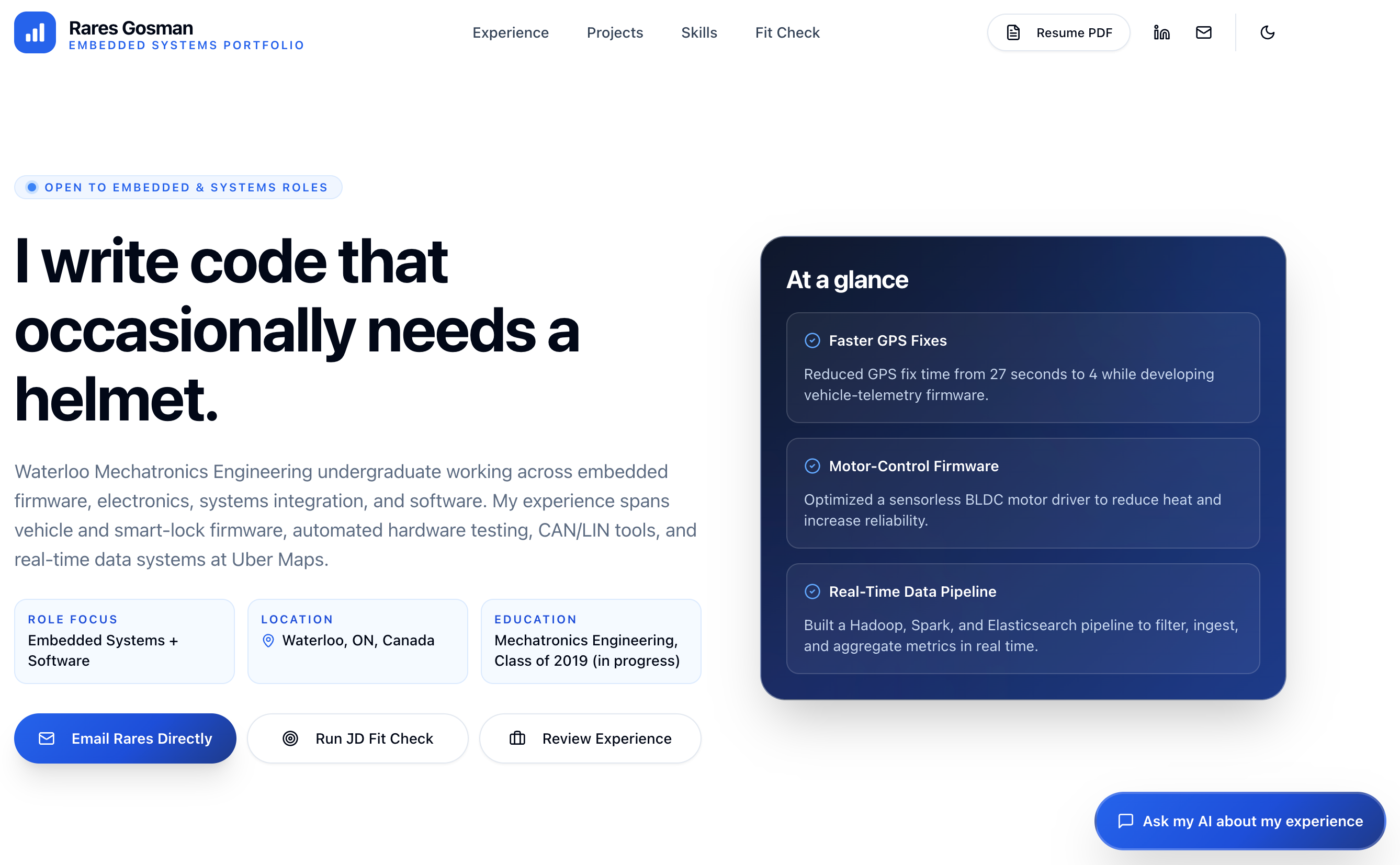
AI 招聘聊天:流式响应,聊天记录保存在客户端 sessionStorage,支持同标签页刷新后继续。
ViteReact作品集
ai-portfolio-template — Vite 作品集模板
作者 rarestg
基于 Vite 与 React 的个人作品集模板,内置 AI 招聘聊天与职位描述匹配检查,通过两个内容文件个性化,部署在 Cloudflare Workers 上。
看看你的网站会是什么样
浏览真实页面截图,比较内容排版与手机效果。点击下方缩略图切换,放大查看整页细节。
目前有 1 张原始预览,可打开完整图片查看设计细节。
截图用于了解视觉与布局,交互效果请以实际项目为准。
采集于 2026-10-01查看来源
值得关注的模板亮点
从已有项目资料中,快速了解它的特点。
职位描述匹配检查:粘贴职位描述后获得带证据、差距和置信度的评估,明确说明“不匹配”也是有效结果。
内容与代码分离:只需编辑 content/portfolio.yaml 和 content/prose/summary.md 两个文件即可完成个性化。
内容构建与校验:通过 Zod 校验 YAML 并生成共享的 TypeScript 文件,内容检查命令防止生成文件过期。
可选集成:Twilio 短信联系交接和 Turnstile 机器人防护,未配置时自动降级为安全模拟。
服务端安全措施:租户隔离、按租户和 IP 的速率限制、请求大小上限。
模板详细介绍
这是一个内容驱动的个人作品集模板,使用 Vite 和 React 构建单页前端,运行在 Cloudflare Workers 上。它内置 AI 招聘聊天功能,可回答关于个人经历的问题,并提供职位描述匹配检查(POST /api/analyze-fit),输出带证据和明确差距的评估结果。模板自带虚构人物 Jordan Ellis 的示例内容,开箱即可运行。个性化只需编辑两个文件:content/portfolio.yaml 存放结构化事实(身份、经历、项目、技能、教育、SEO、首页文案、起始提示),content/prose/summary.md 存放一段长文职业摘要。运行内容构建命令会校验 YAML 并重新生成 shared/content.generated.ts,应用、Worker 和测试均读取该生成文件;内容检查命令会检测生成文件是否过期。本地开发需要 Bun,复制环境变量示例文件并填写后运行开发命令,默认在 3000 端口启动。部署默认发布到 workers.dev 子域,也可配置自定义域名。AI 提供商可选择 workers-ai 或 google-gateway,模型链定义在 shared/models.ts 中。可选的 Turnstile 机器人防护和 Twilio 短信联系交接功能,在未配置时会自动降级为安全模拟。
ViteReact作品集
适合你的项目吗?
适用场景
- 个人开发者或设计师搭建带有 AI 问答能力的在线作品集,展示经历与项目。
- 求职者部署一个可交互的作品集,让招聘方通过聊天了解背景,并粘贴职位描述快速评估匹配度。
- 希望将内容维护与前端代码分离,通过编辑 YAML 和 Markdown 文件更新作品集信息的场景。
- 需要部署在 Cloudflare Workers 上,并可选启用 Turnstile 防护或 Twilio 短信通知的站点。
适合人群
- 熟悉或愿意使用 Bun、Vite 和 Cloudflare Workers 的开发者。
- 希望以低代码方式维护作品集内容,仅编辑两个内容文件的用户。
- 需要 AI 招聘聊天和职位描述匹配检查功能的个人作品集项目。
- 接受使用 Cloudflare 生态服务并自行配置 AI 提供商、密钥和可选集成的用户。
上手与定制指南
结合仓库当前版本的说明,按下面的资料检查内容、配置与运行要求。
- 1
本地开发需要安装 Bun,然后运行 bun install,复制 .dev.vars.example 为 .dev.vars 并填写本地值,再运行 bun run dev。
- 2
个性化时编辑 content/portfolio.yaml 和 content/prose/summary.md,然后运行 bun run content:build 重新生成共享内容文件,不要手动编辑 shared/content.generated.ts。
- 3
部署前需在 wrangler.jsonc 中配置 AI_PROVIDER、CF_AI_BASE_URL 等变量,并设置 SECURITY_HMAC_SECRET 等密钥;Google 提供商还需配置 CF_AI_GATEWAY_TOKEN。
- 4
可选功能如 Turnstile 和 Twilio 短信交接需要额外配置对应的环境变量和密钥,未配置时会自动降级为模拟行为。
- 5
部署默认发布到 workers.dev 子域,也可在 wrangler.jsonc 中添加 routes 块并设置 custom_domain: true 来使用自定义域名。
授权与来源资料
使用条件与限制
免费使用 · 保留许可声明本次收录的是公开仓库中采用 MIT 许可的免费版本;免费范围为该版本代码,不代表外部服务或第三方素材免费。
使用时需要遵守
- 允许免费使用、修改、商用和分发该版本代码。
- 分发代码副本或实质性部分时,保留原作者版权声明和完整 MIT 许可声明。
- 代码按现状提供;担保与责任限制以原许可证及适用法律为准。
额外费用与待核对事项
- 本地开发与构建需要安装 Bun 运行时,未安装 Bun 的环境无法运行开发、构建和内容生成命令。
- 使用 google-gateway 提供商时需自行创建 Google AI Studio API 密钥,并配置到 Cloudflare AI Gateway 的 Provider Keys 中。
- 短信联系交接功能依赖 Twilio 账户与凭据(账户 SID、认证令牌、发送号码),未配置时仅降级为模拟行为。
- 启用 Turnstile 机器人防护需额外配置站点密钥与密钥,并依赖 Cloudflare Turnstile 服务。
- 部署依赖 Cloudflare Workers 平台,默认发布到 workers.dev 子域,自定义域名需在 Cloudflare 账户中配置。
- AI 聊天与匹配检查功能依赖 Cloudflare Workers AI 或 Google AI Gateway 等外部 AI 服务,需配置相应变量与密钥。
- 演示图片、字体、图标及其他第三方素材需按各自许可核对,不能仅凭代码的 MIT 许可判断。
- 域名、托管、数据库、支付或 AI 等外部服务可能另外收费。
查看原文依据
Permission is hereby granted, free of charge
许可证原文
Requires [Bun](https://bun.sh).
README 原文
For Google BYOK, create a [Google AI Studio key](https://aistudio.google.com/api-keys), then store it
README 原文
Optional SMS contact handoff** (Twilio): the assistant can text you a visitor's contact details.
README 原文
Optional Turnstile** bot protection using a verify-once signed lease.
README 原文
By default the Worker publishes to `https://<name>.<subdomain>.workers.dev`
README 原文
https://github.com/rarestg/ai-portfolio-template/blob/main/LICENSEhttps://github.com/rarestg/ai-portfolio-template/blob/main/README.md`AI_PROVIDER` selects `workers-ai` (Gemma 4 with GLM-4.7-Flash fallback through the `AI` binding) or
README 原文
DeepSeek 根据仓库许可证和 README 整理 ·2026-10-01。结果仅覆盖已读取资料,依赖、图片、字体及后续条款变更以各自原文为准。
项目核对记录与介绍依据
模板资料
- 来源平台
- GitHub
- 资料与维护参考分
- 资料一般 · 73 / 100
- 技术栈
- Vite · React
- 网站类型
- 作品集
这个分数如何计算
本站按许可资料(最高30分)、演示链接(12分)、预览图(10分)、Star数(15分)、记录的维护时间(15分)、描述完整度(8分)、功能记录(5分)和分类资料(5分)计算。它不是代码、安全或性能测试,也不是 Google 评分;有链接不代表已实测可用。
这个项目需要核对什么
- 记录的仓库更新时间
- 2026-07-13
- 截图检查日期
- 2026-10-01
目前没有记录演示链接。请依据仓库说明在本地评估;仅凭截图无法确认交互行为。
目录记录的主要技术栈是 Vite。请通过依赖清单和锁文件核对实际版本与托管要求。这些说明基于收录资料,不代表代码审计或部署实测。
查看具体选型方法 →介绍的制作与核对状态
介绍由 AI 辅助整理目录与仓库资料。仓库作者不等于这篇介绍的审核者。
已完成服务器许可规则与 AI 来源核对;未经过人工编辑审核。
查看当时使用的来源资料
SHA-256: f398abe4aa23d203d3dd70c2180f8dc9e13bace2bdbb5a322de69034086dfd9b
2026-10-01T04:20:33.895Z
来源文件 / 仓库# AI Portfolio Template
An AI-powered personal portfolio you deploy on Cloudflare. It renders a single-page site with an AI
"recruiter chat" that answers questions about your experience, plus a job-description fit-check, all
driven from two content files so you never touch the app code to personalize it.
The template ships with a fictional "Jordan Ellis" persona so it runs green out of the box. Replace
that content with your own (an agent can do it for you) and deploy.
## See it in action
<table>
<tr>
<td colspan="6" align="center">
<a href="docs/images/portfolio/landing.png"><img src="docs/images/portfolio/landing.png" alt="Personalized portfolio landing page" width="100%"></a><br>
<sub><b>Personalized landing page:</b> experience, proof points, and calls to action at a glance.</sub>
</td>
</tr>
<tr>
<td colspan="2" align="center">
<a href="docs/images/portfolio/chat-1.png"><img src="docs/images/portfolio/chat-1.png" alt="AI recruiter chat answering a question about experience" width="100%"></a><br>
<sub><b>Grounded answers:</b> ask about experience, projects, or role fit.</sub>
</td>
<td colspan="2" align="center">
<a href="docs/images/portfolio/chat-2-tool.png"><img src="docs/images/portfolio/chat-2-tool.png" alt="AI recruiter chat showing a weather tool result" width="100%"></a><br>
<sub><b>Live tools:</b> structured tool results render directly in the conversation.</sub>
</td>
<td colspan="2" align="center">
<a href="docs/images/portfolio/chat-3-tool.png"><img src="docs/images/portfolio/chat-3-tool.png" alt="AI recruiter chat showing a simulated contact handoff" width="100%"></a><br>
<sub><b>Contact handoff:</b> turn recruiter interest into a direct follow-up.</sub>
</td>
</tr>
<tr>
<td colspan="3" align="center">
<a href="docs/images/portfolio/jd-input.png"><img src="docs/images/portfolio/jd-input.png" alt="Job description fit-check input" width="100%"></a><br>
<sub><b>Paste a job description:</b> provide the full posting for a useful comparison.</sub>
</td>
<td colspan="3" align="center">
<a href="docs/images/portfolio/jd-output.png"><img src="docs/images/portfolio/jd-output.png" alt="Evidence-backed job fit assessment" width="100%"></a><br>
<sub><b>Get an honest assessment:</b> see evidence, gaps, confidence, and a recommended next step.</sub>
</td>
</tr>
</table>
## Set it up with your agent
The fastest path is to let an AI coding agent (Claude Code or OpenAI Codex) personalize and deploy
it for you. Paste this to your agent:
```
Read SETUP.md and guide me through setting up this portfolio.
```
[`SETUP.md`](SETUP.md) is the interactive builder guide: it interviews you, ingests your resume,
writes the content, validates, previews locally, and walks you through the Cloudflare deploy.
Bring your own resume as a PDF path, text, or Markdown. If your agent cannot extract a PDF cleanly,
use [LiteDoc](https://litedoc.xyz/) ([source](https://github.com/0xovo/LiteDoc)) to convert it locally
in your browser, review the result, and paste the Markdown into the agent chat. To show the original
PDF on the portfolio, the setup flow copies it into `public/` only after you approve publishing it;
the template does not generate a new PDF from Markdown.
## Features
- **AI recruiter chat** with streaming responses and same-tab refresh continuity (chat history is
held client-side in `sessionStorage`).
- **JD fit-check** (`POST /api/analyze-fit`): paste a job description and get an evidence-backed
fit assessment with explicit gaps. "Not a fit" is a valid, honest outcome.
- **Weather tool** the assistant can call inline.
- **Optional SMS contact handoff** (Twilio): the assistant can text you a visitor's contact details.
Self-disables to a safe simulation when Twilio is not configured.
- **Optional Turnstile** bot protection using a verify-once signed lease.
- Server-side tenant isolation, per-tenant/per-IP rate limits, and request-size caps.
## Content model (the content seam)
You personalize the site by editing two files, not the app:
- `content/portfolio.yaml` - structured facts (identity, experience, projects, skills, education,
SEO, homepage copy, starter prompts).
- `content/prose/summary.md` - the long-form professional summary (one plain paragraph).
Running `bun run content:build` validates the YAML with Zod and regenerates the **committed**
`shared/content.generated.ts`, which the app, worker, and tests read via `shared/resume-canonical.ts`.
`bun run content:check` is a drift guard (the first step of `bun run check`) that fails if the
generated file is stale. Never hand-edit `shared/content.generated.ts`.
The full content schema (required vs optional keys, the `education` list, the
`proofPoints.sourceId` rule) is documented in [`SETUP.md`](SETUP.md#stage-4---write-the-content).
## Local development
Requires [Bun](https://bun.sh). Then:
```bash
bun install
cp .dev.vars.example .dev.vars # fill in your local values (see the env table below)
bun run dev
```
Open `http://localhost:3000` (override with `PORT`). The `predev` hook regenerates
`shared/content.generated.ts` from `content/*` before the server starts.
## Command reference
| Command | What it does |
| ---------------------------- | ------------------------------------------------------------------- |
| `bun run dev` | Vite dev server on `0.0.0.0:${PORT:-3000}`. |
| `bun run build` | Production build. |
| `bun run preview` | Build, then serve the production bundle on `${PORT:-4173}`. |
| `bun run content:build` | Validate `content/*` and regenerate `shared/content.generated.ts`. |
| `bun run content:check` | Fail if the generated content file is stale (drift guard). |
| `bun run check` | content:check + prettier + eslint + typecheck + knip. |
| `bun run check:fix` | Autofix pass (format + lint:fix + typecheck + knip). |
| `bun run test` | Run the test suite (regenerates content first). |
| `bun run format` | Prettier write pass. |
| `bun run cf-typegen` | Regenerate Worker types (`wrangler types`). |
| `bun run predeploy:validate` | Validate `wrangler.jsonc` is deploy-ready (rejects the sentinel). |
| `bun run deploy:dry-run` | Validate + build + `wrangler deploy --dry-run`. |
| `bun run deploy:init` | One-time fresh-account first publish (creates the Worker). |
| `bun run deploy` | Validate + build + `wrangler deploy` + post-deploy AI health smoke. |
| `bun run smoke:ai` | Probe `GET /api/health/ai` on a deployed URL. |
| `bun run smoke:ai:online` | Opt-in live health, chat/tool, and structured-fit verification. |
## Environment variables
Copy `.dev.vars.example` to `.dev.vars` for local development. `.dev.vars` is gitignored; never
commit secrets. See [`DEPLOYMENT.md`](DEPLOYMENT.md) for the full "what lives where" table.
| Variable | Required? | Where |
| ---------------------------------------------------------------------------------------- | -------------------------------- | -------------------------------------------- |
| `AI_PROVIDER` | Required | `wrangler.jsonc` var; `.dev.vars` locally. |
| `CF_AI_BASE_URL` | Required | `wrangler.jsonc` var; `.dev.vars` locally. |
| `CF_AI_GATEWAY_TOKEN` | Google provider only | Secret / `.dev.vars` (AI Gateway token). |
| `SECURITY_HMAC_SECRET` | Required | Secret / `.dev.vars` (signs tenant cookies). |
| `REQUIRE_TURNSTILE` | Required var (`"false"` default) | `wrangler.jsonc` var. |
| `VITE_TURNSTILE_SITE_KEY` | If Turnstile enabled | Build-time env (`.env.local` / shell). |
| `TURNSTILE_SECRET_KEY` | If Turnstile enabled | Secret / `.dev.vars`. |
| `CONTACT_SMS_TO_NUMBER`, `TWILIO_ACCOUNT_SID`, `TWILIO_AUTH_TOKEN`, `TWILIO_FROM_NUMBER` | Optional (SMS handoff) | Secrets / `.dev.vars`. |
| `AI_HEALTH_TOKEN` | Optional | Secret; gates `GET /api/health/ai` if set. |
| `CLOUDFLARE_API_TOKEN`, `CLOUDFLARE_ACCOUNT_ID` | Optional (deploy auth) | Shell / CI (not runtime bindings). |
`AI_PROVIDER` selects `workers-ai` (Gemma 4 with GLM-4.7-Flash fallback through the `AI` binding) or
`google-gateway` (the native Gemini path). Provider-specific model chains live in
`shared/models.ts`; routes do not change when switching. `CF_AI_BASE_URL` is the Gateway locator
both paths use. Keep its `/compat` suffix. `CF_AI_GATEWAY_TOKEN` is required only for Google.
For Google BYOK, create a [Google AI Studio key](https://aistudio.google.com/api-keys), then store it
in Cloudflare under **AI > AI Gateway > select the gateway > Provider Keys > Add API Key > Google AI
Studio**. Do not put the Google key in `CF_AI_GATEWAY_TOKEN`; that secret holds the separate Cloudflare
Authenticated Gateway token. See [DEPLOYMENT.md](DEPLOYMENT.md#ai-gateway-setup).
## API surface
- `GET /api/health` - basic liveness.
- `GET /api/health/ai` - AI gateway health probe (optionally bearer-gated by `AI_HEALTH_TOKEN`).
- `GET /api/chat/bootstrap` - challenge/turnstile state for the client.
- `POST /api/chat/verify-turnstile` - exchange a solved Turnstile token for a signed lease.
- `POST /api/chat` - streaming chat turn.
- `POST /api/contact-handoff` - idempotent SMS contact handoff.
- `POST /api/analyze-fit` - one-shot JD fit assessment.
- `POST /api/client-errors` - metered client error sink.
## Deploy
By default the Worker publishes to `https://<name>.<subdomain>.workers.dev`, where `<name>` is the
Worker `name` in `wrangler.jsonc`. A custom domain is optional: add a `routes` block with
`custom_domain: true` for a zone on your Cloudflare account, and Cloudflare provisions the DNS record
and TLS certificate.
For a guided, agent-run deploy, follow [`SETUP.md`](SETUP.md#stage-7---deploy-to-cloudflare). For
the detailed manual procedure (AI Gateway setup, secrets, Turnstile, custom domains,
troubleshooting), see [`DEPLOYMENT.md`](DEPLOYMENT.md).
## Repository layout
- `content/` - the content seam (`portfolio.yaml` + `prose/summary.md`).
- `src/` - React 19 single-page frontend.
- `worker/` - Cloudflare Worker: Hono routes, security, chat/AI runtime, Durable Object.
- `shared/` - shared prompts, models, contracts, and the generated resume data.
- `scripts/` - content codegen, predeploy validation, smoke and weather scripts.
- `docs/` - architecture and reference documentation (see [`docs/INDEX.md`](docs/INDEX.md)).
- `wrangler.jsonc` - Worker config, vars, and Durable Object bindings.
For the repo map, sources of truth, and invariants agents must respect, see [`AGENTS.md`](AGENTS.md).
## License
[MIT](LICENSE) © Rareș Gosman. Fork it, personalize it, ship it.
看看同类模板
对比同技术栈与用途的模板,找到更适合的视觉与内容结构。

Resumify
Free, privacy-first resume builder — 6 ATS-friendly templates, full customization, JSON import/export. No sign…
Vite · 作品集

showlit
✨ Showlit - A modern and clean template for creating a personal website
Vite · 作品集

folium
Professional developer portfolio boilerplate (React • TypeScript • Tailwind • Vite) with simple content custom…
Vite · 作品集

kurizu-discord
A Discord themed website built using React & Vite
Vite · 作品集

about-me-personal-portfolio-website-template
Simple Personal Website Template, built with bootstrap and vite js project.
Vite · 作品集
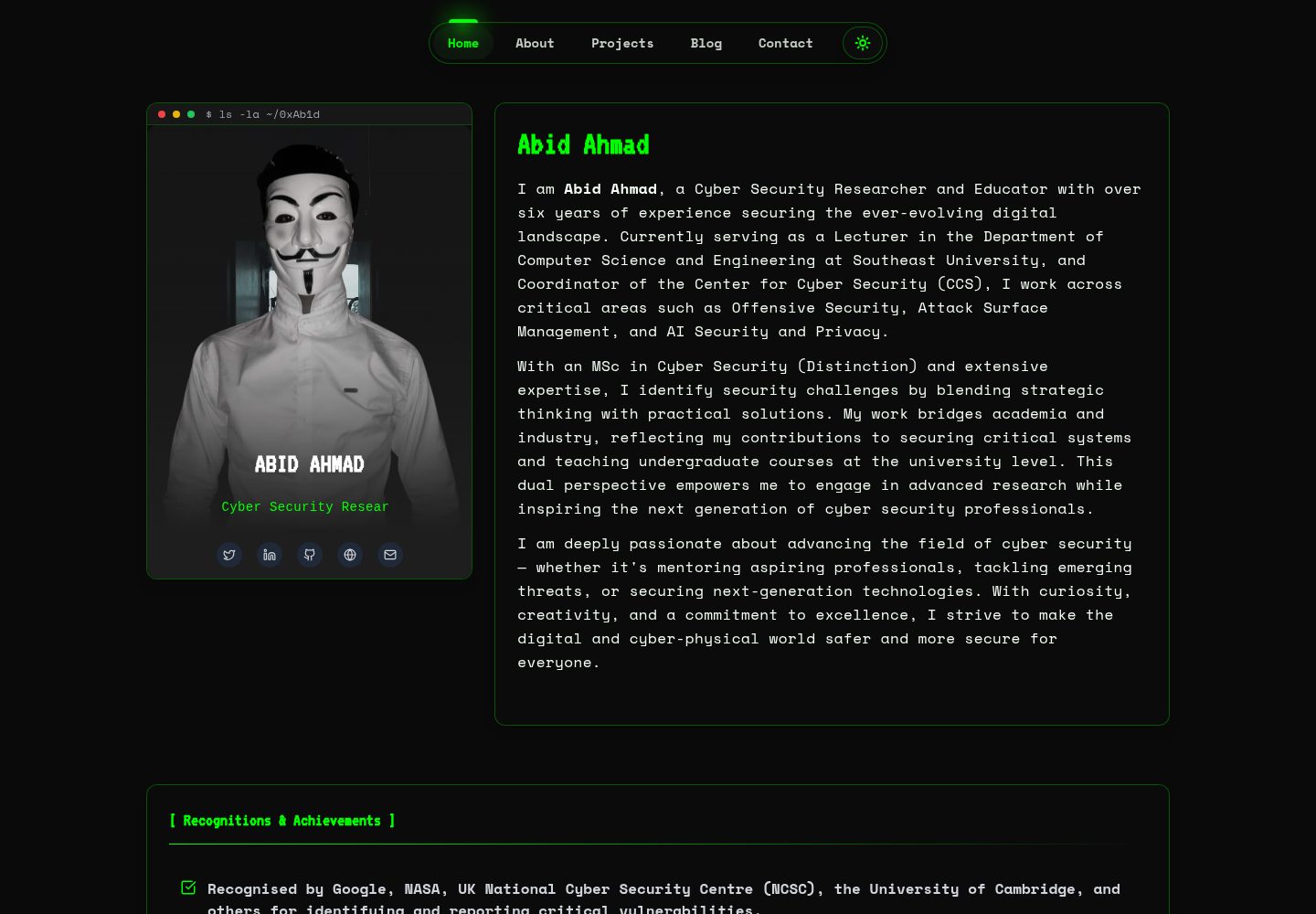
HackFolio
A high-performance, SEO-optimized hacker-themed portfolio website tailored for for ethical hackers, penetratio…
Vite · 作品集