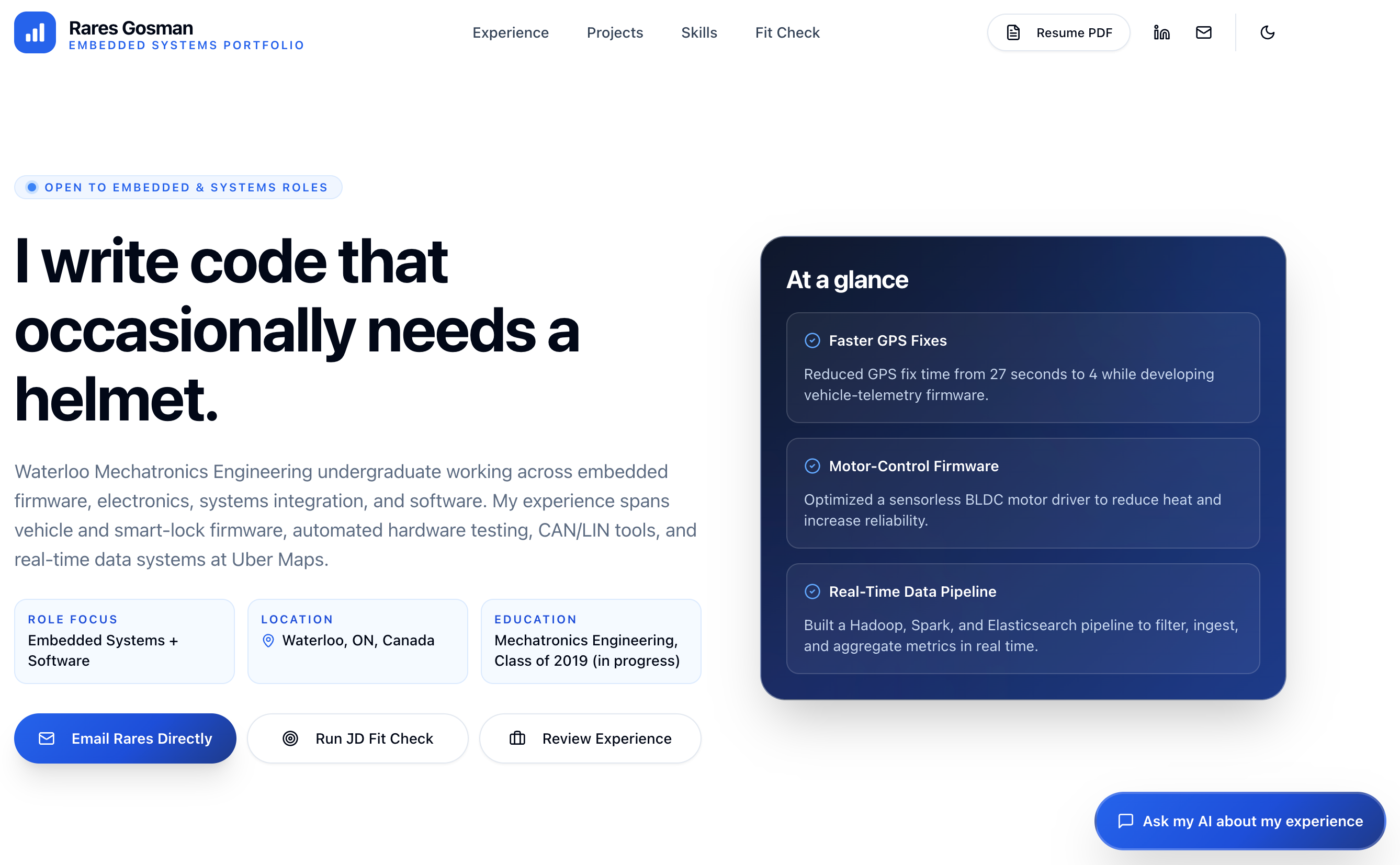
AI recruiter chat: streaming responses, with chat history saved in client-side sessionStorage and support for continuing after a same-tab refresh.
ViteReactPortfolio
ai-portfolio-template — Vite Portfolio Template
By rarestg
A personal portfolio template built on Vite and React, with a built-in AI recruiter chat and job description fit-check, personalized through two content files, and deployed on Cloudflare Workers.
Explore the design
Compare the page layouts and mobile experience. Open any screenshot for a closer look.
Author preview
Author-provided preview
Preview provided in the project README.
One original preview is available. Open the full image to inspect the design.
Screenshots show visual appearance; interactive behavior may differ.
Recorded 2026-10-01View source
What stands out
A quick read of the recorded project description.
Job description fit-check: paste a job description to get an assessment with evidence, gaps, and confidence, explicitly stating that a "no match" result is also valid.
Content and code separation: personalize by editing only two files, content/portfolio.yaml and content/prose/summary.md.
Content build and validation: validate YAML with Zod and generate a shared TypeScript file, with a content check command to prevent the generated file from becoming stale.
Optional integrations: Twilio SMS contact handoff and Turnstile bot protection, which automatically degrade to safe simulations when not configured.
Server-side security measures: tenant isolation, per-tenant and per-IP rate limiting, and request size limits.
Template Details
This is a content-driven personal portfolio template that uses Vite and React to build a single-page frontend running on Cloudflare Workers. It includes an AI recruiter chat that can answer questions about personal experience, and provides a job description fit-check (POST /api/analyze-fit) that outputs an assessment with evidence and clear gaps. The template ships with sample content for a fictional person, Jordan Ellis, and runs out of the box. Personalization requires editing only two files: content/portfolio.yaml holds structured facts (identity, experience, projects, skills, education, SEO, homepage copy, starter prompts), and content/prose/summary.md holds a long-form career summary. Running the content build command validates the YAML and regenerates shared/content.generated.ts, which the app, Worker, and tests all read; the content check command detects whether the generated file is stale. Local development requires Bun; copy the environment variable example file, fill it in, and run the dev command, which starts on port 3000 by default. Deployment publishes to a workers.dev subdomain by default, and a custom domain can also be configured. The AI provider can be workers-ai or google-gateway, with the model chain defined in shared/models.ts. Optional Turnstile bot protection and Twilio SMS contact handoff automatically degrade to safe simulations when not configured.
ViteReactPortfolio
Is it right for your project?
Use Cases
- Individual developers or designers building an online portfolio with AI Q&A capabilities to showcase experience and projects.
- Job seekers deploying an interactive portfolio so recruiters can learn about their background through chat and quickly assess fit by pasting a job description.
- Scenarios where content maintenance is separated from frontend code, updating portfolio information by editing YAML and Markdown files.
- Sites that need to be deployed on Cloudflare Workers and can optionally enable Turnstile protection or Twilio SMS notifications.
Suitable For
- Developers familiar with or willing to use Bun, Vite, and Cloudflare Workers.
- Users who want to maintain portfolio content in a low-code way by editing only two content files.
- Personal portfolio projects that need an AI recruiter chat and job description fit-check.
- Users who accept using Cloudflare ecosystem services and configuring the AI provider, keys, and optional integrations themselves.
Getting started & customization
Use these recorded setup notes alongside the repository instructions for your chosen version.
- 1
Local development requires installing Bun, then running bun install, copying .dev.vars.example to .dev.vars and filling in local values, then running bun run dev.
- 2
For personalization, edit content/portfolio.yaml and content/prose/summary.md, then run bun run content:build to regenerate the shared content file; do not manually edit shared/content.generated.ts.
- 3
Before deployment, configure variables such as AI_PROVIDER and CF_AI_BASE_URL in wrangler.jsonc, and set secrets such as SECURITY_HMAC_SECRET; the Google provider also requires CF_AI_GATEWAY_TOKEN.
- 4
Optional features such as Turnstile and Twilio SMS handoff require additional configuration of the corresponding environment variables and secrets; when not configured, they automatically degrade to simulated behavior.
- 5
Deployment publishes to a workers.dev subdomain by default; a custom domain can also be used by adding a routes block in wrangler.jsonc and setting custom_domain: true.
License & source material
Usage conditions & limitations
Free to use · keep license noticeThis listing covers the free version under the MIT license in the public repository; the free scope is the code of that version and does not mean external services or third-party assets are free.
Must comply with when using
- The code of this version may be used, modified, used commercially, and distributed for free.
- When distributing copies or substantial portions of the code, retain the original author's copyright notice and the full MIT license notice.
- The code is provided as is; warranties and limitations of liability are governed by the original license and applicable law.
Additional costs & items to verify
- Local development and building require the Bun runtime; environments without Bun cannot run development, build, and content generation commands.
- When using the google-gateway provider, you must create a Google AI Studio API key yourself and configure it in the Provider Keys of Cloudflare AI Gateway.
- The SMS contact handoff feature depends on a Twilio account and credentials (Account SID, Auth Token, sending number); when not configured, it only degrades to simulated behavior.
- Enabling Turnstile bot protection requires additional configuration of the site key and secret, and depends on the Cloudflare Turnstile service.
- Deployment depends on the Cloudflare Workers platform and publishes to a workers.dev subdomain by default; a custom domain must be configured in the Cloudflare account.
- The AI chat and fit-check features depend on external AI services such as Cloudflare Workers AI or Google AI Gateway, and require configuring the corresponding variables and keys.
- Demo images, fonts, icons, and other third-party assets must be checked against their respective licenses and cannot be judged solely by the code's MIT license.
- External services such as domains, hosting, databases, payments, or AI may incur additional charges.
View Original Text Basis
Permission is hereby granted, free of charge
Original License Text
Requires [Bun](https://bun.sh).
Original README
For Google BYOK, create a [Google AI Studio key](https://aistudio.google.com/api-keys), then store it
Original README
Optional SMS contact handoff** (Twilio): the assistant can text you a visitor's contact details.
Original README
Optional Turnstile** bot protection using a verify-once signed lease.
Original README
By default the Worker publishes to `https://<name>.<subdomain>.workers.dev`
Original README
https://github.com/rarestg/ai-portfolio-template/blob/main/LICENSEhttps://github.com/rarestg/ai-portfolio-template/blob/main/README.md`AI_PROVIDER` selects `workers-ai` (Gemma 4 with GLM-4.7-Flash fallback through the `AI` binding) or
Original README
Compiled by DeepSeek based on repository license and README ·2026-10-01. Results only cover the materials read; dependencies, images, fonts, and subsequent term changes are subject to their respective original texts.
Project checks & description sources
Template Information
- Source platforms
- GitHub
- Documentation and maintenance reference score
- Partly documented · 73 / 100
- Technologies
- Vite · React
- Website type
- Portfolio
How this score is calculated
Our heuristic uses license records (up to 30), a demo link (12), a preview (10), stars (15), recorded maintenance (15), description completeness (8), feature records (5) and classification data (5). It is not a code, security or performance test, or a Google score. A link does not establish tested functionality.
What to verify for this project
- Repository update recorded
- 2026-07-13
- Screenshot last checked
- 2026-10-01
No demo link is recorded. Use the repository instructions to evaluate the project locally; the screenshot alone cannot establish interactive behavior.
The catalog identifies Vite as the primary stack. Check the actual dependency manifest and lockfile for versions and hosting requirements. These notes use recorded metadata, not a code audit or a deployment test.
Use a selection guide →How this description was prepared
AI-assisted description based on catalog records and repository material. Repository authors are not automatically the reviewers of this description.
Automatically checked against source and license rules; no manual editorial review.
Inspect the recorded source material
SHA-256: f398abe4aa23d203d3dd70c2180f8dc9e13bace2bdbb5a322de69034086dfd9b
2026-10-01T04:20:33.895Z
Source file / repository# AI Portfolio Template
An AI-powered personal portfolio you deploy on Cloudflare. It renders a single-page site with an AI
"recruiter chat" that answers questions about your experience, plus a job-description fit-check, all
driven from two content files so you never touch the app code to personalize it.
The template ships with a fictional "Jordan Ellis" persona so it runs green out of the box. Replace
that content with your own (an agent can do it for you) and deploy.
## See it in action
<table>
<tr>
<td colspan="6" align="center">
<a href="docs/images/portfolio/landing.png"><img src="docs/images/portfolio/landing.png" alt="Personalized portfolio landing page" width="100%"></a><br>
<sub><b>Personalized landing page:</b> experience, proof points, and calls to action at a glance.</sub>
</td>
</tr>
<tr>
<td colspan="2" align="center">
<a href="docs/images/portfolio/chat-1.png"><img src="docs/images/portfolio/chat-1.png" alt="AI recruiter chat answering a question about experience" width="100%"></a><br>
<sub><b>Grounded answers:</b> ask about experience, projects, or role fit.</sub>
</td>
<td colspan="2" align="center">
<a href="docs/images/portfolio/chat-2-tool.png"><img src="docs/images/portfolio/chat-2-tool.png" alt="AI recruiter chat showing a weather tool result" width="100%"></a><br>
<sub><b>Live tools:</b> structured tool results render directly in the conversation.</sub>
</td>
<td colspan="2" align="center">
<a href="docs/images/portfolio/chat-3-tool.png"><img src="docs/images/portfolio/chat-3-tool.png" alt="AI recruiter chat showing a simulated contact handoff" width="100%"></a><br>
<sub><b>Contact handoff:</b> turn recruiter interest into a direct follow-up.</sub>
</td>
</tr>
<tr>
<td colspan="3" align="center">
<a href="docs/images/portfolio/jd-input.png"><img src="docs/images/portfolio/jd-input.png" alt="Job description fit-check input" width="100%"></a><br>
<sub><b>Paste a job description:</b> provide the full posting for a useful comparison.</sub>
</td>
<td colspan="3" align="center">
<a href="docs/images/portfolio/jd-output.png"><img src="docs/images/portfolio/jd-output.png" alt="Evidence-backed job fit assessment" width="100%"></a><br>
<sub><b>Get an honest assessment:</b> see evidence, gaps, confidence, and a recommended next step.</sub>
</td>
</tr>
</table>
## Set it up with your agent
The fastest path is to let an AI coding agent (Claude Code or OpenAI Codex) personalize and deploy
it for you. Paste this to your agent:
```
Read SETUP.md and guide me through setting up this portfolio.
```
[`SETUP.md`](SETUP.md) is the interactive builder guide: it interviews you, ingests your resume,
writes the content, validates, previews locally, and walks you through the Cloudflare deploy.
Bring your own resume as a PDF path, text, or Markdown. If your agent cannot extract a PDF cleanly,
use [LiteDoc](https://litedoc.xyz/) ([source](https://github.com/0xovo/LiteDoc)) to convert it locally
in your browser, review the result, and paste the Markdown into the agent chat. To show the original
PDF on the portfolio, the setup flow copies it into `public/` only after you approve publishing it;
the template does not generate a new PDF from Markdown.
## Features
- **AI recruiter chat** with streaming responses and same-tab refresh continuity (chat history is
held client-side in `sessionStorage`).
- **JD fit-check** (`POST /api/analyze-fit`): paste a job description and get an evidence-backed
fit assessment with explicit gaps. "Not a fit" is a valid, honest outcome.
- **Weather tool** the assistant can call inline.
- **Optional SMS contact handoff** (Twilio): the assistant can text you a visitor's contact details.
Self-disables to a safe simulation when Twilio is not configured.
- **Optional Turnstile** bot protection using a verify-once signed lease.
- Server-side tenant isolation, per-tenant/per-IP rate limits, and request-size caps.
## Content model (the content seam)
You personalize the site by editing two files, not the app:
- `content/portfolio.yaml` - structured facts (identity, experience, projects, skills, education,
SEO, homepage copy, starter prompts).
- `content/prose/summary.md` - the long-form professional summary (one plain paragraph).
Running `bun run content:build` validates the YAML with Zod and regenerates the **committed**
`shared/content.generated.ts`, which the app, worker, and tests read via `shared/resume-canonical.ts`.
`bun run content:check` is a drift guard (the first step of `bun run check`) that fails if the
generated file is stale. Never hand-edit `shared/content.generated.ts`.
The full content schema (required vs optional keys, the `education` list, the
`proofPoints.sourceId` rule) is documented in [`SETUP.md`](SETUP.md#stage-4---write-the-content).
## Local development
Requires [Bun](https://bun.sh). Then:
```bash
bun install
cp .dev.vars.example .dev.vars # fill in your local values (see the env table below)
bun run dev
```
Open `http://localhost:3000` (override with `PORT`). The `predev` hook regenerates
`shared/content.generated.ts` from `content/*` before the server starts.
## Command reference
| Command | What it does |
| ---------------------------- | ------------------------------------------------------------------- |
| `bun run dev` | Vite dev server on `0.0.0.0:${PORT:-3000}`. |
| `bun run build` | Production build. |
| `bun run preview` | Build, then serve the production bundle on `${PORT:-4173}`. |
| `bun run content:build` | Validate `content/*` and regenerate `shared/content.generated.ts`. |
| `bun run content:check` | Fail if the generated content file is stale (drift guard). |
| `bun run check` | content:check + prettier + eslint + typecheck + knip. |
| `bun run check:fix` | Autofix pass (format + lint:fix + typecheck + knip). |
| `bun run test` | Run the test suite (regenerates content first). |
| `bun run format` | Prettier write pass. |
| `bun run cf-typegen` | Regenerate Worker types (`wrangler types`). |
| `bun run predeploy:validate` | Validate `wrangler.jsonc` is deploy-ready (rejects the sentinel). |
| `bun run deploy:dry-run` | Validate + build + `wrangler deploy --dry-run`. |
| `bun run deploy:init` | One-time fresh-account first publish (creates the Worker). |
| `bun run deploy` | Validate + build + `wrangler deploy` + post-deploy AI health smoke. |
| `bun run smoke:ai` | Probe `GET /api/health/ai` on a deployed URL. |
| `bun run smoke:ai:online` | Opt-in live health, chat/tool, and structured-fit verification. |
## Environment variables
Copy `.dev.vars.example` to `.dev.vars` for local development. `.dev.vars` is gitignored; never
commit secrets. See [`DEPLOYMENT.md`](DEPLOYMENT.md) for the full "what lives where" table.
| Variable | Required? | Where |
| ---------------------------------------------------------------------------------------- | -------------------------------- | -------------------------------------------- |
| `AI_PROVIDER` | Required | `wrangler.jsonc` var; `.dev.vars` locally. |
| `CF_AI_BASE_URL` | Required | `wrangler.jsonc` var; `.dev.vars` locally. |
| `CF_AI_GATEWAY_TOKEN` | Google provider only | Secret / `.dev.vars` (AI Gateway token). |
| `SECURITY_HMAC_SECRET` | Required | Secret / `.dev.vars` (signs tenant cookies). |
| `REQUIRE_TURNSTILE` | Required var (`"false"` default) | `wrangler.jsonc` var. |
| `VITE_TURNSTILE_SITE_KEY` | If Turnstile enabled | Build-time env (`.env.local` / shell). |
| `TURNSTILE_SECRET_KEY` | If Turnstile enabled | Secret / `.dev.vars`. |
| `CONTACT_SMS_TO_NUMBER`, `TWILIO_ACCOUNT_SID`, `TWILIO_AUTH_TOKEN`, `TWILIO_FROM_NUMBER` | Optional (SMS handoff) | Secrets / `.dev.vars`. |
| `AI_HEALTH_TOKEN` | Optional | Secret; gates `GET /api/health/ai` if set. |
| `CLOUDFLARE_API_TOKEN`, `CLOUDFLARE_ACCOUNT_ID` | Optional (deploy auth) | Shell / CI (not runtime bindings). |
`AI_PROVIDER` selects `workers-ai` (Gemma 4 with GLM-4.7-Flash fallback through the `AI` binding) or
`google-gateway` (the native Gemini path). Provider-specific model chains live in
`shared/models.ts`; routes do not change when switching. `CF_AI_BASE_URL` is the Gateway locator
both paths use. Keep its `/compat` suffix. `CF_AI_GATEWAY_TOKEN` is required only for Google.
For Google BYOK, create a [Google AI Studio key](https://aistudio.google.com/api-keys), then store it
in Cloudflare under **AI > AI Gateway > select the gateway > Provider Keys > Add API Key > Google AI
Studio**. Do not put the Google key in `CF_AI_GATEWAY_TOKEN`; that secret holds the separate Cloudflare
Authenticated Gateway token. See [DEPLOYMENT.md](DEPLOYMENT.md#ai-gateway-setup).
## API surface
- `GET /api/health` - basic liveness.
- `GET /api/health/ai` - AI gateway health probe (optionally bearer-gated by `AI_HEALTH_TOKEN`).
- `GET /api/chat/bootstrap` - challenge/turnstile state for the client.
- `POST /api/chat/verify-turnstile` - exchange a solved Turnstile token for a signed lease.
- `POST /api/chat` - streaming chat turn.
- `POST /api/contact-handoff` - idempotent SMS contact handoff.
- `POST /api/analyze-fit` - one-shot JD fit assessment.
- `POST /api/client-errors` - metered client error sink.
## Deploy
By default the Worker publishes to `https://<name>.<subdomain>.workers.dev`, where `<name>` is the
Worker `name` in `wrangler.jsonc`. A custom domain is optional: add a `routes` block with
`custom_domain: true` for a zone on your Cloudflare account, and Cloudflare provisions the DNS record
and TLS certificate.
For a guided, agent-run deploy, follow [`SETUP.md`](SETUP.md#stage-7---deploy-to-cloudflare). For
the detailed manual procedure (AI Gateway setup, secrets, Turnstile, custom domains,
troubleshooting), see [`DEPLOYMENT.md`](DEPLOYMENT.md).
## Repository layout
- `content/` - the content seam (`portfolio.yaml` + `prose/summary.md`).
- `src/` - React 19 single-page frontend.
- `worker/` - Cloudflare Worker: Hono routes, security, chat/AI runtime, Durable Object.
- `shared/` - shared prompts, models, contracts, and the generated resume data.
- `scripts/` - content codegen, predeploy validation, smoke and weather scripts.
- `docs/` - architecture and reference documentation (see [`docs/INDEX.md`](docs/INDEX.md)).
- `wrangler.jsonc` - Worker config, vars, and Durable Object bindings.
For the repo map, sources of truth, and invariants agents must respect, see [`AGENTS.md`](AGENTS.md).
## License
[MIT](LICENSE) © Rareș Gosman. Fork it, personalize it, ship it.
Explore similar templates
Compare previews and descriptions within the same stack and category.

Resumify
Resumify is a browser-based resume builder built with React, TypeScript, and Vite.
Vite · Portfolio

showlit
Showlit is a personal website template built with React, Vite, TypeScript, Tailwind CSS, and shadcn/ui.
Vite · Portfolio

folium
A developer portfolio template built with Vite, React, TypeScript, and Tailwind CSS.
Vite · Portfolio

kurizu-discord
A personal portfolio website built with React and Vite that mimics the Discord desktop app, organizing projects, skills, and experience into customizable channels, threads, a member list, and emoji reactions.
Vite · Portfolio

about-me-personal-portfolio-website-template
AboutMe is a free personal website template built with Bootstrap and Vite, released under the MIT license. It provides a single-page index.html with organized src directories for images, JavaScript, and SCSS, along with npm scripts for development and build.
Vite · Portfolio
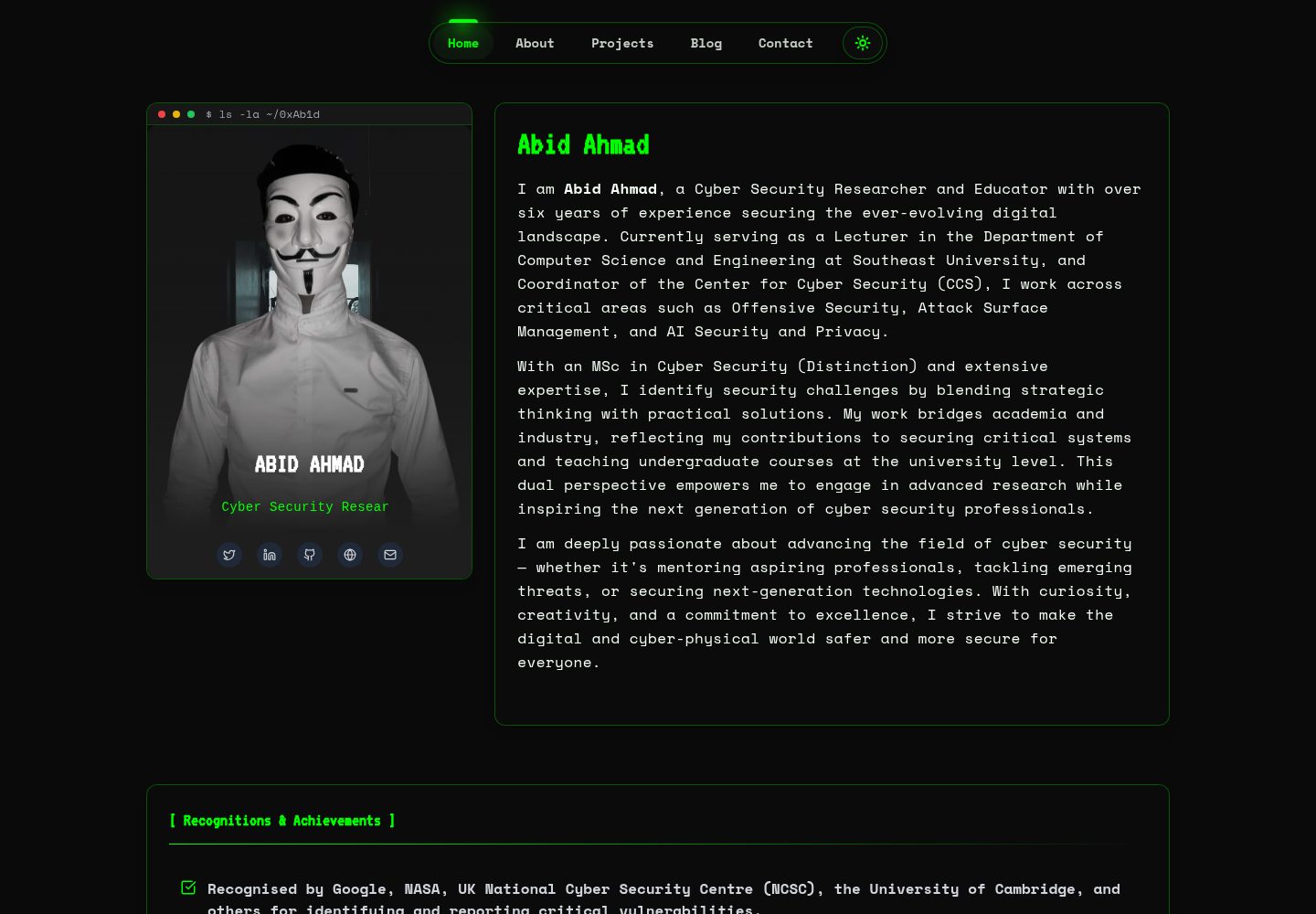
HackFolio
HackFolio is a hacker-style personal portfolio template for ethical hackers, penetration testers, bug bounty hunters, red teamers, and cybersecurity professionals.
Vite · Portfolio