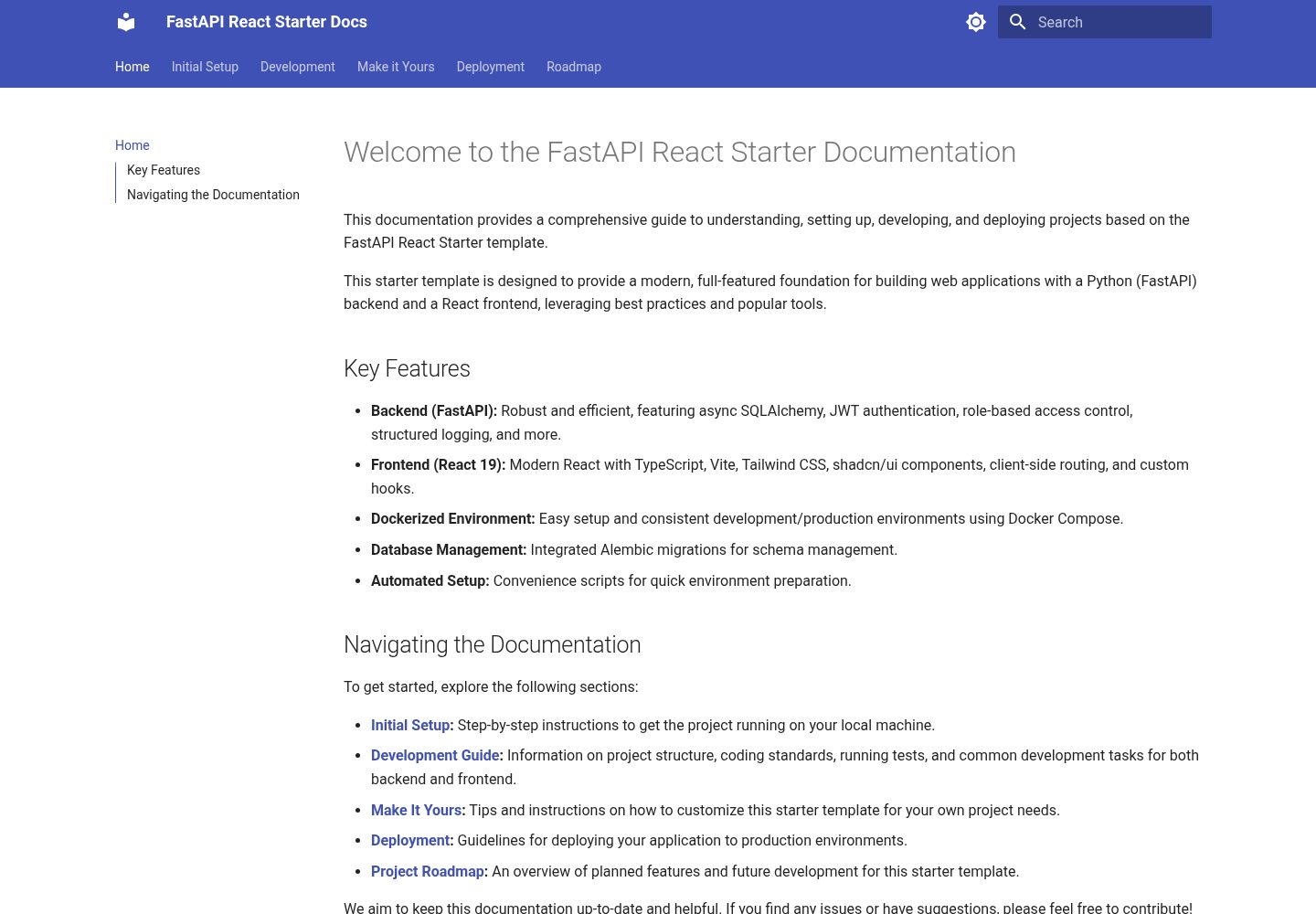
后端 FastAPI 提供 JWT 认证与基于角色的访问控制
ViteReact启动器
fastapi-react-starter — Vite 启动器模板
作者 raythurman2386
基于 FastAPI 与 React 的全栈启动模板,后端使用 PostgreSQL/SQLite 与异步 SQLAlchemy,前端使用 Vite、Tailwind CSS 和 shadcn/ui,内置 JWT 认证与角色访问控制。
看看你的网站会是什么样
浏览真实页面截图,比较内容排版与手机效果。点击下方缩略图切换,放大查看整页细节。
全部页面与视图 3
截图用于了解视觉与布局,交互效果请以实际项目为准。
采集于 2026-10-02查看来源
值得关注的模板亮点
从已有项目资料中,快速了解它的特点。
异步 SQLAlchemy ORM,支持 PostgreSQL 与 SQLite
前端使用 React、TypeScript、Vite 与 Tailwind CSS
界面组件基于 shadcn/ui,路由使用 React Router
提供 Docker Compose 与 Windows/Linux/Mac 安装脚本
manage.py 命令管理数据库迁移、状态查询与回滚
模板详细介绍
这是一个把 Python 后端与 React 前端放在同一仓库的全栈启动模板。后端基于 FastAPI,提供 JWT 认证、基于角色的访问控制、异步数据库操作、健康检查端点、结构化日志与优雅关闭;数据库层使用异步 SQLAlchemy ORM,支持 PostgreSQL 或 SQLite,并通过 pydantic 管理环境配置。前端基于 React 与 TypeScript,使用 Vite 构建,路由由 React Router 负责,界面组件来自 shadcn/ui,样式使用 Tailwind CSS,并包含自定义数据请求 hooks、Error Boundaries 与 Suspense 加载状态。
项目按 backend 与 frontend 两个目录组织:后端进一步拆分为 config、db、routes、schemas、services、utils,前端拆分为 components、features、hooks、layouts、lib、routes、types。仓库提供 Docker Compose 启动方式,也提供 Windows PowerShell 与 Linux/Mac 的自动化安装脚本,以及手动安装步骤。数据库迁移通过 manage.py 命令管理,支持生成迁移、应用迁移、查看状态、回滚以及重置数据库。README 中列出了后端状态报错与注册失败两类常见问题的排查方向。
模板的演示站点为静态页面,展示的是前端界面效果;实际运行需要自行准备数据库与后端服务。使用前需注意:代码采用 MIT 许可,但演示图片、字体、图标等第三方素材需单独核对许可;域名、托管、数据库等外部服务可能另行收费。
ViteReact启动器
适合你的项目吗?
适用场景
- 需要同时搭建 Python API 与 React 前端的全栈项目起步
- 希望直接获得带 JWT 登录注册与角色权限的后端骨架
- 想用 Docker Compose 快速拉起 PostgreSQL、后端与前端联调环境
- 需要一个包含 Error Boundaries 与 Suspense 的 React 前端结构参考
适合人群
- 熟悉 FastAPI 与 React 的开发者
- 需要认证与权限基础能力的全栈项目
- 接受 Docker 或本地手动配置数据库的团队
- 希望按目录分层组织前后端代码的开发者
上手与定制指南
结合仓库当前版本的说明,按下面的资料检查内容、配置与运行要求。
- 1
Docker 方式:在根目录创建包含 DB_USER、DB_PASSWORD、DB_NAME 的 .env,然后执行 docker compose up --build,后端运行在 8000 端口,前端运行在 5173 端口。
- 2
手动方式:后端需安装 PostgreSQL 并创建数据库,配置 backend/.env 中的数据库连接与 CORS_ORIGINS,安装 requirements.txt 后执行迁移并启动 uvicorn;前端在 frontend 目录执行 npm install 与 npm run dev。
- 3
数据库迁移通过 backend 下的 manage.py 执行,支持 makemigrations、migrate、reset_db、db-status 与 downgrade。
- 4
若数据库出现错误需要完全重置,可停止服务后删除 PostgreSQL 的 Docker 卷,再重新构建启动。
- 5
演示站点为静态页面,不能替代本地后端与数据库的完整运行环境。
授权与来源资料
使用条件与限制
免费使用 · 保留许可声明本次收录的是公开仓库中采用 MIT 许可的免费版本;免费范围为该版本代码,不代表外部服务或第三方素材免费。
使用时需要遵守
- 允许免费使用、修改、商用和分发该版本代码。
- 分发代码副本或实质性部分时,保留原作者版权声明和完整 MIT 许可声明。
- 代码按现状提供;担保与责任限制以原许可证及适用法律为准。
额外费用与待核对事项
- 使用 Docker 方式启动前,必须在根目录创建 .env 文件并填写 DB_USER、DB_PASSWORD、DB_NAME 等数据库配置,否则无法正常启动。
- 手动安装方式要求用户自行安装并运行 PostgreSQL 数据库,并创建对应数据库,属于外部服务依赖。
- 需自行提供数据库用户名与密码等凭据,模板不包含可用的数据库账号。
- 后端需正确配置 CORS_ORIGINS,否则前端请求会被跨域策略拦截,注册与登录可能失败。
- 数据库出错需完全重置时,要手动删除 PostgreSQL 的 Docker 卷,会清空已有数据。
- 演示图片、字体、图标及其他第三方素材需按各自许可核对,不能仅凭代码的 MIT 许可判断。
- 域名、托管、数据库、支付或 AI 等外部服务可能另外收费。
查看原文依据
Permission is hereby granted, free of charge
许可证原文
Create `.env` file in the root directory:
README 原文
Install PostgreSQL and create a database:
README 原文
DB_USER=postgres # your database user
README 原文
CORS_ORIGINS=["http://localhost:5173"]
README 原文
https://github.com/raythurman2386/fastapi-react-starter/blob/main/LICENSEhttps://github.com/raythurman2386/fastapi-react-starter/blob/main/README.mdRemove the PostgreSQL Docker volume
README 原文
DeepSeek 根据仓库许可证和 README 整理 ·2026-10-02。结果仅覆盖已读取资料,依赖、图片、字体及后续条款变更以各自原文为准。
项目核对记录与介绍依据
模板资料
- 来源平台
- GitHub
- 资料与维护参考分
- 资料较完整 · 86 / 100
- 技术栈
- Vite · React
- 网站类型
- 启动器
这个分数如何计算
本站按许可资料(最高30分)、演示链接(12分)、预览图(10分)、Star数(15分)、记录的维护时间(15分)、描述完整度(8分)、功能记录(5分)和分类资料(5分)计算。它不是代码、安全或性能测试,也不是 Google 评分;有链接不代表已实测可用。
这个项目需要核对什么
- 记录的仓库更新时间
- 2025-07-08
- 截图检查日期
- 2026-10-02
已收录演示链接。请用你的内容与屏幕尺寸检查;有演示不代表表单、认证或支付已经可用。
目录记录的主要技术栈是 Vite。请通过依赖清单和锁文件核对实际版本与托管要求。这些说明基于收录资料,不代表代码审计或部署实测。
查看具体选型方法 →介绍的制作与核对状态
介绍由 AI 辅助整理目录与仓库资料。仓库作者不等于这篇介绍的审核者。
已完成服务器许可规则与 AI 来源核对;未经过人工编辑审核。
查看当时使用的来源资料
SHA-256: 081d38ffd34d3211994126180834dce6f102dfa0321251dd19025ff51300181d
2026-10-02T18:23:21.600Z
来源文件 / 仓库# FastAPI React Starter Template A modern, full-featured starter template featuring FastAPI backend and React 19 frontend with TypeScript, Tailwind CSS, and shadcn/ui components.  ## Features - **Backend (FastAPI)** - Fast and modern Python web framework - PostgreSQL/SQLite database with async SQLAlchemy ORM - JWT-based authentication system - Role-based access control - Async database operations - Proper connection pooling and cleanup - Environment configuration with pydantic - Structured logging - Health check endpoint - Graceful shutdown handling - Modular project structure - **Frontend (React 19)** - Latest React features including `use` hook - TypeScript for type safety and better developer experience - React Router 7 for client-side routing - shadcn/ui components for beautiful, accessible UI - Component-based architecture - Custom hooks for data fetching - Modern error handling with Error Boundaries - Suspense for loading states - Tailwind CSS for styling - Environment configuration - Vite for fast development ## Project Structure ``` fastapi-react-starter/ ├── backend/ │ ├── app/ │ │ ├── __init__.py │ │ ├── main.py # FastAPI application entry │ │ ├── config/ # Configuration management │ │ │ ├── __init__.py │ │ │ └── config.py # Environment settings │ │ ├── db/ # Database │ │ │ ├── __init__.py │ │ │ ├── database.py # Database connection │ │ │ └── models.py # SQLAlchemy models │ │ ├── routes/ # API routes │ │ │ ├── __init__.py │ │ │ ├── auth.py # Authentication endpoints │ │ │ └── health.py # Health check endpoint │ │ ├── schemas/ # Pydantic models │ │ │ ├── __init__.py │ │ │ └── auth.py # Authentication schemas │ │ ├── services/ # Business logic │ │ │ ├── __init__.py │ │ │ └── auth.py # Authentication services │ │ └── utils/ # Utilities │ │ ├── __init__.py │ │ └── logger.py # Logging configuration │ ├── .env # Environment variables │ └── requirements.txt # Python dependencies ├── frontend/ │ ├── src/ │ │ ├── components/ # Reusable UI components │ │ │ └── ui/ # shadcn/ui components │ │ │ ├── button.tsx │ │ │ ├── card.tsx │ │ │ └── status-dot.tsx │ │ ├── features/ # Feature modules │ │ │ ├── auth/ # Authentication feature │ │ │ │ ├── LoginForm.tsx │ │ │ │ └── RegisterForm.tsx │ │ │ └── health/ # Health check feature │ │ │ └── HealthStatus.tsx │ │ ├── hooks/ # Custom React hooks │ │ │ ├── useAuth.ts │ │ │ └── useHealthStatus.ts │ │ ├── layouts/ # Page layouts │ │ │ └── MainLayout.tsx │ │ ├── lib/ # Utility functions and configurations │ │ │ └── utils.ts │ │ ├── routes/ # Route components and configurations │ │ │ └── root.tsx │ │ ├── types/ # TypeScript type definitions │ │ │ └── index.d.ts │ │ └── App.tsx # Main React component │ ├── .env # Frontend environment variables │ └── package.json # Node.js dependencies └── README.md # Project documentation ``` ## Quick Start ### Using Docker (Recommended) 1. Clone the repository: ```bash git clone https://github.com/raythurman2386/fastapi-react-starter.git cd fastapi-react-starter ``` 2. Create environment files: Create `.env` file in the root directory: ```env # Database Configuration DB_USER=postgres DB_PASSWORD=postgres DB_NAME=fastapi_db ``` 3. Start the application with Docker: ```bash docker compose up --build ``` This will: - Start PostgreSQL database - Apply migrations to a fresh database (e.g., after Docker volume removal) - Start the FastAPI backend at http://localhost:8000 - Start the React frontend at http://localhost:5173 The Swagger docs will be available at http://localhost:8000/docs ### Automated Setup Scripts For your convenience, this project includes automated setup scripts for both Windows and Linux/Mac: #### Windows Setup 1. Open PowerShell as Administrator 2. Navigate to the project directory 3. Run the setup script: ```powershell .\setup.ps1 ``` This script will: - Check for required dependencies (Docker, Docker Compose V2) - Install the correct version of docker recommended for the system. - Set up environment variables #### Linux/Mac Setup 1. Open a terminal 2. Navigate to the project directory 3. Make the script executable and run it: ```bash chmod +x setup.sh ./setup.sh ``` This script performs the same setup steps as the Windows version but is adapted for Unix-based systems. ### Manual Setup (Alternative) 1. Backend Setup: a. Install PostgreSQL and create a database: ```bash # macOS with Homebrew brew install postgresql brew services start postgresql # Create database createdb fastapi_db ``` b. Create a `.env` file in the backend directory: ```env # Database Configuration DB_NAME=fastapi_db DB_USER=postgres # your database user DB_PASSWORD=postgres # your database password DB_HOST=localhost DB_PORT=5432 CORS_ORIGINS=["http://localhost:5173"] ENVIRONMENT=development ``` c. Install Python dependencies and run migrations: ```bash cd backend pip install -r requirements.txt python manage.py migrate uvicorn app.main:app --reload ``` 2. Frontend Setup: ```bash cd frontend npm install npm run dev ``` ### Database Management The project includes several database management commands: ```bash # Generate new migrations python manage.py makemigrations "description of changes" # Apply pending migrations python manage.py migrate # Apply all migrations to a (presumably) fresh database (runs 'alembic upgrade head') python manage.py reset_db # Check migration status python manage.py db-status # Rollback last migration python manage.py downgrade ``` If you encounter database errors and need a full reset: 1. Stop all running services: `docker compose down` 2. Remove the PostgreSQL Docker volume (e.g., `docker volume rm fastapi-react-starter_postgres_data` - verify volume name with `docker volume ls`) 3. Restart services: `docker compose up -d --build` ### Troubleshooting 1. Backend Status shows "error": - Ensure PostgreSQL is running - Check database credentials in `.env` - For a full reset, see the 'If you encounter database errors' section above (involves Docker volume removal). - Check backend logs for specific error messages 2. User Registration fails: - Ensure the database is properly initialized - Check if backend is running and accessible - Verify CORS settings in backend `.env` - Check browser console for specific error messages ## Contributing Contributions are welcome! Please feel free to submit a Pull Request. ## License This project is licensed under the MIT License - see the LICENSE file for details.
看看同类模板
对比同技术栈与用途的模板,找到更适合的视觉与内容结构。

react-starter-kit
Modern React starter kit with Bun, TypeScript, Tailwind CSS, tRPC, Stripe, and Cloudflare Workers. Production-…
Vite · SaaS

cove
The Cove Stack: 🏝️ minimal TanStack Start template with Vite+, Better Auth, Drizzle ORM, shadcn/ui
Vite · SaaS

vite-react-boilerplate
A production ready, scalable starter template for Vite + React
Vite · 启动器

react-vite-admin
This Starter utilizes React, Recoil, React Query, React Hooks, Typescript, Axios And Vite. 全新技术栈的后台管理系统
Vite · 后台

typescript-react_best_practices-vite_template
<⚡⚛️> Start your React project with Vite following code best practices (TypeScript, Linting, testing, CI/CD…)
Vite · 启动器

cloudflare-starter-kit
Template (boilerplate) repository for scaffolding Cloudflare Workers projects
Vite · 启动器