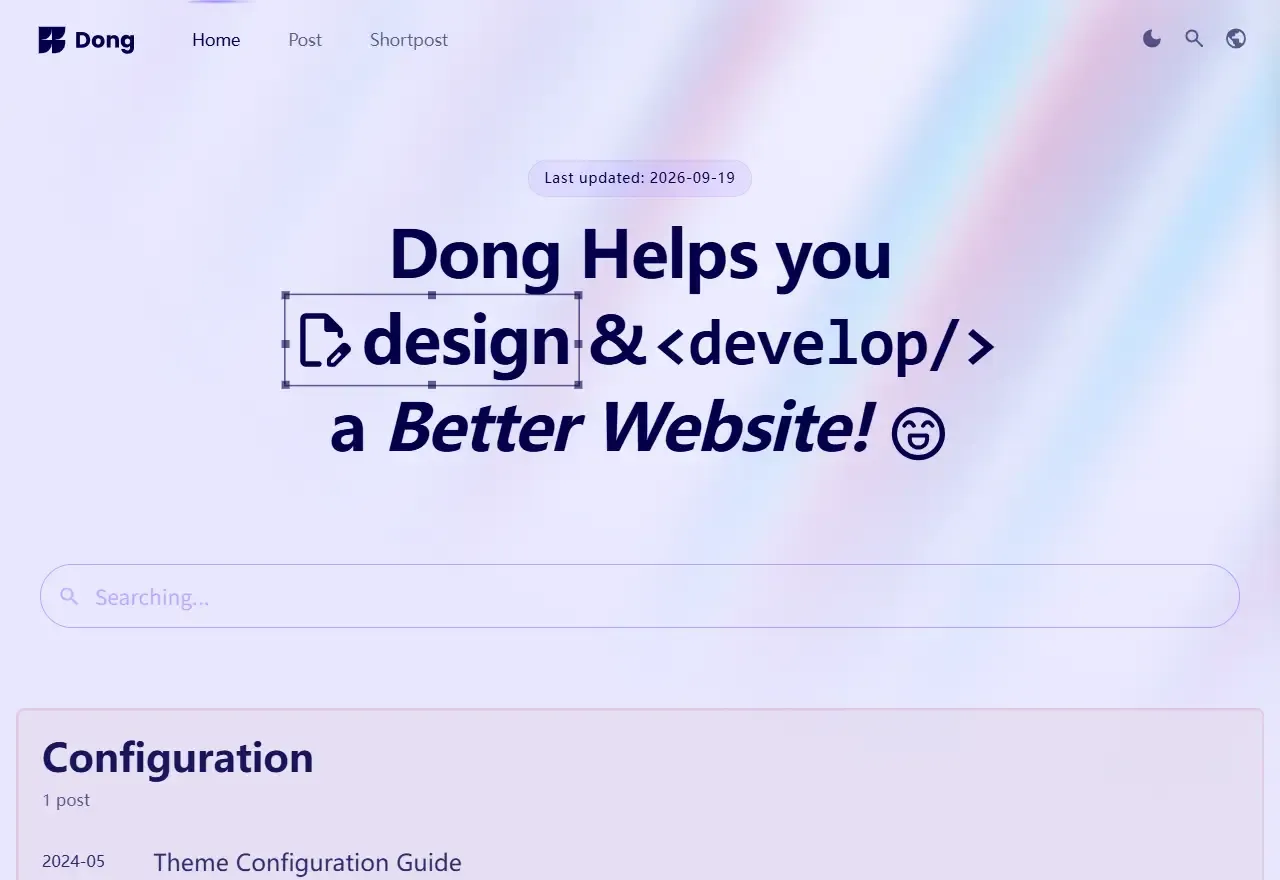
基于 Astro v7,内容用带类型定义的 Markdown/MDX 编写
Astro博客
dong — Astro 博客模板
作者 riceball-tw
基于 Astro v7 的博客主题,内置 i18n、Pagefind 搜索与 OG 图生成,含 CI/CD 流水线。
看看你的网站会是什么样
浏览真实页面截图,比较内容排版与手机效果。点击下方缩略图切换,放大查看整页细节。
全部页面与视图 3
截图用于了解视觉与布局,交互效果请以实际项目为准。
采集于 2026-09-27查看来源
值得关注的模板亮点
从已有项目资料中,快速了解它的特点。
区分 posts 长文与 shortposts 短内容两种发布形态
内置 i18n、Pagefind 搜索和 vercel/og 的 OG 图生成与缓存
expressive-code 代码块与 Mermaid 图表渲染
自带 TypeScript、Biome、Cypress、Lighthouse 的 CI 流水线
CD 支持 Cloudflare Pages 或 GitHub Pages,另有 Docker 构建方式
模板详细介绍
Dong 是作者把自己经营多年的个人博客整理成开源主题的产物,基于 Astro v7,定位是内容型博客站点。内容结构分成两类:常规长文 posts 和短内容 shortposts,两者都用带类型定义的 Markdown/MDX 管理,站点配置、文章和 i18n 文案分别放在 /src/content 与 /src/i18n 目录下,定制入口相对集中。
功能上比较完整:内置多语言、Pagefind 站内搜索、通过 vercel/og 生成并缓存的 Open Graph 图片、Google Analytics,代码块和 Mermaid 图表分别由 expressive-code 与 remark-mermaid 渲染。仓库还带了 TypeScript、Biome、Cypress E2E 和 Lighthouse 组成的 CI 流水线,以及面向 Cloudflare Pages 或 GitHub Pages 的 CD 配置,并提供 Docker 构建方式。README 声称 Lighthouse 满分,这属于作者自述,建议以实际部署结果为准。
使用门槛主要在工程侧:需要熟悉 pnpm、Astro 的配置与内容集合,并自行准备 .env(参考 .env.example)和部署目标。README 的克隆命令写的是 letter 仓库地址,与 dong 不一致,上手前需要核对;Google Analytics、OG 图片等能力是否开箱可用,也建议先跑一遍 demo 和本地构建确认。
Astro博客
适合你的项目吗?
适用场景
- 搭建带多语言支持的个人技术博客
- 需要长文与短内容并行发布的写作站点
- 希望借助现成 CI/CD 配置直接部署到 Pages 平台的 Astro 项目
适合人群
- 熟悉 Astro 与 pnpm 工作流的前端开发者
- 愿意按目录约定维护内容与翻译文件的个人博主
- 需要站内搜索、OG 图和多语言等成体系功能的项目
上手与定制指南
结合仓库当前版本的说明,按下面的资料检查内容、配置与运行要求。
- 1
README 的克隆命令指向 letter 仓库,实际应使用 dong 仓库地址
- 2
需按 .env.example 准备环境变量,尤其是 CI/CD 相关配置
- 3
部署前在 astro.config.mjs 中设置正确的 site URL
- 4
Lighthouse 满分与各功能可用性为作者自述,建议本地构建后自行验证
授权与来源资料
使用条件与限制
免费使用 · 保留许可声明本次收录的是公开仓库中的免费 MIT 版本;免费范围为该版本代码,不代表外部服务或第三方素材免费。
使用时需要遵守
- 使用、修改或分发代码时,保留原作者版权声明和完整 MIT 许可证。
- 允许免费使用、修改及商用,也允许分发代码;分发时仍需随附版权与许可声明。
- 代码按现状提供,作者不承诺担保或承担使用责任。
额外费用与待核对事项
- 演示图片、字体、图标及其他第三方素材需按各自许可核对,不能仅凭代码的 MIT 许可判断。
- 域名、托管、数据库、支付或 AI 等外部服务可能另外收费。
查看原文依据
https://github.com/riceball-tw/dong/blob/main/LICENSEhttps://github.com/riceball-tw/dong/blob/main/README.mdPermission is hereby granted, free of charge
许可证原文
依据完整 MIT 许可证与仓库 README 核对 · 2026-09-27。结果仅覆盖已读取资料,依赖、图片、字体及后续条款变更以各自原文为准。
项目核对记录与介绍依据
模板资料
- 来源平台
- Astro Themes
- 资料与维护参考分
- 资料较完整 · 87 / 100
- 技术栈
- Astro
- 网站类型
- 博客
这个分数如何计算
本站按许可资料(最高30分)、演示链接(12分)、预览图(10分)、Star数(15分)、记录的维护时间(15分)、描述完整度(8分)、功能记录(5分)和分类资料(5分)计算。它不是代码、安全或性能测试,也不是 Google 评分;有链接不代表已实测可用。
这个项目需要核对什么
- 记录的仓库更新时间
- 2026-09-19
- 截图检查日期
- 2026-09-27
已收录演示链接。请用你的内容与屏幕尺寸检查;有演示不代表表单、认证或支付已经可用。
目录记录的主要技术栈是 Astro。请通过依赖清单和锁文件核对实际版本与托管要求。这些说明基于收录资料,不代表代码审计或部署实测。
查看具体选型方法 →介绍的制作与核对状态
介绍由 AI 辅助整理目录与仓库资料。仓库作者不等于这篇介绍的审核者。
审核声明: Codex(本次来源核对) · 2026-09-27
查看当时使用的来源资料
SHA-256: 82a27ec9a5a1d848b1c2f5d612675faad6193cd0589f94bb1f31e8d835871c9b
2026-09-27T12:10:43.752Z
来源文件 / 仓库<div align="center">
<img alt="logo" src="./src/assets/images/brand/logo.svg#gh-light-mode-only" width="64" />
<img alt="logo" src="./src/assets/images/readme/logo-light.svg#gh-dark-mode-only" width="64" />
</div>
<h1 align="center">
Dong Blog
</h1>
<div align="center">
A battle-tested, feature-rich blog theme powered by Astro v7
</div>
<br />
> [!TIP]
> Been building [my blog](https://www.webdong.dev/en/) for years — so I turned it into an open-source theme. <br />
> You might be intrested in building personal site too, Check out [Letter Portfolio theme](https://github.com/riceball-tw/letter)!
## Key Features
Start your online [posts](https://riceball-tw.github.io/dong/en/post/) or [shortposts](https://riceball-tw.github.io/dong/en/shortpost/) through fully typed markdown and settings. Check out the [GitHub Pages Demo](https://riceball-tw.github.io/dong/en/).
- Optimize for speed (100% lighthouse score)
- Responsive & SEO-friendly
- Built-in i18n
- content
- Open Graph image generation through [vercel/og](https://vercel.com/docs/og-image-generation) with cache
- Page search through [Pagefind](https://pagefind.app/)
- Google Analytic
- Beautiful code block & Mermaid diagram using [expressive-code](https://github.com/expressive-code/expressive-code) and [remark-mermaid](https://github.com/temando/remark-mermaid)
- CI pipeline (TypeScript / [Biome linter](https://biomejs.dev/) / [Cypress E2E testing](https://www.cypress.io/) / [Lighthouse](https://github.com/GoogleChrome/lighthouse))
- CD pipeline ([Cloudflare Pages](https://pages.cloudflare.com/) or [GitHub Pages](https://pages.github.com/))
## Getting Started
### Development
```bash
# 1. Clone the repository
git clone https://github.com/riceball-tw/letter.git .
# 2. Install dependencies
pnpm install
# 3. Run development server
pnpm run dev
```
### Build
```bash
# a. Locally
# Deploy the contents of the `./dist` folder wherever you like.
pnpm install
pnpm build
pnpm preview
# b. Build docker image
docker build -t <your-astro-image-name> .
docker run -p <local-port>:<container-port> <your-astro-image-name>
```
### Customization
1. `astro.config.mjs`: Astro configs
- `site`: Your final, deployed URL
2. `/src/content`: Site config, posts, shortposts (Markdown / MDX)
3. `/src/i18n`: Translations used in astro templates
4. `/public`: Assets used in the site (favicon, og image)
5. `/src/assets`: Assets used in the site (logo, logomark)
6. `/src/styles/global.css`: Styles
7. `/.github/workflows/testing-and-deploy-pipeline.yml`: GitHub CI/CD pipeline (setup `.env` base on `.env.example`)
## Helping out
For questions or support, please open an issue on GitHub.
## License
MIT
看看同类模板
对比同技术栈与用途的模板,找到更适合的视觉与内容结构。

astrowind
⭕️ AstroWind: A free template using Astro v7 and Tailwind CSS v4. Astro starter theme.
Astro · 博客

astro-paper
A minimal, accessible and SEO-friendly Astro blog theme.
Astro · 博客

fuwari
✨A static blog template built with Astro.
Astro · 博客

Firefly
Firefly 是一款基于 Astro 的静态博客主题,由 CuteLeaf 在 saicaca 的 Fuwari 模板基础上二次开发,主打清新美观的视觉风格。
Astro · 博客

astro-theme-cactus
A simple Astro theme. Use it to create your blog or website.
Astro · 作品集

astrofy
Astrofy is a free and open-source template for your Personal Portfolio Website built with Astro and TailwindCS…
Astro · 作品集