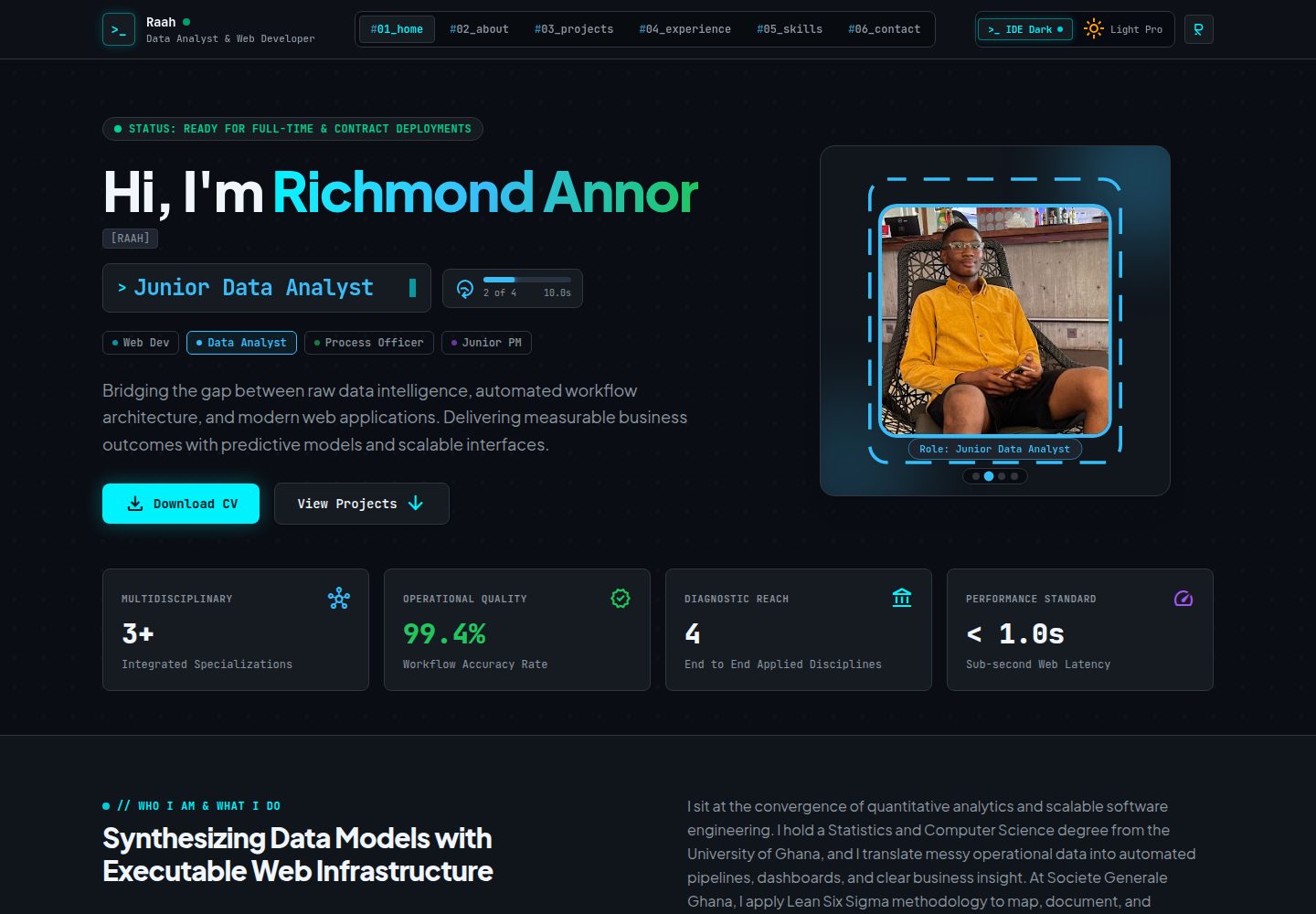
Hero 区域自动循环四个职业阶段,每个阶段有独立照片、角色标题、强调色和边框形状,并有发光 SVG 轮廓跟随
ViteReact作品集
My_Portfolio_Website — Vite 作品集模板
作者 richmondannor
Richmond Annor Ayisah 的个人作品集网站,以 React、TypeScript、Vite 和 Tailwind CSS 构建,包含动画 Hero、Ctrl+K 命令面板、明暗主题与可下载 CV。
看看你的网站会是什么样
浏览真实页面截图,比较内容排版与手机效果。点击下方缩略图切换,放大查看整页细节。
全部页面与视图 2
截图用于了解视觉与布局,交互效果请以实际项目为准。
采集于 2026-10-07查看来源
值得关注的模板亮点
从已有项目资料中,快速了解它的特点。
Ctrl+K(Mac 为 Cmd+K)命令面板支持搜索跳转区块、打开项目、切换主题和打开 CV
明暗主题切换,默认深色模式,访客选择保存在浏览器中
项目详情模态框展示完整描述,当前包含足球预期进球建模、全球银行与经济分析、AHA 医院数据库基准测试三个项目
CV 模态框支持预览、打印和下载 PDF;联系表单会打开邮件应用并预填收件人与内容
内容集中在 src/data/portfolioData.ts 单一文件,便于修改 Hero 阶段、项目、经历和技能
模板详细介绍
这是一个单页 React 作品集网站,将 Web 开发者、初级数据分析师、流程专员和初级项目经理四种职业身份整合在同一界面中。页面包含 Home、About、Projects、Experience、Skills 和 Contact 等区块,顶部导航可跳转。Hero 区域自动循环展示四个阶段,每个阶段有独立照片、角色标题、强调色和边框形状(圆形、矩形、六边形、方形),并有发光 SVG 轮廓跟随当前边框。项目以网格展示,点击后打开模态框查看完整描述,目前包含足球预期进球建模、全球银行与经济分析、AHA 医院数据库基准测试三个项目。按 Ctrl+K(Mac 为 Cmd+K)可打开可搜索的命令面板,用于跳转区块、打开项目、切换主题或打开 CV;Esc 关闭。主题切换会保存访客选择,默认深色模式。CV 模态框支持预览、打印和下载 PDF。联系表单会打开访客的邮件应用并预填收件人与内容。布局适配手机、平板和桌面屏幕。
内容集中在 src/data/portfolioData.ts 中,修改 Hero 阶段、项目、经历和技能分类都在此文件。Hero 照片放在 public 目录,路径以 / 开头。边框形状需同时修改 src/index.css 中的 clip-path 与 src/components/Hero.tsx 中对应的 SVG 轮廓;流程专员边框内部名称仍为 shape-triangle 和 tracer-triangle,需保持名称不变。CV 布局位于 ResumeModal.tsx,肖像图片为 src/assets/images/richmond_cv_portrait.png。联系表单收件地址在 Contact.tsx 顶部的 targetRecipient 行。
构建使用 npm run build 生成 dist 静态文件夹,可部署到 Netlify 或 Vercel 等静态托管服务,安装命令需加 --legacy-peer-deps,输出目录为 dist。项目要求 Node.js 20.19 或更新版本,无需 API 密钥或 .env 文件。package.json 中 @google/genai、express、dotenv、tsx 等依赖来自原始模板且当前代码未使用,保留不影响运行。代码采用 Apache-2.0 许可,但个人内容(文字、照片、CV)属于 Richmond Annor Ayisah,未经许可不得复用。
ViteReact作品集
适合你的项目吗?
适用场景
- 个人求职或自由职业者展示多领域职业身份与项目经历
- 作为 React + TypeScript + Vite + Tailwind CSS 的单页作品集模板进行二次修改
- 需要命令面板、明暗主题、CV 下载等交互功能的个人网站
- 部署到 Netlify 或 Vercel 等静态托管服务作为在线简历
适合人群
- 希望用单页网站展示个人项目与工作经历的前端开发者
- 需要同时呈现开发、数据分析、流程管理和项目管理等多重职业身份的人
- 熟悉 React 和 TypeScript、希望基于现有结构快速替换内容的用户
- 寻找包含命令面板和主题切换等交互细节的作品集模板的开发者
上手与定制指南
结合仓库当前版本的说明,按下面的资料检查内容、配置与运行要求。
- 1
需要 Node.js 20.19 或更新版本,无需 API 密钥或 .env 文件
- 2
安装依赖使用 npm install --legacy-peer-deps,因 esbuild 版本与 Vite 的可选 peer 依赖不完全匹配
- 3
开发服务器运行在端口 3000,使用 npm run dev 启动,不要用 VS Code Code Runner 的运行按钮
- 4
项目文件夹名只能包含字母、数字和短横线,不能有 & 或空格,否则 Windows 下 npm 脚本会失败
- 5
构建使用 npm run build 生成 dist 目录,部署到静态托管时安装命令同样加 --legacy-peer-deps,输出目录设为 dist
授权与来源资料
使用条件与限制
免费使用 · 保留许可声明本次收录的是公开仓库中采用 Apache-2.0 许可的免费版本;免费范围为该版本代码,不代表外部服务或第三方素材免费。
使用时需要遵守
- 允许免费使用、修改、商用和分发;分发时需随附 Apache-2.0 许可证。
- 修改过的文件需显著标明改动,并保留相关版权、专利、商标及归属声明。
- 若原项目附有 NOTICE 文件,分发衍生作品时需保留其中适用的归属声明。
- 许可包含适用的贡献者专利授权;发起许可所述专利诉讼会终止该专利授权,且不授予商标使用权。
- 代码按现状提供;担保与责任限制以原许可证及适用法律为准。
额外费用与待核对事项
- 演示图片、字体、图标及其他第三方素材需按各自许可核对,不能仅凭代码的 Apache-2.0 许可判断。
- 域名、托管、数据库、支付或 AI 等外部服务可能另外收费。
- 个人内容(文字、照片、CV)版权归 Richmond Annor Ayisah 所有,未经许可不得复用;仅源代码部分适用 Apache-2.0 许可。
查看原文依据
no-charge, royalty-free, irrevocable copyright license
许可证原文
https://github.com/richmondannor/My_Portfolio_Website/blob/main/LICENSEhttps://github.com/richmondannor/My_Portfolio_Website/blob/main/README.mdPersonal content, including text, photographs, and the CV, belongs to Richmond Annor Ayisah and may not be reused without permission.
README 原文
DeepSeek 根据仓库许可证和 README 整理 ·2026-10-07。结果仅覆盖已读取资料,依赖、图片、字体及后续条款变更以各自原文为准。
项目核对记录与介绍依据
模板资料
- 来源平台
- GitHub
- 资料与维护参考分
- 资料较完整 · 85 / 100
- 技术栈
- Vite · React
- 网站类型
- 作品集
这个分数如何计算
本站按许可资料(最高30分)、演示链接(12分)、预览图(10分)、Star数(15分)、记录的维护时间(15分)、描述完整度(8分)、功能记录(5分)和分类资料(5分)计算。它不是代码、安全或性能测试,也不是 Google 评分;有链接不代表已实测可用。
这个项目需要核对什么
- 记录的仓库更新时间
- 2026-10-07
- 截图检查日期
- 2026-10-07
已收录演示链接。请用你的内容与屏幕尺寸检查;有演示不代表表单、认证或支付已经可用。
目录记录的主要技术栈是 Vite。请通过依赖清单和锁文件核对实际版本与托管要求。这些说明基于收录资料,不代表代码审计或部署实测。
查看具体选型方法 →介绍的制作与核对状态
介绍由 AI 辅助整理目录与仓库资料。仓库作者不等于这篇介绍的审核者。
审核声明: [email protected] · 2026-10-08
查看当时使用的来源资料
SHA-256: e14289a758bb297af538a86a810041cf83c2a9a8974838fff6e10d4afc2898c4
2026-10-07T13:49:41.657Z
来源文件 / 仓库# Richmond Annor — Portfolio & Engineering Console A personal portfolio website for **Richmond Annor Ayisah**, presented as an "engineering console". It brings together four professional identities in one interactive interface: **Web Developer**, **Junior Data Analyst**, **Process Officer**, and **Junior Project Manager**. The site is a single-page React application with a dark, terminal-inspired design, an animated hero section, a searchable command palette, project detail views, and a downloadable CV. --- ## Table of Contents 1. [Features](#features) 2. [Tech Stack](#tech-stack) 3. [Getting Started](#getting-started) 4. [Available Scripts](#available-scripts) 5. [Project Structure](#project-structure) 6. [Customizing the Site](#customizing-the-site) 7. [Building and Deploying](#building-and-deploying) 8. [Troubleshooting](#troubleshooting) 9. [Notes on Unused Dependencies](#notes-on-unused-dependencies) 10. [License](#license) --- ## Features - **Animated hero section.** The hero cycles automatically through four stages. Each stage has its own photo, role title, accent color, and frame shape: | Stage | Role | Frame shape | | --- | --- | --- | | 1 | Web Developer | Circle | | 2 | Junior Data Analyst | Rectangle | | 3 | Process Officer | Hexagon | | 4 | Junior Project Manager | Square | A glowing, moving SVG outline traces the active frame. Visitors can also jump to any stage using the indicator dots. - **Page sections.** Home, About, Projects, Experience, Skills, and Contact, all reachable from the top navigation bar. - **Featured projects with detail views.** Each project opens in a modal with a full description: - Modelling Expected Goals in Football (machine learning and sports analytics) - Global Banking & Economic Analytics (financial engineering and business intelligence) - AHA Hospital Database Benchmarking (operational analytics and biostatistics) - **Command palette.** Press `Ctrl + K` (or `Cmd + K` on Mac) to open a searchable menu for jumping to sections, opening projects, switching theme, and opening the CV. Press `Esc` to close it. - **Dark and light themes.** The theme toggle saves the visitor's choice in the browser, so it is remembered on the next visit. Dark mode is the default. - **CV viewer.** A resume modal lets visitors preview the CV, print it, or download it as a PDF. - **Contact form.** The form opens the visitor's email app with the message pre-filled and addressed to the portfolio owner. - **Responsive layout.** The site adapts to phones, tablets, and desktop screens. --- ## Tech Stack | Area | Tool | | --- | --- | | UI library | React 19 | | Language | TypeScript | | Build tool and dev server | Vite 8 | | Styling | Tailwind CSS 4 | | Animation | Motion, plus native SVG animation for the hero outline | | Icons | Lucide React | | PDF export | jsPDF and html2canvas | --- ## Getting Started ### Prerequisites - **Node.js 20.19 or newer** (22 or newer also works). Download the LTS version from [nodejs.org](https://nodejs.org). - **npm**, which is installed together with Node.js. Check your versions: ```bash node -v npm -v ``` ### Installation 1. Place the project in a folder whose name uses only letters, numbers, and dashes, for example `richmond-portfolio`. **Do not use `&` or spaces in the folder name**, because it breaks the npm scripts on Windows. 2. Open the folder in VS Code (File → Open Folder). 3. Open the VS Code terminal (`Ctrl + `` ` ``) and install the dependencies: ```bash npm install --legacy-peer-deps ``` The `--legacy-peer-deps` flag is needed because the pinned `esbuild` version differs slightly from what Vite 8 lists as an optional peer dependency. The flag is safe for this project. ### Running the site locally ```bash npm run dev ``` Then open **http://localhost:3000** in your browser. The page refreshes automatically whenever you save a file. Press `Ctrl + C` in the terminal to stop the server. > **Important:** Run the project from the terminal with `npm run dev`. Do not use the ▶ "Run Code" button of the Code Runner extension, because it does not support React or Vite projects and shows the error "Code language not supported or defined". No API keys or `.env` file are required to run the site. --- ## Available Scripts | Command | What it does | | --- | --- | | `npm run dev` | Starts the development server on port 3000 | | `npm run build` | Creates an optimized production build in the `dist` folder | | `npm run preview` | Serves the production build locally so you can test it | | `npm run lint` | Runs a TypeScript type check without producing files | The `npm run clean` script uses a Linux command (`rm -rf`) and does not work in Windows PowerShell. To clean on Windows, delete the `dist` folder manually. --- ## Project Structure ``` richmond-portfolio/ ├── public/ # Static files served as-is (photos, favicons) ├── src/ │ ├── assets/images/ # Images imported directly into components (CV portrait) │ ├── components/ │ │ ├── Header.tsx # Top navigation and theme toggle │ │ ├── Hero.tsx # Animated hero, photo frames, SVG outlines │ │ ├── About.tsx # About section and core competencies │ │ ├── Projects.tsx # Featured projects grid │ │ ├── ProjectModal.tsx # Project detail pop-up │ │ ├── Experience.tsx # Work experience timeline │ │ ├── Skills.tsx # Skill categories and proficiency bars │ │ ├── Contact.tsx # Contact form and email links │ │ ├── ResumeModal.tsx # CV preview, print, and PDF download │ │ ├── CommandPalette.tsx # Ctrl+K command menu │ │ └── Footer.tsx │ ├── data/ │ │ └── portfolioData.ts # All site content: hero stages, projects, skills, experience │ ├── App.tsx # Page layout, theme state, global shortcuts │ ├── index.css # Global styles and hero frame shapes │ ├── main.tsx # Application entry point │ └── types.ts # TypeScript types for the content data ├── index.html # HTML entry file ├── vite.config.ts # Vite configuration ├── tsconfig.json # TypeScript configuration └── package.json # Dependencies and scripts ``` Most content changes happen in a single file: **`src/data/portfolioData.ts`**. --- ## Customizing the Site ### Change a hero photo 1. Copy your new picture directly into the `public` folder (not into a subfolder). Use a simple file name with no spaces, for example `my-photo.jpg`. 2. Open `src/data/portfolioData.ts` and find the `HERO_STAGES` list. Each stage has a `photoUrl` line. 3. Replace the link with a `/` followed by the exact file name: ```ts photoUrl: '/my-photo.jpg', ``` The file name and extension must match exactly, including capital letters. Choose a photo with the face near the center, because the frame shapes crop the corners. ### Change a hero frame shape Each frame shape is defined in two places, which must be edited together: 1. **The photo crop** in `src/index.css`. Edit the `clip-path` of the matching `.shape-...` class. 2. **The moving outline** in `src/components/Hero.tsx`. Edit the matching tracer element inside the `<svg>` block. The Process Officer frame is currently a hexagon. For historical reasons, its internal names are still `shape-triangle` and `tracer-triangle`. Keep those names unchanged, because `src/types.ts` and `portfolioData.ts` refer to them. Update the `shapeLabel` and `badge` text in `portfolioData.ts` if you change the displayed shape name. ### Edit projects, skills, and experience Open `src/data/portfolioData.ts` and edit the text inside the quotes of the relevant list: - `HERO_STAGES` for the hero roles, colors, and photos - `PROJECTS` for the featured projects - `EXPERIENCES` for the work history - `SKILL_CATEGORIES` for skills and their percentages Keep the commas, brackets, and quote marks in place. If the page goes blank after an edit, check the terminal for an error message that points to the line you changed. ### Update the CV The CV layout lives in `src/components/ResumeModal.tsx`. The CV portrait is loaded from `src/assets/images/richmond_cv_portrait.png`. To change it, replace that file with a new image that has the same name. ### Change the contact email The recipient address for the contact form is set at the top of `src/components/Contact.tsx`, in the `targetRecipient` line. --- ## Building and Deploying Create a production build: ```bash npm run build ``` This creates a `dist` folder containing the finished static website. Upload that folder to any static hosting service. **Netlify** and **Vercel** are the easiest options: 1. Push the project to a GitHub repository. 2. Connect the repository to Netlify or Vercel. 3. Use these settings: - Install command: `npm install --legacy-peer-deps` - Build command: `npm run build` - Output directory: `dist` Before pushing to GitHub, make sure `node_modules` is not included. The provided `.gitignore` already excludes it. --- ## Troubleshooting **"Code language not supported or defined" in VS Code** This comes from the Code Runner extension, not from the project. Use `npm run dev` in the terminal instead of the ▶ button. **"npm.ps1 cannot be loaded because running scripts is disabled" (Windows PowerShell)** Run this once, type `Y` when asked, then open a new terminal: ```powershell Set-ExecutionPolicy -Scope CurrentUser -ExecutionPolicy RemoteSigned ``` **`npm install` fails with `ERESOLVE could not resolve`** Run the install with the legacy flag: ```bash npm install --legacy-peer-deps ``` **`'...\node_modules\.bin\' is not recognized` or `Cannot find module ...\vite\bin\vite.js`** The project folder name contains an `&` or similar special character. Rename the folder to use only letters, numbers, and dashes, delete the `node_modules` folder, and run `npm install --legacy-peer-deps` again. Close the folder in VS Code before renaming it, otherwise Windows reports that the folder is in use. **A changed photo does not appear** Check that the picture is directly inside `public`, that the path in `portfolioData.ts` starts with `/`, and that the file name and extension match exactly, including capital letters. **The page does not update after saving** Make sure the dev server is still running in the terminal. If it stopped, run `npm run dev` again. --- ## Notes on Unused Dependencies `package.json` lists a few packages that came with the original project template and are not used by the current site code: `@google/genai`, `express`, `dotenv`, and `tsx`. The site runs without them, and no API key is needed. They can be left as they are. If you ever remove them, run `npm install --legacy-peer-deps` afterward and confirm that `npm run dev` and `npm run build` still work. The `.env.example` file also comes from the template and can be ignored. --- ## License The source code carries an Apache-2.0 license header. Personal content, including text, photographs, and the CV, belongs to Richmond Annor Ayisah and may not be reused without permission.
看看同类模板
对比同技术栈与用途的模板,找到更适合的视觉与内容结构。

Resumify
Free, privacy-first resume builder — 6 ATS-friendly templates, full customization, JSON import/export. No sign…
Vite · 作品集

showlit
✨ Showlit - A modern and clean template for creating a personal website
Vite · 作品集

folium
Professional developer portfolio boilerplate (React • TypeScript • Tailwind • Vite) with simple content custom…
Vite · 作品集

kurizu-discord
A Discord themed website built using React & Vite
Vite · 作品集

about-me-personal-portfolio-website-template
Simple Personal Website Template, built with bootstrap and vite js project.
Vite · 作品集
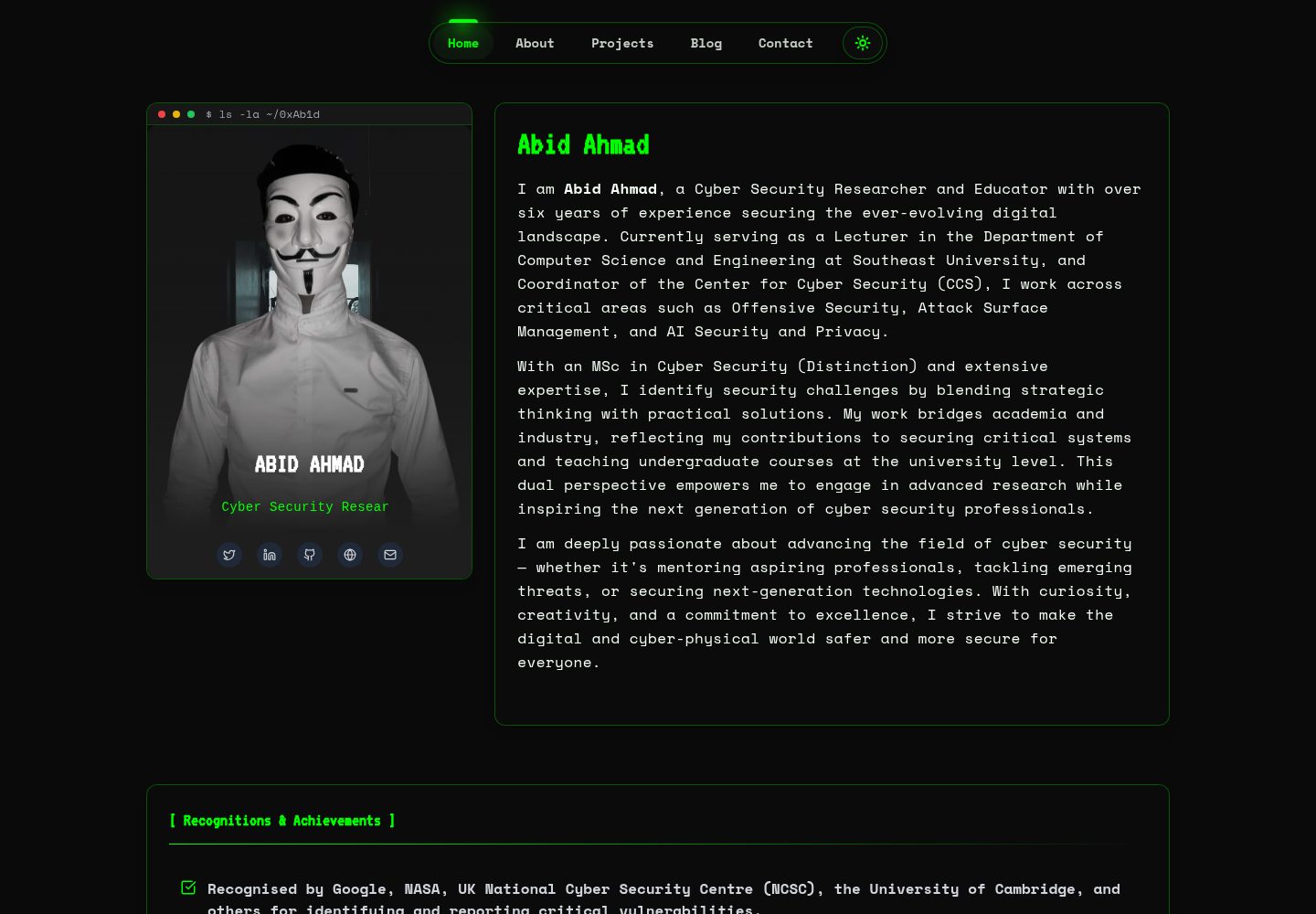
HackFolio
A high-performance, SEO-optimized hacker-themed portfolio website tailored for for ethical hackers, penetratio…
Vite · 作品集