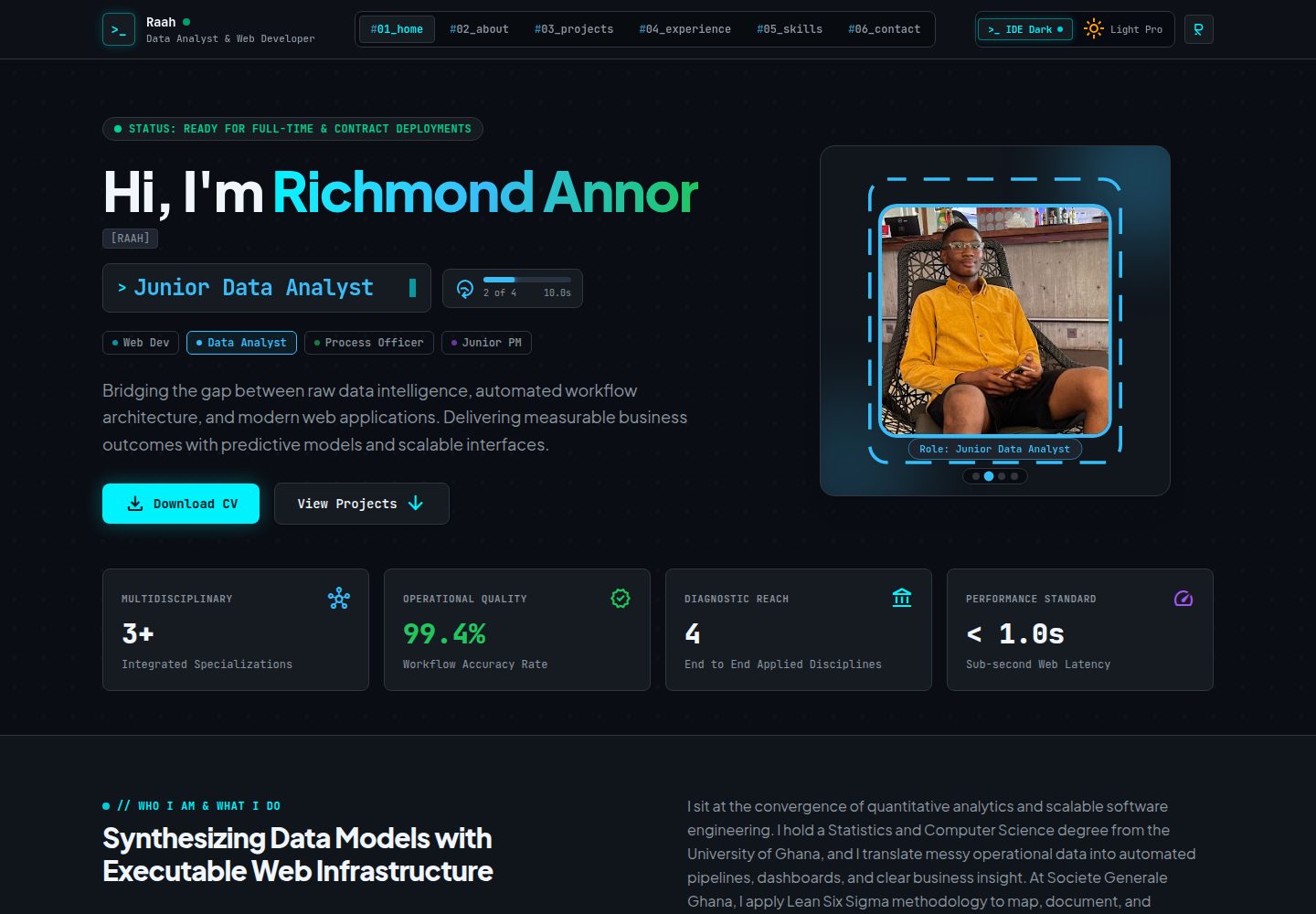
The hero area automatically cycles through four professional stages, each with its own photo, role title, accent color and border shape, plus a glowing SVG outline that follows
ViteReactPortfolio
My_Portfolio_Website — Vite Portfolio Template
By richmondannor
Richmond Annor Ayisah's personal portfolio website, built with React, TypeScript, Vite and Tailwind CSS, featuring an animated hero, Ctrl+K command palette, light/dark themes and a downloadable CV.
Explore the design
Compare the page layouts and mobile experience. Open any screenshot for a closer look.
Desktop homepage1 / 2
Desktop captureTop of page
Actual screenshot captured by the server browser.
All pages & views 2
Screenshots show visual appearance; interactive behavior may differ.
Recorded 2026-10-07View source
What stands out
A quick read of the recorded project description.
The Ctrl+K (Cmd+K on Mac) command palette supports searching to jump to sections, open projects, switch themes and open the CV
Light/dark theme switching, with dark mode as the default and the visitor's choice saved in the browser
Project detail modals show full descriptions; currently includes three projects: football expected goals modeling, global banking and economic analysis, and AHA hospital database benchmarking
The CV modal supports preview, printing and PDF download; the contact form opens the email app with the recipient and content pre-filled
Content is centralized in a single file, src/data/portfolioData.ts, making it easy to modify hero stages, projects, experience and skills
Template Details
This is a single-page React portfolio website that brings together four professional identities in one interface: Web Developer, Junior Data Analyst, Process Officer and Junior Project Manager. The page includes Home, About, Projects, Experience, Skills and Contact sections, with top navigation for jumping between them. The hero area automatically cycles through four stages, each with its own photo, role title, accent color and border shape (circle, rectangle, hexagon, square), plus a glowing SVG outline that follows the current border. Projects are displayed in a grid; clicking one opens a modal with the full description. It currently includes three projects: football expected goals modeling, global banking and economic analysis, and AHA hospital database benchmarking. Pressing Ctrl+K (Cmd+K on Mac) opens a searchable command palette for jumping to sections, opening projects, switching themes or opening the CV; Esc closes it. Theme switching saves the visitor's choice, with dark mode as the default. The CV modal supports preview, printing and PDF download. The contact form opens the visitor's email app with the recipient and content pre-filled. The layout adapts to phone, tablet and desktop screens.
Content is centralized in src/data/portfolioData.ts; modifying hero stages, projects, experience and skill categories all happens in this file. Hero photos go in the public directory, with paths starting with /. Border shapes require changing both the clip-path in src/index.css and the corresponding SVG outline in src/components/Hero.tsx; the internal names for the Process Officer border remain shape-triangle and tracer-triangle, and these names must stay unchanged. The CV layout is in ResumeModal.tsx, and the portrait image is src/assets/images/richmond_cv_portrait.png. The contact form recipient address is on the targetRecipient line at the top of Contact.tsx.
Building uses npm run build to generate the dist static folder, which can be deployed to static hosting services such as Netlify or Vercel; the install command needs --legacy-peer-deps, and the output directory is dist. The project requires Node.js 20.19 or newer, with no API keys or .env file needed. Dependencies in package.json such as @google/genai, express, dotenv and tsx come from the original template and are not currently used by the code; keeping them does not affect operation. The code uses the Apache-2.0 license, but personal content (text, photos, CV) belongs to Richmond Annor Ayisah and may not be reused without permission.
ViteReactPortfolio
Is it right for your project?
Use Cases
- Personal job seeking or freelancers showcasing multi-domain professional identities and project experience
- Using it as a single-page portfolio template built with React + TypeScript + Vite + Tailwind CSS for further modification
- Personal websites that need interactive features such as a command palette, light/dark themes and CV download
- Deploying to static hosting services such as Netlify or Vercel as an online resume
Suitable For
- Front-end developers who want to showcase personal projects and work experience with a single-page website
- People who need to present multiple professional identities such as development, data analysis, process management and project management at the same time
- Users familiar with React and TypeScript who want to quickly replace content based on the existing structure
- Developers looking for a portfolio template that includes interactive details such as a command palette and theme switching
Getting started & customization
Use these recorded setup notes alongside the repository instructions for your chosen version.
- 1
Requires Node.js 20.19 or newer; no API keys or .env file needed
- 2
Install dependencies with npm install --legacy-peer-deps, because the esbuild version does not fully match Vite's optional peer dependencies
- 3
The development server runs on port 3000; start it with npm run dev, and do not use the VS Code Code Runner run button
- 4
The project folder name may contain only letters, numbers and hyphens; it cannot contain & or spaces, otherwise npm scripts will fail on Windows
- 5
Build with npm run build to generate the dist directory; when deploying to static hosting, also add --legacy-peer-deps to the install command and set the output directory to dist
License & source material
Usage conditions & limitations
Free to use · keep license noticeThis entry covers the free version under the Apache-2.0 license in the public repository; the free scope is the code of that version and does not mean external services or third-party assets are free.
Must comply with when using
- Free use, modification, commercial use and distribution are allowed; when distributing, the Apache-2.0 license must be included.
- Modified files must be prominently marked as changed, and relevant copyright, patent, trademark and attribution notices must be retained.
- If the original project includes a NOTICE file, applicable attribution notices in it must be retained when distributing derivative works.
- The license includes an applicable contributor patent grant; initiating patent litigation as described in the license terminates that patent grant, and no trademark rights are granted.
- The code is provided as is; warranties and limitations of liability are governed by the original license and applicable law.
Additional costs & items to verify
- Demo images, fonts, icons and other third-party assets must be checked against their respective licenses; they cannot be judged solely by the code's Apache-2.0 license.
- External services such as domains, hosting, databases, payments or AI may incur additional fees.
- Personal content (text, photos, CV) is copyrighted by Richmond Annor Ayisah and may not be reused without permission; only the source code portion is covered by the Apache-2.0 license.
View Original Text Basis
no-charge, royalty-free, irrevocable copyright license
Original License Text
https://github.com/richmondannor/My_Portfolio_Website/blob/main/LICENSEhttps://github.com/richmondannor/My_Portfolio_Website/blob/main/README.mdPersonal content, including text, photographs, and the CV, belongs to Richmond Annor Ayisah and may not be reused without permission.
Original README
Compiled by DeepSeek based on repository license and README ·2026-10-07. Results only cover the materials read; dependencies, images, fonts, and subsequent term changes are subject to their respective original texts.
Project checks & description sources
Template Information
- Source platforms
- GitHub
- Documentation and maintenance reference score
- More documented · 85 / 100
- Technologies
- Vite · React
- Website type
- Portfolio
How this score is calculated
Our heuristic uses license records (up to 30), a demo link (12), a preview (10), stars (15), recorded maintenance (15), description completeness (8), feature records (5) and classification data (5). It is not a code, security or performance test, or a Google score. A link does not establish tested functionality.
What to verify for this project
- Repository update recorded
- 2026-10-07
- Screenshot last checked
- 2026-10-07
A demo link is listed. Check it with your own content and viewport sizes; its presence does not confirm that forms, authentication or payments work.
The catalog identifies Vite as the primary stack. Check the actual dependency manifest and lockfile for versions and hosting requirements. These notes use recorded metadata, not a code audit or a deployment test.
Use a selection guide →How this description was prepared
AI-assisted description based on catalog records and repository material. Repository authors are not automatically the reviewers of this description.
Review declaration: [email protected] · 2026-10-08
Inspect the recorded source material
SHA-256: e14289a758bb297af538a86a810041cf83c2a9a8974838fff6e10d4afc2898c4
2026-10-07T13:49:41.657Z
Source file / repository# Richmond Annor — Portfolio & Engineering Console A personal portfolio website for **Richmond Annor Ayisah**, presented as an "engineering console". It brings together four professional identities in one interactive interface: **Web Developer**, **Junior Data Analyst**, **Process Officer**, and **Junior Project Manager**. The site is a single-page React application with a dark, terminal-inspired design, an animated hero section, a searchable command palette, project detail views, and a downloadable CV. --- ## Table of Contents 1. [Features](#features) 2. [Tech Stack](#tech-stack) 3. [Getting Started](#getting-started) 4. [Available Scripts](#available-scripts) 5. [Project Structure](#project-structure) 6. [Customizing the Site](#customizing-the-site) 7. [Building and Deploying](#building-and-deploying) 8. [Troubleshooting](#troubleshooting) 9. [Notes on Unused Dependencies](#notes-on-unused-dependencies) 10. [License](#license) --- ## Features - **Animated hero section.** The hero cycles automatically through four stages. Each stage has its own photo, role title, accent color, and frame shape: | Stage | Role | Frame shape | | --- | --- | --- | | 1 | Web Developer | Circle | | 2 | Junior Data Analyst | Rectangle | | 3 | Process Officer | Hexagon | | 4 | Junior Project Manager | Square | A glowing, moving SVG outline traces the active frame. Visitors can also jump to any stage using the indicator dots. - **Page sections.** Home, About, Projects, Experience, Skills, and Contact, all reachable from the top navigation bar. - **Featured projects with detail views.** Each project opens in a modal with a full description: - Modelling Expected Goals in Football (machine learning and sports analytics) - Global Banking & Economic Analytics (financial engineering and business intelligence) - AHA Hospital Database Benchmarking (operational analytics and biostatistics) - **Command palette.** Press `Ctrl + K` (or `Cmd + K` on Mac) to open a searchable menu for jumping to sections, opening projects, switching theme, and opening the CV. Press `Esc` to close it. - **Dark and light themes.** The theme toggle saves the visitor's choice in the browser, so it is remembered on the next visit. Dark mode is the default. - **CV viewer.** A resume modal lets visitors preview the CV, print it, or download it as a PDF. - **Contact form.** The form opens the visitor's email app with the message pre-filled and addressed to the portfolio owner. - **Responsive layout.** The site adapts to phones, tablets, and desktop screens. --- ## Tech Stack | Area | Tool | | --- | --- | | UI library | React 19 | | Language | TypeScript | | Build tool and dev server | Vite 8 | | Styling | Tailwind CSS 4 | | Animation | Motion, plus native SVG animation for the hero outline | | Icons | Lucide React | | PDF export | jsPDF and html2canvas | --- ## Getting Started ### Prerequisites - **Node.js 20.19 or newer** (22 or newer also works). Download the LTS version from [nodejs.org](https://nodejs.org). - **npm**, which is installed together with Node.js. Check your versions: ```bash node -v npm -v ``` ### Installation 1. Place the project in a folder whose name uses only letters, numbers, and dashes, for example `richmond-portfolio`. **Do not use `&` or spaces in the folder name**, because it breaks the npm scripts on Windows. 2. Open the folder in VS Code (File → Open Folder). 3. Open the VS Code terminal (`Ctrl + `` ` ``) and install the dependencies: ```bash npm install --legacy-peer-deps ``` The `--legacy-peer-deps` flag is needed because the pinned `esbuild` version differs slightly from what Vite 8 lists as an optional peer dependency. The flag is safe for this project. ### Running the site locally ```bash npm run dev ``` Then open **http://localhost:3000** in your browser. The page refreshes automatically whenever you save a file. Press `Ctrl + C` in the terminal to stop the server. > **Important:** Run the project from the terminal with `npm run dev`. Do not use the ▶ "Run Code" button of the Code Runner extension, because it does not support React or Vite projects and shows the error "Code language not supported or defined". No API keys or `.env` file are required to run the site. --- ## Available Scripts | Command | What it does | | --- | --- | | `npm run dev` | Starts the development server on port 3000 | | `npm run build` | Creates an optimized production build in the `dist` folder | | `npm run preview` | Serves the production build locally so you can test it | | `npm run lint` | Runs a TypeScript type check without producing files | The `npm run clean` script uses a Linux command (`rm -rf`) and does not work in Windows PowerShell. To clean on Windows, delete the `dist` folder manually. --- ## Project Structure ``` richmond-portfolio/ ├── public/ # Static files served as-is (photos, favicons) ├── src/ │ ├── assets/images/ # Images imported directly into components (CV portrait) │ ├── components/ │ │ ├── Header.tsx # Top navigation and theme toggle │ │ ├── Hero.tsx # Animated hero, photo frames, SVG outlines │ │ ├── About.tsx # About section and core competencies │ │ ├── Projects.tsx # Featured projects grid │ │ ├── ProjectModal.tsx # Project detail pop-up │ │ ├── Experience.tsx # Work experience timeline │ │ ├── Skills.tsx # Skill categories and proficiency bars │ │ ├── Contact.tsx # Contact form and email links │ │ ├── ResumeModal.tsx # CV preview, print, and PDF download │ │ ├── CommandPalette.tsx # Ctrl+K command menu │ │ └── Footer.tsx │ ├── data/ │ │ └── portfolioData.ts # All site content: hero stages, projects, skills, experience │ ├── App.tsx # Page layout, theme state, global shortcuts │ ├── index.css # Global styles and hero frame shapes │ ├── main.tsx # Application entry point │ └── types.ts # TypeScript types for the content data ├── index.html # HTML entry file ├── vite.config.ts # Vite configuration ├── tsconfig.json # TypeScript configuration └── package.json # Dependencies and scripts ``` Most content changes happen in a single file: **`src/data/portfolioData.ts`**. --- ## Customizing the Site ### Change a hero photo 1. Copy your new picture directly into the `public` folder (not into a subfolder). Use a simple file name with no spaces, for example `my-photo.jpg`. 2. Open `src/data/portfolioData.ts` and find the `HERO_STAGES` list. Each stage has a `photoUrl` line. 3. Replace the link with a `/` followed by the exact file name: ```ts photoUrl: '/my-photo.jpg', ``` The file name and extension must match exactly, including capital letters. Choose a photo with the face near the center, because the frame shapes crop the corners. ### Change a hero frame shape Each frame shape is defined in two places, which must be edited together: 1. **The photo crop** in `src/index.css`. Edit the `clip-path` of the matching `.shape-...` class. 2. **The moving outline** in `src/components/Hero.tsx`. Edit the matching tracer element inside the `<svg>` block. The Process Officer frame is currently a hexagon. For historical reasons, its internal names are still `shape-triangle` and `tracer-triangle`. Keep those names unchanged, because `src/types.ts` and `portfolioData.ts` refer to them. Update the `shapeLabel` and `badge` text in `portfolioData.ts` if you change the displayed shape name. ### Edit projects, skills, and experience Open `src/data/portfolioData.ts` and edit the text inside the quotes of the relevant list: - `HERO_STAGES` for the hero roles, colors, and photos - `PROJECTS` for the featured projects - `EXPERIENCES` for the work history - `SKILL_CATEGORIES` for skills and their percentages Keep the commas, brackets, and quote marks in place. If the page goes blank after an edit, check the terminal for an error message that points to the line you changed. ### Update the CV The CV layout lives in `src/components/ResumeModal.tsx`. The CV portrait is loaded from `src/assets/images/richmond_cv_portrait.png`. To change it, replace that file with a new image that has the same name. ### Change the contact email The recipient address for the contact form is set at the top of `src/components/Contact.tsx`, in the `targetRecipient` line. --- ## Building and Deploying Create a production build: ```bash npm run build ``` This creates a `dist` folder containing the finished static website. Upload that folder to any static hosting service. **Netlify** and **Vercel** are the easiest options: 1. Push the project to a GitHub repository. 2. Connect the repository to Netlify or Vercel. 3. Use these settings: - Install command: `npm install --legacy-peer-deps` - Build command: `npm run build` - Output directory: `dist` Before pushing to GitHub, make sure `node_modules` is not included. The provided `.gitignore` already excludes it. --- ## Troubleshooting **"Code language not supported or defined" in VS Code** This comes from the Code Runner extension, not from the project. Use `npm run dev` in the terminal instead of the ▶ button. **"npm.ps1 cannot be loaded because running scripts is disabled" (Windows PowerShell)** Run this once, type `Y` when asked, then open a new terminal: ```powershell Set-ExecutionPolicy -Scope CurrentUser -ExecutionPolicy RemoteSigned ``` **`npm install` fails with `ERESOLVE could not resolve`** Run the install with the legacy flag: ```bash npm install --legacy-peer-deps ``` **`'...\node_modules\.bin\' is not recognized` or `Cannot find module ...\vite\bin\vite.js`** The project folder name contains an `&` or similar special character. Rename the folder to use only letters, numbers, and dashes, delete the `node_modules` folder, and run `npm install --legacy-peer-deps` again. Close the folder in VS Code before renaming it, otherwise Windows reports that the folder is in use. **A changed photo does not appear** Check that the picture is directly inside `public`, that the path in `portfolioData.ts` starts with `/`, and that the file name and extension match exactly, including capital letters. **The page does not update after saving** Make sure the dev server is still running in the terminal. If it stopped, run `npm run dev` again. --- ## Notes on Unused Dependencies `package.json` lists a few packages that came with the original project template and are not used by the current site code: `@google/genai`, `express`, `dotenv`, and `tsx`. The site runs without them, and no API key is needed. They can be left as they are. If you ever remove them, run `npm install --legacy-peer-deps` afterward and confirm that `npm run dev` and `npm run build` still work. The `.env.example` file also comes from the template and can be ignored. --- ## License The source code carries an Apache-2.0 license header. Personal content, including text, photographs, and the CV, belongs to Richmond Annor Ayisah and may not be reused without permission.
Explore similar templates
Compare previews and descriptions within the same stack and category.

Resumify
Resumify is a browser-based resume builder built with React, TypeScript, and Vite.
Vite · Portfolio

showlit
Showlit is a personal website template built with React, Vite, TypeScript, Tailwind CSS, and shadcn/ui.
Vite · Portfolio

folium
A developer portfolio template built with Vite, React, TypeScript, and Tailwind CSS.
Vite · Portfolio

kurizu-discord
A personal portfolio website built with React and Vite that mimics the Discord desktop app, organizing projects, skills, and experience into customizable channels, threads, a member list, and emoji reactions.
Vite · Portfolio

about-me-personal-portfolio-website-template
AboutMe is a free personal website template built with Bootstrap and Vite, released under the MIT license. It provides a single-page index.html with organized src directories for images, JavaScript, and SCSS, along with npm scripts for development and build.
Vite · Portfolio
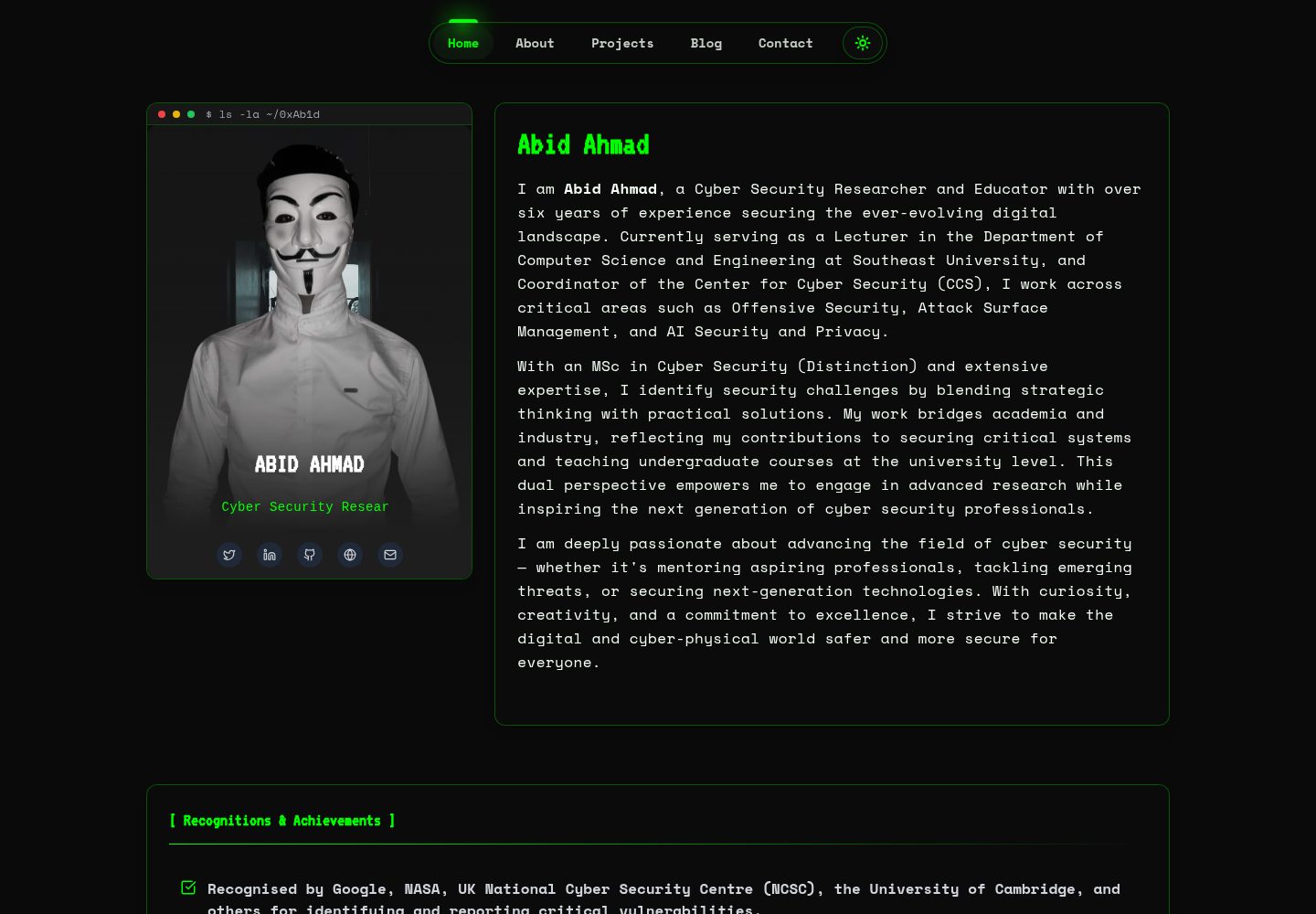
HackFolio
HackFolio is a hacker-style personal portfolio template for ethical hackers, penetration testers, bug bounty hunters, red teamers, and cybersecurity professionals.
Vite · Portfolio