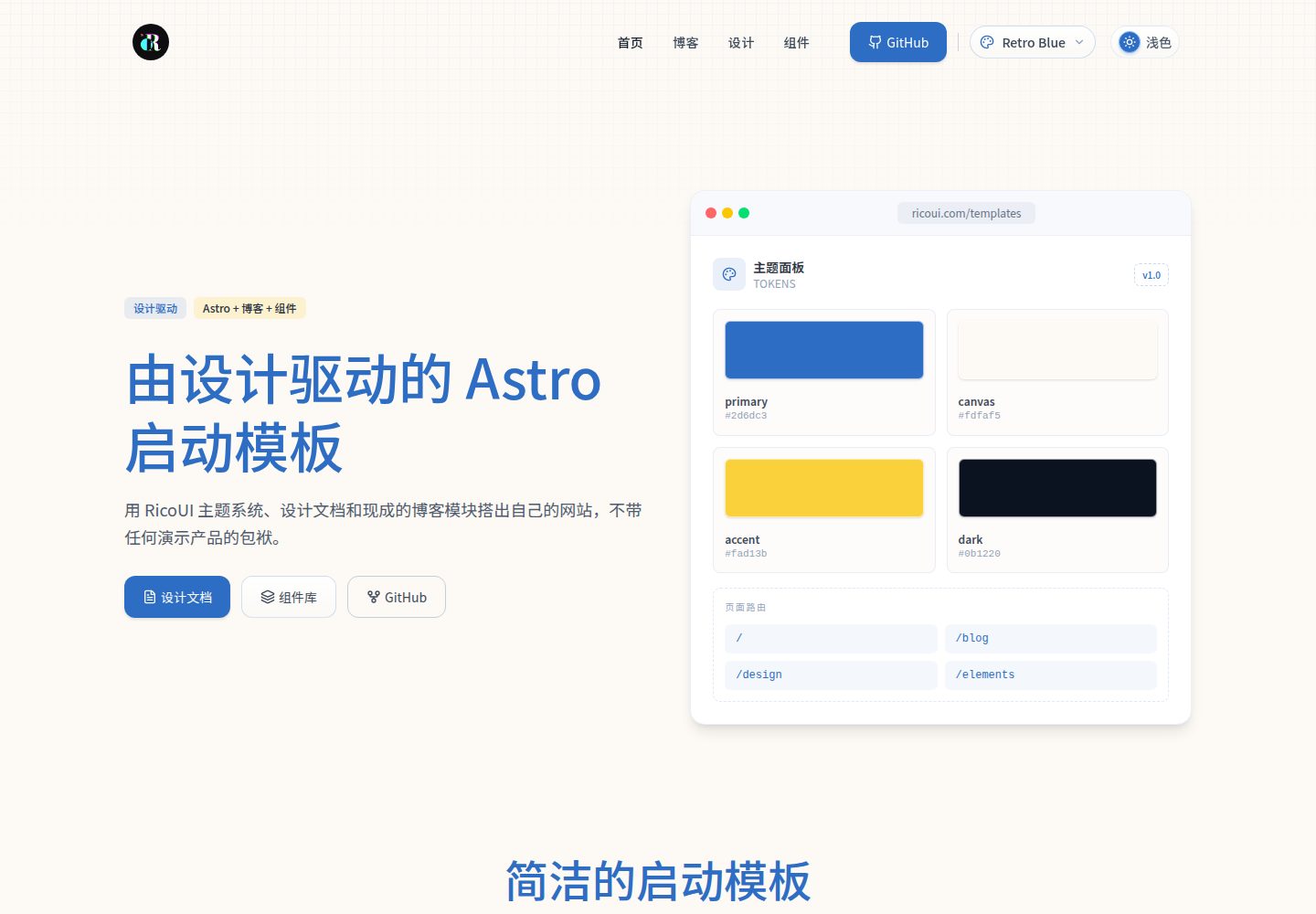
内置 10 套可切换主题配色,统一覆盖同一套语义化令牌
Astro启动器
ricoui-astro-starter — Astro 启动器模板
作者 ricocc
基于 Astro 的内容型站点启动模板,内置可切换主题令牌、MDX 博客、RSS 与站点地图,附带设计系统文档和组件参考页。
看看你的网站会是什么样
浏览真实页面截图,比较内容排版与手机效果。点击下方缩略图切换,放大查看整页细节。
全部页面与视图 3
截图用于了解视觉与布局,交互效果请以实际项目为准。
采集于 2026-10-02查看来源
值得关注的模板亮点
从已有项目资料中,快速了解它的特点。
使用 MDX 编写博客内容,支持 RSS 与站点地图
提供设计系统文档页面和组件、令牌参考页
站点与主题配置集中在 src/config 目录下
包含桌面端与移动端实际页面截图预览
模板详细介绍
这是一个面向内容驱动站点的 Astro 启动模板,仓库中提供的是通用示例项目,不包含个人、公司或生产站点数据。模板自带一套有文档的视觉系统,通过语义化令牌实现主题切换,默认提供 10 套可替换的配色方案,可在主题切换器中一键更换,也可在配置中固定单一主题。内容方面使用 Astro Content Layer 与 MDX 编写博客文章,支持 RSS 订阅和站点地图。路由包含首页、博客列表与详情、设计文档浏览页、组件与令牌参考页以及 RSS 输出。项目结构将组件、配置、内容、布局、页面和样式分目录组织,方便按需替换。构建前需要设置 PUBLIC_SITE_URL,它会影响规范化链接、站点地图、RSS 和 Open Graph 元数据。
Astro启动器
适合你的项目吗?
适用场景
- 搭建以文章或文档为主的内容型站点
- 需要多套配色方案并希望快速切换主题的项目
- 希望参考设计系统文档与组件令牌组织的 Astro 项目
- 作为个人博客或产品内容站点的起始代码
适合人群
- 熟悉 Astro 与 MDX 的前端开发者
- 需要可定制视觉系统的内容站点作者
- 希望以 MIT 许可免费使用和修改代码的团队
上手与定制指南
结合仓库当前版本的说明,按下面的资料检查内容、配置与运行要求。
- 1
使用 pnpm install 安装依赖,pnpm dev 启动本地开发服务器,默认端口为 5200
- 2
构建前设置 PUBLIC_SITE_URL 为最终部署地址,以控制规范化链接、站点地图、RSS 和 Open Graph 元数据
- 3
站点信息在 src/config/site.js 中修改,主题与默认主题在 src/config/themes.js 中配置
- 4
生产环境可设置 showThemeSwitcher 和 persistUserSelection 为 false 以固定单一主题
- 5
示例图片、字体、图标等第三方素材需按各自许可单独核对,MIT 许可仅覆盖代码
授权与来源资料
使用条件与限制
免费使用 · 保留许可声明本次收录的是公开仓库中采用 MIT 许可的免费版本;免费范围为该版本代码,不代表外部服务或第三方素材免费。
使用时需要遵守
- 允许免费使用、修改、商用和分发该版本代码。
- 分发代码副本或实质性部分时,保留原作者版权声明和完整 MIT 许可声明。
- 代码按现状提供;担保与责任限制以原许可证及适用法律为准。
额外费用与待核对事项
- 构建前必须将环境变量 PUBLIC_SITE_URL 设置为最终部署地址,否则规范化链接、站点地图、RSS 与 Open Graph 元数据会指向错误地址。
- 官方演示地址仅用于主题目录审核;若用于自有站点,需在自定义后另行创建独立部署,不应直接沿用该演示地址。
- 演示图片、字体、图标及其他第三方素材需按各自许可核对,不能仅凭代码的 MIT 许可判断。
- 域名、托管、数据库、支付或 AI 等外部服务可能另外收费。
查看原文依据
Permission is hereby granted, free of charge
许可证原文
Set `PUBLIC_SITE_URL` to the final deployment URL before building.
README 原文
https://github.com/ricocc/ricoui-astro-starter/blob/master/LICENSEhttps://github.com/ricocc/ricoui-astro-starter/blob/master/README.mddeploy this repository unchanged there for theme-directory review, then create a separate deployment after customizing it for your own site.
README 原文
DeepSeek 根据仓库许可证和 README 整理 ·2026-10-02。结果仅覆盖已读取资料,依赖、图片、字体及后续条款变更以各自原文为准。
项目核对记录与介绍依据
模板资料
- 来源平台
- Astro Themes
- 资料与维护参考分
- 资料较完整 · 79 / 100
- 技术栈
- Astro
- 网站类型
- 启动器
这个分数如何计算
本站按许可资料(最高30分)、演示链接(12分)、预览图(10分)、Star数(15分)、记录的维护时间(15分)、描述完整度(8分)、功能记录(5分)和分类资料(5分)计算。它不是代码、安全或性能测试,也不是 Google 评分;有链接不代表已实测可用。
这个项目需要核对什么
- 记录的仓库更新时间
- 2026-07-29
- 截图检查日期
- 2026-10-02
已收录演示链接。请用你的内容与屏幕尺寸检查;有演示不代表表单、认证或支付已经可用。
目录记录的主要技术栈是 Astro。请通过依赖清单和锁文件核对实际版本与托管要求。这些说明基于收录资料,不代表代码审计或部署实测。
查看具体选型方法 →介绍的制作与核对状态
介绍由 AI 辅助整理目录与仓库资料。仓库作者不等于这篇介绍的审核者。
已完成服务器许可规则与 AI 来源核对;未经过人工编辑审核。
查看当时使用的来源资料
SHA-256: 4b4e58d2c9e913196550848acd62201164a3ca9394d7aee584f1f127c07e94e8
2026-10-02T18:42:39.908Z
来源文件 / 仓库# Design-led Astro Starter
[中文说明](README-zh.md) · [Live generic demo](https://ricoui-astro-starter.vercel.app/)
A reusable Astro 7 starter for content-driven sites. It includes a documented visual system, switchable theme tokens, MDX blog posts, RSS, sitemap support, and an Elements reference page. The deployed demo is the same generic project in this repository; it contains no personal, company, or production-site data.

## Online Preview
Demo:[Live demo](https://ricoui-astro-starter.vercel.app/)
Demo Zh: [Live demo zh](https://ricoui-astro-starter-zh.netlify.app/)
## Themes
The starter ships with 10 swappable theme palettes. They all override the same semantic tokens, so every component keeps working while the mood of the site changes. Retro Blue is the default; the rest are one click away in the theme switcher.
<table>
<tr>
<td width="50%" align="center"><img src="docs/preview/Retro%20Blue.jpg" alt="Retro Blue theme" width="100%" /><br><sub><b>Retro Blue</b><br>Warm editorial blue + gold · default</sub></td>
<td width="50%" align="center"><img src="docs/preview/Minimal%20Mono.jpg" alt="Minimal Mono theme" width="100%" /><br><sub><b>Minimal Mono</b><br>Restrained black, white, warm gray</sub></td>
</tr>
<tr>
<td width="50%" align="center"><img src="docs/preview/Forest%20Green.jpg" alt="Forest Green theme" width="100%" /><br><sub><b>Forest Green</b><br>Calm botanical greens</sub></td>
<td width="50%" align="center"><img src="docs/preview/Vellum%20Ink.jpg" alt="Vellum Ink theme" width="100%" /><br><sub><b>Vellum Ink</b><br>Warm vellum paper + ink</sub></td>
</tr>
<tr>
<td width="50%" align="center"><img src="docs/preview/Creator%20Yellow.jpg" alt="Creator Yellow theme" width="100%" /><br><sub><b>Creator Yellow</b><br>Bright creator-economy yellow</sub></td>
<td width="50%" align="center"><img src="docs/preview/Precision%20Orange.jpg" alt="Precision Orange theme" width="100%" /><br><sub><b>Precision Orange</b><br>Technical neutral + orange signal</sub></td>
</tr>
<tr>
<td width="50%" align="center"><img src="docs/preview/Comic%20Pulp.jpg" alt="Comic Pulp theme" width="100%" /><br><sub><b>Comic Pulp</b><br>Soft pulp comic energy</sub></td>
<td width="50%" align="center"><img src="docs/preview/Midnight%20Pastel.jpg" alt="Midnight Pastel theme" width="100%" /><br><sub><b>Midnight Pastel</b><br>Dark workspace, muted pastels</sub></td>
</tr>
<tr>
<td width="50%" align="center"><img src="docs/preview/Sky%20Blue.jpg" alt="Sky Blue theme" width="100%" /><br><sub><b>Sky Blue</b><br>Pale blue-white product</sub></td>
<td width="50%" align="center"><img src="docs/preview/Signal%20Red.jpg" alt="Signal Red theme" width="100%" /><br><sub><b>Signal Red</b><br>Pragmatic red enterprise accent</sub></td>
</tr>
</table>
Set `defaultThemeId` in `src/config/themes.js` to choose your default, or turn the theme switcher off for a production site.
## Stack
- Astro 7 and TypeScript
- Tailwind CSS v4 with `@tailwindcss/vite`
- Astro Content Layer, MDX, RSS, and sitemap
- Sharp for local image processing
## Quick start
```bash
pnpm install
pnpm dev
```
The local server runs at `http://localhost:5200`.
## Customize the template
Start with these files. The checked-in values are intentional generic examples, not a real site configuration.
| Location | Change here |
| --- | --- |
| `src/config/site.js` | Site title, canonical URL, SEO metadata, and source link |
| `src/config/themes.js` | Default theme, available theme packs, and semantic tokens |
| `src/styles/global.css` and `src/styles/themes.css` | Base typography and CSS token overrides |
| `src/content/post/` | Sample MDX posts and frontmatter |
| `docs/DESIGN.md` | Visual-system rules for people and coding agents |
| `src/pages/index.astro` | Starter home-page sections and copy |
To use a single fixed theme in a production project, set `showThemeSwitcher` and `persistUserSelection` to `false` in `src/config/themes.js` after choosing `defaultThemeId`.
## Routes
| Route | Purpose |
| --- | --- |
| `/` | Generic starter overview |
| `/blog` | Sample MDX article listing |
| `/blog/[slug]` | Individual article |
| `/design` | Browser view of the design documentation |
| `/elements` | Component and token reference |
| `/rss.xml` | RSS feed |
## Project structure
```text
docs/ Design-system documentation
public/assets/ Replaceable generic images
src/components/ Reusable sections, cards, UI, and widgets
src/config/ Site and theme configuration
src/content/post/ MDX posts
src/layouts/ Shared page layouts and metadata
src/pages/ Astro routes
src/styles/ Global, theme, and article styles
```
## Build and deploy
```bash
pnpm build
pnpm preview
```
Set `PUBLIC_SITE_URL` to the final deployment URL before building. It controls canonical URLs, the sitemap, RSS, and Open Graph metadata. The official demo uses `https://ricoui-astro-starter.vercel.app/`; deploy this repository unchanged there for theme-directory review, then create a separate deployment after customizing it for your own site.
## License
[MIT](LICENSE)
看看同类模板
对比同技术栈与用途的模板,找到更适合的视觉与内容结构。

astrowind
⭕️ AstroWind: A free template using Astro v7 and Tailwind CSS v4. Astro starter theme.
Astro · 博客
accessible-astro-starter
Accessible Astro Starter 是一个以无障碍为核心理念的 Astro 6 启动模板,由 incluud 团队维护。
Astro · 博客

astro-erudite
An opinionated, unstyled static blogging template built with Astro and native CSS.
Astro · 作品集

astro-shopify
astro-shopify 是一个面向开发者的轻量级电商启动模板,用于构建基于 Shopify 的无头店面。
Astro · 电商

brutal
A neobrutalism Astro starter theme
Astro · 启动器

qwind
⭕️ Qwind: A template to make your website using Qwik + Tailwind CSS.
Astro · 工具站