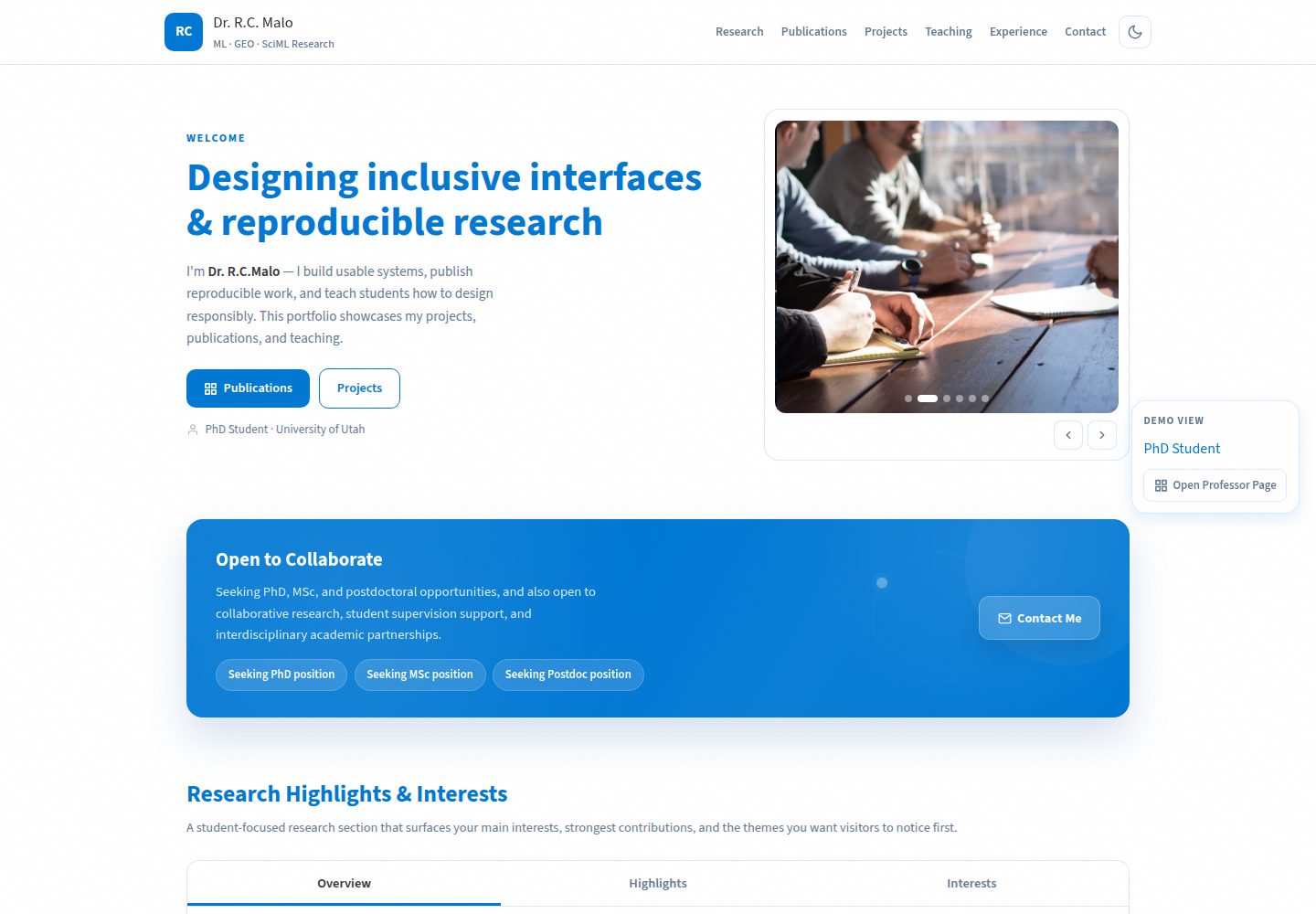
所有站点内容由单个 data.json 驱动,无需编辑 HTML 即可更新页面
HTML作品集
acadpro — HTML 作品集模板
作者 riponcm
AcadPro 是一个由 JSON 驱动的学术作品集与实验室网站模板,使用纯 HTML、CSS 和 JavaScript 构建,提供学生/研究者和教授/实验室两套前端页面。
看看你的网站会是什么样
浏览真实页面截图,比较内容排版与手机效果。点击下方缩略图切换,放大查看整页细节。
全部页面与视图 2
截图用于了解视觉与布局,交互效果请以实际项目为准。
采集于 2026-10-02查看来源
值得关注的模板亮点
从已有项目资料中,快速了解它的特点。
提供学生/研究者和教授/实验室两套前端页面,共用同一份数据文件
论文模块支持按年份或引用数排序、加载更多分页和 BibTeX 复制弹窗
可在 JSON 中配置默认主题(light、dark、blue)并切换模板类型
可选通过 Python 脚本从 Google Scholar 自动更新引用数并保留手动编辑内容
纯 HTML、CSS、JavaScript 实现,无框架、无构建工具、无包管理器依赖
模板详细介绍
AcadPro 是一个面向学术场景的静态网站模板,仓库采用 MIT 许可。模板使用纯 HTML、CSS 和 JavaScript 编写,不依赖框架或包管理器,所有站点内容集中存放在 data.json 文件中,页面加载时通过 JavaScript 读取并渲染各区块,因此日常维护只需编辑 JSON 而无需改动 HTML。
模板提供两套前端:index.html 面向 PhD 学生、MSc/MS 学生、博士后和早期研究者,包含个人简介、招聘/合作横幅、研究亮点与兴趣、论文、项目、教学、经历、教育、奖项和联系方式等区块;professor.html 面向教授、教师、资深教职人员和实验室负责人,包含实验室导向的首屏、合作与开放职位、实验室介绍(含概览、主题、设施/方法、团队等标签页)、实验室论文和带地图的联系方式区块。两套页面共用同一份 data.json 和论文展示引擎。
内容配置覆盖 profile、hiring/opportunities、researchProfile、publications、projects、teaching、experience、education、awards、contact、footer 等 JSON 键,并支持在 settings 中切换 template(phd 或 professor)、设置默认主题(light、dark、blue)以及控制演示用模板切换按钮。论文模块支持按年份或引用数排序、加载更多分页、BibTeX 复制到剪贴板弹窗,并可选通过 fetch_scholar.py 从 Google Scholar 更新引用数。
使用限制:由于页面通过 fetch 读取 data.json,直接以 file:// 打开 index.html 无法正常工作,本地测试需要启动静态服务器;Google Scholar 自动更新需要额外安装 Python 依赖并配置 Scholar ID。模板本身不包含构建工具或服务端代码,部署到 Netlify、GitHub Pages 或 Vercel 等静态托管即可。
HTML作品集
适合你的项目吗?
适用场景
- PhD 学生、MSc/MS 学生或博士后搭建个人学术作品集主页
- 教授或教师建立个人教职简介页面
- 研究实验室或课题组发布实验室介绍、开放职位和论文列表
- 研究人员展示论文、项目、教学、经历、教育和奖项等信息
- 需要以静态方式部署到 Netlify、GitHub Pages 或 Vercel 的学术网站
适合人群
- PhD 学生与 MSc/MS 学生
- 博士后与早期研究者
- 教授、教师与资深教职人员
- 研究实验室、课题组与首席研究员
- 希望用 JSON 集中管理内容的学术网站维护者
上手与定制指南
结合仓库当前版本的说明,按下面的资料检查内容、配置与运行要求。
- 1
克隆仓库后编辑 data.json,将演示内容替换为个人信息
- 2
本地测试需启动静态服务器(如 python3 -m http.server 8000 或 npx serve .),直接打开 index.html 会因浏览器阻止 file:// 下的 fetch 请求而无法工作
- 3
学生/研究者页面使用 index.html,教授/实验室页面使用 professor.html,两者读取同一份 data.json
- 4
在 data.json 的 settings 中设置 template 为 phd 或 professor 以选择模板,并可配置 templateLabel 显示标签
- 5
如需从 Google Scholar 自动更新引用数,需安装 scholarly 并运行 fetch_scholar.py --scholar-id YOUR_SCHOLAR_ID
授权与来源资料
使用条件与限制
免费使用 · 保留许可声明本次收录的是公开仓库中采用 MIT 许可的免费版本;免费范围为该版本代码,不代表外部服务或第三方素材免费。
使用时需要遵守
- 允许免费使用、修改、商用和分发该版本代码。
- 分发代码副本或实质性部分时,保留原作者版权声明和完整 MIT 许可声明。
- 代码按现状提供;担保与责任限制以原许可证及适用法律为准。
额外费用与待核对事项
- 页面通过 fetch 读取 data.json,直接以 file:// 打开 index.html 无法工作,本地测试必须启动静态服务器(如 python3 -m http.server 或 npx serve)。
- 可选的 Google Scholar 自动更新功能需额外安装 Python 依赖 scholarly 并配置 Scholar ID,属于外部服务集成,非模板核心功能。
- Google Scholar 无官方 API,脚本依赖第三方 scholarly 库,可能受 Google 限流影响,需等待后重试。
- 定制品牌、布局修改、额外区块或 CMS/后端集成属于付费委托服务,免费模板本身不包含这些内容。
- 演示图片、字体、图标及其他第三方素材需按各自许可核对,不能仅凭代码的 MIT 许可判断。
- 域名、托管、数据库、支付或 AI 等外部服务可能另外收费。
查看原文依据
Permission is hereby granted, free of charge
许可证原文
Since the site loads `data.json` via JavaScript fetch, you need a local server to test
README 原文
pip install scholarly python fetch_scholar.py --scholar-id YOUR_SCHOLAR_ID
README 原文
Google Scholar has no official API — the script uses the `scholarly` library
README 原文
https://github.com/riponcm/acadpro/blob/main/LICENSE.txthttps://github.com/riponcm/acadpro/blob/main/README.mdIf you need a tailored version of this portfolio with custom branding, unique layout modifications, additional sections, or integration with a CMS or backend system, I am available for commissioned work.
README 原文
DeepSeek 根据仓库许可证和 README 整理 ·2026-10-02。结果仅覆盖已读取资料,依赖、图片、字体及后续条款变更以各自原文为准。
项目核对记录与介绍依据
模板资料
- 来源平台
- GitHub
- 资料与维护参考分
- 资料较完整 · 83 / 100
- 技术栈
- HTML
- 网站类型
- 作品集
这个分数如何计算
本站按许可资料(最高30分)、演示链接(12分)、预览图(10分)、Star数(15分)、记录的维护时间(15分)、描述完整度(8分)、功能记录(5分)和分类资料(5分)计算。它不是代码、安全或性能测试,也不是 Google 评分;有链接不代表已实测可用。
这个项目需要核对什么
- 记录的仓库更新时间
- 2026-04-09
- 截图检查日期
- 2026-10-02
已收录演示链接。请用你的内容与屏幕尺寸检查;有演示不代表表单、认证或支付已经可用。
目录记录的主要技术栈是 HTML。请通过依赖清单和锁文件核对实际版本与托管要求。这些说明基于收录资料,不代表代码审计或部署实测。
查看具体选型方法 →介绍的制作与核对状态
介绍由 AI 辅助整理目录与仓库资料。仓库作者不等于这篇介绍的审核者。
已完成服务器许可规则与 AI 来源核对;未经过人工编辑审核。
查看当时使用的来源资料
SHA-256: cce1472f008bbb731c75340ad4d1066c2c6f9a905eb80409960887fe35583ee7
2026-10-02T21:35:02.450Z
来源文件 / 仓库# AcadPro--Academic Portfolio Template
**A GitHub repository for an academic portfolio template, professor lab website, researcher homepage, and university faculty profile theme.**
  
<div align="center">
[](https://acadpro.netlify.app)
</div>
**Preview**

# AcadPro--Academic Portfolio Template
Acadpro is a modern, JSON-driven academic portfolio and lab website repository built with pure HTML, CSS, and JavaScript for PhD students, MSc students, postdocs, professors, research groups, and university faculty who want a polished online presence without frameworks or dependencies.
---
> **If this project is useful to you, please consider giving it a star.**
> Stars help others discover this project and motivate continued development.
>
> [](https://github.com/riponcm/acadpro)
---
## What's New in V2.0.2
- All site content is now driven by a single `data.json` file — no more editing HTML
- Student and Professor modes are now supported with separate frontends
- New dedicated `professor.html` page for faculty and research lab websites
- Floating demo switcher now opens the Student or Professor page directly
- Student template keeps the portfolio-oriented homepage and no-map contact layout
- Professor page adds a lab-focused hero, collaboration section, lab overview, lab publications, and map-based contact layout
- Research Highlights & Interests now use a tabbed layout matching the existing theme
- Highlights and Interests can now render compact technical skill cards with icons and learning levels
- Optional Google Scholar integration to auto-update citation counts
- Two publication display styles — card grid or tabbed list — switchable via JSON
- Dynamic Publication sorting by "Year" or "Citations" with "Load More" pagination
- BibTeX Copy-to-Clipboard modal
- Every section (projects, publications, teaching, experience, education, awards, contact) is fully configurable from JSON
- Configurable Default Theme (`light`, `dark`, `blue`) directly controlled from `data.json`
---
## Overview
This is a complete, production-ready academic portfolio website. All content lives in `data.json` — edit that one file and the website updates automatically. No build tools, no package managers, no server-side code.
The design follows an editorial aesthetic with warm muted tones, refined typography, and subtle animations. It includes light and dark mode, responsive layout, and all interactive features built from scratch.
---
---
## Templates
Acadpro now supports two main academic website experiences:
- `index.html` for Student / Researcher portfolios
- `professor.html` for Professor / Lab frontends
### Student Template
Use this for:
- PhD students
- MSc / MS students
- Postdocs
- Early-career researchers
Main characteristics:
- Hero remains in the same visual style
- Simple `Open to Collaborate` banner
- Tabbed `Research Highlights & Interests` section
- Compact technical skill cards supported inside research tabs
- Existing publication system stays unchanged
- Existing project cards stay unchanged
- Existing teaching section stays unchanged
- Existing experience and education tabs stay unchanged
- Existing awards section stays unchanged
- `Contact Me` becomes two centered banner blocks with no map
### Professor Template
Use this for:
- Professors
- Teachers
- Senior faculty profiles
- Research labs
- Principal investigators
Main characteristics:
- Same visual theme and shared academic branding
- Dedicated `professor.html` page instead of forcing all logic into one homepage
- Lab-first hero with welcome message and research highlight slider
- Collaboration and open positions section for PhD, Master's, postdoc, and visiting researchers
- Large `About the Lab` section with tabs for overview, themes, facilities/methods, and team/culture
- Lab publications section reusing the shared publication engine
- Map-based `Contact Us` area with professor/lab details, CV, and academic profiles
### How To Change Template
In `data.json`:
```json
"settings": {
"template": "phd",
"templateLabel": "PhD Student"
}
```
Available values:
- `phd` for the student/researcher view
- `professor` for the professor/teacher view
You can also change the visible label:
```json
"templateLabel": "Postdoctoral Researcher"
```
### Which File To Open
- Use `index.html` for the student/researcher site
- Use `professor.html` for the professor/lab site
- Both pages read from the same `data.json`
### Demo Switcher
For demo purposes, the site can show a floating switch button on the middle-right side of the screen to open the Student or Professor page quickly.
Enable it in `data.json`:
```json
"settings": {
"demoTemplateSwitcher": true
}
```
Hide it on a real published site:
```json
"settings": {
"demoTemplateSwitcher": false
}
```
When hidden, visitors will only see the single template selected in `settings.template`.
---
## Page Structure
| # | Section | JSON Key | Description |
|:---:|:---|:---|:---|
| 01 | **Header** | `profile` | Sticky navigation with glass blur effect and theme toggle |
| 02 | **Hero** | `profile` & `projects` | Welcome text with auto-rotating photo carousel (combines profile pics + project pics) |
| 03 | **Hiring Banner** | `hiring` | Highlighted "Open to Work" section with animated pulse |
| 04 | **Research Highlights & Interests** | `researchProfile`, `expertise`, `lab` | Tabbed research overview, highlights, and interests |
| 05 | **Publications** | `publications` | Existing publication system with auto-fetch compatibility, sorting, BibTeX, sharing, and load more |
| 06 | **Projects** | `projects` | Existing project cards with images, GitHub links, and share dropdown |
| 07 | **Teaching** | `teaching` | Existing video tiles that open YouTube in a modal |
| 08 | **Experience** | `experience` | Existing tabbed work-history panel |
| 09 | **Education** | `education` | Existing tabbed degree panel |
| 10 | **Awards** | `awards` | Existing compact cards with external links |
| 11 | **Contact Me** | `contact`, `cv`, `settings.template` | Student view: two centered banners without map. Professor view: map layout with contact info |
| 12 | **Footer** | `footer` | Existing footer style with version and repo link |
### Professor Page Structure
| # | Section | JSON Key | Description |
|:---:|:---|:---|:---|
| 01 | **Header** | `profile` | Shared sticky header and branding |
| 02 | **Lab Hero** | `professorPage.hero`, `profile`, `lab` | Welcome to lab message with research highlight slider |
| 03 | **Collaboration & Open Positions** | `professorPage.collaboration` | PhD, Master's, postdoc, visiting researcher, and collaboration callout |
| 04 | **About the Lab** | `professorPage.aboutLab`, `lab` | Large tabbed lab section with overview, themes, methods, and people |
| 05 | **Lab Publications** | `publications` | Shared publication engine reused for the professor frontend |
| 06 | **Contact Us** | `contact`, `cv`, `lab`, `profile` | Map-based faculty/lab contact section |
| 07 | **Footer** | `footer` | Shared footer style |
---
## Installation
### Step 1 — Clone the Repository
```bash
git clone https://github.com/riponcm/acadpro.git
cd acadpro
```
### Step 2 — Edit Your Data
Open `data.json` in any text editor (VS Code recommended) and replace the demo content with your own information. See the Customization Guide below for details on each section.
### Step 3 — Test Locally
Since the site loads `data.json` via JavaScript fetch, you need a local server to test:
```bash
# Using Python (recommended)
python3 -m http.server 8000
# Using Node.js
npx serve .
```
Then open `http://localhost:8000` in your browser.
**Note:** Opening `index.html` directly as a file will not work because browsers block `fetch()` requests from `file://` protocol. Always use a local server for testing.
### Step 4 (Optional) — Auto-Update from Google Scholar
```bash
pip install scholarly
python fetch_scholar.py --scholar-id YOUR_SCHOLAR_ID
```
Your Google Scholar ID is the value after `user=` in your profile URL:
`https://scholar.google.com/citations?user=YOUR_SCHOLAR_ID`
This updates citation counts for existing papers and adds new ones with placeholder images. Your manual edits (images, PDFs, descriptions) are never overwritten. A backup is saved as `data.backup.json` before each update.
---
## Deployment
### Option 1 — Netlify (Recommended)
1. Go to [app.netlify.com](https://app.netlify.com) and sign in.
2. Click **"Add new site"** then **"Deploy manually"**.
3. Drag your project folder (containing `index.html` and `data.json`) into the upload area.
4. Your site is live. Netlify provides a free URL and HTTPS.
To update: drag the updated folder into the re-deploy area on the **Deploys** tab.
### Option 2 — GitHub Pages
1. Push your repository to GitHub.
2. Go to repository **Settings** then **Pages**.
3. Under **Source**, select branch `main` and root folder `/`.
4. Click **Save**. Your site will be available at `https://username.github.io/repo-name`.
5. Any push to `main` will automatically redeploy.
### Option 3 — Vercel
1. Go to [vercel.com](https://vercel.com) and import your GitHub repository.
2. No build settings needed — it serves static files automatically.
3. Deploys on every push.
---
## File Structure
```
acadpro/
|-- index.html <- Main site (reads data.json, renders everything)
|-- data.json <- All site content (edit this file)
|-- fetch_scholar.py <- Optional: auto-pull from Google Scholar
|-- LICENSE.txt <- License terms
|-- README.md <- This file
|-- .gitignore
|-- screenshots/
|-- light-mode.png
|-- dark-mode.png
|-- hero.png
|-- banner.png
|-- expertise.png
|-- tabs.png
```
---
## Customization Guide
### How It Works
All site content is stored in `data.json`. The `index.html` file reads this JSON on page load and renders every section dynamically. You never need to touch the HTML — just edit the JSON and push.
### Profile and Hero Section
```json
"profile": {
"name": "Dr. Your Name",
"initials": "YN",
"tagline": "Your Research Areas",
"headline": "Your headline text",
"bio": "Your bio with <strong>HTML</strong> allowed",
"role": "Your Title",
"affiliation": "Your University",
"photos": [
{ "src": "https://your-photo-url.jpg", "alt": "Description" }
]
}
```
### Hiring Banner / Open To Collaborate
Toggle the banner on or off:
```json
"hiring": {
"enabled": true,
"title": "Open to Collaboration",
"description": "Your hiring message here."
}
```
Set `enabled` to `false` to hide the banner completely.
You can also supply a cleaner opportunity list for student-style templates:
```json
"opportunities": {
"title": "Open to Collaborate",
"summary": "Open to PhD, MSc, postdoc, and collaborative research opportunities.",
"positions": [
"Seeking PhD position",
"Seeking MSc position",
"Seeking Postdoc position"
]
}
```
### Research Highlights & Interests
```json
"researchProfile": {
"title": "Research Highlights & Interests",
"summary": "Short overview of your research direction.",
"interests": [
"Geotechnical Engineering",
"Ground Improvement",
"Experimental Soil Mechanics"
],
"metrics": [
{ "label": "Publications", "value": "8+" }
],
"highlights": [
{
"title": "Area of Expertise",
"description": "Your focus areas.",
"items": [
"Soft soil improvement",
"Vacuum densification"
]
}
]
}
```
### Contact And CV
```json
"contact": {
"email": "[email protected]",
"phone": "+1 (000) 000-0000",
"office": "Room 101, Building Name",
"cvUrl": "https://example.edu/cv.pdf",
"socials": [
{ "platform": "google-scholar", "url": "https://scholar.google.com/..." },
{ "platform": "github", "url": "https://github.com/..." },
{ "platform": "linkedin", "url": "https://linkedin.com/in/..." },
{ "platform": "orcid", "url": "https://orcid.org/..." }
]
},
"cv": {
"title": "Academic CV",
"buttonLabel": "View CV",
"url": "https://example.edu/cv.pdf"
}
```
Template behavior:
- `phd` removes the map and shows two centered contact banners
- `professor` keeps the map contact layout
### Previous Lab Content
The previous lab-oriented data can still remain in `data.json`, and the research section can reuse it as supporting content when needed.
```json
"lab": {
"directorName": "Dr. Your Name",
"title": "Your Lab Name",
"description": "Lab focus and descriptions go here."
}
```
### Real Site Setup
For a real site, these are the most common production settings:
```json
"settings": {
"template": "phd",
"templateLabel": "PhD Student",
"demoTemplateSwitcher": false,
"publicationStyle": "alt",
"theme": "blue"
}
```
That keeps one stable template live and hides the floating demo switcher from visitors.
### Legacy Lab / About Section Data
If you still want to keep older lab-oriented content in the JSON, you can:
```json
"lab": {
"directorName": "Dr. Your Name",
"title": "Your Lab Name",
"description": "Lab focus and descriptions go here. Explaining what you build.",
"members": [
{
"roleGroup": "Postdoctoral Researchers",
"people": [
{ "name": "Dr. Alice Smith", "role": "Postdoc, ML", "image": "img1.png" }
]
},
{
"roleGroup": "Ph.D. Students",
"people": [
{ "name": "Charlie Davis", "role": "Ph.D. Candidate", "image": "img2.png" }
]
}
]
}
```
### Expertise Tags
Add or remove skills. Levels control visual size: `expert` (largest), `advanced`, `intermediate`.
```json
"expertise": [
{ "name": "Machine Learning", "level": "expert" },
{ "name": "Python", "level": "advanced" }
]
```
### Projects
```json
"projects": [
{
"title": "Project Name",
"subtitle": "Short description",
"year": "2024",
"image": "https://your-image-url.jpg",
"description": "Detailed description.",
"github": "https://github.com/you/repo",
"url": "https://project-url.com"
}
]
```
### Publications
Each publication entry:
```json
{
"title": "Paper Title",
"authors": "A. You, B. Coauthor",
"highlightAuthor": "A. You",
"venue": "Journal Name, Vol. X",
"year": 2024,
"type": "journal",
"image": "https://card-image.jpg",
"thumbnail": "https://list-thumbnail.jpg",
"description": "Paper abstract or summary.",
"pdfUrl": "https://link-to-pdf.pdf",
"url": "https://paper-url.com",
"citations": 42,
"bibtex": "@article{key,title={...},author={...},year={2024}}"
}
```
The `type` field accepts `journal`, `conference`, or `workshop` — this controls the filter tabs.
The `highlightAuthor` field is your name as it appears in the authors string — it gets bolded and color-highlighted automatically.
### Publication Display Style
In the `settings` section of `data.json`:
```json
"settings": {
"publicationStyle": "alt"
}
```
Options: `"alt"` (tabbed list view), `"card"` (grid cards), or `"both"` (shows both styles).
### Teaching
```json
"teaching": [
{
"title": "Lecture 1 — Topic",
"subtitle": "Short description",
"videoUrl": "https://www.youtube.com/embed/VIDEO_ID",
"bgColor": "#2d5a7b"
}
]
```
### Experience and Education
Experience uses icon names. Education uses logo image URLs.
```json
"experience": [
{
"title": "Job Title",
"organization": "Company or University",
"description": "What you did.",
"years": "2022 — Present",
"icon": "monitor"
}
],
"education": [
{
"title": "Ph.D. in Your Field",
"organization": "University Name",
"description": "Details about your degree.",
"years": "2016 — 2020",
"logo": "https://university-logo-url.png"
}
]
```
Available icon names: `monitor`, `globe`, `pencil`, `code`, `shield`, `cap`, `star`, `award`.
### Awards
```json
"awards": [
{
"title": "Best Paper Award",
"subtitle": "Conference Name, 2024",
"url": "https://link-to-award.com",
"icon": "award",
"iconColor": "warm"
}
]
```
Icon color options: `"warm"` (copper), `"accent"` (blue), `"sage"` (green).
### Contact and Socials
```json
"contact": {
"email": "[email protected]",
"phone": "+1 (555) 000-0000",
"office": "Room 100, Building Name",
"mapEmbed": "https://www.google.com/maps/embed?pb=YOUR_EMBED_URL",
"socials": [
{ "platform": "google-scholar", "url": "https://scholar.google.com/..." },
{ "platform": "github", "url": "https://github.com/you" },
{ "platform": "linkedin", "url": "https://linkedin.com/in/you" },
{ "platform": "orcid", "url": "https://orcid.org/0000-..." }
]
}
```
Supported social platforms: `google-scholar`, `github`, `linkedin`, `orcid`, `twitter`.
### Adjust Colors
All colors are CSS variables at the top of `index.html`. Edit `:root` for light mode and `[data-theme="dark"]` for dark mode.
You can also set the default appearance in `data.json` under `settings`:
```json
"settings": {
"theme": "blue" // Available options: "light", "dark", "blue"
}
```
The "blue" theme uses a crisp white background with primary blue accents. Users will still be able to toggle to a dark mode via the UI button.
---
## Google Scholar Integration
The included `fetch_scholar.py` script connects to Google Scholar and updates your `data.json` automatically.
### Setup
```bash
pip install scholarly
```
### First Run
Add your Scholar ID to `data.json`:
```json
"settings": {
"scholarId": "YOUR_SCHOLAR_ID"
}
```
Then run:
```bash
python fetch_scholar.py
```
### What It Does
- Fetches all your publications from Google Scholar
- For **existing papers** in `data.json`: updates citation count only
- For **new papers**: adds them with placeholder images (you replace later)
- **Never deletes or overwrites** your manual edits (images, PDFs, descriptions)
- Creates `data.backup.json` before every save
### Recommended Workflow
Run the script monthly to keep citations current:
```bash
python fetch_scholar.py
# Review data.json for new entries
# Replace placeholder images for new papers
# Add PDF URLs
git add data.json
git commit -m "Update publications from Scholar"
git push
```
### Important Notes
- Google Scholar has no official API — the script uses the `scholarly` library
- Google may rate-limit requests; if blocked, wait and try again later
- The script takes 30-60 seconds depending on your number of publications
---
## Features
### Design
- Clean editorial typography using Playfair Display and Source Sans 3
- Light and dark theme with smooth toggle and persistence via localStorage
- Warm muted color palette — slate blue, copper, sage green
- Subtle grain texture overlay for depth
- Glassmorphism header with backdrop blur
- Responsive layout — works on desktop, tablet, and mobile
- Print-friendly styles
### Interactive Elements
- Auto-rotating photo carousel with dot indicators and navigation arrows
- Scroll-triggered reveal animations with staggered timing
- Expertise cloud with hover tooltips showing proficiency levels
- Tabbed content panel for experience and education
- Tabbed professor lab section for overview, research themes, facilities, and team
- Share dropdown with Copy Link, Facebook, LinkedIn, and X support
- BibTeX download button that generates and saves citation files
- Publication filter tabs including Journal, Conference, Workshop, Poster, and Thesis / Dissertation
- Video tiles that open lectures in a YouTube modal
- Awards and certifications with popup detail support
- Project detail popups with tabs, screenshots, demo links, repository links, and video support
### Technical
- JSON-driven — all content in one file, zero HTML editing needed for content updates
- Dual static frontends: `index.html` and `professor.html`
- All icons are inline SVG — no icon library needed
- Google Fonts loaded via preconnect for performance
- Fully semantic HTML with ARIA labels
- Zero JavaScript frameworks — pure vanilla JS
- No cookies, no analytics, no tracking
---
## Custom Design Service
If you need a tailored version of this portfolio with custom branding, unique layout modifications, additional sections, or integration with a CMS or backend system, I am available for commissioned work.
**Contact for custom design inquiries:**
| | |
|:---|:---|
| **Author** | Ripon Chandra Malo |
| **LinkedIn** | *https://www.linkedin.com/in/engr-ripon/* |
Typical turnaround for custom modifications is 3 to 7 business days depending on scope.
---
## License
This project is released under the MIT License.
You can use, modify, publish, distribute, sublicense, and sell this project, as long as the copyright notice and license text are included in substantial copies of the software.
---
## Technical Notes
- Tested on Chrome, Firefox, Safari, and Edge (latest versions).
- Mobile responsive down to 320px viewport width.
- Lighthouse score: 95+ Performance, 100 Accessibility, 100 Best Practices, 100 SEO (when hosted over HTTPS).
- Total file size: approximately 55 KB HTML + 15 KB JSON uncompressed.
- No external JavaScript dependencies. No npm. No Webpack. No React.
- Requires a web server for local testing (uses `fetch()` to load JSON).
---
**AcadPro — An Academic Portfolio Template** — Version 2.0.2
Designed by **Ripon Chandra Malo**
---
> **If this project helped you, consider buying me a coffee.**
<div align="center">
[](https://www.buymeacoffee.com/riponce) [](https://github.com/riponcm/acadpro)
</div>
<p align="center">
<a href="#">
<img src="https://api.visitorbadge.io/api/VisitorHit?user=riponcm&repo=acadpro-badge&countColor=%237B1E7A" />
</a>
</p>
看看同类模板
对比同技术栈与用途的模板,找到更适合的视觉与内容结构。

simplefolio
⚡️ A minimal portfolio template for Developers
HTML · 作品集

Freelancer
Freelancer 是 Start Bootstrap 出品的单页作品集模板,专为自由职业者、设计师和小型工作室设计。 页面结构清晰,包含多个内容区块、响应式作品集网格,每个作品项目配有模态窗口展示详情。
HTML · 作品集

Resume
Resume 是 Start Bootstrap 推出的简历与 CV 主题,基于 Bootstrap 构建,采用固定侧边栏加内容区块的结构。
HTML · 作品集

Creative
Creative 是 Start Bootstrap 团队维护的一款单页营销模板,定位明确:为创意机构或产品服务提供一个以作品展示和行动号召为核心的落地页。
HTML · 企业官网

Grayscale
Grayscale 是 Start Bootstrap 出品的深色系单页 HTML 模板,基于 Bootstrap 构建。 它的视觉重心放在大尺寸首屏和清晰的内容分区上,整体氛围偏暗,适合摄影、活动或品牌叙事类网站。
HTML · 企业官网

startbootstrap-stylish-portfolio
Stylish Portfolio 是 Start Bootstrap 维护的单页作品集主题,基于 Bootstrap 构建,采用多个内容区块加离屏导航菜单的结构。
HTML · 作品集