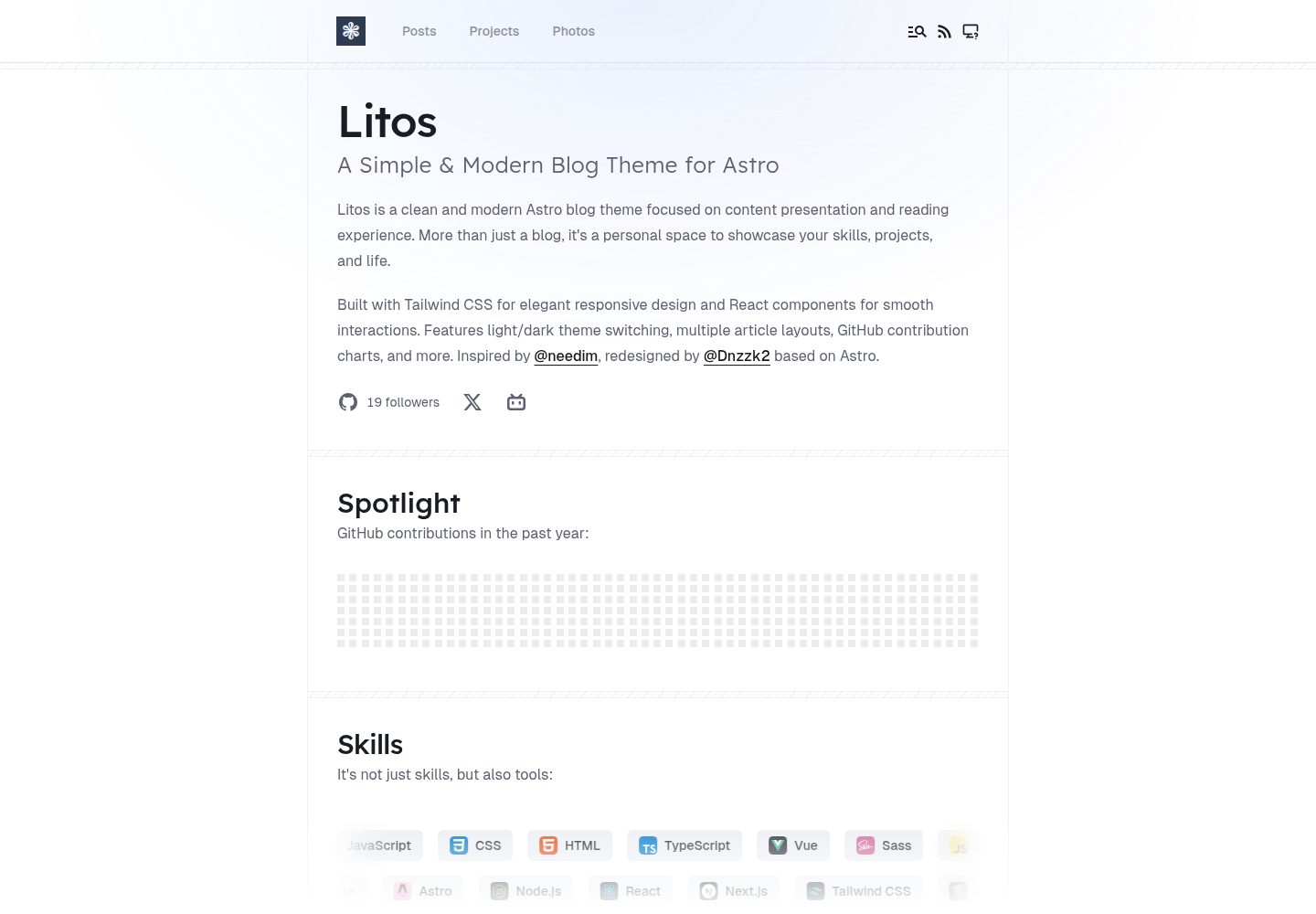
基于 Astro 的静态博客,主题为 Litos
Astro博客
rublog-astro — Astro 博客模板
作者 RUBisco0211
基于 Astro 与 Litos 主题的个人静态博客模板,包含文章、项目、照片与技能展示等页面。
看看你的网站会是什么样
浏览真实页面截图,比较内容排版与手机效果。点击下方缩略图切换,放大查看整页细节。
全部页面与视图 3
截图用于了解视觉与布局,交互效果请以实际项目为准。
采集于 2026-10-12查看来源
值得关注的模板亮点
从已有项目资料中,快速了解它的特点。
包含文章、项目作品集、照片墙与技能展示板块
集成 Expressive Code 代码高亮与 KaTeX 数学公式
支持 Gitalk 评论、站点地图与 robots.txt、可配置统计
提供明暗主题与集中式站点配置(src/config.ts)
模板详细介绍
该仓库是作者的个人静态博客,使用 Astro 框架并基于 Litos 主题构建。README 说明 Litos 是一个面向开发者的博客主题,技术组合为 Astro、React 与 TailwindCSS,提供文章、项目作品集、照片墙、技能展示等板块,并集成 Expressive Code 代码高亮、KaTeX 数学公式、Gitalk 评论、站点地图与 robots.txt、可配置的 Vercount 与 Umami 统计以及明暗主题。站点配置集中在 src/config.ts,可设置站点标题、描述、域名、作者,并通过开关控制技能展示与 GitHub 相关模块,页头与页脚链接由 HEADER_LINKS 和 FOOTER_LINKS 管理。
使用上需要 Node.js 18 或更高版本,推荐使用 pnpm;依次执行克隆仓库、pnpm install、pnpm dev 后可在本地 4321 端口预览,另有 build、preview、format、check 等脚本。仓库采用 MIT 许可,可免费使用、修改、商用和分发该版本代码,分发时需保留版权声明与许可声明;演示图片、字体、图标等第三方素材以及域名、托管等外部服务需另行核对许可与费用。模板未提供关于内容结构、部署流程或生产环境表现的进一步说明。
Astro博客
适合你的项目吗?
适用场景
- 搭建个人技术博客并发布 Markdown 文章
- 展示个人项目作品集与筛选标签
- 整理并展示摄影照片集合
- 呈现个人技术栈与技能信息
适合人群
- 希望用 Astro 搭建静态个人博客的开发者
- 需要文章、项目、照片多板块组合的个人站点
- 偏好通过配置文件集中管理站点信息的用户
上手与定制指南
结合仓库当前版本的说明,按下面的资料检查内容、配置与运行要求。
- 1
需要 Node.js 18 或更高版本,推荐使用 pnpm
- 2
克隆仓库后执行 pnpm install 安装依赖
- 3
执行 pnpm dev 启动本地开发服务器,默认端口 4321
- 4
站点信息与功能开关在 src/config.ts 中配置
- 5
分发代码时需保留原作者版权声明与 MIT 许可声明
授权与来源资料
使用条件与限制
免费使用 · 保留许可声明本次收录的是公开仓库中采用 MIT 许可的免费版本;免费范围为该版本代码,不代表外部服务或第三方素材免费。
使用时需要遵守
- 允许免费使用、修改、商用和分发该版本代码。
- 分发代码副本或实质性部分时,保留原作者版权声明和完整 MIT 许可声明。
- 代码按现状提供;担保与责任限制以原许可证及适用法律为准。
额外费用与待核对事项
- 演示图片、字体、图标及其他第三方素材需按各自许可核对,不能仅凭代码的 MIT 许可判断。
- 域名、托管、数据库、支付或 AI 等外部服务可能另外收费。
- 评论功能依赖 Gitalk,需要 GitHub 仓库与 OAuth 应用配置,属于外部服务依赖。
- 统计功能依赖 Vercount 与 Umami 外部服务,需自行部署或注册账号。
- 运行环境要求 Node.js 18 或更高版本,并推荐使用 pnpm 包管理器。
- 一键部署按钮指向 Vercel 与 Netlify 等第三方托管平台,可能产生外部服务费用。
查看原文依据
Permission is hereby granted, free of charge
许可证原文
**Comments** — Gitalk integration for GitHub-based discussions.
README 原文
**Analytics** — Configurable Vercount and Umami analytics.
README 原文
- **Node.js** (v18 or higher) - **pnpm** (recommended)
README 原文
https://github.com/RUBisco0211/rublog-astro/blob/main/LICENSEhttps://github.com/RUBisco0211/rublog-astro/blob/main/README.mdDeploy your own Litos blog with one click:
README 原文
DeepSeek 根据仓库许可证和 README 整理 ·2026-10-12。结果仅覆盖已读取资料,依赖、图片、字体及后续条款变更以各自原文为准。
项目核对记录与介绍依据
模板资料
- 来源平台
- GitHub
- 资料与维护参考分
- 资料较完整 · 80 / 100
- 技术栈
- Astro
- 网站类型
- 博客
这个分数如何计算
本站按许可资料(最高30分)、演示链接(12分)、预览图(10分)、Star数(15分)、记录的维护时间(15分)、描述完整度(8分)、功能记录(5分)和分类资料(5分)计算。它不是代码、安全或性能测试,也不是 Google 评分;有链接不代表已实测可用。
这个项目需要核对什么
- 记录的仓库更新时间
- 2026-09-03
- 截图检查日期
- 2026-10-12
已收录演示链接。请用你的内容与屏幕尺寸检查;有演示不代表表单、认证或支付已经可用。
目录记录的主要技术栈是 Astro。请通过依赖清单和锁文件核对实际版本与托管要求。这些说明基于收录资料,不代表代码审计或部署实测。
查看具体选型方法 →介绍的制作与核对状态
介绍由 AI 辅助整理目录与仓库资料。仓库作者不等于这篇介绍的审核者。
审核声明: [email protected] · 2026-10-13
查看当时使用的来源资料
SHA-256: 0becbb684312aabc6fb5af3371102ac2f4edfb49c54f0a62f389f9f55d8cc0fd
2026-10-12T22:17:59.619Z
来源文件 / 仓库<div align="center">
<img src="./src/assets/readme/logo.png" width="400" alt="Litos Logo" />




**A modern, elegant, and performance-focused blogging theme built for developers.**
**English** | [简体中文](./README.zh-CN.md)
[Demo](https://litos.vercel.app/) · [Report Bug](https://github.com/Dnzzk2/Litos/issues) · [Request Feature](https://github.com/Dnzzk2/Litos/issues)
</div>
## Introduction
Litos is a comprehensive blogging theme crafted with **Astro**, **React**, and **TailwindCSS**. It is designed to provide developers with a clean, professional, and highly customizable platform to showcase their work, thoughts, and photography.
Unlike traditional themes, Litos emphasizes visual aesthetics without compromising on performance. It features fluid animations, a polished design system, and a robust set of built-in components to help you build your personal brand effectively.

## Key Features
- **Modern Architecture** — Astro 5 + React 19 for blazing fast performance and dynamic interactivity.
- **Elegant Design** — Fully responsive, meticulously crafted UI with TailwindCSS 4.
- **Posts** — Multiple layout options (compact, cover image) with rich Markdown support.
- **Projects** — Dedicated portfolio section with filterable tags.
- **Photos** — Beautiful masonry layout for photography collections.
- **Skills Showcase** — Visually represented technical stack configuration.
- **Code Highlighting** — Integrated Expressive Code for beautiful syntax highlighting.
- **Math Support** — KaTeX for rendering mathematical equations.
- **Comments** — Gitalk integration for GitHub-based discussions.
- **SEO** — Built-in sitemaps, robots.txt, and meta tags.
- **Analytics** — Configurable Vercount and Umami analytics.
- **Dark Mode** — Native light and dark theme support.
## Deploy
Deploy your own Litos blog with one click:
[](https://vercel.com/new/clone?repository-url=https://github.com/Dnzzk2/Litos)
[](https://app.netlify.com/start/deploy?repository=https://github.com/Dnzzk2/Litos)
## Getting Started
### Prerequisites
- **Node.js** (v18 or higher)
- **pnpm** (recommended)
### Installation
1. **Clone the repository**
```bash
git clone https://github.com/Dnzzk2/Litos.git
cd Litos
```
2. **Install dependencies**
```bash
pnpm install
```
3. **Start the development server**
```bash
pnpm dev
```
Your site should now be running at `http://localhost:4321`.
## Configuration
The primary configuration file is located at `src/config.ts`.
### Site Settings
```typescript
export const SITE: Site = {
title: 'Litos',
description: 'Your site description here.',
website: 'https://your-domain.com',
author: 'Your Name',
// ...other settings
}
```
### Feature Toggles
```typescript
export const SKILLSSHOWCASE_CONFIG = {
SKILLS_ENABLED: true,
// ...
}
export const GITHUB_CONFIG = {
ENABLED: true,
// ...
}
```
### Navigation
Links for the Header and Footer can be managed via `HEADER_LINKS` and `FOOTER_LINKS`.
## Scripts
| Script | Description |
| :--- | :--- |
| `pnpm dev` | Starts the local development server. |
| `pnpm build` | Builds the site for production. |
| `pnpm preview` | Previews the built production site locally. |
| `pnpm format` | Formats code using Prettier. |
| `pnpm check` | Runs Astro check for diagnostics. |
## License
Distributed under the MIT License. See [MIT LICENSE](LICENSE) for more information.
## Star History
<a href="https://www.star-history.com/#Dnzzk2/Litos&type=date&legend=top-left">
<picture>
<source media="(prefers-color-scheme: dark)" srcset="https://api.star-history.com/svg?repos=Dnzzk2/Litos&type=date&theme=dark&legend=top-left" />
<source media="(prefers-color-scheme: light)" srcset="https://api.star-history.com/svg?repos=Dnzzk2/Litos&type=date&legend=top-left" />
<img alt="Star History Chart" src="https://api.star-history.com/svg?repos=Dnzzk2/Litos&type=date&legend=top-left" />
</picture>
</a>
---
<p align="center">
made with 💗 by <a href="https://github.com/Dnzzk2">Dnzzk2</a> !
</p>看看同类模板
对比同技术栈与用途的模板,找到更适合的视觉与内容结构。

astrowind
⭕️ AstroWind: A free template using Astro v7 and Tailwind CSS v4. Astro starter theme.
Astro · 博客

astro-paper
A minimal, accessible and SEO-friendly Astro blog theme.
Astro · 博客

fuwari
✨A static blog template built with Astro.
Astro · 博客

Firefly
Firefly 是一款基于 Astro 的静态博客主题,由 CuteLeaf 在 saicaca 的 Fuwari 模板基础上二次开发,主打清新美观的视觉风格。
Astro · 博客

astro-theme-cactus
A simple Astro theme. Use it to create your blog or website.
Astro · 作品集

astrofy
Astrofy is a free and open-source template for your Personal Portfolio Website built with Astro and TailwindCS…
Astro · 作品集