基于 Astro 的静态博客主题,使用 Tailwind CSS 与 TypeScript
Astro博客
astro-theme-cyanwind — Astro 博客模板
作者 rusin-dev
CyanWind(青风)是一个基于 Astro 的个人博客主题,使用 Tailwind CSS 与 TypeScript 构建,内置 Pagefind 搜索、Waline 评论、MDX 与 KaTeX 数学公式支持,采用 MIT 许可。
看看你的网站会是什么样
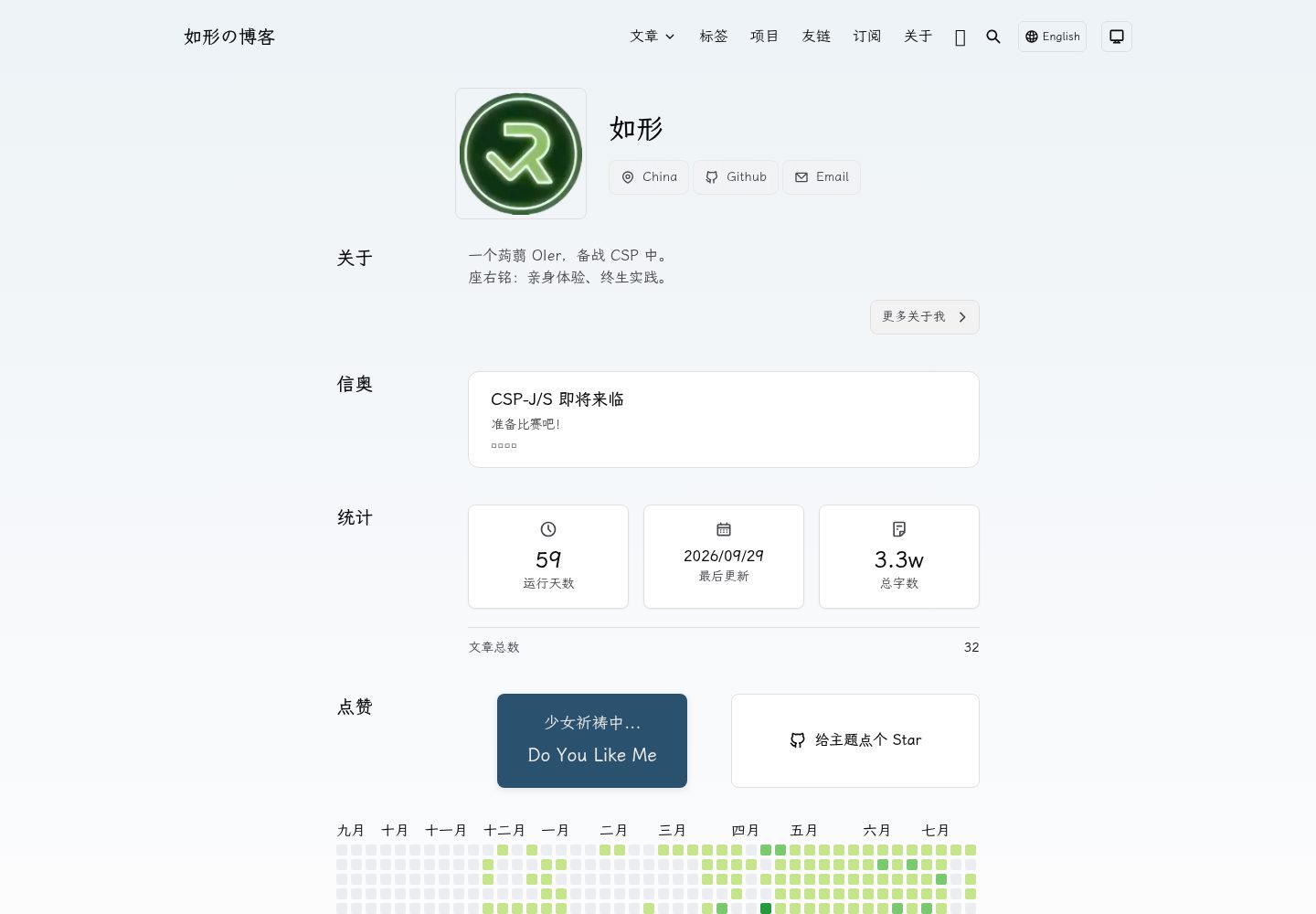
浏览真实页面截图,比较内容排版与手机效果。点击下方缩略图切换,放大查看整页细节。
全部页面与视图 3
截图用于了解视觉与布局,交互效果请以实际项目为准。
采集于 2026-09-30查看来源
值得关注的模板亮点
从已有项目资料中,快速了解它的特点。
内置 Pagefind 全文搜索与 Waline 评论系统集成
支持 Markdown 与 MDX 内容,含 Shiki 代码高亮和 KaTeX 数学公式
提供标签分类、学术分类、项目展示、友情链接与写作统计页面
支持中英文双语配置,并可分享到微博、X 与 Bluesky
MIT 许可,提供 Vercel、Cloudflare Pages、GitHub Pages 等构建命令
模板详细介绍
CyanWind 是一个面向个人博客与内容创作的 Astro 主题,仓库位于 rusin-dev/astro-theme-cyanwind,采用 MIT 许可,作者为如形(Rusin),演示站点为 blog.rusin7.com。主题使用 Astro 作为静态站点生成框架,样式由 Tailwind CSS 驱动,代码使用 TypeScript,并支持 Markdown 与 MDX 内容。
功能层面,主题内置 Pagefind 全文搜索、Waline 评论系统、Shiki 代码高亮、KaTeX 数学公式渲染与 Sharp 图片处理,同时提供标签分类、学术分类、友情链接、博客写作统计以及分享到微博、X、Bluesky 的社交分享入口。内容组织上区分文章、学术、项目、友链、关于、标签等页面类型,支持中英文双语配置。
使用与配置方面,主配置文件为 src/site.config.ts,可设置站点标题、作者、描述、导航菜单、语言与日期格式、favicon 以及各集成开关;文章通过 frontmatter 定义标题、发布日期、标签、描述、分类与头图,也可用 pnpm new 命令生成。构建方面提供 Vercel、Cloudflare Pages、GitHub Pages 与通用静态托管(输出到 dist/)几种方式。
限制与注意:主题要求 Node.js 18+,推荐使用 pnpm;Waline 评论需要按官方文档自行配置服务端;演示图片、字体、图标等第三方素材需按各自许可单独核对,代码的 MIT 许可不覆盖这些素材;域名、托管等外部服务可能另行收费。
Astro博客
适合你的项目吗?
适用场景
- 搭建个人技术博客或写作站点
- 发布带数学公式与代码高亮的学术或技术文章
- 需要站内搜索与评论互动的独立博客
- 以中英文双语维护内容的个人站点
适合人群
- 熟悉或愿意使用 Astro 与 pnpm 的开发者
- 需要 Markdown/MDX 写作流程的个人博主
- 希望自行配置评论与搜索服务的站点维护者
上手与定制指南
结合仓库当前版本的说明,按下面的资料检查内容、配置与运行要求。
- 1
前置要求 Node.js 18+,推荐使用 pnpm 安装依赖
- 2
通过 npm create astro 或 pnpm dlx create-astro 以该仓库为模板创建项目
- 3
编辑 src/site.config.ts 配置站点标题、作者、导航、语言与集成开关
- 4
Waline 评论需按官方文档自行配置服务端
- 5
构建命令区分平台:build:vercel、build:cloudflare、build:github 或 build 输出到 dist/
授权与来源资料
使用条件与限制
免费使用 · 保留许可声明本次收录的是公开仓库中采用 MIT 许可的免费版本;免费范围为该版本代码,不代表外部服务或第三方素材免费。
使用时需要遵守
- 允许免费使用、修改、商用和分发该版本代码。
- 分发代码副本或实质性部分时,保留原作者版权声明和完整 MIT 许可声明。
- 代码按现状提供;担保与责任限制以原许可证及适用法律为准。
额外费用与待核对事项
- Waline 评论功能需自行按官方文档部署并配置服务端,属于外部服务依赖,非主题自带可用功能。
- 使用该主题需本地具备 Node.js 18 及以上环境,并推荐使用 pnpm 包管理器。
- 演示图片、字体、图标及其他第三方素材需按各自许可核对,不能仅凭代码的 MIT 许可判断。
- 域名、托管、数据库、支付或 AI 等外部服务可能另外收费。
查看原文依据
Permission is hereby granted, free of charge
许可证原文
具体如何配置 waline 评论,参见[官方文档](https://waline.js.org)。
README 原文
https://github.com/rusin-dev/astro-theme-cyanwind/blob/main/LICENSEhttps://github.com/rusin-dev/astro-theme-cyanwind/blob/main/README.md- Node.js 18+ - pnpm (推荐) 或 npm
README 原文
DeepSeek 根据仓库许可证和 README 整理 ·2026-10-01。结果仅覆盖已读取资料,依赖、图片、字体及后续条款变更以各自原文为准。
项目核对记录与介绍依据
模板资料
- 来源平台
- GitHub
- 资料与维护参考分
- 资料较完整 · 83 / 100
- 技术栈
- Astro
- 网站类型
- 博客
这个分数如何计算
本站按许可资料(最高30分)、演示链接(12分)、预览图(10分)、Star数(15分)、记录的维护时间(15分)、描述完整度(8分)、功能记录(5分)和分类资料(5分)计算。它不是代码、安全或性能测试,也不是 Google 评分;有链接不代表已实测可用。
这个项目需要核对什么
- 记录的仓库更新时间
- 2026-09-29
- 截图检查日期
- 2026-10-01
已收录演示链接。请用你的内容与屏幕尺寸检查;有演示不代表表单、认证或支付已经可用。
目录记录的主要技术栈是 Astro。请通过依赖清单和锁文件核对实际版本与托管要求。这些说明基于收录资料,不代表代码审计或部署实测。
查看具体选型方法 →介绍的制作与核对状态
介绍由 AI 辅助整理目录与仓库资料。仓库作者不等于这篇介绍的审核者。
已完成服务器许可规则与 AI 来源核对;未经过人工编辑审核。
查看当时使用的来源资料
SHA-256: 39201d10c2c439e8490d7480b9a46b9cee7023e023f51aef84eb30eb6e4b4cf0
2026-10-01T13:33:17.662Z
来源文件 / 仓库<div align="center">
<a href="./public/theme.svg"><img width="40%" alt="logo" src="https://cdn.luogu.com.cn/upload/image_hosting/uwxcg3ya.png" /></a>
<h1><b>CyanWind | 青风</b></h1>
<p><em>一个简单、轻量 astro 框架博客主题,加载快速,SEO 友好,开箱即用。</em></p>
<p>
简体中文 | <a href="https://github.com/rusin-dev/astro-theme-cyanwind/blob/main/README_en.md">English</a> | <a href="https://blog.rusin7.com">Demo</a>
</p>
<p>作者:<a href="https://github.com/ruying-suixing">如形</a></p>
<p align="center">
<a href="https://github.com/rusin-dev/astro-theme-cyanwind/blob/main/LICENSE"><img src="https://img.shields.io/github/license/rusin-dev/astro-theme-cyanwind" alt="License" /></a>
<a href="https://github.com/rusin-dev/astro-theme-cyanwind/releases"><img src="https://img.shields.io/github/release/rusin-dev/astro-theme-cyanwind" alt="latest version" /></a>
<a href="https://github.com/rusin-dev/astro-theme-cyanwind/releases"><img src="https://img.shields.io/github/downloads/rusin-dev/astro-theme-cyanwind/total?color=%239F7AEA&logo=github" alt="Downloads" /></a>
<a href="https://github.com/rusin-dev/astro-theme-cyanwind/stargazers"><img src="https://img.shields.io/github/stars/rusin-dev/astro-theme-cyanwind" alt="Stars" /></a>
<a href="https://github.com/rusin-dev/astro-theme-cyanwind/network/members"><img src="https://img.shields.io/github/forks/rusin-dev/astro-theme-cyanwind" alt="Forks" /></a>
<a href="https://www.repostatus.org/#active"><img src="https://img.shields.io/badge/repo%20status-Active-Green" alt="Project Status: Active – The project has reached a stable, usable state and is being actively developed."></a>
<a href="./"><img src="https://img.shields.io/badge/astro--theme-cyanwind-cyan" alt="theme">
</a>
<a href="./"><img src="https://img.shields.io/badge/version-2.0.0-blue?style=flat-square" alt="version"></a>
</p>
</div>
<div align="center">
<img src="https://s0.wp.com/mshots/v1/https://blog.rusin7.com/" alt="截图" />
</div>
一个现代化、功能丰富的 Astro 主题,专为个人博客和内容创作设计。采用 Astro、Tailwind CSS 和 TypeScript 构建,提供最佳的开发体验。
---
## ✨ 特性
- **🚀 性能优先** - 基于 Astro 构建,提供闪电般的静态网站生成速度
- **🎨 精美设计** - 简洁现代的 UI 设计,Tailwind CSS 驱动,支持深色模式
- **📝 MDX 支持** - 使用 Markdown 编写内容并嵌入组件
- **🔍 全文搜索** - 内置 Pagefind 搜索功能
- **💬 评论系统** - 集成 Waline 评论系统
- **📊 博客统计** - 跟踪写作统计数据
- **🏷️ 标签分类** - 通过标签和学术分类组织内容
- **🔗 友情链接** - 展示和管理友情链接
- **📱 响应式设计** - 完全适配所有设备
- **🌐 多语言支持** - 支持中英文双语
- **📱 社交分享** - 支持分享到微博、X 和 Bluesky
- **🎯 SEO 优化** - 网站地图、RSS 订阅、结构化数据
- **⚡ 图片优化** - 使用 Sharp 自动优化图片
- **🧮 数学公式** - 支持 KaTeX 数学公式
- **🎀 易于定制** - 灵活的主题配置选项
---
## 🚀 快速开始
### 前置要求
- Node.js 18+
- pnpm (推荐) 或 npm
### 安装步骤
1. **克隆仓库**
```bash
# npm 7+
npm create astro@latest cyanwind-blog -- --template rusin-dev/astro-theme-cyanwind
# 或 pnpm(用 npm install -g pnpm 安装)
pnpm dlx create-astro cyanwind-blog --template rusin-dev/astro-theme-cyanwind
cd cyanwind-blog
```
2. **安装依赖**
```bash
pnpm install
```
3. **配置网站**
编辑 `src/site.config.ts` 进行自定义:
- 网站标题和作者信息
- 导航菜单
- 个人信息和社交链接
- 主题设置和集成选项
4. **启动开发服务器**
```bash
pnpm dev
```
访问 `http://localhost:3000` 查看你的网站
5. **生产构建**
```bash
pnpm build
```
---
## 📖 可用命令
| 命令 | 说明 |
| :------: | :------: |
| `pnpm dev` | 启动开发服务器,自动重载 |
| `pnpm dev:force` | 强制重启开发服务器 |
| `pnpm dev:check` | 开发服务器 + TypeScript 检查 |
| `pnpm build` | 生产环境构建 |
| `pnpm preview` | 预览生产构建结果 |
| `pnpm check` | 运行 TypeScript 类型检查 |
| `pnpm lint` | 代码检查并自动修复 |
| `pnpm format` | 使用 Prettier 格式化代码 |
| `pnpm quality` | 运行所有代码质量检查 |
| `pnpm sync` | 同步 Astro 内容集合 |
| `pnpm clean` | 清理构建产物 |
| `pnpm new "name"` | 新建文章(`pnpm new -h` 查看详细信息) |
---
## 🛠️ 配置
### 主配置文件: `src/site.config.ts`
#### 基础设置
```typescript
export const theme: ThemeUserConfig = {
title: "你的博客标题",
titleEn: '你的英语博客标题',
author: "你的名字",
author: "你的英文名",
description: "博客描述",
descriptionEn: "博客英文描述"
favicon: "/favicon/favicon.ico",
locale: { /* 语言和日期设置 */ }
}
```
#### 导航菜单
```typescript
header: {
menu: [
{ title: '文章', titleEn: 'Articles', link: '/article' },
{ title: '学术', titleEn: 'Academic', link: '/academic' },
// 添加更多菜单项...
]
}
```
#### 集成功能
```typescript
export const integ: IntegrationUserConfig = {
pagefind: true, // 启用搜索
waline: { enable: true }, // 启用评论
// 更多集成选项...
}
```
具体如何配置 waline 评论,参见[官方文档](https://waline.js.org)。
查看 `src/site.config.ts` 了解完整的配置选项。
---
## 📁 项目结构
```text
.
├── src/
│ ├── assets/ # 图片和静态资源
│ ├── components/ # 可复用的 Astro 组件
│ ├── content/ # Markdown 内容文件
│ ├── layouts/ # 页面布局
│ ├── pages/ # 路由页面
│ ├── schemas/ # 内容集合 Schema
│ ├── site.config.ts # 主配置文件
│ └── types/ # TypeScript 类型定义
├── public/ # 静态文件
├── astro.config.mjs # Astro 配置
├── tailwind.config.mjs # Tailwind CSS 配置
└── package.json # 项目依赖
```
---
## 📝 内容组织
### 博客文章
在 `src/content/` 中放置博客文章或者使用 `pnpm new "title"` | `pnpm new -l en "title"` 新建以 `title` 为题的 markdown 文章,详见 `pnpm new -h` | See `pnpm new -h en`,使用以下 frontmatter 格式(`pnpm new` 可以自动生成 `publishDate`):
```markdown
---
title: "文章标题"
publishDate: 2024-01-01
tags: [标签1, 标签2]
description: "文章描述"
category: (可选)
heroImage: #头图
src: (可选)
color: "#7da7d4" (可选)
---
你的内容在这里...
```
### 页面类型
- **文章** - 主要博客文章 (`/article`)
- **学术** - 学术内容 (`/academic`)
- **项目** - 项目展示 (`/projects`)
- **友链** - 友情链接管理 (`/links`)
- **关于** - 关于页面 (`/about`)
- **标签** - 标签页面(`/tags`)
自定义请在 ./src/pages 中更改,也可以提交 PR。
---
## 🎨 自定义
### 主题与样式
- 在 `tailwind.config.mjs` 中自定义 Tailwind CSS
- 在 `src/components/` 中修改组件样式
- 在 `src/site.config.ts` 中通过 `customCss` 选项添加自定义 CSS
### 添加自定义页面
1. 在 `src/pages/` 中创建新的 `.astro` 或 `.md` 文件
2. 使用 `src/layouts/` 中的相应布局
3. 文件会自动生成对应的路由
---
## 🔗 部署
本主题支持多个部署平台:
### Vercel
```bash
pnpm build:vercel
```
### Cloudflare Pages
```bash
pnpm build:cloudflare
```
### GitHub Pages
```bash
pnpm build:github
```
### 静态托管
```bash
pnpm build
# 输出在 `dist/` 目录
```
---
## 🔧 技术栈
- **框架:** [Astro 7.2+](https://astro.build)
- **样式:** [Tailwind CSS 3](https://tailwindcss.com)
- **语言:** [TypeScript 5](https://www.typescriptlang.org)
- **内容:** MDX 和 Markdown 支持
- **搜索:** [Pagefind](https://pagefind.app)
- **评论:** [Waline](https://waline.js.org)
- **代码高亮:** [Shiki](https://shiki.matsu.io)
- **数学公式:** [KaTeX](https://katex.org)
- **图标:** [Simple Icons](https://simpleicons.org)
- **图片处理:** [Sharp](https://sharp.pixelplumbing.com)
---
## 📦 核心依赖
| 包名 | 用途 |
|------|------|
| `astro` | 静态网站生成器 |
| `@astrojs/mdx` | MDX 集成 |
| `tailwindcss` | 实用优先的 CSS 框架 |
| `typescript` | 类型安全 |
| `@pagefind/default-ui` | 全文搜索 |
| `@waline/client` | 评论系统 |
| `shiki` | 语法高亮 |
| `rehype-katex` | 数学公式支持 |
---
## 🤝 贡献指南
欢迎贡献!请自由提交 Issue 和 Pull Request。
1. Fork 本仓库
2. 创建特性分支 (`git checkout -b feature/AmazingFeature`)
3. 提交更改 (`git commit -m 'Add some AmazingFeature'`)
4. 推送到分支 (`git push origin feature/AmazingFeature`)
5. 开启 Pull Request
---
## 📄 许可证
本项目采用 MIT 许可证。详见 LICENSE 文件。
---
## 🙏 致谢
- 基于 [Astro](https://astro.build) 构建
- 样式由 [Tailwind CSS](https://tailwindcss.com) 驱动
- 评论系统由 [Waline](https://waline.js.org) 提供
- 搜索功能由 [Pagefind](https://pagefind.app) 提供
---
## 📞 支持与联系
- **作者:** 如形 (Rusin)
- **GitHub:** [ruying-suixing](https://github.com/ruying-suixing)
- **邮箱:** [[email protected]](mailto:[email protected])
- **网站:** [https://blog.rusin7.com](https://blog.rusin7.com)
---
**用 ❤️ 由 Rusin 制作**
看看同类模板
对比同技术栈与用途的模板,找到更适合的视觉与内容结构。

astrowind
⭕️ AstroWind: A free template using Astro v7 and Tailwind CSS v4. Astro starter theme.
Astro · 博客

astro-paper
A minimal, accessible and SEO-friendly Astro blog theme.
Astro · 博客

fuwari
✨A static blog template built with Astro.
Astro · 博客

Firefly
Firefly 是一款基于 Astro 的静态博客主题,由 CuteLeaf 在 saicaca 的 Fuwari 模板基础上二次开发,主打清新美观的视觉风格。
Astro · 博客

astro-theme-cactus
A simple Astro theme. Use it to create your blog or website.
Astro · 作品集

astrofy
Astrofy is a free and open-source template for your Personal Portfolio Website built with Astro and TailwindCS…
Astro · 作品集